Password Security and Usability:
From Password Checkers To a New
Framework For User
Authentication
[Nouf Mohammed D. Aljaffan]
A thesis
submitted for the degree of Doctor of Philosophy
in
Computer Science from the
University of Surrey
Department of Computer Science
Faculty of Engineering and Physical Sciences University of Surrey
Guildford, Surrey GU2 7XH United Kingdom
Supervisors:
Principal Supervisor: Dr. Shujun Li
[March 2017]
Declaration of Originality
This thesis and the work to which it refers are the results of my own efforts. Any ideas, data, images or text resulting from the work of others (whether published or unpublished) are fully identified as such within the work and attributed to their originator in the text, bibliography or in footnotes. This thesis has not been submitted in whole or in part for any other academic degree or professional qualification. I agree that the University has the right to submit my work to the plagiarism detection service TurnitinUK for originality checks. Whether or not drafts have been so-assessed, the University reserves the right to require an electronic version of the final document (as submitted) for assessment as above.
[March 2017] [Nouf Aljaffan]
Summary
Passwords have been dominating user authentication for more than half a century, and many researchers believe that they will continue as a key part of the user authentication world in the foreseeable future. The well-known usability-security problem of textual passwords, i.e., the difficulty for human users to choose strong and easy-to-remember passwords, has received a considerable attention over many years. Many alternative solutions have been proposed to replace textual passwords, however, none of them can keep all advantages of textual passwords without bringing new problems. As a consequence, hybrid user authentication systems such as multi-factor authentication (MFA) has been widely suggested for security-critical applications such as e-banking systems. Such hybrid user authentication systems normally lead to higher usability costs, so are not ideal solutions for all applications. The hybrid nature also means organizations and service providers have to deploy and maintain different user authentication components, thus making reconfiguration of such systems more complicated.
This thesis looks at several less-studies but still important areas of user authentication: how human users perceive objective ratings given by computer programs such as proactive password checkers (PPCs) and subjective ratings given by human experts, how human users can be better educated about password security, and how we can overcome the current drawbacks of hybrid user authentication systems to improve user experience and enhance reconfigurability of such systems. Our research led to some new insights on how human users perceive password strength ratings, a new password security education tool, and a novel “all in one” and backward compatible user authentication framework.
For the first work, we conducted a user study with over 1,000 crowdsourcing workers to gather information about how they perceived their trusts on objective and subjective ratings of a number of given passwords. The results shed light on the influence of personalization and contextualization on users’ perceived trusts on password ratings, implying human users’ decisions on textual passwords depend on highly on their personal characteristics, individual passwords and their own
subjective judgments on given passwords. We observed several typical behavioral patterns in terms of human users’ perceived trust on subjective and objective ratings. These findings can help support better designs of PPCs and other password security tools.
One finding of the above-mentioned user study is that many human users clearly trusted their own subjective judgments more than ratings given by others. This suggests better password educational tools are needed to help human users make better subjective judgments on password strength. We noticed PPCs have a natural side effect of educating users, but this effect has not been well studied and most designs are not optimal in terms of password security education. We therefore proposed Password Security Visualizer (PSV), an interactive visualization system specifically designed for password security education. PSV can provide many new features that do not exist in traditional PPCs, thus having a greater potential to achieve its goals of educating users. A 2-D prototype of PSV was implemented, and a number of user studies were conducted to investigate its performance as both a PPC and a password security education tool. The results showed that PSV was considered the most informative and recommended by most participants as a good educational tool.
The personalization effect observed in our user studies on passwords led us to consider how we can generalize existing user authentication framework to allow personalization beyond textual passwords. This led us to discover Pass∞, a novel “all in one” and backward compatible framework which can support all four authentication factors (knowledge-based, token-based, biometric-based and context-aware authentication) and many different schemes in each factor. Pass∞ enables users to freely combine diverse authentication actions while keeping compatibility with textual passwords so that a user can continue to use his/her old textual password even after Pass∞ is introduced. The diversity of different authentication actions supported by Pass∞ can help users to personalize their individual choices of passwords to reach a better trade-off between security and usability: a human user can define his/her password as a sequence of simple authentication actions that can be easily remembered, and Pass∞ will convert the simple hybrid password into a much more complicated password that a password cracker will find very difficult to guess. Being able to support many different user authentication actions in a single framework also helps make Pass∞highly reconfigurable, e.g., different password policies can be defined for different user groups to allow different types of combinations of user authentication actions. A prototype of Pass∞prototype was implemented which will be tested in a number of user studies we plan to conduct in near future.
Acknowledgements
I am deeply indebted to Dr.Shujun Li (my advisor), for his support, guidance, patient and kindness. He is one of my loyal supporter of my growth as researcher over the past four years.
I would thanks my sponsorship (King Saud University, Saudi Arabia) for giving me the opportunity to achieve one of my dreams.
I am also deeply grateful for my other collaborator (Saeed Alqahtani, and Haiyue Yuan and Sebastian Bartos) for their support and help.
Dedication
To my loving
Father & Mother ...
who are my heaven on earth. Thanks for your endless love, support, encouragements, sacrifices and prayers days and nights that make me able to
get success and honour,
List of Publications
Research Papers
1. N. Aljaffan, H. Yuan, S. Alqahtani, S. Li, P. Rusconi and S. Gould, “Which One Do You Trust? Users’ Perceived Trust on Subjective and Objective Ratings of Password Strength,” under preparation, a former version submitted to the 2017 ACM CHI Conference on Human Factors in Computing Systems (CHI 2017) but not successful (with encouraging comments from reviewers).
2. N. Aljaffan, S. Li, and H. Yuan . “PSV (Password Security Visualizer): From Password Checking to User Education,” accepted to the 5th International Conference on Human Aspects of Information Security, Privacy and Trust (HAS 2017), affiliated conference of 19th International Conference on
Human-Computer Interaction (HCI International 2017), to be held in Vancouver, Canada, 9-14 July 2017, to be published in a volume of Lecture Notes in Computer Science by Springer, preprint available online at http://epubs. surrey.ac.uk/813690/.
3. H. Yuan, S. Li, P. Rusconi and N. Aljaffan, “When Eye-tracking Meets Cognitive Modeling: Applications to Cyber Security Systems,” accepted to the 5th International Conference on Human Aspects of Information Security, Privacy and Trust (HAS 2017), affiliated conference of 19th International Conference on Human-Computer Interaction (HCI International 2017), to be held in Vancouver, Canada, 9-14 July 2017, to be published in a volume of Lecture Notes in Computer Science by Springer, preprint available online at
http://epubs.surrey.ac.uk/813689/.
4. K. Kafas, N. Aljaffan, and S. Li, “Visual Password Checker,” presented as a poster at 9th Symposium On Usable Privacy and Security (SOUPS 2013), 2013, available online at http://cups.cs.cmu.edu/soups/2013/posters/ soups13_posters-final19.pdf.
Patent Application
1. S. Li and N. Aljaffan (as co-inventors), ”Improved Authentication,” GB application filed on January 13, 2017 to UK Intectual Property Office (IPO), Application Number 1700649.5.
Contents
Declaration iii Summary v Acknowledgements vii Dedication ix List of Publications xi Contents xiiiList of Figures xvi
List of Tables xviii
Abbreviations xix 1 Introduction 1 1.1 Motivation . . . 1 1.2 Objectives . . . 3 1.3 Contributions . . . 3 1.4 Organization . . . 4 2 Literature Review 7 2.1 User Authentication . . . 7 2.1.1 Knowledge-based authentication . . . 8 2.1.2 Token-based Authentication . . . 14 2.1.3 Biometric-based Authentication. . . 16 2.1.4 Context-aware Authentication . . . 17
2.1.5 Multi-factor Authentication (MFA) . . . 18
2.2 Usability & Security Tradeoff . . . 19
2.2.1 Password Policies. . . 19
2.2.3 Password management . . . 21
2.3 Attacks on Passwords . . . 22
2.3.1 Brute Force Attacks . . . 22
2.3.2 Dictionary Attacks . . . 22
2.3.3 Targeted Dictionary Attack . . . 22
2.3.4 Rule based Dictionary Attack . . . 23
2.3.5 Hybrid Attack . . . 23
2.4 Password Cracking . . . 23
2.4.1 Markov Model Based Method . . . 23
2.4.2 Probabilistic Context-Free Grammars (PCFG) . . . 24
2.4.3 Machine Learning Based Method . . . 24
2.4.4 Personalized Based Methods . . . 24
2.4.5 Comparisons . . . 24
2.5 Evaluation of Password Strength . . . 25
2.5.1 Statistical Methods. . . 25 2.5.2 Parametrized Methods . . . 26 2.5.3 Limitations on PSM . . . 26 2.6 Password Checkers . . . 27 2.7 Password Visualization. . . 29 2.8 User Studies. . . 29
3 User Perception of Password Ratings 35 3.1 Introduction. . . 35
3.2 Related work . . . 36
3.2.1 General Overview on Trust . . . 37
3.2.2 User Perception Around Password Security . . . 37
3.2.3 Subjective and Objective Ratings Impact . . . 38
3.3 User study design. . . 39
3.3.1 Study Structure . . . 39
3.3.2 Our Choice of Passwords . . . 41
3.3.3 Recruitment. . . 43
3.3.4 Quality Assessment . . . 43
3.4 Results. . . 44
3.4.1 Participants . . . 44
3.4.2 Session-level Behavioral Analysis . . . 46
3.4.3 Password-level behavioral analysis . . . 50
3.4.4 Reasons of trust analysis. . . 53
3.5 Discussions . . . 54
3.6 Limitations . . . 56
3.7 Conclusion . . . 57
4 Password Security Visualizer (PSV) 59 4.1 Introduction. . . 59
4.2.1 Design Principles . . . 61
4.2.2 Two Example Designs . . . 63
4.2.3 Supporting Algorithms. . . 65
4.3 Our PSV Prototype . . . 66
4.3.1 Front-end UI . . . 66
4.3.2 Supporting Algorithms. . . 72
4.4 User Studies. . . 76
4.4.1 Stage 1: Pilot Studies . . . 76
4.4.2 User Studies for Performance Evaluation of PSV as a PPC . 78 4.4.3 Semi-structured Interviews . . . 80
4.5 Summary and Future Work . . . 83
5 Pass∞ (Pass-Infinity) 85 5.1 Introduction. . . 85
5.2 A Framework For User Authentication . . . 86
5.2.1 Architecture . . . 87 5.2.2 Authentication Phases . . . 89 5.2.3 Pass∞ Modules. . . 91 5.2.4 Discussion. . . 94 5.3 Pass∞ Prototype . . . 96 5.3.1 Equation Module . . . 97 5.3.2 Image Module . . . 97 5.3.3 Tagging Mechanism . . . 102 5.3.4 Policy Controller . . . 103
5.4 Conclusion and Future Work . . . 104
5.4.1 Conclusion . . . 104
5.4.2 Future Work . . . 105
6 Conclusion and Future Work 107 6.1 Conclusion . . . 107
6.2 Future Work . . . 109
6.2.1 Password Strength Metering . . . 109
6.2.2 Password Usability Metering . . . 110
6.2.3 Password Checkers . . . 110
6.2.4 PSV . . . 110
6.2.5 Password Visualizer . . . 110
6.2.6 Pass∞ . . . 111
A Users’ Trust in Password Ratings Questionnaire 115
B Predefined Reasons 121
C Interview Schedule 123
List of Figures
1.1 Chart of the world’s largest data breaches that occurred in the last four
years [1]. The data highlighted in pink is password related breaches. . . 2
2.1 A biometric system [2] . . . 16
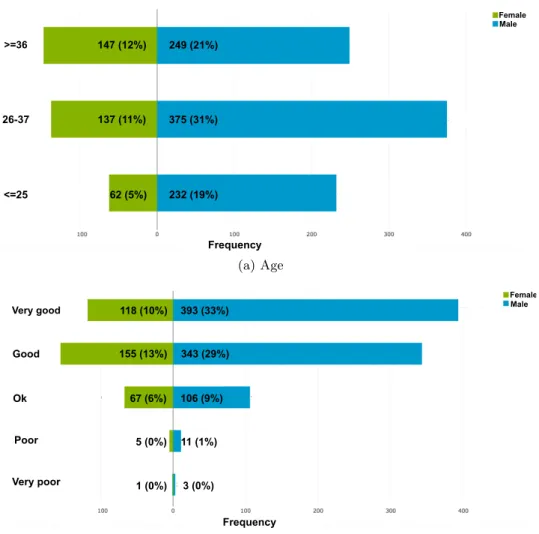
3.1 Age (a) and computer skill levels (b) distribution of participants based on their gender . . . 45
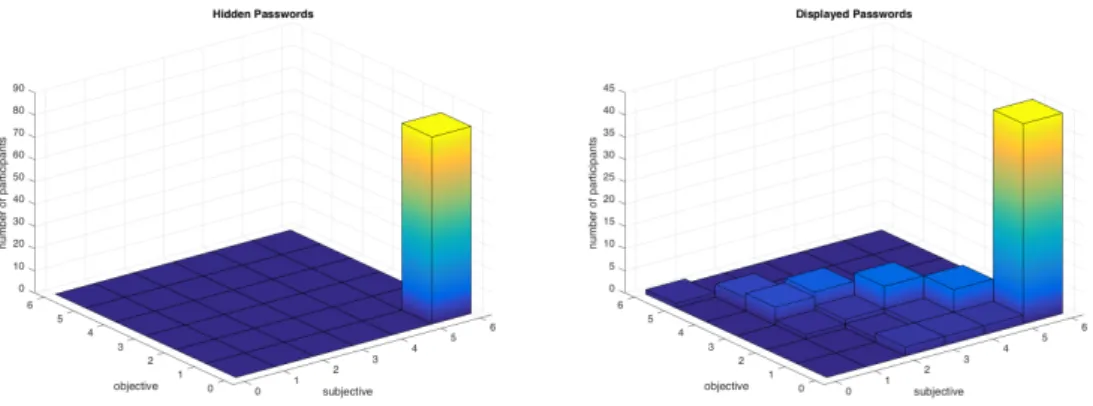
3.2 3-D distribution of user choice on “su” and “ob”. . . 47
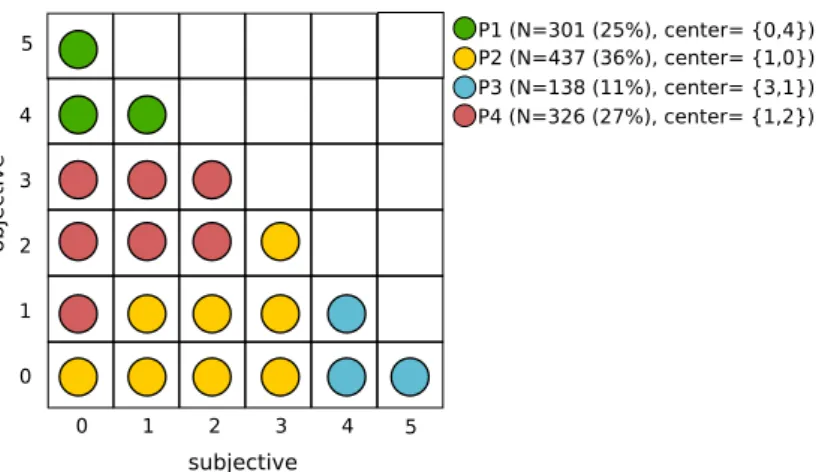
3.3 Migration behavior for two Groups in different two contexts/conditions. Group A refers to participants who chose 5/5 ’su’ for all Hidden passwords. Group B refers to the users who chose 5/5 ’ob’ for all Hidden passwords. 48 3.4 Four clusters of personality in terms of their choice on “su” and “ob”. N refers to the number of participants of a cluster. . . 49
3.5 Distribution of participants’ answers according their personality type. . 51
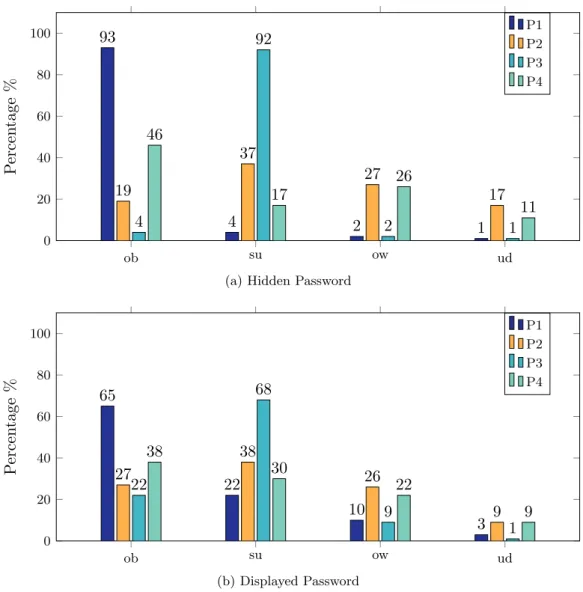
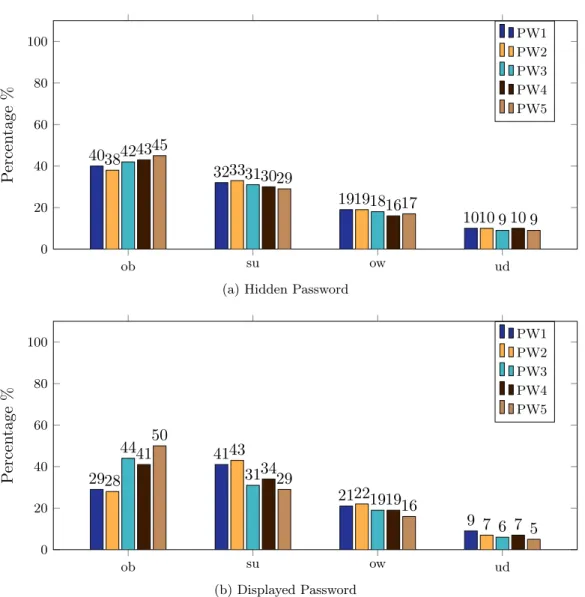
3.6 Percentages of participants’ answers for all five passwords when they are hidden and displayed. . . 53
3.7 Percentages of users’ reasons behind their trust on password ratings. The reasons behind selecting objective, subjective, own and undecided ratings are colored with blue, purple, green and orange respectively.. . . 54
4.1 Two example designs of PSV on a 2-D canvas, which is divided into (a) horizontal bars and (b) concentric circles representing different levels of security risk. . . 64
4.2 The screenshot of an example user registration page of our PSV prototype. 67 4.3 Screenshots when three passwords were being entered into our PSV prototype. . . 67
4.4 Two examples of the PSV notification messages showing different detailed information about a specific PIU. . . 69
4.5 The menu bar of our PSV prototype.. . . 69
4.6 The mobile menu bar of our PSV prototype . . . 70
4.7 The density controller of our PSV prototype. . . 71
4.9 The screenshot of “New Dic” web page. . . 72 4.10 The process of searching for weak passwords in a dictionary, where the
password given is “car” and two detected weak passwords are “car” and “carbon”. . . 73 4.11 The four suggestions of icon design used in the pilot study . . . 77 4.12 The UI screenshots of the three PPCs used in our user study. . . 79 4.13 Mostly highlighted words for the PSV prototype and the three PPCs,
each shown as a word cloud (generated by the online tool WordSift [3]). 81 5.1 Pass∞ Architecture . . . 88 5.2 Registration Phase . . . 90 5.3 Login Phase . . . 91 5.4 Snap shot of the password input controller in the Pass∞ prototype . . . 96 5.5 Screen shot of the equation editor . . . 97 5.6 Example of an equation password created by Pass∞prototype . . . 98 5.7 Screen shots of the image module. Subfigures (a) and (b) illustrate
different ways of finding an image either searching by tags or by URLs. Subfigure (c) shows flexibility on finding more images which are either available online or in the system database. . . 99 5.8 Different types of graphical schemes . . . 100
List of Tables
3.1 Five passwords used in our experiments and their strength ratings, shown in 5-point scale.. . . 40 3.2 Predefined answers for users’ reasons behind each choice of rating. . . . 41 3.3 Multinomial logistic regression models exploring significant effect of
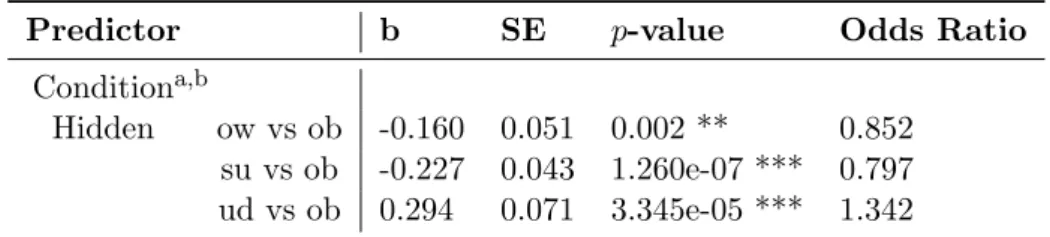
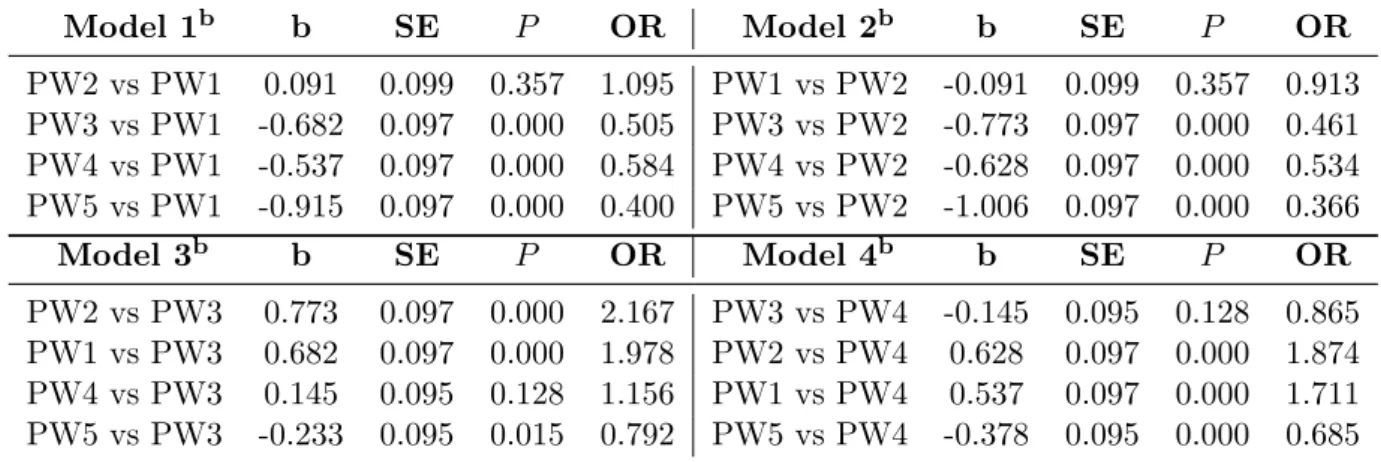
password conditions on perceived trust on subjective and objective ratings. 47 3.4 Multinomial logistic regression models exploring significant effect of
password conditions and personality on perceived trust on subjective and objective ratings. . . 50 3.5 Results of four multinomial logit regression on different password baselines
and one observation (subjective ratings vs objective ratings). . . 52 4.1 Summary of users’ responses to “how do they interpret the used symbols
for VPC” and “If they really understood the VPC interface design”. . 77 4.2 Simple statistics of users’ responses to “how do you interpret the used
symbols for VPC” and “what symbol is the best to denote the weak password security threat”. . . 77 4.3 Participants’ votes on the most informative tool for password security
education, before and after more details on the PSV and the PM PPC were given. . . 82 5.1 Examples of hybrid password created by Pass∞ prototype . . . 102
Abbreviations
DAS Draw-A-Secret ED Edit Distance
IFA Interactive Fear Appeal Proactive Password Checker MFA Multi-factor Authentication
NIST The National Institute of Standards and Technology PA Password Attribute
PCFG Probabilistic Context-Free Grammars PIU Password Information Units
PM Password Meter Proactive Password Checker PPC Proactive Password Checker
PSM Password Strength Metering PSV Password Security Visualizer
Chapter 1
Introduction
1.1
Motivation
The rapid proliferation of computer technology has created an urgent need to protect information assets from theft. Therefore, authentication mechanisms are fundamental for allowing only for authorized access. Despite being older than half a century, textual passwords remain the mostly-used form for user authentication, which can be attributed to their simplicity (ease to use) and cost effectiveness. Many researchers believe that they will continue as a key part of the user authentication world in the foreseeable future, despite many security and usability problems identified and a large number of new user authentication systems proposed over the years [4,5]. Because the widespread use of passwords, they are frequently targeted in cyber attacks and many large-scale password leakage incidents have been reported especially in recent years [6,7]. Figure 1.1 shows the recent data breach over the past four years, including the size of the password leakage. Some of these leaked passwords are not stored in clear to provide more protection on passwords stored on the server side. Password strengthening technologies such as password hashing and salting have been developed for this purpose. Nevertheless, human users remain a weak link because they often choose weak passwords to compromise security for usability, thus making password cracking much more effective [8–13].
The above usability and security problem of passwords is further worsened by the fact that human users normally have many passwords to use across many different computing devices and online services. Consequently, the reuse of passwords has become a trend by many people to reduce the memory burden [14,15], risking their accounts’ security when one account data is breached [12]. Besides, individuals would probably start writing their passwords on paper, making them prone to physical access of unauthorized people such as relatives and colleagues.
Figure 1.1: Chart of the world’s largest data breaches that occurred in the last four years [1]. The data highlighted in pink is password related breaches.
In order to avoid the use of weak passwords by humans, many technologies have been developed. Some of them focus on finding an alternative solution (such as the use of graphics, tokens or biometrics for user authentication) to passwords as an attempt to reduce the memory burden associated with strong passwords. In contrast, other technologies aim to assist users and network administrators in an effort to influence and regulate users’ decisions towards better passwords. Password checkers and password policies are among the most widely-used technologies for this purpose. Although all existing technologies can help to mitigate the problem, almost all of them have still some important limitations (which will be discussed in Chapter2). In this thesis, we look at how to develop better approaches beyond password checkers, and report our work on a number of studies ranging from human users’ perceived trust on password strength ratings, to a better password security education tool and a new framework for designing and implementing user authentication systems going beyond passwords and multi-factor authentication (MFA). This is explained more in the next two sections which summarize our objectives and contributions, respectively.
1.2
Objectives
Here, we summarize the main objectives of this doctoral thesis.
• To achieve a better understanding of human behaviors in user authentication processes, focusing on the role of password strength ratings to see how they are perceived by human users to make decisions on their password choices. • To design and implement better tools to educate human users about password
security so that they are more informed when making decisions on passwords. • To develop a user authentication framework to provide a better trade-off
between security and usability than passwords and other alternative solutions, for both human users, organizations and service providers.
1.3
Contributions
My contributions can be summarized into the following points:
• A background review is given to gain better understanding of the current issues on passwords and research efforts towards solving these issues (Chapter2). We found that it is likely users’ security attitude and behavior is a result of their type of personalty and characteristics. Moreover, there is an apparent lack of taking human differences into consideration in the current efforts on advising users and improving interfaces to engage users towards a better decision on password.
• To better understand users, user perception of trust on the subjective and objective ratings of password strength was studied (Chapter 3). The study involved over 1000 participants and shows that user personality has a great impact on user choice of trust. The results indicated that user decision could be also influenced by other factors. Some factors are attributed to their previous background knowledge while some others are attributed to the given context or environment. In terms of context, the results showed that some users still need objective solutions to make a better decision, especially if there is a lack of knowledge.
• Moving towards developing better beyond password checkers, we proposed Password Security Visualizer (PSV) (Chapter 4), which is an interactive visualization system specifically designed for password security education. PSV supports visualizing different proactive password checkers (PPCs) and password security information, allowing it to be used like a “many in one” or “hybrid” PPC. The aim is to make users become aware of divers aspects related to password security. Then, we developed a PSV prototype based on PPCs in
which users are supported with rich information on the security of password of their choice via an open interface. One important feature is that PSV can be tailored to satisfy user demands. Through a semi-structured interview based on a number of testing sessions with 20 participants, the usefulness of the PSV prototype was evaluated. PSV was considered to be the most educative tools comparing to three traditional types of PPCs1. However, PSV was discovered to be not a good alternative PPC because of the lack of direct password strength estimation and straightforward instructions for improving passwords. Similar results on users’ perception were highlighted in this study. The result revealed that most participants found PPCs useful, but their perceptions vary on what PPC is preferred and when they follow the ratings of a PPC.
• Moving towards developing better beyond passwords and multi-factor authen-tication (MFA), we proposed a Pass∞, a framework for user authentication (see Chapter 5). The framework empowers users and/or service providers to adapt more personalized and universal authentication solutions to enhance password security. In other words, it enables users to have free combinations of diverse authentication actions. We provide some discussion on how the main four authentication factors can be implemented without changing the existing password systems. We also implemented a Pass∞ prototype and provide a number of future works.
1.4
Organization
The remainder of the thesis is organized as follows.
Chapter provides a comprehensive review of literature related to our work. This chapter is divided into eight sections. In section 2.1, existing user authentication solutions are reviewed. Section2.2provides some background needed to understand the tradeoff between usability and security associated with passwords. Section2.3 and Section 2.4 review threat models around passwords, and cracking methods, respectively. In following three sections, other related methods around password se-curity are discussed, including password strengthening algorithms, password strength meters and password checkers. In Section2.8, we discuss a separate topic on empirical user studies methods that are needed in future chapters.
Chapter 3 describes the influence of subjective and objective ratings on user decisions. The chapter is organized as follows. The chapter starts with some introduction to the work, which is followed by a discussion of some related work.
1
One of the PPCs is based on the most common 1-D color bar design. The second PPC is based on multi-bar design, revealing more information on the used criteria for estimating the password strength. The last PPC is based on an interactive fear appeal PPC design. For more details see Section4.4.2
Then, we provide a detailed description of our user study design and data analysis. The last section draws a conclusion and discuses our future work.
Chapter 4 presents a password strength visualizer (PSV) to educate users on password security. This chapter is arranged as follows. First, we gave a brief introduction of PSV. Then, we provide some discussion on our design considerations of PSV. Next, details on the web-based PSV prototype system are given. Afterwards, our conducted user studies are explained. Finally, we conclude the chapter with further discussions and future work.
Chapter 5 discusses Pass∞, a framework for user authentication. First, a brief introduction of the Pass∞is given. Next, the implemented prototype of the Pass∞is discussed. Then, future user studies on our prototype are given. Finally, conclusion and our forthcoming work are presented.
Chapter 2
Literature Review
This chapter presents various research sub-domains related to our work. At the beginning, we review existing user authentication solutions. Then, we provide some background needed to understand usability issues associated with passwords. This is followed by reviewing threat models around passwords, and cracking methods. Then, other related techniques around password security, including password strengthening algorithms, password strength meters and password checkers, which will lay the foundation of our work are detailed in the next three sections. The last section presents a separate topic on how to run empirical user studies for password security and usability, that are needed in future chapters.
2.1
User Authentication
User authentication is the process of verifying the credibility of users to grant access to systems or resources. Bonneau defined the authentication as a protocol between a prover, such as a user, requesting access to a system via a password, and a verifier requesting proof, such as a server [16]. The verifier sends a particular challenge like a question to the prover. The prover responds by providing the password. To avoid an eavesdrop attack, multiple challenges must be given and each password must be marked with its challenge via executing some function. The function value of challenge-password pair is known as a one-time password.
From the above model, several special cases of authentication can be identified. Authentication techniques can be classified into four authentication factors based on “what you know”, “what you have”, “who you are”, and “where you are”. The combination of two or more than one factor refers to more advanced authentication techniques, known as multi-factor authentication (MFA). In this section, an overview of authentication mechanisms under each of the four categories is provided.
2.1.1 Knowledge-based authentication
Knowledge-based authentication mechanisms involve verifying a shared secret be-tween a prover and a verifier as proof of identity. Accordingly, the shared secret can be varied, as the knowledge is unlimited. One might use the term of “password” to denote any secret knowledge, including a textual string (for normal textual pass-words), a number of pictures, a number of points, a number of strokes on a grid, a number of actions, etc. Thus, the knowledge-based authentication systems can be classified based on the “password” format. Throughout this thesis, when clarity is needed to indicate a specific secret knowledge, the term password will be used with an adjective, such as a text password to refer a typical password and graphical password to denote a password which is an image.
Some basic knowledge-based authentication schemes such as the normal textual password, a single static challenge asking for a password is shown and the prover provides it directly. In others, multiple static challenges can be shown for each prover, like a personal knowledge question. In still other schemes, the challenge is dynamic for each authentication attempt, and this is called a nonce, time-stamp or counter.
Nevertheless, knowledge-based authentication techniques can be classified based on three memory retrieval techniques 1, which can be applied in knowledge-based authentication schemes with respect to the type of password in use, as described below.
1. The uncued recall-based technique is where the system depends on users to memorize their passwords without any help. This might work properly with meaningful passwords.
2. The cued recall-based technique is where the system gives a cue to help users to extract the password from their memory. This technique is considered to be easier than uncued recall.
3. The recognition-based technique is a special type of cued recall technique where users have to recognize the password amongst a set of other incorrect secrets.
Authentication systems can be also classified based on the format of the shared secret. This section discusses some examples of authentication systems following the format classification of the shared secret.
1This categorization was originally proposed for graphical passwords but they can be generalized
to other types of passwords as well. This categorizations on the process of the whole password system rather than the format of passwords.
Textual Passwords
In these systems, the format of shared secret is text password which is a sequence of characters including letters, digits and symbols.
Normal text-based scheme: This is the most common and simplest authenti-cation method. The static challenge-response protocol is applied here, where the system asks the user to provide the password at the authentication stage. Thus, user needs to enter a textual password as a response in order to authenticate themselves. The implementation of this method is very easy, as well as being easy to use and learn. In terms of deployability, textual-based authentication is vastly superior to the other authentication schemes [4].
As mentioned in Chapter1, despite the widespread use of textual passwords, users choice of passwords poses a well-known security/usability dilemma. Theoretically, passwords can be very strong and secure when they are long enough, and consist of a combination of random uppercase and lowercase letters, digits and special characters [17]. However, such passwords are less likely to be chosen by humans since they are normally harder to memorize. Hence, users habitually abandon choosing tough passwords, making their passwords more vulnerable to dictionary and brute force attacks (see Section 2.2for further discussion).
Later, passphrase was proposed as an attempt to enhance password security with similar user experience. A passphrase is a special type of long password that consists of a combination of multiple words, which may form a sentence. From a certain point of view, the length of the passphrase may increase the resistance to brute force attacks. However, this might be not true for other types of password attacks. Passphrases can be subject to dictionary attack, especially when their length is exploited to produce more meaningful phrases that are easy to recall [18]. Nevertheless, there is evidence that the memorability of passphrases is almost the same as the memorability of passwords, and users might not prefer them as an authenticator because of their length [17].
Although forgotten passwords can be easily recovered [4], the existing fall-back authentication mechanisms have some serious security or usability weaknesses [19,20]. For example, some fall-back authentication mechanisms rely on users’ email or phone to recover or reset the forgotten-passwords. However, such mechanisms will fail when users have no access to their email or phone devices. If attackers have an access to users’ email accounts/phones, they can also gain access to users’ other accounts by initiating fall-back authentication for those accounts. Nevertheless, some other approaches use users’ trustee social contacts to rest the users’ passwords. Such approach will send a verification code to the users’ trustees who then have to send them to the users. Thus, the users can provide them to the website as an evidence that they are the real account holders to reset their passwords. This approach is less efficient than other fall-back approaches as the trustees might have
slow responses [19]. Perhaps the most common fall-back mechanism is based on challenge questions but it also has its own limitations which is explained later in this section.
Nevertheless, the literature on password security reports techniques which are commonly used in an effort to encourage good password selection, namely password security education tools, password generators, reactive and proactive password checkers. The first two are presented in Section2.2, while Section 2.6discusses the remaining methods.
Dynamic text-based scheme: Some UK bank systems, such as that of Lloyds Bank 2, use normal textual password along with a dynamic challenge-response protocol. The system provides dynamic challenges which ask for a particular character of their password and users have to respond to each challenge with the correct character to authenticate themselves. However, passwords in this scheme can be recovered or reset by using any fall-back authentication mechanisms as previously mentioned in the Normal Text-based Scheme section.
Challenge-question based scheme: This system involves using a text password which is a set of pairs (question, answer) as proof of identity. Several authentication techniques based on challenge-questions have been proposed, such as the preference-based technique and personal verification questions (PVQs) [21]. In these approaches, a user gives predefined answers, called cognitive passwords, to a set of questions, called challenges or prompts. In some systems, all the questions might be fixed for each authentication attempt, while it might be dynamic in others. Each cognitive password is associated with a particular question. In the creation of cognitive passwords, users often rely on a logical analysis of available facts or concepts, in this case related to the question, to create a password. There is evidence that cognitive passwords can be more memorable than typical ones [22,23]. This is because they are meaningful to a particular user and hints can help to easily recall them. Currently, these systems are widely used as part of fall-back authentication, for issuing password replacement, by most websites and as part of web authentication in online banking [21]. However, the applicability of this technique might be limited because the vast amount of personal information that is available online can aid attackers to impersonate users and breach their accounts [4,21]. Even if personal information is kept private, the answers might be extracted from close friends. A study on the security of personal security questions by Rabkin found that many users used a few spaces as an answer for questions and they had answers that could be found on social websites [21].
Perhaps there are difficulties in designing such high-quality authentication questions. However, Rabkin emphasized the need for suitable user studies, as there is insufficient
2
researches on user behaviors for assessing the security of personal security questions. This gap also leaves an open question about the best design for personal security questions. Further, the author declared that user behavior studies have not been fully explored, especially in a wider population than graduate and undergraduate students.
Recent paper studied the security and memorability of personal knowledge questions on real data set [24]. The study found that secret questions are less secure than user-chosen passwords and this is mostly because users’ answers are fake. The same study also reported that users’ also found secure secret question hard to remember. Prior study generates unpredictable questions via querying personal history was proposed by Nosseir et al [25]. The most obvious weakness of this approach is the lack of privacy.
Word association based scheme This mechanism is similar to challenge-question systems, but instead of challenging a user with a single list of fixed questions, the word association scheme challenges a user with a list of word association cues randomly chosen by the system out of a predefined set of cues and answers [26]. Thus, the mechanism requires users to create a unique set of 20 word pairs. A pair consists of a cue and an associative password which have a memorable relation. In the authentication stage, users have to provide the correct response to a random selection of cues shown by the system. Although a prior empirical study found correct response words were remembered at a rate of 70% after 18 months of inactivity, it also showed that the potential of guessing attack by partners was 50% (only a couple was involved in the assessment of guess-ability) [26]. Several later studies showed that the memorability rate of associative passwords is higher than that of typical text passwords [22,23]. To the best of our knowledge, there has surprisingly been no non-target attack evaluation study on the associative passwords.
In the case of forgot associative password, users perhaps can still authenticate themselves by providing correct responses to several other cues [26]. However, users also can regain access to their account by resetting their passwords when one or more fall-back authentication mechanisms are supported (see the Normal Text-based Scheme section).
Pass-Algorithm scheme In an effort to overcome the password memorability problem, Haskett proposed the use of an algorithm in addition to a set of passwords for authentication [27]. In other words, users should agree with a system with a secret algorithm in the registration phase. When the users attempt to login to the system, a set of passwords will be given to users as a challenge/question. Then, the users should take each password and manipulate it using their agreed secret algorithm to authenticate themselves. Haskett provides a simple example of a pass algorithm in which a user applies the transformation technique for a word in a
dynamic challenge, so the password for “BEL” is “CFM” [27]. The password is a one-time password (OTP).
Haskett claims that the technique is flexible and easy to implement and could be a good alternative to other authentication systems [27]. No evaluation studies have been conducted on this technique, making it hard to prove the above statement. However, the lack of studies leaves an open question about whether the use of algorithm without the need for memorizing any other passwords will be sufficient in practice.
In the case of forgot pass-algorithm, users perhaps can rest the agreed password algorithm through using one or more fall-back authentication mechanisms which are used for normal password recovery (see the Normal Text-based Scheme section).
Graphical Passwords
A graphical password is a password involving some visual element, which include a sequence of coordinates (x, y) or a set of images. The concept is based on the observation of peoples superior capacity to memorize pictures over words [28]. Thus, the use of a graphical password might reduce the memory burden, which in turn might enhance security via improving password selection.
Recall-based systems The first recall-based visual password mechanism was Draw-A-Secret (DAS). This was proposed by Jermyn et al. as an alternative solution to text passwords [29]. The challenge is similar to a static textual-based authentication and the response is a sequence of coordinates. The technique requires drawing a predefined shape by users on a two-dimensional (2-D) m×ngrid using either a mouse or a stylus.
DAS nowadays is becoming more popular as variants of DSA have been implemented in touch screen mobile devices (i.e., Android lock patterns) and Windows devices (i.e., Windows 10 picture password). However, van Oorschot and Thorpe found that there is a tendency for users to draw a simple shape in the center of the grid [30], suggesting that the used password space would be significantly smaller. Further, as in any graphical password, DAS passwords are unprotected against observation due to their visual aspect [4,17,28].
Recognition-based systems Passfaces3 is an example of recognition-based
graph-ical authentication (cognometric). The authentication process involves users recogni-tion of predefined graphics from a collecrecogni-tion of distractors [31]. Specifically, users select nhuman faces as a password in the registration. Then, at each authentication attempt, the system challenges the users with several rounds of different panels of candidate faces. In each round, users have to choose their preselected faces from
3
amongst distractions. This technique exploits the fact that people are more able to recognize images previously seen than to recall them [28,31].
Evidence shows that recognition-based graphical passwords are the most memo-rable visual passwords, while uncued-recall-based graphical passwords are the least memorable [32]. However, recognition-based systems have the same weakness as the other graphical-based schemes. They are vulnerable to shoulder surfing attack, and this problem is exacerbated because the number of images used in the schemes is relatively small.
Hence, it might be harder to deploy or use some visual schemes, such as recognition-based graphical schemes, in resource-constrained devices such as mobile devices. Moreover, one of the major challenges with the schemes is the possible attack via observing users graphical password on the screen. Further, graphical passwords can be guessable due to users poor password selection, like textual passwords, and can be broken in dictionary attacks. Surprisingly, no attempt has been made to use password checkers to eliminate guessable graphical passwords.
A recent study on the usability of multiple graphical passwords reveals that managing several graphical passwords may pose the same problem as managing multiple passwords [32]. The same study asserted that there have been few attempts to compare graphical passwords with textual ones in terms of the usability of multiple passwords.
Cued-recall systems PassPoints is an example of click-based graphical authenti-cation (locimetric), where the system requires users to click on predefined points or positions within an image, storing the password as sequence of coordinates. The purpose of these systems is to decrease the memory load on users.
Passpoints challenges a user with a predefined set of points on a static image [33]. Users have to click these points in the correct order to authenticate themselves. The image functions as a cue to identify the preselected locations. Note that this is not an ideal challenge-response scenario, where only a static challenge is shown to users; and they must respond with multiple passwords, referring to multiple points. In terms of usability, although remembering multiple passwords may pose a problem, the memorability problem in Passpoints might be lower than for text passwords [28]. However, similar to textual passwords, choosing unpredictable graphical passwords remain challenging. This is because some regions or areas in an image are more attractive to users. Several studies have reported success in automating hot-spot attacks [28]. Further, similar to DAS, the system is vulnerable to shoulder surfing attacks.
Conclusion To summarize, the popularity of graphical passwords is increasing in personal technology, which incorporates touchscreen and/or pen-based technology such as computers and GPS devices, giving the impression that graphical passwords
can be superior to normal textual passwords [17]. However, perhaps some graphical passwords, such as passfaces, can be superior to textual passwords in terms of the memorability of a single password. Although all the graphical schemes benefit from the memorability of pictures, however, their execution might take longer than that of text passwords.
Graphical passwords can be easily reset as textual passwords [4]. The reset of graphical password can be done via using one or more fall-back authentication techniques such as challenge questions, email-based or phone-based techniques (see Normal Text-based Scheme section for more details).
2.1.2 Token-based Authentication
Tokens have been proposed to tackle the mentioned weakness in knowledge-based authentication methods as users do not need to memorize a secret. Tokens can store static identification information, such as passwords, cryptographic keys and biometric data, or dynamically generate OTP (explained later) via different protocols which are based on time, counter, or challenge-response. Throughout this section we call these stored and generated information as “authentication information”. The authentication information then is either transmitted automatically by the tokens or entered manually by users to authenticate themselves. This approach still relies on users to presenting the token rather than remembering the password each time they login to a system.
Tokens can be classified based on their appearance into hardware and software tokens [34]. Hardware tokens are physical devices which are portable and normally small. Smart cards, ID cards, and secure key fobs are examples of hardware tokens. Some tokens come with or without a special input device (e.g., PIN pad) and/or output device (e.g., small screen) according the deployed protocol. Such tokens have several major limitations related to their higher costs, less flexibility and less convenient comparing to software solutions.
Software tokens are a program which can be run on an existing smart device to obtain a “passcode”. The “passcode” can be obtained by generating it locally using the smart device credentials, or by demanding it from a server through an SMS message. This solution is more flexible and cost-effective as they take an advantage of embedding tokens on a single device.
In addition, tokens can be categorized into connected, disconnected and contact-less tokens. For connected token, users have to plug-in their token at the time of login to prove their identity. In this case, the authentication information will be automatically sent, taking the effort out of users. Hence, a special relative reader device (e.g., USB port and smart card reader) must be used in order to read such tokens. By contrast, disconnected tokens do not establish a physical connection to transmit the authentication information. Yet, they have a display device to present the
authentication information. Then, this information should be entered manually by users to authenticate themselves. For contact-less tokens, the tokens form a wireless connection using a RFID technology as an example to transfer the authentication information.
The main weakness of any of these tokens is that they can be lost or stolen and then used by attackers. This is why many of these systems make use of another factor, such as PINs, for further protection [4,17,34].
One time password can be considered as token based authentication. An OTP is a password that is valid for exactly one authentication attempt or a period of time. Lamport the OTP scheme with the aim of avoiding the threat of replay attacks which exists in the traditional text password authentication scheme [35]. A replay attack is a form of network attack where a user sends his/her password over the network and this transmission is delayed or repeated by attackers.
OTP schemes represent two-factor authentication where two different authentication techniques can be used, a password and a token. Lamports OTP technique depends on a mathematical calculation for generating a sequence of OTPs, each value based on the previous one. The token is used to generate an OTP mi from an appropriate
challenge which is a number of authentications to be performed issued by the system. Then, the system requires the user to pass the generated OTPmi for authentication
purposes, in which the system computes H(mi) using a hash function and compares
it with the stored hash of the password. After each successful authentication, the system updates the stored hash of the password with a new mi, which is equal to
mi−1 , to create a unique sequence authentication numberi+ 1 for the next challenge.
Later, the OTP algorithm evolves from the S/KEY [35].
If the system does not receive the OTP, however, repeating the challenge would be risky, since the OTP related to that challenge might be intercepted and replied to by attacker for access. Therefore, the challenge sequence needs to be random. There are many studies on this topic seeking to tackle the above problem.
The use of a token might also be inconvenient. Organizations with over million customers have to buy, install and maintain vast amounts of tokens, which is very costly. Although some critical systems such as banking have deployed OTP schemes, other uncritical systems such as email services might find that providing a specific token for their customers is very expensive. In addition, users will need to handle several tokens belonging to several accounts, which turns out to be problematic. In an effort to solve these problems, Aloul et al. proposed an inexpensive mobile-based token [34]. However, this raises a concern about privacy, since the mobile number must be stored on a website database. In addition, the token might be stolen or lost such that legitimate users are unable to access the system.
Figure 2.1: A biometric system [2]
2.1.3 Biometric-based Authentication
To gain more reliable and robust authentication method, biometrics have been proposed. Biometrics takes advantage of users unique characteristics, “who you are”, to authenticate them. Biometrics removes users’ dependency on memorizing passwords or/and having tokens. Biometrics authentication systems can be based on physical or behavioral characteristics. Both types of biometrics are believed to be a unique, unforgettable, irrevocable and unhidden identifier, making them hard to be repudiated [36].
A variety of biometrics authentication solutions have been proposed. The most well known biometrics technologies based on physical characters are fingerprint Scan, facial scan, iris scan, hand scan, palm scan, and voice scan. For behavioral biometrics solutions, keystrokes, gait scan, touch dynamics and signature scan are examples of behavioral based authentication. Each solution has its own strength and weakness which make it more usable for a specific application [36,37].
A typical biometric system involves enrollment and verification stages (see Figure2.1). The enrollment stage is done one time at the account registration. In the enrollment phase, the system will start by getting biometric data (B) of a user (Y), extracting a set of features (X) out of B, storing the extracted features (XE), as a template (D)
in a database linked to identifier. The verification stage is done each time a user tries to log into the system. In this stage, the system needs to again extract biometric features (XR) of a user by repeating the first two process in the enrollment stage,
then compare XR with the stored template (D) associated to the user (one-to-one
match) to verify the user’s claimed identity. The biometrics’ verification result (S) is determined by a confidence measure (a pre-defined threshold) to accept or reject users’ access.
However, biometric systems have serious limitations which negatively impact on their widespread adoption. Some weakness are related to their error rates. Unlike tokens and knowledge based authentication approaches, biometrics may produce wrong verification decision since the decision is made according to a pre-defined threshold.
This means that errors can be made such as 1) False Acceptances (FA), accepting illegitimate users, and 2) False Rejections (FR), rejecting legitimate users [36]. In addition, the quality of feature extraction can be also affected by noise factors (n) while scanning the biometric data (see Figure 2.1). Hence, this may also increase the error rates if the quality of the acquired biometric data is low.
In terms of security, some biometrics approach can be faked such as faces and fingerprints. Liveliness detection has been proposed to alleviate the problem [38]. Nevertheless, this did not completely solve the problem for all biometrics. For example, a face-based recognition system can be forged by an impersonator when (s)he wears a facial mask of an authorized user. In this case, the liveliness detection will fail to detect the faked face as the impersonator can move and blink his eyes. This would suggest that such problems can be avoided if biometrics are used with additional factors such as tokens.
Further more, one weakness in biometrics corresponds to the difficulty with replacing it, which raises privacy, confidentiality and security concerns when this critical information is illegitimately used and shared by others or even stolen [4,39,40]. Researchers have shown that biometric data can be reproduced from biometric templates highlighting the importance of protecting biometric templates [40,41]. One suggestion is to transform the original biometric template by, as an example, hashing or encrypting them as an attempt to avoid storing it in clear. Ballard et.al [42] show that biometric cryptographic key can bee attacked. One recent paper highlights challenges of protecting biometric templates [43]. The paper also shows that current biometric templates protection methods fail to ensure nonlinkability and revocability of protected biometric templates, insisting that the use of multi-factor authentication would solve this issue.
Moreover, a biometric capturing device is required to capture biometric data, which may not be always available to users. On the other hand, some biometric features can change throughout the lifetime because of illness, accidents or even aging, which makes the system less useful when legitimate users cannot access it.
2.1.4 Context-aware Authentication
Context-aware authentication approaches have been proposed as the 4th factor for user authentication. One benefit of using context-aware authentication is that the system can verify users without interrupting then unless there is a detection of suspicious activity. In other words, the verification can be done without an explicit action from users but this can be automatically captured by a system through sensors, as an example.
A better understanding of such systems, we need first to know a clear definition of contextual information. Dey and Abowd delineated context as any information that characterize an entity’s state where the entity can be anything relevant to
users’ identity (e.g.,person, location, or object) [44]. Hayashi et al. defined context information as any information about the user’s identity either implicitly (named passive information such as users’ location) or explicitly (named passive information such as fingerprints) [45].
Context-based authentication is different from other authentication factors in terms of capturing and involving environmental attributes to make a better decision on the legitimacy of users’ requested access. The environmental attributes can be associated to computers (e.g., IP address, accessing time, and computer properties), users (e.g., location, surrounded area, people or objects, activities), or physical conditions (e.g., surrounded noise, lighting, and size of room) [44].
Many organizations have adopted context-aware authentication systems to detect suspicious logins [46,47]. Nowadays, context-aware authentication have been applied to detect credit card frauds, as an example. Some banks would require users to provide supported information to prove their identity if they login from different devices. Some banks compare the new access request time and location with the last one and ask for further proof of identity if they do not match.
Context-aware authentication methods have various limitations. Capturing and analyzing contextual information may involve machine learning and intelligence methods. This would lead to potential invasion of privacy if it is not securely protected. In addition, the fraud detection may not always succeed and an illegal access would be possible. For instance, if the case is limiting the access from outside the working hours, the system still cannot discriminate the authorized user from others unless an active factor is also used.
2.1.5 Multi-factor Authentication (MFA)
Multi-factor authentication schemes are a mixture of at least two authentication factors as an attempt to enhance security. Each authentication factor should be satisfied to grant access. Hardware tokens such as smart cards are typical examples of such systems, where both tokens and PINs are combined to resist different attacks including card loss and theft. Similarly, context-based authentication can be another example if active (e.g., password) and passive (e.g., geo location) factors are combined.
MFA has been urged by the European Central Bank to enforce the use of strong authentication for all their online transactions [34]. MFA is the most ubiquitous authentication system on e-banking [47]. Although this will raise security, users have a tendency to prefer using simple authentication scheme [47]. Moreover, MFA are inflexible as the factors should be provided in predefined order. It also do not take into consideration the divers users’ requirements and preference. Consequently, some MFA techniques may not be less usable for some people especially those who would have a disability (e.g., blindness) that affect their usability. A paper [34]
shows that MFA which has been deployed for e-banking do not support users with more than three predefined types of factors. This may make the system functionality more predictable by attackers which may reduce their effort in cracking the system. Moreover, the deployment of MFA may require a complete change to the legacy system which would make e-banking more conservatives to adopted such authentication technologies.
2.2
Usability & Security Tradeoff
2.2.1 Password Policies
Many researchers have suggested that imposing good password policies can help to force users to creating more complex and stronger passwords [48–50]. Password policies are strict requirements proposed by security communities and experts to increase the security of passwords in a given system. They are often used with password checkers (see Section 2.6), where users are allowed to select their own passwords, but only those compliant with password policies are allowed.
Several studies highlight the effect of password policies on the strength of passwords. Strict password policies can increase the burden on users to remember long and complicated passwords; as a result, they may write them down, thereby increasing the vulnerability of the system [50]. Vu et al. also discovered that the possibility of memorizing passwords decreased as more passwords were evoked. In an attempt to achieve memorability, users generally satisfy these policies in a predictable and uncomplicated way, meaning that there is a potential risk of reducing password strength [51]. Moreover, strict password restrictions are not always understandable or convenient for users, which might result in a growing feeling of frustration and reduction of productivity [52,53].
Another study asserted that extensive password policies can have major adverse effects on systems security instead of optimizing it [50], implying that the usability of passwords and password policies might be of vital importance to protect computer system. Florencio and Herley found that even organizations with sensitive assets not use highly strict policies, suggesting that usability more important than security [54]. Further, Vu et al. asserted that enforcing password policies without any assistance is insufficient for producing stronger passwords [50]. Therefore, combining password policies with different techniques can be beneficial to guarantee the creation of stronger password by users.
2.2.2 User Behavior
The need for good password management has been addressed in the literature and some password guidelines; passwords should be memorized, frequently changed,
randomly assigned and well protected [55]. However, these rules challenge users cognitive abilities and eventually decrease productivity.
Users cannot memorize random, meaningless passwords. On the other hand, there is a potential drawback in permitting users to produce their own passwords, as simple, weak passwords are often selected. Therefore, very strong passwords can be guaranteed by allowing a computer system to create passwords on users behalf. The passwords consist of random characters with no link to users, making them highly resistance to guessing attack. However, the password memorability problem can be exacerbated by password complexity and meaninglessness. This encourages some insecure practices which have a direct negative impact on security. For example, users favour writing them down [54–56], meaning that a breach of generated passwords is possible.
On the other hand, some studies assert that when users are allowed to generate passwords consisting of random alphanumeric and symbol characters, they are able to create meaningful passwords which are more memorable than computer-generated ones [34,57].
Users behaviours relating to password systems were studied in 1999 [55], demonstrat-ing that when rememberdemonstrat-ing passwords becomes difficult, users tend to store them somewhere they can reach and share them with others, thereby putting themselves at risk of social engineering attack. Moreover, the strict enforcement of password policies may lead users to low security motivation and practices. For example, users replace their passwords with less secure ones when they are forced to replace them frequently. Password policy enforcement also leads to major pressure on the information technology (IT) help desk because of requests to reset passwords [55]. Several later studies found that users reuse a few passwords and often choose weak ones because they have more accounts [54,56,58]. Users failed to recall more than a quarter of their accounts [56], which are 25 accounts on average [54]. Prior studies attributed insecure password behaviours to a low awareness of their negative consequences of password breaches and the scope of that damage [54–56]. The main argument is that the absence of feedback regarding password security causes users to build their own model of conceivable security threats which does not always translate into good password management practices.
Adams and Sasse asserted that users are often directed by what they see [55]; however, Notoatmodjo and Thomborson argued that users practice cannot be taken a sign of unawareness or lack of concern, but rather of memorability issues. They found that although users were aware of the basic principles of password security, they did not change their poor password practices [58]. The findings showed that users understood that high-risk accounts are more worthy of securing than less valuable accounts. Hence, the underlying causes of password mismanagement are associated with memorability issues in addition to the failure of identifying which account is
more important.
However, it is obvious that the education and assistance of users is essential even for those who are aware of password security in choosing passwords for vital accounts. Moreover, the fact that users are security conscious cannot be taken a sign of their full understanding of password security; moreover, taking into account the small study sample (26 students at the University of Auckland), the results of the above study cannot generalized or taken as representative. Users perceptions can vary, and without clear feedback, they may not be able to form correct judgments on password management [59].
2.2.3 Password management
These studies encourage other technical solutions for helping users to manage their passwords, as well as alleviating users burden in remembering passwords. Most modern web browsers provide automated fill of the user name and passwords fields for websites that are revisited by users. Specifically, users passwords are optionally encrypted with a master password and stored in a password database on a computer from a prior login. Although users no longer need to remember their passwords (except when they use the optional master password for the encryption), they might not be able to access the stored passwords using a different computer device. The system accessibility might become worse when all stored passwords are lost through computer corruption, especially if we know that there is no way to recover them. Nevertheless, some browsers like Firefox also offers a Sync tool to store the encrypted passwords in the cloud as a solution for this [4]. On the other hand, this might pose additional security problems because of the remote storage. Moreover, the problem of password reuse is not addressed.
In an effort to resolve the issues of the above technique, several approaches have been proposed. For example, single sign-on (SSO) systems offer users a way to authenticate themselves by registering with a trusted server that checks users identity for multiple accounts via a single password. However, there has been criticism of the SSO concerning the protection of privacy, as SSO schemes rely on third parties such as Microsoft Passport [60]. However, OpenID [61], an SSO scheme which was designed to offer multiple identity providers, allows technically knowledgeable users to operate their own identity provider. Still, the loss of the availability of the SSO as a result of denial of services attack can be another issue.
Password hashing schemes such as Passpet [62], HP Site Password [63] and PwdHash [64] are another way of managing passwords. Here, a single password called a “master password” can be used with a second, non-secret identifier such as a website URL to form a unique password for each account [62]. Each unique password is then encrypted using a one-way hash function to add protection against attacking the master password. The schemes allow users to remember only the master password
for multiple accounts, while each account has a unique password. The schemes also allow for avoiding storage of the passwords, as they are computed, meaning that the users are able to access the system from anywhere [62]. However, it is not clear whether there is a way to recover the master password if it is forgotten.
2.3
Attacks on Passwords
It is important to understand possible threat to password security in order to improve its strength. Passwords are vulnerable to several attacks that can result from factors relative to human or the used authentication system. Password guessing sometimes can happen either online or offline. In an online attack, attackers will try to predict passwords during the login stage. To mitigate the attack risk, security mechanisms such as CAPTCHAs (Completely Automated Public Turing Test To Tell Computers and Humans Apart) and lockout policies have been used. This would limit the number of guessing attempts which can be done by an attacker. However, the live detection of suspicious login can be avoided if the attack occurrence is not repeated in a short time [14]. On the other hand, an offline attack occurs when an attacker steals hashed passwords that are stored in a server. Hence, the attacker can try unlimited number of guesses without the need for a live interaction with the server. This give them enough time to guess hashed passwords. However, this section presents a selection of such crucial guessing attacks.
2.3.1 Brute Force Attacks
Attackers attempt to guess passwords via an exhaustive search of all possible combination of strings. Each combination is hashed and compared with the hashed password to find the correct one.
2.3.2 Dictionary Attacks
Attackers search for a password within one or more password dictionaries. A dictionary attack differs from a brute force attack in that it limits the research to more probable matches, rather than trying all the possible combinations, to increase the speed of searching. Attackers often use a leaked password database for dictionary attacks. They also can use dictionaries constructed from familiar words and phrases such as phone numbers, popular names and words from English and other languages.
2.3.3 Targeted Dictionary Attack
This can be a special case of dictionary attack where the used dictionary contains personal information about a user. The targeted attacker takes advantage of such knowledge (e.g., users name, first and family name, birth date, etc) to decrement the required number of guesses to find passwords.
2.3.4 Rule based Dictionary Attack
Attackers use rules to transform the given password before performing the dictionary attack. For example, some of these rules apply password reservation or concatenation with prefixes and postfixes to identify more complicated passwords.
2.3.5 Hybrid Attack
A hybrid dictionary attack is when brute-force attacks are appended to dictionary attack. This approach is similar to what real attackers do.
2.4
Password Cracking
Password cracking has been started since at least Morris worm in 1988. A dictionary of 432 entries and several transformation rules were applied. Later, almost all cracking tools, such as Hashcat, John the Ripper, and Cain and Abel, combine transformation rules with either brute force or dictionary attacks to crack passwords. Password cracking has benefited from distributed and parallel computing to leverage a large pool of computing devices to launch attacks. For instance, many password cracking tools have been optimized to run with GPUs.
Recently, more advanced attacks has been proposed to improve the power of password cracking tools. All these cracking methods train set of clear passwords to determinate the probability of each password to be chosen. Passwords then will be ordered in descending order according to their estimated probabilities which will be later used for actual cracking. Theses approaches can be classified into the four categorize which are explained below.
2.4.1 Markov Model Based Method
Markov models are used to eliminate the search space when the use of brute-force attack is required. Narayanan and Shmatikov are probably the first researchers who employed Markov models for password cracking [9]. The first-order Markov model was used to estimate the probabilities of each password character conditional to its previous neighbor based on language dictionaries and leaked password databases. In the first-order Markov model, the probability of each character depends on the probability of the previous character. Thus, the possibility that a letter0hwill follow
w is greater than for other letters in English.
However, Castelluccia et al. [65] enhanced the Markov model in [9]. They used n-th order Markov models in which the probability of a character n−1 characters. Nevertheless, both algorithms do not consider the descending order of likelihood.
![Figure 1.1: Chart of the world’s largest data breaches that occurred in the last four years [1]](https://thumb-us.123doks.com/thumbv2/123dok_us/1460070.2695289/22.892.161.739.150.615/figure-chart-world-largest-data-breaches-occurred-years.webp)
![Figure 2.1: A biometric system [2]](https://thumb-us.123doks.com/thumbv2/123dok_us/1460070.2695289/36.892.194.715.137.327/figure-a-biometric-system.webp)