555-233-002
Issue 1
April 2000
DEFINITY
®
Enterprise Communications Server
Release 8.2
Printed in U.S.A.
Notice
Every effort was made to ensure that the information in this book was complete and accurate at the time of printing. However, information is subject to change.
Your Responsibility for Your System’s Security
Toll fraud is the unauthorized use of your telecommunications system by an unauthorized party, for example, persons other than your company’s employees, agents, subcontractors, or persons working on your company’s behalf. Note that there may be a risk of toll fraud associated with your telecommunications system and, if toll fraud occurs, it can result in substantial additional charges for your telecommunications services.
You and your system manager are responsible for the security of your system, such as programming and configuring your equipment to prevent unauthorized use. The system manager is also responsible for reading all installation, instruction, and system
administration documents provided with this product in order to fully understand the features that can introduce risk of toll fraud and the steps that can be taken to reduce that risk. Lucent Technologies does not warrant that this product is immune from or will prevent unauthorized use of common-carrier telecommunication services or facilities accessed through or connected to it. Lucent Technologies will not be responsible for any charges that result from such unauthorized use.
Lucent Technologies Fraud Intervention
If you suspect that you are being victimized by toll fraud and you need technical support or assistance, call Technical Service Center Toll Fraud Intervention Hotline at 1 800 643-2353 or contact your Lucent Representative.
Federal Communications Commission Statement Part 68: Statement
Part 68: Answer-Supervision Signaling. Allowing this equipment to be operated in a manner that does not provide proper answer-supervision signaling is in violation of Part 68 rules. This equipment returns answer-supervision signals to the public switched network when:
■ Answered by the called station
■ Answered by the attendant
■ Routed to a recorded announcement that can be administered by the CPE user
This equipment returns answer-supervision signals on all DID calls forwarded back to the public switched telephone network. Permissible exceptions are:
■ A call is unanswered
■ A busy tone is received
Modification of this equipment by call aggregators to block access dialing codes is a violation of the Telephone Operator Consumers Act of 1990.
This equipment complies with Part 68 of the FCC Rules. On the rear of this equipment is a label that contains, among other information, the FCC registration number and ringer equivalence number (REN) for this equipment. If requested, this information must be provided to the telephone company.
The REN is used to determine the quantity of devices which may be connected to the telephone line. Excessive RENs on the telephone line may result in devices not ringing in response to an incoming call. In most, but not all areas, the sum of RENs should not exceed 5.0. To be certain of the number of devices that may be connected to a line, as determined by the total RENs, contact the local telephone company.
NOTE:
REN is not required for some types of analog or digital facilities.
Means of Connection
Connection of this equipment to the telephone network is shown in the following table.
If the terminal equipment (DEFINITY® System) causes harm to the telephone network, the telephone company will notify you in advance that temporary discontinuance of service may be required. But if advance notice is not practical, the telephone company will notify the customer as soon as possible. Also, you will be advised of your right to file a complaint with the FCC if you believe it is necessary.
Table 1. Means of Connection
Manufacturer’s
Port Identifier FIC Code
SOC/REN/A.
S. Code Network Jacks
Off/On Premises Station OL13C 9.0F RJ2GX, RJ21X, RJ11C
DID trunk 02RV2-T 0.0B RJ2GX, RJ21X
CO trunk 02GS2 0.3A RJ21X
CO trunk 02LS2 3.0A RJ21X
Tie trunk TL31M 9.0F RJ2GX
1.544 digital Interface 04DU9-B,C 6.0F RJ48C, RJ48M
1.544 digital Interface 04DU9-BN,KN 6.0F RJ48C, RJ48M
2.048 digital Interface 04DU9-BN,KN 6.0F RJ48C, RJ48M
company will provide advance notice in order for you to make necessary modifications to maintain uninterrupted service.
If trouble is experienced with this equipment, for repair or warranty information, please contact the Technical Service Center at 1-800-242-2121. If the equipment is causing harm to the telephone network, the telephone company may request that you disconnect the equipment until the problem is resolved.
It is recommended that repairs be performed by Lucent Technologies certified technicians.
The equipment cannot be used on public coin phone service provided by the telephone company. Connection to party line service is subject to state tariffs. Contact the state public utility commission, public service commission or corporation commission for information.
This equipment, if it uses a telephone receiver, is hearing aid compatible.
Canadian Department of Communications (DOC) Interference Information
This digital apparatus does not exceed the Class A limits for radio noise emissions set out in the radio interference regulations of the Canadian Department of Communications.
Le Présent Appareil Nomérique n’émet pas de bruits radioélectriques dépassant les limites applicables aux appareils numériques de la class A préscrites dans le reglement sur le brouillage radioélectrique édicté par le ministére des Communications du Canada. European Union Declaration of Conformity
The “CE” mark affixed to the DEFINITY® equipment described in this book indicates that the equipment conforms to the following European Union (EU) Directives:
■ Electromagnetic Compatibility (89/336/EEC)
■ Low Voltage (73/23/EEC)
■ Telecommunications Terminal Equipment (TTE) i-CTR3 BRI and i-CTR4 PRI
For more information on standards compliance, contact your local distributor.
Table 1. ETS standards referenced by iCTR3 and CTR4
iCTR3 iCTR4 CTR3 CTR4
L1: ETS300012 ETS300011 ETS300012 ETS300011
L2: ETS300153 ETS300156 ETS300125 ETS300125
L3: ETS300104 ETS300104 ETS300102 ETS300102
If you need additional help, the following services are available. You may need to purchase an extended service agreement to use some of these services. Contact your Lucent representative for more information.
DEFINITY Helpline +1 800 225 7585
(for help with feature administration and system applications)
Lucent Technologies National Customer Care Center Support Line +1 800 242 121 (for help with maintenance and repair)
Lucent Technologies Toll Fraud Intervention +1 800 643 2353
Lucent Technologies Corporate Security +1 800 822 9009
Lucent Centers of Excellence
--Asia/Pacific +65 872 8686
--Western Europe/Middle East/South Africa +44 1252 77 4800
--Central/Eastern Europe +361 645 4334
--Central/Latin America/Caribbean +1 303 804 3778
--Australia 61-2-9352-9090
--North America +1 800 248 1111
How to order more copies
Call: Lucent Technologies Publications Center
US Voice +1 888 582 3688
US FAX +1 800 566 9568
Canada Voice +317 322 6619
Europe, Middle East, Africa +317 322 6416
Asia, China, Pacific Region, Caribbean,
Latin America Voice +317 322 6411
Non-US Fax 1 317 322 6699
Write: Lucent Technologies Publications Center
2855 N. Franklin Road, Indianapolis, IN 46219
USA
Contents
vi
Contents
Contents vi
About This Book
xvii
■ What Is the Purpose of This Book? xvii ■ Who Should Read This Book? xvii ■ What Is in This Book? xvii ■ Conventions Used in This Book xviii ■ Trademarks and Service Marks xviii ■ How Can I Order Other Books? xix ■ How Can I Make Comments About This Book? xx
1 — System Overview
1
■ Hardware 2
Processor Port Network (PPN) 2 Expansion Port Network (EPN) 2 Center Stage Switch (CSS) 2 Carriers and Cabinets 3
■ Reliability and Recoverability 8
Configuring for Reliability/Recoverability 8 Survivable Remote EPN (SREPN) 8
■ DEFINITY ECS Network Connections 9
Contents
vii
TCP/IP Networks 10
ATM Networks 10
Typical Connections 11
■ International Capabilities 13
Public Network Call Priority 13 World Class Tone Detection 13 World Class Tone Generation 13 Administrable Loss Plan 13
■ Power 14
■ Software 14
2 — Telephone Features
15
■ Telephones 15
Telephones for the Global Marketplace 15
IP SoftPhones 16
Wireless Handsets for X-Station Mobility 17
■ Teleconferencing Products 17
Quorum A-28 Conference Bridge 17 SoundStation Audioconferencing Systems 17
■ Telephone Features 19
Contents
viii
Messaging 36
Telecommuting 38
3 — Attendant (Operator) Features
41
■ Attendant (Operator) 41
Attendant Console 41
■ DEFINITY PC Console 41 ■ Attendant Features 42
Call Handling 42
Making Calls 44
Accessing the Attendant 45 Monitoring Calls 45 Centralized Attendant Service 47 Attendant with DCS 47
4 — Computer-Related Calling Features
49
■ Data Modules 49
■ Modem Pooling 49
■ Alphanumeric Dialing 51 ■ Data Call Setup 51
■ Data Hot Line 51
■ Default Dialing 51
■ Data Privacy 51
Contents
ix
Multimedia Call Early Answer on
Vectors and Stations 52 Multimedia Call Handling 53 Multimedia Call Redirection to MM Endpoint 55 Multimedia Data Conferencing (T.120) via ESM 55 Multimedia Hold, Conference, Transfer, and Drop 55 Multimedia Multiple-Port Network 55 Multiple Call Appearances 55
■ Multimedia Applications Server Interface 56 ■ Local Area Network Connectivity (LAN) 56
■ IP Solutions 56
Trunks 57
IP SoftPhones 58
■ Integrated Workstation Applications 59
PassageWay 59
CallVisor ASAI 59
5 — Hospitality Features
61
■ Overview 61
■ Automatic Wakeup 61 ■ Do Not Disturb 61
■ Dual Wakeup 61
Contents
x
■ Property Management System Interface 62 ■ Property Management System (PMS)
Digit to Insert/Delete 63
■ Single-Digit Dialing and Mixed
Station Numbering 63
■ Auto-Selection of DID Numbers 63 ■ Station Hunt Before Coverage 63
6 — System Management Features
65
■ Scheduling 65
■ Concurrent User Sessions 65
■ Security 65
Call Restrictions 65 Class of Restriction (COR) 66 Security Violation Notification (SVN) 66 Station Security Codes 66 Calling/Connected Party Number (CPN)
Restriction 67
Restriction — Controlled 67 Malicious Call Trace 67 CAMA - E911 Trunk Group 68 Authorization Codes 68 Block Collect Call 68 Power Failure Transfer 68
Contents
xi
Automatic Circuit Assurance 69 DCS Automatic Circuit Assurance 70 Busy Verification of Terminals and Trunks 70 Facility Busy Indication 70 Facility Test Calls 70 Packet Error History 70 Variable Length Ping 71
■ Information and Reports 71
Recent Change History 71 Service Observing 71 Calling Party/Billing Number (CPN/BN) 71 Call Charge Information 72 Bulletin Board 72 Call Detail Recording (CDR) 73 Traffic Reports 73
■ Announcements 74
Recorded Announcement 74 Music-on-Hold Access 74 Multimedia Queuing with Voice Announcement 74
■ Class of Service (COS) 74 ■ Administration Without Hardware 75
Terminal Translation Initialization (TTI) 75
■ Tenant Partitioning 75 ■ Trunk Management 75
Contents
xii
Tie Trunks 76
Auxiliary Trunks 77
IP Trunks 77
ISDN Trunks 78
ATM Trunks 81
Personal Central Office Line (PCOL) 81
Tandem 82
Digital Multiplexed Interface 83 Miscellaneous Trunks 83 Digital Interfaces 83 Answer Detection 84 Automatic Transmission Measurement System 85
■ Automatic Routing Features 85
Automatic Alternate Routing (AAR) 85 Automatic Route Selection (ARS) 85 AAR/ARS Overlap Sending 86 AAR/ARS Partitioning 86 Time of Day Routing 86 Facility Restriction Levels
and Traveling Class Marks 87 Generalized Route Selection 87 Look-Ahead Routing 87 Subnet Trunking 88
■ Alarm Assignments 88
Alternate Operations Support System Alarm
Number 88
Contents
xiii
Customer-Provided Equipment Alarm 89
7 — Call Center Features
91
■ Automatic Call Distribution (ACD) 93
Agent Call Handling 95 Intraflow and Interflow 96 Abandoned Call Search 97 Call Vectoring 97 Dialed Number Identification Service (DNIS) 100 User-to-User Information Over the Public Network 100 Basic Call Management System (BCMS) 100 CentreVu Call Management System
(CentreVu CMS) 101 CentreVu Advocate 102 Voice Response Integration (VRI) 103
■ Call Charge Information 103 ■ ASAI (Adjunct Switch Application Interface) 104
CallVisor Adjunct Switch Application
Interface (ASAI) 104
■ CTI (Computer Telephony Integration) 105
CentreVu Computer Telephony on MAPD-NT 105 CentreVu IP Agent 105
■ ATM 106
ATM Trunking 106
Contents
xiv
8 — Private Networking Features
107
■ Private Network Access 107 ■ Node Number Routing 107 ■ ATM-Port Network Connectivity (ATM-PNC) 107 ■ ATM-Circuit Emulation Service (ATM-CES) 108 ■ ATM Wide Area Network PNC (ATM WAN-PNC) 108 ■ Distributed Communications System (DCS) 108 ■ Uniform Dial Plan (UDP) 109
Attendant Features That Work Over the Network 110 Phone Features That Work Over the Network 110 System Management Features That Work
Over the Network 110 DCS Over ISDN-PRI D-channel 111
■ QSIG 111
Call Completion 111 Call Independent Signaling Connections (CISC) 111 Manufacturer-Specific Information (MSI) 112 Path Replacement 112 Call Forwarding (Diversion) 112 Call Transfer 113 Name and Number Identification 113 Called NAME ID 113
Call Offer 113
QSIG Centralized Attendant Service (CAS) 114
QSIG VALU 114
Contents
xv
9 — Adjunct Systems
117
■ Voice Messaging and Response 117
DEFINITY AUDIX 117 INTUITY AUDIX 119 INTUITY Lodging 120 INTUITY Conversant 120 INTUITY Call Accounting System 121 Centralized Voice Mail via Mode Code Integration 121 Other Supported Systems 121
■ Call Center (See Call Center Features) 122
PassageWay 122
■ Wireless 124
Forum Personal Communications Manager 124
Contents
About This Book
xvii What Is the Purpose of This Book?
About This Book
What Is the Purpose of This Book?
This book provides general information about the components and capabilities of the DEFINITY® Enterprise Communications Server (referred to as DEFINITY ECS or the system). It also discusses practical and creative applications for the DEFINITY ECS platform.
This document covers information related to DEFINITY ECS R8.2. For details about changes for Release R8.2, refer to DEFINITY Enterprise Communications Server Release R8.2 Change Description, 555-233-411, Issue 1.
Who Should Read This Book?
This book is written for those who are considering the purchase of a DEFINITY ECS system and for Lucent Technologies representatives and distributors who need high-level information about the system and how it can be used.
What Is in This Book?
This book discusses all DEFINITY capabilities available world-wide. It defines common, practical solutions and suggests unusual, creative ones.
NOTE:
About This Book
xviii Conventions Used in This Book
Conventions Used in This Book
The following conventions are used in this book:
■ The word “system” is a general term for the DEFINITY Enterprise Communications Server.
■ The information in this book refers to DEFINITY ECS R8 unless otherwise specified.
Trademarks and Service Marks
This book contains references to the following Lucent Technologies trademarked products:
■ AUDIX®
■ Callmaster®
■ CallVisor®
■ CenterVu™
■ CONVERSANT®
■ DEFINITY®
■ INTUITY
™
■ INTUITY Lodging
™
■ MULTIQUEST®■ OneVision™
■ Quorum™
■ VOICE POWER®
The following are trademarks or registered trademarks of other companies:
■ MicroSoft® is a registered trademark of Microsoft Corporation
■ Windows™ is a trademark of the Microsoft Corporation
About This Book
xix How Can I Order Other Books?
How Can I Order Other Books?
Call: Lucent Technologies Publications Center
US Voice +1 888 582 3688
US Fax +1 800 566 9568
Canada Voice +317 322 6619
Europe, Middle East, Africa Voice +317 322 6416
Asia, China, Pacific Region,
Caribbean, Latin America Voice +317 322 6411
Non-US Fax 1 317 322 6699
Write: Lucent Technologies Publications Center
2855 N. Franklin Road, Indianapolis, IN 46219 USA
Order: Document No. 555-233-002
Comcode 108595968, Issue 1, April 2000
We can place you on a standing order list so that you will automatically receive
updated versions of this book. For more information on standing orders, or to
be put on a list to receive further issues of this book, please contact the
Lucent Technologies Publications Center.
About This Book
xx How Can I Make Comments About This Book?
How Can I Make Comments About
This Book?
Lucent Technologies welcomes your feedback. Please fill out the reader comment card at the back of this book and return it. Your comments are of great value and help improve our documentation.
System Overview
1
1 —System Overview
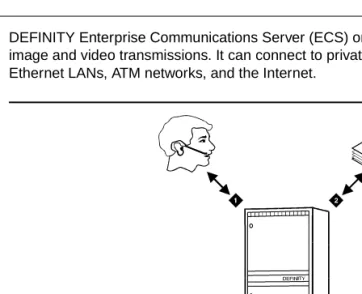
DEFINITY Enterprise Communications Server (ECS) organizes and routes voice, data, image and video transmissions. It can connect to private and public telephone networks, Ethernet LANs, ATM networks, and the Internet.
Figure 1. DEFINITY Enterprise Communications Server
1 Voice 3 Image
System Overview
2 Hardware
Hardware
Though the primary components are the same, your DEFINITY ECS can vary widely in size and appearance, depending on your capacity requirements. It may be as small as a single wall-mounted cabinet, or it may be as large as several tall cabinets linked together in the same room or even hundreds of kilometers apart. Regardless of configuration, however, the system’s footprint is relatively small.
The DEFINITY system is essentially an arrangement of port networks and circuits that connect incoming to outgoing communications ports. Up to three port networks can be connected directly to each other. When there are more than three port networks, the connections are made through a Center Stage Switch.
Processor Port Network (PPN)
Every DEFINITY ECS has one Processor Port Network (PPN). It is often the only component in small systems. The PPN houses the Switch Processing Element.
The Switch Processing Element (SPE) contains the central processing unit, which supervises system operation. It also contains a mass storage system for loading system software and saving system translations.
Because your application requirements may vary widely, DEFINITY ECS has three types of SPEs available with proven capacities of 70,000 calls per hour, 140,000 calls per hour, and 250,000 calls per hour. The performance you realize will depend on the call
processing, administrative, and maintenance activities in which your system is engaged.
Expansion Port Network (EPN)
Expansion Port Networks (EPNs) are used when the system grows beyond the capacity of a single port network or must serve geographically dispersed offices. EPNs provide additional ports as needed. A system can have up to 43 Expansion Port Networks.
Center Stage Switch (CSS)
System Overview
3 Hardware
whether the system is being duplicated for enhanced reliability. Each carrier can reside in the PPN cabinet or an EPN cabinet. One switch node can accommodate up to 15 Expansion Port Networks.
Fiber Link Administration
Port cabinets are connected via direct fiber links or through fiber links to a Center Stage Switch to provide the connections required for voice and data information transfer. The CSS is composed of switch node carriers that are interconnected by fiber links. It provides both circuit-switched and packet-switched connections. Fiber Link
Administration creates the translation data defining these links by identifying the endpoint pairs for each link. Endpoints can be an expansion interface or a switch-node-interface circuit pack.
Carriers and Cabinets
Carriers are enclosed shelves composed of vertical slots that hold circuit packs. Circuit packs make up the logic, memory, and switching circuitry for the system. Port circuit packs connect to telephones, computers, and communications lines. The carriers are designed to accept any type of port circuit pack in each circuit pack position.
Each cabinet contains at least one carrier. The circuit packs fit into connectors attached to the rear of the slots. Every connector is connected to signal buses and power supplies in the cabinet.
The cabinets also house equipment that supplies power backup, ringing signal voltage, and mass storage for software translations.
There are three types of cabinets
■ Compact Modular Cabinet. (CMC)
■ Single-Carrier Cabinet. (SCC)
■ Multi-Carrier Cabinet (MCC))
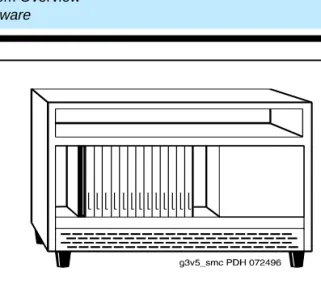
Compact Modular Cabinets
The Compact Modular Cabinet (CMC) is a small, wall- or floor-mounted unit that supports a single port network. It is thus well-suited to small, growing organizations. For a modest initial investment, the CMC gives you the capacity that you need now. As your
System Overview
4 Hardware
Figure 2. Compact Modular Cabinet
Single-Carrier Cabinets
The Single-Carrier Cabinet (SCC) is a compact, floor-mounted modular unit for
businesses that will at some point require more capacity than Compact Modular Cabinets can supply. The SCC can support additional, expansion port networks, so you can add capacity as needed, up to the limit set by the overall DEFINITY system architecture. Each SCC contains a single circuit pack carrier with up to 20 circuit packs, depending on the carrier type. Up to four SCCs can be stacked to form a single port network, and additional port networks can be connected for still more capacity. Figure 3 shows a typical
System Overview
5 Hardware
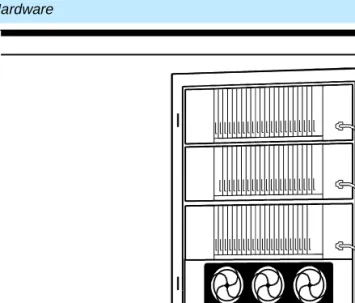
Figure 3. Typical Single-Carrier Cabinet and cabinet stack
Multi-Carrier Cabinets
The Multi-Carrier Cabinet (MCC) is a large unit designed for high-capacity
communications systems and large businesses. It can contain up to five carriers and can be connected to additional, expansion port networks. Figure 4 shows a typical
System Overview
6 Hardware
System Overview
7 Hardware
Figure 5. Standard Configurations
1 Basic System A Processor Port Network
2 Directly Connected System B Expansion Port Network
3 Directly Connected System with Two EPNs C Center Stage Switch
4 CSS-Connected System with up to 15 EPNs D Switch Node
System Overview
8 Reliability and Recoverability
Reliability and Recoverability
The system is designed to recover from a power outage or other failure instantly, regardless of the source of the failure. Each port network includes a set of segmented, parallel buses. If one of the paired segments fails, the other bus segment continues to handle communications. You can always further enhance the system’s reliability by duplicating critical components such as processors or fiber-optic links between port networks.
Configuring for Reliability/Recoverability
DEFINITY ECS can be configured to meet the disaster recovery needs of any business. For example:
■ Calls can be routed through an alternate DEFINITY ECS if one site is destroyed or disabled by natural or man-made disaster.
■ Multimedia (voice, video, data) connections to the network can all be made redundant, in case of network failures. The system can be routed through multiple public exchanges to protect against network failures (a cable or fiber being cut, for example).
■ DEFINITY's universal hardware and flexible software allow systems to be re configured quickly in emergency situations. Port networks can be added and network routing can be changed in a matter of minutes.
■ The TN2211 Optical Drive will replace the present TN1656 Tape Drive. The new Optical Drive will provide the same functionality as the Tape drive, such as, storage for software upgrades, translation backups, announcement file backups, core dumps, etc. It is also faster than the Tape Drive. A full backup to the Optical Drive will take approximately 20 minutes. The present Tape Drive backup takes about 95 minutes.
Survivable Remote EPN (SREPN)
System Overview
9 DEFINITY ECS Network Connections
are restored and stable, the logic switch is manually reset and the EPN is reconnected to the links from the switch. There are both command and manual resets. The resets can be done remotely at the SAT or manually at the equipment.
The SREPN must be administered separately (not as a duplicated PPN) to function in a disaster recovery scenario. It will not function as a survivable remote EPN without the administration (stations, trunks, features) to support its operation.
DEFINITY ECS Network Connections
The system can be connected to public and private networks in a variety of ways.
Public Telephone Network
DEFINITY ECS supports a full range of digital and analog connections to a Public Telephone-Network Central Office, including ISDN-PRI and ISDN-BRI.
Private Telephone Networks
DEFINITY ECS supports the many kinds of private-network connections, including:
■ Digital telephone handsets
■ Data-communications equipment, including data modules and data terminal equipment.
■ Attendant and voice messaging systems
■ Multimedia and video conferencing equipment
■ Call Center systems
■ Hospitality systems
■ Auxiliary loudspeaker-paging and music-on-hold equipment
■ Peripherals, such as journal printers and call detail-recording equipment.
■ Asynchronous Transfer Mode or ATM
■ IP solutions, such as IP trunking and IP softphones
System Overview
10 DEFINITY ECS Network Connections
TCP/IP Networks
DEFINITY ECS can also connect to Ethernet Local Area Networks (LANs) and the Internet.
■ The optional DEFINITY LAN Gateway feature lets the DEFINITY system exchange messages with LAN communications software.
■ DEFINITY ECS now supports Internet Protocol (IP) trunks using the TN802B circuit pack and C-LAN card (TN799B). However, to connect to the network and do signaling over IP, only the TN799B is required.
IP trunking is a good choice for basic, corporate voice and fax communications, where cost is a major concern. IP-trunk calls travel over a company’s intranet rather than the Public Telephone Network. So, for the most common types of internal, corporate communications, IP trunks offer considerable savings.
IP trunking is usually not a good choice for applications where calls have to be routed to multiple destinations (as in most conferencing applications) or to a voice messaging system. IP-trunk calls are compressed to save network bandwidth. Repeated compression and decompression results in a loss of data at each stage and degrades the final quality of the signal. This is not a problem in normal, corporate voice or fax calls. They go through two or three compression cycles at most. But multipoint conference calls and most voice messaging systems add too many compression cycles for acceptable quality.
■ DEFINITY ECS now includes the IP Solutions feature, which supports audio and voice transmissions over a LAN or WAN. For more information about IP Solutions, see ‘‘IP Solutions’’ on page 56.
ATM Networks
Three kinds of Asynchronous Transfer Mode (ATM) connectivity are available with DEFINITY ECS. Any standards-compliant ATM switch can serve as the switch node connecting DEFINITY ECS port networks. In this type of configuration, the ATM switch replaces the Center-Stage Switch.
The three kinds of ATM connectivity DEFINITY ECS supports are as follows:
System Overview
11 DEFINITY ECS Network Connections
■ ATM Circuit Emulation Service (ATM-CES) lets a DEFINITY ECS emulate an ISDN-PRI trunk on an ATM facility. ATM-CES maximizes port network capacities by consolidating trunking.
■ The ATM Trunk feature supports telephony and Wide-Area Network (WAN) connectivity over ATM networks. ATM-WAN extends the PNC beyond a single ATM switch. It allows for use of DEFINITY ECS applications over an ATM infrastructure across locations. ATM-WAN consolidates communications traffic, allowing for quicker and more efficient transport of voice, data, video, and mixed media communications.
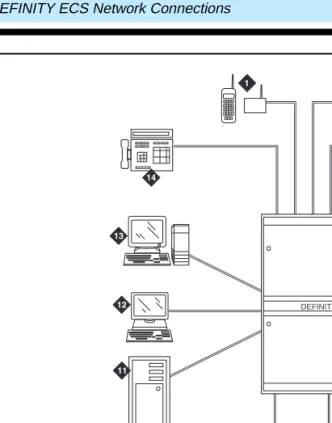
Typical Connections
System Overview
12 DEFINITY ECS Network Connections
Figure 6. Typical DEFINITY ECS Connections
1 Wireless System 8 Digital Facilities
2 Multimedia Call Center 9 Analog Facilities
3 Business Telephone 10 Data Terminals
4 Telephone with Data Module 11 Host Computer
5 Data Terminal 12 Data Terminal
6 Voice Messaging System 13 Management Terminal
7 Customer LAN/WAN 14 Attendant Console
DEFINITY
cydfcn2i KLC 021400
System Overview
13 International Capabilities
NOTE:
Actual equipment may appear different than the equipment shown.
International Capabilities
DEFINITY ECS provides features that allow for differences in telecommunication standards around the world, allowing you to use the same communications system at your various locations in other countries. If you are reading this book, it is likely that the system has been type approved in your country. Check with your local distributor for more information.
Public Network Call Priority
Provides call retention, forced disconnect, intrusion, mode-of-release control, and re-ring to switches on public networks. Different countries frequently refer to these capabilities by different names.
World Class Tone Detection
Enables the DEFINITY ECS to identify and handle different types of call progress tones, depending on the system administration. You can use the tone detector and identification to display on Data Terminal Dialing and to decide when to send digits on trunk calls through Abbreviated Dialing, ARS, AAR, and Data Terminal Dialing.
World Class Tone Generation
Allows you to define call-progress tones. You can select values for frequency and cadence. If you do not define a call-progress tone, DEFINITY ECS sends a default sound for that call-progress tone that is based on your administered country code. For a very few tones, that default may be silence, but for most commonly used tones, that default will make a sound.
Administrable Loss Plan
System Overview
14 Power
Power
DEFINITY ECS can accept a variety of AC or DC power. The system can operate without requiring a power transformer in almost any part of the world.
During a power outage, individual cabinets (Single or Multi-Carrier) will continue to function for up to 15 seconds; the Multi-Carrier Cabinet will function for up to 10 minutes without power, depending on configuration. Optionally, an Uninterruptible Power Supply can protect a DEFINITY ECS system from under or over-voltage conditions, line frequency fluctuations, and power blackout of short duration. A battery backup system can be used to provide power for up to 8 hours, depending on the type and quantity of circuit packs and amount of traffic during the holdover period.
Software
Telephone Features
15 Telephones
2 —Telephone Features
Telephones
DEFINITY ECS telephones fall into three basic families—Analog, Digital Communications Protocol (DCP), and BRI. These terms describe how each type of telephone
communicates with the DEFINITY ECS switch. These families of telephones are designed to accommodate the types of communications various users require. All telephones have touch-tone dialing and the message-waiting lamp for notification of messages.
Telephones for the Global Marketplace
With help from our many global customers, Lucent Technologies has developed the 8400, 9400, 6400 and 6200 series telephones to meet the demand for two-wire telephones in the global marketplace.
8400-Series Telephones
The 8400 digital telephones are versatile two-wire/four-wire Digital Communications Protocol (DCP) telephones with new styling that offer new flexibility and cost savings. They automatically detect whether they are plugged into a two-wire or four-wire digital line circuit card. This is a significant benefit because it provides an easier transition to either a two-line or a four-line environment, therefore reducing wiring expenses and installation adjustments. It also allows you to save space inside the cabinet by using 24-port two-wire boards in place of 16-port four-wire boards.
9400-Series Telephones
Telephone Features
16 Telephones
6400-Series Telephones
The 2-wire, DCP 6400 digital telephones are similar to the 8400 and 9400 telephones, and feature new styling and a pullout instruction card. The 6400 telephones also include the following additional features:
■ Date and time display.
■ A feature button which allows switchhook control of a headset.
■ Group Listen capability, which allows you to use your handset or headset normally while others in the room listen in via speakerphone. This 2-way handset, 1-way speaker mode allows you to serve as a spokesperson for a group.
■ Telephone Self Administration capability, which allows you to program feature buttons on the telephone yourself.
6400 Tip/Ring Interface Module
This module provides a two wire analog interface for the 6400 DCP telephones. This will allow the operation of an analog adjunct to be independent of the digital telephone’s extension for the use of FAX machines or modems without compromising the user’s voice extensions.
6200-Series Analog Telephones
The 6210 and 6220 analog telephones are designed to take advantage of the many features offered by the DEFINITY ECS. They offer the following features.
■ Message light
■ Flash and redial buttons
■ Hold button and hold light
■ Handset volume control
■ Data jack (for connecting a modem or similar device)
■ Personalized ringing, speakerphone button and light, and programmable dialing buttons (6220 only)
IP SoftPhones
IP SoftPhones extend the level of DEFINITY services. They turn a PC or a laptop into an advanced telephone. Users can place calls, take calls, and handle multiple calls on their PCs. For a discussion of the types of SoftPhones available with IP Solutions for
Telephone Features
17 Teleconferencing Products
Wireless Handsets for X-Station Mobility
X-Station Mobility allows remote users to access switch features. It allows wireless telephones remoted over a trunk interface to be controlled by the DEFINITY ECS as if the telephones were directly connected to the switch.
Teleconferencing Products
Quorum A-28 Conference Bridge
The Quorum A-28 Conference Bridge is a microprocessor-controlled analog bridge. It allows you to activate a multipoint connection of switched and private-line circuits to create a single conversation. You can set up, monitor, and control your own teleconferences through your DEFINITY ECS.
The Quorum A-28 Conference Bridge allows you to connect up to 28 different people on a single conference call. Or you can set up multiple conferences — up to four
conferences with seven participants each.
The bridge also provides a lecture mode that you can use for one-way broadcasts. Using the Mute feature, participants can be placed in a listen-only mode, allowing one speaker to address the rest of the conference.
SoundStation Audioconferencing Systems
Lucent Technologies’s SoundStation and SoundStation EX Audioconferencing Systems enable a group of people in a conference room to share their conversation with others through a telephone connection. The Soundstation equipment permits natural
conversation among many people — whether strong or soft, or from a standing or sitting position.
SoundStation
Telephone Features
18 Teleconferencing Products
SoundStation EX
The SoundStation EX includes all the features and functions of the SoundStation. It accommodates larger conferences by including two palm-size external microphones that can be positioned up to six feet (1.8 m) on either side of the center console. An optional wireless microphone is available for stand-up presenters. See Figure 7 for an illustration of the SoundStation EX with External Microphones.
Figure 7. Soundstation EX with External Microphones
1 4 789
0
*
56 23
Telephone Features
19 Telephone Features
Telephone Features
Handling Incoming Calls
Automatic Hold
Allow Attendants and multi-function telephone users to alternate easily between two or more calls. For example, with automatic hold, selection of a second call automatically puts the active call (if any) on hold and makes the second call active. This feature can be activated on a system-wide basis only. When automatic hold is not activated, the selection of the second call drops the first call.
Hold
Allows you to disconnect from a call temporarily, use your telephone for other call purposes, and then return to the original call.
Long Hold Recall
Visual and audible warnings are sent to the telephone where a call has been on hold past a specified period of time. Both visual and audible warnings are used if the telephone is on-hook. If the telephone is off-hook, a "priority ring" is used. The call is identified as a long-held call by the letters "hc" on the display. This is an optional feature at the system level.
Transfer
Allows telephone users to transfer trunk or internal calls to other telephones within the system without attendant assistance. This feature provides a convenient way to connect a party with someone better qualified to handle the call. Single-line telephone users momentarily flash the switchhook or press the Recall button, dial the desired extension, and hang up. Multi-appearance telephone users press the Transfer button, dial the desired extension number, and press the Transfer button again. This is an optional feature at the system level.
Pull Transfer
Telephone Features
20 Telephone Features
Trunk-to-Trunk Transfer
Allows the attendant or telephone user to connect an incoming trunk call to an outgoing trunk call. This feature is particularly useful when a caller outside the system calls a user or attendant and requests a transfer to another outside number. For example, a worker, away on business, can call in and have the call transferred elsewhere. The system assures that incoming Central Office trunks without Disconnect Supervision are not transferred to outgoing trunks or other incoming Central Office trunks without Disconnect Supervision.
Transfer — Outgoing Trunk to Outgoing Trunk
Allows a user or attendant to initiate two or more outgoing trunk calls and then transfer the trunks together. The transfer operation removes the original user from the connection and conferences the outgoing trunks. Alternatively, the controlling party can establish a conference call with the outgoing trunks and then drop out of the conference, leaving only the outgoing trunks on the conference. This is an optional enhancement to Trunk-to-Trunk Transfer and requires careful administration and use. DCS Trunk Turnaround may be a safer alternative to this feature.
Transfer Upon Hang-Up
Provides you with the ability to transfer a call by hanging up instead of having to press the Transfer button a second time. You would press the Transfer button, dial the number the call is being transferred to and then hang up. This is an optional feature at the system level. You will still be able to transfer a call by pressing the Transfer button a second time.
Transfer Recall
Returns the unanswered transfer calls back to the person who transferred the call. Transfer Recall uses a priority alerting signal, and the display on the telephone shows "rt", which indicates a returned call from a failed transfer operation.
Abort Transfer
Telephone Features
21 Telephone Features
Conference
The Conference button allows multiappearance telephone users to make up to six-party conference calls without attendant assistance. This feature also allows single-line telephone users to make up to three-party conference calls without attendant assistance.
Abort Conference on Hangup
When you punch the conference button and for any reason you hang up before you complete the conference, you will cancel the conference. The original call that was put on soft-hold will now be on hard-hold.
Call Park
Allows you to put a call on hold and then retrieve a call from any other telephone on the system. This is helpful when you are on a call and need to go to another location for information. It also allows you to answer a call from any telephone after being paged by a telephone user or an attendant.
Misoperation Handling
NOTE:
This feature is required only in France and Italy, but it can be used at any location where the feature has been turned on.
Defines how calls are handled when a misoperation occurs. A misoperation is when calls are left on hold when the controlling station goes on hook.
For example, a misoperation can occur under either of the following conditions:
■ If you hang up prior to completing a feature operation (in some cases, hanging up completes the operation, as in call transfer). If, for example, you place a call on hold, begin to transfer the call, dial an invalid extension number, and then hang up, that’s a misoperation.
■ When the system enters night service while attendant consoles have calls on hold.
The system administrator can alter the standard Misoperation Handling to ensure that an external caller is not left on hold indefinitely, or dropped by the system after a
misoperation with no way to reach someone for help.
Manual Message Waiting
Telephone Features
22 Telephone Features
pairs of telephones such as a secretary and an executive. The secretary might press the button to signal to the executive that a call needs answering or someone has arrived for an appointment. The executive might use the button to indicate that he or she should not be disturbed.
Internal Automatic Answer
Allows specific telephones to answer incoming internal calls automatically. This feature is intended for use with telephones that have speakerphones or headsets. You simply press an Internal Automatic Answer feature button, and calls are automatically answered when the telephone is idle. Internal and Distributed Communications System (DCS) calls can be answered using Automatic Answer, but only attendants can use Automatic Answer to answer external calls directed to the attendant.
Recall Signaling
Recall Signaling allows the user of an analog station to place a call on hold, use the voice terminal for other call purposes, and then return to the original call.
Local Call Timer Automatic Start/Stop
Automatically starts the local timer of a 6400 series telephone when a call is received. The timer is stopped automatically when a call is ended. When a call is placed on hold the timer continues to run, but is not displayed. When the call comes off hold, the total elapsed call-time displays.
Call Redirection
Call Forwarding
Call Forwarding provides four functions:
■ Call Forwarding All Calls — Allows calls to be forwarded to an internal extension, external (off-net) number, an attendant, or an attendant group.
■ Call Forwarding Override — Allows the user at the forwarded-to extension to override Call Forwarding and either initiate a call or transfer a call back to the forwarded-from extension.
■ Call Forward Busy/Don’t Answer — Allows calls to be forwarded when the called extension is busy or when the call is not answered after an administrable interval. If the extension is busy, the call forwards immediately. If the extension is not busy, the incoming call rings the called extension, then forwards only if it remains
Telephone Features
23 Telephone Features
■ Call Forwarding Off Net — Allows calls forwarded off net to be tracked for busy or no-answer conditions. The system brings the call back for further call-coverage processing if specified conditions are met. This feature is particularly useful for Telecommuters, who can have their on-site office calls forwarded to their home offices.
Call Coverage
Call Coverage provides automatic redirection of calls that meet specified criteria to alternate answering positions in a Call Coverage path. A coverage path can include any of the following: a telephone, an attendant group, a Uniform Call Distribution (UCD) hunt group, a Direct Department Calling (DDC) hunt group, an Automatic Call Distribution (ACD) hunt group, a voice messaging system, or a Coverage Answer Group (CAG) established to answer redirected calls.
In addition to redirecting a call to a local answering position, you can administer Call Coverage to:
■ Redirect calls based on time-of-day
■ Redirect calls to a remote location
■ Allow users to change back and forth between two lead-coverage paths from either an on- or off-site location
Coverage Callback
Allows a covering user to leave a message for the called party to call back the person who called.
Coverage Incoming Call Identification
Allows multi-appearance telephones users without a display in a Coverage Answer Group to identify an incoming call to that group.
Go to Cover
Allows users who call another internal extension to send the call directly to coverage.
Send All Calls
Telephone Features
24 Telephone Features
Consult
Allows a covering user, after answering a call received through Call Coverage, to call the called party for private consultation. Consult can be used to let a covering user ask the principal if they want to speak with the calling party.
Reset Shift Call
Telephone Features
25 Telephone Features
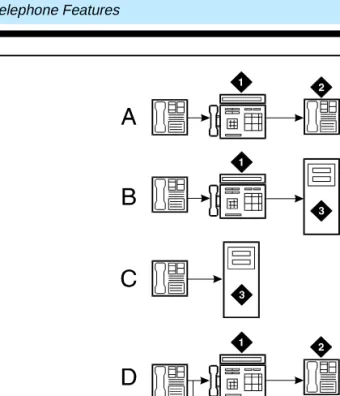
Figure 8. Typical DEFINITY ECS Call Coverage Options
A External Call: Active, Busy, Don’t Answer 1 Secretary
B Internal Calls: Cover All 2 Clerk
C Internal Call: Active, Busy, Don’t Answer 3 AUDIX Voice Messaging
Telephone Features
26 Telephone Features
Night Service
There are five Night Service features:
■ Hunt Group Night Service allows an attendant or a split supervisor to assign a hunt group or split to Night Service mode. All calls for the hunt group then are redirected to the hunt group’s designated Night Service extension. When a user activates Hunt Group Night Service, the associated button lamp lights.
■ Night Console Service directs all calls for primary and daytime attendant consoles to a night console. When a user activates Night Console Service, the Night Service button for each attendant lights and all attendant-seeking calls (and calls waiting) in the queue are directed to the night console. To activate and deactivate this feature, the attendant typically presses the Night button on the principal attendant console or designated console.
■ Night Station Service directs incoming calls for the attendant to designated extensions. Attendants can activate Night Station Service by pressing the Night button on the principle console if there is not an active night console. If the night station is busy, calls (including emergency attendant calls) receive a busy tone. They do not queue for the attendant.
■ Trunk Answer from Any Station allows telephone users to answer all incoming calls to the attendant when the attendant is not on duty and when other voice terminals have not been designated to answer the calls. The incoming call activates a gong, bell, or chime and a voice-terminal user dials an access code to answer the call.
■ Trunk Group Night Service allows an attendant or a designated telephone user to individually assign a trunk group or all trunk groups to the night service mode. Specific trunk groups individually assigned to the service are in Individual Trunk Night Service Mode. Calls coming into these trunk groups are redirected to designated night service extensions. Incoming calls on other trunk groups are processed normally.
Enhanced Night Service
Telephone Features
27 Telephone Features
Bridged Call Appearance — Multi-Appearance Telephone
Allows calls made to or from a primary telephone user’s extension number to be handled from more than one telephone. A bridged call appearance is set up by administering a primary extension and the button number associated with it on a multi-lamp button on another telephone. One way this feature is most often used is by secretaries or assistants who answer or handle calls to the primary extension (an executive, for example). When the primary extension receives a call, the bridged call appearance flashes or rings on all telephones administered with this feature. The call can be answered by anyone having a telephone with this feature and handled as if the primary extension user was answering it. The maximum number of bridged appearances has been expanded from 25 to 64 with DEFINITY ECS R8.
Bridged Call Appearance — Single-Line Telephone
Allows single-line telephones users to have a bridged appearance on a multi-appearance telephone.
Temporary Bridged Appearance
Allows multi-appearance telephone users in a terminating extension group or personal central office line group to bridge onto an existing group call. If a call has been answered using the Call Pickup feature, the originally called party can bridge onto the call. This feature also allows a called party to bridge onto a call that redirects to coverage before the called party can answer it.
Privacy — Manual Exclusion
Allows multi-appearance telephone users to keep other users with appearances of the same extension number from bridging onto an existing call. Exclusion is activated by pressing the Exclusion button on a per-call basis.
Privacy-Auto Exclusion
Telephone Features
28 Telephone Features
Call Pickup
Along with Directed Call Pickup, allows you to answer calls for other telephones within your specified call pickup group. Directed Call Pickup allows you to pick up any call on the DEFINITY ECS system. With this feature, you do not have to leave your telephone to answer a call for a nearby telephone. You simply dial an access code or press a Call Pickup button.
Group Call Pickup
Allows you to dial a Feature Access Code (FAC) and a Pickup Group Number to answer a call from a different group. For example, Marketing would be able to pickup calls in the Sales group when the Sales group is unavailable. This feature is ideal for offices that are not divided by partitions and generally have the departments on the same floor.
Terminating Extension Group
Allows an incoming call to ring (either audible or silent alerting) as many as four telephones at the same time. Any user in the group can answer the call. Any telephone can be administered as a group member. Only a multi-appearance telephone can be assigned a feature button with an associated status lamp, however. The feature button allows the user to select a Terminating Extension Group call appearance for answering or bridging onto an existing call but not for call origination. For example, a department in a large store might have three telephones. Anyone in the department can answer the call. The salesperson most qualified to answer the call can bridge onto the call.
Station Hunting
Routes calls made to a busy extension to another extension. To use Station Hunting, you create a station hunting chain that governs the order in which a call routes from one extension to the next when the called extension is busy. Each extension in the chain links to only one subsequent extension. An extension may be linked from any number of extensions, however.
Station Hunt Before Coverage
Telephone Features
29 Telephone Features
Circular Station Hunting
This new hunt group type is an alternative to the "ddc" or "hot-seat" algorithm in a hunt group. DEFINITY ECS keeps track of the last extension in the hunt group that received a call. When another incoming call arrives, it is sent to the next idle extension, bypassing the extension that had received the previous call. The first extension in the hunt group will no longer be the busiest telephone while the others in the group are sitting idle.
Speed/Convenience Calling
Abbreviated Dialing
Provides lists of stored numbers you can use to:
■ Place local, long-distance, and international calls
■ Activate features
■ Access remote computer equipment
You simply dial the list number and the one-, two-, or three-digit number associated with the telephone number you want. The number is then automatically dialed by the system. A frequently called number can be stored on an abbreviated dialing button that you need only press once to make the call.
Abbreviated Dialing Labeling
Labeling of Abbreviated Dialing (AD) Buttons on Softkeys allows users of 8400 and 6400 series display telephone sets to administer labels for the AD buttons that appear on their softkeys. These personalized labels appear on the menu display.
Abbreviated Dialing On-Hook Programming
On-Hook Programming allows users of 8400 and 6400 series telephone sets with enabled speakers to access the programming mode without going off-hook during available call appearances. Signaling changes from DTMF to the S-channel, allowing the use of a longer (60 seconds) time-out period. Signaling will remain DTMF and the current time-out period of 10 seconds will still apply to non-display telephone sets.
Enhanced Abbreviated Dialing
Telephone Features
30 Telephone Features
enhanced number lists. With privileged lists, users can access otherwise-restricted numbers (e.g., Stations without long-distance access can be programmed to access specified long-distance numbers).
Active Dialing
6400 series telephone sets have a dialing option where the set will send S-channel button codes when the user presses a number on the dial pad when on-hook.
Telephone Self-Administration
Allows you to program feature buttons on 6400-series telephones yourself.
Automatic Callback
Allows internal users who placed a call to a busy or unanswered internal telephone to be called back automatically when the called voice terminal becomes available.
When a user activates Automatic Callback, the system monitors the called telephone. When the called telephone becomes available to receive a call, the system originates the Automatic Callback call. The originating party receives priority ringing. The calling party then lifts the handset and the called party receives the same ringing provided on the original call.
Ringback Queuing
Places calls in an ordered queue (first in, first out) when all trunks are busy. The telephone user who is trying to make a call is automatically called back when a trunk becomes available, and hears a distinctive three-burst signal when called back.
Last Number Dialed
Allows you to automatically redial the last number dialed. The system saves the first 24 digits of the last number dialed, whether the call attempt was manually dialed or dialed using Abbreviated Dialing. When you press the Last Number Dialed button or dial the Last Number dialed feature access code, the system places the call again.
Remote Access
Telephone Features
31 Telephone Features
Recorded Telephone Dictation Access
Allows telephone users, including Remote Access and incoming tie trunk users, to access dictation equipment. The dictation equipment is accessed by dialing an access code or extension number. The start/stop function can be voice or dial controlled. Other functions such as initial activation and playback are controlled by additional dial codes.
Emergency Access to the Attendant
Provides for emergency calls to be placed to an Attendant. These calls can be placed automatically by the system or can be dialed by system users. Emergency access calls can receive priority handling by the Attendant.
Crisis Alert
Crisis Alert uses both audible and visual alerting to notify designated extensions when an emergency call is made. Audible alerting sounds like an ambulance siren. Visual alerting flashes the CRSS-ALRT button lamp and the display of the caller’s name and extension. Crisis Alert’s display of the origin of the emergency call enables the attendant or other user to direct emergency-service response to the caller.
If an emergency call is made while another crisis alert is still active, the incoming call will be placed in the queue. If the system is administered so that all users must respond, then every user must respond to every call, in which case the calls are not necessarily queued in the order in which they were made. If the system is administered so that only one user must respond, the first crisis alert remains active at the phone where it was
acknowledged. Subsequent calls are queued to the next available station in the order in which they were made.
Crisis Alert can also send notification of an emergency call to a digital pager. In this case, it sends a message of 7 to 22 digits to the pager and displays a crisis alert code, an extension and room number, and a main number (if one is entered). The person paged thus knows the origin of the emergency call and can direct emergency-service response to the appropriate location. To use Crisis Alert with a digital pager, the system is
Telephone Features
32 Telephone Features
Manual Originating Line Service
Connects single-line telephone users to the attendant automatically when the user lifts the handset. The attendant number is stored in an Abbreviated Dialing list. When the telephone user lifts the handset, the system automatically routes the call to the attendant using the Hot Line Service feature.
Trunk Flash
Trunk Flash allows a feature or function button on a multifunction telephone or attendant console to be assigned as a Flash button. Pressing this button while connected to a trunk (which must have been administered to allow Trunk Flash) causes the system to send a flash signal out over the connected trunk.
Trunk Flash enables multifunction voice terminals to access central office customized services that are provided by the Central Office to which DEFINITY ECS is connected. These services are electronic features, such as conference and transfer, that are accessed by a sequence of flash signal and dial signals from the DEFINITY System station on an active trunk call. The Trunk Flash feature can help to reduce the number of trunk lines connected to the DEFINITY system. “Digit 1 as Flash” as used in Italy and the United Kingdom will not serve as the flash button in this application.
Special Dial Tone
Provides the ability to play a Special Dial Tone whenever an analog set is not able to receive calls. When such conditions as Call Forward All Calls, Call Forward Busy/NA, Send All Calls or Do Not Disturb are activated on a telephone set, a Special Dial Tone lets you know that you cannot receive any calls.
Telephone Displays
Voice Terminal Display
Provides multi-appearance telephone users with updated call and message information. This information is displayed on a display-equipped telephone. The information displayed depends upon the display mode selected by the user. Information that allows
personalized call answering is available on many calls.
Telephone Features
33 Telephone Features
ICLID on Analog Trunk
In the US and Japan, the user’s terminal displays calling party information. Name and calling number are available from the US central offices; only the calling number is available from central offices in Japan. This feature may be used in countries that comply with either US or Japanese requirements. The display of name and number will work with all DEFINITY digital voice terminals (DCP and BRI) equipped with a 40-character or a 32-character alphanumeric display.
Enhanced Voice Terminal Display
The Enhanced Voice Terminal Display feature allows you to choose the character set that you want to see in DEFINITY ECS softkeys and display terminals. In addition to the standard Roman character set, you can choose either the Katakana or characters used for most European languages.
Administrable Language Displays
Allows the messages that appear on telephone display units to be shown in the language spoken by the user. These messages are available in English (the default), French, Italian, Spanish, or one other user-defined language. The language for display messages is selected by each user. The feature requires 40-character display telephones.
Directory
Allows users with display-equipped telephones to access the system database, use the touch-tone buttons to enter a name, and retrieve an extension number from the system directory. The directory contains the names and extensions assigned to all telephones on the system.
Group Communication
Conference — Terminal
Allows multi-appearance telephone users to set up six-party conference calls without attendant assistance. Single-line telephone users can set up three-party conference calls without attendant assistance.
Intercom — Automatic
Telephone Features
34 Telephone Features
Intercom — Dial
Allows multi-appearance telephone users to easily call others within an administered group. The calling user lifts the handset, presses the Dial Intercom button, and dials the one- or two-digit code assigned to the desired party. The called user’s telephone rings, and intercom lamp, if provided, flashes. With this feature, a group of users who frequently call each other can do so by pressing one button and dialing a one- or two- digit code instead of dialing an extension number.
Manual Signaling
Allows one user to signal another user. The receiving user hears a two-second ring. The signal is sent each time the button is pressed by the signaling user. The meaning of the signal is prearranged between the sender and the receiver. Manual Signaling is denied if the receiving telephone is already ringing from an incoming call.
Group Listen
Simultaneously activates your speakerphone in listen only mode and your handset or headset in listen and speak mode. This allows you to serve as spokesperson for a group. You can participate in a conversation while everyone else in the room is listening to what is said.
Whisper Page
Allows an assistant or colleague to bridge onto your telephone conversation and give you a message without being heard by the other party or parties you are talking to. Whisper Page works only on certain types of telephones.
Loudspeaker Paging Access
Provides attendants and telephone users dial access to voice paging equipment. As many as nine paging zones can be provided by the system and one zone can be provided that activates all zones at the same time. (A zone is the location of the loudspeakers — for example, conference rooms, warehouses, or storerooms.) A user can activate this feature by dialing the trunk access code of the desired paging zone, or the access codes can be entered into Abbreviated Dialing Lists. Once you have activated this feature, you can simply speak into the handset to make the announcement.
Telephone Features
35 Telephone Features
Code Calling Access
Allows attendants, users, and tie trunk users to page with coded chime signals. This feature is helpful for users who are often away from their telephones or at a location where a ringing telephone might be disturbing.
Special Ringing
Distinctive Ringing
Rings or activates alerting on your telephone in such a way that you are aware of the type of incoming call before answering it. This feature operates in a Distributed
Communication System (DCS) environment the same as it does within a single system.
By default, internal calls are identified by a 1-burst ringing pattern, external calls by a 2-burst ringing pattern, and priority calls by a 3-burst ringing pattern. You can administer these patterns, however.
Personalized Ringing
Allows users of certain telephones to uniquely identify their own calls. Each user can choose one of a number of possible ringing patterns. The eight ringing patterns are tone sequences consisting of different combinations of three tones. With this feature, users working closely in the same area can each specify a different ringing pattern in order to better identify their own calls.
Priority Calling
Allows you to ring another telephone with a distinctive signal that tells the called party the incoming call requires immediate attention. The called party can then handle the call accordingly. You activate priority calling by Dialing a Priority Calling access code or pressing a feature button, followed by the extension number. You can use Priority Calling only if your telephone has been administered with the required class of service.
Voice Terminal Alerting Options
Telephone Features
36 Telephone Features
Ringing — Abbreviated and Delayed
Allows you to manually or automatically assign one of four ring types to each call appearance on a telephone. Whatever treatment you assign to a call appearance is automatically assigned to each of its bridged call appearances.
Ringer Cutoff
Allows the user of a multi-appearance telephone to turn audible ringing signals on and off. Visual alerting is not affected by this feature. When this feature is enabled, only Priority (three-burst) ring, Redirect Notification, Intercom ring, and Manual Signaling ring at the telephone. Internal and external calls do not ring.
Multiappearance Preselection and Preference
Provides options for placing or answering calls on selected call appearances. Ringing Appearance Preference automatically connects you to the incoming ringing call when the user picks up the handset. Idle Appearance Preference automatically connects you to an idle appearance. Preselection allows the user to manually select an appearance. Preselection is used, for example, when you want to reconnect with a held call or activate a feature. Preselection can be used with a feature button. For example, if you press an Abbreviated Dialing button, the call appearance is automatically selected and, if you pick up the handset within five seconds, the call is automatically placed. The Preselection option overrides both of the other preference options.
Messaging
Leave Word Calling
Allows internal system users to leave a short preprogammed message (usually “Call” with the calling user’s name, extension number, and the time of the call) for other internal users. When the message is stored on the DEFINITY ECS, the Message Lamp on the called telephone automatically lights. Leave Word Calling messages can be retrieved using a telephone display, Voice Message Retrieval, or AUDIX. Messages may be retrieved in English, French, Italian, Spanish, or a user-defined language.
Audible Message Waiting
Telephone Features
37 Telephone Features
message light. It is often used with telephones that have no Message Waiting Lights. Audible Message Waiting may not be available in countries that restrict the characteristics of dial tones provided to users.
Voice Messaging and Call Coverage
Often an AUDIX system is set up as the last point on a call-coverage path, as in Figure 8. A secretary or colleague who answers a redirected call intended for you can also transfer the caller to your AUDIX mailbox. The caller may prefer to leave voice-mail for you if the message is personal, lengthy, or technical.
Many other options are available. For example, a caller can redirect a call from the AUDIX system to an attendant. Or the caller can transfer to another extension instead of leaving a message. You can even have the AUDIX automated attendant answer all calls to the company and send calls to various extensions. In this case, callers are instructed to enter keypad commands to direct the call.
Voice Message Retrieval
Allows telephone users, remote access users, and attendants to retrieve Leave Word Calli