Table of Contents
Chapter 11: IBM
System Tables...194
Limitations...195
Installation on the Windows Workstation...196
Installation on Mobile Device...197
Development Tools...198
Airplane Tester Application...198
Create Testers Tables...199
Main Application...207
Data Synchronization and Replication...218
Final Thoughts...221
Appendix A: Palm Conduits...222
Appendix B: Microsoft Publication Wizard Script...225
Appendix C: DB2 CLI/ODBC Functions...233
Appendix D: Sybase Glossary...234
C−U...234
Building PDA Databases for Wireless and Mobile
Development
Robert Laberge Srdjan Vujosevic
Wiley Publishing, Inc.
Publisher: Robert Ipsen
Editor: Carol Long
Developmental Editor: Adaobi Obi Tulton
Managing Editor: Fred Bernardi
New Media Editor: Brian Snapp
Text Design & Composition: Benchmark Productions, Inc.
Designations used by companies to distinguish their products are often claimed as trademarks. In all instances where Wiley Publishing, Inc., is aware of a claim, the product names appear in initial capital or ALL
CAPITAL LETTERS. Readers, however, should contact the appropriate companies for more complete information regarding trademarks and registration.
This book is printed on acid−free paper.
Copyright © 2003 by Robert Laberge and Srdjan Vujosevic. All rights reserved.
Published by Wiley Publishing, Inc., Indianapolis, Indiana
Published simultaneously in Canada
No part of this publication may be reproduced, stored in a retrieval system, or transmitted in any form or by any means, electronic, mechanical, photocopying, recording, scanning, or otherwise, except as permitted under Section 107 or 108 of the 1976 United States Copyright Act, without either the prior written permission of the Publisher, or authorization through payment of the appropriate per−copy fee to the Copyright Clearance Center, Inc., 222 Rosewood Drive, Danvers, MA 01923, (978) 750−8400, fax (978) 750−4470. Requests to the Publisher for permission should be addressed to the Legal Department, Wiley Publishing, Inc., 10475 Crosspointe Blvd., Indianapolis, IN 46256, (317) 572−3447, fax (317) 572−4447, E−mail:
other commercial damages, including but not limited to special, incidental, consequential, or other damages. For general information on our other products and services please contact our Customer Care Department within the United States at (800) 762−2974, outside the United States at (317) 572−3993 or fax (317) 572−4002.
Wiley also publishes its books in a variety of electronic formats. Some content that appears in print may not be available in electronic books.
Library of Congress Cataloging−in−Publication Data:
Laberge, Robert, 1961−
Building PDA databases for wireless and mobile development / Robert Laberge, Srdjan Vujosevic. p. cm.
"Wiley Computer Publishing."
Includes bibliographical references and index.
ISBN 0−471−21645−3
1. Mobile computing. 2. Database design. 3. Portable computers−−Programming. I. Vujosevic, Srdjan, 1961− II. Title.
QA76.59 .L33 2002 005.265−−dc21 2002012145
Printed in the United States of America 10 9 8 7 6 5 4 3 2 1
Thanks to all the many firms and individuals who partnered with us in the creation of this project
−Robert Laberge
I am dedicating this book to all the good and professional people at BDP, Business Data Services, Toronto
−Srdjan Vujosevic
ABOUT THE AUTHORS
Robert Laberge
Mr. Laberge is a co−founder of WaveDev, a wireless Internet venture, and a co−founder of
Worldjobmart.com, a global Internet job site. He has had articles published in Microsoft's MSDN, Web
Techniques, and several other popular magazines.
Srdjan Vujosevic
Srdjan has over 17 years of IT experience. Originally from Yugoslavia, Mr. Vujosevic is familiar with a multitude of IT technical issues and related business concerns.
Initially trained as an electrical engineer, Mr. Vujosevic holds intimate knowledge of computer internals (PC, Unix, and Mac), networks, WAP, and many programming languages. In addition, he has many years of database administration experience, which led him to many successful system integration projects. Mr. Vujosevic is a co−founder of WaveDev, a wireless Internet venture, and a co−founder of
Worldjobmart.com, a global Internet job site. He too has had articles published in Microsoft's MSDN, Web
Techniques, and several other popular magazines.
IntroductionAn Introduction to Wireless and Mobile
Applications
Initially, wireless mobile applications, for small portable devices, were programs totally unconnected from corporate or personal computer systems. That is from a real−time point of view. The majority of these types of applications were on Palm Pilots and were limited to address books, personal schedules, to−do lists, and so on. That's great for the traveling salesperson or busy corporate consultants, but not that useful in everyday life for most of us.
Then came the wireless Internet. This was thought to be the best thing since sliced bread in the computer industryand is quite amazing. However, there are limits to business and everyday usage primarily because of the available devices. These wireless portable devices and special Wireless Application Protocol (WAP) cellular telephones are very limited in memory and display screen size, and are also difficult to enter
information into because of the awkwardness of typing on the units themselves. Nevertheless, the technology is excellent. The ability to connect to the World Wide Web from nearly anywhere at anytime is truly a major advancement in the current borderless Information Age. For more information on WAP, including detailed tutorials and programs on how to build WAP applications, refer to our previous book, WAP Integration: A
Professional Developer's Guide, by Srdjan Vujosevic and Robert Laberge, also published by John Wiley &
Sons.
With the wireless Internet, we no longer have to be seated in front of a desktop personal computer physically hardwired to personal or corporate networks to reach our applications and databases. With portable wireless mobile technology, we can easily connect to the Internet or intranet and onto our legacy systems to obtain the most valuable asset of most businesses today: the stored data. This data is usually specifically structured and organized into related entities and objects known to the business users as information. We've all heard the expression "information is power," and to empower our workers with all the information they require when they require it wherever they require it is an absolute advantage to any business.
To sum it up, portable wireless mobile computing is the ability to retrieve information from the main
computer system and/or repository of information on a wireless device at anytime and anywhere. An obvious plus here is the ability to also enter or update information on those main computer systems remotely via our wireless device. This gives us all the freedom to theoretically manipulate all information from afar.
The specific type of wireless devices used in our portable wireless mobile architecture is the Personal Digital
Assistant, better known as the PDA. The usage of these types of devices is growing at an alarming rate. In the
next five years, most cellular telephones will have Internet capabilities, and a large number of individuals will be porting a PDA of some sort.
Chapter 8, "Palm's Database," discusses Palm's offering and how databases are deployed on Palm OS devices. Our example explains how to create an application to access data from the PDB database.
•
Chapter 9, "Microsoft," introduces the Pocket PC offerings from Microsoft. This is a detailed chapter on the many aspects with an interesting application explained in detail.
•
Chapter 10, "Sybase," introduces the Sybase solution to PDA databases. Again, this chapter discusses the components from Sybase, and has examples using specific pieces of the offering.
•
Chapter 11, "IBM," introduces IBM's DB2 solution. A discussion on the components and an easy−to−follow application using the components follows.
•
For your reference, we have a list of acronyms and appendices describing certain fine points from areas in the book.
•
The Web site (www.wiley.com/compbooks/laberge) has all the programs and applications described in this book, plus several more bits. Review them, copy them, and modify them. We created them for you to learn and use as templates for your own development efforts. We hope this book, its material, and associated programs will help you learn and develop your own PDA applications. Once you get the knack, you should be able to integrate your newly acquired knowledge within existing corporate environments, allowing the
extension of your enterprise to a new wireless and mobile portal.
If you have any comments or questions, please feel free to email us at <[email protected]>. We would certainly enjoy your views and hearing about any specific applications you've built using these templates. Enjoy.
Chapter 1: Introduction to PDAs
This chapter provides a brief history of the evolution of mobile wireless databases and introduces the Personal Digital Assistant, or PDA, and typical PDA environment. The purpose is to detail all the pieces of this
technology at a high level. For those with no knowledge of PDAs, this chapter is an absolute necessity.
The Basics
The PDA environment and units can be very simple or quite advanced, depending on your level of technical expertise and usage. The term PDA is highly used, but it should really be handheld computer or handheld PC. PDA was initially used because the units mainly contained a daily calendar, personal address book, calculator, to−do list, perhaps a currency exchange program, and usually an international time zone map. In this respect, these units were indeed personal digital assistants, as people would forgo their usually big personal calendar and to−do agendas for these little electronic machines. I remember back in the early 1990s when I received my first PDA, a Texas Instruments digital assistant. I entered all the telephone numbers for all the people I knew, along with their addresses and whatever comments I could find such as birthdays, anniversaries, and upcoming special events. It was fantasticthe calendar would sound an alarm on the days I marked for notification. In meetings, I could take brief (very brief) notes and was a whiz with my fancy calculator that really couldn't do much more than just the basic functions. We're obviously still using the term PDA, as per its embedded use in the name of this book, but we really mean a handheld personal computer whenever we refer to it here.
A funny thing about the term PDA is that no vendor really uses it. When people are asked what a PDA is, they usually reply "Palm Pilot" (if they remember these), and recognize Pocket PC devices in the same category, but no vendor actually calls their devices "PDAs." "PDAs" was coined back in 1992 when introduced by Apple's Newton MessagePad, which really didn't take off. Microsoft also had their hands in these PDAs with WinPad, but had the same problem. Microsoft poured on the research and development and came up with quite a number of new product releases, including PC Companions, Windows CE, Handheld PCs, Palm−size PCs, Auto PCs, and Pocket PCs. Whenever we refer to PDAs in this book, we are referring to Palm devices such as the m500, and Pocket PC devices such as the Compaq iPaq.
As previously mentioned, the PDA's basic functions were quite simplistic. Palm's devices have expanded upon the PDA base with handwriting recognition, and enhanced memoryit used to be 64K at best, and now we're into megabytes and gigabytes. Along with these, PC synchronization, expansion slots for additional memory, and email have been added. Today's users can even buy added−value packages of memory with embedded programs for many uses. By far, the most popular added functionality is games. One of the latest Palm devices is the m500 model, which we'll be using throughout this book, compliments of Sybase, one of our main sponsors.
wireless Internet evolution was under way. Some call it the Internet's second phase; others coin it as the merger of the Internet and telecommunications. Whatever you call it, it's definitely here and it's a major step in wireless mobile Internet communications.
WAP View
Mobility first came about from the telecommunications industry. It allowed individuals to communicate via wireless cellular phones, which gave us the ability to walk and talk, hence, the term mobility.
The Internet infrastructure has also been around for some time. This infrastructure allows anyone with a computer and a modem to connect to any other computer with a modem, and gives us the freedom to transfer or browse data from anywhere with connections to the Internet. However, unless you have a wireless modem, the communication must be wire based and, therefore, only portable.
Mobility and portability are now easily possible through the use of WAP, which is the merging of these two industries and technologies. Using wireless telecommunications and the Internet via wireless Internet devices, anyone can now access information anytime, anywhere.
With the world rushing toward a standardized telecommunication infrastructure, network, and protocol, along with the ever−increasing wireless device capacity, memory, and functionality, more people will be accessing the Internet via Web phones and PDAs than from any other method. While personal computers will always be our personal base stations at work or in our homes, wireless Internet technology will evolve into our everyday portable and mobile interconnectivity medium. The future potential is unlimited as it only has today's
boundaries to overcome. Growth Predictions
As seen in Figure 1.1, the forecasted number of cellular phone subscribers will increase enormously in the first half of the current decade due to several factors. First, the ongoing trend of individuals wanting to be connected or available whenever they want, anytime, anywhere, is increasing. Second, many countries currently have poor telecommunication infrastructures, and cellular telecommunications is simpler and less expensive to set up.
when they got their first TI personal organizer. They felt like they had a tiny super computer in their hands, with everything at the touch of a button wherever they were. That was technology!
The late 1980s and early 1990s gave us much technology, but the late 1990s were when the real revolution began. An initial player in the PDA business was Palm, who created and introduced the Pilot organizer back in 1996. Soon after came the famous PalmPilot, followed by the even better known Palm III series and Palm V series.
Along with these devices came Palm's HotSync software. We will be discussing this more in depth later, but at this point, it suffices to say that HotSync is the software used by Palm to connect the Palm device to the PC. Palm currently holds approximately 60 percent of the world's PDA device market, and for quite a while they were alone in the industry. Then came Microsoft with their Pocket PC using Windows CE. With the PDA market anticipated to be very large and, very possibly, the future of computing, Microsoft couldn't resist and decided to bring on their own unique version of a PDA. WinCE is a small version of Windows used in many types of small devices, with the most common being the Pocket PC. It has also been used in many types of applications such as TV set−top boxes, factory−floor devices, cell phones, bar code readers, automatic teller machines, digital cameras, and so on. We, the authors, personally expect Pocket PC devices to continue to grow in number, models, and popularity. As with the Internet browser wars, the PDA battle has begun. To parallel Palm's HotSync software, Pocket PC uses ActiveSync to connect devices to PCs. We'll look at this in the next section.
One of the most popular Pocket PC devices today is the Compaq iPaq, which is what we used to build the many Pocket PC applications in this book. Of course, this is just one model, but it's the one that currently dominates the market.
PDA Environment
This section highlights the basic hardware and connectivity software. Let's take it one step at a time and look at the components. The basic components are the physical units, the connectivity devices, and additions based on your requirements.
Devices
There are many types of devices; some are specific to the Palm, and others are specific to the Pocket PC world. Both devices connect to Windows on the PC, but Palm has no Windows components itself. While the Palm m500 is an exceptional device, the iPaq has some very interesting features. It contains built−in Bluetooth software capable of wirelessly connecting to other Bluetooth devices. It also comes with a default voice recorder, which is very handy if you'd like to quickly record a memo or two.
applications. Beware: This will cause loss of data. Soft reset will simply stop and restart the unit.
On the Palm, press a bent paper clip or the special stylus device into the unit for a soft reset. For a hard reset, hold down the Power button and press the stylus reset device into the button opening. Check out the stylus; the top unscrews, revealing a smaller stylus specifically designed to reset the unit.
The Pocket PC unit follows the same rules, but the original stylus fits into the reset opening area. One push and the unit is stopped and restarted. To hard reset the Compaq iPaq, press and hold the two outside
application buttons, insert the stylus into the reset switch area, and press the switch for five seconds. Then, to reactivate your unit, insert the stylus into the reset switch again and press it for one secondor simply connect the unit to the cradle. If ever you forget your device password, you'll have to perform a hard reset.
Connectivity
The great thing about both Palm and Pocket PC is they both have connectibility to a Windows PC. We have not done any test or usage other than with Windows−based platforms. Palm does its connectivity with their HotSync software, and Pocket PC has its own programs called ActiveSync. Each of these is used to connect the individual devices usually, and mostly using their respective cradles to the personal computer.
Connecting the devices to a desktop computer essentially allows them to share information and to synchronize the data between them. Setting up each is fairly simple, and once done, ongoing synchronization is quite easy. The underlying connection and the program, which passes the information between the PC and the device, is called a conduit. We'll discuss more on conduits later in the book.
HotSync and ActiveSync
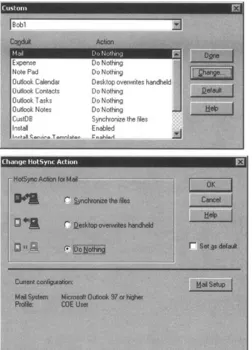
Each of these programs is usually used via the cradles, but can be used via a communication cable. The Palm HotSync cradle is connected directly to the USB port (or serial port depending on the cable you have) on the desktop or laptop. Activating Palm's HotSync is as easy as pressing the special HotSync button on the cradle. Simply set up the Palm desktop program, connect the cradle to the desktop computer, and press the HotSync button. Figure 1.2 shows the Palm desktop custom menu. It has all the different conduits, programs to connect specific applications, and each is customizable depending on how the user wants to synchronize. If you don't want to do anything for a specific application such as mail, choose that action and the next HotSync you perform will not copy mail from PC to Palm, or vice versa. This goes for each application on the device.
Figure 1.2: HotSync custom menu.
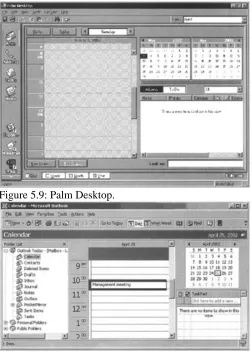
Palm also provides a special Desktop application. Most people using the Windows platform have Microsoft Outlook and prefer to connect to it. However, for those who'd prefer to use another application, Palm supplies its Palm Desktop. Date scheduling, addresses, to−do lists, memos, and more are all available through this desktop application (see Figure 1.3). You can choose to use it and synchronize to it as you see fit.
Figure 1.3: Palm Desktop menu.
Microsoft has an application of the same concept, but with an automated synchronization process. For Pocket PCs, simply install Microsoft ActiveSync on the desktop computer, connect the cradle to the USB port on the
machine, configure the software, and place the iPaq in the cradle. ActiveSync will automatically recognize and detect the device, and then automatically synchronize the unit with the desktop. It can also be
programmed to do this on an ongoing periodic basis. Very handy!
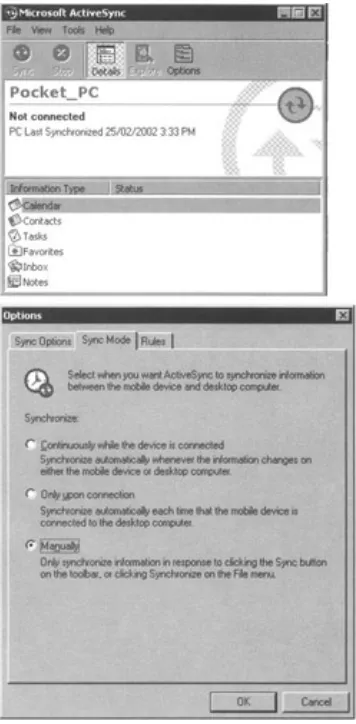
Figure 1.4 shows Microsoft's ActiveSync application. It is the same concept as with the Palm conduit program, but represented slightly differently. This application shows the programs that ActiveSync is
prepared to consider for synchronization. Again, each program has the specific option of how to synchronize, when to synchronize, and what to synchronize. There's a lot more to the program, but we'll cover the details later in the book. One nice feature to note on ActiveSync is that while the device is connected to the PC and the PC is connected to the Internet, pass−through mode allows the device to access the Internet directly, making downloading very simple.
Figure 1.4: ActiveSync menu.
There's much more to say about these units, but let's cover that as we move forward in the book. As we explain the examples, we discuss unit features and functionality.
Modems
type of middleware systemobviously, some level of advanced systems architecture is required at this point. This is a much more advanced topic, but the point is that wireless computing with these PDA mini computers can easily connect to an enterprise system for complete data synchronization to back−end information while on the road anytime, anywhere.
Modems come in different styles. One example is the CompactFlash Fax modem. It runs at 56K and works just like a PCMCIA card but is about one−third the size, which makes it ideal for palm−size and handheld PCs. It adds little weight to the unit (one−third ounce, or eight grams), and has no impact on the size of the unit because it slides into the existing expansion slot.
Final Thoughts
While wireless Internet has come a long way, it's still in its infancy. WAP was the initial kick−start into the wireless world for computers and, in our opinion, the next step is with these PDA devices. To dive into this PDA world, the first step is learning how to build applications on these devices and how to synchronize them with databases on servers. The following chapters will walk you through the components required to build PDA applications with portable and synchronizable databases.
The Relational Database and Its Components
There are many types of database models, such as Dimensional, Network, Hierarchical, Relational, and several others (see Figure 2.1). These are simply known as DBMS, or DataBase Management Systems. Each has its own underlying method of connecting each table and record to the next, and so each has its own naming conventions. The most popular and most efficient under general terms is the Relational database.
Figure 2.1: Database types.
This type of database has certain basic terms. The grouping of specific files such as employee files is called a
table. Each employee file itself is called a row. The employee table is made up of many employee rows, one
per employee. Databases are essentially one big continuous file organized in sections (blocks, pages, segments, or whatever you might want to call them depending on what's being discussed). The database knows how big or long each section is, based on the size we initially allocate. The allocation is based on the size of each table, which is based on the size of each row within the table and on the number of rows in the table. Then, to further understand the components of each row, we subdivide the individual employee rows into columns. This gives us nice, easy−to−comprehend rows and columns. For example, a row for a particular employee might contain the following columns: last name, first name, and telephone number (Jones, Ralph, 5551212).
Tables
Tables 2.1 and 2.2 show a grouping of tables within a database. Table 2.1, the Employee table, was just described in the preceding section. Table 2.2 is the Truck table, and each row represents data. There are five trucks in our fictitious company, and each has its own row in the truck table. Each row is further subdivided into columns: Plate, which shows the truck's license plate number, Type of truck, and Year, which shows the year the truck was made.
Table 2.1: Employee Table
LASTNAME FIRSTNAME TELEPHONE
Jones Ralph 555−1212
Barns Rick 555−8888
Jacobs Abraham 555−1234
Ryan Jack 555−0001
Table 2.2: Truck Table
PLATE TYPE YEAR
ABC123 Moving 1998 EDF456 Flat bed 2000 XYZ001 Delivery 1977 STU002 One−ton 1988 MN0003 Pickup 2000
From a technical point of view, there are quite a few things going on behind the scenes. First, specific databases have specific page sizes. We mentioned before that databases are basically continuous files with data written bit after bit. The files are chopped up into specific sections called pages in this case. It's kind of like formatting a diskette. When a database is created, it is allocated to a specific size, let's say 10MB for our example. 10MB is the total size of the file. The file is then formatted into pages for the database. Each database has its own specific page size requirements, but most are using 2K or 4K pages these days. This is another area where it could easily get more complicated. Professional database administrators can actually change the page size to optimize the database for specific business and data requirements.
So, now we have pages in 4K (4096 bytes) sizes. 10MB (10,240,000 bytes) in 4K chunks gives us 2500 pages. Some of these pages are going to be used by the database management system for internal administration and tracking of the remaining pages as well as other tasks. Each page is then further
subdivided. Each page has a header and footer. All pages are basically strung together: page 1, then page 2, followed by page 3, and so on. Each page has its own number in the header.
While each database system is different, the footer basically says where each row on the page is located. There's more to all this, but let's keep it simple.
Table 2.3: Employee Table
ID LASTNAME FIRSTNAME TELEPHONE
01 Jones Ralph 555−1212
02 Barns Rick 555−8888
03 Jacobs Abraham 555−1234
04 Ryan Jack 555−0001
Table 2.4: Truck Table with Primary Key
ID PLATE TYPE YEAR
77 ABC123 Moving 1998 55 EDF456 Flat Bed 2000 33 XYZ001 Delivery 1977 11 STU002 One Ton 1988 99 MN0003 Pickup 2000
Indexes
On to indexes! We have a database with tables consisting of rows with columns. Primary keys and foreign keys are columns that must have indexes associated with them. Indexes can also be defined individually on one or more specific columns, usually because the database designer believes that most queries will be using these specific columns to obtain information from the table.
A primany key is the definition of one or more specific columns on a table that will be used to uniquely identify rows. It's the index behind the scenes that really allows for the fast accessing of the row based on the predefined columns. In databases, when a query is executed, the database engine will try to figure out if a predefined index matches the query. This gets complicated, so we'll just assume that the database knows what it's doing. The point is, other than really understanding how the database figures out which index to use, you really don't have much say in how the data is being accessed. However, when you specify the primary key in the query, you're specifically telling the database to use the underlying primary key index. This really overly simplifies the process, but you get the picture, right? Same idea behind foreign keys, which we'll discuss in the next section.
Indexes are arranged in a structured fashion allowing for faster lookups. One could simply flip through each page in a book until he found the sought−after page, but that would be very time consuming. Database indexes are just like indexes at the back of books. Look for what you want in the book index and you'll find exactly what page it's on. Flip to that page, and there you go.
Indexes are made in different ways to ensure the optimum method of getting to the required data. The different types include Bitmap and Btrees. At this point, you just have to know how the data is going to be accessed, and build indexes that best suit your requirements. In our employee example, we want to look up people based on their last name and then their first name. We simply create an index on last name followed by
Figure 2.2 shows the relationships between all three tables. The Employee table has its own primary key and index on column ID. The Truck table has its own primary key and index on its own column called ID. Same column names, but that's okay because the names are unique on the individual tables themselves. The third table, DriversAssigned, has its own primary key made up of all three columns called EmployeeID, TruckID, and DateAssigned. We could have called the ID columns something else, but for the sake of simplicity, we called them the same as their originating table names plus the ID word. We then define these same columns as foreign keys to the other tables. This ensures that we cannot add a row to the DriversAssigned table if either of the primary key values is not initially in the originating tables, called parent tables. We couldn't add a row to DriversAssigned with an EmployeeID that doesn't exist in the Employee table, and we couldn't add a row to the DriversAssigned table if the TruckID were not already in the Truck table. This then enforces data integrity between the DriversAssigned, Employee, and Truck tables.
Figure 2.2: Referential integrity on tables.
Joins
This is an excellent time to discuss joins. The referential integrity, foreign keys, in our ongoing example, describes a middle table pointing to two other tables as it represents the relationship between each. From a practical business usage, it's very reasonable to request information such as a list of all the drivers who have been assigned to truck 77. The query would be written as follows with the following join criteria:
Select lastname, firstname from Employee, DriversAssigned where
Employee.ID=DriversAssigned.EmployeeID and DriversAssigned.TruckID=77
Both Employee and DriversAssigned tables were specified. The join criteria in the query was done on the Employee's ID column and the DriversAssigned EmployeeID column. We didn't have to look at the Truck table because we knew the ID and therefore simply used it as a qualifier in the query. We could enhance the query and request the year of the truck by doing a second join between the DriversAssigned table and the Truck table using the TruckID column from DriversAssigned and the ID column from the Truck table. This type of join is called an inner join or just join. Think of two tables intersecting. We want certain column values common to each of the joining tables.
available for rows in B that are not in A.
Figure 2.3: Join types.
Cursors
Armed with the preceding information, we can now design, load, and retrieve all the information in our database. However, what if we want to perform some sort of process for each row returned from our query? Let's say we get two rows back from our previous query, which gave a list of all drivers who have been assigned to truck 77. We'd need to somehow stop the processing after each row and execute another procedure. This is done with the help of a cursor.
Basically, we're going into a sort of holding state per returned row from our database query. As we loop through the result set, two rows in this case (one for Ralph and another for Rick), we can update another table. This is an overly simplified example and it could be done in one snappy query, but for the sake of our
example, we'll stick to updating table X, which we won't even bother to define at this point. In general, a cursor is defined for a particular query and given a name. For example:
Define Cursor ABC for Select lastname, firstname from Employee, DriversAssigned where
Employee.ID=DriversAssigned.EmployeeID and DriversAssigned.TruckID=77
Then, later in the program, we'd run the cursor and use it as a loop. For example:
For each ABC
execute UpdateProcedure
When finished, we close the cursor, because cursors hold ongoing internal counters and pointers within the database management system. The close might look something like a simple
Close ABC
That's it, now you can perform subprocessing for each returned row from your database query as the program loops through each returned database row.
SQL
SQL is short for Structured Query Language. This language contains the Select statement you read about earlier. It also encompasses other commands you'll become aware of as we move forward. Each database has
with the PDA application. In this case, the person must be aware of the application and database. The person must know how to start the database, how to connect, how to access the database, and finally, how to disconnect the application from the database.
Backups
An important portion of database administration is to ensure data availability and safekeeping. The operational database on the PC or network has its own backup and restore strategy, hopefully, and now we must take into consideration the data on the PDA.
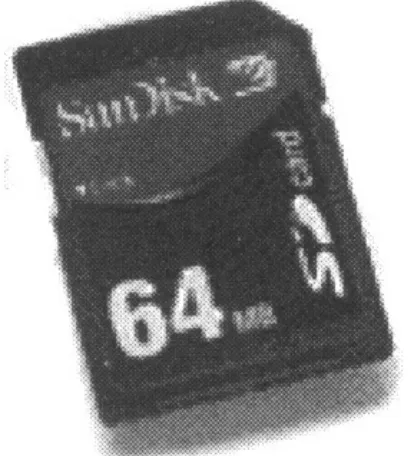
Under normal circumstances, the user should be able to connect to the network or PC via HotSync or ActiveSync (whatever conduit tool is being used). The data from the PDA can then be synchronized and backed up on the PC. However, what if the connection cannot be made? If the wired or wireless connection is not available, there must be a backup plan to save the data. We could just hope for eventual connectivity, or we could be a bit more practical and plan a strategy, which could include storing the information on a memory card (see Figure 2.4). Most new devices have the capability to insert additional memory via a memory card or expansion pack. These are the best places to store the database and application, as the card could be removed and saved in a safe area.
Figure 2.4: Memory cards.
As a note, be sure that old databases of information match up with the application. Many times, the data is backed up and then the application changes. If you have to restore an old version of the database, the application might not be able to access it because it is no longer compatible. This happens quite often after upgrading software. This is not only a PDA issue, as it happens with large databases as well.
PDA Database Considerations
Since these devices have small memories, the database vendors had to figure out a way to implement a database on the units, which allowed for efficiency in query processing and yet didn't consume all the available memory. As you'll see later in this book, each vendor took a particular approach. Most limited the SQL features, which reduced database size, while others decided that pre−specifying the exact queries and then building database tables with only columns required by the queries would reduce the database footprint. Still others decided to implement each table separately as its own file.
Final Thoughts
From a database design point of view for PDAs, we highly suggest to only plan on using exactly what is required. Do not build extra columns if they will not be used. Plan every column usage and know your data. Determine how the data will be imported and/or exported to the driving database on the server as part of the database strategy. Plan your synchronization strategy as part of the database design phase and your PDA database application will hopefully be a success.
To understand more on the two components of the PDA client and a database on the server, the next chapter will explain the issues and considerations for PDA applications.
Chapter 3: Client−Server Architecture
This chapter explains and pinpoints the architectural components of using a PDA device as an extension to an existing (or new) server−based database application system. With the enterprise moving into more access points to corporate data, an understanding of client−server architecture is a fundamental stepping−stone in the development process.
Client−Server History
A major step in the advancement of computer technology was the database. The transition from flat files to a structured, organized, and optimized method of storing and retrieving information was a tremendous move forward. This was way before the personal computer came about, before the Internet, and long before the wireless computer was even conceived. It was the first attempt at understanding data architecture and modeling.
In the beginning of the Computer Age, computers were primarily used for processing and calculation
purposes. They received input data, processed the data, and returned the results. With the advent of databases came the retention of input, processes, and results. Databases were storing scientific data, accounting entries, and the like. Repositories of information were in their infancy and growing. Soon, processing systems were highly dependent on pre−stored information in these quasi−architected databases. We say quasi−architected because the science of data modeling was in its infancy, since it had just been discovered.
Remember the database types model from Chapter 2, "Database Architecture" (Figure 2.1)? Well, the first databases were usually modeled in the hierarchical fashion. This meant chaining data records together, but under owner tags called parents. This was still the flat file layout, but with individual blocks chained together, making the entire architecture much more organized and modular. This allowed for faster processing than flat files did. With flat files, the program would begin to read at the start of the file and proceed until it found the data or reached the end of the file. With hierarchical databases, the program could determine the required ancestor, then loop through the parents, and then onward to the child records for each parent. Once the proper child record was found, the job was done. This is a simplistic but advanced view of databases in those days. It allowed for much faster processing and was hailed as a marvel of backroom computer technology.
Client−servers were big! Let's look at this client−server concept a bit closer. The idea is to remove some of the processing from the central computer and replace it with the capability to execute the process on a smaller yet powerful machine. The central computer would then become a server to the client's requests. We can see this in Figure 3.1.
Figure 3.1: Client−server.
Mind you, a client and server could reside on the same machine. This depends on the logical organization of the user front−end application and the back−end server programs.
In effect, client−server started with the concept of reducing mainframe usage and moving the processing power to the client workstation or personal computer. It evolved from full mainframe usage to a heavy emphasis on database servers. The client program would send requests to the database management system (DBMS) residing on the server. The server would then process the request and return results to the initial client program for further processing and display.
Fat versus Thin
The question now is, how much data and/or programs remain on the server, and how much remains on the client?
A fat client refers to placing much of the programs within an application on the personal workstation or computer. A thin client refers to having only several programs on the client with much still remaining on the server. The more programs on a machine meant more processing on that machine.
Each of these client options has its own pros and cons, each depending on the application programs, the location of the servers, and network constraints. A fat client will take up lots of disk space on the client. A thin client will gobble up less disk space on the client, but place more of a burden on the server. Propagation of upgrades and patches favor the thin client, since fewer programs would be distributed to thin clients.
However, there have been advancements and new strategies in allowing the distribution of software in the past several years. From a network point of view, the thin client model is most highly preferred. Make an
enhancement in one centralized area, and the server and all users obtain the same unified result of the change. The Internet age also brought focus to thin and fat client architectures. The individual's personal computer is the client, the Internet or intranet is the network, per se, and the server is some computer that could be anywhere in the world. Most Internet−based applications are accessed via a browser such as Microsoft's Internet Explorer or Netscape. When a page or site is accessed, the images, certain programs, and data are all sent to the client machine. However, most of the processing happens on the server side. If the program
accesses a database, the database itself processes the information. Sure, JavaScript can do much processing on the PC browser side, but Visual Basic still runs on the server.
In the end, a tailored fat or thin client−server architecture will allow more improvements in usability, flexibility, interoperability, and scalability when compared to the centralized, mainframe, and time−sharing computing.
Tiers
With client−server architecture, there are many potential methods in designing programs and data. Actually, when you think about it, these components can be broken down into processing areas such as presentation layer, logic layer, and the data layer.
The presentation layer deals with how the data is viewed, assuming we're not processing data in a batch mode. Batch mode is a lengthy automated approach to processing data. Suppose you want to add up a customer's bank balance for a certain day. Take the opening daily balance, apply all the daily transactions such as deposits, subtract withdrawals such as bill payments, and add interest. The end result is a closing daily balance. Great if this is a one−time affair, but what if you were required to tally all end−of−day balances for all clients for each day in the month. Obviously, doing this by hand will be very time consuming and probably unrealistic. So instead, put all your commands in one program along with some sort of tally logic to calculate the end result and have it initiated at some off−hour like 2:00 A.M. (If you have 10 million customers, this might take a while, so these types of batch programs are usually run when no one else is using the system, which is usually sometime in the wee hours of the morning.)
A typical presentation layer these days is a Web page presented with the Microsoft Internet Explorer or Netscape browser. Sure, there are other methods and programs to present results and to gain access to back−end data, but let's think Web browsers for our presentation purposes.
The next layer is the logic. This refers to the guts of the application, which for simplicity will be a typical computer program. There could be one, two, or quite a number of programs all bunched up in a prearranged manner so as to execute pieces of work in a prearranged method. These programs are the essence of the data request and data manipulation processes. The majority of logic for the overall presentation to data extraction (or whatever) steps is within this layer.
The final step is the data layer. Can't really do much without data. This layer could be a simple flat file or an entire database management system such as DB2, SQLServer, Access, Sybase, Oracle, Excel, or whatever. The point is that the data layer is sectioned into its own instance that can be maintained independently of the other layers and, hence, managed and administered to optimize its accessibility and availability. Since one of the corporation's largest assets is its data, the databases are very valuable, and, as such, must be organized, maintained, and secured independently.
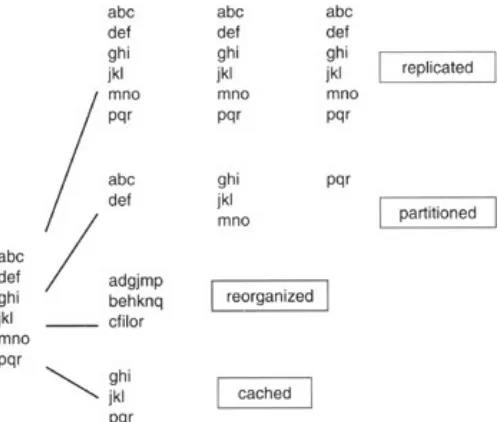
Figure 3.2: Data distribution.
As seen in Figure 3.2, data can be replicated on multiple databases, which could be on a number of different servers. Alternatively, data could span data files, as seen in the partitioned method in Figure 3.2. Another method is the stripping of data, shown in the reorganized method. Yet another possibility could be when data is specifically cached in memory. In that scenario, particular data is highly requested, and it would be efficient from the usage point of view to have it always readily available; hence retained in cache.
At this point, we have three components: the presentation, logic, and data layers. Each layer could be divided into different combinations to satisfy different types of usage based on client−server configuration, network capacity, and device capabilities among other potentials. Figure 3.3 shows different types of setups.
Figure 3.3: Client−server configuration.
In Figure 3.3, the presentation, logic, and data layers are distributed in different fashions depending on the type of network and usage. The following gives a very brief description of each type of configuration. Based on the components described earlier, Figure 3.3 shows how each section can be separated and gives a scenario to which it would pertain:
Distributed data. This may result from decentralized database servers, perhaps located in several
different physical locations around the world.
•
Remote data. Might be due to a database server completely dislocated from the front−end
presentation and logic systems.
•
Distributed transaction. This involves the breakup of program logic with some processing being
done on one platform and some being done on the database server.
•
Remote presentation. The configuration is similar to a browser accessing the Internet, where logic
and data reside on a Web server and the Web browser is on a client machine.
•
Distributed presentation. This would be similar to a partial front−end residing on your laptop but
being driven by a front−end application on another machine being distributed across the network,
•
with that machine having programs and data under its umbrella.
There are more potential configurations, and we're sure that even more will follow in the future.
The tiers of the client−server configuration and data distribution are usually threefold; hence the 3−Tier representation, as shown in Figure 3.4.
Figure 3.4: 3−Tier model.
In the 3−Tier model, the presentation layer resides on the client machine, which is usually the personal computer. The middle server would normally contain the logic process such as the Visual Basic programs. The final server would contain, manage, and organize the data in the database management system. The entire server in this scenario would, or should we say, might be dedicated explicitly to the data.
Many Internet Web sites are only based on a 2−Tier model. The client side is the individual's personal computer, and the server would contain ASP on an IIS server also containing an Access database. This is certainly a very popular method. Corporations, however, usually maintain, at minimum, a 3−Tier model to ensure that their assets are distinct and usually maintained by the data management department, while the applications department usually maintains the programs. The 3−Tier approach allows for simpler portability, as servers can change, data can move, and access can be redirected away from unique points of failure. Back−end systems can move to different machines, platforms, databases, and operating systems without the front−end presentation layer being affected.
No matter the number of tiers (servers), the user can read data from a site or single point of entry and not have to worry about access or location of data. It's the same idea as browsing the Internetyou really have no idea where the data comes from, where it's located, or whether it's on a single machine or distributed across multiple database back−end servers. When updating the data, the user really doesn't know where that data is located, or whether the data is replicated or not. How would you know if the credit card information you entered when purchasing an item over the Internet is really only stored in the vendor's location, or whether it was just distributed to a web of unscrupulous Internet sites?
Front End
As the back end can change in almost any fashion imaginable, so can the presentation layer. Consider a large data warehouse repository. Data warehousing is the accumulation of data upon data over time, usually in a single repository or warehouse. The data layer in this case is completely focused on gathering, capturing, and holding the same data layout (with changing values) over and over again. This could be something as simple as capturing your savings account balance every day or every week. You might access that data from a Web site application or from an ATM machine, or the bank teller might access it through special banking
all−in−one system, very effective for salespeople and portable applications.
Referring back to the client−server configuration diagram in Figure 3.3, all mentioned setups are possible with PDAs, especially with wireless modems as connection to the Internet allowing the dynamic extension of corporate enterprise solutions. Data can be distributed in a push or pull fashion, and with pass−through mode, on the PDA even the distributed presentation configuration is possible.
These units definitely open the possibilities of remote access to corporate data, especially legacy systems or data warehouses, which can really give the mobile end user a real advantage over competitors. Empowered by the entire corporate historical data (with probabilities predetermined) and client history (with trend and co−relation among bought and available product), cross−selling becomes a dynamic and very profitable potential for mobile workers.
Final Thoughts
PDAs are fast becoming a part of enterprise systems. As memory and real−time synchronization potential for these devices increase, they will become more active in our daily lives. As such their interaction with the existing systems will become more distributed. Since these units have strong processors, they will run the spectrum of tiered solutions and provide the users with many possible and viable solutions to corporate data, as well as Internet−based information. Who knows, maybe one day they'll be used as timesharing servers in a distributed environment.
Chapter 4: Data Warehousing
Chapter 2, "Database Architecture," spoke of databases and how they came to be, with a highlight of PDA considerations. Chapter 3, "Client−Server Architecture," spoke of client−servers with an emphasis on PDAs as an extension of the corporate enterprise. Since data is the corporate world's most valuable asset, many firms are centralizing their information into one main area called a data warehouse. By combining databases, client−server methodology, and a pool of corporate information from a data warehouse in a mobile wireless environment, the PDA becomes the next major portal to enterprise data.
Many firms find very valuable information in previously recorded data. If you know what a particular person's spending habits or purchases have been over the past several years, you could focus a specific marketing campaign toward that person if there was a history of purchasing a specific product. If Ralph has a history of purchasing a ski vacation package every winter, wouldn't it be a good idea to put Ralph at the top of your potential purchasers list if you're selling ski vacation packages? Why waste time on someone who never purchased one before? A data warehouse allows this type of analysis to resolve and/or focus on business concerns, patterns, and trends.
What Is a Data Warehouse?
A data warehouse is what it saysa warehouse of data. A warehouse is a place where items, be it shoes or medical supplies, are stored with expectations of being reclaimed or queried at a later time. In our case, the item being stored is data.
Data is stored in a warehouse so that whenever it is required, we can find it all in one place rather than having to gather the individual bits of data from all over to obtain the information we need. It's much faster accessing one central area than having to access a mainframe application, an NT server−based database, a flat file on a Unix box, and so on in the same instance. With a warehouse, all that we want is, generally, in one central area. If it is not, we can arrange it so that the data is in one place by starting a new project to load data from a specific source into the warehouse. These projects are usually quite the undertaking in large organizations, since data must be analyzed and synchronized between the different source systems, which is quite
time−consuming. For example, a telephone number in one system might be different from a telephone number in another system, and we must then determine which is the correct one. This also involves ensuring that they are in the same format. Just look at your personal telephone organizerdo you have the area code for all numbers, or just for those of out−of−town numbers? If someone else were to rely on your organizer for telephone numbers, it would probably not be useful because some of the area codes would be missing. For that information to be useful to anyone else, all must be in the same formatarea code, and then telephone number. The point is that everything we require is in the data warehouse repository, and must be in the same format and synchronized between all the systems. For our example, all telephone numbers would contain area codes.
In a typical warehouse, we could have shoes from this year, last year, and maybe from years ago. The same idea applies to a data warehouse. We might have data from today, yesterday, last week, a month ago, a year ago, 10 years ago, and so on. A data warehouse contains historical information, and we therefore call it a data
warehouse historical repository. It is, however, important to set a base granularity throughout the warehouse
Granularity
Think of granularity as a measurement. We want to make sure that all measurements are of the same type. For example, if we say the granularity is gallons, we know we're always talking gallons, not liters, not barrels, or buckets. If all measurements are gallons, then don't expect to count the number of liters without extra conversion effort. The same concept applies to a data warehouse. If we capture and load data on a monthly basis, do not expect to run a query or perform a calculation to determine daily quantities. If we're talking monthly we can't get daily, but if we're keeping daily facts and figures in a daily granularity warehouse, then, of course, we can determine monthly results since we know how many days are in a month. We refer to rolling up facts in this manner as aggregation.
It's quite normal to count daily facts and figures to determine monthly totals in a daily granularity warehouse. The nice part about aggregation at a fine granularity level is that if a monthly number or figure is under scrutiny, we can easily show how we arrived at the number because we have the individual daily facts to back it up. The granularity of a warehouse is the lowest level of justifiable and attainable information in a data warehouse.
If we were to capture daily data directly from its source and were asked to justify a captured daily number within the warehouse, we couldn't because it wasn't derived from the warehouse data but from a source. Applying this to a monthly aggregated number, we could drill down to the individual daily numbers since we captured the data on a daily basis. If we were to justify those individual days, we'd have to refer back to the originating source system, which initially produced the number.
Organized Structures
Users needing to access data in the data warehouse historical repository could simply perform simple or complicated queries depending on their needs and obtain all the information they want. However, that can cause major problems from a performance point of view. Data warehouse queries usually run long scans for large amounts of data. Imagine a large number of people going into a shoe warehouse looking for specific shoes. Some people might be looking for women's blue shoes, others for men's size 11 shoes, and still others just want shoes that are on sale that day. It would be a mess with people rushing in and out, shoes not being returned to their respective boxes, people at each other's throats over the same pair of shoes, and so on. The best thing to do would be to ensure that everyone knows just what they are looking for and gets only what they want so they can be in and out of the warehouse as quickly as possible. This would allow for a structured and organized approach to shoe shopping and would free up the helpers so they could assist more individuals during the shopping hours.
In a data warehouse, we want to organize our data in the same way as we would the shoe warehouse so all users will get what they want, when they want it, and as quickly as they can get it. This, of course, implies that we have a pretty good idea of what the users want beforehand. If we do, in the shoe warehouse example, we could put all women's shoes in one corner and all men's shoes in the other corner, each ordered by shoe size. Then we could place all shoes on sale for that day by type on the front display racks. We'd then organize the shoe distribution according to anticipated wants. We're, in essence, controlling the flow of people and
would go against reason to include customers who reside in Switzerland in this particular area because they wouldn't be required, so why include them?
A data warehouse is, essentially, an organized and structured central historical repository of data.
Architecture
Think of a data warehouse as a process that includes many pieces. While many people refer to the data warehouse historical repository as the data warehouse, it's important to understand that the data warehouse is the overall process that includes ETL steps (which we will define later), a historical repository, and usually one or more data marts.
Let's examine the components of Figure 4.1. We'll only slightly scratch the surface of each of the components to give a general introduction to the respective topics. There's a lot more to each of these areas, with many books available on each.
Figure 4.1: Data warehouse.
Source
On the left side of Figure 4.1 are the source systems. A data warehouse is usually the centralization of data from multiple legacy source systems. Figure 4.1 shows three legacy source systems: Retail Banking, ATM, and Mortgage Loans.
Data from each of these systems is captured and synchronized into one version of the truth. For example, the retail banking system might contain an address for a particular customer, while the mortgage loan application might contain the same customer but a different address. The problem we'd face is, which address is the correct address for the customer? As you can see a merging, comparison, and synchronization of information process must be performed. This will ensure that all who access the information from the data warehouse will have the same information, thereby allowing the end users from across the enterprise to all view the exact same information throughout history.
Note that we didn't mention an address for the ATM application. This was intentional, as not all applications will all have the same information. Applications might have their own unique information and might contain the same data as other systems, even thought it might have been gathered independently.
Of course, data in certain legacy systems might be incorrect, and this process will help in identifying these instances and allow the individual department applications to correct their information. This is an entirely different topic out of scope from our focus, but definitely a major side effect of data warehousing.
ETL
The data from each of these source systems is captured via what is known as the Extraction, Transformation, and Load (ETL) step. This ETL step represents many processes, which include the extraction of data from the application source systems (such as Retail Banking, ATM, and Mortgage Loans), the transformation of that data into a common format and structure, followed by a loading process, which loads the data into the data warehouse historical repository.
There is quite a bit more to the ETL process, but it suffices to say that this step is the most complicated aspect of a data warehouse. The developers must really understand all possible values of data being brought into the warehouse from each source system. Each piece of information must be verified, cleansed, and transformed into the repository's common model.
This process involves much cleansing of data, synchronization between multiple inputs, very much involves the business users from each source system to verify which value is truly the appropriate main source, and then a clear understanding of all aspects of that data from expected values to overall dependencies between the individual data values.
We think of this step as mining for diamonds. First we find the mineral, verify that it is indeed a potential diamond, clean off any unwanted material, transform it by cutting it into the desired shape, and finally placing it in the store (the repository).
Repository
The data warehouse historical repository holds all the data warehouse data. Not only does it contain the most recently loaded information, but also all previously loaded information at the predefined and architected granularity. It is very important to understand that information in the repository is of a historical nature. The whole point of a warehouse is to capture information from distinct systems, centralize it, and keep the information over time. Normal operational applications such as the retail banking system usually do not keep historical information. For example, if a customer changes her address, the old address is usually not kept in the system. Therefore, by loading the customer address into the data warehouse, we can keep a history of this customer's address over timeif we find this to be a valuable bit of information.
Since we're keeping data over time, there tends to be quite a large amount of data accumulating in the repository. For this reason, it's important to only store data that is required by the business user. Do not keep extra fields of data in the repository knowing that it won't be used in the near future and hoping that it might be requested in the future. This is a common mistake in a data warehouse environment. People hold on to information thinking that it will save them development time and effort in the future when the end user finally does decides that he or she really does want that one bit of information. You'll wonder where all your disk space went only to realize that all that extra unnecessary data gobbled it up over time. Take this hint: Only load exactly what is required and nothing more.
A repository is a database, and databases are modeled. The repository database can be modeled in several fashions, but the most common is called third normal form (3NF). Data modelers usually have certain rules to model data and the structures in which it resides. 3NF is a detailed method of recording business requirements
Data Marts
Once the data warehouse historical repository is populated, the data is nearly ready for the business users. Remember that the end users specifically requested the data in the repository, with users requesting specific data for their specific needs and usage. Many source systems were accessed and used to populate the
repository over many iterations of the same granularity. This means that the repository is full of data, but not necessarily all required by the same user. This is where data marts come into play.
A data mart is usually its own database, just as a data warehouse historical repository is usually its own database. The data mart is created from the data in the data warehouse historical repository and is, therefore, a subset of that historical data. You cannot have data in a data mart unless it's initially in the data warehouse historical repository.
Since data marts are a subset of data in the historical repository, they can therefore be recreated at any time. Remember that many users requested specific data for their own use. This, therefore, could be translated to a completely distinct subset of the repository, thus becoming its own data mart, consequently, a data warehouse can have multiple data marts. End user A could be using customer name and address from the Customer table along with account balance from the Account table, while end user B might be using customer name and telephone number from the Customer table but no account information at all. Each data mart is its own unique environment. To go back on what was said a moment ago, a data mart could also be a logical grouping of data and therefore reside within the data warehouse historical repository and not physically distinct. This is
especially true for very large databases where duplicating information is very time consuming and disk space is a concern. Normally, however, a data mart is physically distinct in its own database environment.
Repositories are usually modeled in a 3NF design, while data marts are almost always modeled in a Star design. As you can see, the tables in Figure 4.2 are set up in a star−like fashion; hence the name Star model.
Figure 4.2: Star model.
The idea behind a Star design is its simplicity. The models are built for nontechnical business users who simply want to query the data. Placing all customer data in one big customer table makes accessing the customer data quite simple. If you want customer name, check the customer table; if you want account information, check the account tablevery simple and very intuitive. These specific tables are called dimension
tables. There's always one extra special table called Time. Since the whole idea behind a data warehouse is to
view historical data, we must have some method to determine if we're looking at last month's data or last year's data. This is accomplished via a table of dates, with the most common denominator being the data warehouse's basic granularity. If we're capturing information on a monthly basis, the lowest level of
not recorded at that level.
The middle table in Figure 4.2 is quite interesting. In this example, it's called the monthly account balance fact table. Every data mart has at least one fact table. Fact tables usually contain numerical cumulative values at the warehouse granularity; hence, in our example, the word monthly in the table name. Each entry in our example table is per Customer's individual Account by Branch per month. The idea is that the business user can add the individual monthly account balances by any of the dimensions associated with the fact table. This really allows end users the freedom to aggregate the individual account balances by whichever dimension they want, which is a very flexible design and highly useful for the business user.
Because we're trying to place all information for each subject area into its own basic dimension tablefor example, all customer information into the Customer tablewe're increasing redundancy. If customer Ralph has an address change, we'd simply add an entirely new row of data with the only thing changing being the address. All other information would remain the same. If you were to query the table looking for Ralph, you'd see two entries instead of one as you would in a 3NF model. This means that the end user must be more precise in his requirements and perhaps re−query the data looking for all customers in a particular area, thereby resulting in only one result row for Ralph. Alternatively, maybe run the query with a specific time period, which might reduce the number of Ralph rows in the final resultget the idea?
This topic can span volumes, but unfortunately, it is not the point of this chapter. What we're trying to show here is how to take large amounts of data from the data warehouse and place it on a PDA. First, however, we had to highlight the major components of the data warehouse. Next, we'll look at the PDA extension portion.
PDA Data Warehousing
There are many reasons why organizations want to build a warehouse. Those reasons can be to centralize information from multiple application systems and get a single view of the data for the enterprise, retain historical data, use the data for cross−selling purposes from existing clients, make trend estimations based on past performance, and so on. The belief is that the enterprise could benefit from the existing data, so don't simply overwrite data and lose it forever; keep it around in an organized and structured historical repository for specific strategic analysis.
With the arrival of portable and mobile wireless systems, organizations are now looking at offering their information on PDAs. Employees would then have access to a wide range of information anytime, anywhere, giving them access to a plethora of past information.
For example, if a salesperson could download his firm's available inventory and his specific client's past purchases, he could certainly benefit from a projected purchasing trend analysis as well as promising product shipping and delivery based on goods on hand.
Data Stores
the ETL steps for loading into the data warehouse historical repository.
PDA Empowerment
Organizations have been building data warehouses for a number of years and are now moving toward merging their entire individual warehouses into enterprise data warehouses (EDW). With this move comes the request from a multitude of diverse users throughout the organization to access the information from different portals. Mobile devices are one method to accomplish this connectivity and to empower the users with historical information access on their personal digital assistants.
Final Thoughts
PDA applications, as with any other type of application, require data. Data can be either accumulated at the PDA or brought over from a server. Data warehousing is read−only data, thus it would have to be uploaded from the corporate server. This information would allow the mobile business user access to historical information and, therefore, potential trend analysis or other potential uses.
Since PDAs have little memory and data warehouses usually have large quantities of information, there would obviously be space issues and, consequently, design issues. Developers must take into account the use of the information, and, therefore, exactly which information is required. Moreover, rather than aggregating
information on−the−fly on the PDA, it might be best, and it is recommended, to pre−aggregate all data before uploading to the mobile units. This will save time as less processing is required on the device, occupy less memory, and ensure that the business requirements are fully analyzed.
If data were to be captured on the PDA, it would not be part of the data warehouse until downloaded and merged with the warehouse through the ETL processes and then re−aggregated and uploaded to the PDA. Any info