A MATLAB GUI: DESIGNED TO PERFORM BASIC
IMAGE PROCESSING OPERATIONS
Nayana R.Shenoy
1, Kamala C
2, Vindhya K
3 1,2,3Medical Electronics, Dr.Ambedkar Institute of Technology,Bangalore-56,India.
ABSTRACT
Image processing is the manipulation and analysis of information contained in images. Image processing techniques help to improve the image characteristics. The basic operation that is usually performed on an image are edge detection, histogram, region of interest, bit planes, morphological operation, segmentation. Digital image processing is rapidly growing technologies and finds importance in various fields. A graphical user interface(GUI) is a set of techniques and mechanisms used to create interactive communication between a program and a user.GUI eliminates the need to learn a language or type commands to run the application ,by providing point-and-click control of software applications.
Keywords: Callbacks, Components, GUI (Graphical User Interface), Processing, ROI (Region Of
Interest), UI (User Interface).
I. INTRODUCTION
Image processing deals with processing of images or video frames. It enhances important image features while
attenuating details irrelevant to a specific application. Image processing involves changing the nature of an
image either to improve its pictorial information for human interpretation or make it suitable for machine
interpretation [1][2]. A graphic user interface (GUI) is a pictorial interface to a program. A GUI gives the user a
better perspective of the operations that they can perform. In the next section of this paper, some of the
fundamental steps of image processing and analysis are presented. In section 2, the basic operations that can be
performed on an image are dealt briefly. In section 3, details about GUI development is dealt in brief. In section
4, the callback functions used for our final GUI and GUI figure is explained. The section 5 is dedicated for
presenting the results for each of the GUI component. Section 6 includes concluding remarks about the work
presented in this paper.
II. BASIC OPERATION IN IMAGE PROCESSING
2.1 Histogram
Histogram of an image represents the occurrence or frequency of a particular gray level .It is a graph depicting
gray level intensities on x-axis and frequency of these intensities on y-axis. It gives an insight about the contrast
in an image .It helps to categorize images. It provides image statistics for various techniques like thresholding,
2.2 Morphological Operators
Morphology in relation to image processing is a tool to extract image components that are useful in the representation and description of region shape. The morphological operations simplify images,quantify and preserves the main shape characteristics of objects .In morphological operations a structuring element is applied
to an input image and an output image of same size is obtained. The value of each pixel in the output image is
calculated by comparing the corresponding pixel in the input image with its neighbors. The most basic
morphological operations are dilation and erosion. Morphological operations are used in image pre-processing,
enhancing object structure, segmenting objects from the background, quantitative description of objects[1].
2.2.1 Dilation
Dilation is a process in which the image is expanded from its original shape. The way in which an image is
expanded is determined by the structuring element. The dilation process is similar to the convolution process,
that is, the structuring element is reflected and shifted from left to right and from top to bottom, at each shift, the
process will look for any overlapping similar pixels between the structuring element and that of the image. One
of its simplest applications is for bridging the gaps.
2.2.2 Erosion
Erosion combines two sets using vector subtraction of set elements .Erosion is the counter process of dilation .It
shrinks the image. The way in which an image is shrunk is determined by the structuring element. It is a
thinning operator. Application of erosion is to eliminate the narrow regions and thin out the wider region.
2.3 Bit Plane
A bit plane of an image is a set of planes, where each plane represents the bit position. For example if each
pixel in an image is represented by 8 bits, then the image is composed of eight 1-bit planes, ranging from
bit-plane0 for the least significant bit and plane7 for most significant bit. Bit plane slicing helps in determining the
adequacy of the number of bits used to quantize each pixel. Higher bit planes convey more information about
the image than the lower bit planes.
2.4 Region of Interest
A region of interest (ROI) is a portion of an image that has to be processed and analysed. An ROI is defined by
masks. The concept of an ROI is used in many application areas such as, in medical imaging to find the
boundaries of a tumor. Region of interest can be selected manually or automatically.
2.5 Edge Detection
An edge is a set of connected pixels that lie on the boundary between two regions, where the brightness changes
sharply. Edges bear a lot of information about underlying objects in the scene. Edge detection is applicable to
binary images only [3]. Processing is reduced by considering just the edge elements instead of all pixels [4]
.Edge detection is mainly used for feature extraction and detection. The magnitude of first derivative
calculated within a neighbourhood around the pixel of interest are used to detect presence of edge in an
2.6 Filters
2.6.1 Low Pass Filter
Low pass filtering, known as "smoothing" aims to suppress noise or small fluctuations in the image [1]. Noise is
often introduced during the analog -to-digital conversion .Smoothing blurs all sharp edges. The principal of
smoothing filter is to replace the value of every pixel in an image by the average of the gray levels in the
neighbourhood defined by the filter mask.
2.6.2 Median Filter
The median filter is a nonlinear digital filter, often used to remove noise. The principal of median filter is to
replace the value of every pixel in an image by the median of the gray levels in the neighbourhood defined by
the filter mask. Median filtering reduces the blurring of edges. It is very effective in the presence of impulse
noise.
2.7 Thresholding
The objects or image regions are characterized by constant reflectivity or light absorption of their surfaces, a
brightness constant or threshold can be determined to segment objects and background.[2] Thresholding is the simplest method of image segmentation. Using thresholding binary image is obtained from a grayscale image. It
helps to partition an image into a foreground and background
.
It is most effective with high contrast images.III .MATLAB
MATLAB developed by The MathWorks Inc., stands for "Matrix Laboratory” [5]. It is a software package used
to perform scientific computations and visualization. Its capability for analysis of various scientific problems,
flexibility and power graphics makes it a very useful software package. It provides an Integrated development
Environment (IDE) for programming with numerous predefined functions for technical computations and
visualization. Besides available built–in functions, user-defined functions can also be included which can be
used just like any other built-in function. The features and programming constructs commonly available in a
general purpose language like C or C++ are also available in MATLAB.
3.1 Building MATLAB GUI
A MATLAB GUI is a figure window to which we add user-operated controls [6]. GUI is designed to integrate
many image processing functions. A good GUI can make programs easier to use by providing them with a
consistent appearance and with intuitive controls like buttons, list boxes [4].We can select, resize and position
the components at any location. Using callbacks the components perform the required task when the user clicks
or manipulates them with keystrokes. We can build MATLAB GUIs in two ways:
i) Use GUIDE (GUI Development Environment), an interactive GUI construction kit.
ii) Create code files that generate GUIs as functions or scripts (programmatic GUI construction).
The first approach starts with a figure that we populate with components from within a graphic layout editor. GUIDE creates an associated code file containing callbacks for the GUI and its components. GUIDE saves both
the figure (as a FIG-file) and the code file. Opening either one also opens the other to run the GUI. In the
properties and behaviours; when a user executes the file, it creates a figure, populates it with components, and
handles user interactions. The figure is not normally saved between sessions because the code in the file creates
a new one each time it runs.
IV. GUI IMPLEMENTATION
In our work we have developed a GUI using guide. The components used are text boxes, push button, pop-up
menu, static text, axes. Push buttons generate an action when clicked. For example, an OK button might apply settings and close a dialog box. When you click a push button, it appears depressed; when you release the mouse
button, the push button appears raised [6].Static text controls display lines of text. Static text is typically used to label other controls, provide directions to the user, or indicate values associated with a slider. Users cannot
change static text interactively [6].Pop-up menus open to display a list of choices when users clicks the arrow[6].Axes enable your UI to display graphics such as graphs and images. Like all graphics objects, axes have properties that you can set to control many aspects of its behaviour and appearance[6].
4.1 GUI Figure
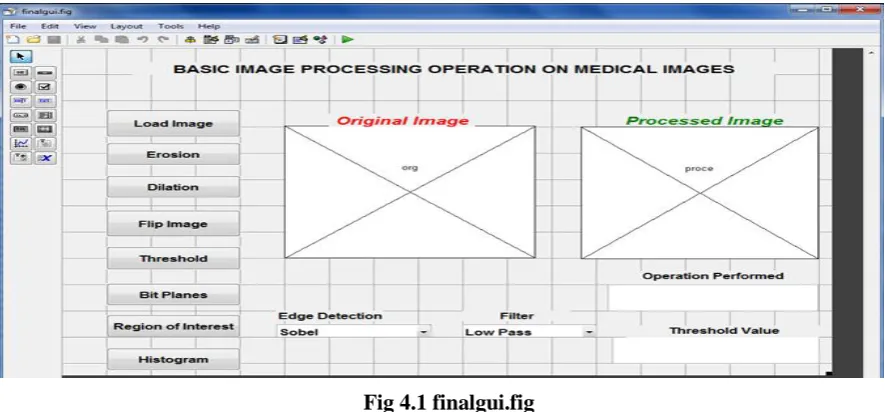
Fig 4.1 finalgui.fig
This GUI figure contains the push buttons for load, erosion, dilation, flip, bit planes, roi, and histogram. Axes
for displaying original and processed image. Pop-up menu for edge detection and filter selection. Text boxes for
displaying the operation performed and threshold value.
4.2 Callbacks
Callback is the function called when an action is performed on the component eg. button push, mouse click.
These are the callbacks implemented for our work.
i)function finalgui_OpeningFcn (hObject, eventdata, handles, varargin) :Executes just before finalgui is made
visible.
ii)function LoadImg_Callback (hObject, eventdata, handles):Executes on pressing the LoadImg button. It loads
iii)function Erosion_Callback(hObject, eventdata, handles): Executes on pressing the Erosion button.It
performs image erosion.
iv)function Dilation_Callback(hObject, eventdata, handles): Executes on pressing the Dilation button.It
performs dilation.
v)function ROI_Callback(hObject, eventdata, handles): Executes on pressing the ROI button.The area of
interest is selected manually.
vi)function histogram_Callback (hObject, eventdata, handles). Executes on pressing the histogram button.It
displays the histogram of an image selected.
vii)function Bitplane_Callback(hObject, eventdata, handles): Executes on pressing the Bitplane button.It
displays the various bit plane extracted.
viii)function filters_Callback(hObject, eventdata, handles:Executes on selection change in filters.Different
filters are selected and their effect is displayed.
ix) function edgedet_Callback(hObject, eventdata, handles:Executes on selection change in edgedet .Various
derative operators are selected and their effect is displayed.
x)function flipimg_Callback(hObject, eventdata, handles): Executes on pressing the flipimg button.It performs
the flipping of an image.
xi)functionThreshold_Callback(hObject, eventdata, handles): Executes on pressing the Threshold
button.Various threshold levels can be selected and their effects can be observed.
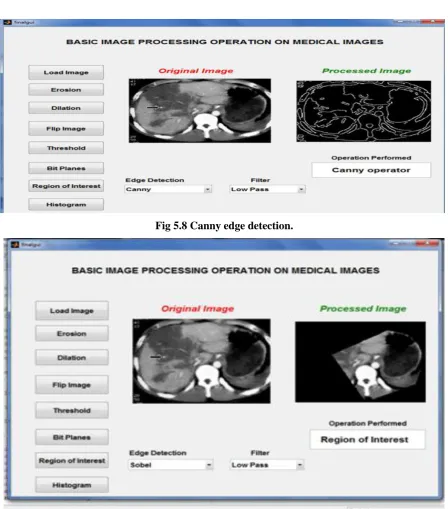
V. RESULTS
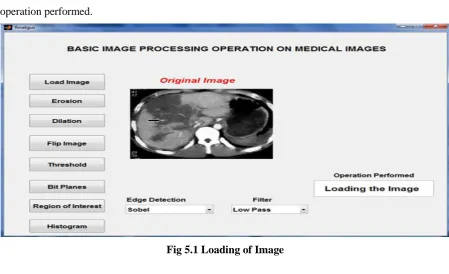
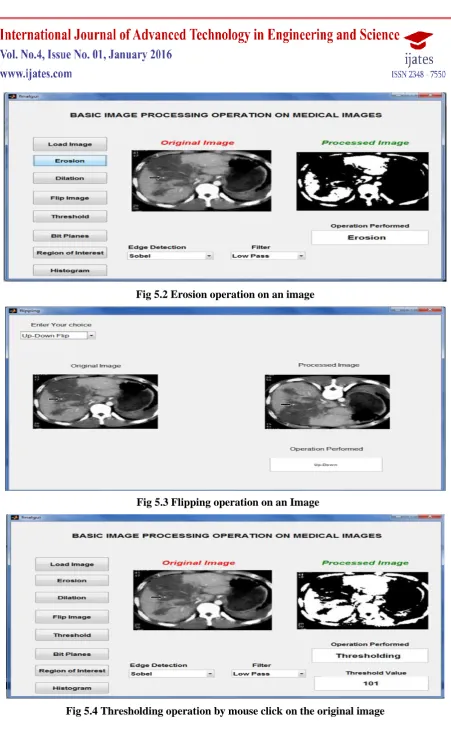
In this section we present the result for various button press events. The text box displays the current
operation performed.
Fig 5.2 Erosion operation on an image
Fig 5.3 Flipping operation on an Image
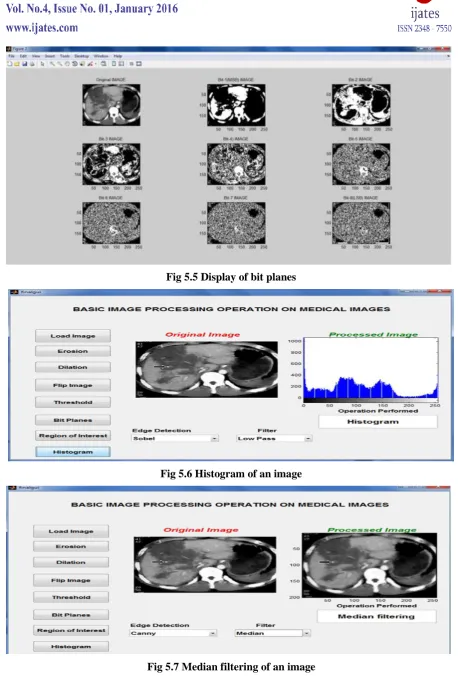
Fig 5.5 Display of bit planes
Fig 5.6 Histogram of an image
Fig 5.8 Canny edge detection.
Fig 5.9 Region of Interest extracted from Original image.
VI. CONCLUSION
Basic important concepts of image processing are briefly presented in this paper. The GUI developed performs
the basic operations on the medical images. It gives the user a better view about each operation at the click of
the button. This GUI can be used for any general image .The same GUI can be used for other operations by
altering the callbacks. Most of the functions presented in this paper can be further investigated and their
performance can be improved. Future work aims at expanding the set of applications, calculating the statistical
REFERENCE
[1] Milan Sonka, Vaclav Hlavac, Roger Boyle, “Image Processing , Analysis, and Machine Vision”Cengage
learning,2013
[2] R. C. Gonzalez and R. E. Woods, “Digital Image Processing” Gatesmark Publishing, 2008.
[3] Raquib Buksh, Soumyajit Routh, Parthib Mitra, Subhajit Banik, Abhishek Mallik, Sauvik Dass Gupta,
”Matlab based image editing and color detection” ,International journal of Science and Research
publications, Vol 4 ,issue 1,Jan 2014, 1-6.
[4] Thabit Sultan Mohammed,Wisam F.Al-Azzo ,Khalid Mohammed Al Mashani,”Image processing
development and implementation :A software simulation using Matlab”,ICIT ,Mar2013
[5] NassirH Salman,Gullanar M Hadi,”Integrated image processing functions using Matlab GUI”,Journal of
advanced computer science and technology research,vol 3 no 1,March 2013,31-38.