© 2016 IJSRST | Volume 2 | Issue 2 | Print ISSN: 2395-6011 | Online ISSN: 2395-602X Themed Section: Science and Technology
Implemented Mitigation of Security Attack in Android
Application Using Pin Tool
Sisara Lalji C., Prof. B. V. Buddhadev
Department of Information Technology, Shantilal Shah Government Engineering College, Bhavnagar, Gujarat, India
ABSTRACT
The popularity and adoption of smartphones has greatly stimulated the spread of mobile malware, especially on the popular platforms such as Android. In light of their rapid growth, there is a pressing need to develop effective solutions. In the past few years, mobile devices (smartphones, PDAs) have seen both their computational power and their data connectivity rise to a level nearly equivalent to that available on small desktop computers, while becoming ubiquitous. On the downside, these mobile devices are now an extremely attractive target for large-scale security attacks. Mobile device middleware is thus experiencing an increased focus on attempts to mitigate potential security compromises. In particular, Android incorporates by design many well-known security features such as privilege separation. In this thesis the Android security model and some potential weaknesses of the model is described. Thesis provides taxonomy of attacks to the platform demonstrated by real attacks that in the end guarantee privileged access to the device and mitigation technique for the same attack would be proposed. The result analysis and testing would be done on mitigation technique.
Keywords: Dynamic Analysis, Runtime, Binary Instrumentation, Pin, Pin tool, Intel, Just-in-time compiler, security attack, android Attack.
I.
INTRODUCTION
Instrumentation is a simple technique for inserting any extra line of code in to an application to observe its behavior. It can be performed at various stages – inside the source code, at compile time, post link time, or even at run time. Source Code Instrumentation is a way to instrument source programs and Binary Instrumentation is to instrument binary executable directly Static binary instrumentation (SBI) occurs before the program is run phase, a phase in which we can rewrite executable code or object code. Dynamic binary instrumentation (DBI) is done at run time.
Program Analysis
Static Analysis and Dynamic Analysis:
Static analysis is the process of analyzing the source code or machine code of the program without need of running it Dynamic analysis is the process of analyzing program as it executes or at the runtime.
Source Analysis and Binary Analysis:
Source analysis is the process of analyzing programs at the level of source code. Source analysis are generally done for the points of programming language constructs such as expressions, statements, functions, and variables.
Binary analysis are generally done for the points machine entities, such as registers, memory locations, procedures, and instructions.
Pin :
Pin has been the framework of choice for researchers working on program analysis and related tools. It can be used for several purposes, but mostly for program analysis (memory allocation analysis, error detection, performance profiling, etc...) and for architectural study (processor and cache simulation, trace collection, etc…). PIN is a dynamic binary instrumentation engine or framework. Pin is used for the instrumentation of software programs. It supports many platforms like Windows, Linux, Mac OS and Android executable for IA-32, and Intel(R) 64[4].The Pin allows a programmer to insert any arbitrary code (written in C or C++) at arbitrary places in the executable (run time of any program). The code is added dynamically while the executable (program) is in the running phase. The input to this compiler is not byte code, but a regular executable. Pin dynamically re-compiles the application during execution. The Pin kit includes many tools (they can be found at: pin-w-x-y-android/source/tools). The tools are provided as source files .Pin provides the framework and API.
Pin Architecture:
Figure 1. Pin architecture [1]
Pin consists of a virtual machine (VM), a code cache, and an instrumentation API invoked by Pin tools. The VM consists of a just-in-time compiler (JIT), an emulator, and a dispatcher. After Pin control of the application, the VM coordinates its components to
execute the application. The JIT compiles and instruments application code, which is then launched by the dispatcher. The compiled code is stored in the code cache. The emulator interprets instructions that cannot be executed directly. It is used for system calls which require special handling from the VM. (E.g. system calls)
II.
METHODS AND MATERIAL
A. Pin Tool
Pin tool is the instrumentation program. Pin tools run on Pin to perform meaningful tasks. The inscount pin tool is used to find out the number of instructions in the running program.
Instrumentation consists of two components:
1. A mechanism that decides where and what code is inserted
2. The code to execute at insertion points
These two components are instrumentation and analysis code.
B. Android
(Software development kit). Read more about open source software.
Android uses following Tools:
Eclipse, ADT Plugins, SDK toolkit, AVD toolkit.
Android Architecture
Figure 2. Android Architecture [3]
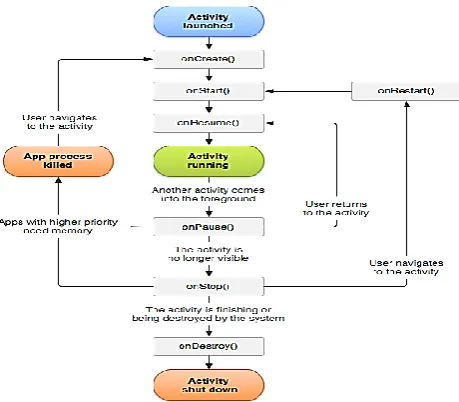
Android Activity Lifecycle
Figure 3. Android Activity Lifecycle [2]
C. Mitigation
Mitigation is the effort to reduce loss life and property by Lessing the impact of disasters.
Figure 4. Attack Classes
No physical access
Attack circumstances where it is impossible to gain physical access to a user’s device. Then the attacker must get the user to perform actions on the attacker’s behalf. Such remote attacks commonly rely heavily on social engineering [5]. To achieve the appropriate initial access to the user’s device an attacker must get some malicious software running on the device. To run code remotely on a user’s device, the attacker typically must convince the user to either download a malicious application or access malicious content via one of the applications already installed on the device. If the attacker can exploit a vulnerability on the user’s device, then this access may be used further to gain privileged access.
Physical access with ADB enabled
If the attacker finds a device left unattended, yet obstructed via a password or screen lock, the attacker may be able to exploit the device through the Android Developer Bridge.
Physical access without ADB enabled
If the attacker finds an obstructed Android device left unattended, but is unable to use the ADB service, the attacker may still gain privileged access via recovery boot.
Physical access on unobstructed device
other attack method since the attacker can choose to install applications, visit malicious websites, enable ADB on the device, etc.
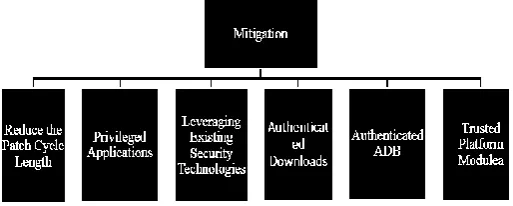
Figure 5. Type of Mitigation
Reduce the Patch Cycle Length
Attackers exploit some flaw in the operating system to gain root privileges. Reducing the patch cycle length would mitigate these threats with greater effectiveness. Zero-day exploits would still be possible, however the common lingering threat will be reduced. While Google has already demonstrated willingness to act quickly with out of band patch releases in reaction to certain attacks (e.g., [6]), reducing complete patch cycles is a more difficult problem. Indeed, manufacturers make changes to the Android source to create a competitive advantage. A fundamental separation between the core of Android and manufacturer modifications should be established.
Privileged Applications
To mitigate application attacks that take advantage of Android’s permission model many solutions have been proposed. Propose lightweight application certification comparing the requested permissions of an application to a set of security rules. If the application does not pass any of the security rules, then possible malicious activity is brought to the attention of the user.
For example, Google could validate that certain software vendors create security software and grant applications created by these vendors additional API functionality. Applications signed by such a vendor could, for example, have read access to the file system in order to facilitate anti-virus scanning beyond limited scope typically granted to applications. Such a configuration would allow users to install security related applications without having to first root their device. Because privileged applications will have unrestricted access to
the device, these applications should be certified by some governing entity before they can be downloaded. This certification process could also help mitigate some weaknesses of an unmodulated market. With access to trusted security tools, users would be able to monitor untrusted applications and provide appropriate feedback.
Leveraging Existing Security Technologies:
There are several existing operating system security enhancements that could be ported to Android. Instrumenting Android to monitor applications and understand how they interact with the user’s sensitive information. A realized implementation of Taint Droid could give users real-time information about how an application uses the permissions it is granted. Generally, operating system level software modifications such as adding a firewall to Android involve porting existing technology to the Android kernel and creating an application to facilitation administration.
Authenticated Downloads:
Once an attacker has physical access to a device, adding malicious applications becomes simple and quick by posing as the legitimate user and downloading them from the Android Market. To ensure downloads are made only by the user, the market should require authentication before every transaction, similar to the model currently used by the iPhone.
Authenticated ADB:
Because of the power given through the ADB, it should not be accessible to unauthorized users. Android should require the device to be unlocked before ADB can be used. Any legitimate user should be able to unlock the device and once the connection is made, the session could be maintained by preventing the screen from locking while it is connected via USB. With ADB authentication, the attacker no longer has a backdoor to bypass the lock mechanism’s authentication process, mitigating the ADB attack against obstructed devices.
Trusted Platform Module:
Module (TPM) provides a ground truth on which device security could be built, providing authentication of device state. Using a TPM would mitigate the recovery image attack, which relies on the ability to change the boot image. Assuming signed byte code and authentication of the boot image, updates running unauthorized code would become extremely difficult.
III.
LITERATURE REVIEW
1. Pin: Building Customized Program Analysis Tools with Dynamic Instrumentation
In this Paper they have described that pin is robust and powerful software instrumentation tool for program analysis tasks such as
1) Profiling
2) Performance Evaluation 3) Bug Detection
2. Behavioral Analysis of Android Applications Using Automated Instrumentation
In this paper, they present efforts on effective security inspection mechanisms for identification of malicious applications for Android mobile applications.
1) Count the number of Instruction in the original Application.
2) Count the number of Instruction in the Malicious Application.
3) If Number of Instruction are different then know there are some extra line of code in the application code
3. All Your Droid Are Belong to Us: A Survey of Current Android Attacks
In this paper we look to Android as a specific instance of mobile computing. We first discuss the Android security model and some potential weaknesses of the model. We then provide taxonomy of attacks to the platform demonstrated by real attacks that in the end guarantee privileged access to the device. Where possible, we also propose mitigations for the identified vulnerabilities.
4. Analysis and Research of System Security Based on Android
In this paper, it has analysis Android system's security mechanisms with widely used in mobile platforms. It has separately introduced its system architecture, security mechanism and safety problems. Through it has
analysis Android security mechanisms and its components; it has set to the Android security, safety mechanism side, system security and data security. It has promoted system security to system permission. At the same time it analysis the Android security risks, it has deeply researched the attack based on Linux kernel. It has proposed security mechanisms based on SELinux policy theory to ensure system security on application program framework layer.
5. Patch droid: scalable third party security patches for android devices.
In this paper they have presented patch droid, a System to patch security vulnerabilities on legacy android Android devices, Patch droid uses dynamic instrumentation techniques to patch vulnerabilities in memory, and uses a path distribution service so that patches only have to be created once and can be deployed on every devices. Because patches are injected directly into the processes, Patch droid does not need to flash or modify system partitions or binaries, making it universally deployable even on tightly controlled devices.
Proposed System
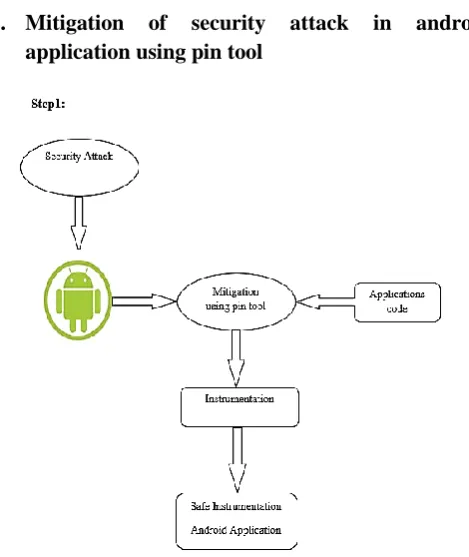
6. Mitigation of security attack in android application using pin tool
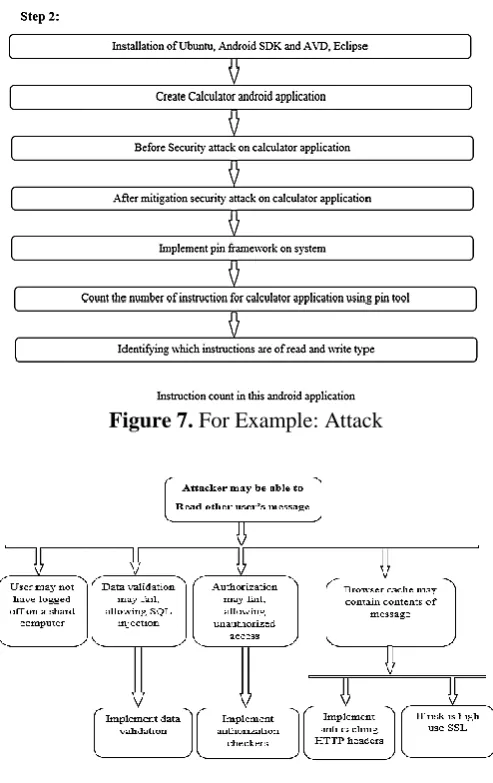
Figure 7. For Example: Attack
IV.
RESULT AND DISCUSSION
Getting the system ready
Table 2. System Specification
Installation on Ubuntu
Figure 8. Install ubuntu in my system
Install Android SDK and AVD, Eclipse
Start eclipse and AVD.
Create calculator android application in eclipse. There are two values add, mul, sub, div.
Figure 9. Install Android SDK and AVD, Eclipse in Ubuntu
Before Security attack on calculator application
Create calculator android application and the privilege escalation type attack will be performed.
Figure 11. Before attack addition, subtraction
After mitigation Security attack on calculator application
Figure 12. After mitigate attack in addition, subtraction
Figure 13. After mitigate attack in multiplication division
Implement pin framework on system
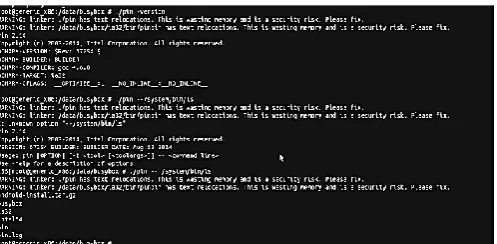
Start the terminal and use to command
Run on pin this command. /pin –version and. /pin -- /system/bin/ls.
Figure 14. The pin framework version on android avd on system
Count the number of instruction for calculator application using pin tool
Inscount pin tool code used for count the number of instruction in calculator application
Run this code on pin framework.
Figure 15 .Output of inscount pin tool
process. When we open that file we see a value ”484677” which means that there are total 484677 instructions during the running of the Calculator Application.
V.
CONCLUSION
We have presented a method of mitigation of security attack in Android Applications using Pin tool which allows the user to instrument an Android Application. Instrumented code alters the behavior of the original application and the attacker can’t find the right way to inject his own code into the running Application. Moreover instrumentation can also be used as a protecting weapon. So here we have used pin tool to mitigation of security attack in android application.
VI.
FUTURE WORK
In future on any android application, the attack will be performed. Using pin tool, its mitigation will also be provided. Any types of attack will be done and mitigation technique will be developed to protect application from any attack. Any android application count the number of instructions and API read and write type and run on pin framework.
VII.
REFERENCES
[1] Chi-Keung Luk, Robert Cohn, Robert Muth, Harish Patil, Artur Klauser, Geoff Lowney , Steven Wallace, Vijay Janapa Reddi, Kim Hazelwood,"Pin: Building Customized Program Analysis Tools with Dynamic Instrumentation" PLDI '05 Proceedings of the 2005 ACM SIGPLAN conference on Programming language design and implementation Pages 190-200. and www.pintool.org
[2] Android Kernel Issues.http://www.kandroid.org. [3] Intel. IA-32 Intel Architecture Software
Developer’s Manual Vols 1-3, 2003.
[4] Just because it’s signed doesn’t mean it isn’t
spying on you.
http://www.f-secure.com/weblog/ archives/00001190.html, May 2007.
[5] J. Oberheide. Remote kill and install on google android.
http://jon.oberheide.org/blog/2010/06/25/remote -kill-and-installon- google-android/