Automatic MT Error Analysis: Hjerson Helping Addicter
Jan Berka
1, Ondˇrej Bojar
1, Mark Fishel
2, Maja Popovi´c
3, Daniel Zeman
11Charles University in Prague, Faculty of Mathematics and Physics,
Institute of Formal and Applied Linguistics 2Institute of Computer Linguistics, University of Zurich 3German Research Center for Artificial Intelligence (DFKI), Berlin
{berka,bojar,zeman}@ufal.mff.cuni.cz [email protected]
Abstract
We present a complex, open source tool for detailed machine translation error analysis providing the user with automatic error detection and classification, several monolingual alignment algorithms as well as with training and test corpus browsing. The tool is the result of a merge of automatic error detection and classification of Hjerson (Popovi´c, 2011) and Addicter (Zeman et al., 2011) into the pipeline and web visualization of Addicter. It classifies errors into categories similar to those of Vilar et al. (2006), such as: morphological, reordering, missing words, extra words and lexical errors. The graphical user interface shows alignments in both training corpus and test data; the different classes of errors are colored. Also, the summary of errors can be displayed to provide an overall view of the MT system’s weaknesses. The tool was developed in Linux, but it was tested on Windows too.
Keywords:machine translation, error analysis, visualization
1.
Introduction
Until recently, most efforts in machine translation (MT) evaluation were to define methods producing a single score of MT output quality, correlating with human judgments as much as possible. This can be valuable for comparison of different systems’ performances but the task of develop-ing a translation system needs more detailed information – classification of errors, statistics of the error classes over a testing corpus and so on. It would be also helpful for the developer to be able to easily browse the analyzed data, e.g. to see all sentences with an occurrence of the error from a certain class.
We introduce a complex tool for such a detailed machine translation error analysis, which can be operated via com-mand line as well as with a graphical user interface in a web browser. The tool provides the user with handy fea-tures, such as automatic detection and classification of er-rors, summarization of its results, test data browser and word explorer.
The paper is organized as follows: In Section 2. the auto-matic error detection and classification is briefly described. Section 3. introduces the graphical user interface in web browser. Section 4. gives insight of how to install and use Addicter1together with Hjerson, and finally Section 5. dis-cusses some related work.
2.
Automatic Error Detection and
Classification
Automatic error classification is based on finding erroneous words in the translation output and assigning a correspond-ing error class to each of them. The classification of errors
1https://wiki.ufal.ms.mff.cuni.cz/user:
zeman:addicter
is vital for presentation and navigation in the system out-puts. The user gets an overall picture of the output quality in the given test set and he or she can start by exploring the most frequent error types first.
The workflow of Addicter with Hjerson is shown in Fig-ure 1, while the algorithms of Addicter and Hjerson error detection and classification are described in (Zeman et al., 2011) and (Popovi´c, 2011) with more detail.
2.1. Error Detection
The first step of Hjerson and Addicter’s analysis is the au-tomatic detection of errors in the hypothesis translation. This is done by comparing tokens in the hypothesis with the reference translation, relying on some word alignment between the two texts.
Previous experience (i.a. Bojar (2011)) shows that the qual-ity of the alignment is critical, otherwise many errors can be mis-classified (e.g. a pair of “missing” and “extra” errors instead of one error of bad lexical choice). Our tool cir-cumvents current limitations of word alignment by provid-ing several methods and allowprovid-ing the user to choose which of them works best for the particular language pair, MT system and dataset.
Test Data
Training Data
SRC
REF
HYP
align_hmm.pl,
align_lcs.pl ...
Hjerson
Various alignments (ref-hyp, ...)
detecter.pl
Custom
alignment
SRC
TGT
ALI
addictindex.pl
Corpus Index
Error Summary
Test Data Browser
Word Explorer
Addicter Web Interface
Figure 1: Overview of Addicter with Hjerson.
2.2. Error Classification
Hjerson and Addicter try to automatically classify errors into categories similar to those of Vilar et al. (2006), such as: morphological, reordering, missing words, extra words and lexical errors.
Currently, there are two algorithms available: the one from Addicter which strictly relies on the selected alignment and the one from Hjerson which simply compares the sets of words identified as erroneous due to a mismatch with the reference. (The latter case actually implies an injective alignment of the hypothesis and the reference.)
When using Hjerson for the classification, the user has two options: first, he can just use its own HTML or plain text output, as is described in (Popovi´c, 2011). Second, he can use Addicter’s script to transform Hjerson outputs into XML format readable by Addicter and then browse through the dataset using only Addicter.
The transformation of missing reference and extra hypoth-esis words is straightforward, as Addicter’s classification contains these two categories as well. Because Hjerson works only with reference and hypothesis translations with-out the source text, it cannot distinguish between wrong lexical choice and untranslated token errors. Therefore, Hjerson’s category “lexical error” is visualized by Addicter as “other mismatch” error class. Inflectional and reordering errors keep their category name.
The errors can be then summarized into a table showing their counts in the test data. When using GUI, the table is connected to the test data browser, so with just one click, the user can see the list of sentences with the occurrence of the given error type and even look at the sentences one by one in more detail.
3.
Graphical User Interface
Addicter creates static or dynamic HTML pages, providing its user with the possibility to use a web browser as a simple
graphical user interface. The starting point is the Addicter main page, which contains links to all defined experiments. Each experiment has its own main page, consisting of three parts: the Error Summary, the Test Data Browser and the Word Explorer.
3.1. Error Summary
Test Data Browser and Word Explorer serve for examin-ing individual sentences or words, the Error Summary page gives the user a global view of the dataset, providing a table with error counts for all error classes. This feature can re-veal weak spots of the examined MT system and thus serve as a hint in what direction to focus further efforts first. Under the summary table, for each error class there are links to sentences containing error(s) of given type to the Test Data Browser, so it is very simple to switch between global and local viewpoint and examine observed problems more profoundly.
An example of Error Summary page is shown in Figure 2 for experiment with name TectoMT WMT09. The er-ror detection and classification was done using the Hidden Markov Model alignment algorithm. At the top of the page is the summary table with absolute and relative counts of detected errors of recognized categories and under it are links to sentences containing given error types, e.g. there were no error-free sentences in the given dataset.
3.2. Test Data Browser
Figure 2: Error Summary Page with the HMM Alignment
All words in the sentence are links to their pages in the Word Explorer (see Section 3.3.). By moving cursor over a particular word, all words matched by the active alignment are highlighted. Also, if the dataset contained not only sur-face forms, but also lemmas or other information, these are shown when hovering the cursor on any word in the error summary at the bottom of the page.
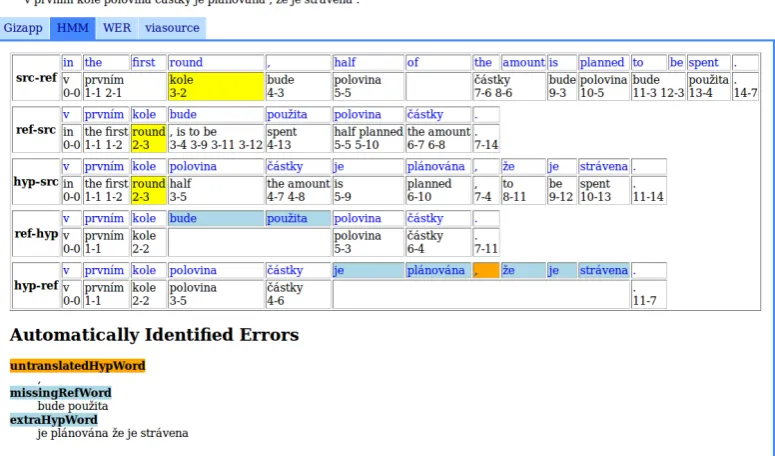
Figure 3 shows a sample sentence in the Test Data Browser. With the use of HMM alignment (highlighted), errors of three categories are detected (untranslated hypothesis word, missing reference word, extra hypothesis word errors). Clicking on the “WER” or other tab would display sentence with a different alignment algorithm used, probably leading to detection of different errors.
3.3. Word Explorer
The Word Explorer allows to browse the training and test data and search for sentences containing a given word. It also displays simple statistics of word co-occurrence in the data and observed translations.
An example of Word Explorer usage is shown in Figure 4. The wordstarsoccurred in three sentences in the cor-pus and got translated to the same Czech wordhvˇezdy ev-ery time. Word Explorer automatically displays the first sentence with the word stars (the source text with the translation and the alignment), enabling a quick navigation through other sentences in the dataset. Also all the words in the table in the Word Explorer page are links to other pages of Word Explorer.
The user can navigate into Word Explorer from the Test Data Browser by clicking on any displayed word, or di-rectly from the experiment main page, where he has the opportunity to list all words on source or target side of the dataset starting with a given letter or matching a given Perl-like regular expression.
3.4. Interpreting Results
In the example presented in Figure 2, most frequent errors are by far of the classes missing reference word and extra
Figure 4: The Wordstarsin Word Explorer
hypothesis word, which may lead to conclusion, that the MT system translates worse than it actually does, because this problem may be caused not only by poor translation, but (more probably) by poor performance of the alignment between reference and hypothesis. This is even more likely, when the numbers of missing reference and extra hypothe-sis words are similar, as in presented example.
This suspicion can be then confirmed or refused by look-ing at individual sentences in Test Data Browser. As we see in example in Figure 3, the reference words “bude” and “pouˇzita” were labeled as missing in the hypothesis, while words “je” and “str´avena” were labeled as extra. In fact, though, the word “bude” (meaning “will be” or “is going to be” in English) is just a future time of the word “je” (mean-ing “is” in English) and the mean(mean-ing of “str´avena” can be the same as the word “pouˇzita” (both meaning “used” in English). This implies that the MT system translated the sentence correctly (or to be more precise, did not make mis-takes in the words “bude” and “pouˇzita”) but the alignment failed to align corresponding words, possibly because of missing dictionary of synonyms.
4.
Installation and Usage
Addicter is written in Perl and it needs a Perl interpreter. This is usually no problem on Unix systems, but on Win-dows the user may need to install Perl version≥5.8.2 To install Addicter, one has to simply check it out from our public SVN repository.3
2
Possibilities include Strawberry Perl (http:
//strawberryperl.com/) and ActiveState Perl
(http://www.activestate.com/activeperl).
3
On Linux, use the following command: svn checkout https://svn.ms.mff.cuni.cz/svn/statmt/
Figure 3: Example of a Sentence in Test Data Browser.
Because Addicter uses some non-standard Perl libraries, it is necessary to check them out, too, and export them to Perl system path:
svn checkout \
https://svn.ms.mff.cuni.cz/svn/dzlib \
˜/dzlib
export PERL5LIB=˜/dzlib:\$PERL5LIB
# add the above line also to your ˜/.bashrc
Hjerson is written in Python and so it needs a Python inter-preter. Addicter now contains a slightly modified Hjerson script in its repository, so the user does not need to install Hjerson separately.4
4.1. Experiment Preparation
Addicter needs the dataset to be in a given, but simple and straightforward file structure: each experiment should be in its own directory5in thecgidirectory. The data of the experiment have to be in following files in the experiment folder:
• train.src– source side of training corpus
• train.tgt– target side of training corpus
http://tortoisesvn.net/. In both cases, use the word
publicfor both the username and the password.
4
The original Hjerson is available athttp://www.dfki. de/˜mapo02/hjerson/
5which will be then displayed as the experiment name in the
GUI
• train.ali– alignment of training corpus
• test.src– source side of test data
• test.tgt– reference translation of test data
• test.system.tgt– system output for test data
• test.ali– alignment of the source and reference translation of test data
• test.system.ali – alignment of the source and the system output for test data
Training corpus is mandatory for indexing (Word Explorer part in the GUI), alignments of source and reference and source and hypothesis translations of test corpus are op-tional and serve for displaying these alignments in the Test Data Browser.
There are number of alignment, indexing and error de-tection and classification scripts in Addicter. Alignment scripts are located in thetestchamberdirectory and are namedalign-x.pl, where the xis the name of align-ment algorithm. Scripts for running error detection and corpus indexing are in the preparedirectory. By run-ning any script without parameters, its mearun-ning and usage are outputed to the command line.
Mark Fishel, Ondˇrej Bojar, and Maja Popovi´c. 2012. Terra: a Collection of Translation Error-Annotated Cor-pora. In International Conference on Language Re-sources and Evaluation, Istanbul, Turkey, May.
Jes´us Gim´enez and Llu´ıs M`arquez. 2010. Asiya: An Open Toolkit for Automatic Machine Translation (Meta-)Evaluation. The Prague Bulletin of Mathemati-cal Linguistics, (94):77–86.
James W. Hunt and M. Douglas McIlroy. 1976. An Algo-rithm for Differential File Comparison. Computing Sci-ence Technical Report 41, Bell Laboratories, June. Phillip Koehn. 2010. An Experimental Management
Sys-tem. The Prague Bulletin of Mathematical Linguistics, 94.
Vladimir Iosifovich Levenshtein. 1966. Binary Codes Ca-pable of Correcting Deletions, Insertions and Reversals.
Soviet Physics Doklady, 10(8):707–710, February. Nitin Madnani. 2011. iBLEU: Interactively Debugging
& Scoring Statistical Machine Translation Systems. In
Proceedings of the Fifth IEEE International Conference on Semantic Computing.
Sonja Nießen, Franz Josef Och, Gregor Leusch, and Her-mann Ney. 2000. An evaluation tool for machine trans-lation: Fast evaluation for mt research. InProceedings of the 2nd International Conference on Language Re-sources and Evaluation, pages 39–45, Athens, Greece, May-June.
Franz Josef Och and Hermann Ney. 2003. A Systematic Comparison of Various Statistical Alignment Models.
Computational Linguistics, 29(1):19–51.
Maja Popovi´c. 2011. Hjerson: An open source tool for au-tomatic error classification of machine translation output.
The Prague Bulletin of Mathematical Linguistics, pages 59–68.
David Vilar, Jia Xu, Luis Fernando D’Haro, and Her-mann Ney. 2006. Error Analysis of Machine Transla-tion Output. In International Conference on Language Resources and Evaluation, pages 697–702, Genoa, Italy, May.
Daniel Zeman, Mark Fishel, Jan Berka, and Ondˇrej Bojar. 2011. Addicter: What is wrong with my translations?
The Prague Bulletin of Mathematical Linguistics, 96:79– 88.