www.ijmer.com
332 | P a g e
CHIPURUPALLI SEKHAR
1,
U. NANAJI
21(Department of CSE, St.Theresa Institute of Engg. & Technology, Garividi, Vizayanagaram, (A.P.), India)
2
(HOD, Department of CSE, St.Theresa Institute of Engg. & Technology, Garividi, Vizayanagaram, (A.P.), India)
Abstract
In this paper we discuss the evolvement if cloud computing paradigm and present a framework to provide security to Cloud computing concept through IT Auditing. Our approach is to establish a general framework using several checklists by following data flow and its lifecycle. The lifecycle is based on the cloud deployment models and cloud services models. The contribution of the paper is to understand the implication of cloud computing and what is meant secure cloud computing via IT. Our approach has strategic value to those who are using or consider using cloud computing because it addresses concerns such as security, privacy and regulations and compliance.
Keywords---
Cloud computing, IT Auditing1. INTRODUCTION
Cloud computing is Internet ("cloud") based development and use of computer technology ("computing"). It is a style of computing in which dynamically scalable and often virtualized resources are provided aa service over the Internet. Users need not have knowledge of, expertise in, or control over the technology infrastructure "in the cloud" that supports them.
The underlying concept dates back to 1960 when John McCarthy opined that "computation may someday be organized as a public utility"; indeed it shares characteristics with service bureaus which date back to the 1960s. The term cloud had already come into commercial use in the early 1990s to refer to large ATM networks. By the turn of the 21st century, the term "cloud computing" had started to appear, although most of the focus at this time was on Software as a service (SaaS).
A visionary scnario in the cloud is that a thin client interacts with remote cloud operating system to get virtual desktop with a chosen virtual local operating to access virtual data storage and executes applications from anywhere and at anytime. This idea is not new. It can trace back all the way when IBM Watson claimed the world needed only five machine.
But why is it now? At present, IT is reaching a critical Point. Explosion of information is driving 54% growth in storage; large scientific calculation such as weather forecast compu-tation, new medicine, and healthcare informatics is demand- ing more powerful and faster processing capacity. While in reality, around 85% of computing capacity is idle, average 70% of IT budget is spent on managing IT infra-structure versus adding new capabilities .On the other hand, tech- nologies like virtual computing, parallel computing, services oriented architecture, autonomic computing are advancing in an unusual pace. In addition,
as the connectivity cost keeps falling, the world is even more flat. Web-based applications over the internet, depicted by cloud, are becoming standard starting applications. People without extensive period of skill training and manual remembering on underline operating systems and basic hardware maintenance can accomplish their work fairly easily. Consumers purchase computing capacity on-demand and are not generally concerned with the underlying technologies used. Computing resources and data being accessed are typically owned and operated by a third-party provider, not necessarily located in nearby. They can be potentially beyond state even country’s physical boundary.
In this paper, we address the security issue from information assurance and security point of view. That is, we take holistic view of securing cloud computing by using the IT auditing vehicle.
Types Of Cloud Computing:
Public cloud:
An IT capability as a service that providers offer to consumers via the public Internet.Private cloud:
An IT capability as a service that providers offer to a select group of customers.Internal cloud:
An IT capability as a service that an IT organization to its own business (subset of private cloud).www.ijmer.com
333 | P a g e
External cloud
:
An IT capability as a service offered to abusiness that is not hosted by its own IT organization.
Hybrid cloud
:
IT capabilities that are spread between internal and external cloudsWhile there are many roads to cloud computing from existing client-server infrastructures, there are at least three major paths as follows:
IT auditing or in general accounting auditing under cloud computing has added extra role of building strategic plan for the enterprise in addition to the traditional auditing role. We make master checklists as a framework specifically toward cloud computing based on its deployment models and service models. After a section of literature review, we start to make checklists for public cloud, community cloud and private cloud as well as IaaS and SaaS. The last section is devoted to further discussions.
2. Data Life Cycle
Cloud computing makes the world even flatter. Public cloud providers can have their computing resources locally or globally. The sky is the limit in this case. Cloud users do not need to know in theory where the computing resources location is because they are all virtualized. We start with cloud data life cycle. Data and information in this paper are exchangeable terms. In general, the data life cycle includes collection, storage, transferring and destruction. The data collection includes both raw data and derived data. Derived data is also called information that is generated from raw data to deliver intelligence, which is usually not see easily from raw data. Data storage includes active data storage and inactive storage. For example, former employee data can be considered as inactive. Its storage procedure could be different from active employee data. Data processing and data storage are not necessarily under the same location in the cloud environment. Therefore data transferring around the net is more a common activity. Data destruction is to destroy data permanently, no backup should be left somewhere either in the user side or the provider side. We see that cloud data life cycle presents many unique features. Data is crossing different security domain and regulations. Data is constantly moving due to the nature of data storage provided by a third party. Information assurance has a new dimension via contracts among cloud users and cloud providers. They need to establish formal agreement. We can even borrow the term
service level agreement (SLA) since we now need to add
crossing domain compliance clauses that can be
implementable. The following three sections is a framework of checklists for public cloud, community cloud and private cloud. The core is data protection following the data life cycle. 3. Checklist for Public Cloud
Public cloud has its root from Google, Amazon, Microsoft, salesforce, and more. Enterprise uses public cloud to focus on its core business and save cost. Government is keen to use public cloud to take the advantage of cost effective by providing public useful information in cloud. It can also explore cloud concept to integrate various computing resources from different departments and agencies into a manageable pool. Therefore making a connected government is a reality.
IT auditing in public cloud can have different focus based on different service models. We address two popular service models in this paper, Infrastructure as a Service (IaaS) and Software as a Service (SaaS). We will discuss PaaS late. 3.1 IaaS
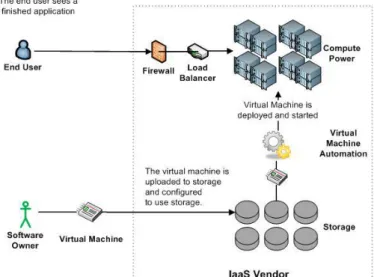
Infrastructure as a Service (IaaS) is a popular service model that provides computing resources to cloud users who deploy operating systems and run their applications on top of it or use it as a storage or archive. When it comes to IT auditing, location, geopolitics, data owner and regulatory issues are not going to be virtualized. For the public cloud, our check list focuses on the following issues.
1. Data location Aware
Rationale: Cloud computing makes the world even
flatter. Public cloud providers can have their computing resources locally or globally. The sky is the limit in this case. Public cloud users do not need to know theoretically where the infrastructure location is because they are all virtualized. For the IT auditing purpose, public cloud users need to know geometric location of their data storage and their running applications although in general, they do not need to. Public cloud providers o the other hand would like to hide the location information. Knowing the location helps IT auditors understand the applied regulation or study the implication and make proper recommendations and decisions.
What: location aware should include all the history of data location following its life cycle. Pay special attention to those data locate outside legal territory such as in other states or countries.
How: Get these documents from cloud coordinators. Usually it should be in the agreements. Cloud coordinators and IT auditors should talk to cloud providers about location if these documents either not exist or out dated
2. Data ownership aware
Rationale: data owner in public cloud is always a touchy issue between providers and users. We see it happened in the argument among facebook and its users, and a 9th Circuit Court of Appeals ruling stating that providers of hosted e-mail/SMS services may not turn over messages to the company under the Stored Communications Privacy Act
www.ijmer.com
334 | P a g e
without a warrant. Many cloud users are sure to avoid such situations. So far, no universal legal guidance is established. Cloud users could assume they are the owners of their data. This assumption should be written in an agreement. When it comes to move data out of the cloud or destroy data, cloud users should know if they data are destroyed completely and how. No backup should be left alone when the data is supposed to discard. The process should be written in the agreement.
What: Clearly stated in the agreement on data ownership on data life cycle. Also included the data destroy and verification process.
How: Discuss with cloud coordinators about the data ownership and data life cycle management. Get written document on data ownership the procedure of data removal.
3. Data protection plan and best practice
Rationale: It is obvious data protection is crucial to cloud users. Detailed data protection plan following data life cycle is important part of agreement among all parties, users, providers and affected stakeholders. In addition to written agreement, actual practice is also important to data protection. What: Data protection plan should include clear procedure and practice in each phase of data life cycle such as collection, storage, transferring and destruction. The ability of data auditability is an important part of the plan.
How: It auditors needs to understand the classification of essential and non-essential data. With this in mind, they should talk to cloud coordinators and compliance officers to understand what’s been done. In addition, IT auditors should suggest various controls like red tape in place for every phase of data life cycle. These controls can report any incidents happened.
4. Data processing isolation
Rationale: Another possibility of data leakage is during the data processing in a shared cloud environment. Data might be stored in a temporary storage accessed by other applications. To isolate data processing and make sure no other applications can access the data during the processing.
What: Processing isolation should have clear procedure to make sure data processing does not leak data How: IT auditors should not only read document in written but also look for evidence the procedures are followed.
5. Data Lock-in
Rationale: So far, there is no unified cloud user interface to access cloud. Different cloud providers provide different data access method using different format. This will cause an issue when cloud users want to move their data to another provider or back in house. This phenomenon is called data lock-in. What: To avoid data lock in, cloud users should know the exit strategy and options
How: It auditors should ask such documents that include exit strategy and options.
6. IaaS IT architecture
Rationale: IaaS architecture varies although we see general reference architecture. Knowing the actual architecture, IT
auditors can define their work scope and focus easily. Because of the IaaS is new to many management personnel, the IT SaaS architecture could help them visually get the main IT auditing concerns
What: List all the components inside the architecture, not just a general conceptual one. It should include as much detail as possible.
How: Talk to cloud coordinators and cloud providers to get the IT architecture descriptions.
7. Regulatory Compliance
Rationale: many regulatory issues such as HIPAA, GLBA,FISMA, SOX , PCI DSS are new and need to do through investigation when sensitive data are processed and put in cloud. To make compliance in public cloud is a daunting task.
What: Regulatory compliance in terms of public should include privacy, safeguard, security rule, information system Controls, etc.
How: understand the specific needs of compliance for the enterprise by talking to the compliance officers and chief information officers. Collect all the documents and practices.
8. Cloud IT technique
Rationale: IT auditing toward public cloud is challenging because the IT infrastructure basically offered by a third party to which depending on the agreement auditors may not have direct access. Practical IT auditing techniques need to refine to reflect the change.
What: The techniques should include database, data center, wired and wireless connection, cloud operating system like
Azure, virtual technology like VMware, hardware
dependencies
How: It auditors should find out the agreement using third party cloud provider, how far it can go and test, talk to cloud coordinators what are procedures of reporting any incidents, inspecting specific areas routinely, what kind of tools can use.
9. reporting control
Rationale: cloud control structure should be there with or without cloud presence. It is required by SOX.
Although SOX is for public trading companies, private companies are recommended to do so too. With cloud presence, the reporting and responsible extend to third parties as cloud providers.
What: Reporting structure should be all the way to CIO, CEO or Board of Directors. It includes incidents and response mechanisms involving cloud providers. Usually it is written in an agreement with cloud providers.
How: Ask IT administrators for such documentation. And check if it is in compliance with regulations and best practices
10. Cloud Disaster recovery plan
Rationale: Cloud disaster recovery plan is crucial for business recovers from any disaster. With cloud in place, the disaster recovery process should include them as well.
What: Cloud disaster recovery plan should include how to get crucial data back and how quickly in the case of disaster either on cloud provider side or on the cloud user side. So the plan should include disaster recovery plan from cloud providers.
www.ijmer.com
335 | P a g e
How: Ask IT administrators for such documentation, and if it is being frequently tested and updated.
11. Cloud business continuity
Rationale: Business glitch is evitable. Damage minimization is carried out by business continuity. Because of cloud computing, the probability being failure is even higher as services are delivered over internet. Business continuity under cloud should include cloud providers’ business continuity plans in addition to own business continuity plan.
What: Cloud business continuity should include those foreseeable glitches from inside and outside.
How: Ask IT administrators for such documentation. Business Continuity plan should be tested frequently.
12. Overall IT projects cost
It is desirable to know the actual cost structure using public cloud and how much saving compared to traditional IT model. It may not related to IT auditing directly. Strategically, the but it tied to IT budget and alignment with
3.2 SaaS
Software as a Service (SaaS) is a popular cloud service model. Applications are accessible various web browsers. It pays for usage. Many checklist items are similar to those from IaaS. We list some of special toward to SaaS.
13. Data activity surrender
Rationale: Some countries require that data and activity from SaaS providers should be kept within the national boundaries so that government agencies can access them when needed. USA has USA Patriot Act that mandates SaaS providers keeps all the customer data that can be accessed under special occasions such as court order. This is not a pleasant outcome many SaaS users want. Therefore SaaS users should ask if there is a possibility that can avoid such intrusion.
What: data activity surrender should include what regulation and laws apply, what information is being surrendered and what option available to avoid such surrender.
How: IT auditors should work with legal and contract team to understand the local law and regulation on data service providers such as phone records, utility bills, library book lending records, etc. T hey should ask documents about what kind of information cloud providers keep and to surrender. This documented policy should be checked on site. It auditors should also ask what option available to avoid surrender
Fig. 2 Architectural diagram of Software as a Service..
14. Data format
Rationale: If data format from specific software can be read by many freely available readers like adobe, work, open office and notepad, SaaS users can avoid pay extra software usage. What: Check available data format from the software service. How: It auditors should test out all availability data format and check if these format can be accessed by general reader applications. They should talk to users to find out reasons that specific format being used or not used.
15. Monitoring for availability and performance
Rationale: From SaaS providers, assuring high level of availability and performance is the key for their business success. For SaaS users, monitoring high availability and performance is an important control.
What: The monitoring control should collect availability and performance data and use the data to work with providers to fine tune SaaS service.
How: Talk to cloud coordinator about such type of controls and data for offline analysis.
4. Checklist for Community Cloud
Community cloud is another attractive solution to many large and middle size enterprises that have common business interests within one region. Many corporations are used to regulations within one region or one country. They would like to take the advantages of cloud computing but they do not want to have the complication of cloud crossing their comfortable zones. They want both convenient and control. Hence, community cloud computing is an attractive concept for them. The actual implementation of community cloud varies. It can be built on from scratch. Or it can utilize existing computing resources from the community to form a cloud. The ownership of the cloud is open to discuss. Ideally it should be owned by the community. The technical challenging is enormous and its implication remains to be seen The IT auditing under community cloud computing is more of under controllable like private cloud. They know where the computing resources located and assigned. It is certainly more work than a pure private cloud as it is owned by a community in which collaboration and competition exist
www.ijmer.com
336 | P a g e
as always. The key to its success is to make sure agreements are clearly written and the whole community needs to obey the rules and regulation. We have made the following list for IT Auditing specially for community cloud computing
16. Community cloud IT architecture
Rationale: Clear cloud community IT architecture will help the community understand its computing resources and its capacity. It can help to build responsible community.
What: The Community Cloud IT architecture should include core infrastructure, resource layer and service layer .Data life cycle, user identifies and trust are important elements. Use case analysis is proper. If the cloud is built upon the contribution of the community, the relation among own computing resources and the community resource should be marked clearly.
How: Talk to cloud administrators to get a sense of its architecture. If possible, get technical documents that describe the community cloud.
17. Community Cloud management
Rationale: Because community cloud is used by a group of industrials of same regions or of same interests, they are collaborative and in the mean time competitive. Clear community cloud management structure will prevent any future arguments. Community cloud can be managed by a third party or by a technical committee made from the community.
What: It should include clear management structure and responsibility. It should include the procedure in case of argument and disagreement.
How: IT auditors from a specific member of the community should have access the latest documents on management.
18. EXIT Strategy
Rationale: When a member wants to leave the community, the community cloud should have procedure of the departure. Without the procedure and agreement, community cloud could not last long.
What: The Exit strategy should include documents on separation. The document should include procedure to follow and a responsible body for the task. The procedure should clear state what to do about the computing resources the member contributed before.
5. Checklist for Private Cloud
So far, a private cloud is a very practical and attractive option to many security sensitive enterprises. The private cloud gives not only the self control but also the benefits of cloud computing, mainly sharing computing resources including processing power and storage capacity among different departments within an enterprise. Traditionally, department computing resources are not shared due to data sensitivity, self control and different business nature of departments. Private cloud could remove or blur these boundaries. It virtualizes all computing resources from different departments into a computing resource pool. Each department is allocated computing resources from the pool by provisioning need on demand. From the department point of view, the computing resource is unlimited.
Therefore achieving a task faster or making a task not achievable before due to computing power constrain. In most cases, a private cloud could cut IT cost down, increase flexibility and scalability, make available 24x7 and even do applications that are impossible before the cloud. Private cloud certainly poses a great management challenging as well as auditing challenging.
19. Private cloud IT architecture
Rationale: Different enterprise implements private
cloud differently from actual technology realization. Therefore to understand the cloud IT architecture is vital for meaningful IT auditing
What: IT architecture includes technical details about virtualization, provisioning, workflow, data movement, access control, etc.
How: Talk to cloud administrators to get a sense of its architecture. If possible, get technical documents that describe the cloud.
20. Private cloud reporting control
Rationale: Like public cloud, reporting is required not only by the regulation but also vital to the success of the business. Private cloud reporting is more of internal control. Because of sharing computing resources, private cloud has to make sure that sharing does not hamper security and privacy. Any incidents should be logged and reported immediately. The reporting structure should be established and updated often. What: Reporting structure should includes incidents and response mechanisms and who is in charge. The escalating reporting structure can guarantee any incident and disaster can be handled properly.
How: Ask IT administrators for such documentation. And
check if it is updated.
21. Disaster recovery and continuity plan
Rationale: In the private cloud, disaster recovery plan should also follow the procedure like public cloud except that the cloud is managed by the enterprise. The IT team and management should work together to modify the existing disaster plan to fit the cloud scenario.
What: The disaster recovery plan should include how to get
crucial data back and how quickly. The plan should include data different location backup.
How: Ask IT administrators for such documentation, and if it
is being frequently tested and updated. Gramm-Leach-Bliley Act (GLBA, the Financial Services Modernization Act),
6. Discussion
In this paper, we discussed a framework of checklist of IT auditing cloud computing to assure secure cloud computing. It is more toward Cloud than a complete list of IT Auditing. IT auditors should refer general requirements for IT auditing. The checklist also gives a reference point to those want to dive into cloud computing wave and a question set to answer if cloud is good for the business in long run. We would like to discuss on PaaS service model in the future work as we are still looking for a feasible PaaS business model.
www.ijmer.com
337 | P a g e
References
[1] NIST Definition of Cloud Computing v15, accessed on 4/15/2010, http://csrc.nist.gov/groups/SNS/cloudcomputing/ cloud-def-v15.doc
[2] Will Forrest, Clearing the Air on Cloud Computing, Discussion Document from McKinsey and Company, March 2009
[3] Luis M Vaquero, et al, A Breaks in the Clouds: Toward the Definitions, ACM SIGCOMM Computer
Communication Review, V39 No1, January, 2009, pp 50- 55.
[4] open crowd cloud computing taxonomy, http://www.opencrowd.com/views/
[5] NIST Presentation on Effectively and Securely Using the Cloud Computing Paradigm v26, accessed on
4/15/2010, http://csrc.nist.gov/groups/SNS/cloudcomputing/ cloud-computing-v26.ppt
[6]FISMA: ttp://csrc.nist.gov/drivers/documents/FISMAfinal.
[7] Gramm-Leach-Bliley Act (GLBA, the Financial Services Modernization Act),
http://www.gpo.gov/fdsys/pkg/PLAW-106publ102/contentdetail.
html.
[8] HIPAA U.S. Department of Health & Human Services, Office of Civil Rights, HIPAA,
http://www.hhs.gov/ocr/hipaa/privacy.html
[9] Cloud Computing: Principles and Paradigms By Benoit
Hudzia.
Mr.Ch. Sekhar received the B.Tech Degree from JNTU, Hyderabad in 2005 and He is currently pursuing M.Tech in the Department Of Computer Science and Engineering in St. Theresa Institute Of Engg & Tech Garividi, Vizianagaram, Of JNTUK Affiliation. His research interests include Cloud computing and Computer Networks.
Uppe.Nanaji received the B. Tech degree from JNTU, Hyderabad, India and the M. Tech degree in Computer Science Technology from GITAM College Of Engg Of Andhra University Affiliation in Vishakhapatnam in 2003, and he is currently pursuing the Ph. D in Computer Networks from Andhra University Visakhapatnam. He is working as a Head of the Department for CSE in Saint Theresa College Of Engg & Technology Garividi, Vizianagartam (Dist) India. His research interests include Computer Networks & Data Ware Housing