VisualAge Generator
Server Guide for AS/400
Version 4.5
VisualAge Generator
Server Guide for AS/400
Version 4.5
Note
Before using this document, read the general information under “Notices” on page v.
First Edition (September 2000)
This edition applies to the following licensed programs:
v IBM VisualAge Generator Developer for OS/2 and Windows NT Version 4.5
v IBM VisualAge Generator Server for OS/2, AIX, Windows NT, HP-UX, and Solaris Version 4.5 v IBM VisualAge Generator Server for AS/400 Version 4 Release 4
v IBM VisualAge Generator Server for MVS, VSE, and VM Version 1.2
Order publications by phone or fax. IBM Software Manufacturing Solutions takes publication orders between 8:30 a.m. and 7:00 p.m. eastern standard time (EST). The phone number is (800) 879-2755. The fax number is (800) 445-9269. Faxes should be sent Attn: Publications, 3rd floor.
You can also order publications through your IBM representative or the IBM branch office serving your locality. Publications are not stocked at the address below.
IBM welcomes your comments. You can send your comments in any one of the following methods:
Electronically, using the online reader comment form at the address listed below. Be sure to include your entire network address if you wish a reply.
v http://www.ibm.com/software/ad/visgen By mail to the following address:
IBM Corporation, Attn: Information Development, Department G7IA Building 503, P.O. Box 12195, Research Triangle Park, NC 27709-2195.
Contents
Notices . . . . . . . . . . . . . . v
Trademarks . . . . . . . . . . . . vii
Terminology used in this document . . . ix
Terminology differences between Java and Smalltalk . . . x
About this document. . . . . . . . . xi
Who should use this document . . . xi
How this document is organized . . . xi
Documentation provided with VisualAge Generator . . . . . . . . . . . . xiii
OS/400 publications . . . . . . . . . xv
Chapter 1. Installing and configuring VisualAge Generator Server for AS/400 . . 1
Installing VisualAge Generator Server for AS/400 . . . 1
Objects created or replaced during installation 1 Customizing VisualAge Generator for multiple users . . . 2
OS/400 library and file setup . . . 2
Setting up an OS/400 job description . . . 3
OS/400 run-time CL templates . . . 4
Customizing the preparation templates . . 4
Reasons for modifying templates . . . . 8
Customizing VisualAge Generator . . . 9
Chapter 2. Application generation outputs 11 Outputs of generation . . . 11
Objects generated for applications. . . . 13
Objects generated for tables . . . 13
Objects generated for map groups. . . . 14
Objects generated for all member types . . 14
Objects generated for application and message table members . . . 15
Chapter 3. Preparing generated applications . . . . . . . . . . . 17
Running the Preparation CL . . . 18
Analyzing the preparation listing . . . 18
Preparing a DB2/400 application . . . 19
Chapter 4. Running a generated application in OS/400 . . . . . . . . 21
Making VisualAge Generator Server for AS/400, COBOL, and generated modules available . . . 21
Establishing a library list for a job. . . . 23
Running VisualAge Generator applications under OS/400 . . . 23
Passing arguments and declaring parameters . . . 23
VisualAge Generator run unit concept . . . 25
Using activation groups with run units . . 25
Using tables with run units . . . 26
Chapter 5. General considerations for VisualAge Generator Server for AS/400 . . 27
Using data description specifications generated by VisualAge Generator . . . . 27
Modifying the generated DDS information 27 Restrictions on logical files . . . 28
Changing DDS member types . . . 28
Application run-time considerations . . . . 28
Starting and ending commitment control cycles . . . 28
VisualAge Generator and CSP/AE applications coexisting . . . 29
Mixing run units and run unit isolation . . 29
Sharing native database files . . . 30
Map group and table isolation . . . 30
Message file compatibility . . . 30
Chapter 6. Moving prepared applications to other OS/400 systems . . . . . . . . 33
Moving prepared applications to another OS/400 system . . . 33
Moving workstation code that is part of a VisualAge Generator application to an OS/400 system . . . 33
Maintaining backup copies of production libraries . . . 34
Chapter 8. VisualAge Generator Server for AS/400 messages . . . . . . . . . 39 Escape messages . . . 39 Diagnostic and informational messages . . . 40 Chapter 9. Diagnosing problems during run time . . . . . . . . . . . . . 53
Debugging VisualAge Generator . . . 54 OS/400 First Failure Data Capture component 54 Index . . . . . . . . . . . . . . 57
Notices
References in this publication to IBM products, programs, or services do not imply that IBM intends to make these available in all countries in which IBM operates. Any reference to an IBM product, program, or service is not
intended to state or imply that only that IBM product, program, or service may be used. Subject to IBM’s valid intellectual property or other legally protectable rights, any functionally equivalent product, program, or service may be used instead of the IBM product, program, or service. The evaluation and verification of operation in conjunction with other products, except those expressly designated by IBM, are the responsibility of the user.
IBM may have patents or pending patent applications covering subject matter in this document. The furnishing of this document does not give you any license to these patents. You can send license inquiries, in writing, to the IBM Director of Licensing, IBM Corporation, 500 Columbus Avenue, Thornwood NY 10594, U.S.A.
Licensees of this program who wish to have information about it for the purpose of enabling: (i) the exchange of information between independently created programs and other programs (including this one) and (ii) the mutual use of the information which has been exchanged, should contact the SWS General Legal Counsel, IBM Corporation, Department TL3 Building 062, P. O. Box 12195, Research Triangle Park, NC 27709-2195. Such information may be available, subject to appropriate terms and conditions, including in some cases, payment of a fee.
IBM has made reasonable efforts to ensure the accuracy of the information contained in this publication. If a softcopy of this publication is provided to you with the product, you should consider the information contained in the softcopy version the most recent and most accurate. However, this publication is presented “as is” and IBM makes no warranties of any kind with respect to the contents hereof, the products listed herein, or the completeness or
accuracy of this publication.
Trademarks
The following terms are trademarks of the IBM Corporation in the United States or other countries:
v AD/Cycle v AIX v AS/400 v CICS
v CICS Operating System/2 v CICS OS/2 v CICS/ESA v CICS/MVS v CICS/VM v CICS/VSE v Client Access/400 v COBOL/370 v COBOL/400 v DB2 v DB2/2 v DB2/400 v IBM v IBMLink v ILE v IMS v IMS/ESA v Language Environment v MVS v MVS/ESA v Operating System/2 v Operating System/400 v OS/2 v OS/400 v SAA v SQL/DS v SQL/400 v VisualAge v VisualGen v VM/ESA v VSE/ESA v WebSphere
The following are trademarks of other companies:
Micro Focus COBOL Micro Focus Limited
HP-UX Hewlett-Packard Company
Microsoft, Windows, Windows NT, the Windows 95 logo, and the Windows 98 logo are trademarks or registered trademarks of Microsoft Corporation.
Solaris, Java, and all Java-based trademarks and logos are trademarks or registered trademarks of Sun Microsystems, Inc. in the U.S. and other countries.
UNIX is a registered trademark in the United States and other countries licensed exclusively through X/Open Company Limited.
Terminology used in this document
Unless otherwise noted in this publication, the following references apply: v MVS CICS applies to Customer Information Control System/Enterprise
Systems Architecture (CICS/ESA) systems.
v CICS applies to CICS for VSE/ESA, CICS/ESA, CICS for OS/2, CICS for AIX, CICS for Windows NT, and CICS for Solaris.
v CICS for Windows NT refers to IBM TXSeries for Windows NT Version 4.2. v CICS for AIX refers to IBM TXSeries for AIX Version 4.2.
v CICS for Solaris refers to IBM WebSphere Enterprise Edition Version 3.0. v IMS/VS applies to Information Management System/Enterprise System
Architecture (IMS/ESA) and IMS/ESA Transaction Manager systems. v IMS applies to IMS/ESA and IMS/ESA Transaction Manager, and to
message processing program (MPP), IMS Fast Path (IFP), and batch
message processing (BMP) regions. IMS/VS is used to distinguish MPP and IFP regions from the IMS BMP target environment.
v LE applies to the IBM Language Environment for MVS and VM. v COBOL applies to any of the following types of COBOL:
– IBM VisualAge for COBOL for OS/2 – ILE COBOL/400
– IBM COBOL for VSE
– IBM COBOL for MVS and VM
v “Region” and “CICS region” correspond to the following: – CICS for MVS/ESA region
– IMS region
– CICS for VSE/ESA partition – CICS for OS/2 system – CICS for AIX system
– CICS for Windows NT system – CICS for Solaris system
v DB2/VSE refers to SQL/DS Version 3 Release 4 or later. Any references to SQL/DS refer to DB2/VSE and SQL/DS on VM. In addition, any references to SQL/400 refer to DB2/400.
v OS/2 CICS applies to CICS Operating System/2 (CICS for OS/2). v Workstation applies to a personal computer, not an AIX workstation. v The make process applies to the generic process not to specific make
commands, such as make, nmake, pmake, polymake. v Unless otherwise noted, references to VM apply to Virtual
v References to VM batch apply to any batch facility running on VM. v DB2/2 applies to DB2/2 Version 2.1 or later, and DB2 Universal Database
(UDB) for OS/2 Version 5.
v DB2/6000 applies to DB2/6000 Version 2.1 or later, and DB2 Universal Database (UDB) for AIX Version 5.
v Windows applies to Windows 95, Windows 98, Windows NT, and Windows 2000.
v Unless a specific version of Windows NT is referenced, statements regarding Windows NT also apply to Windows 2000.
Terminology differences between Java and Smalltalk
VisualAge Generator Developer can be installed as a feature of VisualAge for Java or VisualAge Smalltalk. Where appropriate, the documentation uses terminology that is specific to Java or Smalltalk. But where the information is specific to VisualAge Generator and virtually the same for both environments, the Java/Smalltalk term is used.
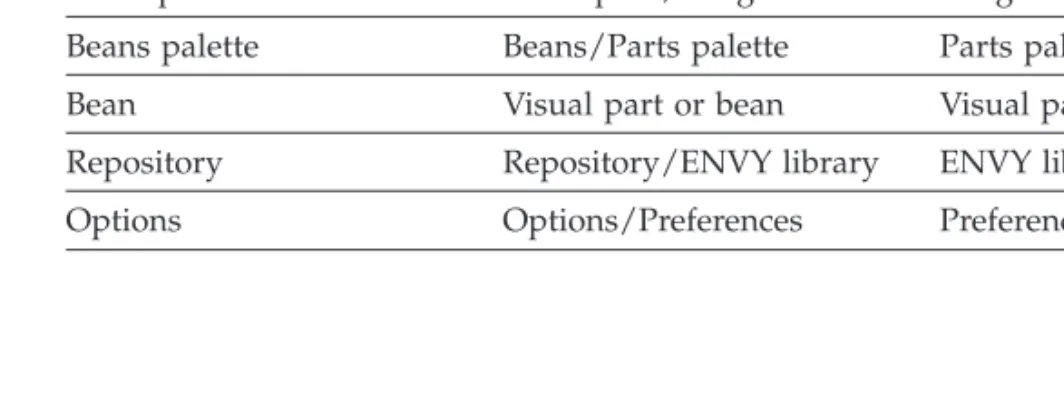
Table 1. Terminology differences between Java and Smalltalk
Java term Combined Java/Smalltalk term
Smalltalk term
Project Project/Configuration map Configuration map
Package Package/Application Application
Workspace Workspace/Image Image
Beans palette Beans/Parts palette Parts palette
Bean Visual part or bean Visual part
Repository Repository/ENVY library ENVY library manager
About this document
This document provides information on installing and configuring VisualAge Generator Host Services for OS/400*, preparing and running VisualAge Generator-generated COBOL applications in the OS/400 environment, and diagnosing problems. Explanations and user responses for the run-time messages are also provided.
Who should use this document
This document is intended for anyone responsible for installing, configuring, developing, and running applications on VisualAge Generator Server for AS/400.
How this document is organized
The chapters in this document are designed to help you with: v Installing and configuring VisualAge Generator Server for AS/400 v Preparing and running applications in the OS/400 environment v Developing applications with OS/400 specific considerations v Moving applications to other systems
Documentation provided with VisualAge Generator
VisualAge Generator documents are provided in one or more of the following formats:
v Printed and separately ordered using the individual form number.
v Online book files (.pdf) on the product CD-ROM. Adobe Acrobat Reader is used to view the manuals online and to print desired pages.
v HTML files (.htm) on the product CD-ROM and from the VisualAge Generator web page (http://www.ibm.com/software/ad/visgen).
The following books are shipped with the VisualAge Generator Developer CD. Updates are available from the VisualAge Generator Web page.
v VisualAge Generator Getting Started(GH23-0258-01)1,2
v VisualAge Generator Installation Guide(GH23-0257-01)1,2
v Introducing VisualAge Generator Templates(GH23-0272-01)2,3
The following books are shipped in PDF and HTML formats on the VisualAge Generator CD. Updates are available from the VisualAge Generator Web page. Selected books are available in print as indicated.
v VisualAge Generator Client/Server Communications Guide(SH23-0261-01)1, 2
v VisualAge Generator Design Guide(SH23-0264-00)1
v VisualAge Generator Generation Guide(SH23-0263-01)1
v VisualAge Generator Messages and Problem Determination Guide
(GH23-0260-01)1
v VisualAge Generator Programmer’s Reference(SH23-0262-01)1
v VisualAge Generator Migration Guide(SH23-0267-00)1
v VisualAge Generator Server Guide for Workstation Platforms(SH23-0266-01)1,4
v VisualAge Generator System Development Guide(SG24-5467-00)2
v VisualAge Generator User’s Guide(SH23-0268-01)1, 2
v VisualAge Generator Web Transaction Development Guide(SH23-0281-00)1
The following documents are available in printed form for VisualAge Generator Server for AS/400 and VisualAge Generator Server for MVS, VSE, and VM:
v VisualAge Generator Server Guide for AS/400(SH23-0280-00)2
v VisualAge Generator Server Guide for MVS, VSE, and VM(SH23-0256-00)2
1. These documents are available as HTML files and PDF files on the product CD. 2. These documents are available in hardcopy format.
3. These documents are available as PDF files on the product CD.
The following information is also available for VisualAge Generator:
v VisualAge Generator External Source Format Reference(SH23-0265-01)
v Migrating Cross System Product Applications to VisualAge Generator
(SH23-0244-01)
v VisualAge Generator Templates V4.5 Standard Functions—User’s Guide
OS/400 publications
The following documents contain information related to running applications in the OS/400 environment:
v AS/400 ILE Concepts V4R4, SC41-5606
v AS/400 Programming Reference Summary V4R4, SX41-5720
v AS/400 System Operation for New Users V3R1, SC41-3200
v AS/400 System Operation V3R6, SC41-4203
v CSP/AE Reference, SC41-3613
v Data Management, SC41-5710
v DB2 for AS/400 Database Programming, SC41-5701
v DB2 for AS/400 Distributed Database Programming, SC41-5702
v DB2 for AS/400 SQL Programming, SC41-5611
v DB2 for AS/400 SQL Reference, SC41-5612
v DB2/400 Database - An Overview, SC41-3700
v DDS Reference, SC41-5712
v Getting Started, SC41-5601
v Getting Started on the AS/400 System, SC41-3204
v ILE COBOL for AS/400 Programmer’s Guide, SC09-2540
v ILE COBOL for AS/400 Reference, SC09-2539
v OS/400 Backup and Recovery V4R4, SC41-5304
v OS/400 CL Programming V4R4, SC41-5721
v OS/400 Program and CL Command APIs V4R4, SC41-5870
v OS/400 Security - Reference V4R4, SC41-5302
v OS/400 Server Concepts and Administration, SC41-3740
v OS/400 Work Management V4R4, SC41-5306
v Performance Tools V4R2, SC41-5340
v Publications Reference, SC41-3003
Chapter 1. Installing and configuring VisualAge Generator
Server for AS/400
This chapter contains general information on the installation and
customization of VisualAge Generator Server for AS/400 on the host and VisualAge Generator on the workstation.
Installing VisualAge Generator Server for AS/400
VisualAge Generator Server for AS/400 (program number 5769-VG1) is available on a CD. To install VisualAge Generator Server for AS/400 Version 4.4 on the host, enter the following command:
RSTLICPGM LICPGM(5769-VG1) DEV(OPTnn)
wherennis the two-digit number of the device where the CD-ROM is loaded. The estimated time to run theRSTLICPGM LICPGM(5769-VG1) DEV(OPTnn) command is 15 minutes.
Objects created or replaced during installation
The following list provides a general description of the objects created or replaced during the installation process:
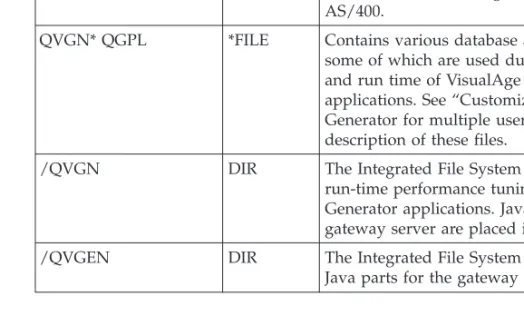
Table 2. Objects Created or Replaced during the Installation Process
Object and library
name Type Description
QVGEN QSYS *LIB The primary library for those system objects that constitute VisualAge Generator Server for AS/400.
QVGN* QGPL *FILE Contains various database and source files, some of which are used during development and run time of VisualAge Generator applications. See “Customizing VisualAge Generator for multiple users” on page 2 for a description of these files.
/QVGN DIR The Integrated File System directory for run-time performance tuning of VisualAge Generator applications. Java parts for the gateway server are placed in this directory. /QVGEN DIR The Integrated File System directory where
Customizing VisualAge Generator for multiple users
Although the VisualAge Generator Server for AS/400 and VisualAge
Generator products are installed as ready to use, you should read this section for customization considerations that can better meet your project
development needs and to assist in understanding and integrating development tasks with your OS/400 system management. The following is a list of the customization steps:
1. Create OS/400 user libraries to contain generation output and application executables.
2. Copy to user libraries OS/400 files that contain generated output for each developer or project.
3. Tailor templates that the application generator uses to produce OS/400 job streams to prepare generated applications and associated parts.
4. Create OS/400 job descriptions that are used by the OS/400 job streams.
5. If you are using client server support of VisualAge Generator to call non-VisualAge Generator servers, upload the file QVGNRNCL.CLR from the VisualAge Generator Developer directory to the AS/400 and compile the program using the CRTCLPGM command. Place the program in every library that you have non-VisualAge Generator server programs.
OS/400 library and file setup
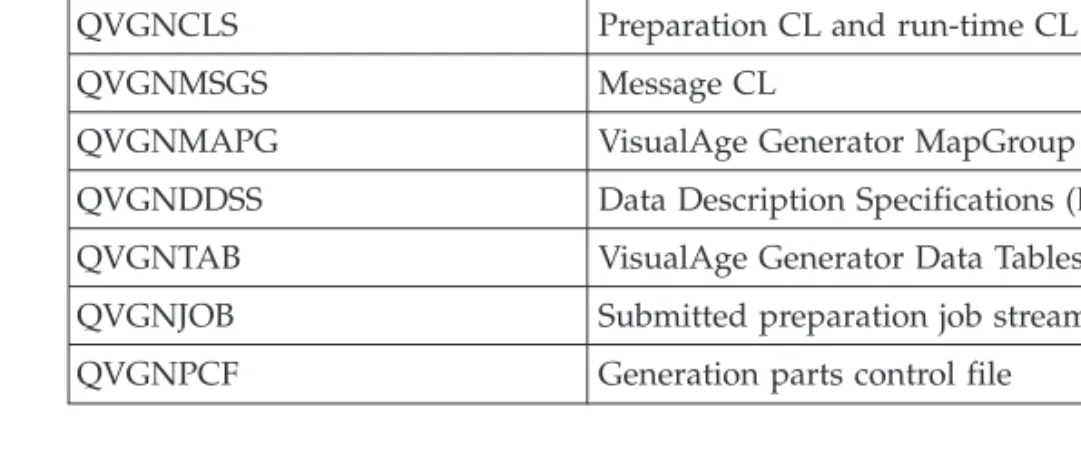
The outputs from generation are, by default, placed into files in the QGPL library on the OS/400 system. The files are created in the QGPL library during installation of VisualAge Generator Server for AS/400. The output files from generation are as follows:
Table 3. Generation Output Files
File name Description
QVGNCBLS ILE COBOL application programs and print services
QVGNCLS Preparation CL and run-time CL
QVGNMSGS Message CL
QVGNMAPG VisualAge Generator MapGroup
QVGNDDSS Data Description Specifications (DDS)
QVGNTAB VisualAge Generator Data Tables
QVGNJOB Submitted preparation job streams
To preserve the original installation-defined definition of the QVGN* files in the QGPL library and to avoid member name collisions when multiple application developers are using the same host OS/400 system, it is highly recommended that you copy the QVGN* files from the QGPL library to specific application developer user libraries. You can name these user libraries any name you choose, and you can set up as many as necessary to meet your needs.
The application developer user library corresponds to the VisualAge
Generator option /DESTLIB= value specified during application generation. The default for this value is QGPL. After application generation and
preparation is complete, you can leave the files and programs where they are, move them, or copy them to any other library for run time.
To create libraries for multiple developers or projects, do the following:
1. Type the following command on the command line:
CRTLIB xxxxxx
wherexxxxxxis the library name.
2. Create a duplicate of the VisualAge Generator files in the new library by typing the command:
WRKOBJ OBJ(QGPL/QVGN*) OBJTYPE(*FILE)
3. Placeoption=3(copy) next to each file, then type the command:
TOLIB(XXXX)
Setting up an OS/400 job description
An OS/400 job description is required for preparation before you can submit batch jobs. It is recommended that each VisualAge Generator application developer have a job description on the OS/400. You can create a job
description with the CRTJOBD command. Name the job description the same as the application developer’s LAN ID. If the application developer does not have a LAN ID, then either set the VisualAge Generator environment variable EZERUSRID to the job description name or the template EFK14PBJ must be modified.
Specify the application developer’s OS/400 user ID in the job description, do not use the default *RQD. Set message logging to *SECLVL. The job
description must be in a library named the same as the userid. The system default library list (*SYSVAL) does not contain user libraries.
You can customize the job descriptions and templates in whatever way you want to meet your project requirements as long as you do not use the default *RQD in the job descriptions.
CRTJOBD +
USER(userid) +
LOG(4 00 *SECLVL) +
JOBD (userid/userid) +
INLLIBL (destlib QVGEN otherlibs) +
whereuseridis the user ID,destlib is the library where the generation output files should be stored, andotherlibis the library you can use for whatever you want.
OS/400 run-time CL templates
For all called OS/400 applications, VisualAge Generator creates a run-time CL that is called when the VisualAge Generator application is used as a server. The file is generated with the namembrname.clrand uploaded asmbrname_R to the QVGNCLS file on the OS/400.
Each server application runs in a prestarted job with the job description specified in the QUSER profile. The run-time CL is used to add libraries to the library list so that programs and data files used by the server can be found. The templates used to create the run-time command file are as follows:
EFK24EBC
This is the run-time prologue template. This template establishes CL program entry and global error monitoring during client/server run time.
EFK24EEC
This is the run-time epilog template. This template adds the library that the server application is in to the library list. If this is the first server program in a client run unit, the CL command sets up
commitment control. Add additional libraries to the beginning of the CL for data and programs in libraries that are different from the server program.
Customizing the preparation templates
VisualAge Generator can be customized to meet the needs of any application development project. All of the customization is in the area of application generation and encompasses the use of generation options and application preparation templates.
Generation options are keywords named or referred to on the command to generate a VisualAge Generator application member. Refer to theVisualAge
Generator Generation Guidedocument for more information about generation
Preparation templates are files that represent a unique segment of instructions for larger generation output files. These output files manage the transfer, compile, and bind of application members.
Preparation templates overview
The VisualAge Generator Developer default templates produce OS/400 control language (CL) programs to manage the task of compiling and binding ILE COBOL programs. The CL programs have an extension of CLP and CLJ in the generation output directory. When the CL programs are transferred to OS/400, they are placed in the files QVGNCLS and QVGNJOB in the library named on the /DESTLIB generation option. Each generated member for QVGNCLS or QVGNJOB has the same name as the program part from which it was generated. The submitted batch job (.CLJ) compiles and calls the .CLP file that prepares the generated programs. When the CL program is run, generated VisualAge Generator programs are prepared for run time. All of the templates have the file-name extension .TPL and are originally installed in the directory C:\Program Files\Vast\bin for the Smalltalk version of VisualAge Generator or C:\IBMVJava\IDE\program for the Java version. The following are the templates for the OS/400 environment and their functions:
EFK24PBC
Establishes CL program entry and global error monitoring during preparation of one VisualAge Generator part type
EFK24PCL
Provides CL to compile and bind ILE COBOL/400 when the VisualAge Generator part is a CALLED (non-SQL) program type
EFK24PEC
Provides an epilogue to the CL preparation program, such as general purpose error handling, during preparation of one VisualAge
Generator part type
EFK24PMN
Provides CL to compile and bind ILE COBOL/400 when the VisualAge Generator part is a MAIN (non-SQL) program type
EFK24PPM
Provides CL to compile and bind ILE COBOL/400 when the VisualAge Generator part is a map group containing printer maps (mapping services program)
EFK24PSC
Provides CL to DB2/400 pre-compile, COBOL compile, and bind ILE COBOL/400 when the VisualAge Generator part is a CALLED program type containing SQL statements
EFK24PSM
Provides CL to DB2/400 pre-compile, COBOL, compile, and ILE COBOL/400 when the VisualAge Generator part is a MAIN program type containing SQL statements
EFK24WCL
Provides CL to compile and bind ILE COBOL/400 when the VisualAge Generator part is a Web transaction (non-SQL) program type
EFK24WSC
Provides CL to DB2/400 pre-compile, COBOL compile, and bind ILE COBOL/400 when the VisualAge Generator part is a Web transaction program type containing SQL statements
The message file CL used for the OS/400 environment has the file-name extension .MSG. CL for the message file is similar to the preparation for VisualAge Generator program and map group print map part types. The message file preparation CL that is produced from templates prepares a VisualAge Generator message table part when started. During the preparation phase, message table parts are converted to OS/400 message file objects to be used by VisualAge Generator programs. CL message templates are used for the OS/400 environment as follows:
EFK24TCM
Provides CL to create the message file
EFK24TAM
Provides CL to add a message to the message file
EFK24TEM
Provides an epilogue to the CL preparation program, such as general purpose error handling, during preparation of one VisualAge
Generator part type
The run-time file CL, used for client/server programs in the OS/400 environment, has the file extension .CLR. During the preparation phase, the run-time CL source is copied to the file QVGNCLS in the destination library, with the name of prgmname_R. It is then compiled.
EFK24EBC
Provides the CL to add libraries to the client/server job and to start commitment control if this is the first server program called by a client. Customize this template to add any libraries that the server program needs for data or programs.
EFK24EEC
Batch jobs used for the OS/400 environment have the file extension .CLJ. OS/400 batch jobs are used to create and then run the preparation CL programs previously defined by the CL templates. The batch job stream is produced from the following templates:
EFK24PBJ
Establishes the database batch job entry. This template must contain the //BCHJOB command. This template is similar to the MVS JOB card template. This template can also contain job setup commands, such as library list alterations and job value changes.
Note: The generation option /JOBCARD= value can be used to override this template name with one of your own choosing, enabling easy customization to batch job parameters that control the job definition.
EFK24TMJ
Provides CL commands to create the message CL preparation
program, and then runs it. This template is used when the VisualAge Generator part is a message file.
EFK24PEJ
Provides CL commands to create the program CL preparation
program, and then runs it. This template is used when the VisualAge Generator part is a program or a print map.
Modifying templates
Templates can be modified to meet installation requirements for preparing and running applications. These modifications are usually done by a system administrator or project leader.
Templates are used to generate files used in preparing members for run time. The template files required for generation are shipped with the VisualAge Generator application generator.
The file-name extension for template files is .TPL. These sample template files are placed in the directory C:\Program Files\Vast\TEMPLATE during installation. The installation procedure updates the OS/2 environment variable PATH to include the C:\Program Files\Vast\TEMPLATE directory. If the /TEMPLATES generation option is specified, VisualAge Generator searches for templates in the specified directory. The specified directory must contain copies of all the templates. If the /TEMPLATES generation option is not specified, VisualAge Generator searches for templates in the directories listed by the PATH environment variable of the process currently running the EZERGEN command. If you want to modify the templates, create a new directory. Then, consider the following:
v If you intend to use the /TEMPLATES generation option to make your modifications, copy all the templates from the
C:\Program Files\Vast\TEMPLATE directory into the new directory and apply your changes.
v If you prefer to use the DPATH environment variable, copy only those templates you want to change and add this new directory to the DPATH environment variable in the OS/2 process that starts the EZERGEN command.
The templates contain symbolic parameters that are indicated by the percent sign (%). Values can be defined and substituted in place of these symbolic parameters dynamically. The substitution values are derived from any of the following sources:
v Definitions of the members being generated v Generation options
v /SYMPARM values
User-defined symbolic parameters can also be inserted in the template. The values for user-defined symbols are specified at generation time using the /SYMPARM generation option. When using symbolic parameters in a template, ensure that the generated statement does not exceed column 71 when the largest possible values are substituted for the symbols. Statements longer than 71 columns in host templates are truncated. Also make sure that your changes result in the generation of valid syntax. The generation facility does not check the syntax.
Refer to theVisualAge Generator Generation Guideunder “Symbolic parameters” for more information about symbolic parameters.
Reasons for modifying templates
You should not need to modify templates often. However, if a template needs to be changed, your system administrator or project leader usually makes the change. Some reasons why templates might need to be modified include the following:
v Conforming to your system or project application development file naming conventions
v Changing the preparation process commands run on OS/400; either changing the order of, adding, or removing commands
v Changing command parameter values; either hardcoded or add VisualAge Generator symbolic parameters, predefined or user-defined
v Changing the library list setup at different stages of the preparation batch job
v Overriding objects during the preparation batch job execution, such as the VisualAge Generator COBOL compiler options copybook member,
v Changing the COMMIT parameter value on the CRTSQLCBLI command to control the commitment control level for SQL statements in an application v Changing the ownership or granted authority to created objects
v Changing the parameters on the //BCHJOB command, such as using a different job description or changing the message logging. It might be better in this case to create a new template with a name of your choosing and use the /JOBCARD= VisualAge Generator generation option to include it instead of the VisualAge Generator- supplied template (EFK24PBJ.TPL) for the purpose of using //BCHJOB command variations.
For more information on OS/400 batch job management, refer to theAS/400
Work Managementdocument For more information on CL programming, refer
to theAS/400 CL Programmingdocument.
Customizing VisualAge Generator
If you have installed VisualAge Generator Server for AS/400 in a language other than the following languages, VisualAge Generator Server for AS/400 creates an abbreviated conversion table in the file QVGNSCTB of the QVGEN library.
Suffix Language ENU U.S. English
ENP Uppercase English
CHS Simplified Chinese
DEU German
DES Swiss German
ESP Spanish
JPN Japanese (Katakana)
KOR Korean
Chapter 2. Application generation outputs
This chapter provides an overview of the output files from application generation to OS/400. VisualAge Generator prepares the output files before running your applications. The format and content of the output files are in COBOL/400, control language (CL) source, and structured binary streams. Each output file is described in Table 4.
Outputs of generation
After you generate an application, a number of objects must be transferred to the OS/400 host system as members in various OS/400 physical files. On the OS/400 host system, these members must be prepared before the application can be run.
Table 4 provides information about the types of files produced by generation, including the following:
v Type of object produced
v Physical file name where the object is written as a member v How the member name of the object is derived
v Whether production is controlled by a generation option
v Whether the object can be modified after generation is performed
Refer to theVisualAge Generator Generation Guidedocument for more information on controlling and modifying generation and preparation of OS/400 objects.
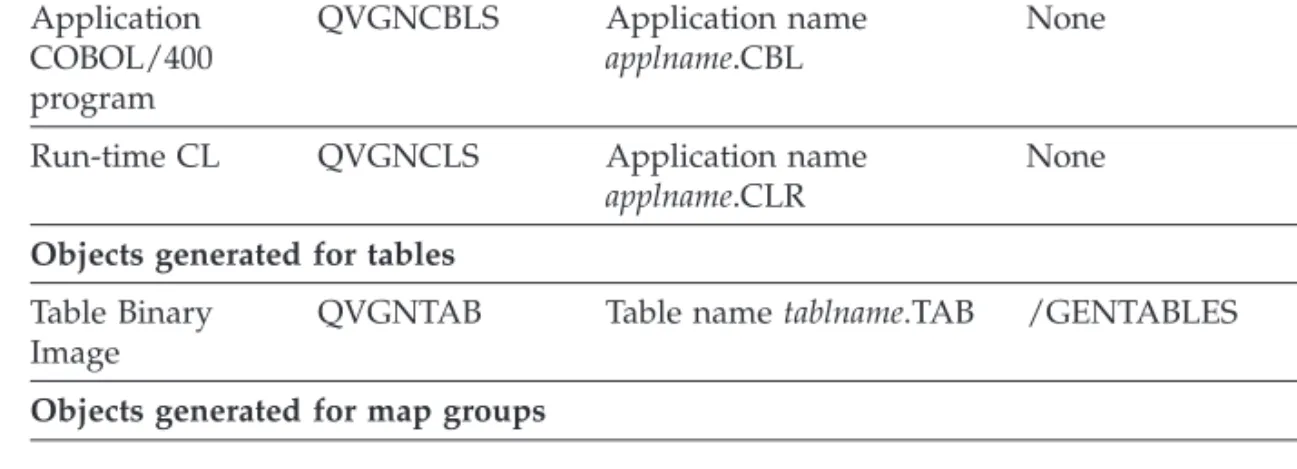
Table 4. Objects transferred to an OS/400 host by the VisualAge Generator preparation utility
File type
Physical file name
PF member name and
generated file name Generation option Modifiable Objects generated for applications
Application COBOL/400 program QVGNCBLS Application name applname.CBL None No
Run-time CL QVGNCLS Application name applname.CLR
None Yes
Objects generated for tables
Table Binary Image
QVGNTAB Table nametablname.TAB /GENTABLES No
Table 4. Objects transferred to an OS/400 host by the VisualAge Generator preparation utility (continued)
File type
Physical file name
PF member name and
generated file name Generation option Modifiable
Print services program (See note 3)
QVGNCBLS Map group name mapgname.CBL
/GENMAPS /GENHELPMAPS
No
Map group module (See note 4)
QVGNMAPG Map group name mapgnameFM.FMT
/GENMAPS /GENHELPMAPS
No
Objects generated for all member types (applications, tables, map groups)
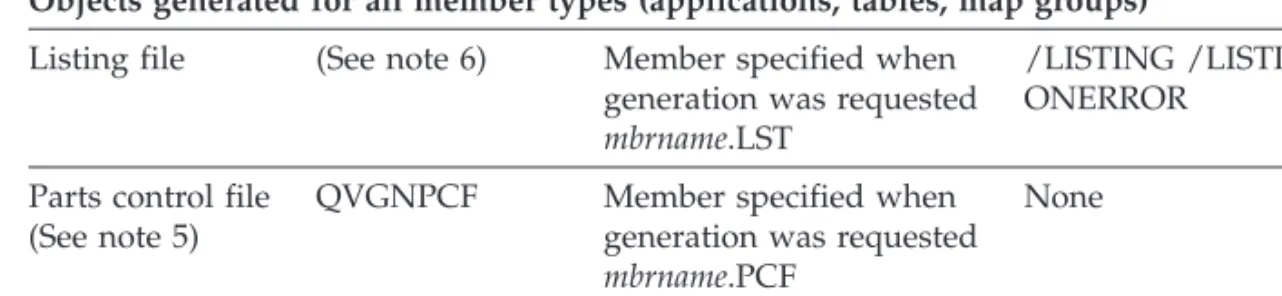
Listing file (See note 6) Member specified when generation was requested mbrname.LST
/LISTING /LISTING ONERROR
None
Parts control file (See note 5)
QVGNPCF Member specified when generation was requested mbrname.PCF
None No
Preparation Command File
(See note 6) Member specified when generation was requested mbrname.PRP
/PREPFILE No
Preparation CL QVGNCLS Application name applname.CLP
/PREPFILE Yes
Preparation job stream CLJ
QVGNJOB Application name applname.CLJ
/PREPFILE Yes
Objects generated for message tables
Message file CL QVGNMSGS Member specified when generation was requested tablename.MSG
/GENTABLES Yes
Message file CLJ QVGNCLJ Message table name tablename.CLJ
/GENTABLES Yes
Objects generated for file creation
Data definition specification (DDS)
QVGNDDSS File name as specified in VisualAge Generator record definitions filename.DDS
Table 4. Objects transferred to an OS/400 host by the VisualAge Generator preparation utility (continued)
File type
Physical file name
PF member name and
generated file name Generation option Modifiable Notes:
1. The generator produces ILE COBOL/400 for the OS/400 environments.
2. Generated application, table, and map group objects are environment dependent. All objects are generated for one environment and cannot be used in another environment.
3. This object is produced only if the map group contains print maps. 4. This object is produced only if the map group contains terminal maps.
5. The parts control file is no longer generated. Version 3.1 and earlier versions of VisualAge Generator Developer generated this file. One parts control file is created for a GENERATE subcommand. The parts control file has the same name as the member specified on the GENERATE subcommand. If any map groups or tables are generated with an application, the parts control file for the application lists all parts generated for the application and all parts generated for the associated map groups and tables.
6. These files are not transferred to the host. The OS/2 file name is the same as the name of the member specified on the GENERATE subcommand.
Objects generated for applications
The follow sections describes the objects generated for applications.
Application COBOL/400 program
The generated application is a COBOL/400 program that contains the following:
v Application control logic
v Logic for application processes, statement groups, and I/O operations v Data for both the application and application control
Run-time CL
The run-time CL sets commitment control and adds libraries to the OS/400 library list when a server application or Web transaction runs.
Data definition specification (DDS)
The generator produces OS/400 data definition specifications (DDS) to create instances of OS/400 physical and logical files that the application uses. The DDS produced is the result of theindexed, relative, serial,andalternate
specificationrecord types used within the application member being generated.
The generation option /CREATEDDS enables the production of the DDS output type. The preparation command file uploads the DDS files to the host system, but the command file does not manage processing beyond that point.
Objects generated for tables
Table binary image file
The table binary image file contains the run-time VisualAge Generator table member contents as defined by VisualAge Generator Developer. The table contents are already converted to the code page of the target run-time environment. The table contents are formatted to an application defined structure (possibly containing various data types) and the contents are treated as binary data. You might not be able to view the contents outside the scope of VisualAge Generator Developer and utilities. The generation option /GENTABLES enables the production of the table binary image files.
Objects generated for map groups
The following section describes the objects generated for map groups.
Map group format module
The map group format module is a generated structure that describes the map layout for terminal maps in the map group. The generator builds the structure as a binary image file converted to the code page of the target system. This object is produced when you specify the /GENMAPS or the
/GENHELPMAPS generation options and the application has defined terminal maps in the map group.
Objects generated for all member types
The following objects are generated for applications, tables, and map groups.
Listing file
A source listing of the member being generated and its associates is produced if you specify one of the print options (/LISTING or /LISTINGONERROR) during generation. The listing includes any messages that were issued and options that were in effect during generation.
Parts control file
The parts control file, generated in earlier versions of VisualAge Generator Developer (see Table 4 on page 11), is a list of all objects produced by the generator the last time generation was performed for the application, table, or map group with the same name as the parts control file member. This list provides a record of generated objects.
Preparation command file
A preparation command file is generated when the /PREPFILE generation option is specified. The preparation command file produced by a GENERATE subcommand contains logic to prepare the generated members. If the
generated application includes tables and maps, the logic for preparing them is contained in the preparation command file.
The preparation command file runs on the workstation and contains commands used to transfer the source files and preparation CL file to the
target host system. One preparation command file is created for each GENERATE subcommand that was issued.
Objects generated for application and message table members
The following objects are generated for applications and message tables.Preparation CL for OS/400 environments
The generator produces control language (CL) statements to compile and bind generated applications. The CL statements produced depends on the nature of the program:
v SQL applications require DB2/400 precompile. v CL programs must compile generated applications.
The CL statements are produced from model CL templates that you can modify to enforce source file naming conventions or preparation procedures. Refer to “Customizing the preparation templates” on page 4 for more information on preparation templates.
The preparation command file on the workstation transfers the preparation CL to the host system and submits it to the batch subsystem.
Preparation job stream file
The OS/400 job stream file contains the commands needed to compile and run the preparation CL program. The CL program compiles the VisualAge Generator applications.
Message file CL
The generator produces CL statements to create or update OS/400 native message file objects (*MSGF type). VisualAge Generator message table members are implemented as message files on OS/400. The CL is produced from model CL templates that you can modify to control OS/400 message description attributes and error handling during run time of the CL statements. Refer to theVisualAge Generator Generation Guidedocument for more information.
The generation option /GENTABLES enables the production of the message file since the origin of the data is the VisualAge Generator message table. The preparation command file uploads the message file CL to the host system and submits it to the batch subsystem.
Chapter 3. Preparing generated applications
This chapter describes the preparation procedures for preparing an application to run in the OS/400 environment. It is assumed that you are familiar with jobs and work management on OS/400 and with transferring files and submitting remote commands using ftp. If you are not familiar with these tasks, see “OS/400 publications” on page xv for a list of documents that cover these tasks.
After VisualAge Generator generates one (or an associated set) of its source members, the generated output is transferred to the target run-time system and prepared to run. For OS/400, VisualAge Generator produces a set of specific command files to manage the application preparation process for each VisualAge Generator source member that is scheduled for generation.
Application preparation includes the following steps: v Transferring generation output files to the host system v Compiling the various application COBOL/400 source files
v Binding the compiled modules with VisualAge Generator Server for AS/400 v Creating and updating application run-time support objects, such as
message files and tables
These subprocess preparation steps are common to the third-generation language (3GL) method of application development. VisualAge Generator relieves the application developer from having to manage and individually perform these preparation steps. The only task left for the application developer to perform is to verify and test the resulting run-time objects. VisualAge Generator cannot predict or provide every possible run-time scenario an application developer might design. However, VisualAge Generator does provide the flexibility that enables the application developer to customize the preparation process, both before and after VisualAge Generator produces the command files that control the preparation process. For automating the preparation process and development process control, it is recommended that you customize your preparation processbeforeVisualAge Generator produces the command files. Refer to “Customizing the preparation templates” on page 4 for information on the preparation templates and how to modify the templates. The remainder of this chapter covers specific
subprocess preparation steps, such as the following: v Running the CL
v Analyzing the listings and run-time targets
v Recovering from errors (analyze, fix, and restart the preparation process) that may occur during the preparation process
Running the Preparation CL
VisualAge Generator Developer submits the preparation CL file built by the generator to the OS/400 batch subsystem. If the preparation job ends with an error that can be corrected without requiring the application to be generated again, you can do one of the following:
v Use the VisualAge Generator Developer PREPARE subcommand to submit the preparation CL file to the batch subsystem again
v Issue the OS/400 SBMDBJOB (Submit Database Job) command to submit the preparation job stream CLJ file
Analyzing the preparation listing
This section describes the procedures for analyzing the preparation listing for error messages related to the generation of the CL.
The first place to start when verifying the preparation listing is the generator messages and the message log. If the messages indicate that the generation output files did not transfer correctly, determine the error. After the error is corrected, issue the VisualAge Generator generator PREPARE subcommand to start the preparation process again (this process includes transferring files). Issuing the PREPARE subcommand to start the preparation process is much faster than issuing the GENERATE subcommand and reproducing the generation output files. Refer to theVisualAge Generator Generation Guide document for more information on producing and locating the preparation listing and using the PREPARE subcommand.
Note: Messages that begin with the prefix EZE are the VisualAge Generator messages and are listed in “Chapter 7. Generator messages” on page 35. Other messages are produced by ftp.
If the generation output files transferred correctly but the OS/400 SBMDBJOB command failed or a command within the submitted job failed, analyze the type of error on OS/400 by examining job logs and spooled output files, such as the compile and bind listings.
To view the job log and the listings produced by the preparation phase, use the Work with Submitted Jobs command
WRKSBMJOB SBMFROM(*USER)
for jobs submitted by your user ID or the command
wherejobnameis the //BCHJOB JOB(jobname) value from the submitted database job stream file on OS/2 (genmember.CLJ) or on OS/400 (destlib/QVGNJOB(genmember)).
If you receive a message that the job you are requesting is no longer on the system, then any spooled output (listing files) that might have been produced has either been printed or deleted. To verify that the submitted job is
producing a job log, check the submitted database job stream file for either the //BCHJOB LOG(4 00 *SECLVL) value or the //BCHJOB LOG(*JOBD). In the latter case, verify the job description named on the //BCHJOB
LOG(*JOBD) parameter for the same information.
It is recommended that you set up each VisualAge Generator application developer with a user ID on OS/400 and a personal job description object for the developer to reference when submitting batch jobs such as the preparation job stream. The installed VisualAge Generator generator batch job header template (EFK24PBJ.TPL) is set up to use a job description with the same name as the value of VisualAge Generator OS/2 environment variable EZEUSRID in a library with the same name as the EZEUSRID variable. If errors concerning a preparation batch job on OS/400 can be corrected so that no new generation files are needed, and all the most recent generation output files have already been transferred to OS/400, you can submit the preparation batch job via the SBMDBJOB command again as in the following example:
SBMDBJOB FILE(destlib/QVGNJOB) MBR(genmbr)
Using the preparation batch job via the SBMDBJOB command requires less time to restart a preparation batch job than using the GENERATE or PREPARE generator subcommands.
Refer to theAS/400 Work Managementdocument, SC41-3306, for more information on OS/400 batch jobs and batch job control.
Preparing a DB2/400 application
When you specify an SQL table name in VisualAge Generator Developer, you can enter the table name on theTable Specificationwindow using either the SQL naming convention of collection.tablename or the OS/400 SYSTEM naming convention of collection/tablename. Whichever format you use as the standard to qualify table names, tailor the OPTION parameter on the
CRTSQLCBLI command in the VisualAge Generator DB2/400 application templates (EFK24PSM.TPL and EFK24PSC.TPL) to be *SQL
(collection.tablename) or *SYS (collection/tablename). In the template, the default naming convention is *SQL.
When you tailor the VisualAge Generator DB2/400 application templates (EFK24PSM.TPL and EFK24PSC.TPL), ensure that the *APOSTSQL and *QUOTE values are part of the OPTION parameter. The *APOSTSQL and *QUOTE values are required for VisualAge Generator DB2/400 applications.
Chapter 4. Running a generated application in OS/400
This chapter describes the information required to run VisualAge Generator applications on an OS/400 system.
Making VisualAge Generator Server for AS/400, COBOL, and generated modules
available
The setup tasks that are required to run VisualAge Generator applications on OS/400 are simpler than with other run-time environments because no run-time setup control programs are produced, other than the application program itself.
VisualAge Generator Server for AS/400 and the generated COBOL applications use the run-time job library list (*LIBL) to resolve all named object references
The library list must be set up by the application programmer, system administrator, or VisualAge Generator application developer before starting the application. To aid in the library setup, Table 5 on page 22 lists the names and types of objects that VisualAge Generator might use while running in the OS/400 environment. VisualAge Generator searches for these objects
dynamically when the application is running by scanning the libraries named in the library list. It is recommended that the installation library, QVGEN, be added to the library list of the end user when running VisualAge Generator applications.
VisualAge Generator uses the first object it finds that matches the target name in the libraries named in the library list. This first-found object is used in all cases of object resolution except for objects of *FILE type. In this case, VisualAge Generator uses the first member it finds that matches the target name, after the first member have been qualified with the correct file name. Multiple files with the same name might exist in the libraries named in the library list. VisualAge Generator checks each library file until it finds the first instance of the member name.
Table 5. Names and types of objects used by VisualAge Generator at run time Object and library name Type Description QVGN* QVGEN *PGM *SRVPGM
VisualAge Generator Server for AS/400 program and service program objects.
OVGNMSGF QVGEN
*MSGF VisualAge Generator Server for AS/400 product message file.
QVGNMAPG userlib
*FILE Members of this file contain the generated applications 5250 map groups. Members are named for the map group it contains. QVGNTAB
userlib
*FILE Members of this file contain the generated applications tables. Members are named for the table it contains.
QVGNPRNT QVGEN
*FILE This is the standard printer device file for application use of the EZEPRINT file. Usually, all jobs on the system share one of these objects. QVGMAP
QVGEN
*FILE This standard display device file is used for interactive applications when they display maps. Usually, all jobs on the system share one of these objects.
mmmmnls userlib
*MSGF A specific application’s message table, where mmmmis the message table prefix as defined to the application, andnlsis the value of generation option /TARGNLS when the application was generated.
calltarg userlib *PGM Any target of the CALL, XFER, or DXFR statements coded within an application. filetarg userlib *FILE Any file named on record definitions used by
VisualAge Generator process options within an application.
Note: The designated libraryuserlibin Table 5 indicates that the object is in a library named by the application developer at the time the application was developed.
The two exceptions to using the library list to resolve object references by running applications are as follows:
v When VisualAge Generator application tables and map groups reside in the OS/400 IFS file system for improved run-time performance.
v When either:
– The object (table or view) was explicitly qualified when an SQL record was defined during development
– The object was implicitly qualified when the application using the record was compiled.
In either case, SQL object resolution is independent of the library list.
Establishing a library list for a job
You can establish a library list for a job in several ways, but each method involves using an OS/400 system command. You can also mix the methods. The initial OS/400 library list is contained in the job description referenced by the user profile. For more information about the following OS/400 system commands, refer to theAS/400 CL Programmingdocument or enter the command at a command line entry on OS/400 and request command prompting.
ADDLIBLE
Adds a library list entry
CHGCURLIB
Changes the current library
CHGSYSLIBL
Changes the system library list
Running VisualAge Generator applications under OS/400
To run a VisualAge Generator application in the OS/400 environment, call the *PGM application object just as you would any other *PGM object on OS/400. You can run VisualAge Generator applications from menus, commands, command lines, or interlanguage program calls. This applies to MAIN and CALLED VisualAge Generator applications. Examples of how to run a VisualAge Generator application from an OS/400 command line follow: v To call an application without the use of arguments, use the following
format:
CALL applname
v To call a CALLED application that expects a parameter declared as CHA 16, use the following format:
CALL applname ('char arg literal')
v To call a CALLED application that expects two parameters declared as CHA 15 and PACK 15,5, use the following format:
CALL applname ('char arg literal' 1234)
Passing arguments and declaring parameters
Arguments are passed to VisualAge Generator applications in the same way that other OS/400 *PGM objects pass and receive arguments. Both MAIN and CALLED VisualAge Generator applications can receive arguments; however, MAIN applications have a more fixed argument format, and CALLED
applications offer parameter definition diversity. Arguments are always passed by reference. That is, a pointer to the argument is passed.
MAIN applications can optionally receive the following two arguments: v The application working storage record
v A FIRSTMAP argument
The application working storage record is a structured binary data format that should match or map exactly to the working storage record structure defined in the application for the length of the defined working storage record. If the application working storage record does not match or map to the working storage record, design the application logic to handle uninitialized record fields.
To indicate to the application the amount of data contained in the working storage record argument, a 2-byte length field immediately precedes the record data and is considered part of the argument. The target VisualAge Generator MAIN application accesses only that portion of the record data that is within the length bounds specified by the lesser of the following:
v The length passed with the record data
v The length of the application’s defined working storage record
The details of the working storage record are important only if you are using a non-VisualAge Generator or non-CSP/AE application to pass the argument, because the non-VisualAge Generator or non-CSP/AE program establishes the argument storage layout. VisualAge Generator and CSP/AE applications account for all internal structures and data typing where records with the same name are specified on the XFER or DXFR statement and on the working storage of the target application.
The FIRSTMAP argument is a VisualAge Generator-specific format. The FIRSTMAP name is defined to the application during application
development. The structure of the argument is a programming interface for VisualAge Generator only.
CALLED applications that are defined with parameters must receive matching arguments when called. Otherwise, you can receive unpredictable results. Do not reference an argument that either has not been received or has been received but with a data type different from its declared matching parameter. Usually, a function check occurs.
For VisualAge Generator CALLED applications, you can declare a maximum of 30 parameters during application development. Parameters can be declared as VisualAge Generator data items, records, or maps.
Record arguments for CALLED application targets do not have the leading 2-byte length field preceding the record data like the working storage record arguments for MAIN application targets.
VisualAge Generator CALLED applications that are called from an OS/400 command line or CL can receive literal numeral arguments if the VisualAge Generator parameters are declared as type PACK, 15 digits, 5 decimals. For more information on the literal data types, refer to theOS/400 CL
Programmer’s Guide
VisualAge Generator run unit concept
VisualAge Generator applications operate in a run unit much like that of ILE COBOL. VisualAge Generator’s run unit can be considered a subset of the ILE COBOL run unit because the COBOL run unit might exist before and persist longer that VisualAge Generator’s run unit.
VisualAge Generator’s run unit is bounded by the first VisualAge Generator application on the OS/400 program call stack for a specific job. Run units are scoped within a single job. As long as a VisualAge Generator application is on the program call stack, a VisualAge Generator run unit is active. Only one VisualAge Generator run unit can be active in a job at any time. This is the most obvious difference between VisualAge Generator run units and ILE COBOL run units.
MAIN or CALLED applications can initiate a VisualAge Generator run unit. VisualAge Generator MAIN applications can exist in a run unit only if it is the initiating application. MAIN applications cannot be called from an application that initiates a VisualAge Generator run unit, even if it is called from a non-VisualAge Generator program while a VisualAge Generator run unit was active.
Using activation groups with run units
VisualAge Generator run units normally correlate on a one-to-one basis with ILE COBOL run units and ILE activation groups. When a VisualAge
Generator application initiates or begins a run unit, a named activation group is also initiated. Using a named activation group ensures that all VisualAge Generator applications that run in the job share the same resources in terms of ILE resource management.
If your application system consists of non-VisualAge Generator programs as well as VisualAge Generator applications, you can add your non-VisualAge Generator programs to the named activation group or use a different activation group. Sharing commitment control logical units of work and sharing database file Open Data Paths are important aspects to consider when making your decision. To share either ILE resources, using the same activation
group achieves the above result. Conversely, using different activation groups keeps the ILE resources isolated in terms of VisualAge Generator application use and non-program use.
The ILE activation group name is established when VisualAge Generator applications are in the preparation phase of application development. VisualAge Generator preparation templates, which create OS/400 program objects, name the activation group in the OS/400 command template for the CRTPGM command. The keyword is ACTGRP and the default is
ACTGRP(QVGN). The preparation templates that use the CRTPGM command follow: v EFK14PCL.TPL v EFK14PMN.TPL v EFK14PSC.TPL v EFK14PSM.TPL v EFK24WCL.TPL v EFK24WSE.TPL
See “Customizing the preparation templates” on page 4 for information on changing templates.
Using tables with run units
The resource type of data tables used for a VisualAge Generator run unit is specific to VisualAge Generator and is not a function of ILE or OS/400. VisualAge Generator tables are static entities, which are intended for quick table search programming tasks. The tables can be shared among applications in the same run unit. For these reasons, the tables are loaded into storage from a database file. Usually, table in-storage scoping ceases with the run unit in which the tables were loaded. However, the following two factors
associated with VisualAge Generator table management warrants table in-storage scoping to extend beyond the VisualAge Generator run unit: v The time necessary to acquire memory, to read a table from a database file,
and to load the table into memory
v The need to retain modified table data for use by another run unit, thereby serving as a quick application-to-application communication method VisualAge Generator table in-storage scoping extends beyond the VisualAge Generator run unit when the table is defined with the table attribute tag RESIDENT and the run unit is ended by the DXFR statement without the non-CSP option. This means that the application eventually enters the run unit again. When it does, it wants the RESIDENT tables of the previous run unit to remain available in storage. The DXFR statement is the non-committal method of ending a run unit. All other methods close the RESIDENT table, all other tables, and all other VisualAge Generator resources.
Chapter 5. General considerations for VisualAge Generator
Server for AS/400
This chapter describes the general considerations for administering VisualAge Generator Server for AS/400 in the OS/400 environment.
Using data description specifications generated by VisualAge Generator
During generation, VisualAge Generator can generate data description specifications (DDS) information from VisualAge Generator record definitions that are used for file I/O operations.The DDS information generated by VisualAge Generator is useful only to the OS/400 system administrator or application developer. The system
administrator can use the DDS source members, or modified versions of them, to create the files that do not already exist on the OS/400 system. Using the DDS source information to create the files qualifies these files for OS/400 data management functions, such as specifying key fields, unique keys, and logical files.
You are not required to use the DDS source information to create files because VisualAge Generator does not require that the files an application accesses be externally described. VisualAge Generator relies on the record definition, which is built into the *PGM object, for the structure of a record. However, using the DDS information guarantees agreement between the application’s view of the record structure and the record data stored on the OS/400 system.
Modifying the generated DDS information
Indexed and indexed alternate specification record organizations might require that you modify the corresponding DDS source member. Adding DDS keywords to the file- and record-level identifiers in the DDS source member is the minimum modification necessary. Table 6 on page 28 shows the DDS keywords and the conditions under which they are required.
You can add other DDS keywords to optimize record retrieval and simplify application logic. For example, logical files can be used to select a subset of physical file records. You can also to build your own DDS source member, based on your knowledge of the VisualAge Generator record definitions in the application. In this case, individual field names and field lengths in the DDS source need not match those of the VisualAge Generator record definition. However, the record length and key field length of the VisualAge Generator record definition and the DDS source must be equal.
Refer to theVisualAge Generator Design Guidedocument for more information on VisualAge Generator record organizations that cause DDS information to be generated and the recommended OS/400 file types corresponding to those record organizations.
Table 6. Conditions for using DDS keywords
DDS keyword Condition
PFILE(pfname) When using the DDS information to create a logical file.pfname identifies the physical file on which the logical file is based. PFILE is a record-level keyword.
UNIQUE When the application tests for the UNQ or DUP record I/O error conditions. UNIQUE is a file-level keyword.
Restrictions on logical files
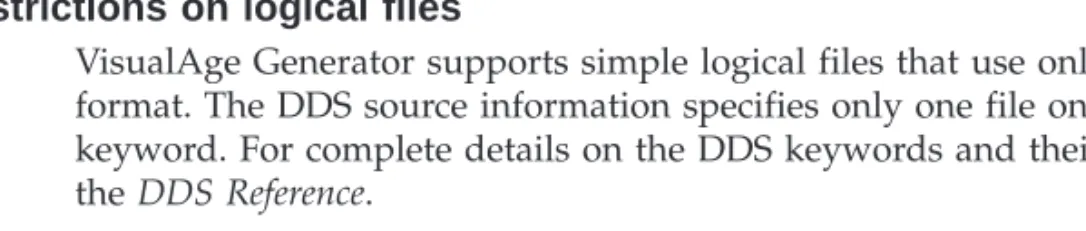
VisualAge Generator supports simple logical files that use only one record format. The DDS source information specifies only one file on the PFILE keyword. For complete details on the DDS keywords and their usages, refer to
theDDS Reference.
Changing DDS member types
VisualAge Generator creates DDS source members without specifying a member type. To assist you in modifying the DDS source information, change the member type to one of the following:
v PF for a DDS source member describing a physical file v LF for a DDS source member describing a logical file
Changing the member type to PF or LF enables the Source Entry Utility (SEU) prompting to help you to modify the DDS source member.
Application run-time considerations
The following sections describe the considerations to keep in mind during application run time.
Starting and ending commitment control cycles
To use OS/400 Commitment Control Services for single-system OS/400 applications, you must explicitly start and end a commitment control cycle using the start commitment control (STRCMTCTL) command to start the commitment control and the end commitment control (ENDCMTCTL) command to end the commitment control. VisualAge Generator Server for AS/400 does not implicitly start or end commitment control cycles for single-system OS/400 applications. However, DB2/400 implicitly starts commitment control automatically for applications that use SQL I/O process options. After commitment control is started for the job, both native database I/O and SQL I/O can use the common commitment control OS/400 provid