Building XML Web Services for the Microsoft .NET Platform
by Scott Short
ISBN: 0735614067 Microsoft Press © 2002 (426 pages)
Understand how to build robust, high-performing business solutions for the Web by exploiting protocols and tools such as SOAP, WSDL, UDDI, and XML.
Introduction...10
Whom This Book Is For...10
How This Book Is Organized
...10
If You Are in a Hurry...11
System Requirements
...11
The Companion CD...12
Support...12
Chapter 1: Why Web Services?
...14
Overview...14
Web Services Building Blocks
...16
Web Services Design Decisions...17
Choosing Transport Protocols...17
Choosing an Encoding Scheme...18
Choosing a Formatting Convention...18
Choosing Description Mechanisms
...19
Choosing Discovery Mechanisms
...20
What’s Missing from Web Services?...20
Summary
...20
Chapter 2: Creating a Basic Web Service...22
Overview...22
A Simple Commerce Application...22
Creating a Web Form
...22
Creating a Payment Web Service
...25
Updating the Order Web Form...27
The Web File Share Application
...29
Creating the WebFileShare Web Service...29
Creating the WebFileUtil Program
...31
Summary
...35
Chapter 3: SOAP...37
Overview...37
Anatomy of a SOAP Message
...38
SOAP Actors
...39
The
Header
Element
...39
The
Body
Element...42
Using SOAP RPC Messages...44
SOAP Encoding...46
Simple Types
...47
Compound Types
...47
Passing Parameters by Reference
...55
Summary
...63
Chapter 4: XML Schema
...64
Overview...64
Describing XML Documents
...65
Built-In Datatypes
...66
Integers
...67
Strings
...67
Binary Data...68
Namespaces
...70
targetNamespace
Attribute
...70
xmlns
Attribute
...71
schemaLocation
Attribute
...73
noNamespaceSchemaLocation
Attribute
...74
XML
Schema
and
XML
Schema
Instance
Namespaces
...74
Element Definitions...75
Custom Datatypes...75
Simple Types
...76
Complex Types
...81
Element and Attribute Groups...88
Namespace Scoping
...89
Polymorphism
...91
Restricting Inheritance...95
Summary
...97
Chapter 5: Using WSDL to Document Web Services
... 100
Overview... 100
WSDL Document Syntax... 100
definitions
Element
... 101
types
Element
... 102
message
Element... 104
portType
Element
... 106
binding
Element... 108
service
Element... 110
Extensibility Elements
... 111
SOAP Extensions
... 111
HTTP GET/POST Extensions
... 115
import
Element... 121
Documentation... 122
The Calculator Web Service WSDL Document
... 123
Summary
... 128
Chapter 6: ASP.NET... 130
Overview... 130
Transport Protocols and Bindings... 136
Web Service Documentation
... 138
Raising Errors... 142
SOAP Encoding Styles... 144
Encoding References
... 147
Interface Inheritance
... 151
Managing State
... 155
Session State... 156
Application State... 160
Defining and Processing SOAP Headers... 165
Processing Unknown Headers... 172
Using SOAP Extensions... 174
SOAP Extension Attributes
... 174
SOAP Extension Class... 175
Using the WSDL Utility to Generate Proxy Code
... 189
Proxy Class
... 191
Cookies
... 200
Summary
... 201
Chapter 7: XML Serialization... 203
Overview... 203
Controlling XML Serialization... 204
Defining the Root
PurchaseOrder
Datatype... 205
Defining the
Items
Array
... 211
Creating Derived Datatypes
... 216
Creating an Open
PurchaseOrder
Schema
... 217
Defining the
AcceptPO
Web Method
... 219
Server-Side Validation... 220
Implementing Custom Serialization
... 221
Summary
... 221
Chapter 8: Using Remoting to Build and Consume
Web Services... 223
Remoting vs. ASP.NET... 223
The Grabber.NET Application... 224
Remoting Architecture
... 225
Creating an IIS-Hosted Web Service
... 226
Creating a WinForm-Hosted Web Service... 231
Accessing Web Services
... 235
Adding SOAP Headers... 241
Generating WSDL
... 244
Suds WSDL Extension Elements
... 245
Chapter 9: Discovery Mechanisms for Web Services
... 248
Overview... 248
UDDI... 248
UDDI Architecture
... 249
UDDI API
... 249
UDDI SDK... 252
UDDI Enterprise Server... 253
Registering the Purchaser
... 253
Registering the Supplier... 269
Visual Studio .NET Integration
... 275
DISCO
... 277
Visual Studio .NET and DISCO
... 277
Summary
... 280
Chapter 10: Building Secure Web Services
... 281
An Introduction to Threat Modeling... 281
Brainstorming Threats
... 281
Choosing Techniques to Mitigate the Threats
... 282
Web Service Security Technologies... 285
Web Services Authentication
... 286
Web Services Authorization
... 290
Web Services Privacy and Integrity... 291
Security Technologies in the .NET Framework... 292
Future Web Service Security Technologies
... 294
Common Security Mistakes... 295
Mistake #1: Storing Secret Data Insecurely... 295
Mistake #2: Connecting to SQL Server Incorrectly... 296
Mistake #3: Building Insecure SQL Strings
... 296
An In-Depth Example... 297
The Insecure Version (Do Not Try This at Home!)
... 297
A Secure Solution... 298
Summary
... 301
Chapter 11: Debugging Web Services... 302
Overview... 302
Interactive Debugging
... 302
The Basics of Debugging... 302
Remote Debugging
... 303
Web Services –Friendly Call Stack... 304
Information the Debugger Needs
... 306
Assembly Metadata
... 307
Program Database... 307
Tracking Information... 308
Instrumenting Web Services
... 311
Tracing
... 311
Event Log... 321
Performance Counters
... 322
Tips and Tricks for Debugging... 326
Summary
... 327
Chapter 12: Scalability and Availability... 328
Overview... 328
Scaling Your Web Service
... 328
Scaling Up
... 329
Scaling Out... 329
Overcoming Scalability Bottlenecks
... 333
Maintaining High Availability
... 333
Highly Available Scale-Up Resources
... 334
Highly Available Scale-Out Resources
... 336
Programming Against a Highly Available Resource... 336
Third-Party Web Services and Availability
... 337
Failing Over to an Alternative Web Service... 338
Creating an Offline Mode of Operation... 342
Optimizing Performance... 343
Caching
... 343
Summary
... 350
Chapter 13: The Future of Web Services
... 351
Overview... 351
Introducing .NET My Services
... 351
Securing .NET My Services... 353
Working with .NET My Services
... 355
The Global XML Web Services Architecture (GXA)
... 358
WS-Inspection... 359
WS-Security and WS-License... 362
WS-Routing... 368
WS-Referral... 370
WS-Referral Registration Message Exchange
... 372
Dynamic Application Topologies
... 373
Orchestrating Web Services... 374
Summary
... 378
Appendix: XML Schema Built-In Types... 380
List of Figures... 384
Chapter 10: Building Secure Web Services
... 384
List of Tables
... 385
Introduction
... 385
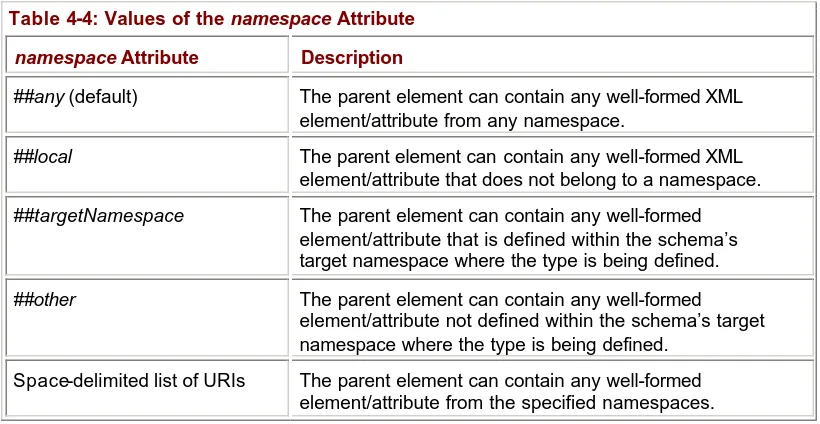
Chapter 4: XML Schema
... 385
Chapter 5: Using WSDL to Document Web Services... 385
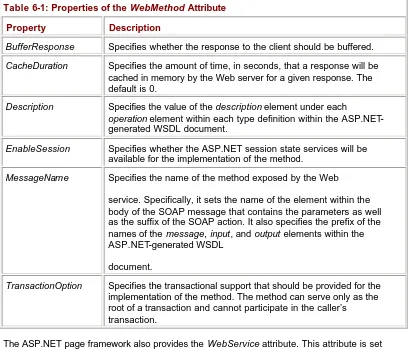
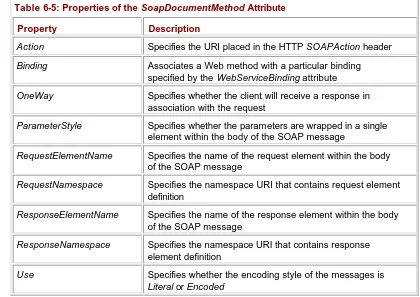
Chapter 6: ASP.NET... 385
Chapter 7: XML Serialization
... 386
Chapter 8: Using Remoting to Build and Consume Web Services... 386
Chapter 9: Discovery Mechanisms for Web Services... 386
Chapter 10: Building Secure Web Services
... 386
Chapter 11: Debugging Web Services
... 386
Chapter 12: Scalability and Availability
... 387
List of Sidebars
... 388
Acknowledgments
As with any project of this magnitude, it took a considerable amount of effort from a lot of people to deliver a complete manuscript.
I couldn’t ask for a more supportive and loving family. I would like to extend a very special thank you to my wife, Suzanne. Without your support, I never could have completed this book. You supported my decision to write this book even though you were pregnant with our first child when I signed the contracts and you gave birth to our son, Colin Patrick Short, toward the beginning of the project.
I would also like to thank my son Colin for being such a good little proofreader as he quietly sat in my lap as I typed, at least for the first 15 to 30 minutes. Now that the book is done, Daddy has much more time to play!
I have the unique opport unity to work for Microsoft but still enjoy the sunshine and the great skiing that Colorado has to offer. I would like to thank the Microsoft Rocky Mountain District management team for supporting my efforts. Specifically, I would like to thank Catharine Morris for your creativity in making this happen. Jim Sargent, Larry Shaw, Laura Neff, and Scott Johnson, without your support, this project would never have gotten off the ground. Catharine and Jim, good luck with your new positions at corporate. I miss you both! I work with a very talented group of peers in Colorado and throughout Microsoft. Of those, I would like to thank Michel Barnett and Joe Hildebrand for your peer reviews of the first couple of chapters and Karsten Januszewski for reviewing the Discovery chapter. I would also like to thank Mike Howard and Peter Roxburg. Your contributions to the
manuscript directly affected getting this book in the hands of the readers in a timely fashion. Thank you both for reading my nagging e-mails about topics I wanted covered in your material.
I would also like to thank the Microsoft Press project team. You guys have been incredibly supportive throughout the entire project. David Clark and I met early on to discuss potential projects. David, thank you for thinking of me when the opportunity to write the Web services title presented itself. Kathleen Atkins was the enforcer. Kathleen, thank you for taking on the unenviable task of ensuring that I didn’t slip the schedule too much. Dail Magee Jr. helped ensure the technical accuracy of the content. Dail, thank you for your colorful commentary in the edited text. I too believe that “the publishing industry went astray when it stopped using scrolls.” Ina Chang had the responsibility of transforming my raw material into prose. Through the course of the project, there were quite a few late nights in which I found myself staring at my computer screen completely exhausted and unmotivated. During these times, I would often fire up my Web browser and look at Jeff Prosise’s Book Blog
(http://www.wintellect.com/about/instructors/prosise/blog/ ), his online diary of the book-writing experience. Reading through a couple of entries always seemed to provide motivation to crank out a few more pages. Jeff, thank you for your inspiration as well as taking the time to give me advice now and then.
Finally I would also like to thank all of the folks in the product group for their support with this project. You all gave me the best material in the industry to write about. Specifically, I would like to thank Keith Ballinger, Rob Howard, Karsten Januszewski, Angela Mills, Jonathan Hawkins, Peter de Jong, Scott Guthrie, and Oliver Sharp.
About the Author
Scott Short is currently a Senior Consultant with Microsoft Consulting Services. He works with a number of high-tech companies, helping them develop scalable, available, and maintainable e-business applications. He is always interested in working with companies to solve challenging problems, so feel free to contact him at [email protected].
Scott has also contributed to a number of books about developing .NET applications and is a frequent speaker at professional developer conferences.
Introduction
You can hardly pick up a technical magazine, developer conference brochure, or corporate IT strategy document without seeing a reference to Web services. So what is all the hype about? Simply put, Web services allow developers to create unrestricted applications— applications that span different operating systems, hardware platforms, and geographic locations. In this book, I explain what Web services are and how you can leverage the Microsoft .NET platform to build and consume them.
Whom This Book Is For
To get the most out of this book, you should be an experienced programmer. The platform on which you have gained your experience is not important. However, you should have a reasonable handle on object-oriented concepts and basic programming constructs. You should also have some familiarity with basic C# syntax. All examples in this book are written in C#. But even if your primary development language is not C#, the examples are simple enough that you should be able to easily port them to other .NET languages, such as Microsoft Visual Basic.
How This Book Is Organized
Developers generally fall into two groups: those who like to learn the underpinnings of a technology before they use it, and those who have little concern about what is going on under the hood and feel comfortable using a tool set that abstracts many of the details. I personally fall into the former category and, chances are, if you have purchased a 400-plus page book dedicated to Web services, so do you. Therefore, I’ve decided to take a bottom-up approach to presenting Web services and the sbottom-upport that the .NET platform provides for building and consuming them.
It is hard to make sense of the details unless you have a good grounding in how Web services fit into the overall solution, so the first two chapters of the book provide the necessary background. In Chapter 1, I explain the rationale behind Web services. I also present an overview of the underlying protocols and explain how they build on one another to provide an overall solution.
Chapter 2 offers a high-level overview of how to use Microsoft Visual Studio .NET to create and consume Web services hosted on the ASP.NET platform. My primary goals in this chapter are to give you an appreciation of how well the ASP.NET runtime abstracts the underlying protocols for the developer and to explain where the protocols come into play in the context of a functioning Web service.
In Chapters 3 through 5, I discuss the core underlying Web services protocols in detail— what some might consider too much detail. Frankly, much of the content in these chapters could have gone into the appendix, but unfortunately the limitations of the publishing process prevented me from making such a drastic change to the structure of the book. So you will have to wait until the second edition.
Meanwhile, I recommend that you skim those chapters the first time through. As you become more involved with Web services, you can give them a more thorough read. There is no better way to advance your understanding of Web services than to have a deep
In Chapters 6 through 8, I get into the heart of the book and explain ASP.NET and
Remoting, the core .NET technologies that enable developers to quickly build and consume Web services. These seemingly overlapping technologies have distinctly different goals. The primary focus of ASP.NET Web services is to maintain the fidelity of the instances of XML datatypes passed between the client and the server. This is in sharp contrast to Remoting, in which the primary focus is to maintain the fidelity of the instances of .NET types passed between the client and the server. In time, these two goals will be achieved by a unified technology set.
In the remaining chapters of the book, I cover specific topics relevant to most production-quality Web services. Chapter 9 explains how to leverage UDDI and DISCO to advertise your Web service and discover other Web services. In Chapter 10, I examine strategies for ensuring that your Web services are secure. In Chapter 11, I explain how to debug your Web service. Chapter 12 offers strategies for ensuring that your Web service meets your
scalability and availability needs. Finally, in Chapter 13, I examine some of the problems involved in building Web services today and introduce emerging technologies that are aimed at addressing these problems.
If You Are in a Hurry
Sometimes I have been engaged in a project for which I need to use a technology that I know little or nothing about. In these cases, I try to learn just enough about the technology to solve the problem at hand. When you find yourself in such a situation, take advantage of the fact that I wrote each chapter of this book to be read individually, without requiring the previous chapters as background. For example, you can pick up the book and start reading
Chapter 6, the ASP.NET chapter, without first reading the chapters on SOAP, XML Schema, or WSDL.
So, without further ado, here is what I recommend you do if you want to get up to speed as quickly as possible developing and consuming Web services:
Skim through Chapter 1 to get a sense of how the technologies and protocols that compose Web services fit together.
Read Chapter 2, and load Visual Studio .NET to follow the steps presented as I build two simple applications. This will help familiarize you with developing basic Web services using the Visual Studio .NET tool set.
Pick out the important pieces of Chapter 6 that apply to your project.
Read the “Interactive Debugging” section of Chapter 11, which is about debugging Web services using the Visual Studio .NET debugger.
Read Chapters 9 and 10 (on Discovery and Security, respectively) as needed.
Throughout the course of the project, thoroughly read Chapters 6 and 7 to get a concise but in-depth overview of how to use the ASP.NET platform to develop and consume Web services.
Finally read the other chapters as needed for your project. For example, if you plan to leverage UDDI, read Chapter 9 for relevant information about publishing your Web services and discovering other Web services.
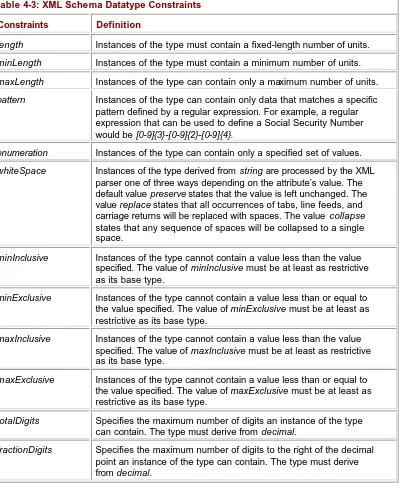
To work through all the samples in this book, you need the hardware and software listed in
Table I-1.
Table I-1: Hardware and Software Requirements
Component Requirements
Visual Studio .NET Enterprise Architect, Enterprise Developer,
Professional, or Academic Edition Processor Pentium III class, 600 MHz or faster
RAM 128 MB or more for Windows 2000 or Windows XP
Professional and 256 MB or more for Windows .NET Server Hard disk 500 MB on the system drive and 3 GB on the installation drive Operating system Windows .NET Server, Windows XP, Windows 2000 or Windows
NT 4.0 CD-ROM or
DVD-ROM drive
Required
Video 800x600 high color (16-bit or higher)
Mouse Microsoft mouse or compatible pointing device
The Companion CD
Many of the samples in this book were too long to print in their entirety without interruption by explanatory text. In reading reviews of other technical books, I have learned that some readers do not like this approach. If you prefer to see a sample application in its entirety, you can go to the companion CD, which contains most of the source code presented in the book. You can view the contents of the CD by inserting it into your CD-ROM drive. If you have the Windows autorun feature enabled, a splash screen will appear and provide you with options for use.
If you don’t feel like lugging around your laptop along with this book, then bag the book! The companion CD also contains an electronic version of the book (an eBook). One of the best features of the eBook is that it is fully searchable. For information about installing and using the eBook, see the Readme.txt file in the \eBook folder.
Support
I have made every effort to ensure the accuracy of the contents of this book and the accompanying code on the companion CD. Despite my efforts, some errors and omissions inevitably occur in this text. Therefore, monitor the list of updates and corrections that will be posted at http://www.microsoft.com/mspress/support/.
If you find what you believe is an error or have a suggestion as to how I could improve the book, please send correspondence to either of the following addresses:
Microsoft Press
Attn: Building XML Web Services for the Microsoft .NET Platform Editor
One Microsoft Way
Redmond, WA 98052-6399 E-mail:
Reference this book within the subject line or body of the e-mail.
Chapter 1:
Why Web Services?
Overview
Component-based programming has become more popular than ever. Hardly an application is built today that does not involve leveraging components in some form, usually from different vendors. As applications have grown more sophisticated, the need to leverage components distributed on remote machines has also grown.
An example of a component-based application is an end-to-end commerce solution. An e-commerce application residing on a Web farm needs to submit orders to a back-end Enterprise Resource Planning (ERP) application. In many cases, the ERP application resides on different hardware and might run on a different operating system.
The Microsoft Distributed Component Object Model (DCOM), a distributed object infrastructure that allows an application to invoke Component Object Model (COM) components installed on another server, has been ported to a number of non-Windows platforms. But DCOM has never gained wide acceptance on these platforms, so it is rarely used to facilitate communication between Windows and non-Windows computers. ERP software vendors often create components for the Windows platform that communicate with the back- end system via a proprietary protocol.
Some services leveraged by an e-commerce application might not reside within the datacenter at all. For example, if the e-commerce application accepts credit card payment for goods purchased by the customer, it must elicit the services of the merchant bank to process the customer’s credit card information. But for all practical purposes, DCOM and related technologies such as CORBA and Java RMI are limited to applications and
components installed within the corporate datacenter. Two primary reasons for this are that by default these technologies leverage proprietary protocols and these protocols are inherently connection oriented.
Clients communicating with the server over the Internet face numerous potential barriers to communicating with the server. Security-conscious network administrators around the world have implemented corporate routers and firewalls to disallow practically every type of communication over the Internet. It often takes an act of God to get a network administrator to open ports beyond the bare minimum.
If you’re lucky enough to get a network administrator to open up the appropriate ports to support your service, chances are your clients will not be as fortunate. As a result,
proprietary protocols such those used by DCOM, CORBA, and Java RMI are not practical for Internet scenarios.
The other problem, as I said, with these technologies is that they are inherently connection oriented and therefore cannot handle network interruptions gracefully. Because the Internet is not under your direct control, you cannot make any assumptions about the quality or reliability of the connection. If a network interruption occurs, the next call the client makes to the server might fail.
Developers have tried to overcome these limitations by leveraging a model called stateless programming, but they have had limited success bec ause the technologies are fairly heavy and make it expensive to reestablish a connection with a remote object.
Because the processing of a customer’s credit card is accomplished by a remote server on the Internet, DCOM is not ideal for facilitating communication between the e-commerce client and the credit card processing server. As in an ERP solution, a third-party component is often installed within the client’s datacenter (in this case, by the credit card processing solution provider). This component serves as little more than a proxy that facilitates communication between the e-commerce software and the merchant bank via a proprietary protocol.
Do you see a pattern here? Because of the limitations of existing technologies in facilitating communication between computer systems, software vendors have often resorted to building their own infrastructure. This means resources that could have been used to add improved functionality to the ERP system or the credit card processing system have instead been devoted to writing proprietary network protocols.
In an effort to better support such Internet scenarios, Microsoft initially adopted the strategy of augmenting its existing technologies, including COM Internet Services (CIS), which allows you to establish a DCOM connection between the client and the remote component over port 80. For various reasons, CIS was not widely accepted.
It became clear that a new approach was needed. So Microsoft decided to address the problem from the bottom up. Let’s look at some of the requirements the solution had to meet in order to succeed.
§ Interoperability The remote service must be able to be consumed by clients on other platforms.
§ Internet friendliness The solution should work well for supporting clients that access the remote service from the Internet.
§ Strongly typed interfaces There should be no ambiguity about the type of data sent to and received from a remote service. Furthermore, datatypes defined by the remote service should map reasonably well to datatypes defined by most procedural programming languages.
§ Ability to leverage existing Internet standards The implementation of the remote service should leverage existing Internet standards as much as possible and avoid reinventing solutions to problems that have already been solved. A solution built on widely adopted Internet standards can leverage existing toolsets and products created for the technology.
§ Support for any language The solution should not be tightly coupled to a particular programming language. Java RMI, for example, is tightly coupled to the Java language. It would be difficult to invoke functionality on a remote Java object from Visual Basic or Perl. A client should be able to implement a new Web service or use an existing Web service regardless of the programming language in which the client was written.
§ Support for any distributed component infrastructure The solution should not be tightly coupled to a particular component infrastructure. In fact, you shouldn’t be
required to purchase, install, or maintain a distributed object infrastructure just to build a new remote service or consume an existing service. The underlying protocols should facilitate a base level of communication between existing distributed object
infrastructures such as DCOM and CORBA.
Web Services Building Blocks
The following graphic shows the core building blocks needed to facilitate remote communication between two applications.
Let’s discuss the purpose of each of these building blocks. Because many readers are familiar with DCOM, I will also mention the DCOM equivalent of each building block.
§ Discovery The client application that needs access to functionality exposed by a Web service needs a way to resolve the location of the remote service. This is accomplished through a process generally termed discovery. Discovery can be facilitated via a
centralized directory as well as by more ad hoc methods. In DCOM, the Service Control Manager (SCM) provides discovery services.
§ Description Once the end point for a particular Web service has been resolved, the client needs sufficient information to properly interact with it. The description of a Web service encompasses structured metadata about the interface that is intended to be consumed by a client application as well as written documentation about the Web service including examples of use. A DCOM component exposes structured metadata about its interfaces via a type library (typelib). The metadata within a component’s typelib is stored in a proprietary binary format and is accessed via a proprietary application programming interface (API).
§ Message format In order to exchange data, a client and a server have to agree on a common way to encode and format the messages. A standard way of encoding data ensures that data encoded by the client will be properly interpreted by the server. In DCOM, messages sent between a client and a server are formatted as defined by the DCOM Object RPC (ORPC) protocol.
§ Encoding The data transmitted between the client and the server needs to be encoded into the body of the message. DCOM uses a binary encoding scheme to serialize the data contained by the parameters exchanged between the client and the server.
§ Transport Once the message has been formatted and the data has been serialized into the body of the message, the message must be transferred between the client and the server over some transport protocol. DCOM supports a number of proprietary protocols bound to a number of network protocols such as TCP, SPX, NetBEUI, and NetBIOS over IPX.
Web Services Design Decisions
Let’s discuss some of the design decisions behind these building blocks for Web services.
Choosing Transport Protocols
The first step was to determine how the client and the server would communicate with each other. The client and the server can reside on the same LAN, but the client might potentially communicate with the server over the Internet. Therefore, the transport protocol must be equally suited to LAN environments and the Internet.
As I mentioned earlier, technologies such as DCOM, CORBA, and Java RMI are ill suited for supporting communication between the client and the server over the Internet. Protocols such as Hypertext Transfer Protocol (HTTP) and Simple Mail Transfer Protocol (SMTP) are proven Internet protocols. HTTP defines a request/response messaging pattern for
submitting a request and getting an associated response. SMTP defines a routable
messaging protocol for asynchronous communication. Let’s examine why HTTP and SMTP are well suited for the Internet.
HTTP-based Web applications are inherently stateless. They do not rely on a continuous connection between the client and the server. This makes HTTP an ideal protocol for high-availability configurations such as firewalls. If the server that handled the client’s original request becomes unavailable, subsequent requests can be automatically routed to another server without the client knowing or caring.
Almost all companies have an infrastructure in place that supports SMTP. SMTP is well suited for asynchronous communication. If service is disrupted, the e-mail infrastructure automatically handles retries. Unlike with HTTP, you can pass SMTP messages to a local mail server that will attempt to deliver the mail message on your behalf.
The other significant advantage of both HTTP and SMTP is their pervasiveness. Employees have come to rely on both e-mail and their Web browsers, and network administrators have a high comfort level supporting these services. Technologies such as network address translation (NAT) and proxy servers provide a way to access the Internet via HTTP from within otherwise isolated corporate LANs. Administrators will often expose an SMTP server that resides inside the firewall. Messages posted to this server will then be routed to their final destination via the Internet.
In the case of credit card processing software, an immediate response is needed from the merchant bank to determine whether the order should be submitted to the ERP system. HTTP, with its request/response message pattern, is well suited to this task.
the orders be submitted to the ERP system in real time. Therefore, SMTP can be leveraged to queue orders so that they can be processed serially by the ERP system.
If the ERP system supports distributed transactions, another option is to leverage Microsoft Message Queue Server (MSMQ). As long as the e-commerce application and the ERP system reside within the same LAN, connectivity via non-Internet protocols is less of an issue. The advantage MSMQ has over SMTP is that messages can be placed and removed from the queue within the scope of a transaction. If an attempt to process a message that was pulled off the queue fails, the message will automatically be placed back in the queue when the transaction aborts.
Choosing an Encoding Scheme
HTTP and SMTP provide a means of sending data between the client and the server. However, neither specifies how the data within the body of the message should be encoded. Microsoft needed a standard, platform-neutral way to encode data exchanged between the client and the server.
Because the goal was to leverage Internet-based protocols, Extensible Markup Language (XML) was the natural choice. XML offers many advantages, including cross-platform support, a common type system, and support for industry -standard character sets. Binary encoding schemes such as those used by DCOM, CORBA, and Java RMI must address compatibility issues between different hardware platforms. For example, different hardware platforms have different internal binary representation of multi-byte numbers. Intel platforms order the bytes of a multi-byte number using the little endian convention; many RISC processors order the bytes of a multi-byte number using the big endian convention. XML avoids binary encoding issues because it uses a text-based encoding scheme that leverages standard character sets. Also, some transport protocols, such as SMTP, can contain only text-based messages.
Binary methods of encoding, such as those used by DCOM and CORBA, are cumbersome and require a supporting infrastructure to abstract the developer from the details. XML is much lighter weight and easier to handle because it can be created and consumed using standard text-parsing techniques.
In addition, a variety of XML parsers are available to further simplify the creation and consumption of XML documents on practically every modern platform. XML is lightweight and has excellent tool support, so XML encoding allows incredible reach because practically any client on any platform can communicate with your Web service.
Choosing a Formatting Convention
It is often necessary to include additional metadata with the body of the message. For example, you might want to include information about the type of services that a Web service needs to provide in order to fulfill your request, such as enlisting in a transaction or routing information. XML provides no mechanism for differentiating the body of the message from its associated data.
another transport protocol, such as SMTP. Because the routing information is specific to the message and not the transport protocol, it should be a part of the message.
Simple Object Access Protocol (SOAP) provides a protocol-agnostic means of associating header information with the body of the message. Every SOAP message must define an envelope. The envelope has a body that contains the payload of the message and a header that can contain metadata associated with the message.
SOAP imposes no restrictions on how the message body can be formatted. This is a potential concern because without a consistent way of encoding the data, it is difficult to develop a toolset that abstracts you from the underlying protocols. You might have to spend a fair amount of time getting up to speed on the Web service’s interface instead of solving the business problem at hand.
What was needed was a standard way of formatting a remote procedure call (RPC) message and encoding its list of parameters. This is exactly what Section 7 of the SOAP specification provides. It describes a standard naming convention and encoding style for procedure-oriented messages. I will discuss SOAP in more detail in Chapter 3.
Because SOAP provides a standard format for serializing data into an XML message, platforms such as ASP.NET and Remoting can abstract away the details for you. In the next chapter, I will show how to create and consume two Web services for which knowledge of SOAP is not required.
Choosing Description Mechanisms
SOAP provides a standard way of formatting messages exchanged between the Web service and the client. However, the client needs additional information in order to properly serialize the request and interpret the response. XML Schema provides a means of creating schemas that can be used to describe the contents of a message.
XML Schema provides a core set of built-in datatypes that can be used to describe the contents of a message. You can also create your own datatypes. For example, the merchant bank can create a complex datatype to describe the content and structure of the body of a message used to submit a credit card payment request.
A schema contains a set of datatype and element definitions. A Web service uses the schema not only to communicate the type of data that is expected to be within a message but also to validate incoming and outgoing messages.
A schema alone does not provide enough information to effectively describe a Web service, however. The schema does not describe the message patterns between the client and the server. For example, a client needs to know whether to expect a response when an order is posted to the ERP system. A client also needs to know over what transport protocol the Web service expects to receive requests. Finally, the client needs to know the address where the Web service can be reached.
This information is provided by a Web Services Description Language (WSDL) document. WSDL is an XML document that fully describes a particular Web service. Tools such as ASP.NET WSDL.exe and Remoting SOAPSUDS.exe can consume WSDL and automatically build proxies for the developer.
As with any component used to build software, a Web service should also be accompanied by written documentation for developers who program against the Web service. The
some examples of how to use it. Good documentation is especially important if the Web service is exposed to clients over the Internet.
Choosing Discovery Mechanisms
Once you’ve developed and documented a Web service, how can potential clients locate it? If the Web service is designed to be consumed by a member of your development team, your approach can be pretty informal, such as sharing the URL of the WSDL document with your peer a couple of cubicles down. But when potential clients are on the Internet,
advertising your Web service effectively is an entirely different story.
What’s needed is a common way to advertise Web services. Universal Description, Discovery, and Integration (UDDI) provides just such a mechanism. UDDI is an industry-standard centralized directory service that can be used to advertise and locate Web services. UDDI allows users to search for Web services using a host of search criteria, including company name, category, and type of Web service.
Web services can also be advertised via DISCO, a proprietary XML document format defined by Microsoft that allows Web sites to advertise the services they expose. DISCO defines a simple protocol for facilitating a hyperlink style for locating resources. The primary consumer of DISCO is Microsoft Visual Studio .NET. A developer can target a particular Web server and navigate through the various Web services exposed by the server.
What’s Missing from Web Services?
You might have noticed that some key items found within a distributed component
infrastructure are not defined by Web services. Two of the more noticeable omissions are a well-defined API for creating and consuming Web services and a set of component services, such as support for distributed transactions. Let’s discuss each of these missing pieces.
§ Web service –specific API Most distributed component infrastructures define an API to perform such tasks as initializing the runtime, creating an instance of a component, and reflecting the metadata used to describe the component. Because most high-level programming languages provide some degree of interoperability with C, the API is usually exposed as a flat set of C method signatures. RMI goes so far as to tightly couple its API with a single high-level language, Java.
In an effort to ensure that Web services are programming language–agnostic, Microsoft has left it up to individual software vendors to bind support for Web services to a particular platform. I will discuss two Web service implementations for the .NET platform, ASP.NET and Remoting, later in the book.
§ Componentservices The Web services platform does not provide many of the services commonly found in distributed component infrastructures, such as remote object lifetime management, object pooling, and support for distributed transactions. These services are left up to the distributed component infrastructure to implement. Some services, such as support for distributed transactions, can be introduced later as the technology matures. Others, such as object pooling and possibly object lifetime management, can be considered an implementation detail of the platform. For example, Remoting defines extensions to provide support for object lifetime management, and Microsoft Component Services provides support for object pooling.
Component-based programming has proven to be a boon to developer productivity, but some services cannot be encapsulated by a component that resides within the client’s datacenter. Legacy technologies such as DCOM, CORBA, and Java RMI are ill-suited to allowing clients to access services over the Internet, so Microsoft found it necessary to start from the bottom and build an industry-standard way of accessing remote services.
Chapter 2:
Creating a Basic Web Service
Overview
In this chapter, I show you how to build a couple of Web services so that you can see how easy it is to do. In later chapters, when I discuss the underlying protocols, you will more fully appreciate how much complexity is abstracted for you by the .NET platform. In this chapter, I make high-level references to those underlying technologies to give you a basic
understanding of where they fit into the larger picture.
In the first example, you create a simple commerce application in Microsoft ASP.NET—a Web Form for collecting payment information. Then you create a Web service that performs credit card validation business logic on behalf of the application. This example shows you how easy it is to refactor an existing .NET application to move business logic into a Web service so that it can be used by other applications.
In the second example, you create a Web service for sending and receiving binary files. As I mentioned in Chapter 1, messages between the Web service and the client are encoded in XML. Because XML is a text-based markup language, we can encode something into the message that might be surprising: the contents of a binary file. The binary file is contained within a complex type. The complex type also contains information about the file. This example demonstrates to you the robustness of the underlying .NET Framework. These two scenarios should give you a good idea of what the .NET platform offers. I also show you in this chapter how the rapid application development capabilities of Microsoft Visual Studio .NET simplify development of applications that expose or consume Web services. Because the best way to learn is by doing, I encourage you to fire up Visual Studio .NET and step through the processes I describe to create the sample applications yourself.
A Simple Commerce Application
You will first create an ASP.NET Web Form that collects and validates credit card information. The Web Form allows users to enter their credit card information, and then it informs users whether the information they entered is valid. You then move the credit card validation logic into a Web service and modify the Web Form so that it calls the Web service to validate the credit card information.
Creating a Web Form
Visual Studio .NET creates a project on the specified Web server and places template Web application files into that directory. Included in these files is a Web Form page named WebForm1.aspx. Rename it Order.aspx, and then change the name of the class defined within Order.aspx from WebForm1 to Order by following these steps:
1. Open the Order.aspx code-behind file by right-clicking on the filename in Solution Explorer and selecting View Code.
2. Change the name of the WebForm1 class and its corresponding constructor to Order. 3. In the Properties pane, change the name of the label to Status, the text of the label to
Please enter your credit card information, the name of the button to PlaceOrder, and the text of the button to Place Order. After you adjust the layout and add some additional text, the Web Form should look similar to the following:
public void PlaceOrder_Click(object sender. Syste.EventArgs e) {
if(Validate(TextBox1.Text, Calendar1.SelectedDate) ) {
Status.Text = "Thank you for your order."; }
else {
Status.Text = "Credit card invalid."; }
}
Next you create the Validate method immediately following the PlaceOrder_Click method. public bool Validate(string cardNumber, DateTime expDate)
{
if(expDate >= DateTime.Today) {
int total = 0; int temp = 0;
char [] ccDigits = cardNumber.ToCharArray();
for(int i = 0; i < cardNumber.Length; i++) {
if(((i+1)%2) == 0) {
total += int.Parse(ccDigits[i].ToString()); }
else {
temp = int.Parse(ccDigits[i].ToString()) * 2; if(temp > 9)
{
temp = (int)temp - 9; }
total += temp; }
}
if((total%10) ==0) {
} else {
return false; }
} else {
return false; }
}
The Validate method determines whether the expiration date has passed. If it has not, the
Validate method uses a standard mod10 algorithm to validate the credit card number. Now compile and test the Web application to ensure that it works as expected.
Creating a Payment Web Service
At this point, the validation functionality is embedded in the Web Form. Now I will show you how to leverage the validation functionality within other applications. For example, you might want to develop a WinForm application for running the cash registers. This application would probably need to call the same logic to validate credit cards. If you expose the validation logic as a Web service, any application that can send and receive XML over HTTP will be able to invoke the service to validate credit card information.
You have a couple of options for creating the new Web service. You can simply add the Web service to an existing application by choosing Add Web Service from the Project menu. Or you can create a new project to contain the Web service.
Recall that your intention is to have the credit card validation logic serve as a shared resource across multiple applications. It might have infrastructure and scalability
requirements that differ from those of the commerce application. So, in this case you will create a separate application—a Visual Studio .NET Web service application.
Change the name of the Service1.asmx file to CreditCard.asmx. Because it is good practice to have the class name match the name of the .asmx file, change the name of the Service1
class to CreditCard. Visual Studio .NET creates a code-behind file for the .asmx file similar to those it creates for .aspx files, so you must open CreditCard.asmx.cs to modify the class declaration. To view the code-behind file, right-click on CreditCard.asmx and choose View Code. Change the name of the Service1 class and its corresponding constructor to
CreditCard.
Next cut the Validate method from the Order Web Form and paste it into the CreditCard
class. Then decorate the class with the WebMethod attribute and compile the application. The WebMethod attribute is the only code required to expose the Validate method on the Web!
[WebMethod]
public bool Validate(string cardNumber, DateTime expDate) {
: }
The WebMethod attribute tells the ASP.NET runtime to provide all of the implementation required to expose a method of a class on the Web—including the ability to advertise the Web service’s functionality in the form of Web Services Description Language (WSDL). Visual Studio .NET will use the automatically generated WSDL to create a reference to the Web service in your commerce application.
Next test the Validate method using the test harness supplied with the documentation. Entering a valid credit card number and a date of 1/1/2052 produces the following results (assuming you are not reading a 50-year-old book):
<?xml version="1.0" encoding="utf-8" ?>
<boolean xmlns="http://tempuri.org/">true</boolean>
As expected, the result is true. However, the XML response message is not a valid SOAP message. There are multiple ways in which an ASP.NET-hosted Web service can be called. The Web service will return a well-formed SOAP message only if the request was a SOAP message. I will discuss ASP.NET-hosted Web services in detail in Chapter 6.
Updating the Order Web Form
The next task is to switch back to the Commerce application and update the Order Web Form so that it calls the CreditCard Web service to validate the user’s credit card. You first add a Web reference for the CreditCard Web service to the commerce application by using the Web Reference Wizard.
Click Add Reference. You should see the Web reference listed in Solution Explorer. Visual Studio .NET processes the WSDL metadata associated with the Payment Web service and automatically creates a proxy. You can think of WSDL as the Web services equivalent of a TypeLib. The resulting proxy allows the Web service to be treated like any other .NET class. Next you alter the implementation of the PlaceOrder_Click method to call the Web service instead of the local Validate function. First create an instance of the CreditCard class by using the new keyword as you would with any other .NET type. Notice that the default namespace for the Web service is the name of the server on which it resides.
public void PlaceOrder_Click (object sender, System.EventArgs e) {
localhost.CreditCard cc = new localhost.CreditCard();
Finally you call the Validate method on the cc object to cause a communication exchange to occur between the client (the Order Web Form) and the CreditCard Web service.
if(cc.Validate(TextBox1.Text, Calendar1.SelectedDate)) {
Status.Text = "Thank you for your order."; }
else {
Status.Text = "Credit card invalid."; }
}
If you are writing the code as you read this chapter, notice that you have full IntelliSense support for the cc object. After you type cc., the list of methods supported by the object, including the Validate method, will be shown. As soon as you type the opening parenthesis for the method, the parameters for the method will be displayed—including the .NET equivalent of the Web service’s parameter types.
WebMethod attribute. Once the code is compiled and deployed, any client that supports HTTP and is capable of parsing strings can call the method.
The Web File Share Application
This example will create a Web service that allows binary files to be transferred over HTTP and SOAP. Because SOAP leverages an XML-based method of encoding, you must represent method parameters and return values in a way that is conducive to XML.
In the preceding example, it was rather straightforward to encode the credit card number and the expiration date. In this example, the Web service will encode complex types that contain, among other things, binary data. As you will see, the .NET platform will handle the encoding and decoding for you. It will ensure that byte arrays are encoded so that they do not introduce special characters into the SOAP message that would invalidate the XML.
Before I go any further, I want to throw in a little disclaimer: There are more efficient ways of sending the content of a file over the Web than encoding it into a SOAP message. The purpose of this example is not to create a replacement for FTP; it is to demonstrate the power and flexibility of Web services and the robustness of the .NET platform.
Creating the WebFileShare Web Service
The WebFileShare Web service will expose two methods, ListFiles and GetFile. ListFiles is used to obtain a list of files that are available from the Web service, and GetFile will allow the client to retrieve the specified file.
First you create a Visual Studio .NET Web Service project using steps similar to those shown in the previous example: Open Visual Studio .NET, and create a new project. Set the project type to your language of choice, and select the Web Service template. Name your project WebFileShare, and set the location to a URL that points to the targeted Web server.
Change the name of the Service1.asmx file to WebDirectory.asmx. Right- click on
WebDirectory.asmx, and choose View Code. Change the name of the Service1 class and its corresponding constructor to WebDirectory. Then modify the Inherits property in the ASMX header to point to the new class name.
Now that you have set up the Visual Studio .NET project, you will add the implementation to enable the client to request and retrieve files. First you need to create an alias for the
System.IO namespace with the using keyword. Underneath the using statement that creates an alias for the System.Web.Services namespace, type the following statement:
using System.IO;
Next you define the WebFile structure, which encapsulates the contents of the file in addition to its metadata. The file structure contains the name of the file, the file’s contents, and the file system attributes associated with the file.
Define the following structure immediately after the WebFileShare namespace is defined: public struct WebFile
{
public DateTime LastAccessTime; public DateTime LastWriteTime; }
Next you need to create a number of methods within the WebFileShare class. These methods will be defined immediately before the example HelloWorld method.
The first method that must be defined returns a list of files available for download in the c:\Public directory. The list of files is returned as an array of strings. The .NET Framework will properly serialize the array for you.
[WebMethod]
public string[] ListFiles() {
return Directory.GetFiles("c:\\Public"); }
Next you create a GetFile method that allows the client to request a file. If the file is available, an instance of the WebFile structure should be sent back to the client. In this method, you use the System.IO.File object to obtain the necessary information about the file. You obtain a Stream object from the File object and write the contents of the stream into a byte array in the WebFile structure. You also set the CreationTime, LastAccessTime, and
LastWriteTime fields to the values obtained from the associated static methods exposed by the File class.
[WebMethod]
public WebFile GetFile(string fileName) {
WebFile webFile = new WebFile();
string filePath = "c:\\Public\\" + fileName;
// Set the name of the file. webFile.Name = fileName;
// Obtain the contents of the requested file. Stream s = File.Open(filePath, FileMode.Open); webFile.Contents = new byte[s.Length];
s.Read(webFile.Contents, 0, (int)s.Length); s.Close
// Retrieve the date/time stamps for the file.
webFile.CreationTime = File.GetCreationTime(filePath); webFile.LastAccessTime =
File.GetLastAccessTime(filePath);
webFile.LastWriteTime = File.GetLastWriteTime(filePath);
After the WebFile structure is initialized, it is sent back to the client. Once again, the .NET Framework performs the appropriate serialization. In this case, the instance of the structure is serialized, including its data. The Contents byte array is encoded into its Base-64 representation. Base-64 encoding maps each byte of the array into an alphanumeric character that can be contained within the XML document without introducing any invalid characters. In addition, the values of the Name, CreationTime, LastAccessTime, and
LastWriteTime fields are serialized into the SOAP message.
In future chapters, I will discuss in detail how the .NET Framework encodes more complex data types such as structures, byte arrays, and enumerations. The important thing to realize is that the resulting message is 100 percent compliant with the industry-standard SOAP specification. Therefore, clients on other platforms, operating systems, or hardware can interact with your WebDirectory Web service.
Now that you have built the Web service, let’s create a client for retrieving files through the WebFileSystem Web service.
Creating the WebFileUtil Program
Next you will create a console application to retrieve files from the WebFileShare Web service. This console application will accept at least two command- line arguments: a command specifying the action to take, and the name of the targeted file. You can optionally specify a third argument if you want to specify the name of the destination file. Otherwise, the default value is the original name of the file.
Start by opening Visual Studio .NET and selecting Create New Project. Set the project type to your language of choice, select the Console Application template, and name the project WebFileUtil, as shown here:
You can change the name of the Service1 file (with an extension based on the language you chose) to WebFileUtil and then delete the default implementation in WebFileUtil provided by Visual Studio .NET.
Next you add a Web reference to the WebDirectory Web service. Start the Web Reference Wizard by choosing Add Web Reference from the Project menu. In the Address text box, enter the URL of the server that hosts the Web service. Click on the link to the
Click the Add Reference button. Change the name of the new W eb reference listed in Solution Explorer to WebFileShare.
Now that you have created and configured a Web reference, let’s step through a C# implementation of WebFileUtil.
First you import the System.IO namespace into the project. This will simplify your code when you use the File class in the code below. You must also import the namespace of your Web reference, WebFileShare.
using System; using System.IO;
using WebFileUtil.WebFileShare;
namespace WebFileUtil {
You then change the name of the class from Class1 to a more descriptive name,
WebFileUtil.
public class WebFileUtil
Ensure that the program was passed the correct number of command-line arguments, and then initialize the source and destination variables.
{
// Validate number of command-line arguments. if(args.Length < 1 || args.Length > 3)
{
DisplayUsage(); return 1;
}
string destination = source;
if(args.Length == 3)
destination = args[2];
Next process the commands that were passed. The appropriate helper function will be called for the DIR or GET command:
// Process command.
switch(args[0].ToUpper()) {
case "DIR": ListFiles(); break;
case "GET":
GetFile(source, destination); break;
default:
DisplayUsage(); break;
}
return 0; }
Next create a ListFiles method to output to the console the list of files available from the Web service. To do this, create a WebDirectory object and a reference to an array of strings. Then set the reference to the array of strings equal to the return value from the
WebDirectory.ListFiles method. Finally iterate through the array and write the name of each file out to the console.
private static void ListFiles() {
WebDirectory webDir = new WebDirectory(); string[] files;
files = webDir.ListFiles(); foreach(string file in files) {
Console.WriteLine(file); }
Console.WriteLine("\n{0} file(s) in directory.", files.Length);
To create the GetFile method that will retrieve the requested file and save it to the file system, you first create a new instance of the WebDirectory class and a reference to
WebFile. Then you call the GetFile method on the WebDirectory object to retrieve the
WebFile object. You open the destination file and use the stream class to write the byte array to the file. Finally you set the date/time stamps for the file to the values contained within the CreationTime, LastAccessTime, and LastWriteTime fields.
private static void GetFile(string source, string destination) {
WebDirectory webDir = new WebDirectory(); WebFile webFile = new WebFile();
// Retrieve the requested file and then save it to disk. webFile = webDir.GetFile(source);
// Save the retrieved Web file to the file system. FileStream fs = File.OpenWrite(destination);
fs.Write(webFile.Contents, 0, webFile.Contents.Length); fs.Close();
// Set the date/time stamps for the file.
File.SetCreationTime(destination, webFile.CreationTime); File.SetLastAccessTime(destination, webFile.LastAccessTime); File.SetLastWriteTime(destination, webFile.LastWriteTime); }
Finally you create a DisplayUsage method to write the proper syntax for WebFileUtil to the console.
private static void DisplayUsage() {
Console.WriteLine("WebFile is used to retrieve files from the
WebDirectory Web service.");
Console.WriteLine("\nUsage: WebFile command source [destination]");
Console.WriteLine("\tcommand - Either DIR or GET."); Console.WriteLine("\tsource - The name of the file to retrieve.");
Console.WriteLine("\tdestination - Optionally the name of the
destination file.");
Console.WriteLine("\nExamples:");
Console.WriteLine("\tWebFile GET somefile.exe");
Console.WriteLine("\tWebFile GET somefile.exe c:\temp\myfile.exe");
} }
Note that this example uses .NET types throughout. The Web service declared classes that exposed methods with strongly typed parameters and return values. For example, the WebFileShare Web service declared a WebFile struct. The client code uses the WebFile
struct as if it were a native .NET type even though the messages are passed between the WebFileUtil client and the WebDirectory Web service in XML.
As a result, many of the rich features of Visual Studio .NET are available to the developer, such as IntelliSense and the ability to catch type mismatch errors at compile time. For example, the WebFile structure was available to the client with no loss in fidelity. If the client attempts to set the LastAccessTime field to a string, an error would be generated at compile time. This was accomplished because the WebFile structure was exposed in the WSDL file that is automatically generated by the ASP.NET runtime. Visual Studio .NET uses the information in the WSDL file to create a strongly typed proxy for the Web service.
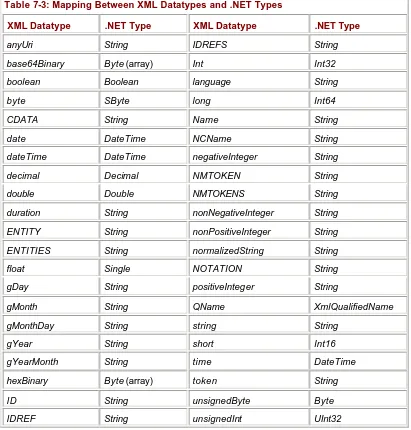
As you might assume, the byte array had to be encoded in some fashion before it could be included in an XML document. However, the .NET infrastructure handled all of the encoding for you. The byte array was transformed into a Base-64-encoded string, placed into the SOAP message, sent across the wire, and then decoded back into a byte array. (I will cover Base-64 and other XML data types in Chapter 4.)
Summary
This chapter demonstrates how easy it is to create and consume Web services using Visual Studio .NET. You create two Web services, one to validate a credit card and the other to send and retrieve files.
The first example demonstrates the ease with which you can factor Web services into your existing .NET applications. You are easily able to move the business logic for your Web application and place it into its own Web service. The second example, in which you create a Web service for receiving files, demonstrates the flexibility of Web services and the
robustness of the .NET Framework.
Almost all of the code you write in this chapter is related to business logic instead of building infrastructure. The only code you write to expose methods as Web services is to decorate the method with the WebMethod attribute. The ASP.NET framework handled decoding the request message from the client and encoding the response message.
Microsoft .NET provides many services for the client as well. Visual Studio .NET