Hanaa A. Sayed et al, International Journal of Computer Science and Mobile Applications, Vol.7 Issue. 3, March- 2019, pg. 1-7 ISSN: 2321-8363 Impact Factor: 5.515
ع
elmni-
AN ANDROID APPLICATION
FOR TEACHING ARABIC LANGUAGE
AND ARABIC LITERACY
Hanaa A. Sayed
1; Moetaz A. Barakat
2; Mohamed A. Mohamed
2;
Taha H. Awad
2; Ayman S. Fahmy
21
Faculty of Science, Assuit University, Egypt, [email protected]
2
Faculty of Science, Assuit University, Egypt
Abstract
Illiteracy is one of the biggest problems faces the developing countries. The illiteracy in the Arab world has reached 96 million; two thirds of them are women, According to Arab Human Development Report. We will use a graphical interactive ways to teach the illiterate people. We build this application (عelmni) to help illiterate people to confront illiteracy and eliminate it. The application allows users learn the Arabic letters and words with many activates. The application helps the three types of learners auditory, visual and kinesthetic/tactile. We use speech recognition technique to measure the reading skills. The words are displayed in text and the user is asked to pronounce it. The application can work online from the cloud or offline.
Keywords: Android Application, Teaching Arabic Language, and Arabic Literacy
1.
Introduction
Smartphone usage in the Middle East registered a growth rate of 16.2% in 2016, growing by 123.7 million compared to 106.4 million in 2015 [1]. The number of mobile subscribers in the Middle East is 381 million, representing 64% of the total population.
The Arabic alphabet is the Arabic script as it is codified for writing Arabic language. It is written from right to left in a cursive style and includes 28 letters [2]. Most letters have contextual letterforms. The Arabic alphabet is always cursive and letters vary in shape depending on their position within the word. Letters can exhibit up to four distinct forms corresponding to an initial, medial (middle), final, or isolated position (IMFI). While some letters show considerable variations, others remain almost identical across all four positions. Generally, letters in the same word are linked together on both sides by short horizontal lines.
Most people today depend on Self-Learning instead of normal learning and as result the use of technology increased by the time and people start to use tools and applications help them in this mission whatever OS application designed. With the increased availably of computers, many applications are being used in learning process. Computer-based multimedia learning environments—consisting of pictures and words offer a potentially powerful venue for improving student understanding.
With the increased availably of computers, many applications are being used as computer-based learning (CBL). CBL provides several advantages over paper-and-pencil learning including ease and flexibility of administering and grading tests, as well as allowing for the development of novel technology-based learning environments [3]. Language is a living thing, so the best way to learn a language is in interactive, authentic environments. Computer technologies and the Internet are powerful tools for assisting these approaches to language teaching [4].
Hanaa A. Sayed et al, International Journal of Computer Science and Mobile Applications, Vol.7 Issue. 3, March- 2019, pg. 1-7 ISSN: 2321-8363 Impact Factor: 5.515
2.
Related Work
There are few mobile applications for learning language such as Sololearn, Duolingo and Lingbe. Sololearn helps users to learn the most popular programming language such as Java, C++ and Python [5]. Duolingo helps in learning human language such as English, Arabic and French [5]. Lingbe also is used to practice languages with native speakers [7].
There are application learning Arabic from other languages such as English and French. Arabic Alphabet – TenguLogi is example of these applications [8]. In this work we propose to learn Arabic for natives reading and writing. There are three types of learners auditory, visual and kinesthetic/tactile [9]. In our application we tried to satisfy the three learner’s style for example: for Auditory learning they remember information by talking aloud in word pronounce quiz we think by that way the talking skills improved. For visual learners we supplied our application by big number of pictures to relate letters and words with pictures. For tactile learners they want to be involved in learning process this type of learners will be very useful for us by rate the application and send their suggestions to improve the application.
For language learning, speech recognition can be useful for learning language [9]. It can teach proper pronunciation, in addition to helping a person develop fluency with their speaking skills.
The present work aims to:
Teaching kids the main concepts of Arabic Language like letters ,Words and Writing
Teaching non-spoken Arabic language some keys of this language
Help illiterate people on their fight against the illiterateness
Find the easy way to teach users with the good tools
3.
The Proposed Application (عelmni)
Our application was implemented on android operating system which an operating system for mobile devices. The advantage of this operating system is providing access to a wide range of useful libraries and tools that can be used to build rich applications [11] as speech recognition.
We used three types of database in the application explained as the following: SharedPreferences Interface in android for accessing and modifying preference data as key and value and using on small data [12]. Each SharedPreferences file is managed by the framework and can be private or shared. Firebase is a mobile and web application development platform, Firebase gives the tools and infrastructure that need to build better applications and grow successful businesses. We used four services from Firebase: Realtime Database, Authentication, Cloud Storage and Crash Reporting.
The application logo (عelmni) is pronounced AAlemni, which means teach me in English. The first letter is Arabic letter (the first letter in the word Arab" برع" . (
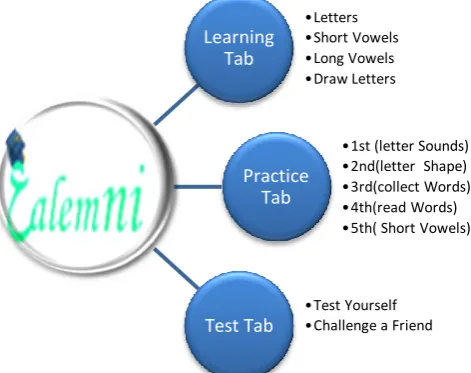
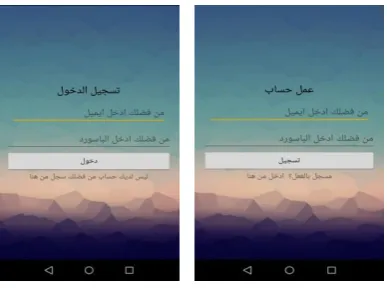
3elmni application allows user to create account and login as shown in figure 1. Then the user can use the main tabs of application. The main tabs are learning tab, practice tab and test tab.
Learning Tab •Letters •Short Vowels •Long Vowels •Draw Letters Practice Tab
•1st (letter Sounds) •2nd(letter Shape) •3rd(collect Words) •4th(read Words) •5th( Short Vowels)
Test Tab
Hanaa A. Sayed et al, International Journal of Computer Science and Mobile Applications, Vol.7 Issue. 3, March- 2019, pg. 1-7 ISSN: 2321-8363 Impact Factor: 5.515
The download manager is a system service that handles long-running HTTP downloads. Clients may request that a URI be downloaded to a particular destination file. The download manager will conduct the download in the background, taking care of HTTP interactions and retrying downloads after failures or across connectivity changes and system reboots. Instances of this class should be obtained through getSystemService(String) by passing DOWNLOAD_SERVICE. Applications that request downloads through this API should register a broadcast receiver for ACTION_NOTIFICATION_CLICKED to appropriately handle when the user clicks on a running download.
Figure 2: create account and login
To maintain security for the system and users, Android requires applications to request permission before the application can use certain system data and features. Depending on how sensitive the area is, the system may grant the permission automatically, or it may ask the user to approve the request in our application we added some of these permissions: ACCESS_NETWORK_STATE, INTERNET, WRITE_EXTERNAL_STORAGE, READ_EXTERNAL_STORAGE, CAMERA.
To guarantee best performance user should consider the following; Minimum version of android should not less than KitKat, If you doesn’t want to download the data on your device you should have an internet connection, the device must support speech recognition technology to solve related quiz
4.
عelmni Tabs Layout
3elmni application tabs use Arabic language and depend mainly on images. The GUI is friendly and easy to understand. We use expressed icons rather than words. The user can create an account by entering Email address as user identifier to confirm the account and password. Then the user used this data to login as shown in figure 2.
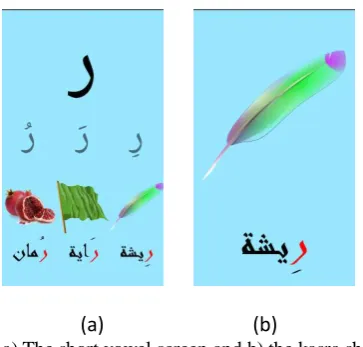
The application composed of three tabs learning tab, practice tab and test tab. The first tab is learning tab contain four buttons Arabic letters, short vowels, long vowels and letter drawing as shown in figure 4. The letter button opens the letters panel as shown in figure 3. As soon as the letter panel opened a song of Arabic letters is played. When the user press any letter the letter showed, pronounced and three words contain the letter viewed with their images as shown in figure 3.
The letter screen contains the letter image and the letter pronounced sound. Also it contain three words have the letter in varies places (beginning, middle and end) of the word. Each word can be opened to show and listen the word as shown in figure 4.
Hanaa A. Sayed et al, International Journal of Computer Science and Mobile Applications, Vol.7 Issue. 3, March- 2019, pg. 1-7 ISSN: 2321-8363 Impact Factor: 5.515
Figure 3: learning tab and Arabic letters panel
(a) (b)
Figure 4: a) the letter screen and b) word screen
(a) (b)
Hanaa A. Sayed et al, International Journal of Computer Science and Mobile Applications, Vol.7 Issue. 3, March- 2019, pg. 1-7 ISSN: 2321-8363 Impact Factor: 5.515
above the preceding consonant. Wāw is the long vowel ū (like the "oo" in "moon"). It also represents the consonant w. When Waw is used to represent the long vowel, damma appears above the preceding consonant as shown in figure 6.
(a)Arabic long vowel (b) Alif (c) Ya' (d) Wāw
Figure 6: Arabic long vowel screen.
The fourth button is drawing. In this screen the selected letter is drawn to teach the user how to write the letter as shown in figure 7.
Figure 7: the drawing screen of letter
The practice tab composed of five levels practice buttons to train the user to remember the letters and words. The first two levels are practice in letters while the next three levels are practice in word write and reading as shown in figure 8 and figure 9. In the first level the user trained to remember and find matched the letter shape as shown in fig 8(a).
Hanaa A. Sayed et al, International Journal of Computer Science and Mobile Applications, Vol.7 Issue. 3, March- 2019, pg. 1-7 ISSN: 2321-8363 Impact Factor: 5.515
The second level, the user match the letter vowel with the letter shape using picture of thing begin by the letter vowel as shown in figure 8(b). The user answer’s is evaluated and go to the next exercise. The exercises are selected randomly from the exercise data.
The levels from the third to the fifth are in word reading and writing. The third level shows picture of word and the user compose the word from the given letters. In the fourth level the word is dictated to the user. The fifth level shows the word and the user read it.
Figure9: examples of practice levels from the third to the fifth
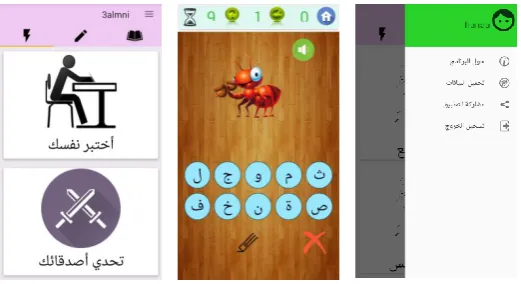
The last tab in application is test tab. There are two buttons in the test tab. The first button evaluates the user performance. The evaluation test contains 10 questions. The time for each question is 15 seconds. The test questions are selected randomly from question database. The second button is challenge a friend in the same test as shown in figure 10.
Figure 10: The test tab, the evaluation test screen and the main menu
The main menu of the application contain many commands such as about application, download data, share the application, and logoff as shown in figure10.
5.
Conclusion
Hanaa A. Sayed et al, International Journal of Computer Science and Mobile Applications, Vol.7 Issue. 3, March- 2019, pg. 1-7 ISSN: 2321-8363 Impact Factor: 5.515
References
1. https://www.statista.com/statistics/494580/smartphone-users-in-middle-east-and-africa/
2. Hanaa A. Sayed, 2006, ―Translation of Arabic Text to Sign Language by Computer Animation‖, Master Of Computer Science, Submitted To The Faculty Of Science, Assiut University.
3. Mayer, Richard E., and Roxana Moreno. 2002 "Aids to computer-based multimedia learning." Learning and instruction 12.1, 107-119.
4. Li, W. A. N. G. 2005"The advantages of using technology in second language education." TH E Joural 32.10 (): 38-42.
5. https://www.sololearn.com/
6. https://forum.duolingo.com/comment/13914239/Learn-programming-Duo-style 7. http://www.lingbe.com/
8. https://www.fluentu.com/blog/arabic/arabic-apps/
9. Gilakjani, Abbas Pourhossein. 2012,"Visual, auditory, kinaesthetic learning styles and their impacts on English language teaching." Journal of studies in education 2.1 : 104-113.
10. Witt, Silke Maren. 1999, Use of speech recognition in computer-assisted language learning. Diss. University of Cambridge.
11. "Android Overview" Open Handset Alliance. Retrieved 2019-03-04. 12. https://developer.android.com/reference/android/content/SharedPreferences
13. Habash, Nizar, Abdelhadi Soudi, and Timothy Buckwalter. 2007,"On arabic transliteration." Arabic computational morphology. Springer, Dordrecht,. 15-22.
A Brief Author Biography
1st Hanaa A. Sayed – Received her Ph.D in Computer Science (computer vision) from Faculty of Science, Assuit University, Egypt in 2014. She received the M. Sc. in Computer Science (computer graphics) from Faculty of Science, Assuit University, Egypt in 2006. She is now Lecturer of computer science in Mathematic Department, Faculty of Science, Assuit University, Egypt.
2ndMoetaz A. Barakat – Received his Bachelor in computer science from Faculty of Science, Assuit University, Egypt in 2017.. His current research focuses on Android applications.
3rd Mohamed A. Mohamed – Received his Bachelor in computer science from Faculty of Science, Assuit University, Egypt in 2017.. His current research focuses on Android applications.
4th Taha H. Awad – Received his Bachelor in computer science from Faculty of Science, Assuit University, Egypt in 2017.. His current research focuses on Android applications.