
UTILITY PARTITION
SUPERVISOR
UPS
. User's Guide
Version 2
September, 1980
Document No. 50401
NOTICE
UTILITY PARTITION SUPERVISOR UPS
User's Guide
Version 2
September, 1980
Document No. 50401
Datapoint strongly recommends that its customers use Datapoint
Customer supplies. These disks, diskettes, cassettes, ribbons
and other products are certified by Datapoint to meet all Datapoint
Hardware specifications for consistent optimum performance.
PREFACE
UPS is a partition supervisor for the Datapoint 6600
processor. UPS provides concurrent execution of DATASHARE and
certain other utility programs.
The intention of this program is to provide a very high
efficiency in partitioning the 6600 for DATASHARE applications,
specifically, to provide the DATASHARE user the highest possible
DATASHARE throughput and maintain simultaneous facilities for most
needed utilities, such as compilations, sorting, indexing, and
general DOS file utilities. Other programs and languages will
execute under some restrictions in the variable partition.
However, every situation must be analyzed on its own merits.
TABLE OF CONTENTS
1. INTRODUCTION
1.1 Differences from version 1 1.2 Description
1.3 Requirements for Execution
2. EXECUTION
3. UPSTIME
4. ASSEMBLY LANGUAGE ROUTINES 4.1 Base Register Load
4.2 Mailman
4.3 Setting of Time Slices
4.4 Disk Controller Buffer Address 4.5 Sector Table Manipulation
4.5.1 Get New Segment
4.5.2 Get What Segments are Curre~tly Assigned 4.5.3 Sector Table Load at Offset
4.6 Timed Pause
5. ERROR MESSAGES.
5.1 UPS Initialization 5.2 UPS Execution
5.3 UPSTIME
6. ACCEPTABLE VARIABLE PARTITION SOFTWARE
CHAPTER 1. INTRODUCTION
1.1 Differences from version 1
UPS version 2 will allow the use of the upper half of the 6040 256K memory through the use of the additional system call
(system call 11). UPS also supports DS6 on either a l20K or 256K 6600.
1.2 Description
UPS will allow execution of only DS5 or DS6 in the fixed
partition. The DATASHARE executes in an 'invisible' partition,
which does not have a CRT available for the system console and does not allow rollouts, but does provide DSSLAVE support, ACALL
facilities, and external communications via MULTILINK (see the respective DATASHARE User's Guide for details of these functions). The variable partition may execute any program that requires no more than 48K bytes of memory (not including System RAM, which is available to the program) and does not require foreground service. Programs which use foreground, like MTE or most of those that use a servo printer, will not be able to run; however, programs such
as FASTSORT, INDEX, and DBCMPLUS will be executable. Programs not
acceptable to UPS will be rejected during their execution with an appropriate error message (and DS55500 execution will continue
unaffected). Chapter 6 lists programs which may be run under
ups.
1.3 Requirements for Execution
UPS requires a Datapoint 6600 processor with 120K or 256K byte memory operating under DOS.D or DOS.E Version 2.6 or later, and DS5 Version 1.2 or DS6 Version 1.1 or later for execution in
the fixed partition. Other machines and environments (such as
ARC) are not supported.
CHAPTER 2. EXECUTION
UPS is executed by entering 'UPS' on the DOS command line. After UPS has loaded and initialized itself it will request the
fixed partition command line. The user should normally enter the
DATASHARE command line, after which DATASHARE will initialize, then the variable partition will return to DOS.
DATASHARE must be configured for the fixed partition prior to
the execution of
ups.
The DATASHARE configurator takes care of thesize consideration of the fixed partition automatically when told that DATASHARE will be running under uPS.
CHAPTER 3. UPSTIME
UPSTIME is a utility program provided to allow the user to offer more background time to either partition. UPSTIME must be executed in the variable partition with UPS running. The format of the command line is:
UPSTIME <variable),<fixed>
where the two entries are the time slice value in milliseconds that should be allocated to each partition. Values from 1 to 255 are valid, and the initial time slice values are 10 milliseconds for each partition. When a partition is given control, UPS begins to count down the number of milliseconds specified for that
partition. UPS will give the other partition control upon either the expiration of the time slice value or a call to WAIT$ by the program, whichever occurs first. When determining time slices, bear in mind that the variable partition gives up control to DATASHARE whenever it is awaiting keyins or involved in disk activity. This will frequently make it appear that the variable partition has l i t t l e or no affect on DATASHARE, even with the default value of 10 and 10. In fact, the variable partition will have almost no affect on DATASHARE throughput when sitting idle awaiting keyin commands, no matter what the proportion.
For example:
UPSTIME 20,10
would set the variable partition time slice to 20 milliseconds and the fixed partition (DATASHARE) time slice to 10 milliseconds.
CHAPTER 4. ASSEMBLY LANGUAGE ROUTINES
UPS is intended to interface with tested Datapoint utilities and software. The user is cautioned that special user-generated assembly language routines may not function as expected unde~
ups.
The user generally interfaces with UPS via the System Call. A System Call is accomplished by executing an
'sc'
op code withthe L register containing the system call number. Other registers may contain additional parameters as specified below. Except as noted, a system call will destroy all registers except the X register.
4.1 Base Register Load
To load the base register, the user program must issue a
System Call 0 (L register equal to zero) with the desired value to be loaded in the A register. This will allow
ups
to reload the base register for the partition before giving control to that partition.Entry: HL = 0; A = Base register load value.
4.2 Mailman
Mail may be passed between programs running in the partitions via a System CallI. Note that 'several' messages can be sent at the same time, but that the order of receJpt is undefined. The parameters for the system call are as follows:
Entry:
Exit:
L=l
A=O Requests sending of mail A=l Requests receiving of mail
E=addressee (1 - 255, 0 is illegal)
D=message (any value is legal, only used to send)
Sending
True Zero - mailbox full, try again later False Zero - message is in the mail
Receiving
True Zero - no mail for you
False Zero - message returned in D register
4.3 Setting of Time Slices
The user may set the time slices by executing a System Call 5 with the D register containing the variable partition's time slice
(1-255) and the E register containing the fixed partition's time
slice (1-255).
Entry: D = Variable Partition Time in MS. (1-255)
E
=
Fixed Partition Yime in MS. (1-255)4.4 Disk Controller Buffer Address
UPS maintains the disk controller buffers in main memory. The user may obtain the msb of a desired buffer page by executing a System Call 7 with the B register set to octal 020 times the
disk buffer number (0 - 17). UPS will return with the carry flag
false and the H register containing the msb of the buffer page.
Entry: Exit:
B
=
020*
Disk Buffer Address. False Carry; H=>
Buffer Page.4.5 Sector Table Manipulation
System Call 11 is used to manipulate the sector table. For example, DS6 uses this to access the upper half of the 256K memory in the 6040. System Call 11 has the following three functions.
4.5.1 Get New Segment
System call 11, function 0 is used to get ownership of a new segment.
Entry: L = 11; H = 0
Exit: True Carry
=
No more segment available.False Carry = Got one; E = It's memory sector.
4.5.2 Get What Segments are Currently Assigned
Entry: L
=
11; H=
1DE = User Destination Address.
Exit: User's Memory Sector in User's Destination Address.
4.5.3 Sector Table Load at Offset
Entry: L
=
11; H=
11DE = ) String of Memory Sectors for STLOC
C = same as for STLOC in the 6600 Hardware Reference Manual
4.6 Timed Pause
The timed pause function of DOS (DOS Function 8) is not implemented and an attempt to utilize it will result in an
immediate return to the calling program. See the DOS User's Guide
for more information on this function.
CHAPTER 5. ERROR MESSAGES.
5.1 UPS Initialization
PS ALREADY ACTIVE
THIS PROGRAM REQUIRES A 6600
THIS PROGRAM REQUIRES DOS 2.4 OR LATER
THIS PROGRAM REQUIRES DOS.D OR DOS.E
UPS OVERLAY LIBRARY INCOMPLETE
UNABLE TO LOAD OVERLAY
UTILITY/REL NOT FOUND ON BOOTED DRIVE
SEC5500 NOT IN UTILITY/REL
INVALID FORMAT IN UTILITY/REL
OBSOLETE VERSION OF UTILITY/REL
UNABLE TO LOAD SEC5500 FROM UTILITY/REL
5.2 UPS Execution
ATTEMPT TO DISPLAY ON SCREEN
ATTEMPT TO READ FROM KEYBOARD
ATTEMPT TO LOAD DOS
ATTEMPT TO USE FOREGROUND (INTERRUPTS)
BAD PARAMETER NUMBER TO SYSTEM CALL
ABOVE ERROR IN VARIABLE PARTITION, FIXED PARTITION CONTINUES
ABOVE ERROR IN FIXED PARTITION, UPS HALTS. REBOOT MACHINE
5.3 UPSTIME
FORMAT ERROR: FORMAT IS UPSTIME <VARIABLE>,<FIXED>
UPS IS NOT RUNNING
CHAPTER 6. ACCEPTABLE VARIABLE PARTITION SOFTWARE
The following is a list of utilities and other software packages supported under UPS in the variable partition.
OBCMPLUS EOITMOD FASTSORT
except with servo printer output
DOS Utilities:
APP BUILD COpy ENCODE INDEX REFORMAT LIST SUR
CHAPTER 6.
AUTO CAT DECODE FILES KILL SAPP AUTOKEY CHAIN DUMP FIX MANUAL SORT BLOKEDIT CHANGE EDIT FREE NAME
except with servo printer output does not affect DATASHARE partition
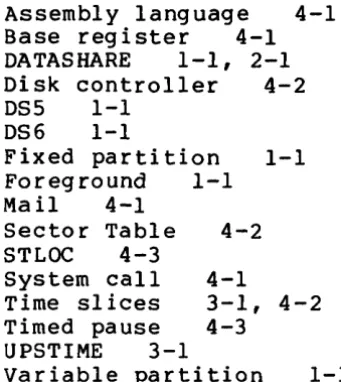
Assembly language 4-1
Base register 4-1
DATASHARE 1-1, 2-1
Disk controller 4-2
DS5 1-1
DS6 1-1
Fixed partition 1-1
Foreground 1-1
Mail 4-1
Sector Table 4-2
STLOC 4-3
System call 4-1
Time slices 3-1, 4-2
4-3 Timed pause
UPSTIME 3-1
Variable partition 1-1
[image:14.617.150.321.153.344.2]Manual Name ________________________________________ _ Manual Number ______________________________________ __ READER'S COMMENTS Did you find errors in this manual? If so, specify by page.
Did you find this manual understandable, usable, and well-organized? Please make suggestions for improvement.
Fold Here
_ _ _ _ _ _ _ _ _ _ _ _ _ _ _ _ _ _ _ _ _ _ _ _ _ _ _ _ _ ~~I~ l2.e~ ~n~ ~t~~ _ _ _ _ _ _ _ _ _ _ _ _ _ _ _ _ _ _ _ _ _ _ _ _ _ _ _ _ _
BUSINESS REPLY MAl L
No Postage Necessary if mailed in the United States
Postage will be paid by:
DATAPOINT CORPORATION
DIRECTOR OF SOFTWARE SUPPORT 8550 Datapoint Drive, Mail Station# N60 San Antonio, Texas 78284
I II II I
FIRST CLASSPermit 5774 San Antonio
![Crystal structure of 2 amino 4 (4 methoxyphenyl) 4H benzo[g]chromene 3 carbonitrile](data:image/gif;base64,R0lGODlhAQABAIAAAP///wAAACH5BAEAAAAALAAAAAABAAEAAAICRAEAOw==)