585-300-512
Comcode 108413543
Issue 7
All Rights Reserved, Printed in U.S.A.
Notice
Every effort was made to ensure that the information in this book was complete and accurate at the time of printing. However, information is subject to change.
Your Responsibility for Your System’s Security
Toll fraud is the unauthorized use of your telecommunications system by an unauthorized party, for example, persons other than your com-pany’s employees, agents, subcontractors, or persons working on your company’s behalf. Note that there may be a risk of toll fraud associated with your telecommunications system and, if toll fraud occurs, it can result in substantial additional charges for your telecommunications services.
You and your system manager are responsible for the security of your system, such as programming and configuring your equipment to pre-vent unauthorized use. The system manager is also responsible for reading all installation, instruction, and system administration docu-ments provided with this product in order to fully understand the fea-tures that can introduce risk of toll fraud and the steps that can be taken to reduce that risk. Lucent Technologies does not warrant that this product is immune from or will prevent unauthorized use of com-mon-carrier telecommunication services or facilities accessed through or connected to it. Lucent Technologies will not be responsible for any charges that result from such unauthorized use.
Lucent Technologies Fraud Intervention
If you suspect you are being victimized by toll fraud and you need technical support or assistance, call the appropriate BCS National Cus-tomer Care Center telephone number. Users of the MERLIN®, PART-NER®, and System 25 products should call 1 800 628 2888. Users of the System 75, System 85, DEFINITY® Generic 1, 2 and 3, and DEFINITY® ECS products should call 1 800 643 2353. Customers outside the continental United States should contact their local Lucent representative, or call one of the above numbers in the following man-ner:
• Dial the International Access Code; for example, 011. • Dial the country code for the U.S., that is, 01.
• Lastly, dial either of the telephone numbers provided above.
Lucent Technologies Web Page
The world wide web home page for Lucent Technologies is: http://www.lucent.com
Federal Communications Commission Statement
Part 15: Class A Statement. This equipment has been tested and
found to comply with the limits for a Class A digital device, pursuant to Part 15 of the FCC Rules. These limits are designed to provide rea-sonable protection against harmful interference when the equipment is operated in a commercial environment. This equipment generates, uses, and can radiate radio-frequency energy and, if not installed and used in accordance with the instructions, may cause harmful interfer-ence to radio communications. Operation of this equipment in a resi-dential area is likely to cause harmful interference, in which case the user will be required to correct the interference at his own expense.
This digital apparatus does not exceed the Class A limits for radio noise emissions set out in the radio interference regulations of Industry Canada.
Le Présent Appareil Nomérique n’émet pas de bruits radioélectriques dépassant les limites applicables aux appareils numériques de la class A préscrites dans le reglement sur le brouillage radioélectrique édicté par le Industrie Canada.
Trademarks
See the preface of this document.
Ordering Information
Call: Lucent Technologies BCS Publications Center
Voice 1 800 457-1235 International Voice 317 322-6791 Fax 1 800 457-1764 International Fax 317 322-6699
Write: Lucent Technologies BCS Publications Center 2855 N. Franklin Road
Indianapolis, IN 46219
Order: Document No. 585-300-512 Comcode 108413543 Issue 7, May 1999
For additional documents, refer to the section in “About This Docu-ment” entitled “Related Resources.”
You can be placed on a standing order list for this and other documents you may need. For more information on standing orders, or to be put on a list to receive future issues of this document, contact the Lucent Tech-nologies Publications Center.
Obtaining Products
To learn more about Lucent Technologies products and to order prod-ucts, contact Lucent Direct, the direct-market organization of Lucent Technologies Business Communications Systems. Access their web site at www.lucentdirect.com. Or call the following numbers: custom-ers 1 800 451 2100, account executives 1 888 778 1880 (voice) or 1 888 778 1881 (fax).
Warranty
Lucent Technologies provides a limited warranty on this product. Refer to the “Limited Use Software License Agreement” card provided with your package.
European Union Declaration of Conformity
The “CE” mark affixed to the equipment means that it conforms to the following directives. Lucent Technologies Business Communications Systems declares that DEFINITY AUDIX System equipment specified in this document conforms to the referenced European Union (EU) Directives and Harmonized Standards listed below:
EMC Directive 89/336/EEC Low-Voltage Directive73/23/EEC
Acknowledgment
May 1999 Contents
iii
Contents
Contents iii
About This Document ix
■ Purpose ix
■ Intended Audience ix
■ How This Document Is Organized x
■ Conventions Used xi
■ Related Resources xii
■ Trademarks and Service Marks xii
■ How to Make Comments About This Document xiii
1
Overview 1-1■ AMIS Analog Networking 1-2
AMIS One-Step and Two-Step Addressing 1-3
Subscriber Features 1-4
One-Step Addressing Features 1-4
Two-Step Addressing Summary 1-5
Types of Users 1-6
Feature Operation 1-7
■ Message Delivery 1-9
Subscriber Features 1-10
Types of Users 1-11
Feature Operation 1-12
■ Feature Enhancements by Release 1-14
AUDIX System Enhancements 1-14
DEFINITY AUDIX System Enhancements 1-15
Intuity System Enhancements 1-15
2
Planning and Design 2-1■ Requirements 2-1
Software Requirements 2-1
Hardware Requirements 2-2
Voice Port Needs 2-2
Calculate Expected Voice Port Use 2-2
Monitor Voice Port Use 2-3
May 1999 Contents
iv
■ Network Design 2-5
Designing an AMIS Analog/Message Delivery
Network 2-5
Defining Address Ranges 2-10
AMIS Prefix 2-10
Address Prefixes 2-10
Overlapping or Duplicate Ranges 2-12
Extension Ranges and Length 2-12
Dial String Interaction 2-13
Sample Network Design 2-14
■ Network Planning 2-16
Collect Local Machine Information 2-16
Collect Remote Machine Information 2-19
Collect Remote Subscriber Information 2-21
3
AUDIX Administration 3-1■ Implementation 3-2
Task 1: Display the Local Machine 3-3
Task 2: Administer AMIS Loopback Test
Mailbox (Optional) 3-6
Task 3: Administer AMIS Analog/Message
Delivery Parameters 3-7
Task 4: Administer Outcalling Periods 3-12
Task 5: Adjust System Limits 3-14
Task 5A: Calculate New Filesystem Sizes 3-14 Task 5B: Compare the Recommended Sizes
to the Actual Sizes 3-16
Task 5C: Increase Filesystem Sizes 3-17
Task 6: Administer Retransmission Intervals 3-18
Task 7: Restart the AUDIX System 3-19
Task 8: Administer Remote Machines/Telephone
Numbers 3-20
Task 9: Record Remote Machine Names
(Optional) 3-32
Task 10: Administer Remote Subscribers
(Optional) 3-33
Task 11: Record Remote Subscriber Names
(Optional) 3-35
May 1999 Contents
v Task 12A: Testing an AMIS Analog Connection 3-36
Task 12B: Testing a Message Delivery
Connection 3-37
■ Ongoing Administration 3-38
Educate Subscribers 3-38
Maintain the Network 3-38
Monitor Logs and Traffic Reports 3-38
4
DEFINITY AUDIX Administration 4-1■ Implementation 4-2
Task 1: Verify AMIS Service 4-3
Task 2: Display the Local Machine 4-4
Task 3: Administer Loopback Test Mailbox
(Optional) 4-5
Task 4: Administer AMIS Analog/Message
Delivery Parameters 4-5
Task 5: Administer Outcalling Periods 4-9
Task 6: Adjust System Limits 4-12
Task 7: Administer Retransmission Intervals 4-14
Task 8: Activate the Changes 4-15
Task 8A: Reboot the System (R1.0) 4-15
Task 8B: Run Audits (R2.0 and Later) 4-16 Task 9: Administer Remote Machines/Telephone
Numbers 4-17
Task 10: Record Remote Machine Names
(Optional) 4-28
Task 11: Administer Remote Subscribers
(Optional) 4-29
Task 12: Record Remote Subscriber Names
(Optional) 4-30
Task 13: Test the Connection 4-31
Task 13A: Testing an AMIS Analog Connection 4-32 Task 13B: Testing a Message Delivery
Connection 4-33
■ Ongoing Administration 4-33
Educate Subscribers 4-33
Maintain the Network 4-34
May 1999 Contents
vi
5
Intuity System AMIS Administration 5-1■ Checking and Activating the AMIS
Analog Networking Feature 5-3
■ Local Machine Administration 5-5
Check the Local Machine Administration on the
Intuity Platform 5-5
Check the Local Machine Administration on the
Intuity AUDIX Voice Messaging Feature Package 5-8
■ Administer Loopback Test Mailbox (Optional) 5-10 ■ Administer AMIS Analog/Message
Delivery Parameters 5-11
■ Administer the Outcalling Periods 5-15
■ Adjust the System Limits 5-17
■ Administer Retransmission Intervals 5-19
■ Activate the Changes 5-21
Restart the AUDIX Voice System 5-21
■ AMIS Remote Machine Administration 5-23
Administer AMIS Remote Machines on the
Intuity Platform 5-24
Administer AMIS Remote Machines on the
AUDIX Voice Messaging Feature Package 5-28
Enter the Address Ranges for the Remote
Machine 5-32
■ Record Remote Machine Names (Optional) 5-36
■ Administer Remote Subscribers (Optional) 5-39 ■ Record Remote Subscriber Names (Optional) 5-41
■ Test the Connection 5-42
AMIS Analog Network Connection Test 5-42
Message Delivery Connection Test 5-43
■ Ongoing Administration 5-44
Educating Subscribers 5-44
Maintain the Network 5-44
Monitor Logs and Traffic Reports 5-45
Changing Remote AMIS Machine Information on
the Intuity Platform 5-45
Changing Remote AMIS Machine Information on
May 1999 Contents
vii
Deleting Remote Machines 5-47
Renaming a Remote AMIS Machines 5-48
■ Administration Examples 5-50
AMIS Casual Addressing to Local Numbers
Example 5-50
AMIS Pre-Administered Addressing to Specific
Machines Example 5-52
AMIS Message Delivery Addressing to Local
Number Example 5-54
A
Administration Log Entries A-1B
Administration Forms Summary B-1C
Subscriber Operation C-1■ AMIS Analog Networking Examples C-1
One-Step AMIS Addressing C-1
Two-Step AMIS Analog Networking Example C-5
■ Message Delivery Example C-6
■ Template Letter for Using the AMIS Analog Networking and Message
Delivery Features C-9
AMIS Analog Networking C-9
Using AMIS Analog One-Step Addressing C-10 Using AMIS Analog Two-Step Addressing C-11
Message Delivery C-11
Addressing Message Delivery Messages to
Individual Recipients C-12
Addressing Message Delivery Messages to a
Number in an Administered Range C-13
ABB
Abbreviations ABB-1GL
Glossary GL-1May 1999 Contents
About This Document
ix Purpose
May 1999
About This Document
Purpose
This document, AMIS Analog Networking, 585-300-512, provides procedures for planning, administering, and using the Audio Messaging Interchange
Specification (AMIS) Analog Networking and Message Delivery features on the following Lucent Technologies voice messaging system:
■ AUDIX R1V6, R1V7, and R1V8 systems ■ DEFINITY AUDIX systems
■ Intuity systems
Information is organized and presented in a user-oriented manner and allows easy access and retrieval of the information.
Intended Audience
May 1999 About This Document
x How This Document Is Organized
How This Document Is Organized
This document is organized into the following chapters:
■ About This Document
This preface describes the document’s purpose, intended audiences, organization, conventions, trademarks and service marks, and related resources. This preface also explains how to make comments about the document.
■ Chapter 1, "Overview"
This chapter describes the AMIS Analog Networking and Message Delivery features.
■ Chapter 2, "Planning and Design"
This chapter contains hardware and software requirements, security issues, and network planning procedures.
■ Chapter 3, "AUDIX Administration"
This chapter describes the administration and testing of the AMIS Analog Networking and Message Delivery features on an AUDIX R1V6 or later system.
■ Chapter 4, "DEFINITY AUDIX Administration"
This chapter describes the administration and testing of the AMIS Analog Networking and Message Delivery features on a DEFINITY AUDIX system.
■ Chapter 5, "Intuity System AMIS Administration"
This chapter describes the administration and testing of the AMIS Analog Networking and Message Delivery features on an Intuity system.
■ Appendix A, "Administration Log Entries"
This appendix provides AMIS Analog Networking and Message Delivery administration error codes and resolution procedures.
■ Appendix B, "Administration Forms Summary"
This appendix summarizes the forms used for Lucent Technologies voice messaging systems for AMIS Analog Networking and Message Delivery administration.
■ Appendix C, "Subscriber Operation"
This appendix describes the procedures subscribers would use to send AMIS Analog Networking and Message Delivery messages. The appendix includes a template letter you can customize and distribute to the
subscribers to inform them about the AMIS features.
■ Abbreviations
May 1999 About This Document
xi Conventions Used
■ Glossary
The Glossary provides a definition of terms and acronyms used in the document.
■ Index
The Index provides an alphabetical listing of principal subjects covered in this document.
Conventions Used
The following conventions were used in this document:
■ Rounded boxes represent keyboard keys that you press.
For example, an instruction to press the enter key is shown as Press .
■ Square boxes represent phone pad keys that you press.
For example, an instruction to press zero on the phone pad is shown as Press .
■ The word “enter” means to type a value and press .
For example, an instruction to type y and press is shown as Enter y to continue.
■ Two or three keys that you press at the same time (that is, you hold down
the first key while pressing the second and/or third key) are shown as a rounded box that contains two or more words separated by hyphens. For example, an instruction to press and hold while typing the letter d is shown as
Press
■ Commands and text you type or enter appear in bold.
■ Values, instructions, and prompts that you see on the screen appear as
follows: Press any key to continue.
■ Variables that the system supplies or that you must supply appear in
italics.
For example, an error message including one of your filenames appears as
The filefilenameis formatted incorrectly ENTER
0
ENTER ENTER
ALT
May 1999 About This Document
xii Related Resources
Related Resources
In addition to this document, you may need to reference additional documents about your voice mail system. For a list of documents related to your system, see the Lucent Technologies Product Publications Catalog website at
www.lucent.com/enterprise/documentation.
Trademarks and Service Marks
The following trademarked products are mentioned in the books in the INTUITY library:
■ AT™ is a trademark of Hayes Microcomputer Products, Inc. ■ AUDIX® is a registered trademark of Lucent Technologies. ■ BT-542B™ is a trademark of BusLogic Inc.
■ COMSPHERE® is a registered trademark of Paradyne Corp. ■ CONVERSANT® is a registered trademark of Lucent Technologies. ■ DEFINITY® is a registered trademark of Lucent Technologies in the U.S.
and throughout the world.
■ Dterm™ is a trademark of NEC Telephones, Inc. ■ Equinox™ is a trademark of Equinox Systems, Inc. ■ 5ESS® is a registered trademark of Lucent Technologies. ■ INTUITY™ is a trademark of Lucent Technologies. ■ MD110® is a registered trademark of Ericsson, Inc. ■ MEGAPLEX™ is a trademark of Equinox System, Inc. ■ MEGAPORT™ is a trademark of Equinox Systems, Inc. ■ Meridian™ is a trademark of Northern Telecom Limited.
■ MERLIN LEGEND® is a registered trademark of Lucent Technologies. ■ Microcom Networking Protocol® is a registered trademark of Microcom,
Inc.
■ Microsoft® is a registered trademark of Microsoft Corporation. ■ MS® is a registered trademark of Microsoft Corporation. ■ MS-DOS® is a registered trademark of Microsoft Corporation. ■ NEAX™ is a trademark of NEC Telephone, Inc.
■ NEC® is a registered trademark of NEC Telephones, Inc. ■ Netware® is a registered trademark of Novell, Inc.
May 1999 About This Document
xiii How to Make Comments About This Document
■ NLM® is a registered trademark of Novell, Inc.
■ Northern Telecom® is a registered trademark of Northern Telecom
Limited.
■ Novell® is a registered trademark of Novell, Inc. ■ ORACLE™ is a trademark of Oracle Corporation. ■ Paradyne® is a registered trademark of Paradyne Corp. ■ Phillips® is a registered trademark of Phillips Screw Company. ■ Rolm® is a registered trademark of International Business Machines. ■ SL-1™ is a trademark of Northern Telecom Limited.
■ softFAX® is a registered trademark of VOXEM, Inc. ■ TMI™ is a trademark of Texas Micro Systems, Inc.
■ UNIX® is a registered trademark of Novell in the United States and other
countries, licensed exclusively through X/Open Company Limited.
■ VOXEM® is a registered trademark of VOXEM, Inc. ■ VT100™ is a trademark of Digital Equipment Corporation. ■ Windows™ is a trademark of Microsoft Corporation.
How to Make Comments About This
Document
We are interested in your suggestions for improving this document. Please send your comments and suggestions to:
Lucent Technologies OMD Technical Publications Room 22-2X57
11900 North Pecos Street Denver, Colorado 80234
Send email comments to:
May 1999 About This Document
Overview
1-1
1
May 1999
1
Overview
The Audio Messaging Interchange Specification (AMIS) Analog Networking feature permits subscribers to exchange voice mail messages with voice messaging systems anywhere in the world, provided those systems also have AMIS analog networking capabilities. The Message Delivery feature permits subscribers to send recorded messages to any touch-tone telephone, anywhere in the world (including someone’s home).
Both features are sold together in a single package. The AMIS Analog Networking and Message Delivery features must be activated by Lucent Technologies personnel before customers can implement them.
General considerations related to the AMIS Analog Networking and Message Delivery features include:
■ The Message Sending Restrictions feature can be used to limit AMIS
Analog Networking and/or Message Delivery calls to specified remote machines (numbers) or user communities. This helps the system administrator prevent unnecessary outcalls and control unauthorized long-distance calls. For more information about voice mail system security, refer to the GBCS Products Security Handbook, 555-025-600, or the appropriate administration manual for your system.
■ Messages are played to the remote machine or message recipient; for
May 1999 Overview
1-2 AMIS Analog Networking
1
■ The AMIS Analog Networking feature, Message Delivery feature, and
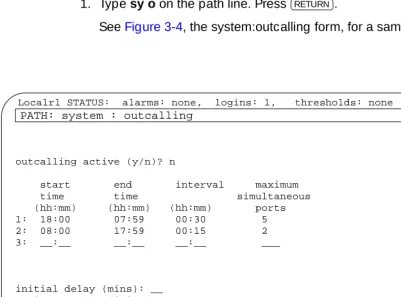
Outcalling feature all share the outcalling message-transmission queue and the outcalling ports administered for the system. The message transmission schedule administered for AMIS Analog and Message Delivery messages to be delivered must be equal to or a subset of the outcalling periods administered on the system, or the messages will not be transmitted. Further considerations for outcalling port use are covered in Chapter 2, "Planning and Design"
The maximum number of messages that can be stored in the shared AMIS/message delivery/outcalling queue is 250. If the transmission queue reaches 250 messages, no more messages are delivered to the queue until the messages in the queue are transmitted (they remain in the sender’s outgoing mailbox in the undelivered category).
The AMIS Analog Networking and Message Delivery feature description, use, and operation are described in the following sections. A summary of feature enhancements between various software releases appears at the end of this chapter.
AMIS Analog Networking
AMIS analog networking allows remote or disparate voice mail systems to literally “talk” to each other. Because the AMIS protocol is an industry standard,
messages can be exchanged with users on Lucent Technologies voice mail systems or on systems made by vendors other than Lucent Technologies. The only restriction is that both systems have AMIS analog networking capabilities.
The AMIS Analog Networking feature is especially useful to the following customers:
■ AUDIX system customers who wish to exchange voice mail messages
with DEFINITY AUDIX systems, Intuity systems, or with non-Lucent Technologies voice messaging systems that cannot be digitally
networked. The AUDIX system supports both digital networking and AMIS analog networking. Both types of networking may be used on the same machine.
■ DEFINITY AUDIX system customers who wish to exchange voice mail
messages with AUDIX systems, other DEFINITY AUDIX systems, Intuity systems, or with non-Lucent Technologies voice messaging systems. The DEFINITY AUDIX system currently relies upon AMIS analog networking for all its networking functions.
■ Intuity system customers who wish to exchange voice mail messages with
May 1999 Overview
1-3 AMIS Analog Networking
1
Other considerations related to the AMIS Analog Networking feature include:
■ An Lucent Technologies voice mail system using AMIS analog networking
can exchange messages with any voice mail system that has AMIS analog capabilities as long as the remote machine is defined on the local voice mail system. AMIS messages can alternatively be sent to a range of administered remote machines (for example, all machines in a specific area code or all local numbers). However, system administrators should take precautions when administering a range of machines to prevent unauthorized long-distance calls or minimize excessive port use (see the "Security" section in Chapter 2, "Planning and Design"
■ Messages are played to the recipient’s system; for example, it takes one
full minute for the receiving system to record a one-minute message. If the same message is being delivered to more than one recipient on the same remote machine, the local system plays the message one time for each intended recipient. Because messages are transmitted over analog lines, their quality may degrade.
■ The AMIS analog specification allows the local voice mail system to send
up to nine AMIS messages per call to an individual remote system. For example, if several AMIS messages have been delivered to the outcalling message queue for delivery, the local system calls the remote system once and plays out up to nine AMIS messages during that call. If any messages beyond the first nine are left in the queue, the local system calls the remote system again to transmit any additional AMIS messages it may have queued.
AMIS One-Step and Two-Step Addressing
The system administrator may administer remote AMIS voice mail systems for one-step (pre-administered) or two-step (casual) addressing.
The “steps” refer to the way local subscribers address messages to remote recipients. For one-step addressing, subscribers typically enter the remote machine’s prefix (if assigned), followed by the recipient’s mailbox ID and the key. In two-step addressing, subscribers first enter the prefix (if assigned), followed by the telephone number of the remote machine, followed by the key. They are then prompted to enter the extension (mailbox ID) for the intended recipient, followed by another .
One-step versus two-step addressing also has implications for the system administrator. One-step addresses are easier for subscribers to enter and may take advantage of many Lucent Technologies voice mail conveniences (see the following "Subscriber Features" section). To use one-step addressing, the system administrator only needs to pre-administer the machine. However, the
administrator may also wish to administer remote subscribers to allow name addressing and name voiceback.
#
#
May 1999 Overview
1-4 AMIS Analog Networking
1
Two-step addressing is often easier for the system administrator to implement because only the remote voice mail system (or range of remote systems) needs to be administered. For example, a range of remote systems could be
administered for two-step addressing (for instance, an entire area code or all local telephone numbers) without needing to administer each remote system individually (as must be done for one-step addressing). SeeChapter 2, "Planning and Design" for additional considerations when planning AMIS addressing schemes.
Subscriber Features
Subscriber features related to AMIS analog networking are summarized below. Refer to Appendix C, "Subscriber Operation" for examples of one-step and two-step addressing. This appendix also includes a template letter that can be customized to introduce subscribers to the features available at their site.
One-Step Addressing Features
For one-step addressing, local subscribers typically enter the remote machine’s prefix (if assigned), followed by the recipient’s mailbox ID and the key. However, subscribers who wish to send AMIS messages to recipients on remote systems administered for one-step addressing can also take advantage of the following features.
■ Address-by-Name: Local subscribers can address AMIS messages using
name addressing only for administered remote recipients.
■ Mailing Lists: Local subscribers can include remote recipients on any
system administered for AMIS one-step addressing in their personal mailing lists. Administered remote recipients can be included by name or telephone number; non-administered remote recipients can be included only by telephone number. (See the following "Types of Users" section for a description of administered and non-administered remote recipients.)
■ Name Voiceback: Local subscribers hear the name of administered
remote recipients they are addressing or looking up in a directory only if the system administrator has voiced-in the name of that remote recipient. Otherwise, they hear the remote mailbox ID.
■ Names-and-Numbers Directory: Local subscribers can look up
administered remote subscribers on systems administered for AMIS one-step addressing using the local system’s names-and-numbers directory ( ).
#
May 1999 Overview
1-5 AMIS Analog Networking
1
■ Personal Directory: Local subscribers can assign aliases to any remote
recipients on systems administered for AMIS one-step addressing. Administered remote recipients can be included by name or telephone number; non-administered remote recipients can be included only by telephone number.
■ Reply to Sender: Local subscribers can respond to incoming AMIS
messages using the Reply to Sender feature to supply automatic addressing. This feature works for all one-step administered remote subscribers.
Two-Step Addressing Summary
Subscribers who wish to send AMIS messages to recipients on remote systems administered for two-step addressing must enter the recipient’s address in two steps. During the first step, local subscribers enter the prefix (if assigned), followed by the telephone number of the remote machine, followed by the key. At this point they may hear the name of the remote system voiced back (if the system administrator has recorded a name for that machine or range of
machines). The system then prompts subscribers to enter the extension (mailbox ID) for the intended recipient, followed by another key. Subscribers will hear the digits voiced back to confirm they entered the correct extension number (recipient name voiceback is not available on systems administered for two-step addressing).
The headers of AMIS analog messages delivered to recipients on two-step remote systems differ slightly from standard voice mail or one-step AMIS messages. The two-step message header first states that the message is an AMIS message. Next, the system voices (typically) the complete telephone number of the remote voice mail system, followed by the mailbox ID of the person who sent the message. The sender’s name is not voiced for two-step messages.
NOTE:
AMIS recipients on remote systems administered for AMIS two-step addressing cannot be addressed by name or included in subscribers’ mailing lists or personal directories, nor are they included in the local system’s names-and-numbers directory. The name voiceback and Reply to Sender features also are not available.
#
May 1999 Overview
1-6 AMIS Analog Networking
1
Types of Users
Users of the AMIS Analog Networking feature are divided into the following groups:
■ Local subscribers: Voice mail users whose mailboxes reside on the local
Lucent Technologies voice mail system. Unless restricted through the Message Sending Restrictions feature, all local subscribers are capable of sending AMIS messages.
■ Remote voice mail recipients: AMIS users whose mailboxes reside on a
remote voice mail system (any system other than the local system). Remote recipients are divided as follows:
— Administered remote subscribers: Those remote users who have been administered on the local voice mail system. These recipients can be addressed by name and their names, if recorded, are voiced back. Only AMIS recipients whose mailboxes reside on systems administered for AMIS one-step addressing can be administered on the local system.
— Non-administered remote recipients: Remote users who have not been administered on the local voice mail system. All users on remote systems administered for AMIS two-step addressing are non-administered remote recipients. Remote users on systems administered for AMIS one-step addressing may be administered or non-administered (the system administrator indicates whether local subscribers can send messages to non-administered remote recipients when administering each remote system).
Non-administered remote recipients are further divided as follows:
■ Non-verified non-administered remote recipients: Those
non-administered remote users who have been addressed in an AMIS message, but a successful delivery has not yet occurred.
■ Verified non-administered remote recipients: Those remote
May 1999 Overview
1-7 AMIS Analog Networking
1
Feature Operation
The AMIS Analog Networking feature operates as follows:
1. A local subscriber either records a new voice mail message, forwards an existing call answer or voice mail message, or retrieves a message saved in the subscriber’s outgoing mailbox.
2. When prompted for the recipient’s extension, the subscriber enters one of the following, depending on the type of AMIS addressing administered on the system:
■ For AMIS one-step addressing: Subscribers enter the AMIS and/or
address prefix (if assigned), followed by the remote mailbox ID (typically the extension) of the intended recipient, followed by the
key.
NOTE:
Administered remote recipients can alternatively be
addressed by name (last-name-first). All recipients on remote systems administered for one-step addressing may be included in local subscribers’ mailing lists or personal directories as long as they are specified by extension number.
■ For AMIS two-step addressing:
— When prompted for the recipient’s extension, the subscriber enters the AMIS and/or address prefix (if one is assigned), followed by the full telephone number of the remote voice mail system (an area code, or country code plus area code, may be necessary), followed by the key.
— The system prompts the subscriber for the extension (mailbox ID) of the intended recipient on the remote system. The subscriber then enters the appropriate digits, followed by the key.
■ Subscribers can add other local or remote addresses, then
approve the message for delivery as described in the quick-reference card for their voice mail system.
NOTE:
Messages designated as private will not be delivered. AMIS messages designated as priority will be delivered, but appear as regular messages to the remote system. Subscribers may optionally specify a time when they want the message delivered; if they do, the local system delivers the message to the AMIS transmission queue at the requested delivery time, but the message may not be transmitted until the next administered outcalling period.
#
#
May 1999 Overview
1-8 AMIS Analog Networking
1
3. At the first available transmission period, the local system attempts to call the remote voice mail system as follows:
— If the message arrives during an active transmission period, the system attempts to make the outcall immediately. If the maximum number of simultaneous outcalling resources is busy, the system tries again in one minute.
— If a port is available but the local system for some reason cannot deliver the AMIS message, the system makes two more attempts to deliver the AMIS message. The intervals at which the system tries to deliver messages are specified by the system administrator. 4. When the remote system answers the call and is ready to record, the local
voice mail system plays the message. The remote system delivers the recorded message to the appropriate recipient’s mailbox.
NOTE:
Because AMIS analog messages are actually played to the remote system and not transmitted digitally, the remote system takes one minute to record a one-minute message. If a message is sent to more than one subscriber on the same remote system, it is played to the remote system multiple times.
5. After the message is delivered successfully, the local voice mail system updates the outgoing message status to delivered. If all delivery attempts fail, the local system sends a new voice mail message to the sender notifying him or her that the message was undeliverable. The message is saved in the sender’s outgoing mailbox so the subscriber can attempt to send it again if desired. The header in the outgoing mailbox contains a more detailed explanation of why the message was not deliverable. 6. The remote recipient retrieves the AMIS analog message using the same
May 1999 Overview
1-9 Message Delivery
1
Message Delivery
Message Delivery is an optional feature that permits subscribers to send recorded messages to any touch-tone telephone, anywhere in the world
(including someone’s home), as long as that telephone number is in the range of allowable numbers defined by the system administrator. This feature is an extension of the AMIS Analog Networking feature and is automatically available when the AMIS feature is activated.
After a subscriber addresses a Message Delivery message, the local system places the message in the outcalling queue for delivery during the interval(s) defined by the system administrator. The system makes a total of six attempts to deliver the message. If the recipient doesn’t answer by the sixth attempt, the system sends the sender a new voice mail message informing him or her that the message was undeliverable. The message is saved in the subscriber’s outgoing mailbox so it may be redelivered.
When the system makes a Message Delivery call to the designated number and the phone is answered, a recording states that a message is waiting and that the intended recipient should press to hear it. When the listener presses , the local system plays the message. Recipients may alternatively press to delete the message instead of listening to it (for example, if they already know what the message is about and do not wish to hear it). They may also press
to delete the message after listening to it, although the system automatically deletes an accessed message after the listener hangs up.
The system administrator can individually administer any telephone numbers to which Message Delivery traffic is heavy. This allows subscribers to use name addressing and hear name voiceback (if the system administrator records a name for this recipient).
The system administrator can also administer a range of Message Delivery telephone numbers (for example, all local phone numbers or an entire area code). In this case, individual recipients’ numbers do not need to be
administered on the local voice mail system. However, system administrators should take precautions when administering a range of numbers to prevent unauthorized long-distance calls and to minimize excessive port use (see the "Security" section in Chapter 2, "Planning and Design").
0 0
*
D*
May 1999 Overview
1-10 Message Delivery
1
Other considerations related to the Message Delivery feature include:
■ Recipients may be individually administered on the local system so
subscribers can address them by name and receive name voiceback. However, any Message Delivery recipient can be included in subscriber’s mailing lists and personal directories if the complete telephone number is used.
■ Messages are played to the recipient; if a recipient is listening to a one
minute message, an outcalling port will be busy for at least one minute.
■ If a Message Delivery message is sent to a remote recipient and a
non-Lucent Technologies voice mail system or an answering machine picks up the call, the recipient’s machine may record the message header. (A remote Lucent Technologies voice mail system does not record the header.) The remote machine is not able to record the message body because it cannot press to have the local system play out the
message. However, from the header, recipients will hear either the name or number of the person who sent the message when they next pick up their messages. Meanwhile, the local system continues trying to deliver the message (up to a total of six attempts) because it did not detect a touch-tone indicating the message was received.
Subscriber Features
To send a Message Delivery message, local subscribers enter an address prefix (if one was assigned) to identify the message as a Message Delivery message. They then enter the complete telephone number for the recipient, followed by the
key. At this point, if the system administrator has recorded a name for the recipient, they should hear the recipient’s name voiced back. If no name has been recorded, subscribers hear the digits voiced back to confirm the telephone number they just entered.
Subscribers may also take advantage of the following voice mail features for sending Message Delivery messages. Refer to Appendix C, "Subscriber Operation", for examples of Message Delivery addressing. This appendix includes a template letter that can be customized to introduce subscribers to the feature.
■ Address-by-Name: Local subscribers can address Message Delivery
messages using name addressing only for administered remote recipients.
■ Mailing Lists: Local subscribers can include any Message Delivery remote
recipients in their personal mailing lists. Administered remote recipients can be included by name or extension number; non-administered remote recipients can be included only by extension number. (See the following "Types of Users" section for a description of remote recipient types.)
0
May 1999 Overview
1-11 Message Delivery
1
■ Name Voiceback: Local subscribers hear the name of administered
remote recipients they are addressing or looking up in a directory only if the system administrator has voiced-in the name for that remote recipient. Otherwise, they hear the remote telephone number.
■ Names-and-Numbers Directory: Local subscribers can look up
administered remote recipients using the local system’s names-and-numbers directory ( ).
■ Personal Directory: Local subscribers can assign aliases to any remote
Message Delivery recipients. Administered remote recipients can be included by name or extension number; non-administered remote recipients can be included only by extension number.
Types of Users
Users of the Message Delivery feature are divided into the following groups:
■ Local subscribers: Voice mail users whose mailboxes reside on the local
Lucent Technologies voice mail system. Unless restricted through the Message Sending Restrictions feature, all local subscribers are capable of sending Message Delivery messages.
■ Recipients: Those people who can receive Message Delivery messages.
Recipients must have a touch-tone telephone. All Message Delivery recipients can be addressed by complete telephone number and may be included in local subscribers’ mailing lists and personal directories. Recipients are further divided as follows:
— Administered recipients: Those remote recipients who have been administered on the local voice mail system. These recipients can be addressed by name and their names, if recorded, are voiced back to local subscribers.
— Non-administered recipients: Those remote recipients who have not been administered on the local voice mail system.
May 1999 Overview
1-12 Message Delivery
1
Feature Operation
The Message Delivery feature operates as follows:
1. A local subscriber either records a new voice mail message, forwards an existing call answer or voice mail message, or retrieves a message saved in the subscriber’s outgoing mailbox.
2. When prompted for the recipient’s extension, the subscriber enters one of the following, depending on how Message Delivery recipients have been administered on the local system:
— If the recipient’s number is in a valid range of administered telephone numbers but the recipient is not individually
administered, the subscriber typically enters an address prefix (if one was assigned), followed by the full telephone number of the recipient (a country code and/or area code may be necessary), followed by the key.
— If the recipient is individually administered, the subscriber typically enters an address prefix (if one was assigned), followed by as much of the recipient’s telephone number as is needed for a unique address, followed by the key. Administered recipients may alternatively be addressed by name (last-name-first).
3. Subscribers can add other local or remote addresses, then approve the message for delivery as described in the quick-reference card for their voice mail system.
NOTE:
Messages designated as private will not be delivered. Messages designated as priority will be delivered, but appear as regular messages to the recipient. Subscribers may optionally specify a time when they want the message delivered; if they do, the system delivers the message to the outcalling transmission queue at the requested delivery time, but the message may not be transmitted until the next administered outcalling period.
4. At the first available transmission period, the system attempts to deliver the Message Delivery message as follows:
— If the message arrives during an active transmission period, the system attempts to make the outcall immediately. If the maximum number of simultaneous outcalling resources is busy, the system tries again in one minute.
— If an outcalling port is available but the local system cannot deliver the message (no one pressed ), the system makes five more attempts to deliver the message. The intervals at which the system tries to deliver messages are specified by the system administrator.
#
#
May 1999 Overview
1-13 Message Delivery
1
5. When the system makes a Message Delivery call to the designated number and the phone is answered, a recording states that a message is waiting and that the intended recipient should press to hear it. (If a non-Lucent Technologies system or answering machine answers the call, it may record this part of the message, including the name or telephone number of the sender.)
6. Listeners may take one of the following actions:
— Listeners can press to hear the message. Afterwards, they may press to delete the message or simply hang up (in the latter case, the system will delete the message for them).
— Listeners may press to delete the message without listening to it (for example, if they already know what the message is about and do not wish to hear it). Pressing ensures the system will not call them again with this same message.
7. After the message is delivered successfully, the local voice mail system updates the outgoing message status to delivered. If all delivery attempts fail, the local system sends a new voice mail message to the sender notifying him or her that the message was undeliverable. The message is saved in the sender’s outgoing mailbox so the subscriber can attempt to send it again if desired. The header in the outgoing mailbox contains a more detailed explanation of why the message was not deliverable.
0
0
*
D*
DMay 1999 Overview
1-14 Feature Enhancements by Release
1
Feature Enhancements by Release
The AMIS Analog Networking and Message Delivery features have been enhanced since their initial introduction for various Lucent Technologies voice messaging software releases. These enhancements are summarized in this section.
AUDIX System Enhancements
The AMIS Analog Networking and Message Delivery features have been enhanced since the initial AUDIX R1V6 software release as follows. Any enhancements made for a given release are carried forward to later releases.
■ R1V7 — The send to non-administered recipients (y/n)? field moved from
the system:appearance form in AUDIX R1V6 software to the
system:translation:machine:audix/amis/call delivery form in the R1V7 7:1 software release to make feature administration more flexible.
■ R1V7 7:2 — Several enhancements were made to the AMIS Analog
Networking feature in the 7:2 software release. These changes,
summarized below, are fully documented in the AUDIX R1V7 Issue 7:1 to 7:2 Change Description, 585-306-402.
— A country code of “0” was added to allow the AUDIX system to work in a mixed-vendor environment over private networks in any country.
— Any messages remaining in the outcalling queue after an initial transmission are transmitted within 2 minutes after the first nine are sent.
— Enhanced pre-administered machine processing improved the performance of the Reply to Sender and name voiceback features. — Additional administration log entries and improved error messages
were added to benefit subscribers and system administrators.
■ R1V8 — Multiple callback numbers were added to allow more flexible
AMIS operation in mixed public/private networks. Up to five callback numbers can be specified on the system:translation:machine: analog network form. Callback numbers are assigned to remote machines using the
system:translation:machine:audix/amis/call delivery
May 1999 Overview
1-15 Feature Enhancements by Release
1
DEFINITY AUDIX System Enhancements
The AMIS Analog Networking and Message Delivery features have been
enhanced since the initial DEFINITY AUDIX R1.0 software release as follows. Any enhancements made for a given release are carried forward to later releases.
■ R2.0 — Several enhancements were made to the AMIS Analog
Networking feature in the R2.0 software release. These changes,
summarized below, are fully documented in the DEFINITY AUDIX Release 1.0 to 2.0 Change Description, 585-300-401.
— DEFINITY AUDIX R2.0 systems no longer need to be rebooted to activate AMIS analog networking feature parameters (as was required for R1.0 systems). In R2.0 software, audits can be run to activate AMIS analog networking or message delivery
administration changes.
— The same improvements made for the AUDIX R1V7 7:2 software load were also made in DEFINITY AUDIX R2.0 software (see the previous "AUDIX System Enhancements" section for a summary).
■ R3.0 — Multiple callback numbers were added to allow more flexible
AMIS operation in mixed public/private networks. Up to five callback numbers can be specified on the System-Parameters Analog-Network screen. Callback numbers are assigned to remote machines using the Machine screen, and may be displayed using the List Machines screen.
Intuity System Enhancements
May 1999 Overview
1-16 Feature Enhancements by Release
Planning and Design
2-1 Requirements
2
May 1999
2
Planning and Design
This chapter covers procedures needed to plan and design a network using the AMIS Analog Networking and/or Message Delivery features. Information includes hardware and software requirements, security considerations, and required network information.
Requirements
This section describes the hardware and software required to implement the AMIS Analog Networking and/or Message Delivery features on your local Lucent Technologies voice mail system. There are no switch or installation requirements other than those listed in this section.
Software Requirements
The following software is required to implement AMIS analog networking and/or message delivery:
■ AMIS analog networking must be enabled by authorized Lucent
Technologies personnel to use either the AMIS Analog Networking or Message Delivery feature.
■ The local voice mail system must be running an appropriate version of
software:
— AUDIX System: Requires R1V6 or later software.
— DEFINITY AUDIX System: Requires R1.0 or later software. — Intuity System: Requires R1.0 or later software.
■ For AMIS Analog Networking: Any remote voice mail systems in the
May 1999 Planning and Design
2-2 Requirements
2
Hardware Requirements
The following hardware is required to implement AMIS analog networking and/or message delivery:
■ For Both Features: Sufficient voice ports must be installed on the local
system to handle the additional traffic. See the following "Voice Port Needs" section to determine if additional voice ports may be needed.
■ For Message Delivery: The recipient must have a touch-tone telephone.
Voice Port Needs
In order to determine if additional voice ports may be needed on your system to support the AMIS Analog Networking and/or Message Delivery features, first consider the amount of traffic (number and length of messages) you expect to occur during the busy hour of the day.
■ If you do not plan to use the AMIS Analog Networking and/or Message
Delivery features during the busy hour (for example, if you plan to allow messages to be transmitted only at night), you probably have enough voice ports to support this feature. However, after the feature has been activated, you may wish to verify that system performance is not affected by following the steps in the "Monitor Voice Port Use" section.
■ If you plan to use the AMIS Analog Networking and/or Message Delivery
features during the busy hour, consider the impact of these features on voice-port use as follows:
— If the expected AMIS analog networking and/or message delivery traffic is light, you probably do not need to add any voice ports to support this feature. However, after the feature has been activated, you may wish to verify that system performance is not affected by following the steps in the "Monitor Voice Port Use" section.
— If the expected AMIS analog networking and/or message delivery traffic is heavy, do the calculations in the following section to determine the effect these features may have on system performance.
Calculate Expected Voice Port Use
If you plan to use the AMIS Analog Networking and/or Message Delivery features during the busy hour and you want to estimate the impact these features might have on your system performance, you can do the following calculations. (If you are purchasing a new voice mail system, the Lucent Technologies account team runs these calculations for you.)
May 1999 Planning and Design
2-3 Requirements
2
2. Estimate the anticipated length of each message. Each AMIS and/or message delivery message requires an additional 45 seconds of overhead to transmit.
3. Multiply the values from Steps 1 and 2 as follows:
(# messages) (average message length + 45 seconds) = X seconds of port use
4. Divide the total seconds of projected port usage by 3600. This number represents the additional port usage required to support this feature during the busy hour.
X seconds of port use / 3600 = # additional port usage
5. Add this number to the maximum average number of ports in use. Refer to the following "Monitor Voice Port Use" section for the form and field needed on your system to get these values.
6. Use the table in the appropriate administration manual (see next section) to determine if the resulting grade of service (GOS) will be acceptable (refer to the following "Monitor Voice Port Use"). If not, plan to install the recommended number of additional voice ports before implementing the AMIS Analog Networking or Message Delivery features.
Monitor Voice Port Use
Use the following procedure to determine if additional voice ports may be needed on your system. You may use this procedure after activating the AMIS Analog Networking and/or Message Delivery features to determine their impact (if any) on system performance.
■ For an AUDIX System:
1. Display the traffic:feature:day form and record the number in the max average number of ports in use field.
2. Using the AUDIX Administration, 585-305-501, manual, calculate the grade of service (GOS).
3. Using the DEFINITY AUDIX System — Administration, 585-300-507, manual, calculate the grade of service (GOS).
■ For an Intuity System:
1. Display the Feature Daily Traffic form using the list measurements feature day command and record the number you see in the
Maximum Average Ports in Use field.
2. Calculate the grade of service (GOS). For procedures, search your Intuity documentation for grade of service (GOS).
■ For any of the systems, a GOS of .05 is recommended (a lower GOS is
May 1999 Planning and Design
2-4 Security
2
Security
Because the AMIS Analog Networking and/or Message Delivery features use the switch’s analog lines to transmit messages, verify that the class of restriction (COR) assigned to the local system’s voice ports supports outcalling, or these features will not work. For example, to protect against possible toll fraud, the local system’s voice ports might be restricted from accessing 2-way or outgoing trunk groups. The COR for the voice mail system might need to be altered to allow the AMIS Analog Networking, Message Delivery, and Outcalling features to work.
However, if left completely unrestricted, the AMIS Analog Networking and/or Message Delivery features could allow local voice mail users to send messages to any valid telephone number worldwide. Consequently, the system
administrator must use judgment when administering the AMIS Analog Networking and/or Message Delivery features. For example:
■ In order to minimize exposure to unauthorized long-distance calls, the
AMIS Analog Networking and Message Delivery features should be restricted to sending messages to remote machines or telephone numbers located in specific calling areas or at the specific destinations needed to conduct business.
■ Additionally, the system administrator can use the Message Sending
Restrictions feature to limit the use of the AMIS Analog Networking and/or Message Delivery features to only those subscribers who have a need to use it. The Message Sending Restrictions feature can also be used to limit AMIS Analog Networking and/or Message Delivery calls to specified remote machines (numbers) or user communities. It may be overridden for specific subscribers if needed. Refer to the feature descriptions manual for your voice mail system for more information on the Message Sending Restrictions feature.
For more information about voice mail system security, refer to the GBCS Products Security Handbook, 555-025-600.
!
CAUTION:
The customer is responsible for administering their Lucent Technologies voice mail systems to prevent subscribers from sending unauthorized long-distance AMIS Analog Networking or Message Delivery messages. Remote systems can be administered so subscribers can send messages to voice mail systems anywhere in the world, only to specific countries, only to domestic systems, only to specific domestic area codes, only locally, or only to specific destinations. See the following"Network Design" section for details.
May 1999 Planning and Design
2-5 Network Design
2
Network Design
Planning is the essential first step in implementing an AMIS analog networking and/or message delivery network. Actual network administration should not begin until the local voice mail system is running smoothly and the system administrator is familiar with all aspects of administering it.
A network coordinator should be named to manage the administration and updates for every remote system (for AMIS analog networking) or telephone number (for message delivery). This is particularly important on AMIS analog networking and/or message delivery networks where remote subscriber records must be input manually on the local machine (machine-to-machine updates are not supported over an AMIS analog/message delivery network).
Designing an AMIS Analog/Message Delivery
Network
Figure 2-1 shows you a sample network that contains the following systems:
■ AUDIX System: This sample R1V8 system uses AMIS analog networking to
connect with a DEFINITY AUDIX system and a set (range) of non-Lucent Technologies voice mail systems. The system uses the Message Delivery feature to connect to several other locations including all local numbers and one long-distance destination.
In this example, the AUDIX system is also digitally networked to other AUDIX or Intuity systems. These digital connections do not directly affect the AMIS analog/message delivery network except that the address ranges cannot be duplicated or overlap. Address ranges are discussed in the "Defining Address Ranges" section of this chapter.
■ DEFINITY AUDIX System: This system has a smaller number of
subscribers. The system also connects to several Message Delivery locations including all local numbers and one long-distance site, a range of non-Lucent Technologies voice mail systems, and the AUDIX R1V8 and Intuity systems.
■ Intuity System: The sample Intuity system uses AMIS analog networking to
connect with a DEFINITY AUDIX system and a set (range) of non-Lucent Technologies voice mail systems. The system uses the Message Delivery feature to connect to several other locations including all local numbers and one long-distance destination.
May 1999 Planning and Design
2-6 Network Design
2
■ Non-Lucent Technologies Voice Mail Systems: These other-vendor
systems must have AMIS analog networking capability. The example assumes a range of other-vendor voice mail systems.
■ Message Delivery Destinations: Each Message Delivery destination must
be a touch-tone telephone.
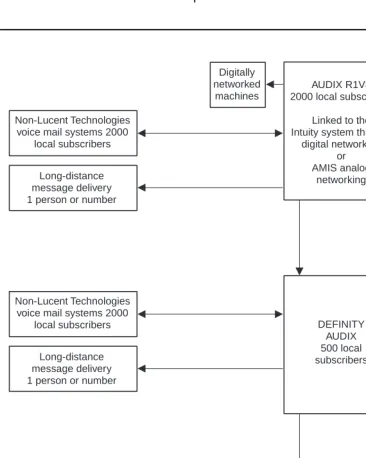
Figure 2-1. Sample AMIS Analog/Message Delivery Network Non-Lucent Technologies
voice mail systems 2000 local subscribers
Non-Lucent Technologies voice mail systems 2000
local subscribers Non-Lucent Technologies
voice mail systems 2000 local subscribers
Long-distance message delivery 1 person or number
Long-distance message delivery 1 person or number
Long-distance message delivery 1 person or number
Digitally networked machines Digitally networked machines AUDIX R1V8 2000 local subscribers
Linked to the Intuity system through
digital networking or AMIS analog networking Intuity system 5000 local subscribers
Linked to the AUDIX system through digital networking or AMIS analog networking DEFINITY AUDIX 500 local subscribers Local message delivery Local message delivery Local message delivery
May 1999 Planning and Design
2-7 Network Design
2
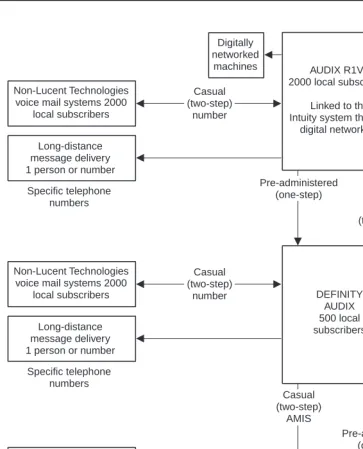
Figure 2-2 shows how the network planner decided to design the connections between the machines (nodes or destinations) of the sample AMIS
analog/message delivery network shown in Figure 2-1.
■ AUDIX System AMIS Connections: Because traffic between the AUDIX
and DEFINITY AUDIX system was expected to be heavy, the AUDIX system is designed to use one-step (pre-administered) addressing to the DEFINITY AUDIX system. Digital Networking was used for the connection to the Intuity system.
Because there is more than one non-Lucent Technologies voice mail system, the AUDIX system is designed to use two-step (casual) addressing for this range of systems. Because two-step addressing is used, these remote recipients cannot be administered on the local machine.
NOTE:
Each remote system administered for AMIS one-step addressing must have an individual machine profile administered on the local system. The one-step connection provides an easier user interface (see the "Subscriber Features" section in Chapter 1, "Overview").
■ DEFINITY AUDIX System AMIS Connections: Because the system
administrator is expecting to add a large number of subscribers, the network planner decided to use a two-step (casual) connection to the AUDIX and Intuity systems. Alternatively, the administrator could have set up a one-step (pre-administered) connection and left most of the
subscribers non-administered.
Because there is more than one non-Lucent Technologies voice mail system, the DEFINITY AUDIX system is designed to use two-step (casual) addressing to this system.
NOTE:
May 1999 Planning and Design
2-8 Network Design
2
■ Intuity System AMIS Connections: Because traffic between the Intuity
system and the DEFINITY AUDIX system was expected to be heavy, the Intuity system is designed to use one-step (pre-administered) addressing to the DEFINITY AUDIX system. Digital Networking was used for the connection to the AUDIX system.
Because there is more than one non-Lucent Technologies voice mail system, the AUDIX system is designed to use two-step (casual) addressing for this range of systems. Because two-step addressing is used, these remote recipients cannot be administered on the local machine.
NOTE:
Each remote system administered for AMIS one-step addressing must have an individual machine profile administered on the local system. The one-step connection provides an easier user interface (see the "Subscriber Features"section in Chapter 1, "Overview").
■ Message Delivery Connections: Both the AUDIX and DEFINITY AUDIX
May 1999 Planning and Design
2-9 Network Design
2
Figure 2-2. Sample AMIS Analog Network/Message Delivery Connections Specific telephone numbers Specific telephone numbers Specific telephone numbers Non-Lucent Technologies
voice mail systems 2000 local subscribers
Non-Lucent Technologies voice mail systems 2000
local subscribers Non-Lucent Technologies
voice mail systems 2000 local subscribers
Long-distance message delivery 1 person or number
Long-distance message delivery 1 person or number
Long-distance message delivery 1 person or number
Digitally networked machines Digitally networked machines AUDIX R1V8 2000 local subscribers
Linked to the Intuity system through
digital networking
Intuity system 5000 local subscribers
Linked to the AUDIX system through digital networking DEFINITY AUDIX 500 local subscribers Local message delivery Local message delivery Local message delivery Range of local numbers Range of local numbers Range of local numbers Casual (two-step) number Casual (two-step) number Casual (two-step) number Pre-administered (one-step) Casual (two-step) AMIS Casual (two-step) AMIS Pre-administered (one-step)
May 1999 Planning and Design
2-10 Network Design
2
Defining Address Ranges
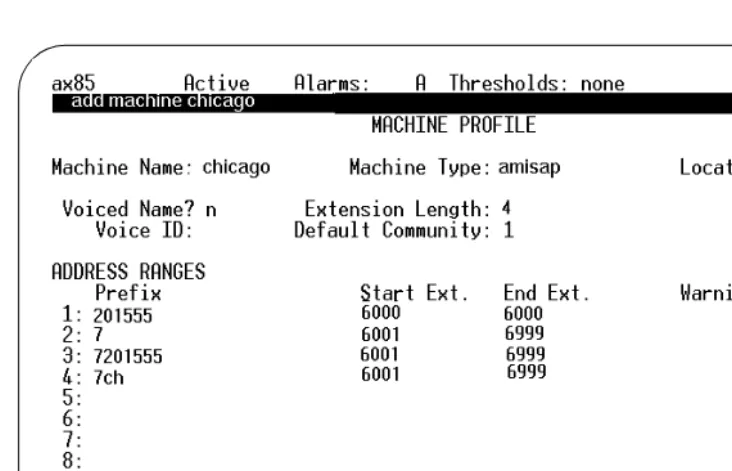
All local and remote machines (including Message Delivery telephone numbers) in the AMIS analog/message delivery network work must have unique addresses. The parts that make up a remote machine’s address are the AMIS prefix
(optional), the address prefix (sometimes required), and the extension ranges (required).
For non-Lucent Technologies systems or remote destinations, you may need to call the person responsible for administering that machine to collect address information. The address ranges for Lucent Technologies voice mail systems can be displayed using the following forms:
■ On AUDIX systems, use the system:translation:address form.
■ On DEFINITY AUDIX systems, use the List Address-Ranges form. ■ On Intuity systems, use the List Address-Ranges screen.
AMIS Prefix
An AMIS prefix may be defined on the same form used to implement the AMIS analog networking feature. If an AMIS prefix is administered, local subscribers must always dial it as the first part of the recipient’s address whenever they address an AMIS message (the prefix signals to the system that the following digits constitute an AMIS analog networking address). Even though the AMIS prefix introduces another digit for subscribers to dial, you may wish to administer one to help subscribers distinguish between AMIS messages and other features, and to ensure that the address ranges for the AMIS analog network destinations are unique.
Address Prefixes
Address prefixes are digits subscribers dial after the AMIS prefix (if one is administered) and prior to the recipient’s extension or phone number when addressing messages. Address prefixes may be provided to allow subscribers to address remote messages in various ways and still allow the message to be delivered (for example, if the remote system can be accessed over a public or a private network).
Address prefixes may be required in some cases to prevent extension ranges from overlapping; duplicate or overlapping ranges are not allowed on AMIS analog networking or message delivery networks (see the following "Overlapping or Duplicate Ranges" section for details). Generally, prefixes are not
May 1999 Planning and Design
2-11 Network Design
2
An address prefix could be any of the following, or combinations of the following:
■ The same numbers as the country code and area code (for example, 1 303 within the United States, or 011 44 71 to reach London, United Kingdom).
■ The same numbers as the area code (NPA) and office code (for example, 614 555).
■ The office code (NNX or NXX) if the remote system shares the same area
code (for example, 555).
■ An alphanumeric code used as a mnemonic of a location or system (for
example, CB for Columbus).
■ An RNX code if the remote system is in a private network (for example, 8).
■ The AMIS prefix for AMIS address ranges only (for example, 7). If an AMIS prefix is defined, it must precede any other characters subscribers must dial in any other address prefixes defined for the AMIS address ranges.
■ A Message Delivery prefix to help subscribers distinguish between
Message Delivery messages and AMIS messages (for example, 6). A Message Delivery address prefix and AMIS prefix could be the same, or two different prefixes could be used.
May 1999 Planning and Design
2-12 Network Design
2
Overlapping or Duplicate Ranges
For all AMIS analog networking and message delivery addresses, duplicate address ranges or overlapping address ranges are not permitted. A duplicate range (or full overlap) means that the address range you have defined is already defined for another machine. An overlapping range means that the range you have defined is a subset of an already existing range or is overlapping another range.
For example, you would be assigning a subset if you tried to assign the extension range 2000-3999 when the range 2000-5999 already exists. The new range would not be allowed (you would receive an error message). You would be assigning an overlap if you tried to assign the extension range 5000-6999 when the range 2000-5999 already exists. To avoid this problem, assign two new ranges instead (1000-1999 and 6000-6999). If you cannot avoid a duplicate or overlapping range, return to the"Address Prefixes" section and select an address prefix that will make the range of numbers unique.
Extension Ranges and Length
Every remote machine in an AMIS analog/message delivery network must be assigned an extension range. If you want local subscribers to access a specific remote machine or telephone number (for example, for long-distance AMIS casual systems or Message Delivery destinations), you can assign an extension “range” of a single number (such as 4000 to 4000).
The length of the extension depends on the application. For example, on AMIS one-step systems, the system dials the remote system’s telephone number for the subscriber, allowing subscribers to type fewer digits. The interaction between extension length and the dial string (the number t