KOC¸ UNIVERSITY
Department of Computer Engineering
Comp.101 Structure and Interpretation of Computer Programs Crawling and Indexing the World Wide Web
• Retrieval: Please read the handout “Project Submission Information” carefully. Retrieve the file “project3.scm” as described in the handout. There are two helper files in this project: generate.scm and search.scm.
• Submission: Please write your answers in “project3.scm” and make sure the file loads without errors. Do not modify the other files. Submit project3.scm as described in the “Project Submission Information” handout before the due date.
This project explores some issues that arise in constructing a “spider” or a “web agent” that crawls over documents in the World Wide Web. For purposes of this project, the Web is an extremely large collection of documents. Each document contains some text and also links to other documents, in the form of URLs.
In this project, we’ll be working with programs that can start with an initial document and follow the references to other documents to do useful things. For example, we could construct an index of all the words occurring in documents, and make this available to people looking for information on the web (as do many of the search engines on the web, such as Google or Yahoo). Just in case you aren’t fluent with the details of HTTP, URLs, URIs, HTML, XML, XSL, HTTP-NG, DOM, and the rest of the alphabet soup that makes up the technical details of the Web, here’s a simplified version of what goes on behind the scenes:
1. The Web consists of a very large number of things called documents, identified by names called URLs (Uniform Resource Locators). For example, the course home page for Fall 2005 has the URL:
http://ais.ku.edu.tr/course/7963/Default.html.
The first portion of a URL (http://) reveals the name of a protocol (in this case hypertext transmission protocol, or HTTP) that can be used to fetch the document, and the rest of the URL contains information needed by the protocol to specify which document is intended. (A protocol is a particular set of rules for how to communicate information.) 2. By using the HTTP protocol, a program (most commonly a browser but any program can
do this— “web agents” and “spiders” are examples of such programs that aren’t browsers) can retrieve a document whose URL starts withHTTP:. The document is returned to the program, along with information about how it is encoded, for example, ASCII or Unicode text, HTML, images in GIF or JPG or MPEG or PNG or some other format, an Excel or Lotus spreadsheet, etc.
4. A spideris a program that starts with an initial set of URLs, retrieves the corresponding documents, adds the links from these documents to the set of URLs and keeps on going. Every time it retrieves a document, it does some (hopefully useful) work in addition to just finding the embedded links.
5. One particularly interesting kind of spider constructs an index of the documents it has seen. This index is similar to the index at the end of a book: it has certain key words and phrases, and for each entry it lists all of the URLs that contain that word or phrase. There are many kinds of indexes, and the art/science of deciding what words or phrases to index and how to extract them is at the cutting edge of research (it’s part of the discipline calledinformation retrieval). We’ll talk mostly aboutfull text indexing, which means that every word in the document (except, perhaps, the very common words like “and,” “the,” “a,” and “an”) is indexed.
In this project, we’ll be interested in three tasks related to searching the World Wide Web. First, we will develop a way to think about the “web” of links as a directed graph. Second, we will build procedures to help in traversing or searching through graphs such as the Web. Third, we will consider ways to build an index for some set of web pages to support fast retrieval of URLs that contain a given word.
1
Directed Graphs
The essence of the Web, for the purpose of understanding the process of searching, is captured by a formal abstraction called a directed graph. A graph (like the one in Figure 1), consists of nodes and edges. In this figure, the nodes are labelled U through Z. Nodes are connected to other nodes via edges. In a directed graph, each edge has a direction so that the existence of an outgoing edge from one node to another node (e.g. node X to node Y) does not imply that there is an edge in the reverse direction (e.g. from node Y to node X). Notice that there can be multiple outgoing edges from a node as well as multipleincomingedges to a node, e.g. there are edges from both Y and Z to W. The set of nodes reachable via a single outgoing edge from a given node is referred to as the node’schildren. For example, the children of node W are nodes U and X. Lastly, a graph is said to contain a cycle if you start from some node and manage to return to that same node after traversing one or more edges. So for example, the nodes W, X and Y form a cycle, as does the node V by itself.
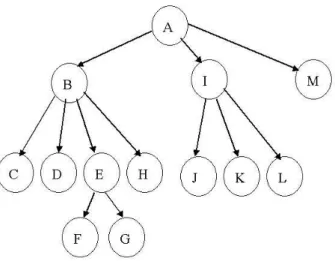
A second example of a directed graph is shown in Figure 2. This particular directed graph happens to be a tree: each node is pointed to by only one other node and thus there is no sharing of nodes, and there are no cycles (or loops).
In order to traverse a directed graph, let’s assume that we have two selectors for getting infor-mation from the graph:
• (find-node-children graph node) returns a list of the nodes in graph that can be reached in one step by outbound edges from node. For example, in Figure 2 the chil-dren of node B are C, D, E, and H – things that can be reached in one hop by an outgoing edge.
Figure 1: An example of a general graph.
Note, we have not said anything yet about the actual representation of a graph, a node, or an edge. We are simply stating an abstract definition of a data structure.
1.1 The Web as a Graph
The Web itself can be thought of as a directed graph in which the nodes are HTML documents and the edges are hyperlinks to other HTML documents. For example, in Figure 2 the node labeled B would be a URL, and a directed edge exists between two nodes B and E if the document represented by node B contains a link to the document represented by node E (as it does in this case).
As mentioned earlier, a web spider (or web crawler) is a program that traverses the web. A web spider might support procedures such as:
• (find-URL-links web URL)returns a list of the URLs that are outbound links fromURL. • (find-URL-text web URL) returns an alphabetized list of all of the words occurring in
the document atURL.
Note, we have not said anything yet about the actual representation of the web. We are simply stating an abstract definition of a data structure.
In a real web crawler,find-URL-linkswould involve retrieving the document over the network using its URL, parsing the HTML information returned by the web server, and extracting the link information from <a HREF=...>, <image src=...> and similar tags. Similarly, in a real web crawler,(find-URL-text web URL)would retrieve the document, discard all of the mark-up commands (such as <body>, <html>, <ul>, etc.), alphabetize (and remove duplicates from) the text, and return the resulting list of words.
For this project our programs will not actually go out and retrieve documents over the web. Instead, we will represent a collection of web documents as a graph as discussed earlier. When you load the code for this project, you will have available a global variable, the-web, which holds the graph representation for a set of documents for use in this project.
Note: It is important to separate our particular representation of information on the web from the idea of the web as a loose collection of documents. We are choosing to use a graph to capture a simple version of the web – this is simply to provide us with a concrete representation of the web, so that we can examine issues related to exploring the web. In practice, we would never build an entire graph representation of the web, especially since it is a dynamic thing that constantly changes.
Our implementation of find-URL-linksand find-URL-textwill simply use the graph proce-dures to get web links (children) and web page contents:
(define (find-URL-links web url) (find-node-children web url))
(define (find-URL-text web url) (find-node-contents web url))
1.2 Directed Graph Abstraction
We will build a graph abstraction to capture the relationships as shown in Figures 1 and 2, as well as enable us to have some contents at each node. You should study the code insearch.scm provided with the project very closely; parts of it are described in the following discussion. We will assume that our graph is represented as a collection of elements. Each graph-element will itself consist of a node (represented as a symbol – the name of the node), a list of children nodes, and some contents stored at the node (which in general can be of any type). The constructors, type predicate, and accessors for the graph-element abstraction are shown below:
;;; Graph Abstraction ;;;
;;; Graph a collection of Graph-Elements
;;; Graph-Element a node, outgoing children from the
;;; node, and contents of the node
;;; Node = symbol a symbol label or name for the node
;;; Contents = anytype the contents of the node
;;---;; Graph-Element
; make-graph-element: Node,list<Node>,Contents -> Element (define (make-graph-element node children contents)
(list ’graph-element node children contents))
(define (graph-element? element) ; anytype -> boolean
(and (pair? element) (eq? ’graph-element (car element))))
; Get the node (the name) from the Graph-Element
(define (graph-element->node element) ; Graph-Element -> Node (if (not (graph-element? element))
(error "object not element: " element) (first (cdr element))))
; Get the children (a list of outgoing node names) from the Graph-Element (define (graph-element->children element) ; Graph-Element -> list<Node>
(if (not (graph-element? element))
(error "object not element: " element) (second (cdr element))))
; Get the contents from the Graph-Element
(define (graph-element->contents element) ; Graph-Element -> Contents (if (not (graph-element? element))
(error "object not element: " element) (third (cdr element))))
Given this representation for a graph-element, we can build the graph out of these elements as follows:
(cons ’graph elements))
(define (graph? graph) ; anytype -> boolean
(and (pair? graph) (eq? ’graph (car graph))))
(define (graph-elements graph) ; Graph -> list<Graph-Element>
(if (not (graph? graph))
(error "object not a graph: " graph) (cdr graph)))
(define (graph-root graph) ; Graph -> Node|null
(let ((elements (graph-elements graph))) (if (null? elements)
#f
(graph-element->node (car elements)))))
In the above implementation, we will arbitrarily consider the first graph-element to hold the “root” for the graph. The procedure graph-rootreturns the root node.
Given these abstractions, we can construct the graph in Figure 2 (with nodeaas the root) using: (define test-graph
(make-graph (list
(make-graph-element ’a ’(b i m) ’(some words)) (make-graph-element ’b ’(c d e h) ’(more words)) (make-graph-element ’c ’() ’(at c node some words)) (make-graph-element ’d ’() ’())
(make-graph-element ’e ’(f g) ’(and even more words)) (make-graph-element ’f ’() ’())
(make-graph-element ’g ’() ’()) (make-graph-element ’h ’() ’())
(make-graph-element ’i ’(j k l) ’(more words yet)) (make-graph-element ’j ’() ’())
(make-graph-element ’k ’() ’()) (make-graph-element ’l ’() ’()))))
Note that several of the nodes have no children, and that several have no contents.
We would like to have some accessors to get connectivity and contents information out of the graph. We first define a procedure to find a graph-element in a graph, given the node (i.e. the symbol or name that identifies the element):
; Find the specified node in the graph
(define (find-graph-element graph node) ; Graph,Node -> Graph-Element|null (define (find elements)
(cond ((null? elements) ’())
((eq? (graph-element->node (car elements)) node) (car elements))
(else (find (cdr elements))))) (find (graph-elements graph)))
; Find the children of the specified node in the graph
(define (find-node-children graph node) ; Graph,Node -> list<Node>|null (let ((element (find-graph-element graph node)))
(if (not (null? element))
(graph-element->children element) ’())))
; Find the contents of the specified node in the graph
(define (find-node-contents graph node) ; Graph,Node -> contents|null
(let ((element (find-graph-element graph node))) (if (not (null? element))
(graph-element->contents element) ’())))
In our representation above, we use node names (Node = symbol) to reference agraph-element in agraph; the children of a node are represented as a list of other node names. An alternative to this approach would be to make the node itself a full abstract data type, so that a node object would have identity, and the children of a node could be, for example, a list of the actual children node objects. The tradeoff would be more work in building the graph (e.g. to link together actual node objects as nodes and edges are added to a graph), but substantial savings when nodes are requested from the graph (i.e. by avoiding a linear search of the graph-elements for the matching node name). With such an alternative abstraction, when requesting a child node one can achieve constant time access (in the size of the graph), as opposed to linear time access as in the current implementation.
2
Searching a Graph
How can we search a graph? The basic idea is that we need to start at some node and traverse the graph in some fashion looking for some goal. The search might succeed (meaning that some goal is found), or it might fail (meaning that some goal was not found). This very basic and abstract search behavior can be captured in the following procedure:
;; search: Node, (Node->Boolean), (Graph, Node -> List<Node>), ;; (List<Node>, List<Node> -> List<Node>), Graph
;; --> Boolean
(define (search initial-state goal? successors merge graph) ;; initial-state is the start state of the search
;;
;; goal? is the predicate that determines whether we have ;; reached the goal
;;
;; successors computes from the current state all successor states ;;
;; merge combines new states with the set of states still to explore (define (search-inner still-to-do)
(if (null? still-to-do) #f
(write-line (list ’now-at current))) (if (goal? current)
#t
(search-inner
(merge (successors graph current) (cdr still-to-do))))))) (search-inner (list initial-state)))
Note the use of the *search-debug* flag. If we set this global variable to #t, we will see the order in which the procedure is traversing the graph.
2.1 Looking at search
What does this search procedure do? Well, let’s look at it a bit more closely. Searchtakes several arguments. The first is the initial state of the search. For our purposes, this will be aNode or in other words, the name of some node in our graph. The second is a goal? procedure, which is applied to a node to determine if we have reached our goal. This procedure will presumably examine some aspect of the node (for example, maybe it wants to see if a particular word is contained in the contents of that node) to decide if the search has reached its termination point. The third is a procedure for finding the successors of the node, which in this case basically means finding the children of a node in the graph on which we are searching. The fourth is a procedure for combining the children of a node with any other nodes that we still have to search. And the final argument is the graph over which we are searching.
Looking at the code, you can see that we start with a list of nodes to search. If the first one meets ourgoal? criterion, we stop. If not, we get the children of the current node, and combine them in some fashion with the other nodes in our collection to search. This then becomes our new list of nodes to consider, and we continue.
2.2 Search Strategies
There are two common approaches for searching directed graphs, called depth-first search and breadth-first search. In a depth-first search we start at a node, pick one of the outgoing links from it, explore that link (and all of that link’s outgoing links, and so on) before returning to explore the next link out of our original node. For the graph in Figure 2, that would mean we would examine the nodes (if we go left-to-right as well as depth-first) in the order: a,b,c,d, e,f, g,h, i,j, k, l, and finallym (unless we found our goal earlier, of course). The name “depth-first” comes from the fact that we go down the graph (in the above drawing) before we go across. In a breadth-first search, we visit a node and then all of its “siblings” first, before exploring any “children.” For Figure 2, we’d visit the nodes in the ordera, b, i, m, c, d, e, h, j, k, l, f, g. We can abstract the notions of depth-first, breadth-first, and other kinds of searches using the idea of a search strategy. A search strategy will basically come down to what choice we make for how to order the nodes to be explored.
2.3 A Depth-First Strategy
(define (DFS-simple start goal? graph) (search start
goal?
find-node-children
(lambda (new old) (append new old)) graph))
And here is an example of using it (DFS-simple ’a
(lambda (node) (eq? node ’l)) test-graph)
In this case, we are searching a particular graphtest-graph, starting from a node with namea. We are looking for a node namedl(hence our second argument). We use our graph abstraction to extract the children of a node (i.e. find-node-children). The key element is how we choose to order the set of nodes to be explored. Note the fourth argument. We can see that this will basically take the list of nodes to be explored, and add the new children to the end of the list. This should give us a depth first search (you should think carefully about why).
This simple method does not work in general, but it does work for the graph in Figure 2. (See Exercise 1 for some thoughts on why this algorithm does not work on all graphs.)
3
An Index Abstraction
We will also be interested in constructing an index of web pages. To do this, we will first construct a general purpose index abstraction, and then use it for our purpose of web indexing. An Indexenables us to associate values with keys, and to retrieve those values later on given the key. Here we will assume that a key is a Scheme symbol (i.e. Key = symbol), and that a value is also a symbol (i.e. Val = symbol). Our index will be a mutable data structure. A concrete implementation for an index is as follows. An Index will be a tagged data object that holds a list ofIndex-Entries. Each Index-Entryassociates aKeywith a list of values for thatKey, i.e.
;; Index = Pair<Index-Tag, list<Index-Entry>> ;; Index-Entry = Pair<Key, Pair<list<Val>, null>>
Thus our index implementation is shown (partially) below. You will be asked in the exercises to complete the implementation. The index implementation makes use of the Scheme procedure assv; you will find it helpful to consult the Scheme manual as to what this procedure does.
(define (make-index) ; void -> Index
(list ’index))
(define (index? index) ; anytype -> boolean
; This is an internal helper procedure not to be used externally. (define (find-entry-in-index index key)
(if (not (index? index))
(error "object not an index: " index) (assv key (cdr index))))
; returns a list of values associated with key
(define (find-in-index index key) ; Index,Key -> list<Val> (let ((index-entry (find-entry-in-index index key)))
(if (not (null? index-entry)) (cadr index-entry)
’())))
(define (add-to-index! index key value) ; Index,Key,Val -> Index (let ((index-entry (find-entry-in-index index key)))
(if (null? index-entry)
;; no entry -- create and insert a new one... ... TO BE IMPLEMENTED
;; entry exists -- insert value if not already there... ... TO BE IMPLEMENTED
)) index)
An example use of the index is shown below (define test-index (make-index))
(add-to-index! test-index ’key1 ’value1) (add-to-index! test-index ’key2 ’value2)
(add-to-index! test-index ’key1 ’another-value1)
(find-in-index test-index ’key1) ;Value: (another-value1 value1)
(find-in-index test-index ’key2) ;Value: (value2)
4
Programming assignment: A web spider
The first two exercises will get you thinking about the project. We suggest that you do them early.
Warmup Exercise: Index Implementation.
Draw a box and pointer diagram (you do not need to turn this in), and show the corresponding printed representation, to illustrate the implementation of an Index as defined in Section 3. Think about how you want the following expressions to create and then mutate your data structure:
(define test-index (make-index))
(add-to-index! test-index ’key1 ’value1) (add-to-index! test-index ’key2 ’value2)
(add-to-index! test-index ’key1 ’another-value1)
Exercise 1: The Web as a General Graph
Although we’ve been presenting the concepts and ideas in this problem set in the context of the Web, for the project you will be using data structures that have been pre-built. Thus, you will not be interfacing or touching the Web directly; instead, you will be dealing with a graph data structure we’ve created for you calledthe-web.
The following partial definition of the-web mimics a subset of the graph of web pages at the Comp101 web site. Each node here is the URL of a web page and the children nodes are the URLs referenced in the links on the page.
(define the-web-initial (make-graph
(list
(make-graph-element
’http://ais.ku.edu.tr/course/7963/Default.html ’(http://ais.ku.edu.tr/course/7963/CWMenu.html
http://ais.ku.edu.tr/course/7963/des.html)
’(... help words extracted from http://ais.ku.edu.tr/course/7963/Default.html ...)) (make-graph-element
’http://ais.ku.edu.tr/course/7963/CWMenu.html ’(http://ais.ku.edu.tr/course/7963/des.html
http://ais.ku.edu.tr/course/7963/syl.html http://ais.ku.edu.tr/course/7963/hnd.html )
’(... words extracted from http://ais.ku.edu.tr/course/7963/CWMenu.html ...)) (make-graph-element
’http://ais.ku.edu.tr/course/7963/syl.html ’(http://trackit.edu.tr
http://ais.ku.edu.tr/course/7963/Default.html http://etutor.ku.edu.tr/comp101
)
’(... words extracted from http://ais.ku.edu.tr/course/7963/syl.html)) )
))
Now, begin by loading the code for the project in project3.scm. This will define the search and data structure procedures listed above. Just to make sure everything is working, evaluate (DFS-simple ’a
(lambda (node) (eq? node ’l)) test-graph)
This should traverse thetest-graphgraph until the search finds nodel(lowercase L), and you should see the nodes being visited in depth-first order.
Exercise 2: A breadth-first search.
Our previous example used a depth-first strategy. A breadth-first search strategy can be ob-tained by modifyingonly one lineof the DFS-simple, leaving the total number of characters in the expression unchanged! Do this to create a new procedure (call itBFS-simple), demonstrate that it works on test-graph, and write a short (but clear) explanation of why it works.
4.1 Marking nodes
In Exercise 1, you discussed a problem withDFS-simple. One way to fix this problem is to keep track of what nodes you have visited. The basic idea is that when we move to a “new” node, we can check to see if we have already examined that node. If we have, we can simply remove it from our list of nodes to explore, ignore any children (since they will have also already been visited), and move on to the next node in the list.
Exercise 3: Marking visited nodes.
You should be able to use the definition ofsearchas a starting point to create a new procedure (call it search-with-cycles) that keeps track of already visited nodes, and implements the idea described above.
To show that your implementation works, use it with a depth first strategy to create a new procedure (call it DFS) that implements full depth first search. Use it to walk the sample graph test-cycle which is defined for you in search.scm. Show that it visits nodes at most once. Also create a breadth first search, and also show that it only visits nodes once (albeit in a different order).
Once you are sure these procedures are working, give the order in which the nodes are visited for depth-first search and for breadth-first search ofthe-web. You should provide a goal? pro-cedure that always returns false so that the entire web is traversed, and start the walk at the node labeledhttp://ais.ku.edu.tr/course/7963/default.html.
5
Indexing the web
the World Wide Web, and this graph uses node names that correspond to URLs (as inthe-web sample given earlier). Remember, we’re assuming that we have a procedure find-URL-text which, for this web representation, gets us the alphabetized text at the node. For example, (find-URL-text the-web ’http://ais.ku.edu.tr/course/7963/des.html)yields the list:
1 101 1724 3745 49 ABSTRACTIONS AN AND ARE ASSIGNMENTS ASSISTANT B10 B29 BUILDING CODE COMP COMPILERS COMPLEXITY COMPUTER CONCEPTS CONTROL CORE COURSE COURSE
DATA DAYS DENIZ DEPARTMENT DESCRIPTION DYURET DYURET@KUEDUTR EMAIL ENG ENGINEERING EXTENSION FOCUSING GENERAL HOME IN INFORMATION INSTRUCTORS INTEGRAL INTERPRETATION INTERPRETERS INTRODUCTION LARGE LOCATION MACHINE MNB3 MODELS MODULARITY NAME OBJECTS OF ON PART PROCEDURES PROFESSOR PROGRAMMING PROGRAMS REGISTERED ROOM SEC SOFTWARE STATE STRUCTURE STUDENTS SUBSTANTIAL SYSTEMS THE TIMES TITLE TO WEB3 WEEKLY WITH YURET
Exercise 4: The Index Abstraction.
Your first task is to complete the implementation of the index abstraction. Complete the definition ofadd-to-index! so that we have available the following procedures:
• (make-index): Creates a new index.
• (add-to-index! index key value): Add the value under the given key in the index. Make sure that you prevent the addition of null values.
• (find-in-index index key): Returns a list of all the values that have been entered into the index under the specified key.
• (remove-key-from-index index key): Remove a key from a given index.
Verify that your add-to-index! works with the other index procedures by showing the result of evaluating the insertions and finds presented in Warmup Exercise.
Exercise 5: A Web Index
Given this index data abstraction, we want to write a procedure to use the index to keep track of all the documents (URLs) that contain a particular word:
• (add-document-to-index! index web url): Add an entry in the index for each word in the contents of the URL (so that the key for that entry is a word, and the data in the entry is the url).
This will enable you later on to get back the list of all documents (URLs) that appear under that key (and thus contain that word). Here’s an example of how it should work:
(define the-web-index (make-index))
(add-document-to-index! the-web-index the-web
(find-in-index the-web-index ’description)
;Value: (http://ais.ku.edu.tr/course/7963/des.html)
(find-in-index the-web-index ’*magic*) ;Value: #f
Write this procedure and show it working on appropriate test cases.
Exercise 6: Crawling the Web to Build an Index.
Now let’s simulate what a typical search engine’s spider does: Crawl the entire web(recall: use a goal procedure that always returns false) and produce a full-text index of everything you find. To do this, we are first going to need to create one last set of search procedures. The only modification we need to make is to allow for a specific action to take place at each node that we visit (so we will want to be able to pass this procedure in as an argument). Create a final search procedure that accomplishes this, and then use that to create a breadth-first strategy using this idea.
Next, write a procedure,make-web-index, that creates a new index, finds all the URLs that can be reached from a given web and initial URL, indexes them, and returns a procedure that can be used to look up all the URLs of documents containing a given word. Your procedure should use a breadth first strategy to actually traverse the-web. You will also want to make use of the index manipulating procedures from above.
You can test your program by trying the following example. Which document(s) do you find?
(define find-documents (make-web-index the-web ’http://ais.ku.edu.tr/course/7963/des.html))
(find-documents ’description)
Exercise 7: A dynamic web search.
Let’s put everything together by comparing the performance of crawling the web to find a desired document, versus using a full-text index of the web. Note the difference: a dynamic search would traverse URLs in real-time when a user initiates a search, while the full-text index is the result of some precomputation stage that has occurred prior to any user initiated search. This won’t be a full or fair comparison, but it should give you some ideas about tradeoffs in designing real systems that analyze the contents of the actual Web.
To investigate crawling, write two procedures:
1. (search-any web start-node word) searches or traverses the indicated web (using a breadth first strategy) and returns thefirstdocument that it finds that contains the given word. It should stop searching as soon as it finds such a document.
2. (search-all web start-node word)searches theentireweb (using a breadth first strat-egy) and returnsall documents that contain the given word.
Exercise 8: Comparison – Web Index vs. Dynamic Search.
Let’s compare the technique of dynamic web searching with web indexing usingmake-web-index andfind-documents. We’ve provided a program, (generate-random-web size), that you can use to create test webs of different sizes (total number of nodes) with some randomly generated text. Use this to build several test webs. You don’t have to make them too big; the procedure will in fact not build anything larger than size 200. For each web, measure the amount of time it takes, starting from the node named*start*:
• to usesearch-anyto find a document containing the word ’description;
• to use search-any to find a document containing a word that is not in the test web: ’Susanhockfield;
• to usesearch-allto find all documents containing the word ’description; • to runmake-web-indexto create an index for the test web;
• to usefind-documentsto find all documents containing the word ’description, not includ-ing the time needed to create the index.
• to usefind-documentsto find all documents containing the word ’Susanhockfield (there won’t be any), not including the time needed to create the index.
Note that althoughfind-documentswas originally created in Exercise 6 to deal withthe-web, you can use the same method (utilizingmake-web-index) to apply this idea to any random test web.
To enable you to do timing, we’ve included a special function called timed. To use it, place the symbol timedat the beginning of a combination that you want to evaluate, e.g.
(timed factorial 25)
will apply the procedurefactorialto the argument 25, print out the time (in seconds) it takes to compute this, and return the result.
Write a few short paragraphs explaining the measurements you made and what conclusions you might want to draw about searching and crawling the real Web. If you were building a service to help people find information on the Web, what kinds of factors would you consider in deciding which method to use?
Exercise 9: Using a better indexing scheme.
A professionally written version of our procedures for creating an index would pay careful at-tention to the efficiency of the algorithm used, and would probably involve alphabetical order and more complicated data structures than we have currently used. In this exercise, you should create a more efficient indexing scheme.
abstraction, so there are two structures we could optimize: the list of values associated with each entry, and the list of keys.
Since, in our formulation, we just return all of the values associated with a key, we’re going to focus on optimizing the time to search for a particular key in the index.
Modify your index abstraction as follows. Create a new abstraction Optimized-Index which contains keys and corresponding Index-Entrys in vector form. A vector is simply another data structure. It has a fixed length, it stores its entries in a linear fashion, and it can store and retrieve entries at any point in its structure in constant time (compare this to a list). You can look up more details about a vector in the Scheme manual.
There should be a constructor (optimize-index ind) which takes a normal index ind and returns a correspondingOptimized-Index. The constructor should sort the data, in alphabetical order of keys. Then, to query for a particular key, we will use a binary search, as described in the next problem.
You will find the following procedures useful:
• (symbol<? x y): symbol, symbol -> boolean
determines if the symbol xcomes before the symbolyin alphabetical order. • (make-vector k init): int, X -> vector<X>
creates a new vector of lengthkwith all entries initialized to init. • (vector-set! vec k obj): vector<X>, int, X -> unspecified
set the kth entry ofvecto obj.
• (vector-ref vec k): vector<X>, int -> X returns thekth entry ofvec.
• (vector-length vec): vector<X> -> int returns the length ofvec.
• (sort! vec proc): vector<X>, (X, X -> boolean) -> vector<X>
sorts the elements of vec, using the proc to compare values (i.e., if (proc a b) is true thena will appear beforeb in the vector. The original vector is mutated into this sorted order, and returned.
You may also use the conversion procedure list->vector. Here is a demonstration usage of sort!and list->vector:
(sort! (list->vector (list 8 6 4 3 9 2 5 1 7)) <) ;Value: #(1 2 3 4 5 6 7 8 9)
Note: Make sure that your sorting procedure maintains the correct associations between keys and index entries. If you just sort the keys without somehow rearranging the values in the corresponding way, your optimized index will give the wrong answer. In testing, you should verify that this problem doesn’t occur.
Exercise 10: Binary Search.
The idea behind a binary search is that if we know a vector has sorted elements, we can search for a particular key without examining every member of the vector. Initially, our “search domain” is 1, . . . , nwherenis the length of the vector. Then, we check the middle (n/2th) element of the vector, and see if it holds the key we are seeking. If it is not a match, we compare that element against our key. If we see that our key is greater than the middle element, we can recursively call a binary search on the right half of the vector (i.e., make the search domainn/2 + 1, . . . , n). Conversely, if the key is smaller than the middle index, we continue the search in the left half. This continues until our search domain only has 1 item in it; either it is the item we are seeking, or we conclude that the item we are seeking is not in our vector.
You need to complete the following definition:
(define (find-entry-in-optimized-index optind k) ; type: Optimized-Index, Key -> List<Val>
; k is a symbol representing the key we are looking for ; this procedure does a binary search, so it takes O(log n) ; time where n is the number of entries in optind
; ...