The research reported in this thesis has been carried out under the auspices of SIKS, the Dutch Graduate School for Information and Knowledge Systems.
Promotiecommissie:
prof.dr. J.C. van Vliet (promotor) dr. G.C. van der Veer (co-promotor) dr. A. Eli¨ens (co-promotor)
dr. F. Patern`o (CNUCE Italy, referent)
prof.dr. M. Rauterberg (IPO & Technische Universiteit Eindhoven) prof.dr. J.M. Akkermans (Vrije Universiteit Amsterdam)
prof.dr. B. Wielinga (University of Amsterdam)
TASK-BASED
USER
INTERFACE
DESIGN
ACADEMISCH PROEFSCHRIFT
ter verkrijging van de graad van doctor aan de Vrije Universiteit Amsterdam, op gezag van de rector magnificus
prof.dr. T. Sminia, in het openbaar te verdedigen ten overstaan van de promotiecommissie
van de faculteit der Exacte Wetenschappen\Wiskunde en Informatica op dinsdag 17 april 2001 om 13.45 uur
in het hoofdgebouw van de universiteit, De Boelelaan 1105
door
Martijn van Welie geboren te Lisse
This thesis could not have been written without the help and inspiration of many people around me. At the Vrije Universiteit, I was in an interesting environment with many different ideas. I want to thank Gerrit van der Veer, Anton Eli¨ens and Hans van Vliet for their enthusiasm and how they enriched my research by showing me their perspectives. Thanks to Gerrit for introducing me to the “world of Human Computer Interaction”. I very much enjoyed our collaboration where we had different approaches to a common interest. Thanks to Anton for “convincing” me to do a Ph.D. in the first place and for showing me the use of several interesting techniques during the development of my tool EUTERPE.
I also want to thank many other people who supported me throughout the last years. A big part of that was due to Bastiaan Sch¨onhage, by being a friend and roommate for many years. We sure had a lot of fun in between the “serious” work. It was very good to have someone like him to discuss “raw” ideas and to keep me from “overdoing” it. During the last months, we were both writing our dissertation which definitely helped me to keep up the spirit and finish it in time.
In addition, thanks to my direct colleagues Nico Lassing, Jacco van Ossenbruggen, Frank Niessink and Jaap Gordijn. During a working day, it is also important to relax and have pointless discussions, for example during lunch when Arno Bakker and Gerco Ballintijn used to join us.
Thanks to Hallvard Trætteberg for his work on the patterns. During the development of the patterns he was my best reviewer and contributor. Without his help I would not have developed them so fast. Joerka Deen also proved to be a good discussion partner, always emphasizing the more “philosophical” side of patterns.
And of course, many thanks to my parents, my sister and Merche for all their support and love during these years.
1 Introduction 1
1.1 The Task-based Design Process . . . 2
1.1.1 Analyzing the current task situation (Task model 1) . . . 3
1.1.2 Envisioning the future task situation (Task model 2) . . . 4
1.1.3 Detailed design . . . 4
1.1.4 Evaluation and usability testing . . . 4
1.2 Research Goals . . . 5
1.2.1 Improving the design process . . . 5
1.2.2 Improving the final product . . . 5
1.3 Research Approach . . . 6
1.4 Outline of this Thesis . . . 7
1.5 Publications . . . 8
2 Designing for Usability 9 2.1 Introduction . . . 9
2.2 Potential Benefits of Usability . . . 10
2.3 Understanding Usability . . . 11
2.3.1 Understanding humans . . . 11
2.3.2 Understanding the work . . . 12
2.3.3 Understanding the interaction . . . 13
2.4 Definitions of Usability . . . 14
2.5 Heuristics, Guidelines and Principles . . . 16
2.6 A Layered Model of Usability . . . 18
2.7 Usability and Software Quality . . . 20
2.8.1 Measuring usability . . . 22
2.8.2 Improving usability . . . 24
2.8.3 Usability process improvement . . . 24
2.9 Usability and Design Methods . . . 25
2.9.1 Modeling humans and work . . . 25
2.9.2 Modeling the system . . . 26
2.10 Summary . . . 27
3 An Ontology for Task Models 29 3.1 Introduction . . . 29
3.2 A Short History of Task Analysis . . . 30
3.3 Methods and techniques . . . 31
3.3.1 Hierarchical Task Analysis (HTA) . . . 31
3.3.2 Goals Operators Methods Selectors (GOMS) . . . 31
3.3.3 M´ethode Analytique de Description des tˆaches (MAD) . . . . 34
3.3.4 Groupware Task Analysis . . . 35
3.4 An Ontology for Task World Models . . . 37
3.4.1 Modeling work structure . . . 37
3.4.2 Modeling the work flow . . . 39
3.4.3 Modeling work artifacts . . . 40
3.4.4 Modeling the work environment . . . 40
3.4.5 Defining an ontology . . . 42
3.5 Related Work . . . 45
3.6 Summary . . . 46
4 Task Modeling and Analysis 47 4.1 Introduction . . . 47
4.2 Representations for Task Modeling . . . 48
4.2.1 Common representations . . . 48
4.2.2 A collection of ontology-based representations . . . 55
4.3 Static versus Dynamic Representations . . . 62
4.4 Analyzing the Task World . . . 63
4.4.1 Heuristic model-based evaluation . . . 64
4.4.3 Comparing two specifications . . . 67
4.4.4 Model validation . . . 68
4.5 Summary . . . 68
5 Detailed Design 71 5.1 Introduction . . . 71
5.2 The Gap between Analysis and Design . . . 72
5.3 Guidelines for Bridging the Gap . . . 72
5.4 Designing the User’s Virtual Machine . . . 74
5.4.1 Designing the functionality . . . 75
5.4.2 Designing the dialog . . . 76
5.4.3 Designing the presentation . . . 77
5.5 Cognitive aspects in UVM Design . . . 78
5.6 Specifying the User Interface . . . 79
5.6.1 Informal methods for detailed design . . . 79
5.6.2 Formal specification techniques . . . 81
5.7 NUAN: New User Action Notation . . . 83
5.7.1 Adding an interface pre-state column . . . 84
5.7.2 A modified interface feedback column . . . 85
5.7.3 Expanding time capabilities . . . 85
5.7.4 Mental actions . . . 85
5.7.5 Generic interaction diagrams . . . 86
5.7.6 Parallellism . . . 86
5.8 Evaluating Design Alternatives . . . 86
5.8.1 Scenarios, guidelines, and patterns . . . 87
5.8.2 Prototype evaluation tools . . . 88
5.8.3 Formal usability evaluation of the user interface . . . 89
5.9 Summary . . . 92
6 Interaction Patterns in User Interface Design 93 6.1 Introduction . . . 93
6.2 Guidelines or Patterns? . . . 94
6.3 An Example . . . 95
6.4.1 Defining a pattern . . . 97
6.4.2 Anti-patterns . . . 97
6.4.3 Types of patterns . . . 97
6.5 Interaction Design Patterns . . . 98
6.5.1 Taking the user perspective . . . 99
6.5.2 Categorizing user problems . . . 100
6.5.3 A focus on usability . . . 101
6.5.4 A template for interaction patterns . . . 102
6.6 Towards a Pattern Language . . . 105
6.6.1 Structuring a pattern collection . . . 106
6.6.2 Developing a pattern language . . . 107
6.7 Summary . . . 108
7 Tools for Task-based Design 109 7.1 Introduction . . . 109
7.2 User Interface Design Tools . . . 110
7.3 Supporting Task-based Design . . . 110
7.3.1 Support throughout the process . . . 111
7.3.2 Integrated modeling and modeling Purposes . . . 111
7.4 An Overview of Current Task Analysis Tools . . . 112
7.4.1 Commercially available tools . . . 113
7.4.2 Research tools . . . 116
7.5 Requirements for Task Analysis Tools . . . 123
7.5.1 Base the tool directly on a conceptual framework . . . 124
7.5.2 Offer consistent and coherent representations . . . 124
7.5.3 Support cooperative task analysis . . . 124
7.5.4 Support documentation including multimedia . . . 124
7.5.5 Support design tracking . . . 125
7.5.6 Offer stability, robustness and product support . . . 125
7.6 Discussion . . . 125
8 EUTERPE, a design workbench 127
8.1 Introduction . . . 127
8.2 The Project’s Context . . . 128
8.3 An Ontology-based Tool . . . 129
8.4 Supporting Task-based Design . . . 130
8.4.1 Supporting task modeling . . . 131
8.4.2 Supporting model analysis . . . 132
8.4.3 Supporting cooperative design . . . 134
8.4.4 Supporting documentation . . . 134
8.4.5 Supporting dialog modeling . . . 136
8.5 Extending EUTERPE . . . 137
8.5.1 Adding support for design space analysis . . . 137
8.5.2 Adding support for simulation . . . 138
8.6 EUTERPEin Use . . . 139
8.7 Implementation of Euterpe - a logic approach . . . 140
8.7.1 A model-view-controller architecture . . . 141
8.7.2 Embedding a Prolog engine . . . 142
8.7.3 Mapping the ontology to Object Prolog . . . 144
8.7.4 Prolog and application functions . . . 146
8.8 Lessons Learned . . . 146
8.9 Summary . . . 147
9 Task-based Design in Practice 149 9.1 Introduction . . . 149
9.2 Applications in Industry . . . 149
9.2.1 Dutch social security . . . 150
9.2.2 Seibersdorf . . . 151
9.3 Application Issues of Task-based Design . . . 154
9.3.1 Performing task analysis . . . 154
9.3.2 Integration with current design practice . . . 156
9.3.3 Designing for usability . . . 157
9.3.4 Developing design alternatives . . . 158
9.4 Limitations and Critical Success factors . . . 159
10 Conclusions and Future Research 163
10.1 Summary of the Thesis . . . 163 10.2 Contributions . . . 165 10.3 Future Research . . . 166
A NUAN symbol definitions 169
B Interaction Design Patterns 173
Bibliography 187
Samenvatting 197
Introduction
Every day many people get frustrated with systems that do not adequately support them in their work. Often the software is of high internal quality, but when the system does not match the users’ tasks and needs, internal software quality becomes almost irrelevant (Bevan 1999). Users will try to avoid using such systems if they can or may even reject using them at all. Real users have real problems trying to do real work. Many books such as (Cooper 1999, Norman 1999) are dedicated to describing and analyzing the problems users are nowadays facing when they use interactive systems. Although understanding these problems is very important, they often constitute a ”post-mortem” analysis that does not contribute to improvements of the design processes. The usage problems so often encountered in practice are not only caused by a lack of good design methods. It is simply true that marketing issues and business practices play an important role as inhibitors of delivering usable systems. Perhaps even the end-users are to blame; e.g. who ever asks to see the remote control before buying a TV set? This thesis takes the position that user interface designers should try to deliver usable products, despite the presence of all those inhibiting forces.
As a consequence, user interface design should mature as a discipline that can deliver usable systems under those restricting circumstances. To do so, we need efficient and effective design methods complete with the appropriate techniques and tools that allow us to systematically deliver usable systems. When designing for usability, the focus should be on usability throughout the process and should not be added in the final stages of product development. Therefore, user interface design needs to become more engineering rather than a pure creative or artistic process, focusing on quality in use instead of artistic qualities.
Many methods rely solely on usability testing to guard the usability of the system. Us-ability testing is very valuable but ”trying to get it right the first time” should not be thought of as an illusion. Although incremental development can be very effective, iteration is often done because there is a lack of effective techniques. The more tradi-tional engineering disciplines use proven techniques and knowledge to get it right more
or less the first time. There is only room for minor adjustments during the construc-tion process. User interface design often relies too much on trial-and-error techniques. The methods and techniques for user interface design need to be improved in order to systematically develop better systems. Better methods and techniques can improve the quality of the initial design and less iterations will be needed to get the details right. This thesis describes ”Task-based User Interface Design” (TB-UID)1. It is a design method that covers the important aspects from task analysis to prototype evaluation. The main idea behind the method is that a firm understanding of the users’ tasks is the proper basis for interactive systems development. With a systematic process of building systems to support users in their tasks, a higher level of usable and useful systems can be achieved by both expert and novice designers.
Task-based design is not the only existing method for designing interactive systems. However, most methods cover only specific aspects or activities in the design process. The method presented in this thesis builds on existing techniques, but it also adds sev-eral original insights, tools and techniques. In the next sections, the task-based design process is outlined briefly. All activities in the design process will be discussed in the following chapters. Additionally the main research goals are discussed, followed by an outline of the thesis.
1.1
The Task-based Design Process
Over the past years we have taken useful bits of theories and combined them with our own techniques to form a coherent practical method for designing complex interactive systems, called DUTCH2. The method has been used successfully in both industry and education proving the practical value of the method. From our experiences, we learned that for a practical method it is required to a) define a clear process, b) define the models and representations including their semantics and c) support the method and models with tools. In the next chapters these requirements will be discussed in detail. Our design process is task based, which means that it uses the tasks of users as a driving force in the design process. The goal is to design both usable and useful systems. We think it is important to base the design on the work that has to be done by the users. Therefore, the users play an important role in acquiring knowledge about their work as well as for usability testing.
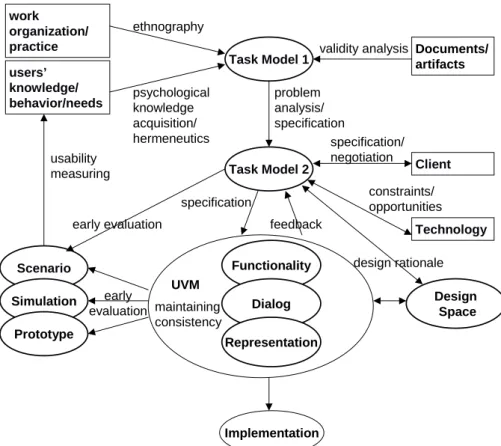
Our process consists of four main activities: (a) analyzing a ”current” task situation, (b) envisioning a future task situation for which information technology is to be designed, and (c) specifying the information technology to be designed. In parallel to these ac-tivities, (d) evaluation activities make the process cyclic. Figure 1.1 gives an overview of the whole design process with all activities and sources of information. In the next chapters, the four main activities will be described in detail.
The design process starts by an extensive task analysis using our method Groupware Task Analysis (GTA). We distinguish two task models. The first task model we make
1Throughout this thesis the phrase ”task-based design” is also used as a synonym. 2Designing for Users and Tasks from Concepts to Handles
work organization/ practice Client users’ knowledge/ behavior/needs Technology Task Model 1 Task Model 2 Scenario Simulation Prototype Functionality Dialog Representation Implementation usability measuring ethnography psychological knowledge acquisition/ hermeneutics problem analysis/ specification specification/ negotiation constraints/ opportunities feedback specification early evaluation early evaluation UVM maintaining consistency Documents/ artifacts validity analysis Design Space design rationale
Figure 1.1: The DUTCHDesign Process
is a descriptive task model which is used for analyzing the current task situation. The second task model is a prescriptive task model for the system to be designed.
1.1.1
Analyzing the current task situation (Task model 1)
In many cases the design of a new system is triggered by an existing task situation. Either the current way of performing tasks is not considered optimal, or the availability of new technology is expected to allow improvement over current methods. A system-atic analysis of the current situation may help formulate design requirements, and at the same time may later on allow evaluation of the design. Whenever it is possible to study the ”current” task situation, a thorough analysis is very valuable for the design of a new system. We use a combination of classical HCI techniques such as structured interviews (Sebillotte 1988) and CSCW techniques such as ethnographic studies and interaction analysis (Jordan 1996). The current situation is described by task model 1, also referred to as the ”current task model”.
1.1.2
Envisioning the future task situation (Task model 2)
Many design methods in HCI that start with task modeling are structured in a number of phases. After describing a current situation (task model 1) the method requires a re-design of the task structure in order to include technological solutions for problems and technological answers to requirements. Johnson et al. (1988) provide an example of a systematic approach where a second task model is explicitly defined in the course of design decisions. Task model 2, the future task model, will in general be formulated and structured in the same way as the previous model, but in this case it is not con-sidered a descriptive model of users’ knowledge but a prescriptive model of the future task world. Task model 2 describes the task situation as it should be when the system has been developed and is used.
1.1.3
Detailed design
After the task modeling activity, the actual system needs to be designed and speci-fied. Task model 2 describes the envisioned task world where the new system will be situated. From there, the details of the technology and the basic tasks that involve interaction with the system need to be worked out. This activity consists of three sub-activities that are strongly interrelated: specifying the functionality, structuring the di-alog between the users and the system, and specifying the way the system is presented to the user. This activity is focused on a detailed description of the system as far as it is of direct relevance to the end-user. We use the term User Virtual Machine (UVM) (Tauber 1988) to indicate the total of user relevant knowledge of the technology, in-cluding both semantics (what the system offers the user for task delegation) and syntax (how task delegation to the system has to be expressed by the user). When making the transition from task model 2 to a detailed design of the UVM, the users’ tasks and the objects determine the first sketch of the application. The task or object structure is used to create the main displays and navigational structure. From there on, the iterative refinement process takes off together with the use of explicit design knowledge such as guidelines and patterns.
1.1.4
Evaluation and usability testing
During the entire process, some kind of evaluation activity can take place. As soon as an initial task model is available it can already be evaluated using scenarios and use cases. Later on when some initial sketches for the new system are known, mockups and prototypes can be used for early evaluation of design concepts. Each evaluation activity can cause another iteration. For instance, a task model may turn out to be in-complete after a mockup is evaluated in a critical scenario. In that case, the designers need to go back to the task model and rethink their model. When some parts of the design are worked out in detail, we can begin usability testing with a prototype and users. Early evaluation can be done by inspecting design specifications or by perform-ing walkthrough sessions with designers and/or users.
1.2
Research Goals
The research goals addressed in this thesis are all concerned with the improvement of both the design process as well as the final product being designed. Nowadays, many systems are not usable enough and the question is how to develop usable systems in practice.
1.2.1
Improving the design process
Many design methods exist but only few of them try to address the entire design pro-cess. In task-based user interface design, we try to cover the entire process from early analysis to prototyping. Effective and practical methods are needed in practice and task-based design is intended to meet that need. The industry’s context can be charac-terized by limitations in the available resources such as time, money, people, and skills. These limitations should be taken into account when designing. The main process goals this dissertation addresses are:
• Improving the available techniques for both task analysis and design. Although
task analysis is an old topic, the techniques have not been developed far enough to be of sufficient value.
• Reducing the effort of performing a detailed task analysis. Partly because of
poor techniques, performing an effective task analysis takes too much effort. This often leads to rejection of the entire activity.
• Improving effective use of task analysis results in the design of the actual product.
Most task analysis methods are weak on the topic of how the results lead to new or improved systems. Consequently, task models often do not contain the knowledge that is needed in the later stages of design.
In this thesis, we try to address these issues by first analyzing task modeling on the conceptual level followed by the development of suitable representation techniques. Those representation techniques are based on the conceptual model for tasks and are supported by tools. Tools can reduce the effort to build and analyze task models. Con-sequently, task models will be of higher quality and require less effort to build.
1.2.2
Improving the final product
Although a structured analysis method can improve the final product by dictating the necessary activities, it is still not a guarantee for high quality products. Most methods are focussing on analysis activities or specification techniques while the actual design activities remain largely creative and ad hoc. The main problem in ensuring quality of the final product is to use the analysis results effectively in combination with explicit design knowledge. Incorporating design knowledge into the design process makes detailed design less prone to ad hoc design and increases at least the minimum quality of the product. The main research goals in designing for usability are:
• Providing a better understanding of what usability is. Usability is a poorly
un-derstood quality concept. Although most designers have an idea what it is con-ceptually, the concept remains fuzzy and hard to measure.
• Allowing re-use of successful solutions in design. Besides the use of guidelines,
almost no re-use is done in interaction design. Design knowledge and the use of it is highly designer dependent. This gives design an ad-hoc character combined with a trial-and-error mentality.
In this thesis we address these issues first by providing a new framework for the usabil-ity concept. A better understanding of usabilusabil-ity can facilitate measurements and com-parisons hopefully leading to a more objective notion of quality in use of the system. Additionally, interaction design patterns are presented as a new way of documenting explicit design knowledge. Patterns describe solutions in a particular context and allow for re-use of successful solutions.
1.3
Research Approach
At the start of the project the main structure of the DUTCH design method was al-ready developed. However, the theory, the tools and the techniques were in need of improvements. During the project the idea to develop tool support for the method has been a driving force. Effective tool support requires clear conceptual ideas about the necessary models and representations. A large part of the research has focused on de-veloping task analysis to a point were tool support could actually be built. To do that, it was necessary to define a detailed meta level model of what needs to be described in task models. The task world ontology we developed is such a meta model. The task world ontology has been formalized and can be used in tool development. Our tool EUTERPEprovides an operationalization of the ontology by offering ontology based representations.
The results of task analysis are to be used in the detailed design phase. This gives a different perspective on what kind of information task models need to contain. Trying to bridge the gap from analysis to design led to questions regarding the concept of usability. One of the important insights is that quality of the design is related to both task knowledge and design knowledge. This led to a refinement of the existing ideas on usability and the development of interaction design patterns.
An important question regarding the research methodology is how to determine the quality of our method. Since it is almost impossible to conduct a controlled experi-ment to compare design methods, we have adopted a more pragmatic approach. By continuously applying the method whenever we were able to do so, we tried out new ideas and assessed the value of the used techniques. The methods and techniques as described in this thesis show the result of this approach.
In the period the work for this thesis was conducted, one new method was published that has similar goals and activities i.e. Contextual Design (Beyer & Holtzblatt 1998).
Although they both share the main goals and ideas there are many differences. Where appropriate the differences are discussed in the relevant chapters.
1.4
Outline of this Thesis
The structure of this thesis loosely follows the activities that comprise the DUTCH
design method. Before we discuss the first activity, chapter 2 discusses the usability concept in detail. For user interface design, high quality products are products with high levels of usability. This chapter explains what it is and how it is related to the users and their tasks. It gives a frame of reference on what quality in use is and it will be used in other chapters whenever quality aspects are discussed.
The first step in most design methods is an analysis of the current context of use of the product. In task-based design this is called task analysis. Chapter 3 investigates what the important aspects of the task world are and puts them into a basic structure called the task world ontology. It forms the basis of how we look at the tasks and goals that need to be supported by the system that is to be designed.
The task world ontology gives designers structure and is intended to link the important concepts from a theoretical perspective. In practice, designers also need techniques to describe or document all these aspects. Chapter 4 discusses representation and anal-ysis techniques that designers can use in practice. These techniques are based on the ontology and form an implicit use of the ontology in practice. For producing these representations quickly, a modeling tool called EUTERPEhas been developed which is discussed in chapter 8.
When the analysis has been more or less completed, the detailed design activities need to start. Creating detailed design solutions is done on the basis of the analysis results
and the available design expertise. It uses the analysis results as input and produces a
concrete design as output. Chapter 5 discusses the transformation of analysis results and highlights some of the common techniques that can be used. One of those tech-niques, New User Action Notation (NUAN), is an extension we developed to improve one of the existing techniques.
All of the techniques for describing the detailed design lack the explicit input of proven design knowledge. In chapter 6, interaction design patterns are introduced as a possible way to include explicit design knowledge into the design process. Design patterns capture proven design knowledge and provide means to define a link between user tasks and suitable design solutions. Some example patterns are included in appendix B.
In practice, time is always limited. Software tools are necessary for reducing the time needed to develop specifications throughout the design process. Chapter 7 discusses the state of the art in tools that can be used in task based design. Based on the overview of tools, several requirements are set for future tools.
EUTERPEis a tool developed to meet those requirements. It is directly based on the task world ontology and supports designers in creating representations and performing
semi-automatic analysis of task models. In chapter 8, the functionality is discussed together with an overview of the technical aspects of building an ontology based tool. Although we have described a method for designing user interfaces that should be useful in practice, several issues are still present when the method is applied in practice. Chapter 9 gives an overview of the issues encountered when the method is (partly) applied. They give an informal validation of the method as well as a direction for further improvements.
In chapter 10 the main conclusions are presented together with suggestions for future research.
1.5
Publications
The chapters of this dissertation are largely based on previous published work. This section lists the publications this dissertation is based on.
Chapter 2 is based on a paper published at the Interact 99 conference (van Welie et al. 1999a).
The task world ontology and most of Chapter 3 has been published at Design
Specifi-cation VerifiSpecifi-cation of Information Systems 98 (DSV-IS) (van Welie et al. 1998a).
Chapter 4 is based on two papers published at the European Conference on Cognitive
Ergonomics (van Welie et al. 1998b, van Welie, van der Veer & Koster 2000).
Chapter 5 contains work published at DSV-IS99 (van Welie et al. 1999b) and the
Code-signing Conference 2000 (van Welie & van der Veer 2000).
The theory about patterns and the patterns themselves can be found in chapter 6 and appendix B. They have been published in Tools for Working with Guidelines 2000 (van Welie, van der Veer & Eli¨ens 2000) and at the Pattern Languages of Programming conference (van Welie & Trætteberg 2000).
Chapter 8 contains portions from publications at Designing Interactive Systems 2000 (van der Veer & van Welie 2000), and ECCE 9 (van Welie et al. 1998b).
Two papers published at European Conference on Cognitive Science Approaches to
Process Control (van der Veer et al. 1997, van Loo et al. 1999) describe work that is
Designing for Usability
2.1
Introduction
From a designer’s point of view, the main goal in design is to design a highly usable and useful system (Hartson 1998). We design for people and the systems we develop need to be usable by them. The last decade has shown a trend towards systematic development of systems with a high degree of usability. Users are now recognized as important participants in the design process, for their knowledge about their work and sometimes even for active participation in designing a new system. Human centered design methods all share the thought that systems should be developed around the people that are going to use them.
These methods are based on the assumption that systems that are developed from a
human and work perspective, will have a higher degree of usability. When comparing
different methods on their ability to ”deliver” usable systems, the usability of the final system is the main measure. Hence, it needs to be clear what usability is, how it can be determined and preferably how usability is influenced by certain design choices. In this chapter, we take a detailed look at the concept of usability.
Literature on user interface design frequently uses the term usability. Several defini-tions exist, some show a high degree of similarity but others may seem very different. In addition, several guidelines, standards, heuristics and checklists have been produced that all claim to deal with usability. Although it is not really a problem if each of these ”lists” is designed for slightly different purposes (assessments/ improvement/ standard-ization), they do need to share a common view on the concept of usability. For design-ers that have to deal with these ”lists” the question arises whether one list is ”better” than another and when to use which list. Over the years, frequent usage of the term usability has cluttered the concept. Therefore, in this chapter we look into the different views on usability and we give a framework for dealing with these various views on usability.
2.2
Potential Benefits of Usability
Although user interface designers may see a high degree of usability as a main design goal, others may not. For systems where the amount of work that should be done by users is crucial, designing for usability is a fairly natural goal. For other systems, commercial or financial goals may be regarded far more important resulting in less attention for the usability goals. For example, the Dutch Railways introduced ticket vending machines as a way to reduce the personnel costs for the ticket counters. The machines were a success. Less personnel was needed although at the cost of a lower service to their customers. The machines had several usability problems causing longer waiting times and they were also unusable for several kinds of user groups (elderly people and non-Dutch speakers).
Usability is strongly of interest to the end users but it is also of interest to other stake-holders. A high degree of usability could bring several potential benefits (Karat 1994). These include:
• Increased Efficiency. Systems are often introduced to get more work done in less
time. When the system is not usable the user will waste time struggling with the interface, making them less efficient in their work.
• Increased Productivity. A usable interface allows users to concentrate on the
work rather than the tools they use.
• Reduced Errors/Increased Safety. A significant portion of the errors humans
make can be related to poor design. In some cases, these errors may cause dan-gerous situations for both humans and the environment.
• Reduced Training. When a system closely matches the tasks humans have to
perform and care has been taken concerning memorability, the need for extensive training is reduced. Hence, the time and costs are reduced.
• Reduced Support. A usable product may cause less problems for users and hence
the need for product support is reduced.
• Improved Acceptance. When users like the system because it is very usable, they
are more likely to accept and use it.
• Savings in Development Costs. Making changes early in the design life cycle is
much cheaper than making changes late in the life cycle.
• Increased Sales. A system can have a competitive edge over other systems
be-cause of its usability.
Estimating how much is gained when designing for usability is hard to quantify, but the benefits have been shown to have a considerable impact in practice (Bias & Mayhew 1994). Some attempts have been made to create models that predict the gains in terms of costs (Mayhew & Mantei 1994). These benefits are not necessarily benefits for
all stakeholders of the system. Stakeholders may have different roles such as end-user, designer, software developer, project manager, or client. For some stakeholders certain benefits may actually turn out to be disadvantages. For example, companies whose core business is product support and training may see a decrease in demand for their services. Other companies may want to release a new version every year for commercial reasons, adding new needed functionality which requires additional training. The role of a user interface designer is to make the functionality of the system available to the users in a usable way. Other stakeholders may have different roles and consequently other interests.
This conflict in goals is normal and needs to be recognized by designers as well as the other stakeholders. It is the designers’ task to guard and promote usability aspects despite the less than ideal circumstances. Unfortunately, in practice usability is a poorly understood concept and it often has to give way to other goals. Usability does not come for free and the benefits versus the costs are often discussed (Bias & Mayhew 1994). This situation can be improved in at least two ways. Firstly by providing a better understanding of what usability actually is, how to measure it and how to improve it. Secondly by providing methods and techniques for designing usable systems. Methods can make usability a manageable concept. The costs can be kept low and the impact of the effort can be predicted much better. This chapter focuses on understanding what usability is and the next chapters discuss methods and techniques for developing usable systems.
2.3
Understanding Usability
The first issue with usability is to understand why a system would be usable in the first place. Usability is concerned with humans interacting with a system for some purpose and therefore we need to look at what is known about the users, the work they do and about the interaction that takes place when using a system.
2.3.1
Understanding humans
The systems we design are being used by humans so we need to understand the abil-ities and limitations of humans. Especially cognitive and perceptual abilabil-ities are rel-evant to design but sensor and motor abilities are important as well. Humans have serious limitations when it comes to information processing and other tasks such as decision making, searching and scanning (Shneiderman 1998). The fields of cogni-tive psychology and ergonomics give a theoretical and practical background on these matters. Research in those fields has given useful knowledge that can be used in prac-tice, for instance knowledge about working memory can directly be used to improve learnability of systems. Methods such as GOMS (Card et al. 1983) and CCT (Kieras & Polson 1985) have tried to incorporate cognitive aspects to predict the influence of changes to dialog aspects of a design. Other knowledge such as Fitts’ Law (Fitts 1954)
and color perception can also be applied directly in screen design and layout (Mullet & Sano 1995).
When users work with a system they develop a mental model (van der Veer 1990) of the system. The mental model is part of the long term memory and it is an internal representation of the system. The mental model is formed through interaction with a system and is ’activated’ when humans use a system. This mental model guides them in using the system and is modified when the model is not entirely valid. Generally speaking, usability problems are often caused by a mismatch between the users’ mental model and the system structure, procedures and organization that the mental model is representing.
Another important aspect of knowledge about humans is the social and organizational viewpoint. Users perform their tasks in a larger context where they have a social and organizational position that is important to them. In this context they may have to work together or are part of a team. Consequently there are issues concerning individual and group knowledge. Contextual aspects about users have a less direct impact on the de-sign process but are strongly related to the position of a new system in the organization where it is going to be used (Jordan 1996). Therefore, knowledge about humans as a social organization may not be immediately used for detailed design decisions but it is very useful when (re)structuring the work and organization.
2.3.2
Understanding the work
Generally speaking, humans use systems to aid them in their work. Therefore, un-derstanding the work they do is crucial for designing usable systems. In their work, users perform tasks in order to achieve certain goals and some of these tasks may be performed using a computer system. In this respect, we can speak of task allocation between humans and computer systems. Designing often means changing this task al-location. A conservative approach to design is to allocate tasks performed by humans to the computer. However, this may lead to design solutions that do not take full ad-vantage of the technology. A more innovative approach may change the task structure because of the available technology. In this case, the user’s technology independent goals are being preserved while the used technology leads to a new task structure. One difficult aspect in design is finding out what tasks the users perform and to dis-tinguish goal directed tasks and instrumental tasks. Instrumental tasks exist because of the technology currently used. Goal directed tasks are needed for achieving a user goal. If instrumental tasks are being automated, there is a big danger of automating ”the wrong thing”. For example, if the classical typewriter would have been automated by replacing all instrumental tasks by corresponding tasks in a computer system, no usability gains would occur. Sometimes it indeed makes sense to change a large part of the task structure, especially when the tasks are often instrumental. Innovative design focuses on the main user goals whereas conservative design may lead to automation of instrumental tasks.
Understanding the work humans do is important for designing usable systems but using that knowledge in design can be difficult. Hierarchical models of the task structure are
widely accepted but many important aspects of work are not covered by these models. The work is performed in a certain context of use which also needs to be described in addition to details of the task structure. According to ISO9241 (ISO 1991c) the context of use comprises user, tasks, equipment, the social and physical environment. Understanding of the work is important when design choices are made but a direct relationship between work models and design solution is often hard to specify. In chapter 3 we look at all aspects of the context of use in detail.
2.3.3
Understanding the interaction
Understanding interaction means understanding what happens when users interact with a system. Users are confronted with a user interface that allows them to do many possi-ble things. Users have to ”see” what they can do and how they can use the availapossi-ble pos-sibilities to reach their goals. Naturally, some interfaces work better than others. Every designer acquires skills and experiences during projects and that knowledge helps the designer in later projects. Because of this knowledge, the designer knows what kind of solutions work for which design problems. This knowledge about interaction comes not only from both practical experience but also from literature. Currently the amount of knowledge available in literature is rather limited which makes the personal expe-rience of the designer an important factor for the usability of the system. The more explicit knowledge is available the more UI design becomes an engineering discipline. Basically the only concrete design knowledge that can be used during design is em-bedded in guidelines. Guidelines deal with both structural (the dialog) and presen-tational aspects of a user interface. For example, guidelines on color use and but-ton sizes refer to the presentation and guidelines on feedback and menu structure (Mayhew 1992, Shneiderman 1998) deal with dialog. Usually no explicit distinction between dialog and presentation is made, although both have a distinguishable im-pact on usability. Since guidelines often go into depths on describing a platform’s style, mainly presentational aspects are covered and there is little guidance for dia-log and functional aspects. Some guidelines such as the Macintosh (Apple Computer Inc. 1992) or MS Windows (Microsoft 1995) guidelines mainly describe a platform
style and hardly contain style independent guidelines. The underlying assumption that
applications that have been designed according to the guidelines have good usability, remains unjustified. Other guidelines such as those developed by Smith & Mosier (1986) focus on a narrow scoped list of guidelines dealing with detailed design choices and consequently they are quickly outdated by new technological developments. Some of the older guidelines were designed for character based applications and it is not clear to what extent they apply to e.g. WIMP (Windows, Icons, Menus and Pointers) interfaces or Virtual Reality interfaces.
Despite the differences in guidelines they certainly embody design knowledge and ev-ery designer should know them. However, there may be several reasons why the guide-lines are not followed during the design process. Even if a designer tries to use the guidelines there are still many problems applying them. In Dix et al. (1998) a num-ber of problems with guidelines are discussed such as when to apply a guideline or
choose one out of contradicting guidelines. Also the effectiveness of guidelines is un-der discussion and research has shown that not all guidelines are as practical as desired (Scapin & Bastien 1997).
Another way of capturing design knowledge is in design patterns. Such patterns de-scribe generalized problems and proven solutions that can be immediately used in prac-tice. Because design patterns work from a problem to a solution it is more likely to find guidance on structural aspects emphasized in design patterns. Research on design pat-terns has just started and only a small number of patpat-terns have been written. See chapter 6.
2.4
Definitions of Usability
In this section, definitions of usability are discussed. After a short discussion on heuris-tics, guidelines and principles, section 2.6 introduces a framework that provides an inte-grating view on usability and related concepts. There is not one agreed upon definition of usability and usability certainly cannot be expressed in one objective measure. Sev-eral authors have proposed definitions and categorizations of usability and there seems to be at least some consensus on the concept of usability since they mostly differ on more detailed levels.
Shackel defines usability of a system as “the capability in human functional terms to
be used easily and effectively by the specified range of users, given specified training and user support, to fulfil the specified range of tasks within the specified range of environmental scenarios” (Shackel 1991). The definition is then operationalized by
using four criteria; effectiveness, learnability, flexibility and attitude. This definition already shows the importance of the context of use and that usability is depending on it.
Shackel also makes a distinction between usability, utility (also known as usefulness) and likability. L¨owgren (L¨owgren 1995) elaborates on the issue of usability and util-ity. Whether or not utility is ”included” in usability is a matter of perspective but it is agreed that both are desirable. Especially the engineering approaches seem to make this distinction whereas others simply see utility as part of usability. The ISO 9241-11 (ISO 1991c) standard contains another abstract three-parts definition of usability; The
extent to which a product can be used by specified users to achieve specified goals with effectiveness, efficiency and satisfaction in a specified context of use. ”Effectiveness” is
defined as the accuracy and completeness with which users achieve specified tasks and ”Efficiency” as the resources expended in relation to the accuracy and completeness
with which users achieve goals. ”Satisfaction” is a subjective measure and concerns
the comfort and acceptability of use by end users. Satisfaction is actually the least understood aspect of usability. In (Hassenzahl et al. 2000) the relationship between satisfaction aspects such as fun and challenge are compared to effectiveness and effi-ciency aspects. One of the interesting conclusions is that the most effective interface is not necessarily the most fun or pleasant to used, it might even be boring.
In another definition by Preece et al. (1990) usability is defined as a measure of the ease
with which a system can be learned or used, its safety, effectiveness and efficiency, and the attitude of its users towards it. This definition does not make an explicit reference
to the context of use or specified user goals and suggests that usability is a ”property” of a system.
These definitions approach usability from a theoretical viewpoint and may not be very practical. Nielsen (1993) has a slightly different definition that is specified in elements that are more specific, see Table 2.1. A similar definition is given by Shneiderman (1998). Shneiderman does not call his definition a definition of usability but he calls it
“five measurable human factors central to evaluation of human factors goals”. As can
be seen from Table 2.1, Shneiderman’s definition is essentially identical to Nielsen’s definition and only differs in terminology. Note that the potential benefits mentioned in section 2.2 are almost completely derivable from the definition given by Nielsen. It is surprising that both Nielsen and Shneiderman do not mention any aspect concerning to usefulness (e.g. task completion, can the users complete their tasks).
Table 2.1: Usability as in ISO9241-11, B. Shneiderman and J. Nielsen
ISO 9241-11 Shneiderman Nielsen
Efficiency Speed of performance Efficiency
Time to learn Learnability
Retention over time Memorability Effectiveness Rate of errors by users Errors/Safety Satisfaction Subjective satisfaction Satisfaction
Table 2.2 shows the usability factors as described by Dix et al. (1998). This catego-rization looks rather different from the ISO, Shneiderman and Nielsen definitions. Dix defines three main groups; learnability, flexibility and robustness, suggesting that those concepts are on the same abstraction level. The groups are specified further by factors that influence the concept they belong to. For instance, consistency influences learn-ability positively when a design is consistent within the application and between appli-cations on the same platform. Learnability is subdivided into aspects that are mostly of cognitive nature thereby giving more grip on the important cognitive skills of users in relation to learnability. Robustness corresponds more or less to effectiveness. In flex-ibility also some lower level concepts such as multi-threading are mentioned but most aspects are mainly related to efficiency. This categorization raises the issue of which forces influence usability rather than how it is defined.
Table 2.2: Usability categorization by Dix et al.
Learnability Flexibility Robustness
Predictability Dialog initiative Observability Synthesizability Multi-Threading Recoverability
Familiarity Task Migratability Responsiveness
Generalizability Substitutivity Task conformance
Consistency Customizability
When comparing these categorizations and definitions it is remarkable that Nielsen and the ISO standard give a concise outline of the term usability while Dix focuses
more on the concrete elements that influence usability. From a practical viewpoint, Dix’s categorization gives the designer concrete means for improving the usability of a design. On the other hand, it is odd that Nielsen’s notions of efficiency or error rate can not be found in Dix’s categorization, as they are clear indicators of usability. The most interesting aspect of Dix’s categorization is that it raises the question what the causes for sub-optimal usability might be and how it might be improved.
2.5
Heuristics, Guidelines and Principles
In addition to definitions of usability, there are also several lists of design principles, heuristics or criteria. These should help the designer in designing usable systems. The assumption is that when the guidelines are appropriately applied, they have a positive effect on the overall usability. Both Nielsen and Shneiderman give a set of design heuristics to follow that should have a positive effect on his categories. Table 2.3 shows that Shneiderman’s eight ”golden rules” for design (Shneiderman 1998) and Nielsen’s heuristics are very similar:
Table 2.3: Rules and heuristics
Shneiderman Nielsen
Strive for consistency Consistency
Enable frequent users to use shortcuts Shortcuts
Offer informative feedback Feedback
Design dialogs to yield closure
Offer error prevention and simple error handling Prevent Errors / Good Error Messages
Permit easy reversal of actions Forgive the user
Support internal locus of control
Reduce short-term memory load Minimize User Memory Load
Simple and Natural Dialogue Help and Documentation Speak the User’s Language Clearly Marked Exits
Both Dix’s categorization and Nielsen’s heuristics show that the root factors that in-fluence usability need to be found in the cognitive and perceptual abilities of users such as working memory, problem solving, decision making, searching and scanning (Shneiderman 1998). A similar list is given by the ISO 9241-10 (ISO 1991b) standard and is called a set of dialog principles, see Table 2.4. Where Nielsen and Shneiderman mainly focus on human specific guidelines, the ISO 9241-10 principles also explicitly mention suitability for the task referring to the importance of work in usability. On the other hand, none of these principles give concrete hints on how to actually achieve this ”suitability”.
Another interesting list is the list of ergonomic criteria developed by Scapin & Bastien (1997), see Figure 2.1. These criteria have been developed for finding usability prob-lems in a walkthrough evaluation. Most of the criteria can also by found in Nielsen’s and Shneiderman’s lists but some are new. For example, Scapin’s list of ergonomic
Table 2.4: ISO 9241-10 dialog principles
Dialogue Principles Suitability for the task Self-descriptiveness Controllability
Conformity with user expectations Error tolerance
Suitability for individualization Suitability for learning
criteria mentions ”grouping and distinguishing items”. Grouping is concerned with the ”visual organization of information items in relation to one another” and is therefore concerned with presentational aspects. Usually there is no explicit distinction between dialog and presentation level aspects and only the design as a whole is considered. It is useful to realize that measures have both dialog and presentation aspects. However, often a clear distinction cannot be made. Mullet & Sano (1995) show the importance of presentational aspects and their effect on usability. In addition, they also provide techniques for improving presentational aspects such as grouping, grids etc.
Scapin’s list also shows that some aspects are hard to organize. For example, flexibility is a main category in Dix’s categorization but it is merely an aspect of adaptability in Scapin’s criteria.
1. Guidance 1.1 Prompting
1.2 Grouping and distinguishing items 1.2.1 Grouping by location 1.2.2. Grouping by format 1.3 Immediate feedback 1.4 Legibility 2. Workload 2.1. Brevity 2.1.1. Conciseness 2.1.2. Minimal actions 2.2 Information density 3. Explicit control
3.1. Explicit user actions 3.2. User control 4. Adaptability 4.1 Flexibility 4.2. Users’ experience 5. Error management 5.1. Error protection
5.2. Quality of error messages 5.3. Error correction
6. Consistency
7. Significance of codes 8. Compatibility
Arnold (Arnold 1998) gives another set of heuristics for design. These heuristics are much more task related with a strong focus on cognitive aspects of interaction.
1. Adapt as much as possible to the user’s knowledge of language, work procedures, computer operation, etc.
2. Supply means for action preparation, especially for orientation and action pro-gram design.
3. Contribute to an uninterrupted, swift execution of action programs by giving signals, and feedback on the course and results of activities.
4. Leave room for modification of action programs and their manner of execution. 5. Supply means for supervision of action execution including anticipation to future
operations or actions.
6. Take into account the capabilities and limitations of sensory, cognitive and motor mechanisms.
7. Take into account and try to support user’s tendency towards optimization of action efficiency; allow changes of the regulation level.
8. Contribute to the maintenance of a workload balance.
9. Take into account and try to support user’s tendency to be engaged in more than one task at the same time.
2.6
A Layered Model of Usability
All the different definitions and principles make usability a confusing concept when actually designing a new system. Usually authors spend a lot of effort trying to find out what is the ”best” set of principles or to define a ”complete set of heuristics”. Although these ”aids” are useful it remains unclear how they are related and how to judge when an ”aid” is useful to improve usability. Figure 2.2 shows a layered model of usability (van Welie et al. 1999a) that helps understanding the various aids. On the highest level, the ISO definition of usability is given split up in three aspects: efficiency, effectiveness and satisfaction. This level is a rather abstract way of looking at usability and is not directly applicable in practice. However it does give three solid pillars for looking at usability that are based on a well-formed theory (ISO 1991b). The next level contains a number of usage indicators which are indicators of the usability level that can actually be observed in practice when users are at work. Each of these indicators contributes to the abstract aspects of the higher level. For instance, a low error-rate contributes to a better effectiveness and good performance speed indicates good efficiency. The desired ”level” for each of the usage indicators depends on the nature of the system. For a production system efficiency may be the main goal but for an entertainment web site satisfaction may be far more important than efficiency.
Effectiveness Satisfaction Learnability Satisfaction Memorability Performance Speed Errors/Safety Consistency Feedback Warnings Shortcuts Undo Task Conformance Efficiency
Usability
Usage Indicators
Means
User Model Design Knowledge Task Model
Knowledge
Adaptability
has an impact on is a source for improving
Grouping
Task Completion
Figure 2.2: A Layered Model of Usability
One level lower is the level of means. Means cannot be observed in user tests and are not goals by themselves whereas indicators are observable goals. The means are used in ”heuristics” for improving one or more of the usage indicators. For instance, consistency may have a positive effect on learnability and warnings may reduce errors. On the other hand, high adaptability may have a negative effect of memorability while having a positive effect of performance. Hence, each means can have a positive or negative effect on some of the indicators. The means need to be ”used with care” and a designer should take care not to apply them automatically. The best usability results from an optimal use of the means where each means is at a certain ”level”, somewhere between ”none” and ”completely/everywhere/all the time”. Determining the appropriate usage of means is looking for the right compromise. It is up to the designer to find those optimal levels for each means. In order to do that, the designer must use the three knowledge domains (humans, interaction, and work) to determine the appropriate levels. For example, when design knowledge is consulted by using guidelines, it is clear that the guidelines should embody the knowledge of how changes in use of the means affect the usage indicators.
The means of Figure 2.2 are examples of means and the given set is certainly not com-plete. The different lists and heuristics all give suggestions for useful means. More research is needed to determine which means are most effective for improving usabil-ity. One interesting issue is what kind of groupings of means can be made. Scapin’s list shown in Figure 2.1 suggests a reasonable set of groupings. The usage indicators of Figure 2.2 are complete, i.e. based on the operational definitions of usability and usability metrics. However, satisfaction is difficult to measure and may in the future be
split up in more detailed aspects.
When comparing the definitions of section 2.4 and 2.5 using our layered model it is clear that some definitions are on a single level and that others have aspects from more than one level. For instance the dialog principles of the ISO9241-10 standard men-tion ”suitability for learning” (which is learnability) and ”error tolerance” which are both usage indicators, but it also mentions ”suitability for individualization” (which is adaptability) which is a means. Looking at the usability categorization of Dix it shows that mainly means are summed up and the categories are a mixture of means and in-dicators; learnability is an indicator and flexibility and robustness are means. Scapin’s list of ergonomic criteria is essentially a list of means grouped together. Shneiderman’s golden rules say to strive for ”a certain level” for each of the eight specific means he considers the most important.
When means and indicators are mixed in one list the semantics of the list are ambiguous which causes confusion and makes it more difficult to apply them for actual design decisions. Additionally, it is good to realize that none of the lists can be regarded as being complete. Each of the lists has at least one element not mentioned by any of the others. Therefore, all of the lists can be useful but the most important thing is to realize what the semantics of a list is. That way, it is clear how a list can be used and what the limitations are.
2.7
Usability and Software Quality
From a different perspective, that of a software engineer, usability is closely related to the quality of software. In the ISO 9126 (ISO 1991a) standard, usability is put in relationship with software quality. Usability is seen as one of the ”six quality aspects of software quality from a users’ perspective”, see figure 2.3. Each aspect can be further described in factors.
The software quality model suggests that the six aspects are independent. However, if we look at usability from a user’s perspective we see that it surely depends on the functionality (e.g. the suitability) as well as efficiency of the system. Usability is split up in three factors (understandability, learnability and operability) which is a rather narrow definition in comparison to the definitions of section 2.4. Furthermore, these quality aspects are not explicitly related to any stakeholders. Not every stakeholder has an interest in all aspects. For end-users maintainability and portability of a system are probably not of interest. Other factors such as reliability are of interest for end-users but only indirectly, users mostly expect a system to work and be reliable.
Another important issue is the notion of context. The model suggests that software quality is a ”property” of the system itself. However, for all aspects and factors it holds that they do not have any absolute value, they all depend on a context. For example, fault tolerance depends on the hardware used and environmental conditions. Similarly, changeability depends on the changes that occur rather than those that are foreseen. Therefore, it is important to notice that software quality, just like usability, is not an inherent attribute but depends on a specified context of use.
accuracy suitability interoperability compliance security understandability learnability operability analyzability changeability stability testability maturity fault tolerance recoverability time behaviour resource utilization adaptability installability conformance replaceability functionality usability reliability maintainability efficiency portability
Figure 2.3: The ISO9216 Software Quality Model
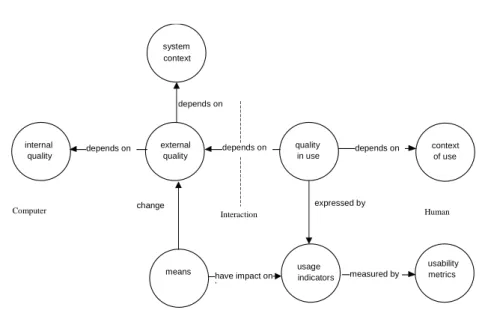
In the software quality model, internal and external quality attributes are distinguished. Internal quality attributes are related to the product itself. External quality attributes are related to the product in its environment. However, it remains unclear if users are part of this environment. The external quality attributes suggested in the ISO 9126 standard seem directed to the performance of the system when used, not the perceived quality by a certain user. Therefore, in (Bevan 1999) a revision of the standard is described that explicitly sets users apart.
The term quality in use is used to indicate the quality when used by a specified user in a specified context and can hence be regarded as a synonym for usability. The usage indicators and means are related to the different kinds of quality as is shown in Figure 2.4. It shows the relationships between software quality and quality in use/usability as we described it. The usage indicators are quality metrics for quality in use which are influenced by means, possible by changing external attributes of the system. Quality in use depends on the context of use in the same way external quality depends on the system’s context.
2.8
Usability Evaluation and Improvement
Evaluation of usability can be done afterwards and during design. The usefulness of all the guidelines, heuristics and other aids is related to the kind of evaluation that is being conducted. In terms of our layered usability model, evaluating with users should be done by looking at the usage indicators. When evaluating during design without users,
internal quality external quality quality in use depends on context of use depends on depends on
Computer Interaction Human
system context depends on means usage indicators expressed by change have impact on hnge usability metrics measured by
Figure 2.4: Usage indicators, means and software quality
the usage indicators cannot provide any data and designers can only look at how the means are used and make an estimate on their impact.
2.8.1
Measuring usability
Evaluating with users is a good method for obtaining data about the actual usage. Us-ing scenarios and other techniques, data about the number of errors or speed of perfor-mance can be obtained which should provide a good indication of the usability of the product. The scenarios should be explicitly related to the usability goals for the system. The actual measuring activities should be done in the actual context of use for which the system is designed. When this is not possible usability labs may be an inferior sur-rogate. Measuring of the usage indicators is not always easy. Task performance times are easy to measure but satisfaction and memorability are harder to quantify. Using questionnaires such as QUIS and SUMI, a more standardized measurement can be ob-tained, although these are only valid for certain classes of systems. Measuring of usage indicators can be done using usability metrics. In Whiteside et al. (1988) and Nielsen (1993) lists of metrics are given. Table 2.5 summarizes all given metrics.
Evaluation during the design process is more problematic than evaluating with users. Although mockups and paper prototypes can be tested with users, the usage indicators cannot be evaluated directly. What can be done is looking at the means that influence the usage indicators. Using walkthroughs and scenarios each of the means can be evaluated by looking at the way they are present in the design and by estimating the positive or negative impact on the usage indicators. For instance, it can be checked if a design is consistent with a platform’s style guideline or if sufficient warnings are given. This is where the heuristics and ergonomic criteria of Scapin & Bastien (1997)
Table 2.5: Usability Metrics
Metric Usage Indicator
Time to complete a specific task Performance Time
Number of commands used Performance Time
Percent of task completed per unit time Performance Time
Relative time spent in physical actions Performance Time
Relative time spent in mental actions Performance Time
Time spent waiting for the system responds Performance Time Number of tasks that can be completed within a given time limit Performance Time
Number of regressive behaviors Memorability
Number of system features users can remember afterwards Memorability
Time spent in errors Errors
Percent of number of errors Errors
Number of repetitions of failed commands Errors
Number of immediately subsequent erroneous actions Errors
Time spent using help or documentation Learnability
Frequency of help and documentation use Learnability
Ration of users using effective vs. ineffective strategy Learnability Number of good and bad features recalled by users Satisfaction Percent of favorable/unfavorable user comments Satisfaction
Number of users preferring your system Satisfaction
Number of times user expresses frustration or satisfaction Satisfaction Number of times interface misleads the user Task Completion
Percent of task completed Task Completion
Number of available commands not invoked Task Completion
Ratio of successes to failures Task Completion
Number of runs of successes and of failures Task Completion Number of times users need to work around a problem Task Completion Number of times the user is disrupted from a work task Task Completion Number of times user loses control of the system Task Completion
and Nielsen (1993) are very useful. This kind of early evaluation does not replace the need for late evaluation with users but can contribute when good choices of means can be made.
Another way of ensuring usability during the design process is by using formal de-sign models. Many models and techniques exist for describing dede-signs using formal notations. State charts, GOMS (Card et al. 1983), ConcurTaskTree’s (Palanque & Pa-tern`o 1997) and similar notations are used to describe designs. These kinds of notations are usually strong in describing structural aspects of a design (the dialog structure) and very weak at describing presentational aspects. In (Payne & Green 1989) Payne says, “as far as TAG is concerned, the screen could be turned off ”. Although ETAG (Tauber 1990) also does not consider presentational aspects it deals with functionality. Reisner’s Action Language (Reisner 1983) also allows knowledge sources to be mod-eled, e.g. it is possible to model if a user can get needed information from the screen or from working memory.
In relation to the means of our model, this is already a big limitation since a lot of means such as consistency, warnings or feedback are strongly related to presentational aspects. A heuristic that says ”speak the user’s language” is difficult to deal with us-ing formal models. Another factor is that most formal models are usually built with the viewpoint of describing ”correct” use of the application and therefore do not de-scribe error handling or issuing warnings. For formal models to be really valuable, they
should include the context of use as well and relate properties of the system model to the context models.
2.8.2
Improving usability
When an evaluation shows that the usability needs to be improved the problem is to find out which means need to be changed and how they need to be changed. As was mentioned earlier means may have a positive effect on one usage indicator while hav-ing a negative effect on another. In some cases, it may be obvious how to improve usability but in cases where problems are of a more structural kind it may not be so simple to solve. In that case, the designer has to take a step back and look at the knowl-edge domains again. The knowlknowl-edge domains are the only sources for judging why and how a means is to be change