Collaborative Robotic Navigation Using EZ-Robots
G. Huang, R. Childers, J. Hilton and Y. Sun
Abstract -Robots and their applications are becoming more and more important in our daily life. In this project, we develop a multi-robot collaborative exploration system to efficiently detect objects, avoid obstacles, and explore different area. The system allows robot and robot-computer communications for task coordination. The user can operate the robot system by voice commands. In addition, we developed some cellphone apps for the user to control the robots wirelessly. Our experiments have demonstrated that the systems as well as the above schemes successfully enable multiple-robots to work cooperatively in exploring different areas.
Keywords: EZ-Robots, Exploration, Object Detection and Avoidance, Voice Control, Phone Control
I. Introduction
A. Related Work
Mobile Robot exploration has a lot of applications. It is a hot research topic and lot of research has been conducted on this area. The research [1], entitled “Mapping and Localization for Extraterrestrial Robotic Explorations”, addresses two tasks related to robotic extraterrestrial explorations: mapping and rover localization. Image registration is also discussed as an important aspect for both of them. Image registration is classified into three sub-categories: intra-stereo, inter-stereo, and cross-site, according to the relationship between stereo images. Creating using cover rover ground images mainly involves the generation of Digital Terrain Model (DTM) and ortho-rectified map (orthomap). However, the approach only provides single robot exploration and it will need much more time than multiple robots to explore an area if this area is very big.
Manuscript received June 23, 2016; revised July 29, 2016. This work was partially supported by NASA EPSCoR Grant 2012 (No. NNX13AD32A).
G. Huang is with the Department of Computer Science, University of Central Arkansas, Conway, AR 72034, USA.
R. Childers is with the Department of Computer Science, University of Central Arkansas, Conway, AR 72034, USA.
J. Hiliton is with the Department of Computer Science, University of Central Arkansas, Conway, AR 72034, USA.
Y. Sun is with the Department of Computer Science, University of Central Arkansas, Conway, AR 72034, USA (Phone: 501-450-3385; fax: 501-450-5615; e-mail: yusun@ uca.edu).
This work of “Robotic Exploration as Graph Construction” addressed the problem of robotic exploration as a graph world, where no distance or orientation metric is assumed of the world [2]. The robot is assumed to be able to autonomously traverse graph edges, recognize when it has reached a vertex, and enumerate edges incident upon the current vertex relative to the edge via which it entered the current vertex. The robot cannot measure distances, and it does not have a compass. It is demonstrated that this exploration problem is unsolvable in general without markers, and, to solve it, the robot is equipped with one or more distinct markers that can be put down or picked up at will and that can be recognized by the robot if they are at the same vertex as the robot. The weakness is that it doesn’t have the voice control to help the robot when the robot can’t recognize an edge.
A Cooperative Search and Rescue with a Team of Mobile Robots has been proposed by [3]. This approach presents an implemented algorithm for a distributed team of autonomous mobile robots to search for an object. When one robot finds it, they all gather around it, and then manipulate (“rescue”) it. The algorithm exploits parallelism, with all robots searching concurrently, and is fully distributed; the robots communicate with each other, and there is no central server or supervisor. Applications include hazardous waste cleanup, bomb detection and removal, materials delivery, and eventually the rescue of survivors of accidents or disasters. The strength of this approach is that it provides a very efficient way to let robots work cooperatively. The weakness is that it doesn’t have voice control to better control the exploration process.
All of the above three works: (1) only 1 work involves multi robots, the other two works only worked with one robot, thus their efficiencies are limited; (2) none of them has voice control functions; (3) none of them provides wireless control functions.
B. Motivation and Objectives
whether or not if the robot has searched this area in a big accident. In this situation, only computers can record every step that the robots have gone. In addition, if one robot has searched one area, the system will send commands to other robots to avoid the searched area. There is no doubt that computers can calculate so much faster than human beings, control robots using computers to search corporately will greatly increase the searching efficiency.
Thus, the motivation for this project is to involve multiple robots work corporately and autonomously to search an object. Given an object located in a room, this research investigates algorithms and methods for independently explore that room, followed by retrieval of an object by multiple robots working together. The objective is to speed up the process of search and retrieval. To this end, two robots are to be used to work together and communicate with each other. During the process of exploration, users can also use voice to wirelessly control robots. In this paper, due to the limited space, we only discuss robot communication, object detection, obstacle avoidance and voice control and. The part of exploration will be addressed in another research paper which is also under the process of submission.
The rest of this paper is organized as follows. Section II presents System Overview & Description; Section III discusses Multi Robots Wireless Communication, Section VI focuses on Object Avoidance and Object Detection. Section V addresses Voice Control, Section VI describes wireless phone function development, Section VII provides experiments and demos, and Section VIII concludes the paper and discusses and Future Work.
II.System Overview and Description
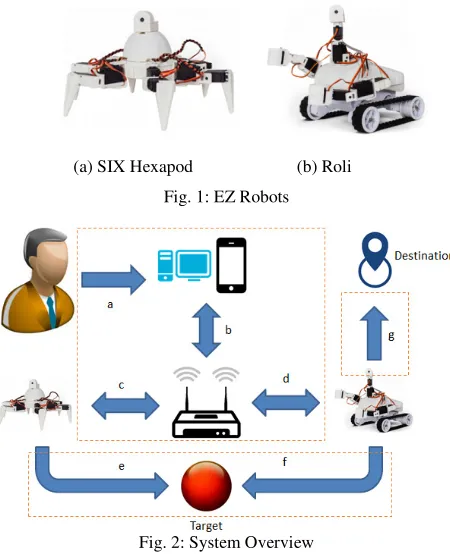
In this research, we adopt two EZ-Robots: SIX (Fig. 1(a)) and Roli (Fig. 1(b)) [4]. Roli is a customizable planetary rover style robot kit; while Six is a customizable robot with 6 legs and 12 degrees of freedom. Fig. 2 illustrates the system overview. Its step by step working procedure is summarized below:
1) User starts the system using PC/Phone in arrow a. 2) PC/Phone sends commands to Six and Roli to start
Searching via arrow b, arrow c and arrow d. 3) Six and Roli start searching in arrow e and arrow f. 4) Six helps Roli find the target, and when Roli locates the
target, it sends back the video streams to PC/Phone asking whether or not to grab the target via arrow c, arrow d and arrow b.
5) User checks the video and then sends voice commands to PC/Phone to let Roli grab the target via arrow a. 6) Roli grabs the object via arrow f, and asks whether or
not to return the target to the destination via arrow d and arrow b.
7) User sends voice commands to PC/Phone to let Roli return the target.
8) Roli returns the target to the destination in arrow g.
[image:2.595.310.535.85.362.2](a) SIX Hexapod (b) Roli
Fig. 1: EZ Robots
Fig. 2: System Overview
In order to let multi-robots work cooperatively to retrieve a specified object from different areas, the tasks have been divided between the two robots. SIX is a scout for Roli, and Roli is the robot to actually pick up the object. The robots then start on opposite ends of a hallway and start scanning the room number on the wall. Overall, the objectives of this research include: make multiple robots navigate a series of areas; enable robots to transmit back the video signal to the system; provide voice control to users; develop algorithms for robots to retrieve specific objects from a random room; develop methods for communication between multiple robots; Wireless cell phone control.
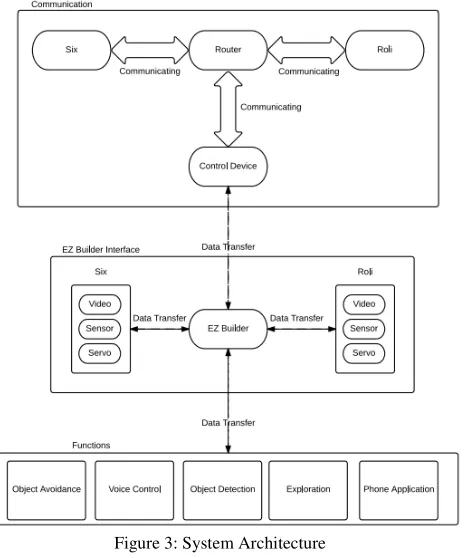
The system architecture, shown in Fig. 3, includes three modules: Communication, EZ-Builder Interface and Functions. In the “Communication” module, all of devices will be connected either through WI-FI or Bluetooth or other communication techniques so that they can communicate with each other. Among these devices, there is a very important device “Router” which makes multiple connections between one controller and multiple robots possible. After many investigations and tests, we found out the only way to connect these devices is using WI-FI, not Bluetooth or other communication techniques.
“EZ Builder Interface” EZ Builder is a Program IDE for developers. Developers can program using this IDE. Its functions are to collects data from robots and users so they can interactive with each other.
We developed five functions in the “Functions” module: Objective Avoidance, Object Detection, Voice Control, Exploration and Phone Application.
1) Object Avoidance: EZ-Robot does not have this function. However, objective avoidance is very important in practical, so we have designed and developed an efficient algorithm to detect the obstacles around it and then move forward, left, right or backward to avoid conflictions.
2) Voice Control: EZ-Robots already have functions to recognize several voice commands. We developed other voice commands that EZ-Robots do not have, like “Robot Dance”, “Robot Search” and “Robot Grab”, etc. 3) Object Detection: we can use the camera of EZ-Robot
to detect an object. However, its weakness is that the accuracy is not high which means it’s not always successful to recognize the object or it will take long time to recognize the object. Therefore, we developed an algorithm to improve the accuracy of recognition. 4) Exploration: this function combines object avoidance,
object recognition, grabbing, signal process, communications, coordination, and other functions together. We have proposed exploration algorithms for Roli and SIX respectively.
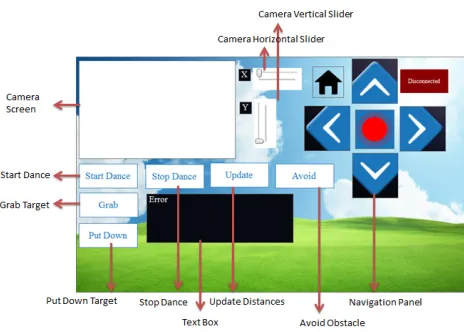
5) Phone Applications: we developed some phone functions to wirelessly control the robots, like forward, backward, dance so on so forth.
[image:3.595.311.524.275.379.2]Due to the limited space, this paper does not address the exploration part. It will be discussed in another research paper [5].
Figure 3: System Architecture
III. Multi-Robots Wireless Communication
EZ-Robot is generally connected directly to computers. In this case, computers are only able to connect to one robot at one time. That is to say, data can only be transferred between these two devices. However, in our project robots
must be able to communicate with each other so that they can work corporately. For this reason, we have to find out an efficient way to connect robots.
[image:3.595.54.286.400.679.2]Several communication methods on sending data wirelessly have been investigated, including Bluetooth, share databases, etc. Due to different reasons, such as no Bluetooth circuit function, complicated configuration, only Wi-Fi is suitable for connecting all devices in this project. We can use the router to work as a medium, and assign IP address to each device. Fig. 4 shows that we use router to connect all devices. The way to connect all these devices is not hard but still need some configurations. Before we connect our PC to our router, we need to connect the PC to the robot. What we are going to do is to set the robot’s Wi-Fi mode to Wi-Fi Client Mode.
Figure 4: Communication Module
EZ-Robot’s Wi-Fi module has two modes, Wi-Fi Access Point (AP) Mode and Wi-Fi Client Mode. In AP Mode, the EZ-B v4 controller becomes a Wi-Fi Server which allows your device to connect to it. This is the default setting for the EZ-B v4. In this mode, your device (i.e. Computer, iPad, iPhone, etc.) will connect directly to the EZ-B v4 over its Wi-Fi network. You will lose access to the internet if connected this way, unless your device has two networks. We won’t use this mode for our project. In Wi-Fi Client Mode, The EZ-B v4 will connect to your existing Wi-Fi network as a client, much like your iPhones, iPads and Computers. When the EZ-B v4 is connected to your Wi-Fi network, you may not know the IP Address that it is assigned. The EZ-Builder software includes a network scan tool which will find all EZ-B v4’s on your network. For our project, we will definitely choose Wi-Fi Client Mode.
The steps to connect all devices are listed below:
1) Click on the right IP address, then go to its network server. 2) Click Wi-Fi Client Mode and type the local Wi-Fi name and
the password for it, and click connect.
3) Connect your computer with the network again and find the IP address of that robot.
4) Go to your network server, and then find the DHCP Client List. From there, we can find the address of the robot. 5) Go to Connection Control, and type the address you just
found and then click connect.
6) For other robots, repeat the same steps from step 1) to step 5).
robot will always automatically read the file. Fig.5 is the flowchart of this method.
In this project, if Roli finds the target, Roli will send data to the computer. Then the computer will write a file with the target’s room number. At the same time, Six will automatically read the file, then Six will stop. In the opposite way, if Six finds that file first, Six will write a file with the room number, and Roli will read that file and approach the target.
VI. Object Avoidance and Object Detection
[image:4.595.370.478.216.343.2]Here we discuss the development of two major functions: Object Avoidance and Object detection
Figure 5: File Sharing Method Flowchart
A. Object Avoidance
In robotics, obstacle avoidance is the task to meet some control objectives subject to intersection or non-collision position constraints. Robots must be able to detect the distances to prevent themselves from collision. There are many sensors to detect distances [6, 7]. In this project, we adopt use Ultrasonic Distance Sensor provided by EZ-Robot. This distance/range detection sensor plugs directly into the ez-bv4. It includes our innovative low energy 5v switching power supply. The sensor uses ultrasonic sound to determine the distance of an object (within approximately 60 inches) in front of it.
[image:4.595.51.282.256.348.2](a) Ultrasonic Distance Sensor (b)Roli
Figure 6: Ultrasonic Distance Sensor Connection
In order to better detect the distances around the robot, we install five sensors in the robot. As you can see in Fig. 6(b), there are three US sensors above the gripper, two of them are facing right and left side and one is facing front. In addition, two more sensors installed in the body of the robot, one faces the left side while another one faces the right side.
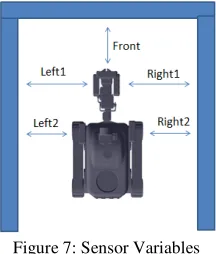
We proposed a simple but efficient algorithm to make the Robot autonomously avoid the obstacle. We improved Roli by adding five US (Ultrasonic) sensors, which are called Front, Left1, Right1, Left2 and Right2 (Fig. 7).
[image:4.595.44.277.524.596.2]After done many experimental tests, we empirically set the threshold values for each US sensor, and then compare the distances with these threshold values. There are 5 distance sensors; therefore we set five threshold values for Front, Right1, Right2, Left1 and Left2. We set threshold values 30, 30, 30, 20, 20 for Front, Right1, Left1, Right2 and Left2 respectively. When all five distances are compared with their threshold values, the system will analyze these comparisons and decide the result which includes Forward, Right, Left and Stop. Specifically, the proposed Object Avoidance Algorithm is summarized below:
Figure 7: Sensor Variables
1) The Robot detects distances include Front1, Left1, Left2, Right1and Right2. Then the robot sends updated distances back to the computer.
2) The computer analyzes those distances data including Front, Right1, Right2, Left1 and Left2 by comparing them with each threshold values.
3) The computer will run specific function based on the final analyzed result.
4) Go to step 1).
B. Object Detection
Object Detection is quite a hot topic in robotics science. In this project, we use EZ Builder scripts to detect objects. EZ-Robot has a camera mounted on it, and it is used to detect colorful objects such as red balls, track motion, or track human faces. In this section, we will use EZ Builder to train objects by colors and how to program to detect objects.
B.1 Train Objects Using Colors
EZ Builder provides the interface to train functions to train different objects, either by colors or shapes. There are many ways to train objects. Here, we just address how to train colorful objects:
1) Click the Multi Color tap in the right top section (Fig. 8). 2) Click the Add Custom Color button.
3) Connect the camera with computer, and put the object that you want to train in front of the camera.
Figure 8: Ultrasonic Distance Sensor Connection
B.2 Detect Objects
To detect objects, the robot first navigates areas and collects image signals. Then the system will receive the image signals from the robot, and start analyzing the image. EZ Builder already provided the method to analyze the image, and the result will be stored in a variable “CameraObject”, which is one of the global variables in EZ Builder System. It can be used in any scripts. When “CameraObject” is null which means that the robot has not found the target, then the system will ask the robot to search again. If the value of “CameraObject” is what we want, then the object is detected. Fig. 9 shows the flowchart of this whole process.
Figure 9: Detect Objects Process
V. Voice Control
We have also developed Voice Control functions to let user control the robot easier. In computer science and electrical engineering, Speech Recognition (SR) is the translation of spoken words into text [8]. EZ Builder analyzes the person’s specific voice and uses it to fine-tune the recognition of that person’s speech and convert its voice signal into text messages [9]. Then the system will run the specific functions based on text messages.
The general working procedure of voice control is: 1) System creates voice commands;
2) A person speaks to the system, and system is receiving voice signals;
3) System convert voice signals into text messages; 4) System using the converted text messages to find the
same voice commands stored in the system; 5) System calls the functions specified by commands.
EZ Builder provides a User Interface of Speech Recognition to recognize voice signals. This control uses the default audio device and listens for known phrases. Phrases are manually configured in the Config menu, and those customized actions are coded using scripts to phrases.
Several default Speech Recognition commands are already provided by EZ-Robot, like “Robot Forward”, “Robot Reverse”. In this project, we developed and added five voice commands: “Robot Dance”, “Say Hello”, “Search Target”, “Grab Target” and “Return Target”.
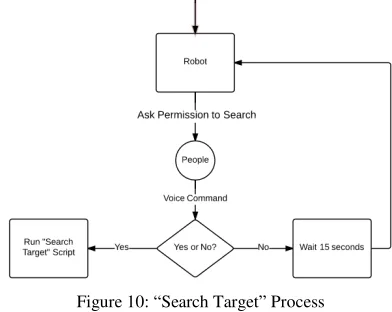
[image:5.595.323.519.369.525.2]As an example, we describe how to develop the voice command “Search Target”. Fig. 10 is the flowchart of voice command “Search Target”. Basically, Roli starts with saying “I’m ready to start searching, do you want me to start?” Then the program will wait for the voice signal for 15 seconds, either “Yes” or “No”. When the user speaks “Yes” to Roli, Roli will respond “No problem”, and then run “Search Target” script. If the user speaks “No”, Roli will respond “OK, I will wait”. After Roli waits for 15 seconds, it will ask the permission again. The other commands are developed using the similar approaches.
Figure 10: “Search Target” Process
VI. Wireless Phone Function Development
EZ-Robot is very powerful that it has provided the Phone Applications. The application GUI is within EZ Builder. Here, we simply discuss how to We use EZ Builder’s IDE to add some functions into its Developed Phone Application. This IDE GUI supports iPhone, iPad, and Andrew phones.
[image:5.595.44.257.372.559.2]VII. Experiments and Demos
[image:6.595.48.280.194.360.2]Our extensive experiments demonstrate that our proposed system, algorithms and methods collectively work successfully. The communication between two robots and wireless phone control are also efficient. The demos of the exploration process can be viewed through our website: http://sun0.cs.uca.edu/~yusun/NASA%20Website/linkedWe bsites/Gerald%20Website/video.html.
Figure 11: Wireless Phone Control Panel
VIII. Conclusion and Future Work
The main objective of this project is to develop a robotic exploration system which can control multi-robots to work cooperatively to explore different areas and search the target. The major contribution of this project includes: (1) developing algorithms for robots to avoid obstacles; (2)
using EZ Builder to train objects and program EZ scripts to detect objects; (3) implementing voice control to interactively control the robot through voice; (4) implementing data communication between robots and the computer; (5) developing several functions to EZ Builder’s Phone Application to wireless control the robot. Our extensive experiments demonstrate that our proposed algorithms and methods collectively work successfully and can make robots explore different areas
Regarding future work, we plan to improve search speed; enhance network model to navigate the entire campus; and also to involve more robots in the exploration.
REFERENCES
[1] F. Xu, “Mapping and Localization for Extraterrestrial Robotic Explorations”, The Ohio State University 2004
[2] G. Dudek, M. Jenkin, E. Milios, D. Wilkes, “Robotic exploration as graph construction”, IEEE Transactions on Robotics and Automation, Vol. 7 , Iss. 6, pp. 859 -865, 1992
[3] J. S. Jennings, G. Whelan, W. F. Evans, “Cooperative search and rescue with a team of mobile robots”, Proceedings of the 8th International Conference on Advanced Robotics, (ICAR) , 1997
[4] EZ-Robot. www.ez-robot.com
[5] G. Huang, R. Childers, J. Hilton, Z. Ye and Y. Sun, “Cooperative Explorations with Wirelessly Controlled Robots”, Proceedings of International Conference on Intelligent Automation and Robotics (ICIAR) 2016, San Francisco, Oct. 2016.
[6] http://jn.physiology.org/content/87/5/2434.short.Controlling the Statistics of Action: Obstacle Avoidance.
[7] M. Tarek, “Using Ultrasonic and Infrared Sensors for Distance Measurement”, Engineering and Technology World Academy of Science, Vol. 3, 2009-03-26.
[8] Speech Recognition, http://en.wikipedia.org/wiki/Speech_recognition. [9] A. Tony, N. Brian, “Voice activated command and control with speech