Using Machine Learning Techniques for Advanced
Passive Operating System Fingerprinting
Julius Schwartzenberg
Abstract
Chapter 1
Introduction
The inference of a remote OS is an important step for several activities related to computer security. Malicious users might fingerprint an OS to select only the correct exploits that they will later use to break-in, in order to lower the chances of being detected by an intrusion detection system (IDS). On the other hand, the same IDS might infer the OS of hosts it monitors in order to make its detection more precise, by discarding attack signatures tailored for a different OS. Knowledge about the remote OS may also be used to detect changes on remote systems: a remote system may have been replaced; or to detect unallowed OSs: not all OSs may be allowed by company policy. Active fingerprinting requires the parties to exchange some packets, which is not always desirable. An attacker may want to be as “hidden” as possible, an IDS may not be authorized to send out packets on the monitored network. Thus, passive fingerprinting offers a choice to meet such constraints. Several systems have been developed to perform passive OS fingerprinting, which although accurate, fail when newer systems or tweaked systems are introduced and databases are not maintained.
1.1
Goal
1.1.1 Initial state
The state of the art gives a complete overview of all the existing fingerprint-ing tools. The most noteworthy tool of these is p0f, because it is the most mature passive tool available, also see Appendix E.4. To recognize a given system, p0f needs to have a fingerprint for it in its fingerprint database. When p0f fingerprints a system and its fingerprint does not match, p0f will mark the system as “unknown”. As newer operating systems (TCP/IP stacks) are released, p0f’s fingerprint database needs to be manually updated to correctly match new systems.
1.1.2 Problem
Although passive fingerprinting tends to be accurate, keeping the finger-print database up to date is essential to achieve high accuracy. Right now the process of creating a new fingerprint and adding it to the database is done manually. The current version of p0f and its fingerprint database are, at the time of writing, almost 4 years old [Zal06c]. This shows that keeping the database up to date is apparently too much effort. The result is that p0f’s accuracy has dropped significantly, only because it is missing the fin-gerprint information needed to recognize modern operating systems, such as MS Windows Vista and MS Windows 7. According to the statistics on W3Schools, a website about web development, these versions were used by more than a quarter of all computer users in February 2010 [w3s10].
1.1.3 Research Question
The goal is to automate the fingerprinting process, so that new operating systems can be recognized with as little human effort as possible. Right now this is not possible because for every system a fingerprint needs to be cre-ated manually. This means fingerprints should be genercre-ated automatically with only the proper tagging of the fingerprinted operating system being necessary.
Chapter 2
State of the art
2.1
Introduction
The ability to detect which operating system is running on a remote system has several advantages. A common use is statistics gathering by companies that are interested in market share. However, there are several other uses which are even more significant.
When scanning a network for possible vulnerabilities, knowing which operating systems (OSs) are running, may quickly indicate which systems are outdated and need updating. This knowledge is controversial because it is very useful for an attacker. System administrators can use the same knowledge to protect their systems. Internet service providers could also help their customers with protecting their systems by redirecting them to a webpage which points them to updates. By using a packet filter which can detect what system they are using, they can redirect all HTTP request to the appropriate page.
indicate that the attacker is skilled and not just a Bot. Enhancing an in-trusion detection system (IDS) with OS detection capabilities would thus enable it to make a much better estimate of the attack impact. Taleck [Tal03] explicitly highlights the importance of OS fingerprinting for IDSs.
Despite the clear advantages of OS fingerprinting, there are few papers in the literature which address this problem.
2.2
Active and passive
The most important distinction between different OS detection mechanisms is whether the detection is done actively or passively. Active systems gen-erate specifically crafted data to identify systems based on their response. Passive systems on the other hand stay completely silent and will determine the OS based on the traffic that happens to come by. This means that passive systems can never be detected through the network, but they are dependant on existing traffic. Another difference is that some systems are never reached by active scanners, because they are behind a firewall or some network address translation mechanisms are in place [EF94]. Passive scan-ners would be able to scan the traffic coming from these systems. The active and passive systems are described in the following sections. Some passive systems also have the capability to actively trigger packets and could thus be seen as a combination of an active and passive system. Since the finger-printing logic is aimed at passive scanning in these cases, those systems are also described in the section about passive fingerprinting.
2.3
Active
This section describes the most relevant existing active fingerprinting tools.
2.3.1 Before TCP/IP fingerprinting
Before TCP/IP fingerprinting became popular, software that had to perform the same task of remote operating system detection used methods that were often very simplistic. The original QueSO documentation lists the following:
• snmp (the Simple Network Management Protocol [CFSD90] is used to monitor networked systems)
• telnet banner (unencrypted remote terminals often display the running system name before the log-in prompt)
• SendMail version
• analyse binaries available through ftp
• other slow and suspicious stuff (likely other application dependant ways)
These methods are simplistic and system administrators can prevent these types of identification, by not advertising the OS in a banner or by just upgrading these services to their modern equivalents, which do not leak this information anymore. Another problem these methods have is that they are heavily dependant on specific services running on the remote host, which are not always there. A better method should be used to properly detect a remote operating system.
2.3.2 sirc, checkos and SS
According to an article written in 1998 by Gordon Lyon for Phrack Magazine [Lyo98] sirc, checkos and SS were the first programs available which were capable of recognising different OSs using TCP/IP fingerprinting. They were limited in doing so and could only identify whether a system was one from a handfull of OS classes. Commercially available software at that time was only capable of checking banners however. These tools do not seem to be referenced anymore and not much information can be found about them.
2.3.3 QueSO
The first wide-spread tool which could detect operating systems remotely using TCP/IP fingerprinting was QueSO. It was originally developed by Jordi Murg in 1998. It is the first tool which used fingerprints stored in a separate file. This allowed new operating systems to be added without modifying the software.
Because of this ambiguity, this results in different behaviour from different TCP/IP stacks. [Mur98] The specific packets QueSO sends out are described in Appendix E.1.
QueSO is able to differentiate about 100 different operating systems. [Mur99] The fingerprint database is not kept up to date anymore with new OS releases however, so it is possible QueSO could detect more different operating systems with an updated database.
2.3.4 Nmap
Shortly after QueSO was released, the popular network mapping tool Nmap, written by Gordon Lyon, also gained support for OS detection based on TCP/IP fingerprinting in October 1998. It continued on the idea that there should be a separate fingerprint database. The biggest improvement over QueSO was the number of tests it could do. Nmap added several extra tests which significantly increased the number of different systems it could recognise. [Lyo09a, Lyo98]
Since the original OS detection support was added to Nmap, it has seen quite a lot of improvements including one complete revision. The current version of Nmap sends out up to 16 TCP, UDP and ICMP probes. These are analysed in Appendix E.2.
Having so many tests, Nmap is one of the most comprehensive scanners available. With its tests it is able to differentiate an enormous amount of systems. A disadvantage of using so many tests is that it allows for easy detection. This is described by Greenwald and Thomas [GT07a]. Some of the tools described in the next sections try to avoid this. Another recurring problem with active tools is the fact they can often only scan a firewall and not the systems behind it. Only passive systems will fully solve this.
2.3.5 Xprobe
After tools which could differentiate TCP stacks became common, Ofir Arkin decided to look into the RFCs related to the ICMP and found that the ICMP has quite some potential to be used in OS fingerprinting. [RK04]
ob-tained using ICMP with tree based decisions. Using ICMP instead of TCP had several advantages, especially when very similar TCP stacks were used. Examples are MS Windows NT4 and MS Windows 9x or MS Windows 2000 and MS Windows XP, where the different systems could not be distinguished from each other before.
Another difference was the small amount of traffic it takes. With the reply from a single datagram, Xprobe can already differentiate eight different systems. A maximum four datagrams are sent in total, which also makes the tool fast. The probes are unlikely to be picked up by IDSs because they are not malformed and normal ICMP datagrams are already common among networks. [Ark02]
Xprobe was also the first program that used “fuzzy logic”. A potential OS is given a score based on how well it matches with certain tests. The end result is a list of scores together with a probability. [Kol05]
Details on Xprobe’s mechanisms are described in Appendix E.3.
2.3.6 RING
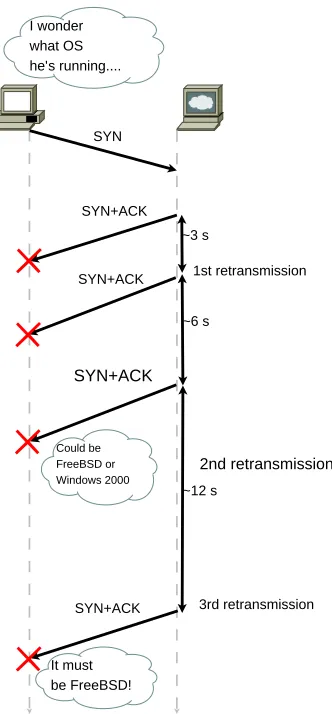
In April 2002 Franck Veysset, Olivier Courtay, and Olivier Heen of the In-tranode Research Team published a paper [VCH02] in which they described a concept to distinguish between OSs on a network by measuring the be-haviour of their TCP retransmission time-out lengths. While the TCP RFC includes an algorithm for retransmissions, it is not imposed. It turns out that although most systems implement a variation of the algorithm, there are differences which can be exploited to reveal the OS.
As a proof of concept, the tool RING was developed. It tries to initiate a connection with a server, but does not acknowledge the initial acknowl-edgement. This causes the other host to retransmit its acknowledgement at timed intervals. By measuring the time between the incoming packets, it is possible to figure out the TCP implementation. The fingerprint in this case consists of the retransmit times an OS uses to retransmit its acknowledge-ments.
SYN+ACK SYN
SYN+ACK
SYN+ACK
SYN+ACK
~3 s
~6 s
~12 s I wonder
what OS he’s running....
Could be FreeBSD or Windows 2000
It must be FreeBSD!
1st retransmission
2nd retransmission
[image:10.595.249.415.69.426.2]3rd retransmission
Figure 2.1: Successful detection of the remote OS by measuring the retrans-mission times
in Figure 2.1.
2.3.7 Neural networks
Carlos Sarraute and Javier Burroni from the company Core Security Tech-nologies published a paper in 2008 in which they described their experiments using neural networks to improve OS fingerprinting [SB08]. Their method uses a neural network which, although mostly based on Nmap’s fingerprint database, uses some application level tests which made use of the RPC ser-vice to test for specific MS Windows versions.
finger-prints by using an initial neural network to determine which fingerfinger-prints are relevant for the attacker. They reduce the testing space of possible re-sponses by using two techniques called Correlation Matrix Reduction and Principal Component Analysis. The Correlation Matrix Reduction notes similar behaviour in similar systems and reduces the tests for this family of systems to the most discriminative tests. Principal Component Analysis is a technique where the factors with the most variance are given more emphasis than factors with less variance when comparing results.
The system is trained using a initial dataset containing inputs and ex-pected outputs. This is called supervised training. During their test they used Monte Carlo simulation to generate inputs using Nmap’s signature database. The paper does not go into Monte Carlo simulation. This book [BH02] by Binder and Heermann describes Monte Carlo simulation in detail. Using these techniques, their detection is slightly more accurate than Nmap in their test environment. Especially specific versions of operating systems could be detected more precisely. However being dependant on the RPC service severely limits the useability of the system. Even within private networks the RPC service is unlikely to be active and running it on a public network is generally considered to be a bad security practise. The initial step to test a given fingerprint for its relevance does not seem logical. According to the text an irrelevant operating system is one for which an attacker has no exploits. One of their examples is a system using Mandrake 7.2 which is detected by Nmap as a broadband router made by ZyXel. Considering Mandrake 7.2 was eight years old at the time the paper was published and had also been succeeded by more than eight releases while on the other hand broadband routers are increasingly common as the public host among households, this idea of relevance is disputable. Limiting the fingerprinting options in this way is a big drawback of the system.
The consessions done to obtain the desired results appear to be too big to make neural networks suitable to be applied generally for OS fingerprinting.
2.4
Passive
2.4.1 p0f
The first version of p0f was written by Michal Zalewski in 2000. After it had been maintained for a while by William Stearns, it was completely rewritten again by its original author.
p0f has four different detection modes used in four different scenarios respectively:
• Incoming connection fingerprinting (what system is connecting to yours)
• Outgoing connection fingerprinting (what system are you connecting to)
• Outgoing connection refused (what system is refusing your connection)
• Established connection fingerprinting (what systems do you have a connection with)
Of these four, only the first method is really well supported. It works by analysing certain properties of SYN packets from incoming TCP/IP connec-tions. With the other methods SYN+ACK, RST and stray ACK packets are analysed. Appendix E.4 describes p0f’s fingerprinting. [Zal06b]
2.4.2 Packet Filtering in OpenBSD
The packet filter included with OpenBSD is also capable of doing passive operating system fingerprinting. This support seems to be based on p0f, using a similar fingerprint file. Only p0f’s SYN filtering is available. With this support is it possible to write rules based on the detected OS. This could mean connections from certain OSs are blocked for example or requests going out on the HTTP port (port 80) for a known vulnerable system could point to an upgrade.
2.4.3 OSF - passive OS fingerprinting for iptables
2.4.4 Ettercap
Ettercap is a tool which can be used for many purposes. Some of its most prominent features are its man-in-the-middle attack abilities. Ettercap also includes plug-ins for specific features including a plug-in named “finger” which describes itself as a passive fingerprinting plug-in. While it is using the same techniques passive tools also use, it is not really passive as it sends a SYN itself to the other host and uses the corresponding SYN+ACK reply to fingerprint the other system.
Its fingerprinting mechanism is rather simple. The database contains a list of fingerprints sorted on the properties. This means systems which have a similar fingerprint are near each other. When a SYN+ACK packet has arrived, Ettercap starts matching this fingerprint with a fingerprint from its database. When a match cannot be found, it will give the nearest match which it had reached in the database. Its database has not been updated since 2004, so it is quite outdated.
2.4.5 SinFP
A very interesting tool written in Perl by Patrice Auffret is SinFP. Using one set of signatures, it is capable of doing both active and passive OS finger-printing. Its first release was in June 2005, which makes it one of the more modern tools. In June 2006 a completely rewritten version was released. One of the interesting points the changelog (the report of changes between versions) makes, is that this version has more accurate passive OS finger-printing. [Auf06] The program was originally written because it turned out that Nmap’s OS detection capabilities were getting into trouble in a specific situation which had become more and more common on the internet. Many home users are connected using a router which performs IP masquerading in combination with network address translation (NAT). Both controversial technologies because they broke some of the original intentions of the IP, they also bring issues for OS detection tools. In addition to those problems, also packet normalisation is emerging which is making Nmap’s approach of fingerprinting obsolete. To prevent getting into the same problems, SinFP was written specifically to avoid using tests that could be influenced by the problems described. [Auf08]
database is based on SQLite and new versions of the fingerprint database can easily be downloaded and used with SinFP. The previously described tools all used plain text files which contained the fingerprint information. Although these are similarly easily updatable, it would be easier to integrate SinFP into another system with which it could share fingerprinting infor-mation. Another advantage of using a database oriented design to store the fingerprints, is the capability to store certain recurring values into a separate table. Next to the fingerprint table, there are tables used to store recurring patterns in: TCP flags; TCP maximum segment size (MSS); TCP options, TCP window size and certain binary properties.
Other interesting features include:
• IPv6 support (including matching against IPv4 signatures)
• Very small amount of packets (often just one) needed to get a match
• Both online and offline modes
• Heuristic matching algorithm to be able to deal with customised stacks
Auffret [Auf08] describes these features in detail.
2.4.6 Satori
Eric Kollmann created a closed source tool called Satori, which is also capa-ble of doing passive OS fingerprinting. The documentation is rather sparse. One interesting aspect is that it prints the results from multiple detection en-gines, so one immediately sees the results of different detection mechanisms. By default Satori uses its own TCP and DHCP fingerprinting together with an engine which can work with Ettercap fingerprints and an engine with p0f fingerprints. For this reason, in addition to its own fingerprint files, also p0f’s and Ettercap’s fingerprint files are included with the Satori download. When a TCP packet passes by, Satori will display the output of its own TCP engine, Ettercap and p0f below each other. This quickly gives an impression of the quality of the different fingerprintings, which normally only differ because one lists a specific version number the other lacks.
obtain such packets from other systems to get an impression of the operating systems that are popular on a LAN. This feature does not work past your own LAN, so its not useful for really distant remote OS detection over the Internet.
There is very little documentation and it is also not possible to look at Satori’s source code. The author has written a paper [Kol05] however which mentions many OS fingerprinting techniques, most of which are employed by Satori.
2.4.7 Bayesian classifier
A paper published in 2004 by Robert Beverly from MIT proposes using a Bayesian classifier for passive fingerprinting [Bev04]. The author uses a naive Bayesian classifier that considers the TTL, DF, window size and SYN size field from initial SYN packets. Naive means all the different fields are considered to be fully independent. While this is not completely true, this assumption does not hinder performance.
In two separate testing rounds the classifier is once tested while it is trained using p0f’s existing fingerprint database. The second round it was trained using traffic from a public non-technical webserver and identifying the operating system based on the operating system part from the user-agent value in the HTTP header. Although this may introduce errors due to proxies and useragent spoofing, these are considered to be statistically insignificant. The results of both tests were roughly similar, so both training methods would seem equally suitable with the last one having the advantage new systems may be added automatically.
The classifier was tested against “approximately 38M packets from an hour long mid-week trace collected at a US internet exchange at 16:00 PST in 2003”. It turns out that the success rate of the system is quite comparable to p0f. This method has two specific advantages over p0f. First, since every value has its own probabilistic weight, it can handle TCP stacks that have been tweaked by the user. Second, the classifier can produce a “maximum-likelihood guess” when there is no accurate fingerprinting data available. A disadvantage of this approach is that a large number of hosts is necessary to verify whether the classifier is working correctly. With the traditional approach, a rule is already valid when it corresponds to a single host.
Al-though they are able to observe independent systems the results are still very limited. Other methods to count such hosts currently give much better results, which is why is it is only suggested that this method may be suitable in combination with other methods. There are far more interesting use cases for this type of passive fingerprinting however.
2.4.8 Answer Set Programming
Gagnon, Esfandiari and Bertossi published several papers [GEB07, GE09] on using Answer Set Programming to perform OS fingerprinting. The main idea of the paper is that while current passive systems often base their full analysis on a single packet, most of the time there are many more packets available and using those too will improve accuracy. This brings a new re-quirement to the system, it will have to keep track of history. By building a tool using Answer Set Programming it is possible to add more reason-ing to the freason-ingerprintreason-ing mechanism. Data from older packets can be used and passive and active techniques may be unified. Vladimir Lifschitz [Lif02] describes Answer Set Programming (ASP) as “representing a given com-putational problem by a logic program whose answer sets correspond to solutions, and then use an answer set solver to find an answer set for this program”. An example scenario where this system would work optimal is described in the paper. Initially each computer is considered to be capable to run any OS. As traffic is seen for specific systems, the set of possible OSs is updated eliminating systems that cannot generate the observed traffic using the passive scanner. When a user then requests information about a particular system, specific active tests may be executed to obtain the rest of the information if necessary. The test results of the system are very promis-ing. Their implementation was able to correctly recognise more than 80% of the 95 OSs tested. Other tools, including Nmap, p0f and Xprobe, had at most a score of 34%.
2.5
Future
2.5.1 IPv6
and are handing out IPv6 subnets to their customers. In practise most hosts still use two stacks so they are reachable using both IPv4 and IPv6. Active tools will not have to necessarily use IPv6 yet to be able to scan them. For passive detection IPv6 support will be necessary as many applications tend to prefer the IPv6 route over the IPv4 one. This means that a dual stack host will use IPv6 as much as possible and passive tools have to support IPv6 to be able to fingerprint them. As IPv6 adoption is continuing also hosts with IPv6 only addresses will start to appear, which will require full IPv6 support from active tools.
It should not be very difficult to add IPv6 support to the current gener-ation of tools. Even the fingerprints could stay the same, since most of them are based on differences in the transport protocol implementations, which should not be influenced by a change in the network protocol.
Currently the only OS detection program that appears to support IPv6 is SinFP. Although Nmap has some IPv6 support, e.g. for port scans, it cannot do OS detection over IPv6 yet.
2.5.2 IPsec
IPsec, specified in RFC 2401 [KA98], is a system which allows full encryption of any data carried inside the network layer. This means that transport protocol data is not visible while flowing over the internet.
It appears that hosts which would only be capable of accepting secure connections will not appear soon. IPsec can be optionally negotiated, but is not mandatory for all connections that would be made to the host. This means current active tools can still scan a system. When IPsec only hosts will appear, it would still be possible for active tools to go over IPsec and scan the hosts.
2.5.3 Masking and Scrubbing
Research has also been done in the area of preventing the above tools from accurately fingerprinting the operating system. Watson, Smart, Malan and Jahanian [SMJ00, WSMJ04] created a packet scrubber which they claim normalises all the traffic and thus leaves no system specific details in the outgoing traffic. Kalia and Singh [KS05] describe some tweaks that can be done to MS Windows and Linux so that Nmap is not able to recognise them anymore. Also Beck [Bec01] uses this as a basis by letting a system respond differently when it detects an Nmap scan. As masking and scrubbing meth-ods may evolve, it may be more difficult in the future to fingerprint OSs. Currently most masking tools are heavily based on the fingerprinting tools that are currently in wide use, so a new tool might just be able to work when it uses newer fingerprinting methods.
2.6
Conclusion
There are a number of tools available to remotely identify an operating sys-tem over the internet. Although operating syssys-tems implement a similar set of protocols to communicate over a network, there are enough implementa-tion details which reveal the origin of software running on the system.
Quite a few tools to perform OS detection have been developed. A clear evolution is visible when looking at all the different tools that are available now. Some of the prominent developments:
• The abandoning of the application layer, moving fully to the transport and network layers.
• The use of external fingerprint information as opposed to hardcoding test cases and results.
• Looking at different transport protocols, not just the TCP but also the ICMP and the UDP.
• Limiting the possible detection, sending a few packets or doing com-pletely passive detection.
• The use of multiple completely separate detection engines.
• Keeping track of past events for use in a comprehensive analysis
Also some experiments have been done using neural networks and Bayesian classifiers which bring quite a different approach to operating system finger-printing, but unfortunately did not give practical results.
There are still some problems to solve. The traditional problem which active scanners face, a firewall (or a router with IP masquerading) in front of the target, can only be worked around by using a passive scanner. Passive scanners have limitations too. Notably signature databases tends to get out of date and without continuous maintenance the tools will stop working, as they will not be able to recognise newer systems on the internet anymore. Proper building and maintenance of a good fingerprint database appears to be a serious issue which still requires a lot of manual work. Some initiatives such as SinFP’s support to use the same fingerprints for both active and passive scanning are already a good step forward in this area.
An overview of the advantages and disadvantages of the different types of scanners:
Active Passive
Range Can only fingerprint sys-tems directly connected to the network
May fingerprint systems behind a firewall
Target Can fingerprint any available system
Can only fingerprint sys-tems of which traffic passes by
Visibility Fingerprinting can be de-tected by IDSs
Detection is impossible
Granularity Can send crafted pack-ets to provoke special and different behaviour in otherwise similar sys-tems
Can only use information from passing traffic for fin-gerprinting
Chapter 3
Architecture
3.1
Introduction
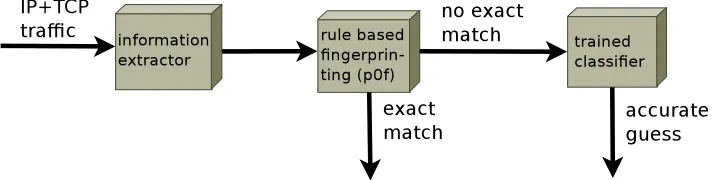
To achieve fully automatic operating system fingerprinting, several steps are needed. In Figure 3.1 the basic components of the architecture are shown.
The first step consists of collecting the relevant data from the network stream. This data is then handed over to a simple matching based fin-gerprinting component which fingerprints the data and compares it to the already known fingerprints. When an exact match is found, the process ends and the classification information returns. When no exact match is found, the data is processed by a trained classifier based on machine learn-ing techniques. The classifier tries to find the closest match based on a known training set.
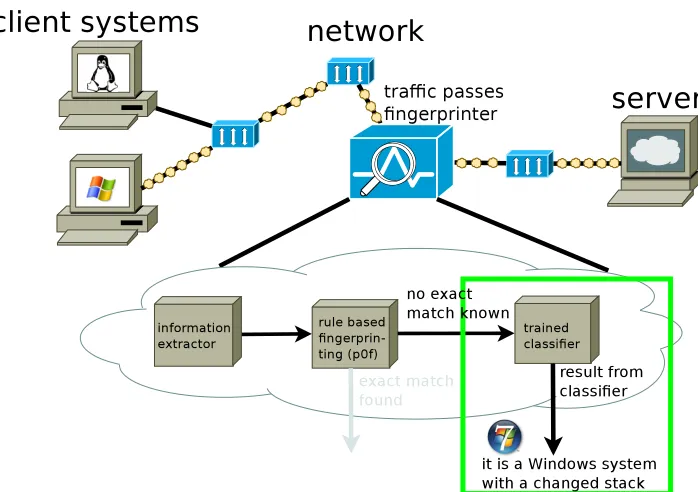
[image:21.595.120.478.569.659.2]Two full pictures which show in detail how the fingerprinter works are shown in Figure 3.2 and Figure 3.3.
Figure 3.2: Detecting a known system which has an exact match in the database
[image:22.595.125.474.438.684.2]Table 3.1: Example of a p0f fingerprint
OS genre OS descr WSS TTL D size options quirks
Linux 2.6 S4 64 1 60 M*,S,T,N,W7
-3.2
Information extractor
The first step in the process is extracting relevant information from a packet stream. This can either be captured live or a stored capture of IP traffic. From the stream, the only information that is interesting are packet and segment headers of IP packets which include TCP SYN or SYN+ACK seg-ments, because fingerprinting is limited to them. Details on TCP SYN and SYN+ACK headers are described in Appendix E.1. All the other data can be discarded. Initially regular packets were also analyzed but in general they produced fingerprints that could not be distinguished, because such packets generally do not have any options or other specific details through which they could be distinguished.
The collected header data is the information on which the classification process will be based. It is fed in a sanitized way to the other components. This is done in the same format as rules used by p0f. A representation of a single p0f rule is shown in Table 3.1.(The next section explains all the fields in detail.)
3.2.1 Normalizing fingerprint data
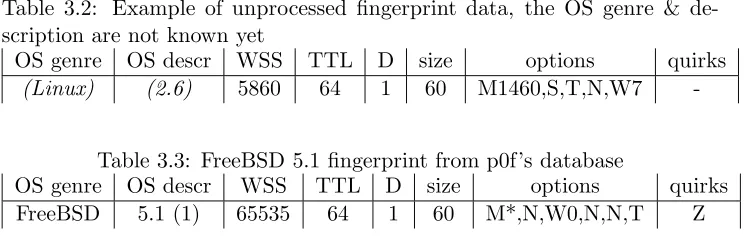
The initial problem is concerned with the automatic generation of finger-prints. This means that the observed network headers are stored in such a way that a comparison is possible between different runs against systems. It is not possible to base fingerprinting directly on the raw headers, because of addressing fields for example which contain information on which differ-entiation should be avoided. Based on the full packet and segment headers, the relevant fields which are important for accurate fingerprinting need to be extracted. In the case of p0f this is done manually according to the spec-ification that instructs users how they can generate a new fingerprint to add to p0f’s database. This section details how this process works for p0f, the tool automates this.
Table 3.2: Example of unprocessed fingerprint data, the OS genre & de-scription are not known yet
OS genre OS descr WSS TTL D size options quirks
(Linux) (2.6) 5860 64 1 60 M1460,S,T,N,W7
-Table 3.3: FreeBSD 5.1 fingerprint from p0f’s database
OS genre OS descr WSS TTL D size options quirks FreeBSD 5.1 (1) 65535 64 1 60 M*,N,W0,N,N,T Z
be similar to what is represented in Table 3.2. This notation is based on how entries in p0f’s database look. The first value of the fingerprint, WSS, is the window size. The next value is the initial TTL. Then the do not fragment flag is listed. Either 1 for true or 0 for false. The next value is the overall packet size (IP header + TCP header). The final two columns are special. The first one contains all the options that the TCP header specifies in order. The second one indicates whether a system has special quirks or other abnormalities. An example of this is usage of the IP options field (which is almost never used) or a non-zero URG pointer. Table 3.3 shows a Z quirk which indicates the ID field in the IP header was zero.
the same system with different values in place to find a common divisor. An automatic system just adds separate fingerprints for each of the new values that it comes across, so this may not be even necessary. A search through p0f’s current fingerprinting database shows that only some AIX and very few MS Windows versions have a fingerprint containing a modulo sign. Apparently some AIX versions always uses a window scale which is divisible by two and some Windows versions tend to have a window size which is divisible by exactly 8192. All other fingerprints can be generated fully by software, except for the OS genre and details, which of course have to be verified by a human the first time.
Although p0f’s fingerprints are a good starting point, it is important to have flexibility and be able to store more details than p0f originally does. Being able to match p0f is significant however, because it allows comparison of the accuracy with it.
3.3
Exact fingerprint based matching
Traditionally, when fingerprinting systems, the scanned fingerprint is com-pared to all known fingerprints in its database. When the fingerprinted system gives a fingerprint that matches exactly with an existing fingerprint from the database, this system is considered to be the same as the one using which the original fingerprint was made. P0f has become quite an advanced tool for obtaining fingerprints and its selection of header information allows for accurate differentiation.
When the operating system is newer or unknown or maybe slightly tweaked, there will be no match and the system will be considered as un-known. In this situation it is necessary to use the trained classifier described in the next section, Section 3.4, to detect the operating system.
3.4
Advanced fingerprinting using machine
learn-ing
match. A classification algorithm is used to determine the closest match among the known classes.
There are many different types of classification algorithms. The classifi-cation algorithm must meet several requirements, namely: support multiple classes, as there are several operating systems, and support high-dimensional data, with more than five analysis dimensions.
Three different algorithms of three different types were chosen: a func-tional algorithm: SVM, a rule based algorithm: RIPPER and a tree based algorithm: C4.5. The primary reason to choose these, is because they are known to give high-quality classifications, while they also perform good. Es-pecially RIPPER is known to do well in network traffic oriented contexts. Also SVM outperforms competing algorithms in 50% of the tests and ranks in the top 3 in 90% of them. [MLH03, Lee99, LFM+02, Qui93]. Using known
high performing algorithms of different classes is also a better idea than us-ing several algorithms of the same type which do somethus-ing very similar. In this way they are meant to compensate for each others weaknesses making it possible to determine which algorithm is more suitable for this context. They also have a fast retrain phase, so they can be quickly retrained when new OSs are added to the classification. They support multiple classes and high-dimensional input data. This is necessary because there are multiple OSs which are all modeled as different classes and the number of attributes which are derived from the input data is large. Although the full dataset needs to be kept to be able to retrain, the dataset can be stored in a very compact way, so the storage requirements are not very high.
non-incremental algorithms have significantly higher classification precision. More details on the different algorithms will now be described.
3.4.1 RIPPER
RIPPER stands for Repeated Incremental Pruning to Produce Error Re-duction and is an optimized version of IREP. It was proposed by William Cohen [Coh95]. In addition to the optimizations, another enhancement over IREP is its support for targets with multiple values. The original IREP could only work with boolean values. This is necessary in this case, because there are several fields which can contain multiple values and some fields even contain numerical values, such as when window scaling is used.
The algorithm has an initialization phase in which it creates its ruleset. These rules can then be applied to classify data.
The initialization works as follows. RIPPER starts with an empty rule-set. When creating a rule, the training data is divided into two sets. A growing set, consisting of two thirds of the data and a pruning set consist-ing of the final third. Usconsist-ing the growconsist-ing set, rules are grown and added to the ruleset when they significantly change the matching. A rule is grown by adding one condition at a time until there are no errors on the growing set. Then an optimization phase is done where two variants of each rule are created from randomized data using a similar procedure as the original, but one variant is generated from an empty rule and the other is generated by adding antecedents to the original rule. From these the rule with the smallest error rate is picked.
An example of a rule from a ruleset generated by RIPPER:
IF
(wss_divisible = mss) and (tcpopt_wscale <= 6) and (initial_ttl <= 64)
THEN
class = linux
3.4.2 The C4.5 decision tree algorithm
The C4.5 algorithm was designed by Ross Quinlan [Qui93]. He based it on his original ID3 algorithm, to which he added some extra features including handling of both continuous and discrete attributes. Continuous attributes are supported by using thresholds. It can handle training data with missing attribute values. It can handle attributes with differing costs based on the number of samples. It prunes trees after creation to get rid of branches that will not help the classification process.
It generates a decision tree that can then be used to classify systems. Such a tree is built in the following way. A recursive algorithm is used with the following base cases: All samples belong to the same class; None of the features provide any information gain. When the algorithm encounters an instance of new class, it goes back up the tree. The algorithm then checks which attribute will give the highest information gain and create a decision node in the tree for that attribute. Then the algorithm will recurse down this tree. When the algorithm is finished, it will prune the tree, trying to remove branches that do not help by replacing them with leaves.
A part of a generated J48 tree: packet size ≤ 60
| tcpopt wscale ≤ 1
| | packet size ≤ 44: linux | | packet size > 44
| | | tcpopt wscale ≤ 0: windows xp | | | tcpopt wscale > 0: bsd
Quinlan also created a successor to the C4.5 algorithm called C5.0. This algorithm has not been made public however and is marketed commercially [Qui09].
3.4.3 Support Vector Machines (SVM)
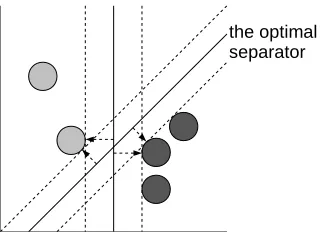
Figure 3.4: Finding the optimal linear separation
the largest separation. Using these, the plane with the maximum margin is found. Once a model has been calculated, new instances are classified by mapping them in the same grid and determining the class based on the existing separators.
The version of SVM used in this case is based on a radial basis func-tion which can also classify non-linear relafunc-tions. This version was later introduced by Vapnik together with Boser and Guyon and can make use of several different non-linear functions [BGV92]. The support for multiple classes was added by reducing them all to multiple binary sub-problems.
3.4.4 Performance Highlights
Table 3.4: Accuracy and execution time of the different algorithms Algorithm Correct Incorrectly Execution time
RIPPER 79.56% 20.44% 18.64 seconds C4.5 79.80% 20.20% 5.83 seconds SVM 79.73% 20.27% 1798.02 seconds
3.4.5 Conclusion
Chapter 4
Implementation & Tests
4.1
Implementation
4.1.1 Information extractor
To detect what operating system is running, information from the network and the transport layer is used. This is the most suitable layer for OS fingerprinting. Differences in the physical layer and data link layer are more dependent on the used hardware and can only be measured in the local area network. This makes these layers unsuitable for fingerprinting. The layers above the application data tend to contain only application specific information as was described in Section 2.3.1, and thus are also not suitable for fingerprinting. The data from the network layer and transport layer is the lowest layer that makes it across the network and the implementation is very often OS dependant. Thus from the traffic data, the network and transport layer information needs to be extracted.
Libpcap
3.2. The tests were all based on SYN fingerprinting, so that the performance could be easily compared to p0f. The details of this analysis will be described in the following section.
Processing a packet
To process a packet, the tool goes through several steps in sequential order. The input data will be a traffic stream of network data. This can either be realtime data or data stored in pcap logs. The pcap format is a simple format used by libpcap and many other programs in which network traffic can be stored. From this data only the headers on the network and transport level are interesting.
First it checks whether a packet starts with an IP header. This can either be an IPv4 or an IPv6 header. If the header is not an IP header, the packet is discarded. Then the tool checks whether the included segment is a TCP segment and without a TCP segment the packet is also dropped.
When the tool has reached this point, it will start analyzing the headers, both the IP and the TCP headers. The tool analyzes and fingerprints every single TCP segment. In practice it can also discard any non-SYN segment at this point, as only SYN segments are interesting. The original tool did not do this, to allow easy observation of the details that could possibly be obtained from different segment types. When observing the analyzed general traffic (details in Section 4.2.1) by looking at the generated output, almost no differences could be seen. Sometimes the TTL values would differ, but options were never included and fingerprints are indistinguishable from each other. This means that general traffic does not show any significant differences between different stacks and only specific TCP segments, such as SYN segments contain useful fingerprinting information.
The header analysis consists of several steps including:
• Rounding up the hop limit (TTL) to the first power of 2 (32, 64, 128, 255) to guess the original value, as explained in Appendix E.2
• Check the state of the DF flag
• Calculating the overall packet size
Table 4.1: An automatically generated fingerprint
OS genre OS descr WSS TTL D size options quirks
@/172.16.246.128 Auto generated 65535 64 1 64 M*,N,W0,N,N,T,S.
-• Look for special quirks as described in Appendix E.4
After this analysis it will generate a p0f compatible fingerprint. The final two fields are filled in differently however as these consist of the OS family and version. Since these are still unknown at this time, they are filled with information data such as the IP address of the origin and a note the fingerprint was generated automatically. A typical result looks like Table 4.1.
4.1.2 Existing fingerprint matching
The data that was generated in the previous section is suitable to allow for comparison. When comparing it with another instance generated by the same software, it should result in an exact match. When the fingerprinting results in an exact match with an existing fingerprint, the system details of the existing fingerprint are returned, for example “Windows XP SP1+, 2000 SP3”. The database contains unique fingerprints, whenever two systems would “share” one fingerprint, they are also likely used the same stack and are listed as one entry. This works similarly to p0f as explained in Appendix E.4.
4.1.3 Classifier
The classifier is triggered when no exact match can be made with an existing fingerprint. The normalized data will now be fed into the classifier. The classifier will return a closest result from its training set which should be a close match to the fingerprinted system. An example is “Windows XP” indicating it is likely a tweaked version or variant of this system. This section will describe the details of the classifier.
Weka
test a single dataset against any of the included machine learning algorithms [HDW94]. This allows one to quickly determine which algorithm is the most optimal for a specific task.
Preparing data for classification
To be able to use Weka, it is necessary to have a representative amount of data in its format, called the Attribute-Relation File Format (ARFF). A converter was written to convert p0f-type fingerprints to ARFF. This converter accepts a file with one or more p0f fingerprints and outputs a specific ARFF format.
ARFF files first start with a header which describes the format. Then all occurrences are stored with comma separated values each on their own line. To use a training set built from one source with another, both ARFF files need to have the exact same header. The format used was heavily based on the p0f rules. For all fields in a p0f fingerprint, separate attributes are defined. The ARFF format has no notion of order. Because the order of TCP options is an important characteristic to differentiate systems, it was necessary to encode order in ARFF too. This was done by specifying ten separate attributes for every option and allowing each of them to have any of the options. Unfortunately this still does not represent the true order of the options as it only shows the fixed positions and the algorithms likely are unaware of any order. All the quirks are simply defined as separate booleans.
The final attribute in an ARFF file is always the result. In this case, it represents which type of system generated the packet. When fingerprinting a new system, this is the attribute that will be determined by the system.
The full ARFF header used for all the data can be found in Appendix C.
Determining relevant factors
The first part of the problem is determining which information of the seg-ment and packet headers is actually needed to obtain information about the OS.
not have been considered before to be able to differ from existing finger-prints. This dynamic determination should be done automatically. This is possible by feeding the header or a sanitized version of the header plus the classification to a machine learning algorithm. Once the algorithm has been fed enough classification data, it should be able to classify unknown segments as coming from a specific operating system.
Together with a suitable dataset it is easy to do different test runs with different algorithms and discover the most optimal algorithm. To test the different algorithms one needs to obtain a large dataset which is already correctly classified. Using this data Weka will let the algorithm train itself and check different parts of the data against the training and note the overall accuracy.
As the attributes are refined and more details about the traffic are pro-vided, it is possible to improve the accuracy. The attributes are now largely based on p0f. Representing the full packet and segment headers in the at-tributes would be the most ideal, although the effect on the performance of RIPPER or other algorithms is unknown.
The most relevant factors in the test data were determined using Prin-cipal Component Analysis. Removing specific attributes from the testing data, each time the accuracy of RIPPER was checked. It turned out that the main differences in the testing dataset came from the window scale and packet size.
4.2
Tests
4.2.1 Collecting a dataset for testing
map with the hash of the source IP address as the hash key. Then when the fingerprinter comes across a segment which includes HTTP header data, it analyzes the useragent header field, takes the OS information from it, and correlates this with the existing fingerprint in the hash map. In this way more than 100.000 fingerprints with classification data were obtained from this 250 GB of traffic, containing 62 different system types. It was this dataset that was used to test the different algorithms. Because this dataset is based on a recent capture, it contains fingerprints for all the systems that are popular at this time. This makes it very suitable for testing the classification, because it covers the systems that are indeed generally used. Because HTTP useragents are sent out by connecting clients, the resulting dataset mainly consists of typical client operating systems.
4.2.2 Testing classification
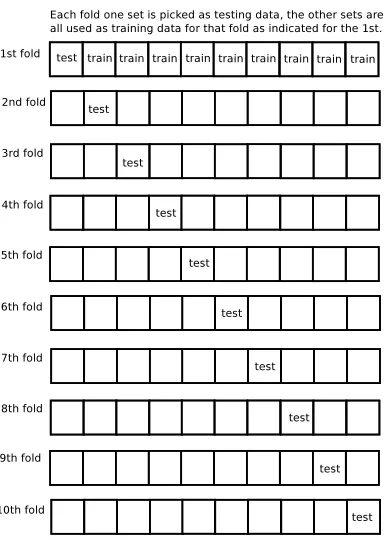
With the obtained dataset, classification tests were performed using Weka. Weka first lets the algorithm train itself using the data set and then uses different subsets to measure the performance of the trained algorithm. This is done using a process called cross-validation. The complete set of samples is partitioned into subsets. A single subset is used to validate the model, while the other subsets are used to train the model. In this case, a ten-fold cross-validation is done, so ten subsets are created. The complete process is repeated ten times, each time with a different subset used as the validation subset and the rest as the training data for the model as visualized in Figure 4.1. The final conclusion is the combination of the separate results. The results of these tests are in Appendix B.
Figure 4.1: 10-fold cross-validation
Diving into the generated classifiers
The details of two classifiers are compared to an existing p0f rule of a known OS. This shows the effectiveness and correctness of the result of the classi-fication algorithms.
This is an example of the ruleset generated by RIPPER:
IF
(wss_divisible = mss) && (initial_ttl <= 64) ||
(packet_size >= 76) THEN
class=linux
IF
(packet_size <= 52) && (initial_ttl <= 64) && (tcpopt_wscale >= 2) THEN
class=windows_7
IF
( (tcpopt_wscale <= 0) && (packet_size >= 64) && (wss_divisible = no) ) ||
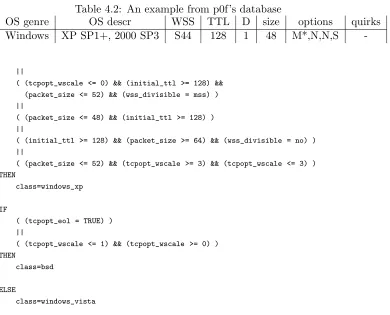
Table 4.2: An example from p0f’s database
OS genre OS descr WSS TTL D size options quirks Windows XP SP1+, 2000 SP3 S44 128 1 48 M*,N,N,S
-||
( (tcpopt_wscale <= 0) && (initial_ttl >= 128) && (packet_size <= 52) && (wss_divisible = mss) ) ||
( (packet_size <= 48) && (initial_ttl >= 128) ) ||
( (initial_ttl >= 128) && (packet_size >= 64) && (wss_divisible = no) ) ||
( (packet_size <= 52) && (tcpopt_wscale >= 3) && (tcpopt_wscale <= 3) ) THEN
class=windows_xp
IF
( (tcpopt_eol = TRUE) ) ||
( (tcpopt_wscale <= 1) && (tcpopt_wscale >= 0) ) THEN
class=bsd
ELSE
class=windows_vista
For each system it comes up with one or more rules which classify the system. These roughly correspond to p0f’s database entries, except that now for each system only the specific relevant attributes are noted. To compare, one line from p0f’s database is shown in Table 4.2 and one of the rules generated by RIPPER is shown below. Both are generated to recognize MS Windows XP.
IF
( (tcpopt_wscale <= 0) && (initial_ttl >= 128) && (packet_size <= 52) && (wss_divisible = mss) ) THEN
class=windows_xp
Table 4.3: Accuracy and execution time of the different algorithms Algorithm Correct Incorrectly Execution time
RIPPER 79.56% 20.44% 18.64 seconds C4.5 79.80% 20.20% 5.83 seconds SVM 79.73% 20.27% 1798.02 seconds
the accuracy, the summary of the report shows the exact results:
Correctly Classified Instances 83208 79.5594 %
Incorrectly Classified Instances 21378 20.4406 %
Which shows directly how well the classifier has performed. For comparison, here is the summary when using the hand-crafted p0f rules as input for the same dataset:
Correctly Classified Instances 32694 31.2604 % Incorrectly Classified Instances 71892 68.7396 %
The same example also works for the tree based decision algorithm C4.5. The corresponding part of the generated decision tree looks like this:
wss_divisible = mss
| tcpopt_5 = s: windows_xp
The full tree is shown in Appendix B.2. As can be seen, with a smart tree, accurate classification can be performed very fast.
4.2.3 Test Analysis
The accuracy of the different algorithms is comparable. The execution time of the algorithm differs significantly however both can be seen in Table 4.3. This shows that SVM has a very significant performance disadvantage and the tree based C4.5 is both the fastest and the most accurate algorithm.
Windows Vista and Windows 7 are basically behaving the same. Since those two operating systems are basically the same, a higher score is obtained when treating both as a single system. The scores are in Table 4.4.
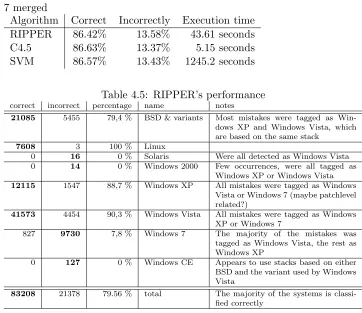
Table 4.4: Accuracy of the different algorithms with MS Windows Vista and 7 merged
Algorithm Correct Incorrectly Execution time RIPPER 86.42% 13.58% 43.61 seconds C4.5 86.63% 13.37% 5.15 seconds SVM 86.57% 13.43% 1245.2 seconds
Table 4.5: RIPPER’s performance
correct incorrect percentage name notes
21085 5455 79,4 % BSD & variants Most mistakes were tagged as
Win-dows XP and WinWin-dows Vista, which are based on the same stack
7608 3 100 % Linux
0 16 0 % Solaris Were all detected as Windows Vista
0 14 0 % Windows 2000 Few occurrences, were all tagged as
Windows XP or Windows Vista
12115 1547 88,7 % Windows XP All mistakes were tagged as Windows
Vista or Windows 7 (maybe patchlevel related?)
41573 4454 90,3 % Windows Vista All mistakes were tagged as Windows
XP or Windows 7
827 9730 7,8 % Windows 7 The majority of the mistakes was
tagged as Windows Vista, the rest as Windows XP
0 127 0 % Windows CE Appears to use stacks based on either
BSD and the variant used by Windows Vista
83208 21378 79.56 % total The majority of the systems is
classi-fied correctly
4.2.4 Test results
This section contains detailed reports about the performance of the different algorithms. The operating systems shown are the ones that were used to access the network.
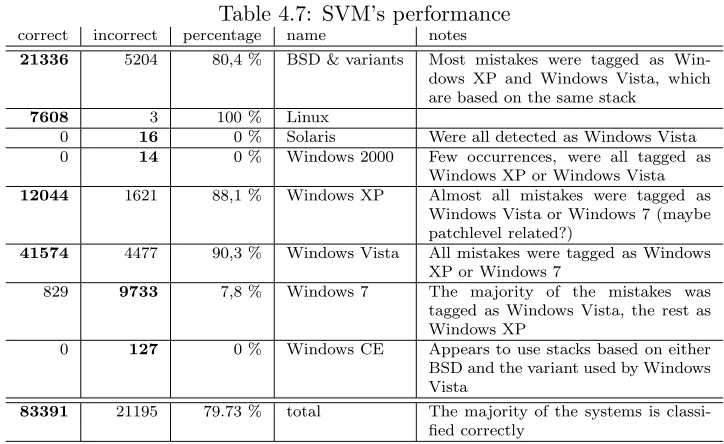
RIPPER took 18.64 seconds to build the model. Table 4.5 shows the accuracy per system and the performance summary from Weka. Because the algorithms always use the classification with the highest number of instances as the result when no rule matches. In the used dataset, Windows Vista had the highest presence. For this reason there are systems with very few instances like Solaris, that are classified as Windows Vista.
C4.5 took 5.83 seconds to build the model. Table 4.6 shows the accuracy per system and the performance summary from Weka.
Table 4.6: C4.5’s performance
correct incorrect percentage name notes
21336 5204 80,4 % BSD & variants Most mistakes were tagged as
Win-dows XP and WinWin-dows Vista, which are based on the same stack
7607 4 99,9 % Linux
0 16 0 % Solaris Were all detected as Windows Vista
0 14 0 % Windows 2000 Few occurrence, were all tagged as
Windows XP or Windows Vista
12115 1550 88,7 % Windows XP Almost all mistakes were tagged as
Windows Vista or Windows 7 (maybe patchlevel related?)
41574 4477 90,3 % Windows Vista Almost all mistakes were tagged as
Windows XP or Windows 7
827 9735 7,8 % Windows 7 The majority of the mistakes was
tagged as Windows Vista, the rest as Windows XP
0 127 0 % Windows CE Appears to use stacks based on BSD
83459 21127 79.80 % total The majority of the systems is
classi-fied correctly
Table 4.7: SVM’s performance
correct incorrect percentage name notes
21336 5204 80,4 % BSD & variants Most mistakes were tagged as
Win-dows XP and WinWin-dows Vista, which are based on the same stack
7608 3 100 % Linux
0 16 0 % Solaris Were all detected as Windows Vista
0 14 0 % Windows 2000 Few occurrences, were all tagged as
Windows XP or Windows Vista
12044 1621 88,1 % Windows XP Almost all mistakes were tagged as
Windows Vista or Windows 7 (maybe patchlevel related?)
41574 4477 90,3 % Windows Vista All mistakes were tagged as Windows
XP or Windows 7
829 9733 7,8 % Windows 7 The majority of the mistakes was
tagged as Windows Vista, the rest as Windows XP
0 127 0 % Windows CE Appears to use stacks based on either
BSD and the variant used by Windows Vista
83391 21195 79.73 % total The majority of the systems is
[image:41.595.115.477.462.684.2]Table 4.8: Three Linux 2.6 fingerprints from p0f’s database
OS genre OS descr WSS TTL D size options quirks Linux 2.6 (newer, 1) S4 64 1 60 M*,S,T,N,W5 -Linux 2.6 (newer, 2) S4 64 1 60 M*,S,T,N,W6 -Linux 2.6 (newer, 3) S4 64 1 60 M*,S,T,N,W7
-Table 4.9: Comparing fingerprints from MS Windows XP and Vista
OS genre OS descr WSS TTL D size options quirks Windows XP SP1+, 2000 SP3 S44 128 1 48 M*,N,N,S -(Windows) (Vista) 8192 128 1 52 M*,N W8,N,N,S
-4.3
Preliminary future work
4.3.1 Detecting progression in network stacks
An interesting feature is the detection of newer versions of known operating systems. As operating systems evolve, their network stacks are also im-proved and sometimes even replaced adding new features and options. The effect this has on the resulting packet and segment headers, is exactly what allows fingerprinting to differentiate operating systems.
extra no-operation (NOP) option. This is also the case for Windows’ stack. Other than that, the packet size is incremented by 4 to take the extra 32 bits (= 4 bytes) into account. Since the WSS value is related to the WS, it obviously changes too. Basically this means that all the expected values have changed in a way that is logical and thus likely also predictable. This could be detected using heuristics. Details of this test are in Section 4.3.2.
With options like WS the evolution of OSs and the evolution of the net-work stack is really visible in the fingerprinting and this information can be used to predict the fingerprints enhanced systems will have. Because such options are often already specified long before they appear in implemen-tations (and before they are turned on by default), one can possibly even predict the options that may appear in future versions of existing network stacks by watching the RFCs from IETF or studying which options are ac-tually implemented already, but which have not been enabled yet. As with the case of the WS option, newer versions are likely to have higher values for the WS, so also this is a good indicator of a new version of an already known system.
Although the classification algorithms as described above cannot be made explicitly aware of these progressions, this enables understanding how progression can be detected by them.
4.3.2 Detecting clients versus detecting servers, SYN finger-printing against SYN+ACK fingerfinger-printing
Most of the work that has been gone into passive operating system finger-printing was based on TCP SYN segments. Because a SYN segment is sent out by a client when it wants to initiate a connection. This is useful when someone offering online services wants to fingerprint the operating systems her users are using. In other cases however, it may be more interesting to fingerprint the server instead of the client. In this case, SYN+ACK finger-printing is required. A SYN+ACK segment is a segment that is sent out by a server in the three-way handshake (explained in Appendix E.1).
Table 4.10: A SYN+ACK fingerprint from p0f’s database
OS genre OS descr WSS TTL D size options quirks Windows XP SP1 S44 64 1 64 M*,N,W0,N,N,T0,N,N,S A
Table 4.11: A response to a SYN with the WS option
OS genre OS descr WSS TTL D size options quirks (Linux) (2.6) 5792 64 1 60 M*,S,T,N,W6 ZAT
the SYN segment that initiated the connection [Zal06a]. This means that differences in SYN+ACK segments may actually result from differences that were in the SYN segment which the SYN+ACK segment is a reply to. If, for instance, a SYN segment is sent without any WS option, the answer is unlikely to contain a WS option, since it assumes the first system does not have support for this option anyhow. This is shown in the following exam-ple. First, a normal connection with default settings is established from one Linux system to another and then the WS option is disabled on the client side. Compare the responses. The response to a packet with the WS option is shown in Table 4.11. The response to a packet without the WS option is shown in Table 4.12. This shows the adaptive behavior of the stack on the connection accepting side. The Z quirk in this case is triggered by the DF flag which is consistently set in these cases, so IP identification is not needed. The details on how this test was performed are described in the following Subsection. Thus, when fingerprinting one should realize the SYN+ACK segment may have been based on a SYN segment with a limited option set specified and so it may not reveal many details. Other values that are likely to depend on the initiating SYN segment are the WSS and the MSS. Taking these into account however, there are still many things that can be used to differentiate systems based on SYN+ACK segments, especially when mul-tiple SYN+ACK segments are collected based on different initiating SYN segments. With a feature rich SYN segment passing by, the correspond-ing SYN+ACK will likely reveal a lot of information about the supported
Table 4.12: A response to a SYN without the WS option from the same system as in Table 4.11
Table 4.13: SYN packet with WS enabled
OS genre OS descr WSS TTL D size options quirks (Linux) (2.6) S4 64 1 60 M*,S,T,N,W7
Table 4.14: SYN+ACK response to SYN with WS enabled OS genre OS descr WSS TTL D size options quirks
(Linux) (2.6) 5792 64 1 60 M*,S,T,N,W6 ZAT
feature set. Together with some segments which advertise less features, pat-terns such as NOP-aligning may be recognized. With other variants, other behavior may be noted. P0f’s fingerprinting is completely based on dealing with a single segment. No correlation between corresponding segments is performed. In this situation it indeed appears as if SYN+ACK fingerprinting is also partially fingerprinting the OS which initiated the connection. With more knowledge of state and a proper database, SYN+ACK fingerprinting may be potentially quite thorough and complicated, but still feasible with a good design.
Showing the SYN+ACK TCP options can depend on initial SYN segments
As stated in Section 4.3.1, the options a TCP stack will return in a SYN+ACK segment often depend on which options were specified. This can be verified using the following test, which consists of connecting to a single server using a different option set specified in the initial segment.
It was earlier described that the window scaling feature is only advertised by some servers when the initial connection also advertises this feature. To test this, the following commands can be used to disable or enable the window scaling feature on the fly.
echo 0 | tee /proc/sys/net/ipv4/tcp window scaling echo 1 | tee /proc/sys/net/ipv4/tcp window scaling
Table 4.15: SYN packet with WS disabled
OS genre OS descr WSS TTL D size options quirks (Linux) (2.6) S4 64 1 56 M*,S,T
Table 4.16: SYN+ACK response to SYN with WS disabled OS genre OS descr WSS TTL D size options quirks
(Linux) (2.6) 5792 64 1 56 M*,S,T ZAT
More testing was done using varying window sizes. It is possible to de-crease the WS to 6 (from 7) using these commands:
echo 4096 8192 2097152 | tee /proc/sys/net/ipv4/tcp rmem
echo 4096 8192 2097152 | tee /proc/sys/net/ipv4/tcp wmem
Using decreased numbers the WS can be lowered further. However this does not have any effect on the WS of the replying system in our tests. This was tested against Linux kernel version 2.4.27, version 2.6.26 and Windows Server 2008. This shows that comprehensive SYN+ACK fingerprinting in-deed gives results as described and could be used to fingerprint servers more comprehensively.
4.3.3 RST+ACK fingerprinting
When fingerprinting the server-side of a connection, RST+ACK fingerprint-ing may also be relevant. When a system does not accept a connection us-ing a SYN+ACK segment, it will usually send back a RST+ACK segment. This means that when aiming to detect the running system on a server, RST+ACK fingerprinting may also be necessary.
[image:46.595.114.443.667.741.2]In practice there is not much information that can be gained from RST+ACK segments however and also p0f’s database for them is very lim-ited. P0f has a single mode in which it fingerprints all types of RST seg-ments, including RST+ACK segments. P0f’s RST database contains just five RST+ACK fingerprints, which shows how limited the detecting possi-bilities are. Two are shown in Table 4.17. As can be seen, the fingerprints
Table 4.17: Two RST+ACK fingerprints from p0f’s database OS genre OS descr WSS TTL D size options quirks
Linux 2.0/2.2 0 255 0 40 - K0A
Chapter 5
Conclusion
The original research question of the work was formulated as:
“Can machine learning techniques be used to recognize new operating systems which current fingerprinting systems cannot automatically recognize?”
It is argued that current passive fingerprinting systems have problems with recognizing modern systems and that this causes the accuracy of these systems to be very limited. To improve the accuracy, it is necessary to either update the fingerprint database manually or use machine learning techniques to deal with newer systems. Because it was observed manual updating is too complex, there is a necessity to use classification.
defined after testing several types of algorithms and determining which ones were suitable for the classification of operating systems based on passive fingerprinting data. Two algorithms that are very suitable for automatic classification turned out to be C4.5 and RIPPER. Both are accurate enough and also perform fast. The testing section shows classification is indeed quite accurate when using for fingerprinting and suitable to be used to recognize previously unrecognized systems.
5.1
Future work
Several notable developments will have a notable impact on passive OS fin-gerprinting in the future. Some of these were already mentioned in Chapter 2.
IPv6 The thesis was mainly focused on IP version 4 and did not detail much about version 6. IPv6 adds several field however, such as the flow label, which also have potential to be useful for fingerprinting. More information can be found in Appendix A.
IPsec IPsec will provide full encryption for the transport layer, which would have a significant impact on the described fingerprinting because of its big dependence on TCP. It may become almost impossible to properly fingerprint connection which are set up by two foreign entities, because in that case the TCP header, which is the main differentiation source, is fully encrypted. Maybe IPsec itself will allow for new methods of differentiation however.
Appendix A
The IP & the TCP
Addressing, routing on the internet are handled by the Internet Protocol (IP) [Pos81b]. Several versions of the IP have been developed. At this moment version 4 and version 6 [DH98, ASNN07] are in widespread use. Both the older IPv4 and newer IPv6 header are shown:
The IPv4 header
Version IHL Type of Service Total Length
Identification Flags Fragment Offset
Time to Live Protocol Header Checksum
Source Address
Destination Address
Options Padding
Version Traffic Class Flow Label
Payload Length Next Header Hop Limit
Source Address
Destination Address
This header is used by routers to route a packet to the right destination. Especially the destination address is relevant. Based on the routing tables and the address from the header, packets are routed to their destination. A short overview of all the fields in the IPv6 header is given here. They mostly correspond to the most relevant fields in the IPv4 header.
Version This field is either 6 for IPv6 or 4 for IPv4.
Traffic Class This field specifies the type of traffic.
Flow Label This field is reserved for future use, so hosts can request special handling of certain traffic flows. For example, realtime voice com-munication.
Payload Length The full length of the packet, minus 40 octets (bytes) (this header).
Next Header Identifies the type of the header that follows the IP header.
Hop Limit This value used to be called TTL, but because it was always treated as a hop limit, it was renamed. This value is subtracted with one by every router this packet passes through.