Technology (IJRASET)
©IJRASET 2015: All Rights are Reserved
227
Augmented Reality for Data Booth
Vrushali A. Chavan1, Abhijeet D. Cholke2
1
Asst. Professor, MCA Dept. Institute of Business Mgmt & Rural Development, Ahmednagar.
2
Computer Tech. Department, P.Dr.Vitthalrao Vikhe Patil institute of Tech. & Engg. (polytechnic), Loni.
Abstract— Nowadays people widely use internet for purchasing a home, car, furniture etc. In order to obtain information about that product user prefer pamphlets or leaflets or obtain the information by means of Salesperson. Though, to receiving such product information on computer or any device, users have to use lots of mouse and keyboard actions again and again, which is wastage of time and inconvenience. This will reduce the amount of time to gather particular information regarding the particular product. User is also unable to determine its inner dimensions through images. These dimensions can be predicted by using 3D motion tracking of human movements and Augmented Reality. Based on 3D motion tracking of human movements and Augmented Reality application, we introduce a novel kind of interaction. In the proposed system, the main aim is to demonstrate that with better interaction features in showrooms as well as online shopping could improve sales by demonstrating the purchasing item more wider. With the help of the our project the customer will be able to view his choices on screen according to him and thereby can make better decisions. In this paper, we proposed hand gesture detection and recognition method to detect hand movements , and then through the hand gestures, control commands are sent to the system that enable user to retrieve data and access from Information Kiosk for better purchase decision.
Keywords: 3D motion tracking, Augmented Reality, Hand Gestures, Information Kiosk.
I. INTRODUCTION
The growth in technology is proving beneficial to the world. With the advancements of computer and Internet technology, e-commerce and online shopping have rapidly progressed, due to the convenience that they provide consumers. Most people have their opinion that, e-commerce and online shopping cannot provide the complete description, especially for products like clothing, shoes, jewelry, furniture, etc. For many such products, onsite shopping has many distinct advantages over online shopping. Still, there is a lot of improvement in technology. Augmented reality is the collection of data from different sources, uses a cameras, mobile devices, and live end users, creating a multi-dimensional, interactive virtual environment which is real time that is overlaid on real world live imagery. The data required comes from all possible sources including, which is not limited to social, geographic, audio, video, graphic, and from different computational sources like mobile, computer etc. Now, with the ability to depend on computational devices like computers, mobile or any device to organize all this data, users can easily spend more time interpreting, designing, and accessing with that data. It easily allows them to experience technology through innovations like augmented reality. Augmented Reality (AR), an upcoming Human-Computer Interaction technology, that aims to combine the computer generated 2D or 3D virtual objects with real world pictures, has improved the shopping over internet. Compared to Virtual Reality, that changes the real world, AR replaces physical reality by combining virtual objects into physical world. Augmented Reality for information kiosk that visually puts virtual products into real physical environments for user interaction. This trending approach provides customers with a chance to “try" a product at home or in another use environment. The combination of Augmented reality with hand gesture had made the system work in a more interactive way. Operating the product involves rotation (left, right), navigation over the product by using the hand gesture of the customer .The customer can view the product from all the directions according to the choice made. This will reduce the efforts of the customer to use the keyboard operations thus making the advertisement of the product in a more interactive way.
II. PROPOSEDSYSTEM
We proposed system where users that are willing to buy any product are expected to be computer users with minimal computer knowledge. However, the user interface of the system is made very simple and user-friendly to the customer. According to our system, we determined that costumer shopping typically includes three main tasks:
From the Information Kiosk Searching for products.
The user interface is designed to facilitate the above three shopping tasks. These tasks are combined into menu system as the Augmented Reality window .Through these menu, users can access full description which is designed for Augmented Reality.
Through the Webcam, hand gesture is recognized, product associated with that is selected from a well-built Information kiosk. Product from the database is Loaded on the Screen and the Users can pick one of virtual products from all and manipulate it, User can move or rotate the model, and also see the Inner view of the product and view all specific information about that product, such as Product name, it’s price, size of it, and lots of thing that help to customer make their purchasing decision in more reliable way.
III. SYSTEMARCHITECTURE
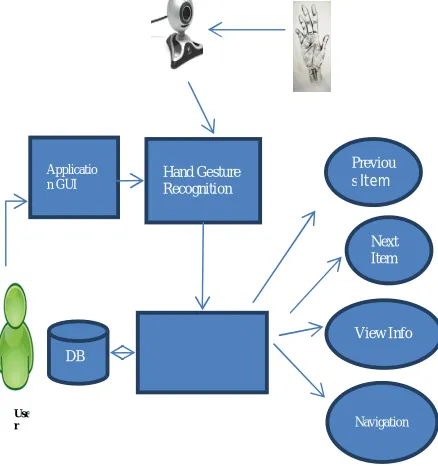
[image:3.612.186.405.291.524.2]We had proposed a system includes hand detection and recognition and the data is retrieved from the database as highlighted in Figure 1. Each user can easily use system, control the system, view the previous and next Product and obtains all information regarding that product. At First user access Application GUI. As well as user enter the screen zone; the webcam will start the process of Hand detection and Recognition. User just need to use hand to access the system within the Screen zone, and when user use hand gesture to choose the different options and the system acquires the information from database. After accessing all information from the database, the required information is visible on the screen or the display.
Figure 1. System Architecture
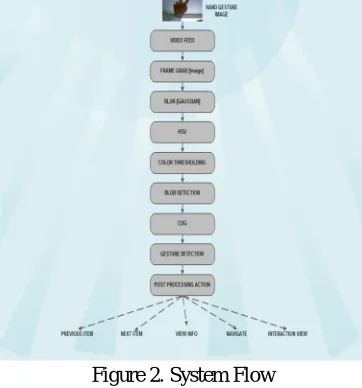
Figure 2 shows system flow of our proposed system. At first, the hand gesture movement is captured by Webcam as video feed. From the video feed, frames are captured and send for processing. In processing all captured images are blurred for better detection and from these images all are converted into HSV color model for obtaining accurate color. Next, thresholding for converting image into binary form (Black and white image) and the blob detection from images are carried out. From these blobs, gesture is recognized. The last step is preprocessing the recognized gestures and according to that gesture command associated with that is send to system and then information regarding to product which user demands is then retrieved from database. When user chooses any option through hand movements, and from these option ,the system will get all information and finally displayed on the screen.
Technology (IJRASET)
©IJRASET 2015: All Rights are Reserved
[image:4.612.220.401.81.275.2]229
Figure 2. System FlowIV. HANDGESTUREDETECTIONANDRECOGNITION
This section will describe the detail of hand gesture detection and recognition technique. Figure 2 is the hand gesture recognition flow chart. First, the Images grab from the video feed is passed through different operations such as image blur, thresholding, RGB to HSV, blob detection and hand gesture recognition. Finally we will analyze ,detect and recognize the hand gesture. Now we will discuss Hand gesture detection and recognition in brief one by one.
A. Blur An Image
When Web camera grab an images of user Gestures, all images get blurred to reduce sharpening effects. By reducing sharpening effects we get more accurate detection. We split all RGB value separately and Calculate the RGB average of surrounding pixels and assign this average value to it. Repeat this above step for each pixel and finally we get blurred images of Hand Gestures. The flow steps of blurring an image are as follows.
Traverse through entire input image array.
Read each single pixel color value (24-bit).
Split the color value into individual R, G and B 8-bit values.
Calculate the RGB average of all surrounding pixels and assign this average value to it.
Repeat the above step for each pixel.
Store the new value at same location in output image.
(a) Original Image (b) Blur Image
[image:4.612.201.415.535.683.2]After Blurring all images ,all blurred images are transferred into HSV (Hue, Saturation, Value) model. HSV is stronger model than RGB because it offers a more intuitive representation of the relationship between colors. HSV selects more specific color.
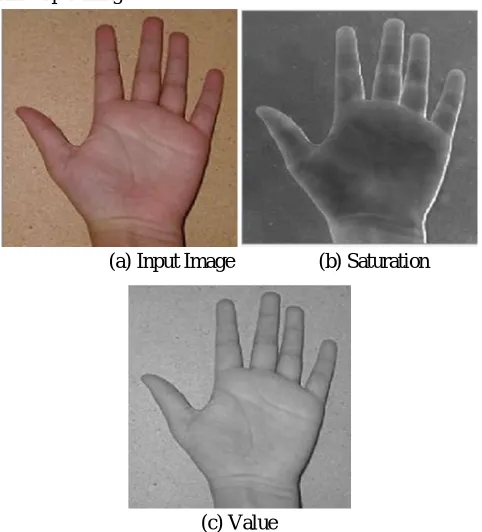
In HSV model value of ‘H’ and ‘S’ remain constant if the value of ‘V’ changes, but value of RGB changes with the change in ‘V’. So we get True color value. Figure 4(a) shows input image, 4(b) saturated image, 4(c) represent Value through which we get grayscale image. The flow steps for conversion of RGB to grayscale image are as follows :
Initially all the images are stored in array. Traverse through entire input image array.
Read each single pixel color value (24-bit).
Calculate the grayscale component (8-bit) for given R, G and B pixels using a conversion formula.
Grayscale = (r +g +b) / 3;
Compose a 24-bit pixel value from 8-bit grayscale value.
Store the new value at same location in output image.
(a) Input Image (b) Saturation
[image:5.612.187.428.263.529.2](c) Value
Figure 4. RGB to HSV Conversion
C. Image Thresholding
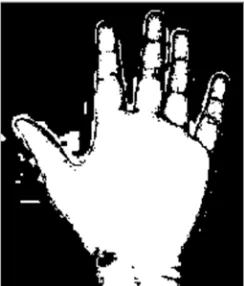
For recognizing Hand Gesture we use Thresholding. Image segmentation can be easily done by the simplest method i.e. thresholding. From a grayscale image, we use thresholding method that can be used to create binary images i.e. image which have only 2 colors, black or white. It is usually used for gesture extraction where required gesture from an image are converted to white and everything else to black (or vice-versa).The flow steps for grayscale image thresholding are as follows :
Traverse through entire input image array.
Read individual pixel color value (24-bit) and convert it into grayscale.
Calculate the binary output pixel value (black or white) based on current threshold.
Technology (IJRASET)
©IJRASET 2015: All Rights are Reserved
[image:6.612.189.424.80.239.2]231
(a) Input Image (b) Threshold ImageFigure 5. Image Thresholding
D. Blob Detection
After getting binary image in the form of only Black and White, we get white blob and rest black (Vice versa), we must have to detect these blobs. For detecting blob firstly, Starts from the first line of the image and find groups of one or more white (or black) pixels. Group of one or more white pixels are called as lineblobs. Find X, Y co-ordinates of each those blob .Number each of these groups. Repeat this sequence on next line. While you are collecting the lineblobs, check whether the lineblobs that checked before this current line and see if these blobs overlap each other. If so, you merge these lineblobs by using there X and Y co-ordinates to one blob it will treat as a whole blob. Repeat this for every line and you have a collection of blobs.
Figure 6. Blob Detection
E. Gesture Recognition
The gesture-recognition module tracks the moving hand features by using Image Subtraction, identifies the motion, and determine which menu is issued. Then the recognized gesture is then send to the application being used which is detect which menu is chosen and what response is associated to that menu, which then communicates with the Augmented Reality.
V. CONCLUSIONSANDFUTUREWORK
[image:6.612.245.367.371.514.2]technology, which aims to mix or overlap computer generated 2D or 3D virtual objects and other feedback with real world scenes, shows great potential for enhancing e-commerce systems. The new approach gives customers a chance to “try" a product at home or in another use environment. In future this can be a better option for advertisement purpose in Malls, Multiplexes.
REFERENCES
[1] Yikai Fang, Kongqiao Wang, Jian Cheng and Hanqing Lu, “A Real-Time Hand Gesture Recognition Method”, in Proceedings of the IEEE International Conference on Multimedia and Expo, pp. 995-998, 2007.
[2] Sheng-Yu Peng, Kanoksak Wattanachote, Hwei-Jen Lin and Kuan-Ching Li”A Real-Time Hand Gesture Recognition System”2011for Daily Information Retrieval from Internet
[3] Jens Lambrecht1 and Jorg Kruger “Spatial Programming for Industrial Robots based on Gestures and Augmented Reality”,2012.
[4] A Ameri E, B. Akan and B. Curuklu, “Augmented Reality Meets Industry: Interactive Robot programming, Proceedings of SIGRAD”,2010. [5] D. H. Liou, “A real-time hand gesture recognition system by adaptive skin-color detection and motion history image,” 2009.
[6] J. Segen and S. Kumar, “Human-computer interaction using gesture recognition and 3D hand tracking,”2010.
[7] Ching-I Cheng, Damon Shing-Min Liu, Chun-Hung Tsai and Li-Ting Chen (2009) “A 3D Virtual Show Room for Online Apparel Retail Shop”, in Proc. 2009 Annual Summit and Conference Asia-Pacific Signal and Information Processing Association, APSIPA ASC 2009, pp193-199.
[8] Bo Begole, Takashi Matsumoto, Wei Zhang, Nicholas Yee, Juan Liu and Maurice Chu (2009) “A 3D Virtual Show Room for Online Apparel Retail Shop”, in Proc. 13th International Conference on Human-Computer Interaction. Part IV: Interacting in Various Application Domains, pp448-457.
[9] Stefan Hauswiesner, Matthias Straka and Gerhard Reitmayr (2011) “Free viewpoint virtual try-on with commodity depth cameras”, in Proc. of the 10th International Conference on Virtual Reality Continuum and Its Applications in Industry (VRCAI '11), pp23-30.