Mahmoud Parsian
JDBC Metadata, MySQL,
and Oracle Recipes
JDBC Metadata, MySQL, and Oracle Recipes: A Problem-Solution Approach
Copyright © 2006 by Mahmoud Parsian
All rights reserved. No part of this work may be reproduced or transmitted in any form or by any means, electronic or mechanical, including photocopying, recording, or by any information storage or retrieval system, without the prior written permission of the copyright owner and the publisher.
ISBN-13: 978-1-59090-637-1
ISBN-10: 1-59059-637-4
Printed and bound in the United States of America 9 8 7 6 5 4 3 2 1
Trademarked names may appear in this book. Rather than use a trademark symbol with every occurrence of a trademarked name, we use the names only in an editorial fashion and to the benefit of the trademark owner, with no intention of infringement of the trademark.
Lead Editor: Steve Anglin Technical Reviewer: Sumit Pal
Editorial Board: Steve Anglin, Dan Appleman, Ewan Buckingham, Gary Cornell, Jason Gilmore, Jonathan Hassell, James Huddleston, Chris Mills, Matthew Moodie, Dominic Shakeshaft, Jim Sumser, Matt Wade
Project Managers: Beckie Brand, Elizabeth Seymour Copy Edit Manager: Nicole LeClerc
Copy Editor: Liz Welch
Assistant Production Director: Kari Brooks-Copony Production Editor: Lori Bring
Compositor: Linda Weideman, Wolf Creek Press Proofreader: Dan Shaw
Indexer: Lucie Haskins
Artist: Kinetic Publishing Services, LLC Cover Designer: Kurt Krames
Manufacturing Director: Tom Debolski
Distributed to the book trade worldwide by Springer-Verlag New York, Inc., 233 Spring Street, 6th Floor, New York, NY 10013. Phone 1-800-SPRINGER, fax 201-348-4505, e-mail [email protected], or visit http://www.springeronline.com.
For information on translations, please contact Apress directly at 2560 Ninth Street, Suite 219, Berkeley, CA 94710. Phone 510-549-5930, fax 510-549-5939, e-mail [email protected], or visit http://www.apress.com. The information in this book is distributed on an “as is” basis, without warranty. Although every precaution has been taken in the preparation of this work, neither the author(s) nor Apress shall have any liability to any person or entity with respect to any loss or damage caused or alleged to be caused directly or indirectly by the information contained in this work.
This book is dedicated to my dears
my beautiful wife, Behnaz;
my gozal daughter, Maral;
my gibldiz son, Yaseen, who taught me how to play Yu-Gi-Oh!
my mother, Monireh, who taught me my mother language and introduced me to the world of computer science;
memory of my father, Bagher, who taught me honesty and hard work;
my angel sister, Nayer Azam;
Contents at a Glance
About the Author
. . . xiiiAbout the Technical Reviewer
. . . xvAcknowledgments
. . . xviiIntroduction
. . . xix■
CHAPTER 1
What Is JDBC Programming?
. . . 1■
CHAPTER 2
Database Metadata, Part 1
. . . 19■
CHAPTER 3
Database Metadata, Part 2
. . . 89■
CHAPTER 4
ResultSet Metadata
. . . 155■
CHAPTER 5
Parameter Metadata
. . . 185■
CHAPTER 6
Exploring Driver Property Information
. . . 217■
CHAPTER 7
RowSet Metadata
. . . 239■
CHAPTER 8
Web Access to Metadata, Part 1
. . . 307■
CHAPTER 9
Web Access to Metadata, Part 2
. . . 381■
CHAPTER 10
RDF and JDBC Metadata
. . . 461■
INDEX
. . . 467Contents
About the Author
. . . xiiiAbout the Technical Reviewer
. . . xvAcknowledgments
. . . xviiIntroduction
. . . xix■
CHAPTER 1
What Is JDBC Programming?
. . . 11.1. What Is JDBC?
. . . 21.2. What Is JDBC Programming?. . . 4
1.3. How Do You Handle JDBC Errors/Exceptions?
. . . 101.4. What Is JDBC Metadata Programming?. . . 14
1.5. What Is an Example of JDBC Metadata Programming?
. . . 15■
CHAPTER 2
Database Metadata, Part 1
. . . 192.1. What Is Metadata?
. . . 212.2. What Is Database Metadata?
. . . 222.3. How Do You Discover Database Metadata?. . . 24
2.4. What Is JDBC’s Answer to Database Metadata?
. . . 252.5. What Is the Vendor Name Factor in Database Metadata?. . . 27
2.6. How Do You Find JDBC’s Driver Information?
. . . 292.7. What Are a Database’s SQL Keywords?
. . . 332.8. What Are the Available SQL Data Types?
. . . 372.9. What Are Catalogs and Schemas?
. . . 412.10. What Are the Table Names for a Database?
. . . 442.11. What Are the View Names for a Database?. . . 50
2.12. Does a Table Exist in a Database?
. . . 532.13. What Are a Table’s Column Names?
. . . 582.14. What Are the Table Types Used in a Database?
. . . 642.15. What Are the Primary Keys for a Table?. . . 66
2.16. What Are a Table’s Privileges?. . . 69
2.17. What Are a Table Column’s Privileges?
. . . 742.18. How Do You Find the Number of Rows Affected by
a SQL Query?
. . . 792.19. What Is a Table’s Optimal Set of Columns
That Uniquely Identify a Row?
. . . 81■
CHAPTER 3
Database Metadata, Part 2
. . . 893.1. What Are a Table’s Indexes?. . . 89
3.2. Does an Index Exist for a Specific Table?
. . . 1023.3. What Are the Names of a Database’s Stored Procedures?. . . 104
3.4. What Is the Signature of a Stored Procedure?
. . . 1123.5. What Is the Username of the Database Connection?. . . 122
3.6. Is the Database Connection Read-Only?
. . . 1233.7. What Is the JDBC’s Driver Information?
. . . 1233.8. How Can You Determine Where a Given Table Is
Referenced via Foreign Keys?
. . . 1283.9. What Foreign Keys Are Used in a Table?
. . . 1373.10. What Is the JDBC View of a Database’s
Internal Structure? . . . 148
3.11. Does a Database Support Batching?
. . . 150■
CHAPTER 4
ResultSet Metadata
. . . 1554.1. What Is ResultSet Metadata?. . . 156
4.2. What Is a ResultSetMetaData Object?
. . . 1564.3. How Do You Create a ResultSetMetaData Object?
. . . 1574.4. How Does JDBC Define ResultSetMetaData?
. . . 1604.5. What Is the Weakness of the ResultSetMetaData
Interface? . . . 163
4.6. What Is the Relationship of ResultSetMetaData to
Other Objects?
. . . 1634.7. How Do You Express ResultSetMetaData in XML?
. . . 1644.8. How Do You Get a Table’s Metadata Without
Selecting Any Rows?
. . . 1744.9. How Do You Retrieve the Column Types from
a ResultSet?
. . . 1794.10. How Do You Retrieve the Column Name/Data/Type
from a ResultSet?. . . 180
■
CHAPTER 5
Parameter Metadata
. . . 1855.1. What Are Dynamic Parameters?
. . . 1865.2. What Is ParameterMetaData?
. . . 1895.3. What Is the Definition of ParameterMetaData?. . . 190
5.4. How Do You Create a ParameterMetaData Object?
. . . 1925.5. How Do You Get Information from a
ParameterMetaData Object?. . . 199
5.6. How Do You Get XML Information from a
ParameterMetaData Object?. . . 203
5.7. Why Should You Use ParameterMetadata Wisely?
. . . 2075.8. How Do You Get ParameterMetadata from
Stored Procedures (Oracle)?
. . . 2085.9. How Do You Get ParameterMetadata from
Stored Procedures (MySQL)?
. . . 212■
CHAPTER 6
Exploring Driver Property Information. . . 217
6.1. What Is DriverPropertyInfo?
. . . 2176.2. How Do You Create a DriverPropertyInfo Object?
. . . 2186.3. What Is a Sample Application of DriverPropertyInfo?
. . . 2246.4. What Connection Properties Should You Supply to a
Database Driver in Order to Connect to a Database?. . . 225
6.5. How Does MySQL’s Driver Implement
Driver.getPropertyInfo()?
. . . 231■
CHAPTER 7
RowSet Metadata
. . . 2397.1. What Is a RowSet Object?
. . . 2407.2. What Are the Relationships Between Key Classes and
Interfaces for Rowsets?. . . 243
7.3. What Is a JdbcRowSet?
. . . 2447.4. What Is a CachedRowSet?
. . . 2477.5. What Is a WebRowSet?
. . . 2527.6. What Is a FilteredRowSet?
. . . 2637.7. How Do You Get Metadata from a FilteredRowSet Object?. . . 268
7.8. What Is a SyncResolver?
. . . 2737.9. How Do You Create a RowSet Object?
. . . 2767.10. What Is a RowSetMetaData Object?. . . 279
7.11. How Do You Create a RowSetMetaData Object?
. . . 2807.13. How Do You Create a WebRowSet Object?
. . . 2837.14. How Do You Get WebRowSet’s Metadata as XML?
. . . 2897.15. How Do You Retrieve Metadata from
RowSetMetaData?
. . . 2937.16. How Can You Create a Custom
RowSetMetaData Object?
. . . 2947.17. How Can You Instantiate and Load a New
CachedRowSet Object from a Non-JDBC Source?
. . . 298■
CHAPTER 8
Web Access to Metadata, Part 1
. . . 3078.1. How Do Web Clients and Servers Communicate?
. . . 3088.2. What Is a Java Servlet in a Nutshell?
. . . 3098.3. What Is CGI?
. . . 3118.4. How Does a Java Servlet Work?
. . . 3118.5. How Does a Servlet Talk to a Servlet Container?
. . . 3148.6. What Are the Advantages of Java Servlets?
. . . 3158.7. What Is the Life Cycle of a Servlet?
. . . 3158.8. What Is a Very Simple Servlet Example Using JDBC?
. . . 3178.9. How Do You Get a List of Table Types for a Database?
. . . 3208.10. How Do You Get a List of Table Names for a Database?
. . . . 3248.11. How Do You Get a List of View Names for a Database?
. . . . 3318.12. How Do You Get a List of Tables and Views for
a Database?. . . 338
8.13. How Do You Get a List of SQL’s Keywords?. . . 347
8.14. How Do You Get a Table’s Primary Key Columns?
. . . 3518.15. How Do You Get a Table’s Columns?
. . . 3588.16. How Do You Get a View’s Columns?
. . . 3678.17. How Do You Get Stored Procedure Names?
. . . 370■
CHAPTER 9
Web Access to Metadata, Part 2
. . . 3819.1. How Do You Get the Signature of a Stored Procedure?. . . 381
9.2. How Do You Get Database Catalogs?
. . . 3919.3. How Do You Get Database Schemas?
. . . 3969.4. What Are the Exported Keys for a Table?
. . . 4029.5. What Foreign Keys Are Used in a Table?
. . . 4139.6. What Are the Available SQL Types Used by a Database?
. . . . 4269.8. What Are the Column Privileges?
. . . 4399.9. What Are a Table’s Optimal Set of Columns That
Uniquely Identify a Row or Record?
. . . 4469.10. How Do You Get a RowSet’s Metadata?. . . 455
■
CHAPTER 10
RDF and JDBC Metadata
. . . 46110.1. What Is RDF?
. . . 46110.2. Where Can You Get More Information on RDF?
. . . 46210.3. What Is an Example of RDF?
. . . 46210.4. How Do You Access RDF?
. . . 46310.5. What Are the Applications of RDF?
. . . 46310.6. Can JDBC Metadata Be Expressed As RDF?. . . 464
10.7. How Do You Exploit RDF Data Models in Your
Java Applications?
. . . 465About the Author
MAHMOUD PARSIAN is a Sun-certified Java programmer and a senior lead soft-ware engineer at Ask Jeeves (http://www.ask.com). Mahmoud earned his PhD in computer science from Iowa State University (Ames, Iowa) and has been working in the software industry for more than 22 years. His expertise is in Java technology, JDBC, database design/development, and server-side Java programming. Mahmoud’s current project is MyJeeves (http:// myjeeves.ask.com).
Mahmoud’s honors include the following (partial list):
• Ask Jeeves Bright Star Award, Ask Jeeves; November 2004
• Octopus Award, Octopus.com; July 2001
• Cisco Systems Leadership Award, Cisco Systems; June 2000
• Individual Achievement Award, Cisco Systems; July 2000
• Winner of the Circle of Excellence Award; Digital Equipment Corporation, 1991
• Winner of the Best Quality (Alex Trotman, CEO) Award; Ford Motor Company, 1990
• Five-time winner of the Specialist of the Quarter Award; Digital Equipment Corpora-tion, 1990–94
You can contact Mahmoud at [email protected].
About the Technical Reviewer
SUMIT PAL is a Java and J2EE technical architect. He has more than 12 years of experience in software development and has worked for Microsoft and Oracle as a full-time employee. He has a master’s degree in computer science.
Sumit loves to swim and play badminton and now loves to crawl with his little baby daughter.
Acknowledgments
I
owe the biggest debt to my family. I’d like to thank my dear supportive wife Behnaz, my gozal daughter Maral, and my son Yaseen, who all had to put up with many lost family evenings and weekends. Without their love and support I could never have finished this book.I thank my parents (Monireh and Bagher Parsian) for their unlimited support. Also, I thank my dear sister, Nayer Azam Parsian, and my dear brother, Dr. Ahmad Parsian, for their support and just being there for me.
I’d also like to thank my dear friend and teacher, Dr. Ramachandran Krishnaswamy. He taught me friendship, as well as the fundamentals of computer science, and showed me how to be a “good” teacher.
This book is a tremendous effort by a ton of people, and I’ll try to mention most of them here. First, I’d like to thank a few special individuals at Apress:
• First, I owe a huge debt of gratitude to Steve Anglin, the lead editor of this book. Steve believed in my “metadata” project and provided tremendous support for writing this book. Thank you, Steve.
• I thank my technical reviewer, Sumit Pal, for doing a great job of reviewing the whole book. Sumit’s critical questioning kept me on the right path. I value his input and objectivity. Sumit’s attention to detail and JDBC coding skills are the reason this book is here today. I am grateful for that.
• I deeply thank Beckie Brand, the first project manager, for this book. Beckie’s hard and outstanding work and caring attitude were always refreshing and rejuvenating. She was well organized and helped me tremendously in many ways. Also, I thank Elizabeth Sey-mour (who took over as project manager) for her great work and tremendous support.
• I thank Liz Welch, copy editor, for her outstanding editing and understanding of my language and JDBC code. She is very smart and understands a lot about “metadata.” Her contributions have greatly improved the accuracy, readability, and value of this book.
• I thank Lori Bring, production editor, for supporting and helping me to produce this book.
• I’ll also take this opportunity to thank many other fine people at Apress: Jim Sumser, Dan Appleman, Ewan Buckingham, Gary Cornell, Tony Davis, Jason Gilmore, Jonathan Hassell, Chris Mills, Dominic Shakeshaft, Nicole LeClerc, Kari Brooks-Copony, Kurt Krames, and Tom Debolski.
Introduction
T
his book focuses on database metadata (data about data) or annotation-based code recipes for JDBC API for use with Oracle and MySQL. The book provides complete and working solu-tions for performing database metadata tasks using JDBC. You can cut and paste solusolu-tions from this book to build your own database metadata applications. All the solutions have been compiled and tested against two leading databases: MySQL and Oracle. This book is ideal for anyone who knows some Java (can read/write basic Java programs) and some JDBC (can read/write basic queries using JDBC and SQL) and wants to learn more about database and result set metadata. Each section of this book is a complete recipe (including the database setup, the solution, and the solutions for both MySQL and Oracle), so you can use the code directly in your projects (although sometimes you may need to cut and paste only the sections you need). You may adopt my solutions to other databases (such as Microsoft SQLServer, DB2, PostgreSQL) by just changing the database parameters (such as the driver, database URL, or database username/password).What Is in This Book?
This book provides solid solutions and guidelines for using JDBC metadata to solve tough problems, such as how to write customized metadata for RowSet(s) and how to retrieve your tables/views names from the database as a URL. Most of the solutions presented in this book have been used and tested in real-world database applications. In fact, I have designed and developed all the JDBC code for MyJeeves (http://myjeeves.ask.com) using the same philoso-phies you’ll find in this book. You can cut and paste the provided solutions and tailor them to your own JDBC metadata applications. For production environments, you should replace my getConnection()method with a production-quality connection pool management product (such as Apache’s DBCP or Excalibur).
What Is the Focus of This Book?
The main focus of this book is to show how to use database metadata (DatabaseMetaData) and result set metadata (ResultSetMetaData) by JDBC API. All of the JDBC’s metadata is discussed, and I have provided lots of examples for MySQL and Oracle databases. You may use all of these metadata recipes freely (no copyrights attached to these recipes!). This book focuses on the JDBC metadata API for database application writers. Also, you may use my recipes for reverse-engineering the whole database, for developing GUI-based database applications, and for developing SQL adapters and connectors.
What This Book Is Not
This book is not designed to teach the Java programming language, JDBC, and the basics of object-oriented programming. I assume you already know the basics of Java, JDBC, SQL, and object-oriented programming.
What Is the Structure of This Book?
This book is filled with database metadata recipes: it asks real metadata questions and pro-vides real, compiled working answers. You can use Java/JDBC to access many kinds of database metadata (such as database table types and tables/columns names) for relational database management systems (including Oracle, MySQL, DB2, SQL Server, and Access, to mention a few).
The goal of this book is to provide step-by-step instructions for using JDBC metadata with two popular relational databases: Oracle and MySQL. I selected these two databases for the following reasons:
• Oracle is the de facto standard in the commercial database applications of major companies.
• MySQL is a high-speed, open-source relational database (you can even use a debugger to debug your JDBC method calls).
For every metadata problem raised, you’ll see two solutions: one expressed using the Ora-cle database and the other one in MySQL.
What Does JDBC Metadata Do?
In a nutshell, JDBC is a Java API for executing SQL statements (such as querying a database, inserting new records, creating a table, and so on). JDBC makes it possible to perform three tasks:
• Establish a connection with a relational database.
• Using the established database connection, send SQL statements (such as a select, insert, update, metadata request, and so on) and result sets.
• Process the result sets (retrieved from the database).
JDBC allows Java programs (applets and applications) to communicate with relational databases (so-called SQL databases) easily and efficiently. JDBC consists of classes in the package java.sqland some JDBC extensions in the package javax.sql. Both of these pack-ages are included in the Java 2 Standard Edition (J2SE) version 1.5 (which covers JDBC 3.0).
On the other hand, JDBC metadata (data about data) deals with database metadata and result set metadata. Using JDBC’s metadata API, you should be able to answer the following questions:
• What are the column names/types for a SQL query?
• What are table/view/stored procedure names?
• What is the signature of a stored procedure?
• What is a RowSet’s and ResultSet’s metadata?
• Is a given database read only?
• What are table/column privileges?
I have answered all of these questions, plus much, much more.
Who Is This Book For?
This book is for software engineers and database application developers who know the basics of Java and JDBC. I also assume you know the basics of the Java programming language (writ-ing a class, defin(writ-ing a new class from an exist(writ-ing class, us(writ-ing basic control structures such as while-loop, if-then-else, and so on). Also, I assume you have a basic understanding of rela-tional databases concepts and SQL. Like in any Apress recipe book, you are encouraged to tweak the solutions presented to fit your own database metadata applications and discover new database metadata solutions using Java/JDBC technology. You can also customize these solutions/recipes as you apply them to a particular metadata problem.
What Software Is Used in This Book?
When developing solutions and examples for this book, I used the following software and pro-gramming environments:
• Relational databases:
• Oracle 9i Enterprise Edition Release 9.2.0.1.0 (from http://www.oracle.com)
• Oracle 10g Release 10.1.0.2.0 (from http://www.oracle.com)
• MySQL 4.1.7 (from http://www.mysql.com)
• MySQL 5.0.0 (from http://www.mysql.com)
• Programming languages:
• Java programming language, J2SE 1.4.2 (from http://java.sun.com)
• Java programming language, J2SE 5.0 (from http://java.sun.com)
• Operating systems:
• Linux Enterprise Edition (from http://www.redhat.com)
• Windows XP Professional (from http://www.microsoft.com)
• Web servers
All programs in this book were tested with J2SE 1.4.2 and J2SE 5.0 (from http:// java.sun.com/). Examples are given in mixed operating system environments (Linux and Windows XP Professional). For all examples and solutions, I developed them using basic text editors (such as Notepad from Microsoft, TextPad from http://www.textpad.com, and vi in Linux) and compiled them using the Java command-line compiler (javac).
Comments and Questions for This Book?
What Is JDBC Programming?
It is the theory that decides what we can observe.
Albert Einstein
T
his chapter explains JDBC programming by using a set of questions and answers. Java and JDBC are trademarks or registered trademarks of Sun Microsystems, Inc. in the United States and other countries. According to Sun Microsystems, JDBC is not an acronym and does not stand for Java Database Connectivity (but the fact of the matter is that most Java engineers believe that JDBC stands for Java DataBase Connectivity).JDBC is a platform-independent interface between relational databases and Java. In today’s Java world, JDBC is a standard API for accessing enterprise data in relational databases (such as Oracle, MySQL, Sybase, PostgreSQL, and DB2) using SQL (Structured Query Language). In this chapter, we will examine the basic aspects of JDBC, and save the details about JDBC metadata for upcoming chapters. Data and metadata (data about data/information) are at the heart of most business applications, and JDBC deals with data and metadata stored and manipulated in relational database systems (RDBMSs). Note that each RDBMS has a lot of metadata, and JDBC maps some of those metadata in a uniform and consistent fashion by its API.
Note
In using the word metadata, we must use the exact term when it is a Java API (since Java is a case-sensitive language)—for example,DatabaseMetaData,RowSetMetaData, and ResultSetMetaData—but in our discussion and descriptions, we will use metadata (and not MetaData).This book takes an examples-based approach to describing the metadata features available in JDBC (such as getting a list of tables or views, or getting a signature of a stored procedure). Whether you are a new or an experienced database or JDBC developer, you should find the examples and accompanying text a valuable and accessible knowledge base for creating your own database solutions. Using JDBC’s database metadata, you can generate GUI/web-based applications (for example, see http://dev2dev.bea.com/lpt/a/257). Also, you can develop web entry forms based on metadata (for example, see http://www.elet.polimi.it/conferences/ wq04/final/paper03.pdf).
In this book, we use some basic Java/JDBC utility classes (such as the DatabaseUtilclass), which are available for download from the Source Code section of the Apress website. The DatabaseUtilclass provides methods for closing JDBC objects (such as Connection, ResultSet,
1
Statement, and PreparedStatement). The reason for using the DatabaseUtilclass is to make the code compact and more readable (for example, closing a ResultSetobject by DatabaseUtil takes one line of code versus a couple of lines without using DatabaseUtil).
VeryBasicConnectionManageris a very simple class that provides Connectionobjects for Oracle and MySQL by using getConnection(dbVendor). In real production applications, the VeryBasicConnectionManagerclass is not an acceptable solution and should be replaced by a connection pool manager (such as the Excalibur from http://excalibur.apache.org/and the commons-dbcppackage from http://jakarta.apache.org/commons/dbcp/). We use these classes to demonstrate JDBC concepts for different vendors such as Oracle and MySQL. Connection pooling is a technique used for reusing and sharing Connectionobjects among requesting clients.
The remaining chapters in this book will deal with JDBC metadata and nothing but JDBC metadata.
1.1.What Is JDBC?
JDBC is a set of programming APIs that allows easy connection to a wide range of databases (especially relational databases) through Java programs. In this book, we will be using JDBC 2.0 and 3.0 versions (JDBC 4.0 is just a specification and has not been implemented extensively yet.) In Java 2 Platform Standard Edition (J2SE) 5.0 (which supports JDBC 3.0), the JDBC API is defined by two packages:
Ä java.sql provides the API for accessing and processing data stored in a data source (usually a relational database) using the Java programming language. This package pro-vides the foundation and most commonly used objects (such as Connection, ResultSet, Statement, and PreparedStatement). Also, this package provides classes and interfaces to get both database and result set metadata from the database server. This package has a set of classes and interfaces (such as DatabaseMetaDataand ResultSetMetaData) that deal with database metadata, which will be one of the focuses of this book.
Ä javax.sql provides the API for server-side data source access. According to the Java Development Kit (JDK) documentation, “This package supplements the java.sql pack-age and, as of the version 1.4 release, is included in the JDK. It remains an essential part of the Java 2 SDK, Enterprise Edition (J2EE).” This package provides services for J2EE (such as DataSourceand RowSets). Also, the package has a set of classes and interfaces (such as RowSetMetaData) that deal with row set metadata. In this book we focus on the metadata components of this package.
In a nutshell, JDBC is a database-independent API for accessing a relational database. You pass SQL to Java methods in the JDBC classes (the packages java.sqland javax.sql) and get back JDBC objects (such as ResultSet, DatabaseMetaData, and ResultSetMetaData) that repre-sent the results of your query. JDBC is designed so simply that most database programmers need learn only a few methods to accomplish most of what they need to do.
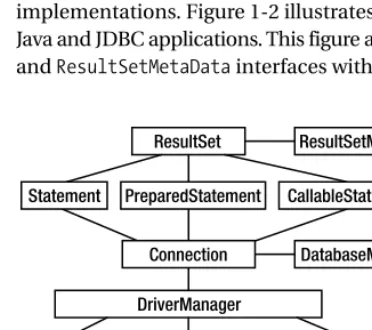
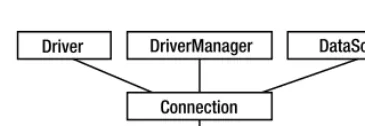
Figure 1-1 presents the basic outline of the JDBC architecture. JDBC’s DriverManagerclass provides the basic service for managing a set of JDBC drivers. The DriverManagerloads JDBC driv-ers in memory, and can also be used to create java.sql.Connectionobjects to data sources (such as Oracle and MySQL). For more details, refer to JDBC Recipes: A Problem-Solution Approach (Apress, 2005) and Sun’s official site on JDBC: http://java.sun.com/products/jdbc/index.jsp.
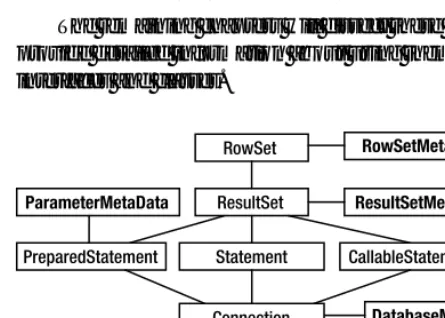
Note that you can have more than one driver and therefore more than one database. Figure 1-2 illustrates how a Java application uses JDBC to interact with one or more relational databases (such as Oracle and MySQL) without knowing about the underlying JDBC driver implementations. Figure 1-2 illustrates the core JDBC classes and interfaces that interact with Java and JDBC applications. This figure also shows the basic relationships of the DatabaseMetaData and ResultSetMetaDatainterfaces with other JDBC objects.
Figure 1-1.Java database application using JDBC
The following are core JDBC classes, interfaces, and exceptions in the java.sqlpackage:
DriverManager: This class loads JDBC drivers in memory. It is a “factory” class and can also be used to create java.sql.Connectionobjects to data sources (such as Oracle, MySQL, etc.).
• Connection: This interface represents a connection with a data source. The Connection object is used for creating Statement, PreparedStatement, and CallableStatementobjects.
• DatabaseMetaData: This interface provides detailed information about the database as a whole. The Connectionobject is used for creating DatabaseMetaDataobjects.
• Statement: This interface represents a static SQL statement. It can be used to retrieve ResultSetobjects.
• PreparedStatement: This interface extends Statementand represents a precompiled SQL statement. It can be used to retrieve ResultSetobjects.
• CallableStatement: This interface represents a database stored procedure. It can exe-cute stored procedures in a database server.
• ResultSet: This interface represents a database result set generated by using SQL’s SELECTstatement. Statement, PreparedStatement, CallableStatement, and other JDBC objects can create ResultSetobjects.
• ResultSetMetaData: This interface provides information about the types and properties of the columns in a ResultSetobject.
• SQLException: This class is an exception class that provides information on a database access error or other errors.
1.2.What Is JDBC Programming?
JDBC programming can be explained in the following simple steps:
• Importing required packages
• Registering the JDBC drivers
• Opening a connection to a database
• Creating a Statement/PreparedStatement/CallableStatementobject
• Executing a SQL query and returning a ResultSetobject
• Processing the ResultSetobject
• Closing the ResultSetand Statementobjects
• Closing the connection
creating a database. For this obvious reason, database creation commands are not portable (this is the main reason why JDBC has stayed away from database creation commands).
Step 1: Import the Required Packages
Before you can use the JDBC driver to get and use a database connection, you must import the following packages: java.sqland javax.sql.
import java.sql.*; import javax.sql.*;
To import classes and interfaces properly, refer to the Java Language Specification (http://java.sun.com/docs/books/jls/).
Step 2: Register the JDBC Drivers
A JDBC driver is a set of database-specific implementations for the interfaces defined by JDBC. These driver classes come into being through a bootstrap process. This is best shown by step-ping through the process of using JDBC to connect to a database,
Let’s use Oracle’s type 4 JDBC driver as an example. First, the main driver class must be loaded into the Java virtual machine (VM):
Class.forName("oracle.jdbc.driver.OracleDriver");
The specified driver (i.e., the oracle.jdbc.driver.OracleDriverclass) must implement the java.sql.Driverinterface. A class initializer (a static code block) within the oracle.jdbc. driver.OracleDriverclass registers the driver with the java.sql.DriverManager.
Now let’s use MySQL’s JDBC driver as an example. First, the main driver class must be loaded into the Java VM:
Class.forName("com.mysql.jdbc.Driver");
The specified driver (i.e., the com.mysql.jdbc.Driverclass) must implement the java.sql.Driverinterface. A class initializer (a static code block) within the
com.mysql.jdbc.Driverclass registers the driver with the java.sql.DriverManager. Note that when loading a JDBC driver, you must make sure that the database-specific driver API (usually a JAR file) is in your CLASSPATH environment variable. Each database vendor has its own specific implementation of the JDBC driver.
Step 3: Opening a Connection to a Database
Next, we need to obtain a connection to the database. To get a connection object to a data-base, you need at least three pieces of information: the database URL, the database username, and the database user’s password.
import java.sql.Connection; import java.sql. DriverManager; É
String dbURL = "jdbc:oracle:thin:@localhost:1521:kitty"; String dbUsername = "scott";
String dbPassword = "tiger";
DriverManagerdetermines which registered driver to use by invoking the
acceptsURL(String url)method of each driver, passing each the JDBC URL. The first driver to return truein response will be used for this connection. In this example, OracleDriver will return true, so DriverManagerthen invokes the connect()method of OracleDriverto obtain an instance of OracleConnection. It is this database-specific connection instance implementing the java.sql.Connectioninterface that is passed back from the
java.sql.DriverManager.getConnection()call.
There is an alternate method for creating a database connection: first get a JDBC driver, then use that driver to get a connection:
import java.sql.Connection; import java.sql. Driver; import java.sql. DriverManager; import java.util.Properties; É
String dbURL = "jdbc:oracle:thin:@localhost:1521:kitty"; String dbUsername = "scott";
String dbPassword = "tiger";
Properties dbProps = new Properties();
String driverName = "oracle.jdbc.driver.OracleDriver";
Driver jdbcDriver = (Driver) Class.forName(driverName).newInstance(); dbProps.put("user", dbUsername);
dbProps.put("password", dbPassword);
Connection conn = jdbcDriver.connect(databaseURL, dbProps);
Step 4: Creating a Statement/PreparedStatement/CallableStatement Object
Once you have a valid java.sql.Connectionobject, you can create statement objects (such asStatement, PreparedStatement, and CallableStatement). The bootstrap process continues when you create a statement:
Connection conn = <get-a-valid-Connection-object>; Statement stmt = conn.createStatement();
In order to do something useful with a database, we create the following table:
create table MyEmployees ( id INT PRIMARY KEY, firstName VARCHAR(20), lastName VARCHAR(20), title VARCHAR(20), salary INT
);
Then we insert two records:
insert into MyEmployees(id, firstName, lastName, title, salary) values(60, 'Bill', 'Russel', 'CTO', 980000);
The connection reference points to an instance of OracleConnection. This database-specific implementation of Connectionreturns a database-specific implementation of Statement, namely OracleStatement.
Step 5: Executing a Query and Returning a ResultSet Object
Invoking the execute()method of this statement object will execute the database-specific code necessary to issue a SQL statement against the Oracle database and retrieve the results (as a table):
String query = "SELECT id, lastName FROM MyEmployees"; ResultSet result = stmt.executeQuery(query);
The result is a table (as a ResultSetobject) returned by executing the SELECTstatement. Again, what is actually returned is an instance of OracleResultSet, which is an Oracle-specific implementation of the java.sql.ResultSetinterface. By iterating the result, we can get all of the selected records.
So the purpose of a JDBC driver is to provide these implementations that hide all the database-specific details behind standard Java interfaces.
Step 6: Processing the ResultSet Object
ResultSet.next()returns a boolean: trueif there is a next row or record and falseif not (mean-ing the end of the data or set has been reached). Conceptually, a pointer or cursor is positioned just before the first row when the ResultSetis obtained. Invoking the next()method moves to the first row, then the second, and so on.
Once positioned at a row, the application can get the data on a column-by-column basis using the appropriate ResultSet.getXXX()method. Here are the methods used in the example to collect the data:
if (rs.next()) {
String firstName = rs.getString(1); String lastName = rs.getString(2); String title = rs.getString(3); int salary = rs.getInt(4); }
or we may use the column names (instead of column positions):
if (rs.next()) {
String firstName = rs.getString("firstName"); String lastName = rs.getString("lastName"); String title = rs.getString("title"); int salary = rs.getInt("salary"); }
Step 7: Closing JDBC Objects
Releasing or closing JDBC resources (such as ResultSet, Statement, PreparedStatement, and Connectionobjects) immediately instead of waiting for it to happen on its own can improve the overall performance of your application. From a good software engineering point of view, you should put close()statements in a finallyclause, because it guarantees that the statements in the finallyclause will be executed as the last step regardless of whether an exception has occurred.
Closing ResultSet
ResultSethas a close()method that releases the ResultSetobject’s database and JDBC resources immediately instead of waiting for that to happen when it is automatically closed. Another major reason to close the ResultSetobjects immediately after they are done is that we increase concurrency; as long as the ResultSetobject is open, the DBMS internally holds a lock.
Here is some sample code for closing a ResultSetobject. It is always a good idea to have utility classes to close these JDBC resources, and the following method can do the job:
/**
* Close the ResultSet object. Releases the * ResultSet object's database and JDBC resources * immediately instead of waiting for them to be * automatically released.
* @param rs a ResultSet object. */
public static void close(java.sql.ResultSet rs) { if (rs == null) {
return; }
try {
rs.close();
// result set is closed now }
catch(Exception ignore) { // ignore the exception
// could not close the result set // cannot do much here
} }
Closing Statement
/**
* Close the Statement object. Releases the Statement * object's database and JDBC resources immediately instead * of waiting for them to be automatically released. * @param stmt a Statement object.
*/
public static void close(java.sql.Statement stmt) { if (stmt == null) {
return; }
try {
stmt.close();
// result set is closed now }
catch(Exception ignore) { // ignore the exception
// could not close the statement // can not do much here
} }
Closing PreparedStatement
PreparedStatementdoes not have a direct close()method, but since PreparedStatement extends Statement, then you may use the Statement.close()method for PreparedStatement objects. It is always a good idea to have utility classes to close these JDBC resources, and the following method can do the job:
/**
* Close the PreparedStatement object. Releases the * PreparedStatement object's database and JDBC * resources immediately instead of waiting for them * to be automatically released.
* @param pstmt a PreparedStatement object. */
public static void close(java.sql.PreparedStatement pstmt) { if (pstmt == null) {
return; }
try {
pstmt.close();
catch(Exception ignore) { // ignore the exception
// could not close the PreparedStatement // can not do much here
} }
Closing Connection
If you are using a connection pool manager to manage a set of database connection objects, then you need to release the Connectionobject to the connection pool manager (this is called a “soft” close). Alternatively, you can use the close()method, which releases the Connection object’s database and JDBC resources immediately instead of waiting for them to be auto-matically released. Here is some sample code for closing a Connectionobject. It is always a good idea to have utility classes to close these JDBC resources, and the following method can do the job:
/**
* Close the Connection object. Releases the Connection * object's database and JDBC resources immediately instead * of waiting for them to be automatically released. * @param conn a Connection object.
*/
public static void close(java.sql.Connection conn) { if (conn == null) {
return; }
try {
if (!conn.isClosed()) {
// close the connection-object conn.close();
}
// connection object is closed now }
catch(Exception ignore) { // ignore the exception
// could not close the connection-object // can not do much here
} }
1.3. How Do You Handle JDBC Errors/Exceptions?
exceptions in the Java language) but not of RunTimeException(RuntimeExceptionis the super-class of those exceptions that can be thrown during the normal operation of the Java VM). Checked exceptions have to be caught (and handled properly) or appear in a method that specifies in its signature that it throws that kind of exception.
When a JDBC object (such as Connection, Statement, or ResultSet) encounters a serious error, it throws a SQLException. For example, an invalid database URL, an invalid database user-name or password, database connection errors, malformed SQL statements, an attempt to access a nonexistent table or view, and insufficient database privileges all throw SQLException objects.
The client (the database application program) accessing a database server needs to be aware of any errors returned from the server. JDBC give access to such information by provid-ing several levels of error conditions:
• SQLException: SQLExceptions are Java exceptions that, if not handled, will terminate the client application. SQLExceptionis an exception that provides information on a database access error or other errors.
• SQLWarning: SQLWarnings are subclasses of SQLException, but they represent nonfatal errors or unexpected conditions, and as such, can be ignored. SQLWarningis an excep-tion that provides informaexcep-tion on database access warnings. Warnings are silently chained to the object whose method caused it to be reported.
• BatchUpdateException: BatchUpdateExceptionis an exception thrown when an error occurs during a batch update operation. In addition to the information provided by SQLException, a BatchUpdateExceptionprovides the update counts for all commands that were executed successfully during the batch update, that is, all commands that were executed before the error occurred. The order of elements in an array of update counts corresponds to the order in which commands were added to the batch.
• DataTruncation: DataTruncationis an exception that reports a DataTruncationwarning (on reads) or throws a DataTruncationexception (on writes) when JDBC unexpectedly truncates a data value.
The SQLExceptionclass extends the java.lang.Exceptionclass and defines an additional method called getNextException(). This allows JDBC classes to chain a series of SQLException objects together. In addition, the SQLExceptionclass defines the getMessage(), getSQLState(), and getErrorCode()methods to provide additional information about an error or exception. In general, a JDBC client application might have a catchblock that looks something like this:
String dbURL = ...; String dbUser = ...; String dbPassword = ...; Connection conn = null; try {
conn = DriverManager.getConnection(dbURL, dbUser, dbPassword); //
// when you are here, it means that an exception has not // happened and you can use the connection object // (i.e., conn) to do something useful with the database ...
catch (SQLException e) {
// something went wrong: maybe dbUser/dbPassword is not defined // maybe te dbURL is malformed, and other possible reasons. // now handle the exception, maybe print the error code // and maybe log the error, ...
while(e != null) {
System.out.println("SQL Exception/Error:");
System.out.println("error message=" + e.getMessage()); System.out.println("SQL State= " + e.getSQLState());
System.out.println("Vendor Error Code= " + e.getErrorCode()); // it is possible to chain the errors and find the most // detailed errors about the exception
e = e.getNextException( ); }
}
catch (Exception e2) {
// handle non-SQL exception É }
To understand transaction management, you need to understand the Connection.setAutoCommit()method. Its signature is
void setAutoCommit(boolean autoCommit) throws SQLException
According to J2SE 1.5, setAutoCommit()sets this connection’s autocommit mode to the given state. If a connection is in autocommit mode, then all its SQL statements will be exe-cuted and committed as individual transactions. Otherwise, its SQL statements are grouped into transactions that are terminated by a call to either the commit()or the rollback()method. By default, new connections are in autocommit mode.
The following example shows how to handle commit()and rollback()when an exception happens:
String dbURL = ...; String dbUser = ...; String dbPassword = ...; Connection conn = null; try {
conn = DriverManager.getConnection(dbURL, dbUser, dbPassword); conn.setAutoCommit(false); // begin transaction
stmt.executeUpdate("CREATE TABLE cats_tricks(" + "name VARCHAR(30), trick VARHAR(30))") ;
stmt.executeUpdate("INSERT INTO cats_tricks(name, trick) " + "VALUES('mono', 'rollover')") ;
conn.commit() ; // commit/end transaction conn.setAutoCommit(true) ;
catch(SQLException e) {
// print some useful error messages
System.out.println("SQL Exception/Error:");
System.out.println("error message=" + e.getMessage()); System.out.println("SQL State= " + e.getSQLState());
System.out.println("Vendor Error Code= " + e.getErrorCode()); // rollback the transaction
// note that this rollback will not undo the creation of // DDL statements (such as CREATE TABLE statement) conn.rollback();
// optionally, you may set the auto commit to "true" conn.setAutoCommit(true) ;
}
In the following example we force the exception to happen: instead of VARCHAR(when creating the cats_trickstable), we type VARZCHAR(the database server will not understand VARZCHARand therefore it will throw an exception):
String dbURL = ...; String dbUser = ...; String dbPassword = ...; Connection conn = null; try {
conn = DriverManager.getConnection(dbURL, dbUser, dbPassword); conn.setAutoCommit(false);
stmt.executeUpdate("CREATE TABLE cats_tricks("+ "name VARZCHAR(30), trick VARHAR(30))") ;
stmt.executeUpdate("INSERT INTO cats_tricks(name, trick) "+ "VALUES('mono', 'rollover')") ;
conn.commit() ;
conn.setAutoCommit(true) ; }
catch(SQLException e) {
// print some useful error messages
System.out.println("SQL Exception/Error:");
System.out.println("error message=" + e.getMessage()); System.out.println("SQL State= " + e.getSQLState());
System.out.println("Vendor Error Code= " + e.getErrorCode()); // rollback the transaction
conn.rollback();
// optionally, you may set the auto commit to "true" conn.setAutoCommit(true) ;
1.4.What Is JDBC Metadata Programming?
JDBC metadata programming is very similar to JDBC programming with one exception: you deal with metadata instead of data. For example, in JDBC programming you are interested in getting employee data and then processing it, but in JDBC metadata programming, you are not interested in getting actual data, but you want to get metadata (data about data, such as the table names in a database).
In JDBC metadata programming, we’re interested in database metadata and result set metadata. For example, for metadata, we want answers to such questions as
• What is the list of tables or views available in the database?
• What are the names and types of the columns in tables or views?
• What is the signature of a specific stored procedure?
In JDBC, several key interfaces comprise the metadata portion:
• DatabaseMetaData: Provides information about the database as a whole.
• ResultSetMetaData: Used to identify the types and properties of the columns in a ResultSetobject.
• RowSetMetaData: An object that contains information about the columns in a RowSet object. This interface is an extension of the ResultSetMetaDatainterface with methods for setting the values in a RowSetMetaDataobject.
• ParameterMetaData: An object that can be used to get information about the types and properties of the parameters in a PreparedStatementobject.
• DriverPropertyInfo: Driverproperties for making a connection. The
DriverPropertyInfoclass is of interest only to advanced programmers who need to interact with a Drivervia the method getDriverProperties()to discover and supply properties for connections.
The remaining chapters will dissect these metadata classes and interfaces and will provide detailed information about using them. Figure 1-3 shows the creation of metadata interfaces and classes.
Database metadata is most often used by tools or developers who write programs that use advanced, nonstandard database features and by programs that dynamically discover data-base objects such as schemas, catalogs, tables, views, and stored procedures.
Some of the DatabaseMetaDatamethods return results in the form of a ResultSetobject. The question is how should we handle ResultSetobjects as return values? Metadata is retrieved from these ResultSetobjects using the normal ResultSet.getXXX()methods, such as getString()and getInt(). To make the metadata useful for any kind of clients, I have mapped these ResultSetobjects into XML.
1.5.What Is an Example of JDBC Metadata Programming?
Suppose you want to get the major and minor JDBC version number for the driver you are using. You can use the following methods from DatabaseMetaData:int getDriverMajorVersion()
// Retrieves this JDBC driverês major version number.
int getDriverMinorVersion()
// Retrieves this JDBC driverês minor version number.
As you can see, these methods do not return the employee or inventory data, but they return metadata.
Our solution combines these into a single method and returns the result as an XML Stringobject, which any client can use. The result has the following syntax:
<?xml version='1.0'> <DatabaseInformation>
<majorVersion>database-major-version</majorVersion> <minorVersion>database-minor-version</minorVersion> <productName>database-product-name</productName>
<productVersion>database-product-version</productVersion> </DatabaseInformation>
The Solution
The solution is generic and can support MySQL, Oracle, and other relational databases. If Connection.getMetaData()returns null, then it means that vendor's driver does not support/ implement thejava.sql.DatabaseMetaDatainterface. Note that the getDatabaseMajorVersion() method (implemented by the oracle.jdbc.OracleDatabaseMetaDataclass) is an unsupported feature; therefore, we have to use a try-catchblock. If the method returns a SQLException, we return the message “unsupported feature” in the XML result:
import java.sql.Connection; import java.sql.DatabaseMetaData; É
/**
* Get database product name and version information. * This method calls 4 methods (getDatabaseMajorVersion(), * getDatabaseMinorVersion(), getDatabaseProductName(),
*
* @param conn the Connection object
* @return database product name and version information * as an XML document (represented as a String object). */
public static String getDatabaseInformation(Connection conn) throws Exception {
DatabaseMetaData meta = conn.getMetaData(); if (meta == null) {
return null; }
StringBuffer sb = new StringBuffer("<?xml version='1.0'>"); sb.append("<DatabaseInformation>");
// Oracle (and some other vendors) do not // support some of the following methods // (such as getDatabaseMajorVersion() and // getDatabaseMajorVersion()); therefore, // we need to use try-catch block. try {
int majorVersion = meta.getDatabaseMajorVersion(); appendXMLTag(sb, "majorVersion", majorVersion); }
catch(Exception e) {
appendXMLTag(sb, "majorVersion", "unsupported feature"); }
try {
int minorVersion = meta.getDatabaseMinorVersion(); appendXMLTag(sb, "minorVersion", minorVersion); }
catch(Exception e) {
appendXMLTag(sb, "minorVersion", "unsupported feature"); }
String productName = meta.getDatabaseProductName(); String productVersion = meta.getDatabaseProductVersion(); appendXMLTag(sb, "productName", productName);
appendXMLTag(sb, "productVersion", productVersion); sb.append("</DatabaseInformation>");
return sb.toString(); }
Client: Program for Getting Database Information
import java.util.*; import java.io.*; import java.sql.*;
import jcb.util.DatabaseUtil;
import jcb.meta.DatabaseMetaDataTool; import jcb.db.VeryBasicConnectionManager;
public class TestDatabaseMetaDataTool_DatabaseInformation {
public static void main(String[] args) {
String dbVendor = args[0]; // { "mysql", "oracle" } Connection conn = null;
try {
conn = VeryBasicConnectionManager.getConnection(dbVendor);
System.out.println("--- getDatabaseformation ---"); System.out.println("conn="+conn);
String dbInfo = DatabaseMetaDataTool.getDatabaseInformation(conn); System.out.println(dbInfo);
System.out.println("---"); }
catch(Exception e){ e.printStackTrace(); System.exit(1); }
finally {
DatabaseUtil.close(conn); }
} }
Running the Solution for a MySQL Database
$ javac TestDatabaseMetaDataTool_DatabaseInformation.java $ java TestDatabaseMetaDataTool_DatabaseInformation mysql
--- getDatabaseformation ---conn=com.mysql.jdbc.Connection@1837697 <?xml version='1.0'>
<DatabaseInformation>
<majorVersion>4</majorVersion> <minorVersion>0</minorVersion> <productName>MySQL</productName>
<productVersion>4.0.4-beta-max-nt</productVersion> </DatabaseInformation>
---Running the Solution for an Oracle Database
The following output is formatted to fit the page:
$ javac TestDatabaseMetaDataTool_DatabaseInformation.java $ java TestDatabaseMetaDataTool_DatabaseInformation oracle
--- getDatabaseInformation ---conn= oracle.jdbc.driver.OracleConnection@169ca65 <?xml version='1.0'>
<DatabaseInformation>
<majorVersion>unsupported feature</majorVersion> <minorVersion>unsupported feature</minorVersion> <productName>Oracle</productName>
<productVersion>
Oracle9i Enterprise Edition Release 9.2.0.1.0 - Production With the Partitioning, OLAP and Oracle Data Mining options JServer Release 9.2.0.1.0 - Production
</productVersion> </DatabaseInformation>
---Database Metadata, Part 1
Example isn’t another way to teach, it is the only way to teach.
Albert Einstein
T
he goal of this chapter (and the next) is to show you how to use JDBC’s database metadata API, which you can use to get information about tables, views, column names, column types, stored procedures, result sets, and databases. It will be of most interest to those who need to write applications that adapt themselves to the specific capabilities of several database systems or to the content of any database. If you write programs—such as graphical user interface (GUI) data-base applications using datadata-base adapters—that use advanced datadata-base features or programs that discover database stored procedures and tables or views at runtime (i.e., dynamically), you will have to use metadata. You can use database metadata to• Discover database schema and catalog information.
• Discover database users, tables, views, and stored procedures.
• Understand and analyze the result sets returned by SQL queries.
• Find out the table, view, or column privileges.
• Determine the signature of a specific stored procedure in the database.
• Identify the primary/foreign keys for a given table.
As you will discover, metadata not only helps you to effectively manage resources, it also helps you find the data you need and determine how best to use it. In addition, metadata pro-vides a structured description of database information resources and services. Some JDBC methods, such as getProcedureColumns()and getProcedures(), return the result as a ResultSet object. Unfortunately, this is not very useful to the client; because the ResultSetobject cannot be passed to some client programs, these programs cannot analyze and understand the content of the ResultSetobject. For this reason, you need to return the results in XML (and possibly an XML object serialized as a Stringobject), which is suitable for all clients. To be efficient, you generate XML expressed as a Stringobject, which can be easily converted to an XML document (using the org.w3c.dom.Documentinterface). The Source Code section of the Apress website pro-vides utilities for converting Strings to org.w3.dom.Documentand org.w3.dom.Documentobjects to Strings.
When you write JDBC applications, you should strive for good performance. But what is “good” performance? Should it be subjective or objective? This depends on the requirements
19
of your application. In other words, if you write “slow” code, the JDBC driver does not throw an exception, but you get a performance hit (which might translate to losing clients). “Good” performance means that you are satisfying your project’s performance requirements, which should be defined precisely in requirements and design documents. To get acceptable per-formance from JDBC drivers, avoid passing nullparameters to most of the methods; for example, passing a nullvalue to the schemaparameter might result in a search of all database schemas— so if you know the name of your desired schema, then pass the actual schema value.
In general, developing performance-oriented JDBC applications is not easy. In every step of the solution, you must make sure that your application will not choke under heavy requirements. For performance reasons, you should avoid excessive metadata calls, because database metadata methods that generate ResultSetobjects are relatively slow. JDBC applications may cache infor-mation returned from result sets that generate database metadata methods so that multiple executions are not needed. For this purpose you may use Java Caching System (JCS) from the Apache Software Foundation. JCS is a distributed caching system written in Java for server-side Java applications; for more information, see http://jakarta.apache.org/turbine/jcs/.
A Java class called DatabaseMetaDataTool(which is defined in the jcb.metapackage) will be available for download from the Source Code section of the Apress website. It provides ready-to-use methods for answering the database metadata questions. For questions about database metadata, I list portions of these classes in some sections of this book, but you’ll find the com-plete class definitions (including JavaDoc-style comments) at the Apress website.
All of the methods in this chapter are static, and each method is written to be as independ-ent as possible. This is so you can cut and paste solutions from this book whenever possible. The methods will return the result as XML (serialized as a Stringobject, which can be easily converted to an XML document such as org.w3c.dom.Documentor org.jdom.Document). Also, I provide a utility class, DocumentManager, which can
• Convert org.w3c.dom.Documentto XML as a serialized Stringobject
• Convert org.jdom.Documentto XML as a serialized Stringobject
• Convert XML as a serialized Stringobject into org.w3c.dom.Document
• Convert XML as a serialized Stringobject into org.jdom.Document
In general, it is efficient to create XML as a serialized Stringobject. The Java and JDBC solutions are grouped in a Java package called jcb(JDBC CookBook). Table 2-1 shows the structure of the package. All of the code will be available from the Source Code section of the Apress website.
Table 2-1.JCB Package Structure
Component Description
jcb Package name for JDBC CookBook
jcb.meta Database and ResultSetmetadata-related interfaces and classes
jcb.db Database-related interfaces and classes
jcb.util Utility classes
servlets Java servlets
When using the DatabaseMetaDataobject, you should observe two key facts:
• The MySQL database does not understand “schema”; you have to use “catalog.”
• The Oracle database does not understand “catalog”; you have to use “schema.”
2.1.What Is Metadata?
Metadata is data about data (or information about information), which provides structured, descriptive information about other data. According to Wikipedia (http://en.wikipedia.org/ wiki/Metadata):
Metadata (Greek: meta-+ Latin: data “information”), literally “data about data”, is infor-mation that describes another set of data. A common example is a library catalog card, which contains data about the contents and location of a book: It is data about the data in the book referred to by the card. Other common contents of metadata include the source or author of the described dataset, how it should be accessed, and its limitations.
The following quote from the NOAA Coastal Services Center, or CSC (http://
www.csc.noaa.gov/metadata/text/whatismet.htm), illustrates the importance of the concept of metadata:
Imagine trying to find a book in a library without the help of a card catalog or comput-erized search interface. Could you do it? Perhaps, but it would be difficult at best. The information contained in such a system is essentially metadata about the books that are housed at that library or at other libraries. It provides you with vital information to help you find a particular book and aids you in making a decision as to whether that book might fit your needs. Metadata serves a similar purpose for geospatial data.
The NOAA CSC further adds that “metadata is a component of data which describes the data. It is ‘data about data.’” Metadata describes the content, quality, condition, and other characteristics of data. Metadata describes the who, what, when, where, why, and how of a data set. Without proper documentation, a data set is incomplete.
KTWEB (http://www.ktweb.org/rgloss.cfm) defines metadata as “data about data, or information about information; in practice, metadata comprises a structured set of descrip-tive elements to describe an information resource or, more generally, any definable entity.”
Relational databases (such as MySQL and Oracle) use tables and other means (such as operating system file systems) to store their own data and metadata. Each relational database has its own proprietary methods for storing metadata. Examples of relational database meta-data include
• A list of all the tables in the database, including their names, sizes, and the number of rows
For example, the Oracle database keeps metadata in several tables (I have listed two here):
• ALL_TABLES: A list of all tables in the current database
• ALL_TAB_COLS: A list of all columns in the database
Imagine, at runtime, trying to execute a SQL query in a relational database without know-ing the name of tables, columns, or views. Could you do it? Of course not. Metadata helps you to find out what is available in the database and then, with the help of that information (called metadata), you can build proper SQL queries at runtime. Also, having access to structured database metadata relieves a JDBC programmer of having to know the characteristics of rela-tional databases in advance.
Metadata describes the data but is not the actual data itself. For example, the records in a card catalog in a local library give brief details about the actual book. The card catalog—as metadata—provides enough information to tell you what the book is called, its unique identi-fication number, and how and where you can find it. These details are metadata—in this case, bibliographic elements such as author, title, abstract, publisher, and published date.
In a nutshell, database metadata enables dynamic database access. Typically, most JDBC programmers know their target database’s schema definitions: the names of tables, views, columns, and their associated types. In this case, the JDBC programmer can use the strongly typed JDBC interfaces. However, there is another important class of database access where an application (or an application builder) dynamically (in other words, at runtime) discovers the database schema information and uses that information to perform appropriate dynamic data access. This chapter describes the JDBC support for dynamic access. A dynamic database access application may include building dynamic queries, dynamic browsers, and GUI data-base adapters, just to mention a few.
For further research on metadata, refer to the following websites:
• “Metadata: An Overview”: http://www.nla.gov.au/nla/staffpaper/cathro3.html
• “Introduction to Metadata”: http://www.getty.edu/research/conducting_research/ standards/intrometadata/index.html
• USGS CMG “Formal Metadata” Definition: http://walrus.wr.usgs.gov/infobank/ programs/html/definition/fmeta.html
2.2.What Is Database Metadata?
The database has emerged as a major business tool across all enterprises, and the concept of
database metadata has become a crucial topic. Metadata, which can be broadly defined as
“data about data,” refers to the searchable definitions used to locate information. On the other hand, database metadata, which can be broadly defined as “data about database data,” refers to the searchable definitions used to locate database metadata (such as a list of all the tables for a specific schema). For example, you may use database metadata to generate web-based appli-cations (see http://dev2dev.bea.com/pub/a/2004/06/GenApps_hussey.html). Or, you may use database metadata to reverse-engineer the whole database and dynamically build your desired SQL queries.
Most of JDBC’s metadata consists of information about one of two things:
• java.sql.DatabaseMetaData(database metadata information)
• java.sql.ResultSetMetaData(metadata information about a ResultSetobject)
You should use DatabaseMetaDatato find information about your database, such as its capabilities and structure, and use ResultSetMetaDatato find information about the results of a SQL query, such as size and types of columns.
JDBC provides the following important interfaces that deal with database and result set metadata:
• java.sql.DatabaseMetaData: Provides comprehensive information about the database as a whole: table names, table indexes, database product name and version, and actions the database supports. Most of the solutions in this chapter are extracted from our solution class DatabaseMetaDataTool(you can download this class from the Source Code section of the Apress website). The DatabaseMetaDatainterface includes a number of methods that can be used to determine which SQL features are supported by a par-ticular database. According to the JDBC specification, “The java.sql.DatabaseMetaData interface provides methods for retrieving various metadata associated with a database. This includes enumerating the stored procedures in the database, the tables in the database, the schemas in the database, the valid table types, the valid catalogs, finding information on the columns in tables, access rights on columns, access rights on tables, minimal row identification, and so on.” Therefore, DatabaseMetaDatamethods can be categorized as
• The schemas, catalogs, tables, views, columns, and column types
• The database, users, drivers, stored procedures, and functions
• The database limits (upper and lower bounds, minimums and maximums)
• The features supported (and those not supported) by the database
• java.sql.ResultSetMetaData: Gets information about the types and properties of the columns in a ResultSetobject. This interface is discussed in Chapter 4.
• java.sql.ParameterMetaData: Gets information about the types and properties of the parameters in a PreparedStatementobject. ParameterMetaData, introduced in JDBC 3.0, retrieves information such as the number of parameters in the PreparedStatement, the type of data that can be assigned to the parameter, and whether or not the parameter value can be set to null. This interface is discussed in Chapter 5.
• javax.sql.RowSetMetaData: Extends the ResultSetMetaData, an object that contains information about the columns in a RowSetobject. This interface is an extension of the ResultSetMetaDatainterface and has methods for setting the values in a RowSetMetaData object. When a RowSetReaderobject reads data into a RowSetobject, it creates a
RowSetMetaDataobject and initializes it using the methods in the RowSetMetaData inter-face. Then the reader passes the RowSetMetaDataobject to the rowset. The methods in this interface are invoked internally when an application calls the method
2.3. How Do You Discover Database Metadata?
To discover metadata information about a database, you must create a DatabaseMetaData object. Note that some database vendors might not implement the DatabaseMetaData inter-face. Once a client program has obtained a valid database connection, the following code can get a database metadata object:
import java.sql.Connection; import java.sql.DatabaseMetaData; import jcb.util.DatabaseUtil; …
Connection conn = null;
DatabaseMetaData dbMetaData = null; try {
// Get a valid database connection conn = getConnection();
// Create a database metadata object as DatabaseMetaData dbMetaData = conn.getMetaData();
if (dbMetaData == null) {
// Database metadata is not supported
// therefore, you cannot get metadata at runtime }
else {
// Then we are in business and can invoke // over 100 methods defined in DatabaseMetaData
// Check to see if transactions are supported if (dbMetaData.supportsTransactions()) {
// Transactions are supported }
else {
// Transactions are not supported }
} }