585-310-670
Comcode 107852345
Issue 1.0
December 1996
plete and accurate at the time of printing. However, information is subject to change.
Your Responsibility for Your System’s Security
Toll fraud is the unauthorized use of your telecommunications system by an unauthorized party, for example, persons other than your company’s employees, agents, subcontractors, or persons working on your company’s behalf. Note that there may be a risk of toll fraud associated with your tele-communications system and, if toll fraud occurs, it can result in substantial additional charges for your telecommunications services.
You and your system manager are responsible for the security of your sys-tem, such as programming and configuring your equipment to prevent unau-thorized use. The system manager is also responsible for reading all installation, instruction, and system administration documents provided with this product in order to fully understand the features that can introduce risk of toll fraud and the steps that can be taken to reduce that risk. Lucent Tech-nologies does not warrant that this product is immune from or will prevent unauthorized use of common-carrier telecommunication services or facili-ties accessed through or connected to it. Lucent Technologies will not be responsible for any charges that result from such unauthorized use. Lucent Corporate Security
Whether or not immediate support is required, all toll fraud incidents involv-ing Lucent products or services shoud be reported to Lucent Corporate Secu-rity at 1 800 821-8235. In addition to recording the incident, Lucent Corporate Security is available for consultation on security issues, investiga-tion support, referral to law enforcement agencies, and educainvestiga-tional pro-grams.
Lucent Technologies Fraud Intervention
If you suspect that you are being victimized by toll fraud and you need tech-nical support or assistance, call Techtech-nical Service Center Toll Fraud Inter-vention Hotline at 1 800 643-2353.
Federal Communications Commission Statement
Part 15: Class B Statement. This equipment has been tested and found to comply with the limits for a Class B digital device, pursuant to Part 15 of the FCC Rules. These limits are designed to provide reasonable protection against harmful interference in a residential installation. This equipment generates, uses, and can radiate radio-frequency energy and, if not installed and used in accordance with the instructions, may cause harmful ence to radio communications. However, there is no guarantee that interfer-ence will not occur in a particular installation. If this equipment does cause harmful interference to radio or television reception, which can be deter-mined by turning the equipment off and on, the user is encouraged to try to correct the interference by one or more of the following measures:
• Reorient the receiving television or radio antenna where this may be done safely.
• To the extent possible, relocate the receiver with respect to the tele-phone equipment.
• Where the telephone equipment requires AC power, plug the tele-phone into a different AC outlet so that the teletele-phone equipment and receiver are on different branch circuits.
Part 15: Personal Computer Statement. This equipment has been certified to comply with the limits for a Class B computing device, pursuant to Sub-part J of Part 15 of FCC Rules. Only peripherals (computing input/output devices, terminals, printers, etc.) certified to comply with the Class B limits may be attached to this computer. Operation with noncertified peripherals is likely to result in interference to radio and television reception.
Part 68: Network Registration Number. This equipment is registered with the FCC in accordance with Part 68 of the FCC Rules. It is identified by an FCC registration number.
Part 68: Answer-Supervision Signaling. Allowing this equipment to be operated in a manner that does not provide proper answer-supervision sig-naling is in violation of Part 68 Rules. This equipment returns answer-super-vision signals to the public switched network when:
• Answered by the called station
• A call is unanswered • A busy tone is received • A reorder tone is received
Canadian Department of Communications (DOC) Interference Information
This digital apparatus does not exceed the Class A limits for radio noise emissions set out in the radio interference regulations of the Canadian Department of Communications.
Le Présent Appareil Nomérique n’émet pas de bruits radioélectriques dépas-sant les limites applicables aux appareils numériques de la class A préscrites dans le reglement sur le brouillage radioélectrique édicté par le ministére des Communications du Canada.
Trademarks
See the section titled “About This Book.” Ordering Information
Call: Lucent Technologies Publications Center
Voice 1 800 457-1235 International Voice 317 361-5353 Fax 1 800 457-1764 International Fax 317 361-5355 Write: Lucent Technologies Publications Center
P.O. Box 4100 Crawfordsville, IN 47933 Order: Document No. 585-310-670
Comcode 107852345 Issue 1.0, December 1996
You can be placed on a standing order list for this and other documents you may need. Standing order will enable you to automatically receive updated versions of individual documents or document sets, billed to account infor-mation that you provide. For more inforinfor-mation on standing orders, or to be put on a list to receive future issues of this document, contact the Lucent Technologies Publications Center.
Warranty
Lucent Technologies provides a limited warranty on this product. Refer to the “Limited Use Software License Agreement” card provided with your package.
European Union Declaration of Conformity
Lucent Technologies Business Communications Systems declares that the equipment specified in this document conforms to the referenced European Union (EU) Directives and Harmonized Standards listed below:
EMC Directive 89/336/EEC Low-Voltage Directive 73/23/EEC
The “CE” mark affixed to the equipment means that it conforms to the above directives.
Comments
To comment on this document, return the comment card at the back of the document.
Acknowledgment
Contents
Contents iii
About This Book ix
■ Purpose ix
■ Intended Audiences ix
■ Release History ix
■ Trademarks x
■ How to Use This Book xi
To Locate Specific Topics xi
■ Conventions Used in This Book xi
Key Presses xi
Screen Displays xi
Typography xii
Safety and Security Alert Labels xii
■ Related Resources xiii
Documentation xiii
Training xiv
■ How to Comment on This Book xiv
■ Disclaimer xv
1
Introduction to Voice ResponseApplication Design 1-1
■ Overview 1-1
■ Purpose 1-1
■ What is a Voice Response System? 1-2 What is a Voice Response Application? 1-2 Voice Response System Versus An Attendant 1-4 ■ Defining Successful Voice Response Applications 1-4 Defining Measurable Objectives 1-4
■ Important Terminology 1-5
2
Voice Response Advanced Technologies 2-1■ Overview 2-1
■ Purpose 2-1
■ Touch-Tone and Dial Pulse Recognition 2-2
Dial Pulse Recognition 2-3
■ Speech Recognition 2-4
WholeWord Speech Recognition 2-4
FlexWord Speech Recognition 2-6
Speech Recognition Accuracy Measurement 2-10
■ Text-to-Speech 2-11
Text-to-Speech Uses 2-11
Text-to-Speech Capabilities 2-11
Text-to-Speech Accuracy 2-12
■ Script Builder FAX Actions 2-13
FAX Actions Uses 2-13
FAX Actions Capabilities 2-13
3
Planning a Voice Response Application 3-1■ Overview 3-1
■ Purpose 3-1
■ Plan Your Application Design 3-2
Use Human Factors/Usability Engineering
Resources 3-2
Use Prerecorded Speech 3-2
Offer a User Guide 3-4
Offer Caller Training 3-4
Provide an Attendant 3-4
Diagram Your Application Design 3-5
4
Designing a Voice Response Application 4-1■ Overview 4-1
■ Purpose 4-1
■ Application Design Research 4-2
Know Your Callers 4-2
Use Simple and Natural Dialogue 4-3 Minimize Demands on the Caller’s Memory 4-3
Be Consistent 4-3
Provide Feedback 4-4
Provide Easy Exits 4-4
Offer Shortcuts 4-4
■ Prompts 4-5
Prompt Length 4-5
How to Word Prompts 4-6
■ Announcements 4-7
Feedback Announcements 4-7
Confirmation Announcements 4-7
■ Menus 4-11
Number of Menu Choices 4-11
Menu Choice Sequence 4-11
Numbered Menu Options 4-12
Subdivided Menu Options 4-12
■ Digit Input 4-13
Constant-Length Digit Sequences 4-13 Variable-Length Digit Sequences 4-13
Entering Digit Sequences 4-14
Validate a Digit Sequence Entry 4-16 Confirming Digit Entries with Callers 4-17
■ Yes/No Questions 4-18
Touch-Tone Input for Yes/No Questions 4-18 Spoken Input for Yes/No Questions 4-18 Yes/No Questions with Barge-in
(WholeWord Speech Recognition) 4-19 Yes/No Question Without Barge-in 4-20
■ Pace the Application 4-21
When Callers Must Wait 4-21
Allow Time for Caller Responses 4-21
Adjustable Pacing 4-22
■ Application Errors 4-23
When Caller Errors Occur 4-23
When Speech Recognition Errors Occur 4-23
How to Word Error Messages 4-24
■ Touch-Tone and Speech Recognition 4-25 Recognizer Differences Between Touch-Tone
Input and Spoken Input 4-25
Application Differences Between Touch-Tone
Touch-Tone Input Used with Spoken Input 4-27 Use Touch-Tone Input When Speech
Recognition Fails 4-32
Modify a Touch-Tone-Only
Application to Include Spoken Input 4-32
■ Dial Through and Barge-in 4-34
Using Dial Through and Barge-in with
Errors Messages 4-34
Using Dial Through/Barge-in Consistently 4-34 How to Word Prompts for Dial Through
and Barge-in 4-34
■ Dial Pulse Recognition in Applications 4-36 Dial Pulse Recognition Training 4-36 Dial Pulse Recognition Digit Input 4-36 Dial Pulse Recognition and Barge-in 4-36 ■ FlexWord Speech Recognition in Applications 4-37
How to Choose Words for Your FlexWord
Vocabulary 4-37
How to Segment Large Wordlists 4-39 How to Word Prompts for FlexWord
Speech Recognition 4-39
■ Bilingual, Multilingual, and Non-US
English Applications 4-40
Bilingual Applications 4-40
Multilingual Applications 4-45
■ Text-to-Speech in Applications 4-45 Use Text-to-Speech for Prompts
and Announcements 4-45
Use Both Text-to-Speech and Prerecorded Speech Prompts
and Announcements 4-46
How to Get the Most Out of Text-to-Speech 4-47 How to Test Text-to-Speech Applications 4-50 ■ Script Builder FAX Actions in Applications 4-51 Informing Callers of Available Information 4-51
Managing Delays 4-51
5
Testing and Using a Voice ResponseApplication Design 5-1
■ Overview 5-1
■ Purpose 5-1
■ Testing the Application 5-2
Plan a Preliminary Application Design 5-2
Set Usability Goals 5-2
Test the Preliminary Application 5-2 Refine the Preliminary Application
Based on Usability Goals 5-6
Test the Application Again 5-6
Continue Testing Until the Usability Goals
are Accomplished 5-7
Use the Tested and Refined Application
in Service 5-7
About This Book
Purpose
This book, INTUITY™ CONVERSANT® System Version 6.0 Application Design Guidelines, 585-310-670, is an introduction to voice response technology, including advanced-technology features of the INTUITY™ CONVERSANT® system, application design principles, and important design guidelines.
Intended Audiences
The primary audiences for this document include:
■ Application developers
■ Readers interested in voice response technology
■ Reader interested in application design principles
Release History
Trademarks
Lucent Technologies has made every effort to supply trademark information about company names, products, and services mentioned in the INTUITY
CONVERSANT documentation library. Trademarks indicated below were derived from various sources.
■ 5ESS, AUDIX, CONVERSANT, DEFINITY, and Voice Power are registered
trademarks and INTUITY and FlexWord are trademarks of Lucent Technologies.
■ 3M is a trademark of Minnesota Mining and Manufacturing.
■ Phillips is a registered trademark of the Phillips Screw Co.
■ Microsoft, MS, MS-DOS, Internet Explorer, and Excel are registered
trademarks and Windows is a trademark of Microsoft Corporation.
■ Truevoice is a registered trademark of AT&T.
■ UnixWare is a registered trademark of The Santa Cruz Operation, Inc.
■ UNIX is a registered trademark of UNIX System Laboratories, Inc.
■ Novell is a registered trademark of Novell, Inc.
■ ORACLE, ORACLE*Terminal, OBJECT*SQL, SQL*FORMS, SQL*Menu,
SQL*Net, SQL*Plus, PRO*C, and SQL*ReportWriter are trademarks of the Oracle Corporation.
■ IBM and VTAM are registered trademarks of International Business
Machines Corporation.
■ CLEO and LINKix are trademarks of CLEO Communications.
■ Hayes and Smartmodem are trademarks of Hayes Microcomputer
Products, Inc.
■ Ethernet is a trademark of Xerox Corporation.
■ VERITAS is a trademark of the Veritas Software Corporation.
■ Netscape Navigator is a trademark of Netscape Communications
How to Use This Book
This book is designed as a discussion of voice response technology, and the best methods to use to design applications for the INTUITY CONVERSANT system. This book contains useful guidelines and suggestions, but does not contain specific procedures to follow to develop applications. For information application development, see the section titled, “Related Resources,” in this chapter.
To Locate Specific Topics
This book includes an alphabetical index at the end for quick access to specific topics.
Conventions Used in This Book
This section describes the conventions used in this book.
Key Presses
Keys that you press on your telephone keypad are represented as square boxes. For example, an instruction to press the first key on your telephone keypad is shown as
Press to record a message.
Screen Displays
■ Values, system messages, field names, and prompts that appear on the
screen are shown in typewriter-style constant width as shown in the following examples:
Example 1:
The grammars provided can be seen in the Choices menu for the Recognition Type field on the Prompt & Collect screen).
Example 2:
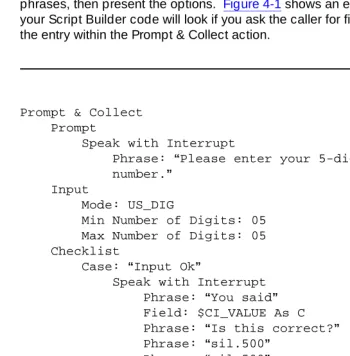
Prompt & Collect Prompt
Speak with Interrupt
Phrase: “Please enter your 5-digit customer number.”
Typography
■ Commands and text you type in or enter appear in bold type, as in the
following examples:
Example 1:
Enter change-switch-time-zone at the enter command: prompt.
Example 2:
Type high or low in the Speed: field.
Safety and Security Alert Labels
This book uses the following symbols to call your attention to potential problems that could cause personal injury, damage to equipment, loss of data, or service interruptions:
!
CAUTION:
Indicates the presence of a hazard that if not avoided can or will cause minor personal injury or property damage, including loss of data.
!
WARNING:
Indicates the presence of a hazard that if not avoided can cause death or severe personal injury.
!
DANGER:
Related Resources
This section describes additional documentation and training available for you to learn more about the INTUITY CONVERSANT product.
Documentation
NOTE:
The INTUITY™ CONVERSANT® System Version 6.0 System Description, 585-310-241, contains a detailed description of all books included in V6.0 INTUITY CONVERSANT documentation library.
Always refer to the appropriate book for specific information on installing, administering, or maintaining an INTUITY CONVERSANT system.
Application Development Documentation
To develop an application for your INTUITY CONVERSANT system, use the following documentation:
■ INTUITY™CONVERSANT® System Version 6.0 Application Development
with Script Builder, 585-310-760
■ INTUITY™ CONVERSANT® System Version 6.0 Application Development
with Advanced Methods, 585-310-761
■ INTUITY™ CONVERSANT® System Version 6.0 Speech Development,
Processing, and Recognition, 585-310-762
■ INTUITY™ CONVERSANT® System Version 6.0 Communication
Development, 585-310-763
■ INTUITY™ CONVERSANT® System Version 6.0 Application Development
with Graphical Designer, 585-310-764
Additional Suggested Documentation
It is suggested that you also obtain and use the following book for information on security and toll fraud issues:
■ BCS Products Security Handbook, 555-025-600
Training
The following training classes are recommended for Script Builder applications on a V6.0 INTUITY CONVERSANT system:
■ Course No. BC3612A, Introduction to Script Builder (for domestic
applications)
■ Course No. GC3604A, Introduction to Script Builder (for international
applications)
■ Course No. BC3625A, Advanced Script Builder (for domestic
applications)
■ Course No. GC3605A, Advanced Script Builder (for international
applications)
For more information on INTUITY CONVERSANT training, call the BCS Education
and Training Center at one of the following numbers:
■ Organizations within Lucent Technologies: (904) 636-3261
■ Lucent Technologies customers and all others: (800) 255-8988
How to Comment on This Book
We are interested in your suggestions for improving this book. Please complete and return the reader comment card that is located behind the title page.
If the reader comment card has been removed, send your comments to:
Lucent Technologies Product Documentation Room 22-2H15
11900 North Pecos Street Denver, Colorado 80234
You may also fax your comments to the attention of the Lucent Technologies INTUITY CONVERSANT documentation team at (303) 538-1741.
Please mention the name and order number of this book, INTUITY™
Disclaimer
Intellectual property (including trademarks) related to this product and registered to AT&T Corporation has been transferred to Lucent Technologies Incorporated.
Any reference within this text to American Telephone and Telegraph Corporation or AT&T should be interpreted as references to Lucent Technologies
Incorporated. The exception is cross references to books published prior to December 31, 1996, which retain their original AT&T titles.
1
1
Introduction to Voice Response
Application Design
Overview
This chapter provides an introduction to the concept of voice response.
Purpose
What is a Voice Response System?
A voice response system consists of hardware and software that provides either full or partial automation of telephone transactions that would otherwise be performed by an operator/attendant, an employee, or a call center agent. The INTUITY™ CONVERSANT® system not only provides the basic voice response technology to automate telephone transactions, but also provides the
mechanism needed to develop the software that guides such transactions. This software is known as an application.
What is a Voice Response Application?
An application is a set of instructions written for the voice response system that informs it how to carry out the automated transaction. Applications define the call flow and determine what callers hear and how callers respond to the system.
Voice Response Application Uses
Voice response applications can be used in a wide variety of situations. The following examples can help you determine some possibilities for the best use of voice response applications for your business.
Voice Response for Repetitive Information Requests
Repetitive information requests that can be fulfilled with a voice response application include:
■ Interest rates, foreign currency exchange rates, and loan rates
■ Real estate information on a property with a specific identifier such as a
number
■ Customer service information such as updates on product maintenance
issues and their resolutions
■ Status of automobile repairs being performed and their estimated costs
■ Registration forms, entry blanks, or tax forms
■ Conference/tradeshow information such as list of speakers and schedules
■ Air travel information such as departure/arrival times
■ Financial statements company shareholders
Voice Response for Database Information Requests
A voice response system can be connected to a system containing enterprise specific information to access or store information in the host. Enterprise specific information includes: published materials, bank accounts, and product
descriptions. Database information requests include:
■ Bank or investment accounts
■ Magazine articles
■ News wire stories
■ Public records such as deeds or licences
■ Telephone directory listings
■ Government records
■ Catalog item descriptions
Voice Response for Order Processing
You can design a voice response application to accept either touch-tone input, spoken input, or both, so that callers can use the system to place orders, confirm orders, or check order status. Ordering processing includes:
■ Merchandise orders, restocking — A manufacturer calls a supplier to
request spare parts. A confirmation of the order can be faxed to the manufacturer.
■ Hotel reservations — Callers can register and pay by telephone, then
receive a confirmation fax including a map and directions.
■ Travel reservations — Callers can reserve a seat and pay over the
telephone. Confirmation can be sent by fax.
■ Benefits registration — Callers sign up for a combination of benefits, and
can request confirmation by fax.
■ Brokerage services — Callers can buy and sell stocks and bonds,
receiving a fax confirmation of the transaction.
■ Talent agency — Callers can request information on actors with particular
talents or physical attributes. Information can be spoken out, and photographs and resumes can be faxed to the caller.
Voice Response for Information Gathering
A voice response system can be used to gather information from those who call a designated number. Information gathering includes:
■ Consumer or political surveys
■ Customer feedback/complaints
Voice Response System Versus An Attendant
Do not eliminate all attendants. Even a well-designed automated transactions cannot serve every caller’s need. Some callers will have problems that cannot be handled by the voice response system. Callers may want and need to speak to a person, so it is important to provide some attendants that are familiar with your business policies and procedures.
Defining Successful Voice Response
Applications
Consider multiple criteria when defining success in your voice response applications. You may have to measure some aspects of how your currently do business, and decide on one or more specific areas to target for improvement. Think about why you are interested in automating some of your business
interactions. To save time? To save money? To better serve your customers? To free personnel for more challenging tasks? Take your most important reasons for automation, and determine measurable objectives for automation.
Defining Measurable Objectives
For example, if you want to use voice response to better serve your customers, you might choose as an objective to reduce call holding times. A measurable objective might be to reduce call holding times by 50%. You can also figure out the yearly savings expected from reduced holding times, and factor this into your plan.
Here are some examples of other types of measurable objectives that you may want to achieve through the design of your application:
■ Reduce your cost per call by 30%.
■ Increase call completion rate by 45%.
■ Reduce the percentage of callers who get a busy signal by 50%.
■ Increase customer satisfaction with the voice response system by 25%.
Remember to estimate the rate of savings for each objective.
Important Terminology
It is a good idea to become familiar with the some of the terms and concepts presented in the rest of this book. The list below is provided to help facilitate your familiarization.
announcement Speech played by the system to the caller that informs, but does not instruct the caller to act. Compare to prompt.
application The computer program that defines and controls the voice response transaction between the system and the caller.
barge-In The capability that allows callers to respond while a prompt is being played. This is similar to dial through for touch tones.
caller The person who calls for a service, gets connected to the system, and interacts with an application.
connected-digit A sequence of digits spoken by a caller without intentional or regular pauses in between digits.
dial ahead The touch-tone recognition capability that allows the system to collect touch tones as they are entered by callers, even before they are asked for. The touch-tone input is then used in the order in which they were received. This allows callers to respond to more than one prompt at a time, without having to listen to the intermediate prompts.
dial through The touch-tone capability that allows callers to respond while a prompt is being played. The playback of speech ceases and the application responds to the key that was pressed. This is similar to barge-in for WholeWord speech recognition. Also known as talk off.
fax The capability that allows an application to send stored or dynamically created fax messages at the caller’s request, or receive incoming faxes from the caller.
FlexWordspeech recognition
The optional system capability that recognizes callers spoken input based on matching caller speech to word models fashioned from representations of sub-words (phonemes), the smallest unit of speech.
FlexWordToolkit An optional software package that provides a
grammar The set of rules by which speech is recognized by
WholeWord speech recognition. For example, a Prompt & Collect statement using the US_1_5 grammar will
recognize the words “one,” “two,” “three,” “four,” and “five” in US English.
Graphical Speech Editor
An optional software package provides a point-and-click, graphical mechanism for you to record and edit prompts and announcements for use in your applications.
key word One of the words in a list of words that the system is instructed to recognize at a particular point in the transaction.
menu A prompt that gives callers a choice of two or more options. For example, “For sales, press or say 1. For service, press or say 2. For an attendant, press or say 0.”
phrase screening The speech recognition capability that decides whether or not a candidate key word is a close enough match to be declared a valid key word.
Prompt & Collect action
The action used to play a prompt to the caller, accept the caller’s response, and go to the appropriate place in the application to process the caller’s request.
prompt Speech played by the system that instructs the caller to enter information that is part of a Prompt & Collect action. Compare to Announcement.
recognition The process within the system that compares caller speech to internal models and returns a match to the application.
recognition type The choices that are associated with the Recognition Type field in the Prompt & Collect action form found in the Script Builder program. The values for recognition type, minimum number of digits, and maximum of digits work in
conjunction to allow the system to select a grammar to be used for that recognition event. See also grammar.
Script Builder An optional software package that allows you to define and generate voice response applications to run on the INTUITY CONVERSANT system.
speech, custom The part of the system speech database that includes application-dependent, prerecorded speech phrases.
speech, enhanced basic
The part of the system speech database that includes prerecorded speech phrases corresponding to numbers, ordinal numbers, days of the week, and months of the year. Applications use these phrases to speak numbers,
amounts, dates, and times in a natural-sounding way.
substitution error An error made by the FlexWord speech recognition software where it mistakes one word for another.
talk off See dial through.
Text-to-Speech An optional software package that converts ASCII text into spoken, computer-generated prompts and
announcements. This package is supported for the US English language only.
touch-tone The signal sent when a caller presses any of the 12 keys on a push-button telephone that sends dual tones rather than rotary pulses.
transaction The exchange of information between the caller and an application. In a typical transaction, the caller dials in to or gets transferred to the system, then the system answers and plays a greeting. The caller enters information in response to spoken prompts and the system speaks information back until the interaction is complete. See also
application.
usability The system quality that reflects whether or not callers can learn and use the features successfully. A system with high usability is called easy to use, or usable.
user Interface The aspect of the application with which callers interact; includes prompts and announcements from the system to which callers respond using touch-tone or speech.
vocabulary The set of wordlists associated with a particular FlexWord application.
WholeWord speech recognition
The optional system capability that recognizes the
language-specific words (and common synonyms) for the digits 0 through 9. Recognition is based on matching caller speech to word models fashioned from many samples of people saying each entire, whole word.
word A FlexWord speech recognition vocabulary item consisting of either a single word or a phrase of several words.
word spotting The speech recognition capability that allows the system to pick out key words from a stream of caller speech, which may include extraneous speech, background noise, or caller noises. Works in conjunction with phrase screening.
2
2
Voice Response Advanced
Technologies
Overview
This chapter provides an introduction to the INTUITY™ CONVERSANT® system advanced technologies including touch-tone and dial pulse recognition, speech recognition, Text-to-Speech, and the Script Builder FAX Actions.
Purpose
Touch-Tone and Dial Pulse
Recognition
The INTUITY CONVERSANT system provides touch-tone recognition and dial pulse recognition as two methods for callers to provide non-spoken input to the system.
Touch-Tone Recognition
Touch-tone recognition is a common feature of voice response applications. The majority of the telephones in the United States are equipped with touch-tone service, but touch-tone telephone availability will be different based on locations. A greater proportion of business locations have touch-tone capabilities than do residences. If your callers have touch-tone telephones, it is economical and efficient to allow touch-tone caller input for most transactions.
Touch-Tone Recognition Uses
Touch-tone input may be used to select choices from a spoken menu. It may also be used to enter numerical data such as credit card numbers or personal identification numbers.
Touch-Tone Recognition Capabilities
Touch-tone recognition recognizes the digits 0 through 9, as well as the asterisk (*) and pound sign (#).
With touch-tone recognition, callers have the option to respond with a tone while a prompt is playing. This capability is known as dial through (may also be referred to talkoff). As soon as the system detects the tone, the prompt stops.
The system also supports dial ahead. This capability allows the system to collect touch-tone input as it is entered by callers, even before they are prompted for it. The touch-tone input is then used in the order in which it was received. This allows callers to respond to more than one prompt at a time, without having to listen to the intermediate prompts. If experienced callers are familiar with the upcoming prompts, they do not have to wait until the next prompt starts playing before pressing the required touch-tone buttons.
Tone-touch recognition can be used in conjunction with other recognition methods, such as the Dial Pulse Recognition (DPR) software package, as well as the two spoken-input recognition software packages (WholeWord and
Touch-Tone Recognition Accuracy
The INTUITY CONVERSANT system is very accurate when recognizing touch-tone input. However, callers may make mistakes when entering touch-tones, and a well designed application must handle caller errors gracefully.
Dial Pulse Recognition
If touch-tone service is not widely available in your area or country of interest, you can offer dial pulse recognition to provide non-spoken input to the system.
Dial Pulse Recognition Uses
The DPR software allows callers with rotary telephones, or push-button
telephones that generate dial pulses, to interact with system applications. Much like tone-touch input, dial pulse input may used to enter menu choices and numerical data such as a bank account number.
Dial Pulse Recognition Capabilities
The DPR software recognizes the digits 0 through 9, but does not recognize the asterisk (*) or pound sign (#).
DPR can be used together in an application with touch-tone recognition and with speech recognition (WholeWord or FlexWord).
Dial ahead and dial through are not supported for DPR.
Dial Pulse Recognition Accuracy
Speech Recognition
It makes good business sense to provide the capabilities offered by the speech recognition software. Speech recognition allows your callers to:
■ Speak their responses; a more natural interface for caller input.
■ Provide input if they do not have touch-tone service.
■ Provide input for some types of information, like names, that do not have a
natural translation to touch-tone input.
WholeWord Speech Recognition
The WholeWord Speech Recognition software package is used to recognize spoken input of connected digits and yes/no responses.
WholeWord Speech Recognition Uses
WholeWord speech recognition is most successful when it is used to augment a touch-tone application to process callers who do not have touch-tone
telephones.
The best applications first ask callers to indicate whether they have a touch-tone telephone (usually by pressing one on the keypad). If no tone is detected, the application prompts callers to respond with spoken input (instead of transferring the call to an attendant). In this manner, callers who want to provide spoken input can be served by the system, instead of requiring an attendant.
If your application requires input that can easily be mapped to touch-tone signals, do not ignore touch-tone input in favor of speech recognition. For longer digit sequences, touch-tone input is more accurate.
WholeWord and FlexWord speech recognition can be used in the same
application for increased flexibility. When developing your application, you can specify a Prompt & Collect action to use either WholeWord or FlexWord speech recognition, depending on what you want the caller to say. For example, you can first prompt “Please say your account number.” After the selection, the next prompt is “Choose from the following transactions. Say ‘account balance,’ or say ‘transfer,’ or say ‘attendant’ to speak to a service representative.”
WholeWord Speech Recognition Capabilities
This section describes the different WholeWord speech recognition capabilities.
WholeWord Speech Recognition Languages
The WholeWord Speech Recognition software is used to recognize words in the following languages:
■ Australian English
■ Brazilian Portuguese
■ Canadian French
■ Castilian Spanish
■ Dutch
■ French
■ German
■ Japanese
■ Latin-American Spanish
■ UK English
■ US English
Each language can recognize:
■ Equivalents for “yes” and “no”
■ Single digits (zero through nine) and commonly used synonyms
■ A series of digits (also known as connected digits)
Bilingual Applications
Any two of the languages listed above can be used together on a single system to support bilingual applications.
WholeWord Speech Recognition and Key Word Spotting
WholeWord speech recognition also supports key word spotting. A key word is one of the words in a list of words that the system is instructed to recognize at a particular point in the transaction. Key word spotting is the ability of the
recognizer to isolate a key word from a stream of caller input, including
extraneous speech, background noise, or caller noises. For this reason, callers do not have to say the key word in isolation. For example, if the recognizer is listening for callers to say “yes” or “no,” it can also recognize “yes” if callers say “Yes, I do.” However, the recognizer finds a key word most accurately when it is said alone, without any other words or other noises before or after it.
WholeWord Speech Recognition and Barge-in
WholeWord speech recognition supports barge-in. Experienced callers do not have to wait until the end of a prompt to begin speaking their responses. As soon as the system recognizes something the caller says, the prompt stops playing. This allows a single application to support both inexperienced and experienced callers.
WholeWord Speech Recognition Accuracy
Decide carefully where to allow spoken input. Spoken input is not the most appropriate input for all applications. Touch-tone input may be faster and more accurate if your callers are often speaking from a noisy environment such as a car or an airport. Some callers may have security concerns about speaking private information (like an account number) aloud if they use your service from outside their homes. If callers must enter a long series of digits or several data items, touch-tone input may achieve better accuracy than WholeWord speech recognition.
FlexWord Speech Recognition
Another way for the system to process spoken input is with the FlexWord Speech Recognition software package. FlexWord speech recognition is used to
recognize spoken words from a specific set of words, a vocabulary, that you, the application designer, define. Allowing callers to say the option they want instead of saying a number assigned to the option can make the interaction more natural and easier to use.
FlexWord Speech Recognition Uses
FlexWord speech recognition and WholeWord speech recognition can be used together for greater flexibility in your applications. You can define a Prompt & Collect action to use WholeWord speech recognition If you want callers to say “yes” or “no,” a series of digits, or single digits. If you want callers to say a word or phrase from your vocabulary, you would define the Prompt & Collect to use FlexWord speech recognition and specify the wordlist.
FlexWord Speech Recognition Capabilities
This section describes the FlexWord speech recognition unique capabilities.
FlexWord Speech Recognition Languages
The FlexWord Speech Recognition software is used to recognize spoken input for the following languages:
■ French
■ German
■ Japanese
■ Spanish
■ US English
Only one FlexWord speech recognition language can be installed on your system at a time.
FlexWord Speech Recognition Vocabularies
As mentioned before, FlexWord speech recognition uses a custom, tailored vocabulary that is specific to each application.
FlexWord speech recognition vocabulary items can be single words or phrases. Each item in a vocabulary is known as a word, even if the item is a phrase of several words. For example, in a FlexWord speech recognition vocabulary, “checking” and “mutual fund” are both considered words, even though “mutual fund” is a phrase.
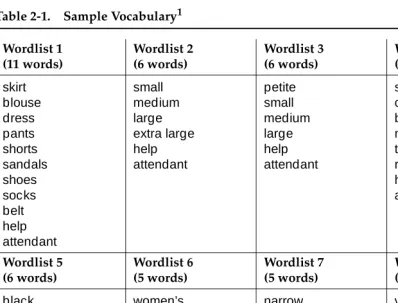
The words in a vocabulary must be divided into groups called wordlists. A wordlist includes all the words that can be spoken at a particular prompt. See Table 2-1 for an example of how words are grouped into wordlists to form a complete vocabulary.
There are two ways to create your vocabularies:
■ Use the FlexWord Toolkit software.
The FlexWord Toolkit software allows you to build your own vocabularies quickly and easily. This optional software package gives you a
point-and-click, graphical environment in which to add, delete, or change words on new or existing wordlists. You can then use these wordlists in your application as soon as you create them.
■ Use Lucent Technologies custom vocabulary service.
The custom vocabulary service is also an available option to build your vocabularies, for a fee.
Consider the size of your vocabularies and how many FlexWord applications you plan to have when deciding to purchase the FlexWord Toolkit or use the custom vocabulary service.
1. This sample vocabulary consists of 53 words divided into 8 wordlists.
FlexWord Speech Recognition and Key Word Spotting
FlexWord speech recognition supports key word spotting. As explained above in “WholeWord Speech Recognition and Key Word Spotting,” key word spotting is the ability of the recognizer to isolate a key word out of a sequence of other words or noises. As with WholeWord key word spotting, the caller does not have to say the key word by itself to be recognized. For example, if the caller says “I want my checking account,” the recognizer can isolate the key word “checking.” Remember, though, that the recognizer finds a key word most accurately when the word is said all by itself.
FlexWord Speech Recognition and Barge-in
Unlike WholeWord speech recognition, FlexWord speech recognition does not support barge-in. Callers must wait until the end of a prompt to begin speaking their response.
FlexWord Speech Recognition Accuracy
Like WholeWord speech recognition, FlexWord speech recognition is most successful when applications first offer callers a chance to indicate that they have a touch-tone telephone (usually by pressing one on the keypad). If no tone is detected, the application prompts the caller to respond with spoken input (instead of transferring the call to an attendant). In this manner, callers who want to provide spoken input can be served by the system, instead of requiring an attendant. You should continue to provide some attendants for your callers to maintain customer satisfaction.
Speech Recognition Accuracy Measurement
The concept of recognition accuracy is similar for both WholeWord and FlexWord speech recognition. Since WholeWord vocabulary is fixed at only a few items in each language, we can measure and then expect accuracy rates. However, since FlexWord vocabularies are completely customized for each application, there is no absolute accuracy rate. For FlexWord speech recognition, accuracy can only be measured on each application, because each application will have a unique set of words and phrases that are grouped into wordlists. The recognition accuracy of each separate wordlist can be measured with some effort.
Recognition accuracy assumes that callers are saying something the recognizer can recognize. When a caller gives an invalid input, the recognizer should reject it. Accuracy is measured over many speakers, different types of applications, various environmental conditions, and regional accents. The average
WholeWord accuracy rate for a speaker saying a single digit is 97%.
A 97% accuracy rate means that for a large number of different types of callers over a long time and under different conditions, 97% of valid inputs will be correctly recognized. It does not mean that every caller speaking the digit will be correctly recognized 97% of the time. Nor does it mean that 97% of people who call in will be recognized correctly.
Accuracy decreases slightly as digit sequences get longer, because of the difficulty to detect boundaries between digits. When two or more digits are spoken in a row (know as connected digits), the accuracy rate is 0.97n, where n
is the number of digits that the recognizer expects callers to say. For example, a three-digit sequence is expected to have an accuracy rate of 0.97 x 3, or 91%. In general, you can subtract about three percentage points for each additional digit spoken in a row.
Improving Speech Recognition Accuracy
Text-to-Speech
This advanced speech technology allows your application to convert ASCII text into spoken words that are said to the caller; simply put, it is a reading machine.
Text-to-Speech Uses
Text-to-Speech is especially useful when it is not practical to prerecord information to be spoken, for example, if the information is lengthy, changes frequently, and/or comes from a database.
Information you could consider speaking to your callers with Text-to-Speech includes:
■ News wire stories
■ Rules and regulations
■ Names and telephone numbers
■ Telephone directory entries
In most of these cases, the cost of having a professional speaker prerecord all the information is prohibitive. Text-to-Speech is an economical way to provide callers with access to extensive or quick-changing information.
Text-to-Speech can also be used in place of prerecorded speech when
prompting callers, thus saving you time when you demonstrate your application for testing purposes.
Text-to-Speech Capabilities
This section describes the Text-to-Speech unique capabilities.
Text-To-Speech Languages
Text-to-Speech is supported only for US English. Text-to-Speech speaks words in a male voice with a US English accent. Most callers find the speech easy to understand.
Text-to-Speech and Abbreviations
Text-to-Speech and Touch-Tone Recognition
Text-to-Speech is fully compatible with touch-tone recognition. An application design can allow callers to press a touch-tone button to dial through a
Text-to-Speech prompt or announcement the same as if it were a prerecorded prompt or announcement. Similarly, you can also allow callers to dial ahead, and respond to several prompts in a row.
Text-to-Speech and Speech Recognition
Text-to-Speech is also compatible with WholeWord and/or FlexWord speech recognition. An application can be designed so that callers can respond during a Text-to-Speech prompt or announcement the same as if it were a prerecorded prompt or announcement. However, when using Text-to-Speech prompts with FlexWord speech recognition, barge-in is not available and the caller must wait until the entire prompt is complete to speak.
Text-to-Speech Accuracy
Text-to-Speak assumes that the information it is reading is structured in standard US English sentences (complete with punctuation, capitalization, subject, object, and verb). If the information you want spoken is not written in complete
Script Builder FAX Actions
You can provide fax service to your callers in your applications with the Script Builder FAX Actions software package. This software provides you with the capability to have your application send fax messages, and receive fax messages from callers.
FAX Actions Uses
You can send graphic and textual information to callers’ fax machines upon their request. Your applications can give callers the opportunity to request information such as:
■ Blank forms (such as tax forms, applications, or entry blanks)
■ Customer service information
■ Financial or medical records
■ Reservation confirmations
■ Advertising brochures
FAX Actions Capabilities
The FAX Actions offer the following capabilities for fax applications:
■ Customize your cover pages.
■ Send either pre-stored faxes or faxes dynamically created directly by the
application.
■ Schedule fax messages so that they are delivered when telephone rates
are low.
■ Redial the caller’s fax machine if it is busy.
■ Create an application to execute a UnixWare shell command to create text
files. (Applications can fax anything that can be put into a text file, including host screens and ORACLE database reports.
■ Receive faxes from callers into the system.
The FAX Actions can be used in the same application as touch-tone input, DPR, WholeWord speech recognition, FlexWord speech recognition, and
3
3
Planning a Voice Response
Application
Overview
This chapter describes some guidelines to keep in mind when planning the design of your voice response applications. These are general guidelines and are not specific to the advanced technologies of the INTUITY™ CONVERSANT® system. Specific guidelines are described in Chapter 4, ‘‘Designing a Voice Response Application.’’
Purpose
Plan Your Application Design
This section offers guidelines to use as you plan the design of your voice response applications.
Use Human Factors/Usability Engineering
Resources
Human factors and usability consultants are experts in the design and testing of interfaces between people and computers. Some consultants specialize in telephone-based user interfaces. If your company does not have people trained in usability or human factors, independent consultants are available to assist you in application design, testing, and deployment.
Contracting professional design and usability testing services can be cost effective as well as save you time and frustration. Customer satisfaction can also be increased, since you will be more likely to offer your customers a
well-designed, extensively tested application.
Lucent Technologies offers human factors design consultation services on a Professional Services basis. For more information, contact your Lucent Technologies representative. For a directory of individuals and companies offering independent consulting in human factors and usability, call the Human Factors and Ergonomics Society at (310) 394-1811.
Use Prerecorded Speech
Prerecorded prompts and announcements spoken by a professional speaker (such as a voice-over artist or a disc jockey) can enhance the quality of your application. It is usually appropriate to use the same recorded voice throughout the application. An exception is when you have a good reason to try to
distinguish between different parts of the application. For instance, you may want to have “help” speech recorded by a male voice and the remainder of your prompts and announcements in a female voice. This consistency may help your callers to know their location within an application.
Purchase Enhanced Basic Speech
The INTUITY CONVERSANT system professionally recorded speech, known as
enhanced basic speech in the following languages (the recorded voice is female unless separate male and female are indicated):
■ Australian English
■ Brazilian Portuguese
■ Canadian French
■ Cantonese Chinese
■ Castilian Spanish
■ Dutch
■ French
■ German
■ Hindi
■ Japanese
■ Latin-American Spanish
■ Mandarin Chinese
■ UK English
■ US English (male and female)
Lucent Technologies also offers professional custom phrase recording services. If you are interested in purchasing custom phrases, contact your Lucent
Technologies representative.
Contract a Professional Speaker
If you choose to contract a professional speaker on your own, consider the following guidelines:
■ Record the speaker’s voice to ensure you like the way it sounds. You may
want to record several different speakers to compare the quality of their recorded voices.
■ Make sure the speaker can maintain a constant speaking rhythm and
intonation throughout the recording session.
■ Make sure the speaker can maintain a constant, acceptable level of
volume and distance from the telephone or microphone while recording.
■ Make sure the speaker’s pronunciation is clear and that words are not
over-enunciated.
■ Make sure the recording environment is as quiet as possible. A room with
carpeted walls and floor is usually sufficient.
Offer a User Guide
If you know your calling population, you can take advantage of this knowledge and provide a user guide. User guides can be very simple, providing just enough information so that callers will not be surprised by the automated transaction. More detailed user guides can include all the prompts and options, so callers can prepare answers ahead of time and become oriented to the application.
The nature of your application and calling population will determine whether or not a user guide is appropriate. User guides are most useful when you know and can easily reach the members of your calling population. Examples of known caller populations include:
■ Subscribers to your service
■ Customers to whom you send bills
■ Students, teachers, and parents of the school you serve
■ Employees in your company
If you distribute a user guide and expect that most callers will use it, you may be able to provide shorter and more concise prompts than if callers do not have a guide. Be aware, however, that shorter prompts may adversely affect callers who forget to use the guide.
Offer Caller Training
If you know that a particular group of callers will use the application extensively, consider offering training classes. Training is most appropriate when you have a limited calling population, and/or a potentially complex or unusual application. The most useful training classes allow callers to call in to the application and use it.
Provide an Attendant
Diagram Your Application Design
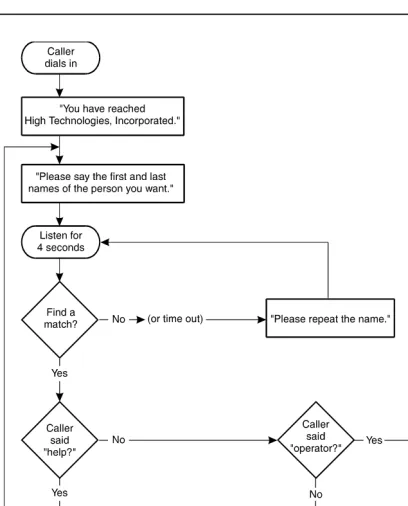
When planning your application, create a diagram of how you want the application to appear to callers. A diagram is helpful to depict the structure of the application. The diagram also allows you to plan what to do when errors occur, an aspect of applications that is frequently overlooked. If the same person or team is not the application designer and developer, a thorough diagram is a very valuable communication tool. Even when one person or team is both designing and developing the application, the diagram will help to separate the tasks, so that each task can receive adequate attention.
Flowcharts and outlines are two ways to diagram the application. If you already have a way to communicate the structure of the application that works for you, use it. Whatever method you choose, plan your application carefully before implementing it.
Be sure to list all prompts and announcements to be played to callers. Make sure you show what should happen each time you expect caller input. Include what should happen when callers give correct (valid) input.
Error cases are also important. What happens if callers give incorrect (invalid) input? How many times will you reprompt after hearing incorrect input? Will the call be transferred to an attendant? What if callers do not respond? How many times will you reprompt after hearing no response? A good flowchart or outline will cover all possible cases.
Use Flowcharts
Use Outlines
Another way to diagram the application is an outline, as shown below. Outlines are easier for some people because they only use words, not symbols.
Sample outline:
Caller dials in.
Prompted with: “You have reached High Technologies, Incorporated.”
1: “Please say the first and last names of the person you want.” 2: (listen for four seconds; listen for anything on Wordlist 1,
that contains all names).
If there is no caller response or silence: Prompt with: “Please repeat the name.” Go to 2.
If the caller response matches the word “help:”
Prompt with: “You can reach anyone at our location by saying their first and last names. If you need further assistance, say ‘operator’ when asked for a name.”
Go to 1.
If the caller response matches the word “operator:” Prompt with: “Transferring.”
Transfer the call to the operator’s extension.
Finished.
If the caller response matches a name on the wordlist: “Calling {first name, last name.} To cancel, say ‘no.’” (listen for two seconds; listen for “yes” or “no”).
If match the word “no:” Prompt with “Call canceled.” Go to 1.
If match the word “yes” or nothing (no caller response or silence):
Prompt with: “Transferring.”
Transfer the call to the named person’s extension.
4
4
Designing a Voice Response
Application
Overview
This chapter describes specific guidelines to use when designing your voice response applications. Many of the guidelines in this chapter are specific and directly related to one or more of the INTUITY™ CONVERSANT® system advanced technologies described in Chapter 2, ‘‘Voice Response Advanced Technologies.’’
Purpose
Application Design Research
In order to design the most successful application possible, it is a good idea to research some basic design principles. Human factors experts call these usability principles, since they are critical to designing a usable application.
Because of experiences with poorly designed applications, some callers are wary of all voice response systems. Be careful that your application does not alienate your customers. Your goal is to make an automated transaction at least as attractive and efficient as interacting with an attendant, if not more.
Know Your Callers
Choices you make in the application design will affect those who the application will serve. Find out as much as you can about the people who will call the system, and use the information when designing your applications.
Relevant information to gather includes the following:
■ Who are your callers?
Your callers have personal attributes that affect how they will interact with the application you are designing.
— What language do they speak? If you expect that many callers will have an accent that is different than what the speech recognition package you are using expects, consider offering a bilingual service. If you are offering service in only one language, but anticipate having many callers with accents, you may want to use DPR or a combination of DPR and speech recognition, since accented speech may not be recognized as accurately as nonaccented speech.
— How old are they? If you expect that a high percentage of callers may be children, you should use simple language and very short menus. Also, since speech recognition works best with deeper voices, you may wish to use touch-tone input or dial-pulse recognition only. If you expect that many of your callers are over the age of 65, you might want to allow them more time to respond. Make sure to reduce confusion by making the transaction as simple as possible.
Note any other personal attributes that could affect how callers will interact with your application, and work to make sure that your application serves all callers well.
■ How often do they call?
Some applications are meant to be used only one time, while others can be used more often. Callers may even access some applications several times a day.
If you expect callers to use the application rarely, your prompts and announcements may need to contain explicit information and instructions. Prompts for applications used very often can be made extremely short, since most callers will likely be experienced. If you expect your callers to be mixed in their experience levels, make it possible for the more
experienced callers to dial through or barge-in during prompts.
■ How well do they know the subject matter?
If you expect that most of your callers will be unfamiliar with the subject matter (for example, if you are describing a new service or product), you should take special care in structuring and presenting the information so that your audience can understand it.
Use Simple and Natural Dialogue
Learning as much as you can about callers will allow you to determine what is “simple and natural” for them. Design uncomplicated, straightforward
applications that use terms familiar to the callers.
Minimize Demands on the Caller’s Memory
Psychological research has shown that a caller’s short-term memory can hold no more than five to nine separate pieces of information at one time. For each menu item you present to callers, two different pieces of information must be
remembered: the option (“For loan rate information...”) and the action required to choose the option (“press 2.”) Menus should offer no more than four or five items at once, since callers cannot remember them all.
The fewer items callers have to remember, the more likely it is that they will remember them. Try to make the interaction easy for the callers. Keep menus short, and avoid wordy prompts and announcements.
Be Consistent
Consistency in the structure of menu choices and in the presentation of
Provide Feedback
Whenever callers press touch tones or speak in response to a prompt, let them know how the response was interpreted. This clarifies the transaction for callers. For instance, if callers press zero for an attendant, the application could say “Please hold for an attendant.” Although the application does not explicitly state that it heard the caller press zero, the interpretation of the key press is implicit in the announcement that follows.
Provide Easy Exits
To prevent callers from getting trapped in an application script, tell them how to reach an attendant, end a transaction, or return to the main menu. You can give this information at the beginning of the transaction. Provide these types of escapes within your application so that callers can always return to a place they know or obtain help as necessary. This gives your callers more control over the interaction, and makes them feel as if they are not powerless in the face of automation.
Offer Shortcuts
If you expect some callers to call often enough to become experts, provide ways to shorten their interaction with the application. For example, allow them to respond before the end of a prompt so that they can move through the interaction at a pace that is comfortable for them. You may want to consider providing separate scripts (or separate branches of a single script) for novice and expert callers.
Prevent Errors
Prompts
The prompts used in your application are one of the only forms of system interaction with callers. For this reason, It is very important that you design the application prompts to facilitate a successful interaction.
Use the guidelines in this section for prompt design.
Prompt Length
Make prompts as short as possible while remaining polite and informative. Keep the prompts brief, but not abrupt. The more quickly callers can do what they called to do, the more satisfied they will be. For example:
There are some trade-offs when considering prompt length. If you expect to have a high proportion of one-time or first-time callers, you might want to provide more information in prompts and make the prompts longer. Longer prompts are acceptable if you think your callers will need the extra information. Include only helpful information and express it in a short, direct manner.
Use longer, more informative prompts if you are asking callers to enter information in a way that may be unfamiliar. For instance, consider a caller entering a date. Most people think of months by name. For a touch-tone application, callers are asked to press the one- or two-digit number for the month. For example, the month of December would be . With WholeWord speech recognition, the month of December are represented by the words “one, two” which callers may say as “twelve.” Both of these examples require that callers think of the information in a way that is unusual, and so prompts should be clear enough for callers to understand. These longer prompts should include examples, such as:
“Next, enter the month listed on your bill. Say two numbers, such as ‘one, two’ for December, or ‘zero, five’ for May.”
Instead of prompting... prompt...
“To listen to information on travel to California, say 1.”
“For California travel information, say 1.”
“If you are calling to register for classes, press 3.”
“To register for classes, press 3.”
How to Word Prompts
Use the following the guidelines when determining the wording of prompts:
■ Present the option before the action.
In menu prompts, always list the option first, and the action second. For example:
When the option is listed first, callers only need to listen to the one action that pertains to their choice. When the action is listed first, they must remember it until they hear the option and decide if it is the one they want. Listing the option first will help both experienced and new callers.
■ Use the same structure for each option-action pair in a menu prompt. This
helps the caller to know what to expect. For example:
■ Make the menu choices clearly different.
Be sure the menu choices are different from each other, so callers can decide which option they want. If callers are confused about which option they want, consider rewording the choices.
■ Avoid jargon and acronyms.
Assume that callers do not use the same technical words you do. Avoid acronyms and abbreviations that may confuse your callers. Speak out the complete words. Use words that your typical callers will understand. Use technical terms only if your audience is a small group of people who are trained in your business.
Instead of prompting... prompt...
“Say 2 to receive the information by fax.” “To receive the information by fax, say 2.”
Instead of prompting... prompt...
“To hear sales information, press 1.
For services, press 2.
If you would like to speak to an attendant, press 0.”
“For sales, press 1.
For services, press 2.
Announcements
As with prompts, it is very important that you design the application announcements to facilitate a successful interaction with your callers. Announcements are used to inform the caller. Be selective when deciding whether or not and how many announcements to include in your design.
Use the guidelines in this section for announcement design.
Feedback Announcements
Feedback announcements should be short and clear. If you want to include “please” and “thank you,” include them only occasionally so that callers can complete the call as quickly as possible.
Avoid referring to the system as I or we. If callers think the system is a person, they may use more words to make their answers more friendly, and thus make speech recognition more difficult. For example:
If a request will take more than two or three seconds to fill, assure callers that work is being done. For example:
“Looking for your records. Please wait.” or
“Please wait while your information is located.”
Confirmation Announcements
There are times where you should read the entry back and allow the caller to confirm it. Other times, a feedback announcement (such as “Please wait while your information is located”) is more appropriate than a confirmation
announcement.
Use the information in this section to determine when you need confirmation or not.
Instead of prompting... prompt...
When You Need Confirmation
In cases where a recognition error or caller touch-tone error would have a significant impact (like credit card numbers or call destinations), you should give callers an opportunity to confirm the entry. To do this, repeat the entry and prompt callers to say “yes” or “no” to confirm it as in the following examples:
■ With WholeWord speech recognition:
“What is your customer number?” <432886>
“Customer Number 432886. Is this correct?” {pause}
“Please say yes or no, now.”
■ With FlexWord speech recognition:
“What department would you like?” <Hardware>
“Calling hardware. Yes or no?”
■ With touch tones:
“Please enter your customer number.” <432886>
“432886. If this is correct, press 1. If not, press 2."
■ With dial pulses
“Please enter your customer number.”