Enterprise Communications Server
Release 6
CallVisor
®
ASAI Technical Reference
555-230-220
Notice
While reasonable efforts were made to ensure that the information in this document was complete and accurate at the time of printing, Lucent Technologiescan assume no responsibility for any errors. Changes and corrections to the information contained in this document may be incorporated into future reissues.
Your Responsibility for Your System’s Security
You are responsible for the security of your system. Lucent Technologiesdoes not warrant that this product is immune from or will prevent unauthorized use of common-carrier telecommunication services or facilities accessed through or connected to it. Lucent Technologies will not be responsible for any charges that result from such unauthorized use. Product administration to prevent
unauthorized use is your responsibility and your system
administrator should read all documents provided with this product to fully understand the features available that may reduce your risk of incurring charges.
Federal Communications Commission Statements Part 15: Class A Statement. This equipment has been tested and found to comply with the limits for a Class A digital device, pursuant to Part 15 of the FCC Rules. These limits are designed to provide reasonable protection against harmful interference when the equipment is operated in a commercial environment. This
equipment generates, uses, and can radiate radio-frequency energy and, if not installed and used in accordance with the instruction manual, may cause harmful interference to radio communications. Operation of this equipment in a residential area is likely to cause harmful interference, in which case the user will be required to correct the interference at his or her own expense.
Part 68: Network Registration Number. This equipment is registered with the FCC in accordance with Part 68 of the FCC Rules. It is identified by FCC registration number
AS593M-13283-MF-E.
Part 68: Answer-Supervision Signaling. Allowing this equipment to be operated in a manner that does not provide proper answer-supervision signaling is in violation of Part 68 rules. This equipment returns answer-supervision signals to the public switched network when:
■ Answered by the called station ■ Answered by the attendant
■ Routed to a recorded announcement that can be administered by the CPE user
This equipment returns answer-supervision signals on all DID calls forwarded back to the public switched telephone network. Permissible exceptions are:
■ A call is unanswered ■ A busy tone is received ■ A reorder tone is received
DEFINITY Enterprise Communications Server is a registered trademark of Lucent Technologiesin the US and throughout the world.
DEFINITY Communications System is a registered trademark of Lucent Technologiesin the US and throughout the world. MultiQuest is a registered trademark of AT&T.
Dialogic CT-Connect is a trademark of Dialogic Corporation. Netware Telephony Services is a registered trademark of Novell. Solaris is a trademark of Sun Microsystems, Inc. in the United States and other countries.
UNIX is a registered trademark in the United States and other countries, licensed exclusively through X/Open Company Limited. UnixWare is a registered trademark of the Santa Cruz Operation, Inc. in the USA and other countries.
Vari-A-Bill is a registered trademark of AT&T.
Ordering Information
The ordering number for this document is 555-230-220. To order this document, call the BCS Publications Fulfillment Center at
1 800 457-1235 (International callers use 1 317 322-6791). For more information about Lucent Technologiesdocuments, refer to the
Business Communications Systems Publications Catalog
555-000-010.
You can be placed on a Standing Order list for this and other BCS documents you may need. Standing Order will enable you to automatically receive updated versions of individual documents or document sets, billed to account information that you provide. For more information on Standing Orders, or to be put on a list to receive future issues of this document, please contact the Lucent Technologies BCS Publications Fulfillment Center.
To learn more about Lucent Technologies products and to order products, contact Lucent Direct, the direct-market organization of Lucent Technologies Business Communications Systems. Access their web site at www.lucentdirect.com, or call 1 800 451-2100. The International fax number is 1 317 322-6699.
Lucent Technologies Fraud Intervention
If you suspect your are being victimized by toll fraud and you need technical support or assistance, call the BCS Technical Service Center Toll Fraud Intervention Hotline at 1 800 643-2353.
Comments
To comment on this document, return the comment card at the front of the document.
Acknowledgment
This document was prepared by the Product Documentation Development, Lucent Technologies
Release Notes
xxxiii■ ASAI Features in Release 6 xxxiii
Single-Step Conference xxxiii
Universal Call ID xxxiv
Phantom Calls xxxiv
Expanded ASAI Capacities in the DEFINITY ECS xxxiv
Trunk Group/Member Information xxxv
MAPD xxxv
Enhancement to Extension Information Query xxxv
About This Document
xxxvii■ Reason for Reissue xxxvii
■ Intended Audience xxxviii
■ Conventions Used in This Document xxxviii
■ Related Documents xl
■ Ordering Documents xli
■ How to Comment on This Document xli
1
ASAI and Capability Groups
1-1■ Introduction 1-1
■ Capabilities 1-2
Capabilities and Associations 1-3
Associations and Capability Groups 1-4
2
ASAI and Supported Applications
2-1■ Introduction 2-1
■ Applications 2-2
■ Sample Applications 2-3
Outbound Call Management 2-3
Predictive Dialing 2-4
Inbound Call Management 2-5
ACD Call Activity Monitoring 2-6
Data Screen Delivery and Voice/Data Transfer 2-7 Data Screen Delivery with Call Prompting 2-8
Speech Processing Integration 2-8
Adjunct Routing 2-9
Information Sources for Routing 2-10
Logging for Call Back 2-11
Automatic Agent Reconfiguration 2-12
Sequence Dialing 2-12
■ Office Automation 2-12
Incoming Call Identification 2-13
Phone Management and Directory Services 2-13
Message Desk 2-14
■ Additional Configurations 2-16
Contacting Lucent Technologies 2-20
3
Event Reporting and U-Abort Capabilities
3-1■ Introduction 3-1
Event Reporting Capability 3-1
U-Abort Capability 3-1
■ Event Reports 3-2
Capability Groups and Event Reporting 3-2
Call-Related Event Reporting 3-2
Non-Call-Related Event Reporting 3-3
Information Flow 3-3
Parameters 3-3
Event Reports and Corresponding Items 3-3
■ Alerting Event Report 3-9
Alerting Event Report Items 3-10
calling party number 3-10
trunk group number/trunk group member number 3-10
called party number (DNIS) 3-10
connected party number (alerting party number) 3-11
call_id 3-11
domain 3-11
user to user information 3-11
reason for redirection 3-12
II-digits 3-12
UCID (Universal Call ID) 3-12
■ Answered Event Report 3-13
Answered Event Report Items 3-13
called party number 3-13
connected party number
(answering party number) 3-13
call_id 3-13
party_id 3-14
cause 3-14
■ Busy/Unavailable Event Report 3-15
Busy/Unavailable Report Items 3-16
called party number (DNIS) 3-16
call_id 3-16
cause 3-16
■ Call Conferenced Event Report 3-17
Call Conferenced Report Items 3-17
calling party number (controlling party number) 3-17 called party number (new party number) 3-17
old party_id 3-18
other call _id 3-18
resulting call_id 3-18
party_id list (up to six numbers) 3-18 extension list (up to six entries) 3-18
UCID (Universal Call ID) 3-18
■ Call Ended Event Report 3-19
Call Ended Report Items 3-19
call_id 3-19
cause 3-19
■ Call Initiated Event Report 3-20
Call Initiated Report Items 3-20
call_id 3-20
party_id 3-20
UCID (Universal Call ID) 3-20
■ Call Offered to Domain Event Report 3-21
Call Offered to a VDN Domain 3-21
Call Offered to Domain Report Items 3-21 calling party number/billing number (CPN/BN) 3-21 trunk group number/trunk group
member number 3-22
called party number (DNIS) 3-22
user-entered information 3-22
lookahead interflow information 3-23
domain 3-23
user to user information 3-23
flexible billing 3-24
II-digits 3-24
UCID (Universal Call ID) 3-24
■ Call Originated Event Report 3-25
Call Originated Report Items 3-25
call_id 3-25
party_id 3-25
calling party number 3-25
called party number 3-25
party extension 3-25
user to user information 3-26
cause 3-26
■ Call Redirected Event Report 3-27
For Monitored Calls 3-27
For Controlled Calls 3-27
Call Redirected Report Items 3-28
call_id 3-28
■ Call Transferred Event Report 3-29
Call Transferred Report Items 3-29
calling party number (controlling party number) 3-29 called party number (new party number) 3-29
other call_id 3-29
old party_id 3-30
resulting call_id 3-30
party_id list (up to six numbers) 3-30 extension list (up to six entries) 3-30
UCID (Universal Call ID) 3-30
■ Charging Event Report 3-31
Charging Event Report Items 3-31
call_id 3-31
called number 3-31
charging number 3-31
trunk group/trunk group member 3-32
type of charge 3-32
Intermediate charge 3-32
Final charge 3-32
Split charge 3-32
charge 3-32
cause 3-33
Considerations 3-33
Display of Charge Information 3-33
ISDN 3-33
Lengthy Calls 3-34
Off-Premises Station 3-34
PPM 3-34
Private Network QSIG ISDN Protocol 3-34
Switch-Classified Calls 3-35
■ Connected Event Report 3-36
Multiple Connected Event Reports 3-36
Connected Event Report Items 3-36
calling party number/billing number (CPN/BN) 3-36 trunk group number and trunk group
member number 3-37
called party number (DNIS) 3-37
connected party number 3-38
call_id 3-38
party_id 3-38
cause 3-38
II-digits 3-38
UCID (Universal Call ID) 3-39
■ Cut-Through Event Report 3-40
ISDN Progress Messages 3-40
Cut-Through Report Items 3-40
call_id 3-40
party_id 3-41
progress indicator 3-41
■ Disconnect/Drop Event Report 3-42
Disconnect/Drop Report Items 3-42
connected party number (dropped number) 3-42
party_id 3-43
user to user information 3-43
cause 3-44
■ Entered Digits Event Report 3-45
Entered Digits Report Items 3-45
call_id 3-45
digits entered 3-45
■ Hold Event Report 3-46
Hold Event Report Items 3-46
connected party number
(number that placed the call on hold) 3-46
call_id 3-46
party_id 3-46
■ Login Event Report 3-47
Login Event Report Items 3-47
agent work mode 3-47
agent physical extension 3-47
agent logical extension 3-47
■ Logout Event Report 3-48
Logout Event Report Items 3-48
agent physical extension 3-48
agent logical extension 3-48
reason code 3-48
■ Queued Event Report 3-49
Queued Event Report Items 3-49
called party number (DNIS) 3-49
call_id 3-49
calls in queue 3-49
■ Reconnected Event Report 3-50
Reconnected Event Report Items 3-50
connected party number 3-50
call_id 3-50
party_id 3-50
■ Reorder/Denial Event Report 3-51
Reorder/Denial Report Items 3-51
called party number 3-51
call_id 3-51
cause 3-51
■ Trunk Seized Event Report 3-53
called party number 3-53
call_id 3-53
party_id 3-53
Trunk group/trunk group member 3-53
Use of Event Reports in Associations 3-54
■ Event Reporting for Merging Two Calls 3-55
Rules for Merging Two Calls with UUI Information 3-58 Transfer and Conference Interactions 3-59
■ U-ABORT 3-60
Information Flow 3-60
U-Abort Parameters 3-60
4
ASAI and Call Control
4-1■ Third Party Make Call 4-4
Information Flow 4-4
Third Party Make Call Parameters 4-4 ACK (Positive Acknowledgement) Parameters 4-5
Denial (NAK) Causes 4-6
Protocol Error (NAK) Causes 4-7
Considerations 4-7
■ Third Party Make Call and Supported Call Types 4-8
1. Switch-Classified Call 4-8
Call Parameters for Switch-Classified Calls 4-9
Call Classification 4-12
Answer Classification 4-13
Drop Classification 4-14
No Answer Condition 4-14
Busy Condition 4-15
Reorder Condition 4-15
Other Conditions 4-15
ECS-Terminated Call Conditions
Prior to Classification 4-15
ECS Operation for Switch-Classified Call Setup 4-16 Switch-Classified Call Originator 4-17 Switch-Classified Call Destination 4-18 Negative Acknowledgement (NAK) of a
Other Failure Conditions for
Switch-Classified Calls 4-19
2. User-Classified Call 4-19
Parameters for User-Classified Calls 4-19 Call Classification for User-Classified Calls 4-22 ECS Operation for User-Classified Call Setup 4-22 User-Classified Call Originator 4-22 User-Classified Call Destination 4-23 Negative Acknowledgement of a
User-Classified Call 4-23
3. Phantom Calls 4-24
Parameters for Phantom Calls 4-25
Call Classification for Phantom Calls 4-27
Phantom Call Originator 4-27
Phantom Call Destination 4-27
Negative Acknowledgment of a Phantom Call 4-28
4. Direct-Agent Call 4-28
Parameters for Direct-Agent Calls 4-29
Call Classification 4-31
ECS Operation for Direct-Agent Call Setup 4-31
Direct-Agent Call Originator 4-31
Direct-Agent Call Destination 4-32
Negative Acknowledgments of a
Direct-Agent Call 4-32
5. Supervisor-Assist Call 4-32
Supervisor-Assist Call Parameters 4-34 Supervisor-Assist Call Classification 4-36 ECS Operation for Supervisor-Assist Call Setup 4-36 Supervisor-Assist Call Originator 4-36 Supervisor-Assist Call Destination 4-36 Negative Acknowledgments of a
Supervisor-Assist Call 4-37
Parameters and Call Types 4-37
■ Third Party Take Control 4-39
Information Flow 4-39
Third Party Take Control Parameters 4-39 ACK (positive acknowledgement) Parameters 4-39
Denial NAK) Causes 4-41
Protocol Error (NAK) Cause 4-41
■ Third Party Selective Hold 4-43
Information Flow 4-43
Third Party Selective Hold Parameters 4-43 ACK (Positive Acknowledgement) Parameters 4-43
Denial (NAK) Causes 4-43
Protocol Error (NAK) Cause 4-44
Considerations 4-44
■ Third Party Reconnect 4-46
Information Flow 4-46
Third Party Reconnect Parameters 4-46
ACK (Positive Acknowledgment) Parameters 4-46
Denial (NAK) Causes 4-46
Protocol Error (NAK) Causes 4-47
Considerations 4-47
■ Redirect Call 4-48
Information Flow 4-48
Third Party Redirect Call Parameters 4-48 ACK (Positive Acknowledgement) Parameters 4-48
Denial (NAK) Causes 4-48
Protocol Error (NAK) Causes 4-49
Considerations 4-49
■ Third Party Listen-Disconnect 4-51
Information Flow 4-51
Third Party Listen-Disconnect Parameters 4-51 ACK (Positive Acknowledgement) Parameters 4-52
Denial (NAK) Causes 4-52
Considerations 4-52
■ Third Party Listen-Reconnect 4-54
Information Flow 4-54
Third Party Listen-Reconnect Parameters 4-54 ACK (Positive Acknowledgement) Parameters 4-54
Denial (NAK) Causes 4-55
Considerations 4-55
■ Third Party Single-Step Conference 4-56
Information Flow 4-56
Third Party Single-Step Conference Parameters 4-57 ACK (positive acknowledgement) Parameters 4-57
Denial (NAK) Causes 4-58
Protocol Error (NAK) Causes 4-58
■ Third Party Merge 4-60
Information Flow 4-60
Third Party Merge Parameters 4-60
ACK (Positive Acknowledgement) Parameters 4-60
Denial (NAK) Cause 4-61
Protocol Error (NAK) Causes 4-62
Considerations 4-62
■ Third Party Selective Drop 4-64
Information Flow 4-64
Third Party Selective Drop Parameters 4-65 ACK (Positive Acknowledgement) Parameters 4-66
Denial (NAK) Causes 4-66
Protocol Error (NAK) Causes 4-66
Considerations 4-67
■ Third Party Relinquish Control 4-68
Information Flow 4-68
Third Party Relinquish Control Parameters 4-68 ACK (Positive Acknowledgement) Parameters 4-68
Denial (NAK) Cause 4-68
Protocol Error (NAK) Cause 4-68
Considerations 4-68
■ Third Party Clear Call 4-69
Information Flow 4-69
Third Party Clear Call Parameters 4-69 ACK (Positive Acknowledgement) Parameters 4-69
Denial (NAK) Cause 4-69
Protocol Error (NAK) Cause 4-70
Considerations 4-70
■ Third Party Send DTMF Signals 4-71
Information Flow 4-71
Third Party Send DTMF Signals Parameters 4-71 ACK (Positive Acknowledgement) Parameters 4-71
Denial (NAK) Cause 4-72
Protocol Error (NAK) Cause 4-72
Considerations 4-73
■ Third Party Call Ended 4-74
Information Flow 4-74
Third Party Call Ended Parameters 4-74
5
ASAI and Domain Control
5-1■ Domain (Station) Control Description 5-3
Station Domain 5-3
Split Domain 5-3
■ Domain Control Capabilities 5-4
■ Third Party Domain (Station) Control Request 5-6
Information Flow 5-6
Domain (Station) Control Request Parameters 5-6 ACK (Positive Acknowledgement) Parameters 5-6
Denial (NAK) Causes 5-6
Protocol Error (NAK) Cause 5-7
■ Third Party Domain Control Request for ACD
Split/EAS Skill Domain 5-8
Information Flow 5-8
Domain Control Request for ACD
Split/EAS Skill Domain Parameter 5-8 ACK (Positive Acknowledgement) Parameters 5-8
Denial (NAK) Causes 5-8
Protocol Error (NAK) Cause 5-9
Considerations 5-9
■ Third Party Answer 5-10
Information Flow 5-10
Third Party Answer Parameters 5-10
ACK (Positive Acknowledgement) Parameters 5-10
Denial (NAK) Causes 5-10
Protocol Error (NAK) Cause 5-11
Considerations 5-11
Multifunction Station Operation 5-11
Analog Station Operation 5-12
■ Third Party Selective Hold 5-13
Information Flow 5-13
Third Party Selective Hold Parameter 5-13 ACK (Positive Acknowledgement) Parameters 5-13
Denial (NAK) Causes 5-13
Protocol Error (NAK) Cause 5-14
Considerations 5-14
■ Third Party Reconnect 5-15
Information Flow 5-15
ACK (Positive Acknowledgement) Parameters 5-15
Denial (NAK) Causes 5-15
Protocol Error (NAK) Cause 5-16
Considerations 5-16
■ Redirect Call 5-17
Information Flow 5-17
Domain Control Redirect Call Parameters 5-17 ACK (Positive Acknowledgement) Parameters 5-17
Denial (NAK) Causes 5-17
Protocol Error (NAK) Causes 5-18
Considerations 5-18
■ Third Party Merge 5-20
Information Flow 5-20
Third Party Merge Parameters 5-20
ACK (Positive Acknowledgement) Parameters 5-20
Denial (NAK) Causes 5-21
Protocol Error (NAK) Causes 5-21
Considerations 5-22
■ Third Party Selective Drop 5-23
Information Flow 5-23
Third Party Selective Drop Parameters 5-23 ACK (Positive Acknowledgement) Parameters 5-23
Denial (NAK) Causes 5-23
Protocol Error (NAK) Cause 5-24
Considerations 5-24
■ Third Party Auto Dial 5-25
Information Flow 5-26
Third Party Auto Dial Parameters 5-26
ACK (Positive Acknowledgement) Parameters 5-28
Denial (NAK) Causes 5-28
Protocol Error (NAK) Cause 5-28
■ Third Party Relinquish Control 5-29
Information Flow 5-29
Third Party Relinquish Control Parameters 5-29 ACK (Positive Acknowledgement) Parameters 5-29
Denial (NAK) Cause 5-29
Protocol Error (NAK) Cause 5-29
Considerations 5-30
■ Third Party Send DTMF Signals 5-31
Third Party Send DTMF Signals Parameters 5-31 ACK (Positive Acknowledgement) Parameters 5-31
Denial (NAK) Cause 5-32
Protocol Error (NAK) Cause 5-32
Considerations 5-33
■ Third Party Single-Step Conference 5-34
Information Flow 5-34
Third Party Single-Step Conference Parameters 5-35 ACK (positive acknowledgement) Parameters 5-35
Denial (NAK) Causes 5-36
Protocol Error (NAK)Causes 5-36
Considerations 5-37
■ Third Party Domain Control Ended 5-38
Information Flow 5-38
Third Party Domain Control Ended 5-38
6
Event Notification Capabilities
6-1■ Event Notification Capabilities 6-1
Event Notification Request 6-1
Event Notification Cancel 6-1
Stop Call Notification 6-1
Event Notification Ended 6-2
Event Report 6-2
■ Event Notification Request 6-3
Information Flow 6-3
Event Notification Request Parameters 6-3 ACK (Positive Acknowledgement) Parameters 6-4
Denial (NAK) Causes 6-4
Protocol Error (NAK) Cause 6-4
Considerations 6-5
■ Event Notification Cancel 6-6
Information Flow 6-6
Event Notification Cancel Parameters 6-6 ACK (Positive Acknowledgement) Parameters 6-6
Denial (NAK) Cause 6-6
Protocol Error (NAK) Cause 6-6
■ Stop Call Notification 6-7
Information Flow 6-7
Stop Call Notification Parameter 6-7 ACK (Positive Acknowledgement) Parameter 6-7
Denial (NAK) Causes 6-7
Protocol Error (NAK) Cause 6-7
Considerations 6-8
■ Event Notification Ended 6-9
Information Flow 6-9
Event Notification Ended Parameter 6-9
Considerations 6-9
7
ASAI and Call Routing
7-1■ Route 7-2
Information Flow 7-2
Route Parameters 7-2
Denial (NAK) Causes 7-5
Protocol Error (NAK) Causes 7-5
Considerations 7-5
■ Route Select 7-6
Information Flow 7-6
Route Select Parameters 7-7
Denial (NAK) Causes 7-9
Protocol Error (NAK) Causes 7-10
Considerations 7-10
■ Route End 7-11
Information Flow 7-11
Route End Parameter(s) 7-11
Considerations 7-13
8
ASAI and Request Feature Capabilities
8-1■ Request Feature Capability Group 8-2
Information Flow 8-2
ACK (Positive Acknowledgement) Parameters 8-3
Denial (NAK) Causes 8-3
Protocol Error (NAK) Cause 8-5
Considerations 8-5
9
ASAI and Value Query Capabilities
9-1■ Value Query 9-2
ACD Agent Login Query 9-2
ACD Agent Status Query 9-2
ACD Split Status Query 9-2
Call Classifier Status Query 9-2
Call Information Status Query 9-2
Date and Time Query 9-2
Extension Type Query 9-3
Integrated Directory Database Query 9-3
Party ID Query 9-3
Station Feature Query 9-3
Station Status Query 9-3
Trunk Group Status Query 9-3
UCID (Universal Call ID) query 9-4
Information Flow for Value Queries 9-4
Value Query Parameters 9-4
item 9-4
item_params 9-5
ACK (Positive Acknowledgement) Parameters 9-7 ACD Agent Login Query ACK Parameters 9-7 ACD Agent Status Query ACK Parameters 9-7 ACD Split Status Query ACK Parameters 9-7 Call Information Query ACK Parameters 9-7 Call Classifier Status Query ACK Parameters 9-8 Date/Time of Day ACK Parameters 9-8 Extension Type Information Query
ACK Parameters 9-8
Integrated Directory Database Query
ACK Parameters 9-9
Special Character Sets 9-9
Station Feature Query ACK Parameters 9-10 Status of Message Waiting Lamp feature 9-10 Status of Send All Calls feature 9-11 Status of Call Forwarding feature 9-11 Station Status Query ACK Parameters 9-11 Trunk Group Query ACK Parameters 9-11 UCID (Universal Call ID) Query ACK Parameters 9-12
Denial (NAK) Causes 9-12
Protocol Error (NAK) Cause 9-14
Considerations 9-14
■ Value Query Response 9-15
Information Flow 9-15
Value Query Response Parameters 9-15
ACK (Positive Acknowledgement) Parameters 9-15
Denial (NAK) Causes 9-15
Protocol Error (NAK) Cause 9-15
10
ASAI and Set Value Capabilities
10-1■ Set Value 10-2
Information Flow 10-2
Set Value Parameters 10-2
ACK (Positive Acknowledgement) Parameters 10-3
Denial (NAK) Causes 10-3
Protocol Error (NAK) Cause 10-3
Considerations 10-4
MWL 10-4
Flexible Billing 10-4
11
ASAI Maintenance Capabilities
11-1■ Heartbeat 11-2
Information Flow 11-2
Heartbeat Parameters 11-2
ACK (Positive Acknowledgement) Parameters 11-2
Protocol Error (NAK) Cause 11-2
■ Suspend Alarms 11-3
Information Flow 11-3
Suspend Alarms Parameter 11-3
ACK (Positive Acknowledgement) Parameters 11-3
Denial (NAK) Cause(s) 11-3
Protocol Error (NAK) Cause(s) 11-3
Considerations 11-4
■ Resume Alarms 11-4
Information Flow 11-4
Resume Alarms Parameters 11-4
ACK (Positive Acknowledgement) Parameter(s) 11-4
Denial (NAK) Cause(s) 11-4
Protocol Error (NAK) Cause(s) 11-5
Considerations 11-5
■ Restart and Link Versions 11-5
Information Flow 11-5
Restart Parameters 11-8
ACK (Positive Acknowledgement) Parameters 11-8
12
ASAI and Feature Interactions
12-1■ 8411D Stations 12-1
■ Administration without Hardware (AWOH) 12-1
■ Analog Sets 12-2
Redirection 12-2
Redirection on No Answer 12-2
Auto-Answer Option 12-2
Manual Answer Option 12-2
Number of Calls at Analog Sets 12-3
Number of Held Calls 12-3
Switch-Hook Operation 12-3
Switch-Hook Flash Operation 12-3
User-Classified Calls 12-4
Direct-Agent Calls 12-4
■ Announcements 12-4
■ Answer Supervision 12-4
■ Attendants and Attendant Groups 12-6
Attendant-Specific Button Operation 12-6
Advice of Charge (AOC) 12-7
■ Attendant Auto-Manual Splitting 12-7
Advice of Charge 12-8
■ Attendant Call Waiting 12-8
■ Attendant Control of Trunk Group Access 12-9
■ Attendant Serial Call 12-9
■ Attendant Through Dialing 12-9
■ AUDIX 12-9
■ Authorization Codes 12-10
■ Automatic Call Distribution (ACD) 12-10
Agents in Adjunct-Controlled Splits 12-10
Agents in Multiple Splits 12-10
Agent Status Displays 12-11
Announcements 12-11
Assist/Supervisor Assist 12-11
Automatic Answering 12-11
Interflow 12-12
Intraflow 12-12
Night Service 12-12
Queue Status Displays/Indications 12-13 Timed ACW/Agent Pause Between Calls 12-13
■ Automatic Callback on Busy/No Answer 12-13
■ Auto-Available Split 12-13
■ Bridged Call Appearance 12-14
■ Busy Verification of Terminals 12-15
■ Call Coverage 12-15
Remote Call Coverage 12-16
Coverage of Calls Redirected Off-Net 12-16 Call Coverage Path Containing VDNs 12-16
■ Call Detail Recording (CDR) 12-17
Advice of Charge (AOC) 12-17
Call Splitting 12-18
■ Call Forwarding All Calls 12-19
Off-Net 12-19
■ Call Management System (CMS) 12-20
■ Call Park 12-20
■ Call Pickup 12-20
Adjunct Routing 12-23
Advice of Charge 12-24
Call Prompting 12-24
Lookahead Interflow (LAI) 12-24
Multiple Split Queuing 12-25
Network-Provided Digits 12-25
Selective Listening 12-25
Vector-Controlled Splits 12-25
Single-Step Conference 12-26
■ Call Waiting 12-26
■ Centralized Attendant Service (CAS) 12-26
■ Class of Restriction (COR) 12-26
■ Class of Service (COS) 12-27
■ Conference 12-27
Advice of Charge (AOC) 12-27
Basic Conference Scenario: 12-28
Scenario with CDR Call Splitting disabled: 12-28 Conferences Calls involving Multiple
Trunks and Stations 12-28
With CDR Calling Splitting disabled: 12-28 With CDR Call-Splitting enabled: 12-28
Consult 12-29
Selective Listening 12-29
■ Data Calls 12-29
■ DCS 12-29
Advice of Charge 12-30
■ Direct Agent Calling 12-30
Agent Work Modes with ACD 12-30
Agent Work Modes with EAS 12-31
Priority Queuing 12-31
Indications of Direct-Agent Calls in Queue 12-31
Number of Calls In Queue 12-32
Oldest Call in Queue 12-32
Hunt Group Measurements 12-32
Delivering Direct-Agent Calls 12-33
Priority Calling 12-33
Direct-Agent Coverage 12-33
■ Direct Agent — Skill Level 12-34
■ Do Not Disturb 12-35
■ Duplication 12-35 ■ Electronic Tandem Network (ETN) - Private Network 12-36
■ Expansion Port Network (EPN) 12-36
■ Expert Agent Selection (EAS) 12-36
Skill Hunt Groups 12-36
Logical Agents 12-36
User-Classified Calls 12-37
Direct-Agent Call 12-37
Logical Direct-Agent Calls 12-37
Supervisor-Assist Calls 12-38
Switch-Classified Call 12-39
Event Reports 12-39
Logins and Logouts for Logical Agents 12-40 Work Mode Changes for Logical Agents 12-41 Activate/Cancel Send All Calls and Call Forwarding 12-41 Value Queries for Logical Agents 12-42
Advice of Charge 12-42
■ Facility Restriction Levels (FRLs) 12-43
■ Forced Entry of Account Codes 12-43
■ Hold 12-43
■ Hot Line 12-43
■ Hunt Groups 12-43
■ Integrated Services Digital Network (ISDN) 12-44
ISDN/Basic Rate Interface (BRI) 12-44
ISDN/Primary Rate Interface (PRI) 12-44
UUI Prior to R6 12-45
UUI and MSI, Starting in R6.3 12-45
Advice of Charge (AOC) 12-47
Germany 12-47
France (VN4) 12-47
Europe (ETSI) 12-47
■ Last Number Dialed 12-47
■ Leave Word Calling 12-48
■ Lookahead Interflow 12-48
Advice of Charge (AOC) 12-48
■ Malicious Call Trace 12-48
■ Message Waiting Lamp 12-48
■ Mixed FAC & TAC 12-48
■ MultiMedia Endpoint 12-49
■ Music on Hold 12-49 ■ Personal Central Office Line (PCOL) 12-49
■ Priority Calling 12-50
■ Privacy-Manual Exclusion 12-50
■ Ringback Queuing 12-50
■ Send All Calls (SAC) 12-50
■ Send DTMF 12-51
■ Service Observing 12-51
■ Single-Digit Dialing and Mixed Station Numbering 12-52
■ Single-Step Conference 12-52
Data Delivery/Data Restriction 12-53
■ Station Hunting 12-53
■ Switch-Classified Calls 12-53
■ System Restarts 12-53
■ Temporary Bridged Appearances 12-53
■ Terminating Extension Group (TEG) 12-54
■ Timed Reminder 12-55
■ Transfer 12-55
Advice of Charge (AOC) 12-55
■ Trunk-to-Trunk Transfer 12-56
■ VDN Override 12-56
■ Voice (Synthesized) Message Retrieval 12-56
■ World Class BRI 12-56
13
ASAI-Ethernet
13-1■ Overview 13-1
■ Physical Connectivity for MFB 13-1
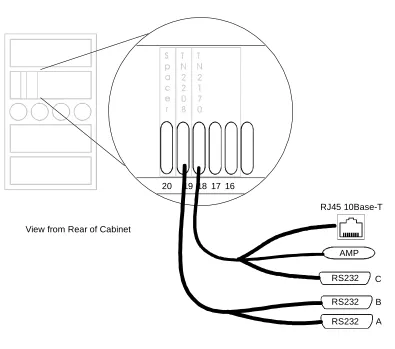
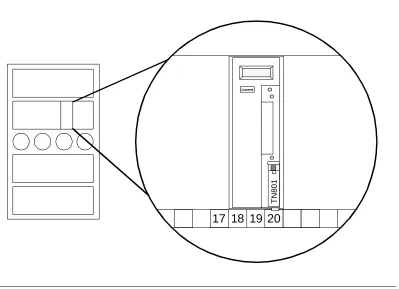
Carrier Connectivity for MFB 13-2
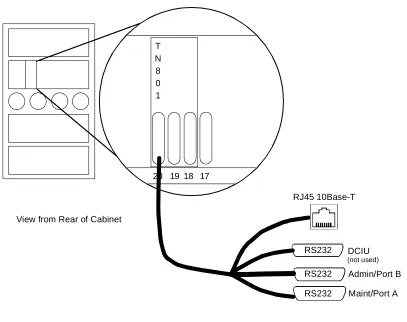
Cable Connectivity for MFB 13-3
Administrative Console Connectivity for MFB 13-4
■ Physical Connectivity for MAPD 13-5
Carrier Connectivity for MAPD 13-5
Cable Connectivity for MAPD 13-6
Administrative Console Connectivity for MAPD 13-7
■ Administration 13-8
14
Installation and Test for
CallVisor ASAI
14-1■ Hardware Installation 14-1
■ Software Installation 14-2
■ CallVisor ASAI Link Administration 14-2
■ DEFINITY ECS Administration Forms 14-7
■ CallVisor ASAI Link Testing 14-8
■ Lucent Technologies Business Partners 14-9
A
Call Scenarios and Applications
A-1■ 1. Basic Application Call Scenarios A-2
Outbound Call Management — Preview Dialing
(Non-ISDN Facilities) A-3
Outbound Call Management — Preview Dialing
(ISDN) Facilities or Local Extensions) A-4 Outbound Call Management — Predictive Dialing
(Destination Busy and No Answer) A-5 Outbound Call Management —
Predictive Dialing (Success) A-6
Call Monitoring —
VDNs and ACD Splits A-7
Multiple Queuing and Call Abandon —
ACD Split or VDN Monitoring A-8
Blind Transfer — ACD Split
or VDN Monitoring A-9
Consultation — ACD Split or
VDN Monitoring A-10
Agent Conference A-11
Service Observing — ACD Split or
VDN Monitoring A-12
Agent Reconfiguration A-13
Incoming Call Monitoring and Manual
Conference — Station Monitoring A-14
Screen-Based Dialing —
Station Monitoring A-15
Call Coverage to AUDIX —
Station Monitoring A-18
Adjunct Routing A-19
Message Desk — Incoming Call A-20
Message Desk —
Message Retrieval via Phone A-21
Message Desk — Message Retrieval via
Data Terminal A-22
VRU-assisted Transaction using
Selective Listening A-23
■ 2. Calls Across Multiple ECSs A-25
External Call to VDN, Answered by Station and
Transferred to a VDN on Another ECS A-26 External Call to VDN, Answered by Station, and
Transferred to a Station on Another ECS A-29 External Call to Lookahead Interflow VDN A-31 External Call to VDN, Answered by a
Local Station, and Transferred to a
Lookahead Interflow VDN A-34
■ 3. Expert Agent Selection Interactions A-38
External Call to VDN, Answered by Logical Agent, and Conferenced with
Another Logical Agent A-38
External Call to a Logical Agent’s Station
Transferred to Another Logical Agent A-41 Direct Agent Call to Logical Agent —
Make Call to Login ID A-43
Value Queries for Logical Agent and
Skill Hunt Groups A-45
■ 4. Converse Vector Command Interactions A-47
External Call to a VDN that has a Converse
Step that is Interrupted A-47
External Call to a VDN that has a Converse
Step that is not Interrupted A-49
■ 5. Redirection On No Answer (RONA) Interactions A-51
Call to Agent with RONA A-51
Direct-Agent Call with RONA A-53
■ 6. VDN in Coverage Path Interactions A-56
Incoming Call Routed to a Station that has a
External Call to a VDN with a Forced First Announcement that gets Routed to a
Second VDN A-58
Outgoing Call over Non-ISDN Trunk A-60 Outgoing Call over ISDN Trunk that Results in
an ISDN Progress Message A-61
■ 7. User Scenarios — User to User Information (UUI) A-63
Call Sequence 1: A-64
Call Sequence 2: A-65
Call Sequence 3: A-66
■ 8. User Scenarios — Connected IE for
Non-ISDN Trunks A-67
■ 9. User Scenarios — ASAI-Provided Dial-Ahead Digits A-68 ■ 10. User Scenarios — ASAI-Requested Digit Collection A-69 ■ 11. User Scenarios — VDN Return Destination A-70 ■ 12. ASAI Messaging Scenarios — VDN Return
Destination A-72
■ 13. User Scenarios — Flexible Billing A-73 ■ 14. User Scenarios - Information Identifier (II) Digits A-76 ■ 15. User Scenarios - Phantom Calls A-78
Call Sequence 1: A-79
Call Sequence 2: A-80
■ 16. Single-Step Conference A-81
Call Sequence 1: A-81
Call Sequence 2: A-82
Call Sequence 3: A-83
B
ASAI and Release 6 Requirements
B-1■ Capacity Requirements and Constraints B-1
C
ASAI Release History
C-1■ Summary of Past Release Notes C-3
■ Release 5 Notes C-3
Global Call Classification C-3
Reason Codes C-4
ASAI Selective Listening C-4
II-Digits C-4
Network-Provided Digits (CINFO) C-4
R2 MFC Calling Party Information C-4
Expansion of Agent Capabilities C-5
27-Character Display C-5
Release 5 Feature Interactions C-5
■ G3V4 Release Notes C-5
Send DTMF Signals C-5
MultiQuest Flexible Billing C-6
Redirect Call C-6
ASAI-Accessed Integrated Directory
Database Service C-6
Event Report Capabilities C-6
Agent Login Event Report C-6
Call-Originated Event Report C-7
Alerting Event Report C-7
Miscellaneous Enhancements C-7
■ G3V3 Release Notes C-8
Answering Machine Detection (AMD) C-8 User to User Information (UUI) Transport C-8
Version Control C-8
Proprietary Adjunct Links C-8
Multiple Monitors C-9
Optionable Switch-Classified Calls on
International Switches C-9
Multiple Outstanding Route Requests C-9 Connected Event Report for Non-ISDN Trunks C-9
ASAI-Provided Digits C-9
ASAI-Requested Digit Collection C-10
■ G3V2 Release Notes C-11
International Address Type for ISDN Calls C-11
Redirection on No Answer C-11
VDNs in Coverage Path C-11
Converse Vector Command C-11
Called Party Number in Route Requests C-11
Expert Agent Selection (EASe) C-11
GL
Glossary
GL-12
ASAI and Supported Applications
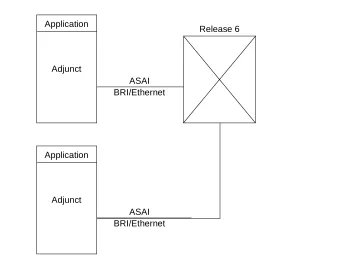
2-1. Single Link — Single Processor Configuration 2-1
2-2. Multiple Link — Single Processor Configuration 2-16
2-3. Single Link — Multiple Processors Configuration 2-17
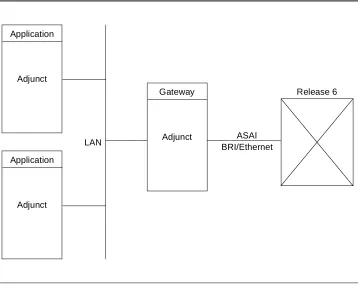
2-4. Single Link — Gateway/Server Configuration 2-18
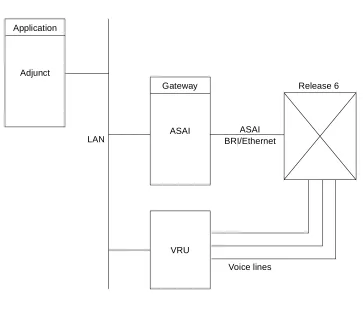
2-5. ASAI Integration with a VRU Configuration 2-19
13
ASAI-Ethernet
13-1. DEFINITY LAN Gateway System Assembly in a
DEFINITY ECS Carrier 13-2
13-2. Cable Connectivity to the System Assembly 13-3
13-3. MAPD System Assembly in a
DEFINITY ECS Carrier 13-5
13-4. Cable Connectivity to the MAPD
System Assembly 13-6
13-5. Overall System Connectivity for MFB/MAPD 13-8
13-6. Relationship of Virtual BRI Ports,
Brouter, and DEFINITY LAN Gateway Clients 13-10
A
Call Scenarios and Applications
A-1. Multiple ECS Configuration A-25
A-2. Call Flow for Blind Transfer to Another ECS A-27
A-3. Call Flow for Consultation Transfer to Another ECS A-29
A-4. Call Flow for Incoming Call to
Lookahead Interflow Vector A-32
A-5. Call Flow for a Transfer to a
Lookahead Interflow Vector A-35
A-6. Call Flow for Incoming Call to Skill VDN A-39
A-7. Call Flow for Incoming Call to Logical
Agent Transferred to Another Logical Agent A-41 A-8. Call Flow for Direct Agent Call to
Logical Agent’s Login ID A-43
A-9. Skill Hunt Groups and Logical Agents A-45
A-10. Call Flow for a Converse Step that
A-11. Call Flow for a Converse Step that will
not be Interrupted A-49
A-12. Call Flow for a Call where RONA Timer Expires A-51
A-13. Call Flow for a Direct Agent Call where
RONA Timer Expires A-54
A-14. Call Flow for an Agent who has a VDN in the
Coverage Path A-56
A-15. Call Flow for Call to a VDN with
Announcement and Routed to Another VDN A-58
A-16. Outgoing Call over Non-ISDN Trunk A-60
A-17. Call Flow for Outgoing ISDN Call that
Traverses a non-ISDN Network A-61
3
Event Reporting and U-Abort Capabilities
3-1. Use of Event Reports in Associations 3-54
3-2. Call Merge Summary 3-58
4
ASAI and Call Control
4-1. Call Control Acceptance in
Various Call/Station States 4-3
4-2. Detected SITs 4-13
4-3. Third Party Make Call Options 4-38
4-4. Allowable Originators and Destinations for
Specific Call Options 4-38
5
ASAI and Domain Control
5-1. Call Control Acceptance in Various Party States 5-5
12
ASAI and Feature Interactions
12-1. Interactions Between ASAI and Call Vectoring 12-22
12-2. Coverage Interactions for ACD
Calls without Priority Calling 12-34
12-3. Coverage Interactions for ACD
Calls with Priority Calling 12-34
13
ASAI-Ethernet
13-1. Brouter Table Format 13-11
14
Installation and Test for
CallVisor ASAI
14-1. ASAI Feature Options Administration for Lucent Technologies Business
Partners over ASAI-BRI 14-5
14-2. ASAI Feature Options Administration for Lucent Technologies Business
B
ASAI and Release 6 Requirements
B-1. System-Wide ASAI Limits B-1
B-2. ASAI Limits per Station B-2
B-3. ASAI Limits per ACD Split Domain B-3
B-4. ASAI Limits per VDN Domain B-3
B-5. ASAI Limits per Call B-3
B-6. ASAI Limits per Link B-4
C
ASAI Release History
C-1. Release Features Matrix C-1
C-2. System-Wide ASAI Limits for Release 5 C-14
C-3. System-Wide ASAI Limits for Release G3V4 C-14
C-4. System -Wide ASAI Limits for Release G3V3 C-15
C-5. System Capacities for G3V2 C-15
This section summarizes major enhancements for Release 6 of the CallVisor® ASAI. These features will be available starting with Release 6.3.
ASAI Features in Release 6
This document covers all the major ASAI features in Release 6.
NOTE:
ASAI is supported on all the DEFINITY Enterprise Communications Servers: R6r, R6si, and R6vs.
Single-Step Conference
The Single-Step Conference capability allows applications to add a device into an existing call for the purpose of playing announcements or facilitating
application-initiated transfers and conferences. This is accomplished with a single ASAI request, without the need for placing anyone on hold or initiating a new call.
This capability can be used by an application to provide a similar functionality as Service Observing. Up to four additional devices may be Single-Step
Universal Call ID
Universal Call ID (UCID) is a unique tag assigned to each DEFINITY call. It is used by an application to track a call for its life, from origination to disconnect, regardless of where the call may end up and how it gets there (transfer, conference, routing, through a variety of network and DEFINITY Enterprise Communications Servers, and voice responses, etc.). Support for the UCID (creation) is an option on the DEFINITY ECS.
The UCID is reported to all ASAI links on the DEFINITY ECS, if so administered. The event reports that contain the UCID are: Call Initiated, Call Offered, Alerting, Connected, Call Transferred, and Call Conferenced. Acknowledgments to Third Party Make Call, Third Party Auto-dial, Third Party Merge, Third Party Take Control, and Third Party Single-Step Conference also contain UCID. The UCID is also passed in a Route Request Capability. A UCID Query is also available in this release.
Phantom Calls
A Phantom Call can be initiated through ASAI as a User-Classified Third Party Make Call but it differs from a regular User-Classified Third Party Make Call. A Phantom Call can be originated either from a station AWOH (Administered Without Hardware), or from a Non-ACD Hunt Group made up of AWOH stations. Regular User-Classified Third Party Make Calls can only be originated from physical stations and they cannot be originated from a hunt group made up of physical stations. Phantom Calls can be used by multi-media application to identify the next available agent (by placing such a call in a queue) and delivering the multi-media call (e-mail, voice-mail, or fax) at the same time Phantom call gets delivered to the agent. Phantom Calls are also used to facilitate a conference or transfer of trunk to trunk connections in conjunction with Single-Step Conference.
A Phantom call is routed and treated by the DEFINITY ECS like a regular voice call. It can also be placed as a Direct-agent call with the originator being the same party as described above.
Expanded ASAI Capacities in the DEFINITY ECS
The following capacities are being expanded for R6r only:—
1. The number of domain controls per station will be increased from 2 to 4.
2. The number of notifications per VDN or ACD will be increased from 3 to 6.
3. The number of ASAI links supported will be increased from 8 to 16, (MAPD is required for more than 8 links).
NOTE:
There will be no capacity changes for R6vs or R6si. In addition, the per-system limits will remain unchanged for all platforms.
Trunk Group/Member Information
The ASAI Trunk Seized event report will contain the trunk group/member number for an outbound trunk call (for non-ISDN trunks). This, in conjunction with the UCID, can be used to track a call from the origination to disconnect.
MAPD
If you are already using DEFINITY LAN Gateway on a MAPD board, upgrades to the DEFINITY R6.3 software also require upgrades to the MAPD Release 2.0, issue 2.0 or greater.
Enhancement to Extension Information Query
This reference manual provides detailed information about the CallVisor® Adjunct/Switch Application Interface1 for the DEFINITY® Enterprise Communications Server (ECS).
NOTE:
The term switch is no longer used in this document and has been replaced by the DEFINITY ECS or the ECS. A few exceptions remain, such as the feature, Switch-Classified calls and the term, Switch-Hook Flash as well as the proper name of ASAI - Adjunct/Switch Application Interface.
ASAI is a communications interface that allows application processors (called adjuncts in this document) to access ECS features and control ECS calls.
The ASAI is implemented using either an Integrated Services Digital Network (ISDN) Basic Rate Interface (ASAI-BRI) or an Ethernet interface (ASAI over the DEFINITY LAN Gateway).
Reason for Reissue
This document has been updated with all the new features up to DEFINITY ECS software Release 6.3.
Intended Audience
This document is written for the application designer responsible for
building/programming custom applications and features. This document is also helpful to any individual who needs a functional description of ASAI.
ASAI provides the users with the capability to drive a variety of the ECS features. It is essential, therefore, that the readers of this document should have extensive knowledge of the ECS features and their interactions.
NOTE:
See the ‘‘Related Documents’’ section for a list of manuals that provide the ECS features and ASAI protocol information.
Conventions Used in This Document
An explanation of the conventions used in this document follows.
Chapters 3 through 11 detail the function of each feature or capability of the ASAI. A capability is a request for or an indication of an operation. For example, dropping a party from a call is a capability of ASAI. Related capabilities are grouped into functional sets called capability groups.
Each capability within the group is divided into the following subsections:
■ Capability Name
Provides a short overview of the capability and its functions.
■ Information Flow
This heading provides information about the flow of data from the adjunct to the ECS or vice versa. For example, the ECS may generate reports for the adjunct (application processor), but the adjunct does not need to respond to these reports. This situation is different when dealing with many of the call control capabilities that require a give and take of data between the ECS and the adjunct.
■ <Capability Name> Parameter(s)
This heading documents the type of information (such as the caller_id) that passes between the ECS and the adjunct (usually in the form of a request to the ECS). The actual name is based on the capability being discussed; for example, Call Control Parameters.
■ ACK (positive acknowledgement) Parameter(s)
There are many instances when the ECS simply acknowledges the request made by the adjunct and subsequently performs the operation. There are other times when the ECS replies with specific information (such as the identity of the party making the call) to the adjunct within the
■ Denial (NAK) Cause(s)
This heading designates a negative acknowledgement (NAK) from the ECS. This means that the information provided by the adjunct to the ECS was incorrect; for example, one of the parameters, such as the call_id, was incorrect. At this point the ECS rejects the request and terminates the communication channel between the ECS and the adjunct. The ECS also provides a reason why the operation was not performed. These reasons or causes fall under the Denial (NAK) Cause(s).
Each ASAI capability contains a Denial (NAK) section with a list of cause values most commonly occurring. An attempt was made to have these lists complete. However, due to various unpredictable ECS/feature interactions, it is not possible to provide a complete list. Therefore, application and ASAI library writers should be able to handle any other (valid) cause values not listed under the particular capability.
■ Protocol (NAK) Error Cause(s)
This heading designates a protocol processing error.
■ Considerations
Related Documents
DEFINITY Enterprise Communications Server Release 6 CallVisor ASAI Protocol Reference, 555-230-221
The Protocol Reference provides detailed protocol information of CallVisor Adjunct Switch Application Interface (ASAI) for the DEFINITY ECS.
NOTE:
Distribution of this document is restricted to Lucent Technologies.
DEFINITY Enterprise Communications Server CallVisor ASAI Overview,
555-230-225
The Overview provides a general description of CallVisor Adjunct Switch Application Interface (ASAI) and its applications. This document also describes the functions and services that are available with this interface.
DEFINITY ECS CallVisor ASAI DEFINITY LAN Gateway over MAPD Installation, Administration, and Maintenance, 555-230-114
This document covers the CallVisor ASAI DEFINITY LAN Gateway over
Multi-Application Platform (MAPD) on the DEFINITY ECS which provides Adjunct Switch Application Interface (ASAI) functionality using an Ethernet transport.
DEFINITY ECS CallVisor ASAI PC LAN over MAPD Installation, Administration, and Maintenance, 555-230-113
This document covers the CallVisor ASAI PC LAN (CV/LAN) application over Multi-Application Platform for the DEFINITY ECS. The MAPD allows CV/LAN to offer ASAI functionality over an Ethernet transport.
DEFINITY Enterprise Communications Server Release 6 CallVisor PC ASAI Installation and Reference, 555-230-227
This document provides details on the installation, administration, programming, testing, and troubleshooting of the CallVisor PC.
DEFINITY Enterprise Communications Server Release 6 Administration and Feature Description, 555-230-522
This Administration and Feature Description document provides a detailed description of the DEFINITY ECS features. It is also a planning, operation, and administration guide for the DEFINITY ECS.
DEFINITY Enterprise Communications Server, Release 6 System Description Pocket Reference, 555-230-211
DEFINITY Enterprise Communications Server Release 6 Call Vectoring/Expert Agent Selection (EAS) Guide, 555-230-521
This manual documents call vectoring for the DEFINITY ECS.
CallVisor ASAI CD Document Set, 585-246-801
This CD ROM contains four CallVisor ASAI release 6 documents. These are CallVisor ASAI Technical reference, CallVisor ASAI Protocol Reference, CallVisor ASAI Overview, and CallVisor ASAI PC. This CD also contains two Release 5 documents, CallVisor ASAI DEFINITY LAN Gateway (DLG) over MAPD and CallVisor ASAI PC LAN (CV/LAN) over MAPD.
BCS Products Security Handbook, 555-025-600
This manual provides information on securing various Lucent Technologies products against toll fraud.
NOTE:
With regard to CallVisor ASAI, the importance of security cannot be
overestimated. It is just as important to secure the processor the application resides on as it is to secure the ECS.
Ordering Documents
To order this book, or any other Business Communications System (BCS) document, call the BCS Publications Center at 1 800 457-1235; the fax number is 1 800 457-1764.
For international calls the number is 317 322-6791; the international fax number is 317 322-6699.
In addition, a complete list of BCS documents is available in the Business Communications System Publications Catalog, 555-000-010.
How to Comment on This Document
Lucent Technologies welcomes your comments on this document. Please complete the reader comment card attached at the end of this document. If you are in the United States you can mail this card to us. Customers outside the United States can fax the card to 1 732 957-4562. If this card is missing, please note the document title and the document number on your correspondence,
1
Introduction
The purpose of this chapter is to present an overview of ASAI and the services it provides.
ASAI services are divided into functional sets called capability groups. Capability groups enable the adjunct1 to communicate with and control the DEFINITY ECS.2
Each capability group is defined by the set of functions within it. ASAI defines eight capability groups in all:
1. For the purpose of this document, the term adjunct is defined as the application processor. 2. ASAI is not limited to a one-to-one correspondence between the ECS and an adjunct. Multiple
adjunct configurations are available and are discussed in a subsequent section. For the sake of this introduction, however, the scope is limited to a single ECS and a single adjunct.
Call Control The capabilities in this group enable the adjunct to place, monitor, and control any party on a single call as it moves through the ECS.
Domain (Station/ACD Split) Control
The station capabilities in this group enable the adjunct to place, monitor, and control all the calls at a specific station domain.
The split capability group enables the adjunct to receive reports as to the status of agents on an ACD split. The DEFINITY ECS provides the Login and Logout Event reports.
Capabilities
While capabilities are grouped by the services they may provide, all groups divide their particular capabilities into three categories or types. These categories are: initiating, controlling, and terminating capabilities.
Routing This capability group allows the ECS to ask the adjunct for a call’s destination. The adjunct supplies the destination based on call-related information (for example, called number).
Request Feature
The single capability in this group lets the adjunct request ECS features, such as the agent login, logout, work mode changes, Call Forwarding, and Send All Calls (SAC).
Value Query This capability group enables the adjunct to request information regarding the ECS resources. Using this capability group would, for example, allow a user to query the ECS for the number of agents currently logged in to an ACD split.
Set Value This capability group enables the adjunct to set the ECS-controlled services, such as the Message Waiting Indicator (MWL), for any specified telephone set.
Maintenance This capability group enables the adjunct to suspend and resume the ECS alarms on the ASAI link. It also enables the adjunct or the ECS to request the status of the ASAI
software at the remote endpoint using the Heartbeat capability.
Initiating These capabilities are used to open a channel of communication between the adjunct and the ECS for
messaging purposes. An example of an initiating capability is Third Party Make Call that allows the adjunct to direct the ECS to place a call.
Controlling These capabilities are used to exchange information once the channel of communication has been established. For example, Third Party Selective Hold can be used to place a call on hold, or Third Party Merge can be used to transfer a call.
Capabilities and Associations
Central to this introduction of capability groups and ASAI in general is the concept of an association. An association is defined as a channel of communication between the adjunct and the ECS for messaging purposes.
It may be helpful to think of an association as a communication session; each session could involve information pertaining to many calls.
Associations and Capability Groups
ASAI defines eight different types of associations, each of which corresponds to a particular capability group:
■ Call Control Associations
■ Domain (Station/ACD Split) Control Associations
■ Notification Associations
■ Routing Associations
■ Request Feature Associations
■ Value Query Associations
■ Set Value Associations
2
Introduction
This chapter examines various configurations and applications that can be supported by the ASAI capabilities.
The first part of this chapter presents a simple configuration and several
application samples. The latter part provides additional configurations that support the ASAI capabilities, and a table that defines the capacity limitations of ASAI.
Figure 2-1 illustrates the simplest configuration, an adjunct (application processor) connected to a DEFINITY ECS via a single ASAI-BRI or ASAI over the DEFINITY LAN Gateway (Ethernet) link.
Figure 2-1. Single Link — Single Processor Configuration
Application
Adjunct
ASAI BRI/Ethernet
The adjunct can be a personal computer, a minicomputer, or a mainframe. Applications on the same adjunct monitor and control voice calls or perform other operations on behalf of a telephone user.
Applications on the adjunct can share the ASAI link when communicating with the DEFINITY ECS. The DEFINITY ECS does not distinguish between multiple applications that may be sharing an ECS link.
A user typically has a telephone and a data terminal (PC) at his or her desk. The user can control the voice calls at his or her telephone by using the telephone or entering commands at the data terminal. When using the data terminal, the application controls the voice call via the ASAI link. How the data terminal is connected to the adjunct is irrelevant to the ASAI-supported applications described in this document.
Applications
ASAI supports a variety of application types:
■ Those that control a single station (telephone set) on behalf of a specific
user
■ Those that control all parties on a call
■ Those that route incoming calls
■ Those that make outbound calls from an ACD split for a telemarketing
center
■ Those that monitor calls entering vectors and/or ACD splits
The DEFINITY Enterprise Communications Server (ECS) allows an application to control a specific extension on a call and, at the same time, allows another application to control another extension on the call. In this case, both applications can independently control endpoints on the call in the same way that users can by using their telephone set.
Sample Applications
The sample applications in the following section provide a practical, “real world” illustration of ASAI capabilities.
NOTE:
The applications described in this section are not restricted to any particular configuration described in this section, nor are they mutually exclusive. Any configuration and group of applications can be used simultaneously. The ECS does not restrict any mix of applications, except as dictated by capacity and performance constraints. For information on ASAI capacity limits, see Appendix B, ‘‘ASAI and Release 6 Requirements.’’
In addition, the ASAI interface provided by the ECS is not the only system component that might be needed to provide these applications. For example, additional hardware (computer data terminals, voice response units, call classifier boards) and/or software (application interface, call vectoring) might be needed. The ASAI interface only provides the communication link to access the ECS services that make these applications possible.
Outbound Call Management
A good example of Outbound Call Management (OCM) is an Outbound
Telephone Support Center Application. An Outbound Telephone Support Center Application automatically generates outbound calls that are to be handled by a specified user community (agent pool).
Outbound applications fall into two categories:
Preview Dialing — The agent or user previews a screen of data pertaining to the call and enters information into the system when ready to make the call. Preview dialing allows an agent or user to control when the outbound call is started, enabling the user to prepare for a conversation with the called party.
Predictive Dialing — The adjunct application makes more outbound calls than there are agents. Statistically, a certain number of calls will go unanswered, will be busy, will go to intercept, or will be answered by an answering machine, etc. The system connects agents only with answered calls. With the answering machine detection option, the system can be set up to connect agents only when a call is answered by a person rather than an answering machine. Predictive dialing makes more efficient use of an agent pool by eliminating dialing time, listening to ringing, etc.
Preview Dialing
1. The agent uses a data terminal to log into the outbound telephone support application. The application establishes a Domain (Station) Control association for the agent. There must be one such association for each agent.
2. The agent enters information indicating readiness to preview data. There must be one such association for each agent.
3. The adjunct application displays a screen of data to the agent.
4. When the agent enters information, the application uses the ASAI Third Party Auto-Dial capability to place an outbound call from the agent’s station to the number associated with the displayed data. See ‘‘Third Party Auto Dial’’ on page 5-25 in Chapter 5, ‘‘ASAI and Domain Control’’ for more information regarding the Third Party Auto-Dial capability. Alternately, when the agent enters information, the application uses the ASAI Third Party Make Call Capability to place an outbound call from the agent to the number associated with the displayed data. See ‘‘Third Party Make Call’’ on page 4-4 in Chapter 4, ‘‘ASAI and Call Control’’ for more information regarding the Third Party Make Call Capability.
5. The ECS sends the adjunct event reports about the call for agent tracking until the call disconnects.
6. The cycle continues.
Predictive Dialing
Predictive dialing uses special hardware, a call classifier. The call classifier is capable of detecting ringing, voice energy, special information tones, and an answering machine.
1. A user (agent) uses either a telephone set or data terminal to log into the outbound telephone support application. If the user uses the data terminal, then the adjunct application uses the ASAI Request Feature Capability to log the agent into the ACD split on the ECS.
2. The application uses the Third Party Make Call Capability with Service Circuit/Call Classifier and Alert Destination First options to make outbound calls from the ACD split extension or from a VDN extension, to external numbers. This is called a “switch-classified” call. Typically, these numbers come from a calling list maintained for the outbound telemarketing application. The application uses queries to monitor ECS resources such as agents logged into the split, available classifiers, and available trunk resources. The application usually has a pacing algorithm that places calls ahead of available agents.
4. The ECS provides the adjunct application(s) with event reports for call activity within the ACD split. The application, in turn, might display information from the calling list to an agent when the ECS ACD software connects an outbound call to an agent.
5. The cycle continues.
6. For G3V3and later, the Answering Machine Detection feature may be used in conjunction with this type of dialing to receive Connected Event Reports on any type of trunk.
7. Starting with Release 5, Call Classification after Answer Supervision can be enabled, thereby allowing the ECS to classify a call as answered without a call classifier being attached. If Answering Machine Detection (AMD) is desired while this feature is enabled, a call classifier can be connected to the call after answer supervision is received. The call classifier can then detect whether the answering party is an answering machine.
Inbound Call Management
Inbound Call Management provides inbound telemarketing centers with the ability to increase ACD agent efficiency and tracking by enabling ICM applications to:
■ Monitor (receive ASAI Event Reports) all calls delivered to Vector Directory
Numbers (VDNs) and ACD splits and calls originated by ACD agents or users
■ Route calls to specific ACD/hunt groups, VDNs, or ACD agents based on
incoming call information [for example, Calling Party Number/Billing Number (CPN/BN), II-Digits, UUI and Dialed Number Identification Service (DNIS)]1 and ACD call activity (for example, total number of calls queued, or number of available agents)
■ Prepare and deliver, together with the voice call, the appropriate data
screen to the selected agent or user
■ Duplicate and transfer the caller’s data screen when an ACD agent or user
conferences or transfers the voice call to another destination (for example, ACD supervisor, or expert agent)
■ Provide ACD agent functions (for example, login, logout, or work mode
change) from a data terminal
■ Set the billing rate for calls to a 900-number with AT&T MultiQuest
Vari-A-Bill® service.
The following sample scenarios illustrate the operation of several ICM applications.
ACD Call Activity Monitoring
The ACD Call Activity Monitoring Application uses event reporting to track the call activity of VDNs, ACD splits, and individual agents or users. (ForG3V3and later, Multiple Monitors provides the ability for up to three ASAI applications to monitor the same ACD Split or VDN domain.)
The application may use the event reports to generate ACD reports containing information such as the following:
■ Call distribution by CPN/BN2 for each DNIS
■ Total number of calls handled by each VDN, ACD split, and/or agent
■ Total number of calls, with CPN/BN, that abandon/drop while in queue
■ Total number of ACD, agent-to-agent, agent-to-supervisor, and personal
calls that were originated and received by each agent
■ Average and maximum time in queue
■ Average and maximum queue length
■ Average and maximum call holding time
■ Average time spent by each agent on a call
■ Total number of calls that interflow/intraflow
■ Total number of calls associated with each II-Digits type
In addition, if the application has complete control of the agent work modes, such as in adjunct-controlled splits, the agent activity reports can also be generated.
A sample scenario for the ACD Call Activity Monitoring application is as follows:
1. The application uses the Event Notification Request Capabilities and Domain Control Capabilities to monitor all calls delivered to ACD splits and all calls originated and delivered to an agent station.
2. The ECS sends event reports (for example, Call Initiated, Alerting, Connected, Call Transferred, or Dropped) to the application for all calls entering the monitored ACD splits and stations.
3. The event reports allow the application to produce the ACD Call Activity reports described previously.
2. For more information on CPN/BN and DNIS administration, refer to DEFINITY Enterprise
Data Screen Delivery and Voice/Data Transfer
A Data Screen Delivery and Voice/Data Transfer application may use CPN/BN or calling party number DNIS or called party number, and answering destination information to construct and deliver a data screen to the answering agent/user’s data terminal. Likewise, when an agent or user conferences or transfers a call, the application uses the conferenced agent or transferred-to agent information to automatically transfer the data screen to the new agent handling the call.
A sample scenario for the Data Screen Delivery and Voice/Data Transfer application is as follows:
1. The application uses the Event Notification Request capability to monitor all incoming calls to an ACD split or VDN.
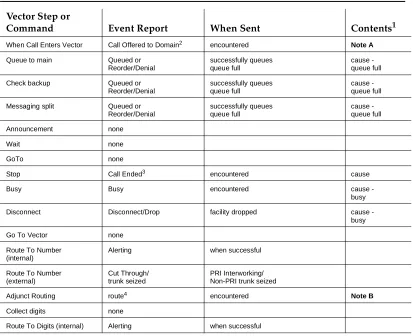
2. When a call enters the monitored ACD split or VDN, the ECS sends a Call Offered to Domain Event Report containing the call’s CPN/BN, DNIS, II-Digits, UUI (whether supplied by the network or by some other CallVisor adjunct), and any lookahead interflow and collected digits information associated with the call.
3. The application does a database search on the caller information
(CPN/BN) and retrieves the caller’s data to fill a data screen based on the service dialed (DNIS).
4. When the call is delivered to an available agent and/or user, the ECS sends an Alerting and/or Connected Event Report containing the number of the agent or user handling the call. The application then delivers the assembled data screen to the data terminal associated with the agent or user handling the call.
5. If the agent or user conferences or transfers the call to another destination, the ECS sends a Call Conferenced or Call Transferred Event Report indicating the new destination. The application then duplicates or recreates the caller’s data screen at the data terminal associated with the new destination.
6. When an agent or caller di