UNIVERSITI TEKNIKAL MALAYSIA MELAKA
DEVELOPMENT OF PATIENT TRAINING SYSTEM USING
IMAGE PROCESSING TECHNIQUE
This report is submitted in accordance with the requirement of the Universiti Teknikal Malaysia Melaka (UTeM) for the Bachelor of Electrical Engineering
Technology (Industrial Automation & Robotics) with Honours.
by
TANESH NAIR S/O SURESH
B071410264
940717-01-6553
DECLARATION
I hereby, declared this report entitled “Development of Patient Training System Using Image Processing Technique” is the results of my own research except as
cited in references.
Signature : ……….
Author’s Name : ………
APPROVAL
This report is submitted to the Faculty of Engineering Technology of UTeM as a partial fulfillment of the requirements for the degree of Bachelor of Electrical Engineering Technology (Industrial Automation & Robotics) with Honours. The member of the supervisory is as follow:
i
ABSTRAK
ii
ABSTRACT
iii
DEDICATION
To my beloved parents (Mr Suresh S/O C. P. Krishnan and Mrs Daivayany D/O Velayudhan), family members (Sajeevan Nair S/O Suresh, Dinesh Nair S/O Suresh
iv
ACKNOWLEDGEMENT
v
TABLE OF CONTENT
ABSTRAK i
ABSTRACT ii
DEDICATION iii
ACKNOWLEDGEMENT iv
TABLE OF CONTENT v
LIST OF TABLES ix
LIST OF FIGURES x
LIST OF ABBREVIATIONS, SYMBOLS AND NOMENCLATURES xii
CHAPTER 1: INTRODUCTION
1.0 Project Background 1
1.1 Problem Statement 3
1.2 Objectives 3
1.3 Scope of Project 3
CHAPTER 2: LITERATURE REVIEW
2.0 Introduction 4
2.1 Theory 4
2.1.1 Medical Rehabilitation 4
2.1.2 Image Processing 5
2.1.3 Types of image processing 6
2.1.4 Techniques of Image Processing 7
a) Image Acquisition 7
b) Image Analysis 7
i) Edge Detection 8
ii) Color Detection 8
vi
i) Contrast Stretching 10
ii) Noise Filtering 10
iii) Histogram Modification 11
d) Image Segmentation 11
i) Color-Based 12
ii) Threshold 13
iii) Watershed 13
e) Image Registration & Geometric Transformation 14
f) Image Matching 14
2.1.5 Software 15
a) SolidWorks 15
b) MATLAB 15
2.1.6 Types of Image in MATLAB 15
a) Grayscale 16
b) True Color RGB 16
c) Indexed 17
d) Binary 17
e) Uint 8 18
2.1.7 Comparison 18
a) Comparison between Color, Thresholding and Edge 18 Detection Technique
b) Comparison between Color, Grey and Binary Image 19
2.2 Previous Research 19
2.2.1 Image Analysis 19
a) Color Detection 19
b) Edge Detection 20
2.2.2 Image Segmentation 21
a) Color-Based 21
b) Threshold 24
2.2.3 Comparison of the methods used by previous researches 26
vii CHAPTER 3: METHODOLOGY
3.0 Introduction 29
3.1 Project Flowchart 29
3.2 Training Board 32
3.3 Circuit 32
a) Materials 33
b) Circuit Design 33
c) Process of LED Blinking 34
d) Coding 35
3.4 Image Capturing 35
3.5 Image Analysis 36
a) Color Detection 36
b) Thresholding Method 37
3.6 Graphical User Interface (GUI) 38
3.7 Conclusion 39
CHAPTER 4: RESULTS & DISCUSSION
4.0 Introduction 40
4.1 Hardware 40
a) Prototype Design 40
b) Training Board Prototype 41
c) LED Pattern Blinking Circuit and Simulation 42
d) Circuit of LED Pattern Blinking System 42
e) Result of Prototype with LED Pattern Blinking 43
4.2 Software 43
a) Design GUI for Color Detection & Thresholding Method 43
b) Main Code for Image Capturing 44
c) Main Code for Color Detection 45
d) Main Code for Thresholding Method 45
e) Main Code for Object Recognition 46
4.3 Software Result 46
viii
b) Result of Color Detection Technique 47
c) Result of Color Detection Technique 48
d) Pattern Test of Prototype Using GUI 48
4.4 Analysis between Two Image Processing Method 50 a) Analysis on Time Taken for Image Processing 51
b) Analysis on LED Detection 53
4.5 Discussion 54
CHAPTER 5: CONCLUSION & RECOMMENDATION
5.0 Introduction 55
5.1 Conclusion 55
5.2 Recommendation 56
REFERENCES 57
ix
LIST OF TABLES
2.1 Comparison between the analog image processing method and digital image processing method.
6
2.2 Comparison between the color detection, thresholding and edge detection method
18
2.3 Comparison between the color, grey and binary image 19
2.4 Output image of thresholding method 25
2.5 Comparison of previous researches 26
4.1 Prototype testing for different pattern sequence using GUI 49 4.2 Comparison of time taken between color detection and
thresholding
52
4.3 Comparison of LED detection between color detection and thresholding
x
LIST OF FIGURES
1.1 Example of color detection 2
1.2 Example of image before and after threshold 2
2.1 Rehabilitation training system using technology 5
2.2 Process of image processing 5
2.3 Example of analog and digital image 6
2.4 Image processing techniques 7
2.5 Example image of edge detection 8
2.6 Color detection process of the red circle 9
2.7 Example image for image enhancement 9
2.8 Contrast stretching 10
2.9 Noise filtering 10
2.10 Histogram modification 11
2.11a Original image 11
2.11b Segmented image 11
2.12 Example of color-based segmentation 12
2.13 Example of threshold effect of an image 13
2.14 Watershed segmentation 14
2.15 Example of greyscale image 16
2.16 Example of true color RGB image 16
2.17 Structure of indexed image 17
2.18 Example of binary image 17
2.19 RGB color cube for uint8 image 18
2.20 Color detection 20
2.21 Detection of RGB colors 20
2.22 Shape detection and signature 21
2.23a Original image of letter 21
2.23b Edge detection of letter 21
xi
2.25 Final result of the algorithm 23
2.26 RGB color segmentation 24
3.1 Flowchart of the overall project 30
3.2 Flowchart of the working process 31
3.3a Top view 32
3.3b Front view 32
3.3c Back view 32
3.4 Some basic materials of the circuit 33
3.5 Schematic diagram of LED blinking circuit 34
3.6 Flowchart of proposed LED blinking system 35
3.7a Interface of image acquisition 36
3.7b Captured image preview 36
3.8 Flowchart of RGB color detection method 37
3.9 The flowchart of thresholding method 38
3.10 GUI for image processing 39
4.1 Prototype design via SolidWork 41
4.2 Completed prototype 41
4.3 Circuit simulation for LED pattern blinking 42
4.4 Circuit of LED pattern blinking 42
4.5 Correct sequence of LED pattern blinking 43
4.6 GUI of the color detection and thresholding process 44
4.7 Result of the captured image 47
4.8 Result of color detection method 47
4.9 Result of thresholding method 48
4.10 Test result for the LED detection process 51
4.11 Comparison of time taken between color detection and thresholding 52 4.12 Comparison of LED detection between color detection and
thresholding
xii
LIST OF ABBREVIATIONS, SYMBOLS AND
NOMENCLATURE
RGB - Red, Green, Blue
HSI - Hue, Saturation, Intensity HSL - Hue, Saturation, Lightness CAD - Computer Aided Design GUI - Graphical user interface
C-Y - Cyan, Yellow
ROI - Region of interest
IR - Infrared
LED - Light emitting diode
1
CHAPTER 1
INTRODUCTION
1.0 Project Background
The rehabilitation system nowadays is considered as one of the important system in the human life as it helps the related individuals to overcome their medical errors and issues. There are many types of rehabilitation system available such as using training boards, physiotherapy and also by using technologies in exercise machines. Although it is good, but most of the systems have some problems which effects the process in one way or another.
In the field of imaging science, image processing method plays an important role. Image processing is a method used to solve the errors, problems and also obtain important information that are related with an image. In this method, the input is usually an image while the output maybe an image or information that are extracted from the input image. There are three basic steps in image processing which are importing the image via image acquisition tools, analyzing and manipulating the image and also the output in which result can be altered image or report that is based on image analysis.
2 Figure 1.0 Example of color detection
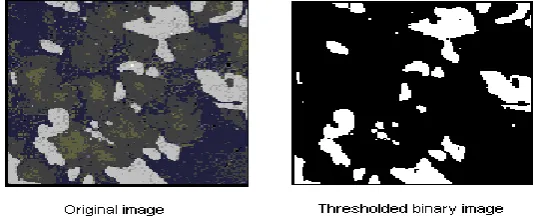
Besides that, thresholding method is known as a simplest and easiest method in image processing for image segmentation. It turns the greyscale image to binary image. Binarization process occurs during this conversion. This process is the important process in sending faxes as the image would be read as the pixel and sends the information. First, the image captured is converted to greyscale. Then, the threshold is applied using cluster algorithm to set fix or adaptive.
Figure 1.1: Example of image before and after threshold
[image:17.595.199.466.420.528.2]3 1.1 Problem Statement
The current available training board system in the rehabilitation field needs a supervisor to supervise the patient manually. Based on manual supervision and data recording, three problems occurs. The results would not be recorded accurately according to the patients training while time taken for data collection would be usually longer. Besides that, if the supervisor left the training area during the training session, it would be difficult to identify whether the users complete the training according to the given pattern instruction or not. According to that, the result of the training process would be not accurate. Therefore, the design of the training board system and image processing focuses on detecting the correct pattern and data acquisition.
1.2 Objective
Due to the problem statement above, the objectives of the project are:
i. To design a monitoring and data acquiring system for patient training board. ii. To develop patient training board system and data acquisition method using
image processing technique.
iii. To test and compare the two methods used for data acquisition.
1.3 Scopes of work
The scopes of work for the project include the following areas:
i. A webcam would be used to capture the image from the training system. ii. All data signal would be analyzed using MATLAB.
iii. Various Image processing technique such as color detection and thresholding method would be used for comparison.
4
CHAPTER 2
LITERATURE REVIEW
2.0 Introduction
This chapter focuses on the theory and information related to the scope of this project. Besides that, information and methods used in previous research are reviewed. According to the project, rehabilitation system, image capturing, color detection and image thresholding in image processing are related to this chapter. There are many past researches that uses image processing method via MATLAB software.
2.1 Theory
2.1.1 Medical Rehabilitation
5 Figure 2.1: Rehabilitation training system using technology
2.1.2 Image Processing
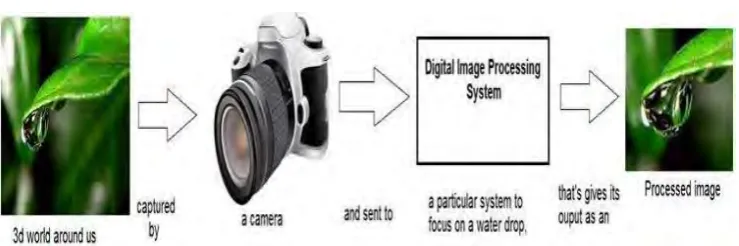
Image processing is a technique, which transforms an image from analog to digital form. Once it is done, some process would take place for image enhancement and to recover essential information or data from it. There are three general steps in image processing. Firstly, capture and record image with using suitable devices such as camera or laptops. Secondly, analyse and manipulate the recorded image, which includes the process of data compression, enhancing and pattern recognizing that is difficult to spot by normal human vision. Lastly, the image output, which is the outcome from the second step, image analysis. There are five purpose for this technique, which are visualization, image sharpening, image retrieval, pattern measuring and image recognition [2].
[image:20.595.146.516.548.671.2]6 2.1.3 Types of Image Processing
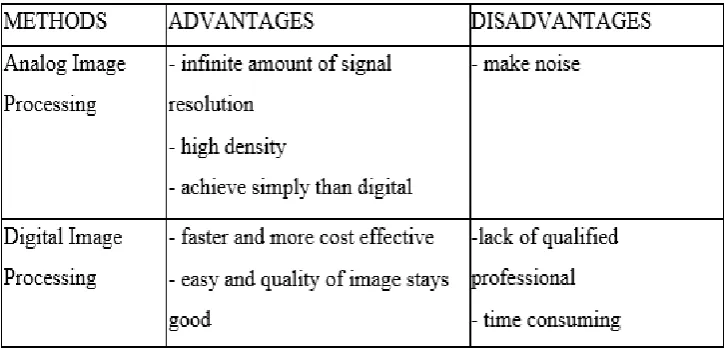
[image:21.595.215.419.262.396.2]Analog and digital image processing is the two methods used in this technique. Analogue image processing usually used for hard copies like printout papers or photographs. Image analyst uses them for interpretation. On the other hand, digital image processing is used for manipulation using devices such as computers or other technology devices. The three general step for this method are pre-process, enhancement and display of the image [3].
Figure 2.3: Example of analog and digital image
[image:21.595.151.514.512.686.2]7 2.1.4 Techniques of Image Processing
[image:22.595.137.506.159.366.2]There are few methods of image processing as shown in Figure 2.4 can be used to provide an effective visualisation and analysis.
Figure 2.4 Image processing techniques
a) Image Acquisition
It helps us to visualise, analyse and process the images in numerous data types. This method utilizes images and videos generated by camera, webcam and other image capturing devices. Image processing applications can be used to explore and find different algorithmic approaches. Segmentation an image based on various color and manipulation in different types of shapes can be done via threshold [4].
b) Image Analysis
8 detecting, noise removing, objects counting and measuring image properties of an object is included in this technique.
i) Edge Detection
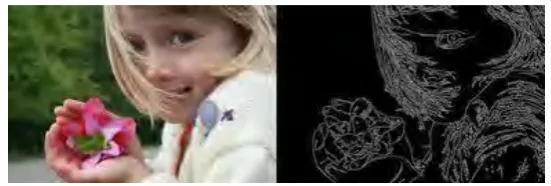
[image:23.595.180.456.362.455.2]Edge detection is one of the method used in image analysis. Edges are local changes of intensity in an image. The edges are located on the boundary between two regions of an image. The methods of edge detection consists of four steps. The first is smoothing, where the noise of the image is reduced. The second step is enhancement, which sharpens the image. Thirdly, determining the edge pixels by using methods such as thresholding. Finally, the localization step would be used locate the exact position of an edge [4].
Figure 2.5: Example image of edge detection
ii) Color Detection
9 Figure 2.6: Color detection process of the red circle
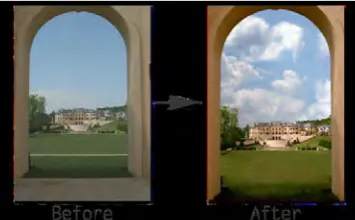
c) Image Enhancement
Image modification by adjusting the values of brightness of the pixel to improve its visual features is known as image enhancement. There are many techniques available to enhance and image. The enhancement would be used to make the features of the image to an even better and nice image which suited for humans and machine interpretation. For example, the satellite images and digital camera images lack in brightness and contrast because of the noise during image capturing.
Figure 2.7: Example image for image enhancement
[image:24.595.230.408.460.570.2]