Computer Science and Engineering: Theses,
Dissertations, and Student Research Computer Science and Engineering, Department of
Summer 7-24-2015
Enabling Distributed Scientific Computing on the
Campus
Derek J. Weitzel
University of Nebraska-Lincoln, [email protected]
Follow this and additional works at:http://digitalcommons.unl.edu/computerscidiss
Part of theComputer Engineering Commons, and theSystems Architecture Commons
This Article is brought to you for free and open access by the Computer Science and Engineering, Department of at DigitalCommons@University of Nebraska - Lincoln. It has been accepted for inclusion in Computer Science and Engineering: Theses, Dissertations, and Student Research by an authorized administrator of DigitalCommons@University of Nebraska - Lincoln.
Weitzel, Derek J., "Enabling Distributed Scientific Computing on the Campus" (2015).Computer Science and Engineering: Theses, Dissertations, and Student Research. 88.
by
Derek Weitzel
A DISSERTATION
Presented to the Faculty of
The Graduate College at the University of Nebraska In Partial Fulfilment of Requirements
For the Degree of Doctor of Philosophy
Major: Computer Science
Under the Supervision of Professor David Swanson
Lincoln, Nebraska July, 2015
Derek Weitzel, Ph.D. University of Nebraska, 2015
Adviser: David Swanson
Campus research computing has evolved from many small decentralized resources, such as individual desktops, to fewer, larger centralized resources, such as clusters. This change has been necessitated by the increasing size of researcher’s workloads, but this change has harmed the researcher’s user experience. We propose to improve the user experience on the computational resources by creating an overlay cluster they are able to control. This overlay should transparently scale to national cyberin-frastructure as the user’s demands increase.
We explore methods for improving the user experience when submitting jobs on a campus grid. To this end, we created a remote submission and overlay compu-tational framework called Bosco. This framework can remotely submit processing from the user’s laptop to clusters on the campus or on national cyberinfrastructure. To illustrate the possibilities of improving the user experience of remote submission, we created BoscoR, an interface to Bosco in the popular statistics and data process-ing programmprocess-ing language, R. Bosco improves the user experience of submittprocess-ing to campus clusters, while also being an efficient method for job management.
In order to solve some of the issues with data distribution on opportunistic re-sources, we created the CacheD, a data management framework for managing and provisioning storage resources on the campus. The CacheD additionally optimizes transfers to multiple resources by using the peer-to-peer transfer protocol, BitTor-rent. Further, the CacheD optimizes shared data between multiple jobs by caching
in time over current transfer methods and significantly decreases stage-in time when the data is already cached.
Finally, we explain how to control data distribution on a campus through a com-prehensive policy framework. This framework is implemented in the CacheD. We present the policy language, its currently available attributes, and how to extend the policy language beyond the default behavior. Multiple examples are given for different data distribution scenarios observed on campus resources.
Combining easy-to-use campus job submission with Bosco, efficient data distri-bution with the CacheD, and a policy language to manage the data distridistri-bution, we have created a unified framework for campus computing.
ACKNOWLEDGMENTS
I am thankful to have worked with many fine people throughout graduate school. Dr. David Swanson, my dissertation advisor, has provided a fertile environment of both distributed computing users and the resources to test and provide solutions. In addition, I am forever thankful for the opportunity he provided for me to attend graduate school.
Dr. Brian Bockelman has provided immense guidance for my dissertation. I thank Brian for mentoring me throughout my collegiate career.
I thank my colleagues at the Holland Computing Center. I have broken their systems, asked for advice, and caused an untold amount of extra work for them. I could not have completed this dissertation without the skilled experts at HCC who have helped me throughout the process.
I would also like to thank my colleagues in the Open Science Grid. They have provided me with a fellowship and internships in support of my Ph.D. I would like to especially thank Ruth Pordes and Dan Fraser for providing valuable advice and mentorship in my academic career.
My family deserves thanks for many intangible gifts. I thank them for encouraging me to complete my goals.
Last but not least, I thank my lovely fianc´ee Katie for providing immeasurable support.
Contents
Contents v
List of Figures vii
List of Tables x
1 Introduction 1
1.1 Campus Grid Computing . . . 1
1.2 Data Management on Campus . . . 5
1.3 Data Distribution Policy Language . . . 6
1.4 Overview of Dissertation . . . 8
1.5 A Note on Terms . . . 9
2 Related Work 10 2.1 Batch Systems and Grids . . . 10
2.2 Data Management . . . 18
2.3 State of Practice in Campus Computing . . . 25
3 Campus Job Distribution 29 3.1 Introduction . . . 29
3.3 Load Balanced Access to Computational Resources . . . 40
3.4 BoscoR: Extending R from the desktop to the Grid . . . 40
3.5 Conclusion . . . 55
4 Campus Data Distribution 57 4.1 Introduction . . . 57
4.2 Background and Related Work . . . 59
4.3 Implementation . . . 63
4.4 Results For Campus Cluster . . . 76
4.5 Results for Open Science Grid . . . 84
4.6 Conclusions . . . 92
5 Campus Storage Policy Language 94 5.1 Introduction . . . 94
5.2 Policy Language . . . 96
5.3 Uses of the Policy Language in the CacheD . . . 98
5.4 Example Policies . . . 102 5.5 User Scenario . . . 107 5.6 Conclusions . . . 109 6 Conclusion 110 6.1 Future Work . . . 112 Bibliography 116
List of Figures
1.1 Bosco Architecture . . . 3
1.2 Bosco’s Growing Reach as Demand Increases . . . 4
2.1 Architecture of Local HTCondor . . . 12
2.2 ClassAd Example Showing Usage of Requirements . . . 13
2.3 Architecture of GlideinWMS . . . 15
2.4 Grid Laboratory of Wisconsin Campus Grid . . . 16
2.5 Storage Technology Categorization . . . 20
2.6 Blast Workflow . . . 26
3.1 Bosco Architecture . . . 33
3.2 Bosco SSH Network Connections to the Cluster Login Nodes . . . 34
3.3 Bosco Job Submission Flow From Submission Host to Remote Cluster . . 36
3.4 Bosco Glidein Launch . . . 37
3.5 Session Log From Bosco Traceroute . . . 39
3.6 Function Definition of lapply . . . 42
3.7 GridR Input Generation . . . 45
3.8 GridR Function with Remote Package Installation Before Execution . . . 47
3.9 Direct Submission . . . 50
3.11 Number of Simultaneously Running Jobs . . . 53
4.1 Blast Workflow . . . 58
4.2 HTTP Cache Architecture . . . 60
4.3 Daemon Locations . . . 64
4.4 Flow of Replication Requests . . . 68
4.5 Cache Replication Showing Bottleneck . . . 70
4.6 Illustration of Cache Parenting Inside a Node . . . 73
4.7 Illustration of Cache Parenting . . . 74
4.8 Example Code to Create a Cache . . . 75
4.9 Function to Request a Replica of the Cache . . . 75
4.10 Illustration of Direct and BitTorrent Transfer Methods Experimental Setup 78 4.11 Comparison of Direct and BitTorrent Transfer Methods with Increasing Distinct Node Counts . . . 79
4.12 Histogram of Transfer Modes vs. Download Times for a BitTorrent Workflow 80 4.13 Timeline of Blast Runs . . . 80
4.14 Transfer Method vs Number of Jobs . . . 81
4.15 Graph of Transfer Nodes in the BitTorrent Transfer . . . 83
4.16 OSG Daemon Locations . . . 84
4.17 Violin Plot of the Transfer Speed Comparing Transfer Protocols . . . 87
4.18 Campus Aggregate Bandwidth Showing the Source Node’s 1 Gbps Con-nection . . . 88
4.19 OSG Aggregate Bandwidth Showing the Source Node’s 1 Gbps Connection 88 4.20 Download Time by Mode for a Single OSG BitTorrent . . . 92
5.1 CacheD ClassAd Example . . . 96
5.3 Example Output from CacheD Cron: test.sh . . . 98 5.4 Example Replication Method for a Cache . . . 102 6.1 Bosco Job Submission Flow From Submission Host to Remote Cluster . . 113
List of Tables
2.1 HTCondor Daemon Functions . . . 11
4.1 Table of Capabilities for Grid Data Caching Software . . . 62
4.2 Table of Capabilities for Direct and BitTorrent Transfer Methods . . . . 67
4.3 Transfer Times for Different Transfer Type . . . 86
4.4 HTTP Transfer Speeds by Site . . . 90
4.5 BitTorrent Transfer Speeds by Site . . . 91
5.1 Sample CacheD Attributes . . . 101
Chapter 1
Introduction
In this dissertation, we optimize distributed computing workflows on a campus grid. We are interested in optimizing a researcher’s use of the computational and storage resources on the campus to increase the reliability of, and decrease the time to solu-tion for, scientific results. We first extend prior work to enhance the computasolu-tional capabilities of researchers on a campus. We then expand our work to the data needs of modern workflows.
1.1
Campus Grid Computing
The increase of performance of computer hardware following Moore’s law [64] has allowed scientists to tackle larger problems. As they increase their use of research computing, their applications far exceed the locally available resources. Such applica-tions often turn to distributed computing to aggregate more computational, memory, or storage resources than locally available resources can provide.
Batch computing can combine the computational, memory, and storage resources of multiple computers in a single cluster through concurrent scheduling of
applica-tions. A computational grid is an extension of batch computing, where resources may be combined from multiple pools of resources to be used for an application.
A computational grid is a hardware and software infrastructure that provides de-pendable, consistent, pervasive, and inexpensive access to high-end computational capabilities [28]. A campus grid is a specialized grid where multiple resources are owned by the same organization, although it may be in multiple administrative do-mains.
A campus grid has become necessary to spread demand across multiple clusters. This is important when demand for a single cluster is large, due to improved per-formance or increased storage, and demand is low on other available clusters. One aim for a campus grid is to move computation from the in-demand cluster to other clusters, which can result in a shorter time to completion for the users’ jobs.
To succeed, a campus grid requires a framework to distribute jobs to multiple clusters in a campus. In [84], I proposed a solution based on HTCondor [47]. The solution required installation of a campus factory [83] on each cluster’s login node. An on-demand overlay was created that could efficiently run high throughput jobs on multiple campus resources.
Although my solution was efficient and fault tolerant, it was deficient in several ways. Installation and setup of the campus factory was difficult since it was not automated. The communication inside the overlay was insecure. We set out to correct these deficiencies.
We have enhanced my Masters thesis’ solution to include:
• Easier installation through automation
• Increased security through secure key exchange
• Improved access to computing through language frameworks such as R [71] We created a framework for job submission to remote resources that the user does not control. Typical grid submission uses custom interfaces such as the Globus Resource Allocation Manager (GRAM) [32], which is previously installed by an ad-ministrator. We assume resources do not have such dedicated grid software installed. This framework does not require administrator intervention for remote submission to opportunistic resources, since it uses interfaces that are installed on nearly all clusters that are typically used for interactive access. It automates the submission and error handling of jobs submitted to remote resources, while providing the user a consistent interface over multiple, load-balanced clusters.
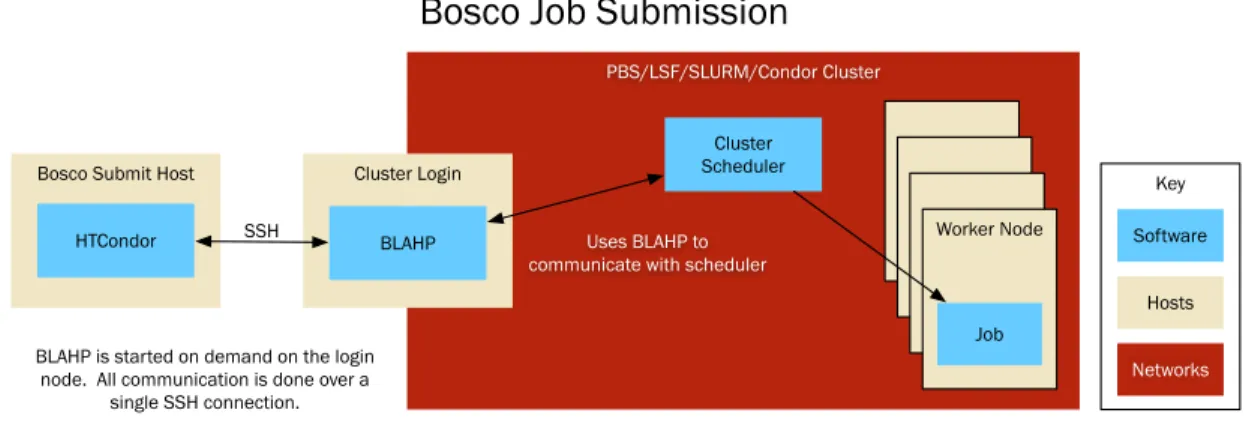
The new framework is named Bosco [82]. It uses secure protocols to connect to remote clusters in order to transfer files and submit, and monitor, jobs. Installation of Bosco on remote clusters and the submit host has been automated with simple tools. Clusters with restrictive firewalls are supported by multiplexing operations through a single secure connection. Furthermore, many cluster schedulers are supported by the underlying technology. A diagram of the architecture of Bosco is shown in Figure 1.1.
Bosco Submit Host
SSH
BLAHP is started on demand on the login node. All communication is done over a
single SSH connection.
Cluster Scheduler
Uses BLAHP to communicate with scheduler
Cluster Login
BLAHP HTCondor
Bosco Job Submission
Worker Node Job Software Hosts Networks Key PBS/LSF/SLURM/Condor Cluster
Bosco, in coordination with technologies in HTCondor, enables a job distribution method which is provisioned based on demand. A default Bosco installation is able to submit to one local cluster. If that cluster does not meet the user’s computational needs, then Bosco can be configured to submit to multiple clusters with load balanc-ing between them. If the user’s computational needs are still not met with multiple clusters, they can configure Bosco to submit resource requests to national cyberinfras-tructure such as the Open Science Grid (OSG) [55]. The provisioning capabilities of Bosco create an ever expanding network of available resources. The goal is to provide an expanding network of resources as shown in Figure 1.2.
Grid
Campus
Local
Figure 1.2: Bosco’s Growing Reach as Demand Increases
In order to ease access to Bosco for data processing, an interface has been devel-oped in the most widely used data processing language, R. This BoscoR framework enables users to never leave their R environment in order to start remote data pro-cessing.
Nonetheless, Bosco is not designed to be enough for researchers that have large data requirements. Input and output data are explicitly listed by the user. The data is transferred over the secure, but slow, connection between the submitter and resource for every job. Therefore, we must consider data and storage management on
the campus grid.
1.2
Data Management on Campus
There are many challenges in data management and distribution in scientific comput-ing [25]. For batch computcomput-ing, one challenge is transferrcomput-ing the data from the user’s computer to the execution resources. Large data workflows can strain the network near the data’s source, which can result in unreasonable amounts of time used solely for data transfer.
Data management is the framework and policies controlling data through the re-search cycle. In this dissertation, we are concerned with optimizing data management when using campus computational resources.
As users spread their computation across multiple clusters either on the campus or across campuses, data distribution and collection becomes more difficult. Before using the campus grid, a user would select a cluster to do their processing. The user then could host all of their data on that cluster by copying the data onto that cluster’s shared filesystem. The jobs access the data from the shared filesystem just as it would on the user’s desktop, available for all executions at the same directory.
These assumptions do not hold for a campus grid. A grid is made up of multiple computational clusters, with potentially many separate filesystems; no single filesys-tem is accessible from every computational resource. Further, the shared filesysfilesys-tem could become a bottleneck if many jobs are requesting the same data simultaneously. Therefore, data management techniques must evolve along with computation.
Most distributed batch schedulers are able to transfer the input data for each job execution. Each job starts with an empty execution area and the scheduler will transfer the files into it. When the user is not using the scheduler to transfer data,
the input data must still reach the execution host. Data will be transferred from the source (usually the user’s computer) to the execution resources for processing. The network connection between the source and the execution resources may be a bottleneck for the computation. Frequent re-transfers of the same input data will further congest the network between the source and the execution resources.
In this dissertation, we optimized two attributes of distributed data management: efficient transfer methods and reduction of duplicate transfers. We introduce the CacheD [85], a caching and data transfer daemon for input data in distributed com-puting. The CacheD uses novel data management methods based on technology developed for large peer-to-peer data transfers on the Internet, BitTorrent. It also caches input data on the execution resources to enable quick transfers on subsequent requests for the same input data.
Similar to the work with Bosco, the CacheD does not require privileged access in order to provision storage resources. It can use the storage on worker nodes spread across multiple clusters as a data input caching system.
1.3
Data Distribution Policy Language
Users of grid submission software currently have to describe how their files will be transferred from their submission host to the remote execution resource where the data will be processed. They have to coordinate the storage and computational re-sources without help. We propose a policy language that allows an agent to decide an appropriate method for data transfer. It determines the transfer method by ne-gotiating between the following three sources: a user-given policy language for the data, the remote execution resource’s capabilities and preferences, and the submit-ting resource’s capabilities and preferences. In addition, the policy language should
determine if the cache should be replicated to multiple resources. A modern flexible policy language for describing data distribution for campus users is needed.
This policy language must help the CacheD make decisions when interacting with other agents, such as other CacheDs or the local node. We discuss extending this pol-icy language to include custom attributes that users can include to improve choices on data distribution. The policy language utilizes the ClassAds [59] language. These ClassAds were originally developed in the context of matchmaking between com-putational resources and potential jobs. ClassAds are a schema-free language for describing heterogeneous resources. We demonstrate usage with new attributes that pertain to storage and expressions that can be evaluated to make decisions.
The user must specify preferences for the cache to consider. Examples include: where this cache should be distributed, how the cache should be distributed, and how long the cache should be stored. Each of these preferences must be negotiated with the preferences of the CacheD that may store or is storing the cache. The user’s preferences will affect how fast the cache is transferred (different transfer methods are more efficient than others), and also on which, and on how many, nodes that cache should be replicated.
Further, each CacheD must coordinate with one another in order to distribute the caches in an efficient method. Replication of caches between CacheDs must be negotiated. Each CacheD may decide, through evaluating its own policies, whether or not to accept a cache to be stored. These policies are again expressed in the ClassAd policy language.
1.4
Overview of Dissertation
This dissertation describes how data intensive applications can be run in a distributed campus environment.
Chapter 2: There are many distributed computing platforms available publicly. In this chapter, we will discuss these schedulers and differentiate them from Bosco. Also, we will discuss other available data management, distributed storage, and caching systems.
Chapter 3: We will discuss how computing can be managed on the campus using the Bosco framework. We will also discuss a case study of integrating Bosco with the programming language, R, in order to provide an easy-to-use interface to campus distributed computing.
Chapter 4: We will discuss the CacheD, a campus data distribution service. The CacheD is able to combine novel transfer methods with data caching to improve the stage-in time for large data sets. Through evaluation, we show that the CacheD demonstrates a significantly shorter stage-in time for large data sets over existing solutions that have been deployed.
Chapter 5: Simply caching and transferring data does not provide the flexibility that the CacheD requires to operate in a distributed environment. In this chapter, we will discuss the user configured policy framework and language that enable the CacheD to interact with the user and other daemons in order to make decisions.
1.5
A Note on Terms
High performance and distributed computing often use terms inconsistently. Below is a definition list of such terms, and how we will define them for this dissertation:
Job: A packaged unit of work with input and output. A job may consume compu-tational, memory, network, and/or storage resources in a batch system.
Workflow: A logical grouping of jobs executed on resources. The jobs may have some ordering.
Campus: An organization that may have multiple administrative domains which may vary access policies to resources.
Execution Resource: A resource which fulfills the requirements of a job and may also run it. This may be a worker node in a cluster.
Cluster: A set of execution resources that have high interconnection bandwidth and are managed by a single scheduler.
Batch System: A scheduler for the resources of a cluster.
Agent: An independent entity that can make decisions on its own without the control of another entity. In this dissertation, we will use the word agent to describe a daemon which can make independent decisions without the explicit control of other daemons.
Pilot: Pilot jobs are containers that once started, will request work from the user’s job queue.
Chapter 2
Related Work
2.1
Batch Systems and Grids
Several batch systems and grid schedulers are able to schedule tasks on execution resources. Examples of cluster schedulers that are frequently used are PBS [42], HTCondor [47], LSF [23], and Slurm [88]. Each scheduler is capable of resource management within a single administrative domain. Each of these resource managers has a limited ability to send processing to remote resources, which are typically under a separate administrative domain. PBS and Slurm can send jobs between clusters that run the same schedulers. HTCondor also has the ability to send processing to other clusters running HTCondor, and it can also transform jobs to the language of other schedulers such as PBS and Slurm.
2.1.1
HTCondor
HTCondor was developed at the University of Wisconsin–Madison. An overview from [72]:
Condor is a high-throughput distributed batch computing system. Like other batch systems, Condor provides a job management mechanism, scheduling policy, priority scheme, resource monitoring, and resource man-agement. Users submit their jobs to Condor, and Condor subsequently chooses when and where to run them based upon a policy, monitors their progress, and ultimately informs the user upon completion.
Commonly used HTCondor daemons and their functions are listed in Table 2.1.
Daemon Function
condor master Maintains HTCondor daemons
condor collector Information Provider
condor schedd User Job Queue
condor negotiator Scheduler: Matches jobs with resources
condor startd Execution manager. Runs on the resource Table 2.1: HTCondor Daemon Functions
Figure 2.1 shows the architecture of a local installation of HTCondor. Users interact with the SchedD to submit jobs. The Negotiator schedules the jobs on worker nodes. The StartD and the Starter runs on the worker node. The Starter starts a user’s jobs.
An important technology used in HTCondor is the Classified Advertisement (ClassAd) mechanism. ClassAds are the language that HTCondor uses to communicate between daemons and for matchmaking [59]. A ClassAd is a list of keys and values, where the values can be strings, numbers, or expressions. All resources and jobs are described by ClassAds. Job ClassAds have attributes such as log file, output, input, and job requirements. Resource ClassAds have attributes such as requirements to run on the resource, ownership, and policies. ClassAds are used for matching jobs to resources by evaluating requirements of both the jobs and the resources.
Cluster Negotiator Collector SchedD Worker Nodes StartD Starter Start Job Schedule Job Submit Job
Figure 2.1: Architecture of Local HTCondor
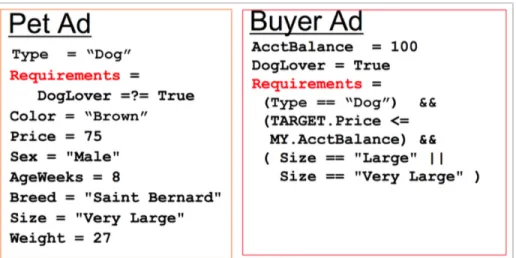
An example of using the Requirements attribute is shown in Figure 2.2. In this example, we have two ads. A pet which describes the attributes of a dog and a buyer ad which describes the attributes of a potential buyer. The pet ad has the requirements that the buyer is a DogLover. The buyer has the requirements:
• The pet must be a dog.
• The pet must cost less than the money the buyer has.
Figure 2.2: ClassAd Example Showing Usage of Requirements
In this example, the pet ad would match the buyer ad.
Another component of HTCondor is the grid computing agent HTCondor-G [34]. HTCondor-G communicates with Globus [31] sites. HTCondor provides job submis-sion, error recovery, and creation of a minimal execution environment. Along with HTCondor-G, HTCondor can also submit jobs to other systems including Amazon EC2 [10], PBS [42], Slurm. But, HTCondor is not capable of submitting to remote clusters without one of these specialized interfaces to the cluster.
HTCondor categorizes jobs by universe. Auniversein HTCondor specifies how the job should be handled. The simplest example is the vanilla universe. In this
universe, the job is handled as a single executable, with input and output, that will exit when the job has completed. When the universe is grid, this means that the job will be translated to another submission method. The other submission methods could be a Globus submission, or as used in this dissertation, a PBS or Slurm job submission.
2.1.2
GlideinWMS
The Glidein Workflow Management System (GlideinWMS) [66] is a job submis-sion method that abstracts the grid interface, leaving only a batch system interface. GlideinWMS accomplishes this abstraction by using pilot jobs. Pilot jobs are contain-ers that once started, will request work from the user’s queue. User jobs will not wait in remote queues; therefore, user jobs do not waste time in remote queues when idle resources are available. GlideinWMS separates the system into two general pieces, the frontend and the factory. The frontend monitors the local user queue and requests glideins from the factory. The factory serves requests from multiple frontends and submits pilots to the grid resources on their behalf. The factory only submits jobs to grid interfaces on multiple resources and can be optimized for that purpose. The frontend only deals with the local batch system, and can be optimized for the user’s jobs.
The GlideinWMS system uses HTCondor throughout. It uses HTCondor-G [34] to submit to the grid resources, as well as manage user jobs on the frontend. The frontend and factory are daemons that run on the user submit host and a central machine, respectively.
The architecture of GlideinWMS is shown in Figure 2.3. Just as in the HTCondor architecture, the user interacts with the SchedD. In the GlideinWMS architecture, the StartD and the Starter run on worker nodes on clusters not managed by the same organization as the GlideinWMS Frontend.
GlideinWMS is heavily used on the the Open Science Grid. A major user and de-veloper of the software is high energy physics, specifically the Compact Muon Solenoid (CMS) experiment [18] and the Collider Detector at Fermilab (CDF) [89]. They have demonstrated recently that GlideinWMS can scale beyond 200,000 running jobs.
GlideinWMS Frontend PBS Cluster Negotiator Collector SchedD Worker Nodes Start Job Schedule Job Glidein StartD Starter Submit Job
Figure 2.3: Architecture of GlideinWMS
GlideinWMS does have a few drawbacks. GlideinWMS uses an external factory that acts as a single point of failure. If the factory quits submitting jobs to grid resources, then users cannot run jobs. Also, GlideinWMS is designed to only submit to Globus Security Infrastructure (GSI) secured sites. GSI is typically used only on production grids, and is rarely used inside a campus where the trust relationship is implicitly stronger.
GlideinWMS requires many components to work together. The GlideinWMS Frontend requests pilots from a GlideinWMS Factory. The factory is run centrally and can server many frontends. Debugging of failed GlideinWMS pilots is a difficult since the pilot submission originates from a central factory. Debugging information is returned to the central factory rather than the researcher’s frontend. GlideinWMS requires significant to personnel time to install and maintain.
GLOW Local Cluster HTCondor Cluster HTCondor Cluster User OSG 3 1 2 HTCondor Cluster HTCondor Cluster 2 2
Figure 2.4: Grid Laboratory of Wisconsin Campus Grid
2.1.3
Existing Campus Grids
An example of an existing campus grid is the Grid Laboratory of Wisconsin’s campus grid. The Grid Laboratory of Wisconsin (GLOW) [33, 52] is a grid at the University of Wisconsin at Madison. GLOW uses Condor to distribute jobs on their campus grid. A diagram of the campus grid is shown in Figure 2.4. When the user submits a job, it first attempts to run at the local HTCondor cluster. If the local cluster is unable to meet the demands of the user’s jobs, then it attempts to run at HTCondor clusters at the University of Wisconsin. If they do not meet the demands of the user, the jobs may then run on the Open Science Grid (OSG), a national grid of clusters.
Security at the GLOW campus Grid is based on IP whitelisting. While there is a central team available to assist with management, each resource is free to de-fine its own policies and priorities for local and remote usage. Cluster ownership is distributed, although there’s also a general-purpose cluster available. Software and data are managed by an Andrew File System (AFS) [50] installation and Condor file
transfer. AFS is a global file system that every worker node will mount, therefore pro-viding a global space to store data and applications. This simplifies data distribution by providing a staging area.
Users of the GLOW campus grid have difficulty expanding to outside resources due to their reliance on a shared file system. Further, they rely on HTCondor to provide an interface to other clusters. They are unable to submit to clusters which have other schedulers such as PBS or Slurm. HTCondor does not excel at multi-node parallel scheduling, typically used in HPC. Therefore, campuses will not use HTCon-dor to managed their HPC resources. Instead, the HPC clusters will be managed by schedulers such as PBS or Slurm. HTCondor cannot submit jobs to remote PBS or Slurm schedulers, and therefore cannot use these HPC resources.
2.1.4
Open Science Grid
One example of a grid is the Open Science Grid (OSG) [55]. The OSG is a national cyber infrastructure consortium that provides dedicated and opportunistic use of computational and storage resources located at nationally distributed universities and national laboratories. The OSG provides infrastructure, services, software, and engagement to the users.
The OSG Production Grid provides a common interface to computing and storage resources. Globus or HTCondor provide an interface to the computing resources, while the Storage Resource Manager (SRM)/GridFTP provide an interface to the storage. Access to resources is provided by an OSG client. Globus, HTCondor, and SRM/GridFTP were developed by consortium members and are included in the OSG packaging.
that can store data. The storage element is both physically close and tightly coupled to the compute element in order to minimize latency for data. Since most sites have their own storage element, they are used to stage data into and out of the site.
A user will install the OSG Client tools and submit to the sites. The OSG tools will also include applications that can be used to stage data to the storage elements. A user only needs a valid OSG certificate to access the grid resources.
The OSG is organized into groups of users called Virtual Organizations (VO’s). These VO’s help users to run on the grid, as well as provide organization to many thousands of researchers. Additionally, the VO can sign members’ certificates to help sites identify users as belonging to the VO.
While users can directly submit jobs with a valid certificate, this method requires considerable amounts of detailed information for the user to be successful. New users are required to learn considerable technical information in order to exploit OSG to any significant extent, and must belong to a well-established VO to gain access to many OSG resources.
As illustrated by the GLOW campus grid above, the OSG can serve as an overflow for the campus’ computational resources. When the campus’ resources do not meet the demands of the users, the users’ jobs can overflow to the OSG using technologies such as GlideinWMS.
2.2
Data Management
The previous discussion primarily concerned access to computational resources. Data management is a further challenge for distributed computing. For this dissertation, data management can be broken down into three categories: storage systems, transfer protocols, and high level services. Storage systems provide access to the underlying
data storage. Transfer protocols provide a method to exchange data between storage systems. High level services provide data management services on top of the file systems, such as:
Data Life Cycle Management: Managing data through the life cycle of creation, processing, storing, and possibly deletion.
Data Placement: Determine where the data should be placed depending on re-quirements created by the system or a user. Additionally, able to respond to queries on the location of data.
Meta-Data Storage: Storage of information that describes the data.
Search Capabilities: Capability to search data that meet a set of requirements.
Rate Limit: Limit the number of transfers occurring simultaneously depending on a configuration or a policy.
Retries: Retry transfers that have failed.
Batching: Grouping transfers together logically. For example, group all files in a directory into a single logical transfers.
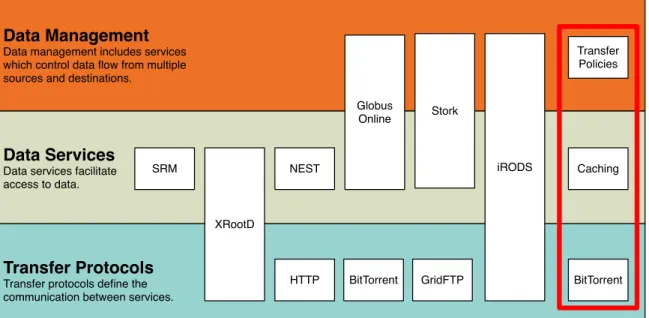
Figure 2.5 shows an overview of the different protocols and services, and how they fit into the three categories: Data Management, Data Services, and Transfer Protocols.
The OSG has has used and maintained many Storage Elements (SE). An SE is an interface to a storage system that my be accessed by many research organizations. An SE provides services such as data movement and data discovery. But, the SE model has been a failure for opportunistic organizations [17]. DQ2 [19] and Phedex [61] are able to manage data movement for the Atlas and CMS experiments, but the cost of
Transfer Protocols Transfer protocols define the communication between services. Data Services
Data services facilitate access to data.
Data Management Data management includes services which control data flow from multiple sources and destinations.
HTTP XRootD SRM NEST BitTorrent GridFTP Globus Online Stork iRODS BitTorrent Caching Transfer Policies
Figure 2.5: Storage Technology Categorization
management of these systems is too high for smaller research organizations. The key to this failure is that file loss is considered an “exceptional” event. For opportunistic research organizations, file loss must be treated as an expected outcome. Additionally, the interface with a storage element is too low level for many users. They must make decisions on their own about what directory the files should be stored.
An example of a data management service is the integrated Rule-Oriented Data System iRODS [58]. It provides meta-data storage, querying, and rule-based place-ments. It can perform transfers to storage resources. When given input, iRODS also has the capability to create rules and take action on data. It creates a small policy framework that, upon certain actions, can execute micro-services. The rules for iRODS can be large and cumbersome for simple data replication. Further, to do anything substantial with the rules, custom code must be written.
iRODS is inflexible in the presence of unreliable underlying storage. iRODS as-sumes that any data stored in it is available at any time, and does not periodically
check the status of the data it is storing. This does not make iRODS a good fit for opportunistic storage, which can be unreliable. Further, the iRODS rules can be cumbersome to write. They are written in micro-services, which are external pro-grams that must interface with iRODS. In contrast, ClassAds expressions are written as simple boolean expressions that are understandable to most programmers. iRODS is an excellent example of data management, but it doesn’t map will to the use case we consider because of the limitations outlined above.
Stork [44] is a data placement scheduler. It can schedule data placement and transfers to and from remote storage systems. Stork is innovative in that it treats data transfers similar to jobs. Just like jobs in a batch system, Stork will queue transfers and check for proper completion of the transfers. If the transfers fail, it is able to retry the transfers according to policy. These policies are written in HTCondor ClassAds. Stork is limited to managing data transfers between storage elements. It is unable to utilize opportunistic storage resources directly.
Kangaroo [73] is another storage scheduler multi-level file access system. It allows for multiple levels of staging in order to send job output back to a storage device. It can do this by asynchronously staging data through multiple storage devices on its path to the destination filesystem. The goal of the Kangaroo system is to utilize unused network and storage resources in order to provide a resilient method for out-put data transfers. The Kangaroo system does not attempt to optimize inout-put data transfers.
DQ2 [19] and Phedex [61] are production transfer services for the Atlas and CMS physics experiments, respectively. They are used to manage distributed transfers to and from sites inside the collaborations. Additionally, they have had databases built on top of them that provide features such as combining files into datasets for easier bulk transfer management. Both were designed for their respective physics
experiments, and therefore, would be very difficult to generalize for outside users. Further, both were designed for reliable storage rather than opportunistic storage.
Distributed filesystems such as Hadoop [86] can provide data placement policy. For example, Hadoop can be configured to replicate the contents of a directory at leastX
times. Further, a script can be given to Hadoop which it can query to create a topology of the data center, further providing control of how the data replicas are sent. This topology script has been used by us to create a data center aware Hadoop replication policy [38]. These Hadoop policies are created and maintained by administrators rather than users. Therefore, a user’s preferences will not be considered when making replication decisions.
2.2.1
Storage Systems and Access Protocols
Distributed file systems have long had their own storage access methods. An example of this is Hadoop, a popular distributed file and processing system. The only method to access Hadoop storage is through the Hadoop protocol. On the Open Science Grid, the primary access methods are through file system independent middleware such as the Storage Resource Manager (SRM) [67] and XRootd [27]. They provide a translation layer from system independent grid protocols and security mechanisms to the underlying storage system, such as Hadoop. The Storage Resource Manager (SRM) is a previously popular protocol to manage remote distributed filesystems. It is a standardized protocol that allows remote, distributed access to large storage with APIs to balance transfers among many data servers.
Beyond storage access methods are storage schedulers. These schedulers do not define a protocol to access the storage, rather they coordinate the access. NeST [14] is a software-only grid aware storage scheduler. It supports multiple transfer protocols
into a storage device, including GridFTP [7] and NFS [77]. Further, it provides features such as resource discovery, storage guarantees, quality of service, and user authentication. It is layered over a distributed filesystem to provide access to it. NeST functions as the interface and access scheduler for a storage device. Features such as the storage guarantees and quality of service require NeST to be the only interface into the storage device, a very rare feature in today’s grid storage. Today’s storage elements, such as the four petabyte Hadoop Distributed Filesystem (HDFS) instance at University of Nebraska–Lincoln, include multiple protocols and interfaces to access the storage element. Nebraska runs four methods of accessing and modifying storage [11], SRM [67], GridFTP, XrootD, and FUSE [69] mounted Hadoop. All of these methods are required for compatibility with different access patterns and clients. NeST could implement each of these protocols, but it would be extremely difficult to manage the storage centrally. For example, FUSE is mounted on all 300 worker nodes. The GridFTP and XrootD servers run on 10s of servers, with an aggregate bandwidth of 10 Gbps. Scaling quality of service and storage allocation/enforcement across all of these access methods would likely prove impossible.
None of the storage management technologies discussed work for limited-duration data. This is data that is tied to a particular workflow, and only needs to be available during that workflow. The storage technology would need to have information about the workflow in order to implement this feature, or provide a clear eviction policy that the user could manage.
2.2.2
Data Services and Management
Storage systems may exchange data via a number of transfer mechanisms, such as BitTorrent. BitTorrent has been used for data transfer in computational grids by
Wei, Fedak, & Capello [79, 80, 81]. It has been shown to improve data transfer speeds when compared to traditional source and sink transfer methods, such as FTP [56], the base protocol to GridFTP, a grid enabled FTP protocol. The researchers did not compare performance of the BitTorrent protocol when compared to modern grid transfer techniques, such as using HTTP caching. Further, the authors did not test BitTorrent transfers across diverse network topologies that are common on the grid. A worker node from one cluster may not be able to communicate directly with a worker node from another cluster. Therefore, BitTorrent may not work between clusters but will work inside clusters.
GridFTP is a grid enabled version of FTP. It uses grid security in order to authen-ticate transfers between storage resources. GridFTP transfers files in multiple TCP streams in order to optimize transfer services. But, it does not have data services features such as automatic retry of failed transfers and transferring entire directories. Globus Online [30] is a web interface for transferring files between sites and shar-ing data with other users. It offers an intuitive web interface for bulk transfers between endpoints. It expands on the capabilities of GridFTP to provide automatic retry of failed transfers and the ability to transfer entire directories. It only sup-ports the GridFTP [7] transfer protocol and requires GridFTP implementations at all endpoints. Further, it does not offer either the ability to find data or to find storage resources that fulfill a set of requirements. Since Globus Online has these limitations, it fits into the “Data Services” category, and only provides limited “Data Management” capabilities.
There are also popular data transfer tools used on clusters such as secure copy (SCP) from OpenSSH [53] and rsync [6]. SCP is a simple copy tool that uses the Secure Shell (SSH) protocol to transfer files from a source to a client. Rsync is also able to copy files from a source to a client, but it can also do differential copies,
where only the changed portion of a directory will be copied at a time. Both of these methods are used heavily when the data size is small. But they both use single stream TCP in order to transfer data, which in practice has been shown to be slower than multiple TCP streams as used in GridFTP [7] or BitTorrent.
2.3
State of Practice in Campus Computing
In order to illustrate the available technologies on the grid, we will begin with a common user application. We will then describe the technologies that could enable this computing on the grid.
2.3.1
Use Case
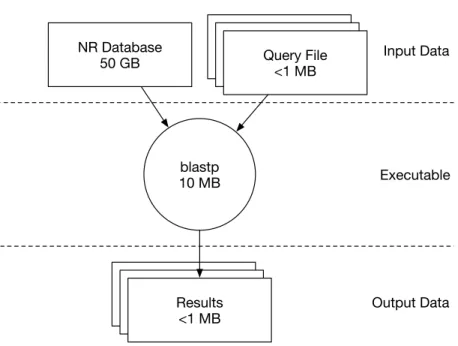
We will focus on the use of a commonly used biology application, BLAST [9]. BLAST workflows typically include the following files:
• Executable: The BLAST application is distributed with many executables,
such as blastp and blastx. They are run on the remote execution resources and produce output. In this dissertation, we will be primarily using blastp, which searches protein sequences.
• Database: A large listing of sequences that will be scanned for similarities to
the sequences in the query files.
• Query Files: A small list of sequences that will be compared to the sequences
in the database to find similarities.
Each of these files have different properties. The executable is relatively small, often 10s of megabytes, but identical copies are used by all executions of BLAST.
Executable Output Data Input Data blastp 10 MB NR Database 50 GB Query File <1 MB Query File <1 MB Query File <1 MB Results <1 MBResults<1 MBResults <1 MB
Figure 2.6: Blast Workflow
The query files are unique to each job but are typically very small, not exceeding 1 MB. The database is a large collection of proteins that is searched for each protein in the query file. Many databases are publicly available for use in BLAST. The most common is the non-redundant (NR) database, which is currently 50 GB and updated weekly. A diagram of the workflow is shown in Figure 2.6. The workflow can be broken into hundreds or thousands of jobs by splitting the queries into subsets of the larger query.
2.3.2
Current Approach
If the user has a BLAST application and wishes to run a large number of jobs, they must first gain access to computational resources. They may have access to a campus cluster. In that case, they will login to the campus cluster. The first step for the user is to learn the scheduler language. There are many different languages, such as PBS, Slurm, or HTCondor; all have slightly different syntax.
Once the scheduler language has been learned enough to write a submission file, the data must be transferred to the cluster from their laptop. This is usually ac-complished with a tool such as SCP from the OpenSSH [53] package. This will be transferred slowly as SCP only uses a single encrypted stream to send data. The 50 GB NR database, transferred from the user’s wireless connected laptop to the cluster could take two hours (at 54 Mbps), if nothing goes wrong with the transfer. The NR database is updated frequently, therefore frequent re-transfers of the database will be required when future BLAST jobs are submitted.
The data is managed on the cluster’s shared filesystem. The filesystem is available on every worker node. The BLAST executables will read the database directly from the shared filesystem.
Once the data is on the cluster, the user will submit the jobs to the scheduler to process the data. The BLAST database will be copied for each and every execution to the execution resources from the cluster’s shared filesystem.
The user must wait for the BLAST jobs to complete before checking the results. If the user has more BLAST jobs to process, they may submit yet more jobs to the cluster, or to another cluster on the campus. If the user submits to another cluster, they must re-transfer the database to that cluster, and submit the BLAST jobs.
Once the computation has completed, the user will copy the output data back to their laptop for further analysis. If the user submitted to multiple cluster, they will need to copy results from each of the clusters.
2.3.3
Issues with Current Approach
There are many issues with the current approach:
only one cluster, then they only need to learn one submission language. But if their demands grow, and they need more resources, they will need to learn another programming language.
• Data copies are very expensive and should be minimized. The NR database is updated frequently; therefore, it must be updated on the cluster frequently.
• Once on the cluster, each job will need to copy the NR database to the worker node in order to process it, even if was already copied by a previous job. This copy will happen every time, as there is no caching in the vast majority of distributed filesystems.
• No storage management is used for the input data, executables, or output. This data may not be cleaned up after the jobs completion, therefore depleting the storage resources available for future workflows.
Chapter 3
Campus Job Distribution
3.1
Introduction
Campus grids are usually defined as a set of clusters available to researchers. These clusters are divided either by purpose, i.e. owned by a certain group, or by hardware generations. Users submit to a single cluster, and their jobs are eligible to run on that cluster. We propose a framework, Bosco, to distribute jobs to multiple campus clusters transparently to the user.
There are many challenges for researchers on campuses with multiple, distinct clusters. For example, a researcher may not know which cluster may run their jobs the quickest. The researcher may not be able to determine which campus cluster will start their jobs first. Each of these challenges can force the researcher to make decisions with insufficient information that may be suboptimal and delay their workflow’s time-to-completion causing costly research delays.
Traditional cluster computing requires the user to log into the cluster and submit their processing and data there. However, researchers are most comfortable on their own laptop computer. A submission method to enable job processing to originate
from the user’s laptop to be run on a remote cluster would provide a more convenient user interface.
Another challenge for researchers attempting to use these clusters is the inability to install applications. In order to protect the clusters’ integrity, campus clusters only give researchers limited capabilities on the resources.
A number of different methods have been used to distribute jobs across multiple resources. Inside a cluster, schedulers such as HTCondor [47] and PBS [39] have been used. Neither of these schedulers are typically used to submit jobs from users’ laptops, a key requirement in improving the user experience. Compute Element based remote submission is heavily used in computational grids, and they use technology such as Globus [29] and UNICORE [63]. This remote submission requires compute element software installation on a server inside the cluster, which requires an administrator.
Bosco [82] is used to effortlessly create a remote submission endpoint on a cluster without requiring the administrator to install any software. Bosco is a remote sub-mission framework based upon HTCondor. It uses the SSH [87] protocol to submit and monitor remotely submitted jobs. Additionally, it performs file transfers using the same SSH connection as the submission.
Improving the user experience was a primary goal of Bosco. We addressed the user experience by improving the interaction with the user during installation and configuration. Another problem area we found is when a user must debug issues with distributed software. In order to address this, we created a traceroute [48] like utility. The traceroute utility tests every step of the job submission process, from network access to a properly configured remote scheduler. If an error is found at any step of the traceroute, a useful message is given to the user, including possible steps to fix the problem.
scien-tific computing on a research campus using Bosco.
3.2
Bosco Architecture
The Bosco user experience can be described in two sections: installation/configuration and running jobs. Each of these areas was approached with the goal of improving the typical user experience for installing and running distributed computing software. The architecture of Bosco is shown in Figure 3.1.
The Bosco architecture is divided into the submit host and the cluster login node. The submit host is where the user submits their jobs and where the user interacts with the Bosco system. The login node is the submit host for a cluster. The login node is assumed to not be maintained by the user submitting to Bosco. The login node has access to the local scheduler with commands such as qsub and qstat (for PBS).
3.2.1
Installation & Configuration
Though typically separate, Bosco combines the installation and configuration steps in order to improve the user experience. Both are done by a single script, the
bosco quickstart script that follows several steps:
1. Determine the platform and download the appropriate version of Bosco (sup-ports Mac, EL5/6, Debian 6)
2. Install Bosco into the user’s home directory.
The script downloads the Bosco binaries from a central server to the submit host. Bosco is installed into the user’s home directory by default in order to enable non-root installations. Connecting a cluster to the Bosco submit host requires configuring the secure connection to the cluster, and installing a small amount of software on the submit node that will be used for job submission and job status checks.
The installation on the user’s laptop and on the remote cluster do not require administrator access. All files and applications are installed in the user’s directories. We have also created a native installer, a PKG, for the Mac version of Bosco. It is distributed in an Apple Disk Image (DMG) for consistency with other Mac software. Unlike the Linux installer, it does not automatically configure a cluster at first installation.
3.2.2
Running Jobs
The image shown in Figure 3.1 shows the architecture of job submissions of a Bosco submit node. Job submissions are done from the Bosco submit host, which in turn submit to the connected cluster login node.
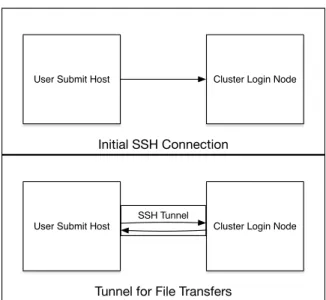
First, the Bosco submit node connects to the login node over an SSH connection and creates the forwarded SSH tunnel back to the submit node, which is used for file transfer. Figure 3.2 shows the network usage for Bosco. SSH was chosen as the protocol, since it is used nearly universally for cluster access. It creates the forwarded SSH tunnel in order to minimize the number of connections between the Bosco submit host and the login node. By reusing the same SSH connection, the number of SSH logins is reduced to one. Further, the number of connections is not dependent on the number of jobs, as Bosco will reuse the same connection for all jobs submitted to a cluster. Minimizing the number of connections to a login node is important since
B os co S ub mi t H os t SSH B LA H P i s s ta rt ed o n d ema nd o n t he lo gi n no de . A ll c ommu ni ca tio n i s d one o ve r a si ng le S S H c onne ct io n. C lu st er S che du le r Us es B LA H P t o co mmu ni ca te w ith s che du le r C lu st er L og in BL AH P H TC ond or
B
os
co
J
ob
S
ub
mi
ss
io
n
W or ke r N od e Job So ft w ar e Hosts N et w or ks Ke y PB S /L S F/ S LUR M /C ond or C lu st erInitial SSH Connection
User Submit Host Cluster Login Node
Tunnel for File Transfers
User Submit Host Cluster Login Node
SSH Tunnel
Figure 3.2: Bosco SSH Network Connections to the Cluster Login Nodes
many login nodes include firewall rules to slow down brute force SSH logins that block frequent successive SSH connections. The Bosco submit host does not require any open ports in a firewall, only outgoing connections to a remote login node’s SSH port. Next, Bosco checks for the necessary installed software on the login node, and starts the BLAHP [60] daemon that will communicate with the scheduler on the lo-gin node. The BLAHP daemon on the lolo-gin node starts the file transfer daemon to connect back to the submit host through a forwarded SSH tunnel that Bosco created. The transfer daemon creates and transfers the job sandbox to the login node. The transfer to the login node is performed by HTCondor’s fault tolerant file transfer mechanisms and is entirely encrypted over the SSH connection. Authentication be-tween the login node and the Bosco submit host is performed by a shared symmetric key that was previously sent out-of-band over the SSH connection to the BLAHP dae-mon. Integrity of the files is ensured by using HTCondor’s built in integrity checking of all communication between daemons.
to the BLAHP daemon to translate to the local site’s scheduler language. The BLAHP supports PBS [22], LSF [23], SGE [36], Slurm [88], and HTCondor schedulers. Since the BLAHP will translate the HTCondor job into any of the above schedulers, there is no need to write submission scripts in anything other than the HTCondor language. The BLAHP creates the submission file, and submits it to the cluster’s scheduler. Bosco periodically polls the BLAHP over the SSH connection for the status of the job. Once the job is detected to have been completed, the BLAHP starts HTCondor’s transfer daemon to transfer the output sandbox back to the submitter machine.
Figure 3.3 shows the job flow from the user to the Slurm scheduler on the remote cluster. As you can see, it goes through six daemons before reaching the cluster scheduler. The HTCondor job manager agent (SchedD) accepts the user’s jobs, act-ing as an agent which will attempt to execute the job. HTCondor’s grid interface daemon (GridManager) is spawned by the SchedD in order to service the Bosco job. The RemoteGahp (Grid Ascii Helper Protocol) starts the SSH tunnel between the user submit host and the cluster. The BLAHP (C portion) interprets the job require-ments, and executes the BLAHP (shell portion) which translates the requirements into the local scheduler language. Finally, the BLAHP submits the jobs to the Slurm Scheduler.
Bosco has two modes of job submission:
1. Direct – A single job on the Bosco submit host corresponds to a single job on the remote cluster. Each job is submitted individually to the remote cluster’s scheduling system. This method is the simplest to run and imposes no special requirements on the submit machine.
2. Glidein– Bosco submits many pilot jobs to the remote cluster using the direct method. But each of the pilots can service multiple user-submitted jobs from
SchedD
GridManager
RemoteGahp
BLAHP (C portion) User
BLAHP (Shell portion)
Slurm Scheduler
User Submit Host
Remote Cluster
Figure 3.3: Bosco Job Submission Flow From Submission Host to Remote Cluster
the Bosco submit host. This method minimizes the overhead on the remote cluster since Bosco is not submitting many jobs through the cluster scheduler. The glidein method requires that the Bosco submit host can be contacted from the remote cluster worker nodes. The glidein submission method is based off of previously written software, the Campus Factory [84].
The two modes of job submission allow users to optimize for their environment. If they are running many short identical jobs (which is frequent in high throughput computing), then the glidein method is ideal for them. The glidein pilots are much faster at starting jobs than the direct method (as will be seen in Section 3.4.7).
If the users are running fewer, longer, and possibly unique jobs, then the direct submission method would work best. When submitting using the direct method, different requirements may be specified for each job. In contrast, all glideins request the same resources, and are therefore not ideal for heterogeneous jobs. We expect most users will start with the direct method then graduate to glidein once they become accustomed to submitting batch jobs.
Pilot Launch PBS Cluster PBS Scheduler PBS WN Condor WN User Bosco 2
User Job Launch
PBS Cluster PBS Scheduler PBS WN Condor WN User Bosco 3 1
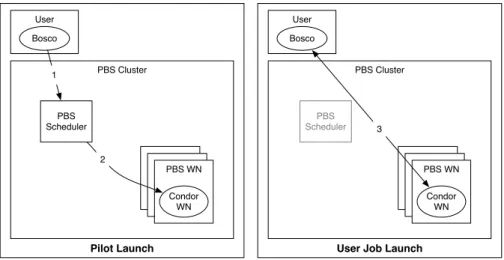
Figure 3.4: Bosco Glidein Launch
Bosco glidein pilot submission is depicted in Figure 3.4. (1) Bosco first submits a glidein pilot to the remote PBS cluster. (2) Once the pilot starts on a worker node, it will connect to the user’s Bosco instance to request work. (3) Jobs will then be run on the PBS cluster’s worker node under the Bosco pilot.
Bosco’s fault tolerance is in its handling of the remote cluster. For example, if the user’s computer loses connection with the remote cluster due to network issues, or
even if the user suspends their laptop, Bosco will place the jobs on hold. Although no new jobs will be submitted to the remote cluster, jobs that were already submitted will continue to run. Further, when Bosco re-establishes a connection to the remote cluster, Bosco will check the status of already submitted jobs. It will then bring back any output data from any jobs that have completed and continue to submit jobs to the remote scheduler.
3.2.3
Improving User Experience
In order to improve the user experience at each step of the job process, extra effort has been given to provide useful error messages in case of failures. For example, HTCondor was modified to relay the standard error for any commands sent to the BLAHP daemon, as useful debugging information is available there.
Also, an additional traceroute was created to test each step of the job submission process, including:
• SSH connection to the remote login host: Tests network connection, login
host availability, and passwordless SSH setup.
• Job submission to the Bosco submit host: Tests Bosco daemon availability and Bosco submit host file system availability.
• Job submission to the remote login host: Tests the remote scheduler
availability, remote cluster software setup, input file transfer, and cluster file system availability.
• Job completion and status update from login host: Tests Bosco status
The traceroute is useful for debugging issues with a Bosco installation. It is designed to test each step in the job execution life cycle and give meaningful error messages and possible solutions.
$ b o s c o _ c l u s t e r - t g l i d e i n . unl . edu
T e s t i n g ssh to g l i d e i n . unl . edu ... P a s s e d ! T e s t i n g b o s c o s u b m i s s i o n ... P a s s e d !
S u b m i s s i o n and log f i l e s for t h i s job are in
/ ho m e / s w a n s o n / d w e i t z e l / b o s c o / l o c a l . b o s c o / bosco - t e s t / b o s c o t e s t . i b h J N W a i t i n g for j o b m a n a g e r to a c c e p t job ... P a s s e d C h e c k i n g for s u b m i s s i o n to r e m o t e c o n d o r c l u s t e r ( c o u l d t a ke ~30 s e c o n d s ) ... P a s s e d ! W a i t i n g for job to e x i t ... t h i s c o u l d t a k e a w h i l e ( w a i t i n g 60 s e c o n d s ) ... F a i l e d
The job did not end in 60 s e c o n d s . T h i s is not a l w a y s a bad t h i n g ... M a y b e c o n d o r is w a i t i n g l o n g e r to p o l l for job c o m p l e t i o n ?
H e r e is the c u r r e n t s t a t u s of the job :"
- - S u b m i t t e r : red - f o r e m a n . unl . edu :
< 1 2 9 . 9 3 . 2 3 9 . 1 7 0 : 1 1 0 0 0 ? n o U D P & s o c k = 1 5 1 4 7 _7985_2 > : red - f o r e m a n . unl . edu
ID O W N E R S U B M I T T E D R U N _ T I M E ST PRI S I Z E CMD
3 8 5 2 9 . 0 d w e i t z e l 7/1 0 0 : 1 7 0 + 0 0 : 0 0 : 0 0 I 0 0.0 e c h o H e l l o
Figure 3.5: Session Log From Bosco Traceroute
Figure 3.5 shows the session log from a successful Bosco traceroute. It first tests the SSH connection to the remote host,glidein.unl.edu. Then, it creates a test job, which it submits to the local Bosco instance. It checks that the local Bosco instance accepts the job, and that Bosco submits the job to the remote cluster. Then, the traceroute waits 60 seconds for the job to exit. In this case, the job did not exit in 60 seconds because there was no available resource to run this test job. Traceroute then tells you the current status of the job before it exits.
3.3
Load Balanced Access to Computational
Resources
Bosco is used in conjunction with the Campus Factory [83], which is described in full in my Master’s thesis [84]. The Campus Factory submits pilot jobs to remote clusters to create an overlay that provides a consistent interface to the resources. The campus factory submits to multiple Bosco endpoints simultaneously, load balancing between them by keeping idle jobs (constant pressure) on all clusters. PBS then provisions resources for the Bosco pilots. The pilots call back to the Bosco submit host in order to request jobs.
Submission via the Bosco framework is done using the HTCondor submit file lan-guage. When an idle user job is detected by the Campus Factory, it begins to submit glideins to all Bosco endpoints simultaneously. The Campus Factory maintains idle glideins on each of the endpoints until the user’s jobs have completed. The jobs run on any resources that become available.
3.4
BoscoR: Extending R from the desktop to
the Grid
As a case study of improving the user experience when using Bosco and distributed computing, we created BoscoR, an interface to Bosco from the R statistical program-ming language.
3.4.1
BoscoR: Introduction
Usage of the R language [70] by data miners has grown much faster than any other programming language [62, 43]. Data mining requires computational resources, some-times more computational resources than can be provided by their desktop computer. In a recent study of data scientists [62], “Available computing power” was the second most common problem for big data analysis. In addition, the respondents stated that distributed or parallel processing was the least common solution to their big data needs. This could be attributed to the difficulty of processing data with the R language on distributed resources, a challenge we tackled with BoscoR.
A reason that distributed computing is not seen as a popular solution to big data processing is that scientists are more familiar processing on their desktop than in a cluster environment. R is typically used by researchers that have not used distributed computing before and do most of their analysis on their local systems with integrated development environments (IDE) such as RStudio [57]. Users are unaccustomed to the traditional distributed computing model of batch processing in which there is no interactive access to the running processes.
Though researchers may not have experience with distributed computing, most have extensive computational resources available to them, either locally provided by their institution or university, or through national cyberinfrastructure such as the OSG [55] or XSEDE [2].
In this section, we will describe GridR [78], an R library used to interact with the Bosco framework. In section 3.4.4, we describe how we combined these two compo-nents to create a fault-tolerant framework that provides a positive user experience. Next, in Section 3.4.7, we discuss preferred submission methods based on the length of the R function, and show results from numerous test runs against a production
cluster. Finally, some conclusions and future work are offered.
3.4.2
Background
BoscoR is primarily made up of two components, Bosco and GridR. Bosco provides a simple setup interface to the remote batch system, and it provides fault tolerance for job submission and file transfers. GridR provides a user interface to create and initiate remote processing.
3.4.3
GridR
Many parallel libraries are available for R. Most focus on managing the R processing on a single server such as the parallel package [5]. The parallel package comes bundled with R and provides simple, single machine, multi-core parallelism. Paral-lelism is done by using variations of the R function lapply. A simplified definition of lapply is shown in Figure 3.6. lapply is the basis for nearly all parallel libraries in R.
lapply(X, FUN, . . .):
X a vector (atomic or list) or an expression object.
FUN the function to be applied to each element of X
. . . optional arguments to FUN.
Returns list of the same length as X, each element of which is the result of applying FUN to the corresponding element of X.
Figure 3.6: Function Definition of lapply
The lapply function is ideally suited for high throughput computing. There is no communication between executions of the function FUN on the input array.