www.ijemst.com
A Typology for Analyzing Digital
Curricula in Mathematics Education
Jeffrey Choppin, Cynthia Carson, Zenon Borys, Cathleen Cerosaletti, Robert Gillis
University of Rochester
To cite this article:
Choppin, J., Carson,C., Borys, Z., Cerosaletti, C., & Gillis, R.. (2014). A typology for
analyzing digital curricula in mathematics education.
International Journal of Education in
Mathematics, Science and Technology, 2
(1), 11- 25.
This article may be used for research, teaching, and private study purposes.
Any substantial or systematic reproduction, redistribution, reselling, loan, sub-licensing,
systematic supply, or distribution in any form to anyone is expressly forbidden.
Authors alone are responsible for the contents of their articles. The journal owns the
copyright of the articles.
Volume 2, Number 1, January 2014, Page 11-25
ISSN: 2147-611X
A Typology for Analyzing Digital Curricula in Mathematics Education
Jeffrey Choppin, Cynthia Carson, Zenon Borys, Cathleen Cerosaletti, Rob Gillis* University of Rochester
Abstract
Digital content is increasingly present in U.S. K-12 classrooms, with a current push by federal officials to increase the rate at which digital textbooks are adopted. While some teachers’ use of electronic resources involves locating activities and lessons from various internet sites, textbook and educational software companies have begun to develop comprehensive programs that can supplement if not fully replace traditional paper textbooks. Digital platforms can be transformative, with possibilities for frequent updating, access to multimedia resources, connection to virtual communities, lower production and distribution costs, and customized instruction. However, there have been no attempts to analyze specific programs in mathematics education with respect to these and other features, a gap we seek to address. In this article, we developed and applied a framework to analyze a representative sample of digital curriculum programs in order to help educators better understand characteristics of these materials. We documented two distinct curriculum types, individualized learning programs and digitized versions of traditional textbooks. While the programs offered some of the features identified as transformative, particularly with respect to assessment systems that rapidly and visually report student performance, there were many features that did not take full advantage of the digital medium. Key words: Digital Media, Mathematics Education, Curriculum
Introduction
Digital content is increasingly present in classrooms across the world, with a current push to increase the rate at which digital textbooks are adopted. South Korea has set a 2015 deadline by which all of their schools will be using digital textbooks (eSchool News, 2013) and top U.S. government officials have implored schools to move as quickly as possible to adopt digital textbooks (Usdan & Gottheimer, 2012). Even now, the use of digital resources in mathematics classrooms has become a staple of classroom life, with two thirds of U.S. middle school mathematics teachers reporting the use of electronic resources at least once a week, and many more often than that (Davis, Choppin, Roth McDuffie, & Drake, 2013). While some teachers’ use of electronic resources involves locating activities and lessons from various sites (Selwyn, 2007), textbook and educational software companies have begun to develop comprehensive programs that have the potential to be supplements if not full replacements for traditional paper textbooks.
Digital platforms have been characterized as being potentially transformative. Various characteristics attributed to them include possibilities for frequent updating, access to multimedia resources, connection to virtual communities, lower production and distribution costs, and customized instruction (Abell, 2006; Fletcher et al., 2012; Selwyn, 2007; Zhao, Zhang, & Lai, 2010). However, there have been no attempts to analyze specific programs in mathematics education with respect to these and other features, a gap we seek to address in this paper.
Digital curriculum programs, as we define them, differ from other forms of educational technology because they can incorporate a variety of features, including multi-media content indexed by topic, assessment systems that electronically record student data and automatically summarize the data in reports and tables, and access to a full range of grade-level content, as specified by national standards documents, such as the Common Core State Standards for Mathematics (CCSSM) (Common Core State Standards Initiative, 2010) in the U.S.
* Corresponding Author: Jeffrey Choppin, [email protected]
In this article, we developed and applied a framework to analyze a representative sample of digital curriculum programs in order to help educators better understand characteristics of digital materials. We analyzed materials with an eye toward their use in brick-and-mortar classrooms, though some of the programs analyzed in this article could be used in virtual settings. As a first step in studying these materials, our analysis focused on the programs’ content and functionality, particularly with respect to instructional design and assessment.
We focused our analysis on digital curriculum materials that can supplement or replace conventional paper textbooks through the use of computers, electronic tablets, or similar devices that allow for one-to-one access. Most, if not all, of the resources analyzed below have an online component or are entirely web-based. The digital curriculum platforms we analyzed include those from major publishers and vendors, those that have received media attention, and those that we identified as having some unique characteristics that merited attention. Below, we provide a brief summary of characteristics of digital curriculum materials and then analyze a representative sample of digital curriculum programs.
Characteristics of Digital Curriculum Materials
Researchers, publishers, government officials, and other advocates have made a number of claims about the potential of digital curriculum materials to transform learning and teaching and to alter the economics of textbook production and distribution (Federal Communications Commission, 2012; LEAD Commission, 2012; Selwyn, 2007). Researchers and advocates have described how digital materials can make learning more interactive, incorporate multimedia to make learning experiences more engaging and effective, make it easier to customize instruction, and provide ongoing assessment and reporting of student progress (Fletcher et al., 2012; Mayer, 2003; Zhao et al., 2010). These claims are explored in more detail below.
Use of Multi-media
Advocates have pointed out that digital content can incorporate a range of media that can be used to demonstrate or model content. These multiple forms of media include “high-definition graphics, video clips, animations, simulations, interactive lessons, [and] virtual labs” (Fletcher et al., 2012, p. 6). Research has shown that multimedia materials have the potential to engage students more deeply than a single mode of communication and can foster deeper learning than print-only materials (Mayer, 2003). However, Mayer also stated that the multiple forms of media, particularly visuals and text, work better when they are situated near to each other and do not include extraneous details. His findings suggest that it is not simply the presence of multimedia, but the ways in which they are coordinated to convey content that determine their impact on learning.
Interactivity
Digital content affords increased interactivity between the learner and curriculum materials. For example, digital materials can incorporate non-linear media such as hyperlinked text that allow the user to move around a text in whatever sequence they choose or to virtually interact with others as they engage with text (Kraidy, 2002). Other forms of interactivity involving digital materials include gathering materials from the web to research ideas or create presentations, designing new content, and posting content to the web (Zhao et al., 2010). Interactivity around specific content can be built into applications that have controls that allow students to manipulate models to pose and answer conjectures (Dede, 2000). The level of interactively in a digital environment can be characterized by the extent to which learners have opportunities to make important choices regarding the nature and sequencing of content as well as the tasks in which the learner engages (Zhao et al.).
Socialization
and relationship” (p. 4). Surveys in higher education indicate that the efficiency afforded by the communication features of learning management systems (LMSs) like Blackboard and WebCt make those features more highly valued by both instructors and students than other instructional features of those systems (Lonn & Teasley, 2009).
Customizing the Learning Experience
Digital materials can customize learning experiences to fit the needs and style of individual students (Fletcher et al., 2012) The United Kingdom, through their Curriculum Online and Digital Curriculum initiatives, touted the customization of digital materials, stating: “for the first time, it is becoming possible for each pupil to learn in a way and a pace that suits them” (House of Commons, 2002, pp. 10-11, as cited in Selwyn, 2007). In the U.S., proponents of Universal Design for Learning (Meyer & Rose, 2000) emphasize the customization in digital content, especially the potential to offer additional support for students as needed. These supports include resources to scaffold learning opportunities such as personalized settings for audio, video, graphics, and text (Abell, 2006).
Ongoing Assessment and Reporting of Student Progress
Digital curricula can incorporate forms of assessment as a regular feature, allowing for convenient storage and rapid reporting of results. Currently, the vast majority of U.S. teachers, for example, already have access to electronic systems for entering or viewing grades (94%) and the results of students’ assessments (90%), and of these teachers, 92% sometimes or often use the system for grades and 75% for student assessments (NCES, 2010). These online assessment systems can incorporate features in which students’ scores are automatically transmitted to the teacher and are integrated with the publishers’ materials so that teacher can adapt her instruction to fit the needs of individual students (Fletcher et al., 2012). Assessment results can be transmitted to the teacher for both individual and group results which allows “teachers and students to quickly and efficiently assess individual learning and class wide instructional progress” (Abell, 2006, p. 14). Furthermore, Abell states that digital assessments can be adaptive, which means that students have customized content depending on their level of performance. There are benefits of online assessments if they are used to inform instruction. Web-based formative assessments offer advantages for students, such as providing immediate feedback, linking feedback to learning resources, and creating interactive features into the assessments that can enhance student learning (Velan et al., 2008).
Potential Economic Benefits to Digital Content
Digital materials offer a number of potential economic benefits. They can be revised more quickly than print materials and the revised materials can be delivered more quickly and at less cost. This makes it easier to keep materials up to date, making them potentially more relevant to students (Fletcher et al., 2012). Fletcher et al. suggest that digital materials have the potential to alter the textbook marketplace by altering business models and encouraging a variety/mix of providers, including non-profit providers.
Challenges to Implementing Digital Textbooks
Criteria for Selecting Digital Curriculum Programs to Analyze
We focused our analysis on programs that provided a comprehensive range of content, had a structured repertoire of lessons, and, typically, included assessment and management systems. The programs we analyzed have the potential to substantially supplement or entirely replace traditional paper textbooks and classroom assessment systems. We placed no restrictions on the kinds of devices on which the programs could be operated, such as computers, electronic tablets, or similar devices that allow for one-to-one access. Consequently, we did not consider programs that are primarily intended as repositories to help teachers to collect and manage digital materials from an array of sources, including teacher-made resources (e.g., Smartboard, moodlerooms, livebinders). Similarly, we did not analyze learning or course management systems like Blackboard that are not associated with specific curriculum content.
Framework for Analyzing Digital Curriculum Resources
We divided the analysis into three themes that reflect the literature reviewed above. The three themes include the potential to change students’ learning experiences, to provide teachers flexibility in designing lessons and sequencing content, and to provide rapid and automatic assessment and reporting. Similarly the categories within the themes were derived from the review of the literature, such as customization of content and having a social or collective component built into the program.
Theme 1: Students’ Interactions with the Programs
In this section, we describe three categories that describe students’ interactions with the programs.
1. Learning Experiences
2. Differentiation/Individualization 3. Social/Collective Features
The first category, Learning Experiences, describes what students see and do in the programs. Features in this category include the materials and activities that students typically encounter in each program. We also analyzed the resources available to students, whether students were able to choose from a list or menu of resources, and whether those resources had interactive features. We analyzed the extent to which students could change parameters in figures or equations to explore dynamic relationships between quantities, choose or manipulate tools or representations to solve problems, craft a range of responses or approaches in the program, or determine the sequencing of topics they explored.
The second category, Differentiation/Individualization, refers to the features that enable teachers to select content according to their perceptions of students’ abilities, including providing different explanations, activities, or support to students. Similarly, the category referred to self-pacing features in which the students can choose different explanations, activities, or means of support. This category was also used to analyze whether the program automatically differentiated content according to internal analytics that evaluated a student’s performance on assessment items or how they used resources such as manipulatives.
The third category, Social / Collective Features, included features of the programs aimed at virtually connecting groups of students or other stakeholders. These features include discussion boards, Google Docs, or other shared virtual spaces that allow students or stakeholders to communicate outside the physical space and time of classrooms and that maintain a record of such communications and interactions.
Theme 2: Curriculum Use and Adaptation
Some programs are designed to interact directly with students while others are intended to be tools for the teacher to organize and present content. To distinguish between these broad types of programs, we analyzed the flexibility each program provided to teachers in terms of providing tools and resources to sequence and design lessons. We analyzed programs according to four categories that provide teachers the ability to:
2.Design content of lessons;
3.Locate and use multi-media presentation materials; and 4.Make and store notes for future planning.
The first category includes such features as lesson-mapping tools that allow teachers to place content in a particular order, possibly to match districts’ or schools’ pacing charts. The second category includes being able to select content for lessons, including resources to present or demonstrate content and resources, such as worksheets, that students would directly access during the lesson. The third category analyzes whether the program has repositories of multi-media files that teachers can use to present or demonstrate content, such as Power-Point files, videos, animations, or digital versions of manipulatives. The fourth category refers to capabilities for teachers to store notes or additional electronic resources located by the teacher so that the teacher has access to these records in future iterations of the curriculum.
Theme 3: Analysis of Assessment Systems
Assessment systems offer the potential for online assessments and the ability to automatically analyze and report assessments. The analysis of the assessment systems built into the programs focused on the following four categories of functionality:
1. Create assessments;
2. Record and store results of assessments;
3. Generate dashboard or other summaries of data; and
4. Generate and transmit reports/results to multiple audiences, including teachers, parents, and administrators.
For the first category, we analyzed the teacher’s ability to select and store items for online assessments. We also analyzed the programs’ capacities to automatically record and store the results of online assessments so that the teacher could conveniently reference the results. The third category involved features for transmitting the results to the teacher for either individual students or groups of students in the form of dashboards or other coordinated displays. For the fourth category, we analyzed the ability to transmit the results to external audiences, including parents and administrators.
Methods
Sample Selection
We selected six programs to analyze. These programs were identified via searches of education publisher web sites, search engine results for digital curriculum materials and announcements of programs in Education Week or other media sources. In our initial previews of the programs, we noted that a substantial proportion of them were designed for use by individual students. These programs were intended to have minimal teacher intervention with respect to the design of lessons or assessments. We labeled these programs as having individual learning designs, and, to reflect their substantial numbers, we selected five of these programs to explore variation in the designs of such program. One of the important ways in which these programs varied was the presence of adaptive assessment systems, in which a program had built-in assessments that determined the pacing and sequencing of content for individual students.
We also noticed that programs affiliated with major educational publishers tended to have similar features, including having content that looked like digitized versions of their traditional textbook series. We called these digitized versions of traditional textbooks. Some of these programs were accompanied by paper texts identical to the electronic texts but without the interactive tools and features available online, while others were strictly online, with no option to download student pages. These programs were not necessarily designed for individual use, and it appeared they were designed to be used in the same way as a traditional paper text in terms of providing content for class work and home work. We selected one of these programs.
Analyzing the Programs
We initially identified eleven characteristics of digital materials based on the research team’s understanding of and prior experiences with traditional mathematics textbooks, web-based learning programs, video games, research on learning, and research on the use of conventional curriculum materials. These characteristics included students’ learning experiences in digital media, the utility of the programs for different stakeholders, the role of the teacher, the role and definition of the collective, and the adaptability of the programs. We did an initial analysis of some programs, which led us to focus more intensively on the assessment systems in the programs and on how these assessment systems informed or controlled student access to content, as well as to drop several characteristics that turned out not to be informative or useful. Furthermore, a review of the literature on digital curriculum materials led us to add categories for differentiation/individualization. Thus, based on our initial analysis and on the review of the literature on educational digital content, we revised the categories to the ones presented above, which we then collapsed into the three themes. We reanalyzed the programs with respect to the new set of categories.
Members of the research team were individually assigned programs to analyze. The research team members sampled ten to twelve lessons to perform the initial analysis and then sampling an additional ten lessons to check for misrepresentations or additional features. We gained access to each program via subscription, through permission of the publisher, or by accessing what was available freely online if a subscription was not necessary.
Brief Overview of Programs
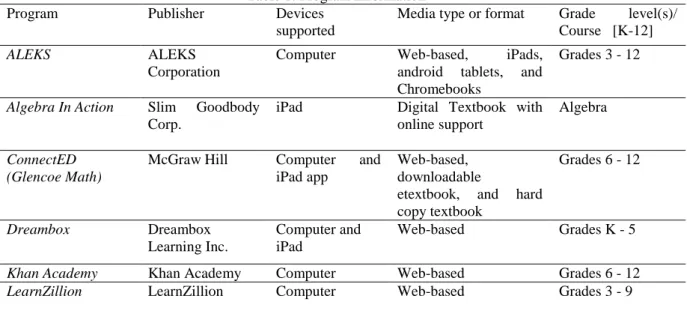
We first present a brief description of each of the programs. This is followed by analysis of the programs according to the framework. The six programs we analyzed are summarized in Table 1, which describes the name of the program, the publisher, the devices that are supported by the program, the media on which the program exists, and the grade levels of the content.
Table 1. Program Information
Program Publisher Devices
supported
Media type or format Grade level(s)/ Course [K-12]
ALEKS ALEKS
Corporation
Computer Web-based, iPads,
android tablets, and Chromebooks
Grades 3 - 12
Algebra In Action Slim Goodbody Corp.
iPad Digital Textbook with online support
Algebra
ConnectED (Glencoe Math)
McGraw Hill
Computer and iPad app
Web-based, downloadable
etextbook, and hard copy textbook
Grades 6 - 12
Dreambox Dreambox
Learning Inc.
Computer and iPad
Web-based Grades K - 5
Khan Academy Khan Academy Computer Web-based Grades 6 - 12 LearnZillion LearnZillion Computer Web-based Grades 3 - 9
Algebra in Action is a digital textbook written for the iPad that weaves together an Algebra curriculum and a narrative about the need to learn a new way of doing math in order to save the Earth from invaders. The interface is modeled after a traditional textbook where the content is accessed by flipping pages, though the pages may include links to interactive applets or games. Students work on interactive applets using touch screen movements. Students can view videos, play games, complete problem sets, or work on exploratory lab applets. The program is intended for individual students.
ConnectED offers digital access to the full range of grade-level content and resources to students and teachers for certain McGraw Hill textbook series, such as Glencoe Math Courses 1, 2, and 3, Glencoe Algebra and Geometry, and Glencoe Precalculus. Each of these programs is accompanied by paper textbooks. In our analysis below, we focused on Glencoe Math Grades 6 – 8. ConnectED incorporates a class and curriculum management system in which teachers can select materials for students to access online, create assignments that students can access online, and communicate electronically with students, either individually or as a class. Students have access to a fully digital edition of the textbook, electronic versions of homework assignments, a message board, and supplementary lesson materials such as notes, presentation files, videos, manipulatives, practice problems, and a glossary.
Dreambox is an adaptive program that provides individualized mathematics instruction. The program adapts by providing access to content based on results of built-in online assessments. These assessments include evaluations of students’ use of manipulatives and performance on a range of interactive activities and not just in response to performance on multiple-choice assessments. The program involves students in range of interactive tasks involving virtual manipulatives for solving mathematical problems. Dreambox also provides a system for students’ progress to be monitored by teachers as a whole class or individually through a classroom dashboard within the program. Parents are also encouraged to monitor their student’s progress on the student’s individual dashboard.
Khan Academy is a web-based program designed to have students work at their own pace through videos of narrated presentations on concepts and procedures, online practice problems, and online assessments. Khan Academy contains a library of videos that include comprehensive collections that cover material for grades 6 - 12. The student is presented with a series of short video topics and then the opportunity to complete practice problems related to the skill presented in the video segment. After the watching a video, the students complete practice problems where they have the opportunity to enter their solutions to the problems in a blank window. If their answer is incorrect, there are options hints to aid the student in solving the problem. The student also has the opportunity to type a question for a coach to answer in a discussion board format. Teachers have the ability to observe students’ progress through a dashboard that reports the concepts and skills the students has completed.
LearnZillion is a collection of recorded presentations developed by a team of over 100 hundred teachers. For each lesson, there is a 3-5 minute video-recorded narration of the topic or procedure, a video-recorded “coach’s commentary” providing insight into what choices the teacher who developed the lesson made, a PowerPoint slide, and video that guides students through practice problems. Students then work offline on questions and indicate their answer in the program. Students watch the videos or teachers play the videos, after which students work on practice problems and take online assessments. LearnZillion has dashboard results for students’ performance on particular standards or topic areas as well as additional program-specific information. LearnZillion displays what videos each student watched and summaries of the activities of the whole class in terms of videos watched and skills practiced.
Results
Features that Affect Student Interaction with the Programs
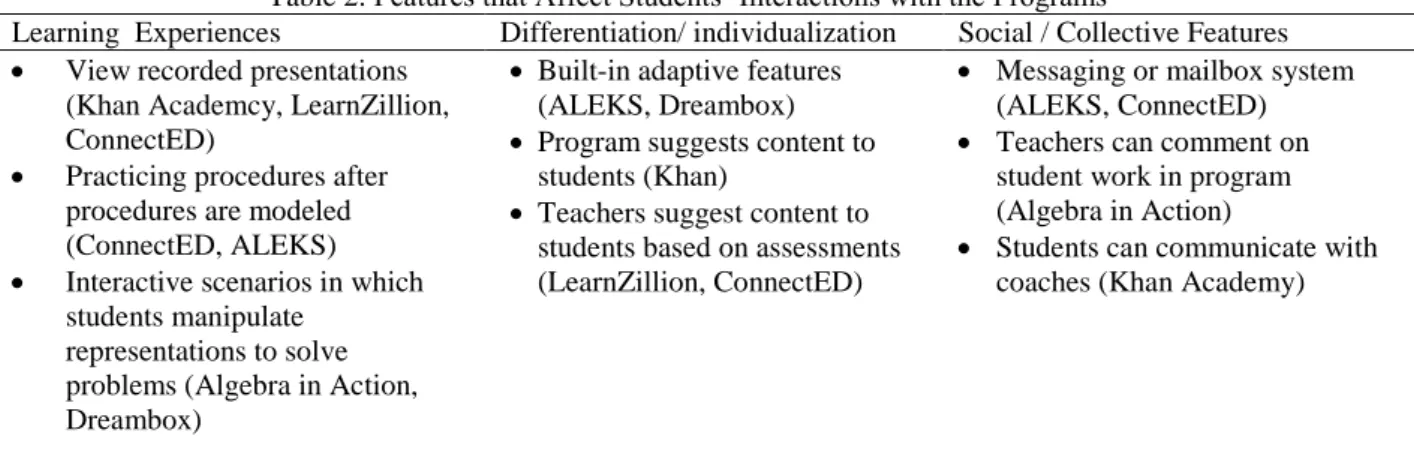
Table 2. Features that Affect Students’ Interactions with the Programs
Learning Experiences Differentiation/ individualization Social / Collective Features
View recorded presentations (Khan Academcy, LearnZillion, ConnectED)
Practicing procedures after procedures are modeled (ConnectED, ALEKS)
Interactive scenarios in which students manipulate
representations to solve problems (Algebra in Action, Dreambox)
Built-in adaptive features (ALEKS, Dreambox)
Program suggests content to students (Khan)
Teachers suggest content to students based on assessments (LearnZillion, ConnectED)
Messaging or mailbox system (ALEKS, ConnectED)
Teachers can comment on student work in program (Algebra in Action)
Students can communicate with coaches (Khan Academy)
Learning Experiences
The learning experiences in the program primarily consisted of passive activities. The most predominant intended form of interaction students have with the programs is to view recorded presentations that include narrations of concepts or established algorithms. Two programs, Algebra in Action and Dreambox, go beyond presentations or explanations by using interactive applets that have students manipulate representations to explore relationships.
In Khan Academy and LearnZillion, students watch videos of concepts or procedures and then work on related problems. In Khan Academy, for example, a video explains how algebra can be used to represent simple relationships by using a balance scale to show how two quantities are equal (one of the quantities has a question mark to represent an unknown number). Similarly, LearnZillion uses a narrated PowerPoint to explain how equivalent fractions can be represented on a number line. In Khan Academy, students watch a video and then enter a short-response solution. In LearnZillion, students watch a video that demonstrates a procedure and introduces definitions. The student then watches the beginning of another video that introduces a guided practice problem. The student works on the problem and then finishes watching the video. The lesson usually ends with a multiple choice assessment.
ConnectED has collections of online demonstrations of procedures for most topics as well as interactive tools. The structure of lessons are similar to those found in traditional textbook and the materials are designed for the teacher to present topics to students and then assign problems from the text for students to work on. Similar to ConnectED, ALEKS focuses content on mastering established algorithms. In ALEKS, the program generates sets of practice problems for students and could evaluate students’ responses to those problems. If a student does not solve a problem accurately, the program shows a worked-out solution to the problem before assigning a new problem. ALEKS also has online timed skill drills for basic facts.
Dreambox and Algebra In Action include interactive scenarios in which the students manipulates representations as they solve a problem set in a context. In Algebra in Action, students play the game Algeroid, in which they create equations to destroy asteroids placed on the coordinate plane. In Dreambox, students compose and decompose numbers by bundling objects into 10s, which are then placed into a virtual machine, triggering a 10 being displayed in a table. In Dreambox, students choose topics within their grade band and are moved to new topics when their performance displays mastery. In Algebra in Action, students also watch videos and work on practice problems.
Differentiation/individualization
those lessons and related assessments. ConnectED allows teachers to select assignments for individual students, and communicate those assignments to students. In ConnectED, the teacher and students communicate with each other via a messaging system. There is a student dashboard that indicates content the teacher has assigned either to the class or to the individual student, and assessment results.
Social/Collective Features
The programs vary by the extent to which there are features for teachers and students to communicate with each other or with people external to the classroom. Two programs, ALEKS and ConnectED, have a messaging or mailbox system enabling students and teachers to communicate with each other, while Algebra in Action just allows teachers to communicate with students but not vice versa. In Algebra in Action, teachers have the ability to comment on student work when grading the online problem sets, quizzes, and labs. Khan Academy allows students to communicate with external coaches by asking questions in the program; however, the responses are asynchronous and it is not clear in advance who would respond to the student question. Dreambox and LearnZillion offer no means for teachers or students to communicate within the program.
Features for Curriculum Use and Adaptation
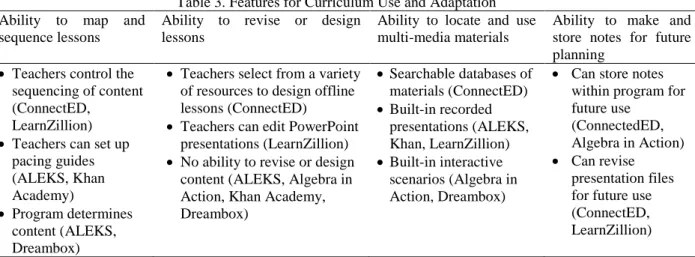
This section presents the features that influence the ways that teachers would be likely to use the program to design instruction. These features include the ability to design and sequence lessons, to incorporate multimedia into files stored in the program, and to make notes about a lesson that can be referenced in the future. The summary of these results are in Table 3.
Table 3. Features for Curriculum Use and Adaptation Ability to map and
sequence lessons
Ability to revise or design lessons
Ability to locate and use multi-media materials
Ability to make and store notes for future planning
Teachers control the sequencing of content (ConnectED,
LearnZillion)
Teachers can set up pacing guides (ALEKS, Khan Academy)
Program determines content (ALEKS, Dreambox)
Teachers select from a variety of resources to design offline lessons (ConnectED)
Teachers can edit PowerPoint presentations (LearnZillion)
No ability to revise or design content (ALEKS, Algebra in Action, Khan Academy, Dreambox)
Searchable databases of materials (ConnectED)
Built-in recorded presentations (ALEKS, Khan, LearnZillion)
Built-in interactive scenarios (Algebra in Action, Dreambox)
Can store notes within program for future use
(ConnectedED, Algebra in Action)
Can revise presentation files for future use (ConnectED, LearnZillion)
Ability to Map and Sequence Lessons
Two programs provide the ability for teachers to control the sequencing of content within the program, while in two other programs the teachers set up pacing guides that students reference when seeking new content. The other programs offer no options within the program for teachers to indicate a content sequence. In ConnectED and LearnZillion, the teacher links lessons to a calendar or chart that determines what content students have access to on a particular day.
Ability to Revise or Design Content of Lessons
ConnectED provides options for teachers to select from a variety of resources to design presentations for offline lessons or student worksheets. Teachers also have the option to revise content from the online resources and also incorporate teacher-generated or other external content. The other five programs offer little to no capabilities for teachers to select or edit content for designated lessons. In LearnZillion, teachers cannot change content of the videos or related exercises but can add or edit PowerPoint slides for presentations. Similarly, in ALEKS teachers can attach resources to specific lessons but cannot edit the content of the lessons themselves. Teachers using Khan Academy cannot modify the content of presentations, practice exercises, or assessments. Dreambox does not allow teachers to add to or revise content of any of the activities but does provide teachers access to virtual manipulatives for whole class presentations. Algebra in Action does not allow teachers to edit or sequence content.
Ability to Locate and Use Multi-media Presentation Materials
The programs vary by the extent to which they store and index multi-media resources for use by teachers, such as applets and videos. ConnectED has searchable databases for activities, applets, and videos provided by the programs as well as options to link to the internet to import external materials. Khan Academy and LearnZillion each have built-in pre-selected presentation materials, but each program is limited to one or two media files for each topic, either a video or recorded presentation (Khan Academy), or PowerPoint slides accompanied by video (LearnZillion). ALEKS and Dreambox have no multi-media resources available to present topics, but use visuals within the programs to demonstrate topics or, in the case of Dreambox, have interactive manipulatives. Algebra in Action has no multi-media content that can be accessed by teachers separate from pre-designed activities in the program.
Ability to Make and Store Notes for Future Planning
Only two programs, ConnectED and Algebra in Action, provide options for storing notes that could be referenced by the teacher when they next teach a lesson. Two programs, ConnectED and LearnZillion, allow teachers to revise files that can be saved within the program. ALEKS, Dreambox, and Khan Academy have no capability for storing notes of lessons in the programs.
Features of Assessment Systems
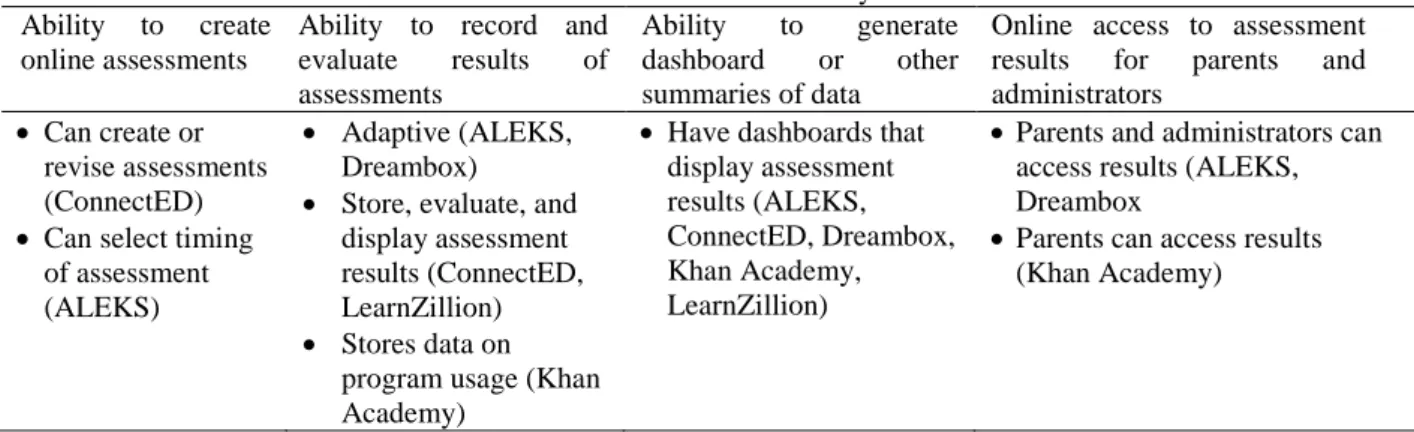
This section presents the features related to the online assessment systems built into the programs. These features include the ability for teachers to create assessments as well as built-in features for storing and reporting results of online assessments. The summary of these results are in Table 4.
Table 4. Features of Assessment Systems Ability to create
online assessments
Ability to record and evaluate results of assessments
Ability to generate dashboard or other summaries of data
Online access to assessment results for parents and administrators
Can create or revise assessments (ConnectED)
Can select timing of assessment (ALEKS)
Adaptive (ALEKS, Dreambox)
Store, evaluate, and display assessment results (ConnectED, LearnZillion)
Stores data on program usage (Khan Academy)
Have dashboards that display assessment results (ALEKS, ConnectED, Dreambox, Khan Academy, LearnZillion)
Parents and administrators can access results (ALEKS, Dreambox
Parents can access results (Khan Academy)
Ability to Create Online Assessments
own online assessments. There is a “wizard” to enable teachers to customize assessments from a database of questions based on the number of questions and question type. Teachers can also use an editor to create and save their own questions with a variety of different question types. In ALEKS and Dreambox, the teacher cannot create or revise assessments, but there are other assessment-related capabilities. In ALEKS, the teacher selects the timing of an assessment but has no control over the content, while in Khan Academy, the teacher has no control over assessments but can set goals towards which a student’s progress is viewed on the dashboard. ALEKS, Algebra in Action, Dreambox, Khan Academy, and LearnZillion provide no teacher options to create or revise online assessments.
Ability to Store and Evaluate Results of Assessments
All of the programs store some data about student performance in the program, though there are differences in the type of data stored and how the programs evaluate the data. ALEKS and Dreambox are adaptive in that both automatically store results of online assessments and then use the information to select the next topic or activity for the student. Algebra in Action stores assessment data on an external server. Teachers then access that server to grade student work. The graded work and teacher comments are then visible to the students within the program. For the interactive applets, the program provides feedback but does not store results. Two programs, ConnectED and LearnZillion, store, evaluate, and display student responses. Khan Academy stores data on time spent watching videos, exercises a student completes, the student’s solution steps, and the hints accessed by the student.
Ability to Generate Dashboard or other Summaries of Data
All but one of the programs offer a dashboard or summary view of each student’s progress across a range of content standards. Some programs offer more information about each student, such as the number of videos watched or exercises completed, and others offer aggregated summaries by class or by student across a number of assessments. ALEKS and Dreambox have the most comprehensive displays, which include summaries of progress on particular topics or in relation to the CCSSM. In addition, ALEKS shows the time students spend working on the program and performance on basic skill drills. Dreambox provides displays of how much time a student spends on a standard and number of lessons the student needs to reach an adequate performance level. Khan Academy and LearnZillion similarly have dashboard results for students’ performance on particular standards or topic areas as well as additional program-specific information. Khan Academy allows teachers to see what exercises a student has completed, what hints the student needs on each problem, and how much time the student spends watching videos or doing exercises. LearnZillion displays the videos each student watched and summaries of the activities of the whole class in terms of videos watched and skills practiced. ConnectED offers dashboard or similar views of students’ progress. Furthermore, the program allows the teacher to customize the content of performance reports by individual student, class subsets, or entire class. Classes and students are viewed comparatively. Algebra in Action has no features that summarize or present assessment data.
Online Access to Assessment Results for Parents and Administrators
Discussion
We summarize the results for each of the three themes analyzed above. We then relate the results to the major claims about the transformative potential of digital curriculum content. We then present implications of our findings.
Features that Affect Students’ Interactions with the Programs
Only two of the programs incorporated multimedia in ways that take advantage of the learning potential of multimedia (Mayer, 2003). Two programs, Algebra in Action and Dreambox, used multimedia (e.g., applets with representations that could be manipulated) and interactive features, such as games and scenarios that allow students to manipulate representations or models to solve problems, as described by Dede (2000). The use of multimedia in the other programs was more limited, and typically involved videotaped presentations or narrated PowerPoint files. These programs provided opportunities to explore in ways similar to what is found in traditional textbook series, which is in contrast with the opportunities in Algebra in Action and Dreambox. There were limited opportunities for students to link to virtual communities, to communicate with each other, or to communicate with the teacher within the programs. The lack of these features constrains opportunities for the kinds of collaborative or social features of learning envisioned by proponents of digital curricula and by learning theorists’ exploration of distributed cognition (cf. Hutchins, 1995). Instead, there was a pronounced focus on individualized learning in many of the programs. In most cases, there were few intended opportunities for the students to engage with the teacher as students used the programs.
The differentiation and individualizing of content was possible in most programs, with two programs automatically providing differentiation by responding to evaluations of student performance in online assessment. Other programs allowed the teacher to select content, while yet other programs offered no means in the program to indicate what content students should study. The most sophisticated differentiation included responding to the speed and productiveness of students’ actions with virtual manipulatives as well as the accuracy of their performance on tasks. In all other cases, the differentiation was in response to students’ performance on short-item or multiple choice assessments. While this reflects the practice in most classrooms, there are concerns that students’ performance on such assessments in not a robust indicator of their understanding and capabilities (Berg & Smith, 1994).
Curriculum Use and Adaptation
The programs offered options for teachers to revise, select, and sequence content. Most of the revising of content or ability to design lessons involved selecting multimedia files that presented or explained the content. There were few choices with respect to interactive tools or activities that teachers could select or revise. Most interactive tools or activities were built directly into the student text materials. One of the most robust features involved the teacher’s ability to indicate sequencing of content, so that students would be notified within the program about the progression of activities or content. In most of the individualized learning programs, teachers had few opportunities to revise the content or tools made available to students.
Assessment Systems
Summary of Broad Program Types
Individualized Learning Programs
The individualized learning programs had two distinct categories. In one category were three programs that mimicked traditional mathematics instruction but incorporated multimedia presentation materials. The intent of these programs is to get students to master well-defined procedures and numerical or symbolic manipulation. Two of these programs, ALEKS and LearnZillion, offer built-in assessment systems that allow teachers quick access to and reporting of students’ performances on short-answer or multiple choice assessments. Khan Academy tracked videos viewed by students, time spent watching videos, exercises a student has completed, the student’s solution steps, and the hints accessed by the student.
The other two programs in this category, Algebra in Action and Dreambox, offered different experiences than the other three. Dreambox was the least orthodox of the programs, with the content exclusively consisting of scenarios with interactive manipulatives and dynamic representations. Algebra in Action had some features of a traditional textbook in terms of having pages and problem sets. Furthermore, the assessments required teacher scoring, providing opportunities for interactions between the teacher and the students. However, the program had no intentionally collective activities built in.
Digitized Traditional Textbooks
The digitized textbook, ConnectED, essentially contained the same content as a traditional textbook, with the inclusion of collections of multimedia files and virtual tools (rulers, compasses, algebra tiles). The biggest innovations for this program were the management and assessment systems that allow the teacher to differentiate instruction and to rapidly monitor and report student progress. The program also had built-in communication features such as discussion boards, messaging systems, mailbox systems, and student dashboards that allowed teachers to communicate assignments and other information to students, and, in a more limited way, for students to communicate with the teacher and with each other.
Suggestions for Future Digital Curriculum Development
The programs analyzed in this paper take advantage of some of the features touted for digital content, but in general offer few changes to the underlying opportunities for teaching and learning found in print materials. The use of multimedia in particular lacked interactivity, with the exception of Algebra in Action and Dreambox. Curriculum developers should incorporate media that allow for manipulating objects or controls to make activities more meaningfully interactive, much like what occurs in video games. Similarly, the dynamic coordination of graphical, numeric, and symbolic representations that can be found in programs such as Mathematica is also surprisingly absent in the programs we analyzed. Although incorporating interactive content is important, the challenge will be to build comprehensive and well-connected sequences of activities that incorporate these interactive media in meaningful ways, rather than just being collections of activities. Digital curriculum programs should be more coherent than individual activities that can be found on the internet.
Fourth, the potential for programs to provide immediate feedback to both students and teachers is well-developed. Many of the programs have systems to evaluate and report data on student performance in multiple visual forms. An area in which assessment systems could be improved is in the kinds of data that are reported. Currently, most of the performance data are multiple choice or free response assessments or time on task data. As programs develop, hopefully more subtle and complex forms of data can be reported, such as strategic choices students make in solving problems or in how they communicate their results to peers.
Acknowledgements
This research was supported in part by the National Science Foundation under grant No. DRL- 1222359. The opinions expressed herein are those of the author and do not necessarily reflect the views of the National Science Foundation. We would like to acknowledge Jon Davis, Corey Drake, and Amy Roth McDuffie for providing feedback on earlier drafts of this manuscript.
References
Abell, M.. (2006). Individualizing learning using intelligent technology and universally designed curriculum. Journal of Technology, Learning, and Assessment, 5(3), 21.
Anderson, T. (2005). Distance learning - Social software's killer ap? Paper presented at the ODLAA 2005 Conference. http://www.unisa.edu.au/odlaaconference/PPDF2s/13%20odlaa%20-%20Anderson.pdf Berg, C., & Smith, P. . (1994). Assessing students' abilities to construct and interpret line graphs: Disparities
between multiple choice and free-response items. Science Education, 78, 527-554.
Common Core State Standards Initiative. (2010). Common Core State Standards for mathematics. Retrieved from http://www.corestandards.org/assets/CCSSI_Math%20Standards.pdf
Daalsgard, C. (2006). Social software: E-learning beyond learning management systems. European Journal of Open, Distance and E-Learning.
Davis, J., Choppin, J., Roth McDuffie, A., & Drake, C,. (2013). Common Core State Standards for Mathematics: Middle School Teachers’ Perceptions (pp. 16). Rochester, NY: Warner Center for Professional Development and Education Reform.
Dede, C.. (2000). Emerging influences of information technology on school curriculum. Journal of Curriculum Studies, 32(2), 281-303.
Devaney, L.. (2013, October 3, 2012). Education chief wants textbooks to go digital, eSchool News: Technology News for Today's K-12 Educator. Retrieved from http://www.eschoolnews.com/2012/10/03/education-chief-wants-textbooks-to-go-digital/
Fletcher, G., Scaffhauser, D,, & Levin, D. (2012). Out of Print: Reimagining the K-12 textbook in a digital age: State Educational Technology Directors Association.
Gray, L., Thomas, N., Lewis, L., & Tice, P. (2010). Teachers' use of educational technology in U.S. public schools: 2009. Washington, DC.: National Center for Education Statistics, Institute of Education Sciences, U.S. Department of Education,.
Hutchins, E. (1995). Navigation as a context for learning. In Hutchins (Ed.), Cognition in the wild (pp. 263-285). Cambridge, MA: The MIT Press.
Kraidy, U. (2002). Digital media and education: Cognitive impact of information visualization. Journal of Educational Media, 27(3), 95-106.
LEAD Commission. (2012). Leaders discuss transition to digital textbooks. Leading Education by Advancing Digital Retrieved from www.leadcommission.org website:
Lonn, S., & Teasley, S. D. (2009). Saving time or innovating practice: Investigating perceptions and uses of Learning Management Systems. Computers & Education, 53, 686-694.
Mayer, R.. (2003). The promise of multimedia learning: Using the same instructional design methods across different media. Learning and Instruction, 13, 125-139.
Meyer, A., & Rose, D. (2000). Universal design for individual differences. Educational Leadership, 58(3), 39-43.
Selwyn, N. (2007). Curriculum online? Exploring the political and commercial construction of the UK digital learning marketplace. British Journal of Sociology of Education, 28(2), 223-240.
Shapiro, T. R. (2012, December 12, 2012). Fairfax schools to buy paper textbooks after pixel predicament, The Washington Post.
Sporkin, A. (2013). Trade publishers' net revenue grows 6.2% for calendar year 2012. Association of American Publishers. http://www.publishers.org/press/101/
Velan, G. M., Jones, P., McNeil, H. P., & Kumar, R. K. (2008). Integrated online formative assessments in the biomedical sciences for medical students: Benefits for learning. BMC Medical Education, 8(52), 11. Ward, K.. (2012). VA: Online math textbooks - worth $7.7M - don't add up for school distsrict. Retrieved from
watchdog.org website:
Usdan, J., & Gottheimer, J. (2012). FCC Chairman: Digital textbooks to all students in five years. Retrieved from http://www.fcc.gov/blog/fcc-chairman-digital-textbooks-all-students-five-years