R E S E A R C H
Open Access
Structural analysis of packing schemes for
extracting hidden codes in mobile malware
Jongsu Lim and Jeong Hyun Yi
*Abstract
In the Internet of Things service environment where all things are connected, mobile devices will become an extremely important medium linking together things with built-in heterogeneous communication functions. If a mobile device is exposed to hacking in this context, a security threat arises where all things linked to the device become targets of cyber hacking; therefore, greater emphasis will be placed on the demand for swift mobile malware detection and countermeasures. Such mobile malware applies advanced code-hiding schemes to ensure that the part of the code that executes malicious behavior is not detected by an anti-virus software. In order to detect mobile malware, we must first conduct structural analysis of their code-hiding schemes.
In this paper, we analyze the structure of the two representative Android-based code-hiding tools, Bangcle and DexProtector, and then introduce a method and procedure for extracting the hidden original code. We also present experimental results of applying these tools on sample malicious codes.
Keywords: Repackaging attack, Android app security, Mobile code hiding
1 Introduction
In the present advent of the Internet of Things (IoT) [1] era, communication functions such as Wi-Fi and Blue-tooth are embedded in all things, so that real-time connec-tion between things is made possible. While connecting various IoT devices with a single communication standard is practically very difficult, individual users already own mobile devices that fuse together multiple communica-tion modules and companies provide a bring your own device (BYOD) work environment; hence, mobile devices will play a key role in the proliferation of IoT services.
However, in the case of mobile devices, when this cou-pling medium for all things is exposed to hacking, there is the threat that all the connected things will also become targets for cyber hacking. If there is a cyber attack aimed at specific connected devices, the security vulnerability of mobile devices can bring about side effects that may even have a major adverse effect on a different industry [2]. For example, in smart car service, cars connected through a mobile device can become infected with a virus and, if an infected car has problems operating, studies show that, in
*Correspondence: [email protected]
1Department of Software, Soongsil University, 369 Sangdo-ro, Dongjak-gu, Seoul, 06978, South Korea
the worst case, major car accidents could result [3]. Con-sequently, in the IoT, it is a task of utmost importance and urgency to ensure that mobile devices cannot be infected easily.
Unfortunately, the number of mobile malware codes is increasing each year with evolution into various types. Recently, there has even been an emergence of ran-somware, where documents in an infected device are secretly encrypted to demand payment. The majority of the mobile malware targets the Android platform. Android malware can be generally divided into two camps: those that have been designed to impersonate a normal app and those that have been designed to hide their malicious behavior. In the case where malware is designed to impersonate a normal app, it impersonates apps that users most frequently use such as apps related to the smartphone theme, finance, and games, so that a similar app is designed to secretly execute malicious behavior such as account charging and game informa-tion extracinforma-tion, without the user’s realizainforma-tion. To pre-vent an anti-virus from detecting such malware, attackers apply methods such as encryption, packing, and obfusca-tion [4] on the main code related to malicious behavior and then distribute it. To bring about speedy malware detection and response, understanding the structure of
Fig. 1Packing and unpacking mechanisms
such code-hiding methods in order to extract the orig-inal code related to malicious behavior must first be achieved.
Thus, in this paper, we analyze the fundamentals behind the main code-hiding schemes used by mobile mal-ware and, by running tests, empirically present methods for extracting the original code hidden in the malware through reverse engineering analysis. The tests target the malware that applies the main code-hiding tools, Bangcle [5] and DexProtector [6], and we analyze in detail the method of extracting the actual code responsible for malicious behavior from the packed Android application package (APK) files generated by these two analysis tools.
This paper is organized as follows. Section 2 presents background knowledge. Sections 3 and 4 describe the pro-cess of extracting the original code by conducting reverse engineering analysis of the structures of Bangcle’s pack-ing scheme and DexProtector’s class encryption scheme. Section 5 presents results from experiments using sample apps, and Section 6 draws conclusions.
2 Related works
2.1 Repackaging attacks
The cause of various problems, including malware dis-tribution in the Android environment is as follows. The Android platform, also labeled the Android Open
Table 1List of files added by Bangcle
Source Project (AOSP) [7], promotes broad openness. While Androids possess a high market share for the smart-phones because of this, various security problems have arisen owing to the app structure and signing method devised to provide this openness [8].
Android apps are, by default, built using the Java lan-guage and are generated in the APK file format [9, 10]. Because at this level in app development the developer distributes code by self-signing using jarsigner, an attacker can distribute code by re-signing using the attacker’s private key rather than the developer’s signature [11]. An attacker can use this point of weakness to insert attack code into a normal app, repackage it, and then distribute it. This is called a repackaging attack [12, 13].
2.2 Mobile code packing
Packing is a method used when one wishes to hide the code’s structure before the code is run. Code packed by techniques such as encryption and compression is not revealed until execution; then, at each run time, the packed code is unpacked through dynamic loading and executed. Code exposure is minimized through static analysis. Such packing methods are used mainly so that malware such as viruses or worms are not detected by an
Table 2Classes added and used by Bangcle
Classes Description
ACall Interfacing with libraries
ApplicationWrapper Entry point of the packed app
FirstApplication Loading the original app
MyClassLoader Loading the original app
Util Other utilities
Fig. 3Source code decompiled fromUtilclasses
anti-virus; however, recently, normal programs have also utilized this method in the area of copyright protection to protect important code logic [14].
Generally, when using packing, the original code exists in its packed state, so a loader that unpacks packing code is added and the control flow is also adjusted so that the loader is run first. When a packed app is run, the loader is run first, so that the app loads once the packed code is unpacked before running the original code (Fig. 1). Such packing schemes have the advantage of minimizing modifications to the original code compared to a code obfuscation scheme.
2.3 Mobile code reverse engineering
Reverse engineering methods for mobile code can be grouped roughly into static analysis methods or dynamic analysis methods. In static analysis, the method uses a disassembler or decompiler. Disassemblers targeting the Android execution file, called Dalvik Executable (DEX), includebaksmali[15],dedexer[16], andapktoolkit [17], and using these programs, the DEX file is converted into a smali file [18], so that Dalvik virtual machine (DVM) bytecode [19] can be analyzed in units of commands. For decompilers, dex2jar [20], jad.jeb [21], etc. have been made public, and they also provide the function of restor-ing a DEX file into Java source code. Static analysis of the app is done through APK extraction using ADB, DEX conversion to JAR using dex2jar, and JAR file analysis using a Java decompiler while static analysis ofsolibrary is carried out using IDA [22] with Hex-Ray. We can investi-gate which functions and libraries are used through static analysis.
Fig. 4Copying procedure when theCopyBinaryFilemethod is invoked
Fig. 5Processing steps of thecreateChildProcessmethod
Fig. 7Target app process is terminated when being attached to IDA
and GDB [26] are used not only for static analysis but also frequently for dynamic analysis.
3 Structural analysis on Bangcle
3.1 Packing
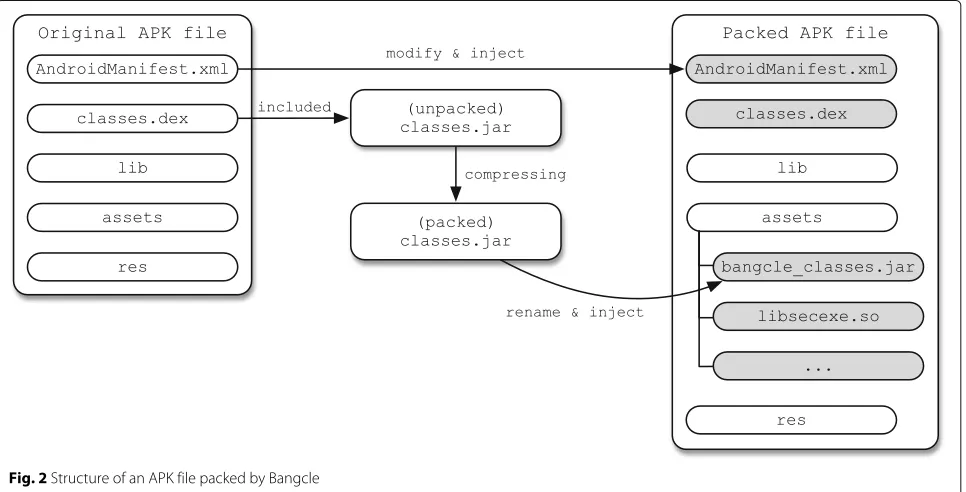
Bangcle is a packing tool that provides anti-reverse engineering functions such as debugging [27], anti-tampering, anti-decompilation, and anti-runtime injec-tion for mobile code using execuinjec-tion code compression [28]. To examine the functions provided by this tool, we examine the packing process for a sample app that has a simple log-in function shown in Fig. 2. The areas colored in gray in the illustration denote files that have been newly added or changed by Bangcle.
First, using justclasses.dexfrom the original APK file, another classes.jar in the APK file format is generated. Compressing this(unpacked) classes.jarfile, the file is gen-erated under the same file name(packed) classes.jar. Then, thisclasses.jar file is renamed tobangcle_classes.jar and saved in the packed APK file’s assets folder. Additionally,
files such as libsecexe.so which provide decompression and anti-analysis functions for thebangcle_classes.jarfile are also stored together in the assets folder. The list of added files is shown in Table 1.
After packing the original classes.dex, a separate classes.dex file is newly generated and added to the packed APK. In addition, the AndroidManifest.xml file is also updated with information regarding the newly generatedclasses.dex file. Table 2 shows the class infor-mation included in the newly generated classes.dex file. The ACall class manages the interface with library files, and the ApplicationWrapper class monitors the control flow using the entry point of the compressed app. The FirstApplication class and MyClassLoader class are used to load the original app into memory. The Util class carries out over-head operations needed to executelibsecexe.soand calls functions fromlibsecexe.so to perform unpacking, anti-debugging, anti-tampering, and anti-runtime injection functions.
Fig. 9Modified code to extract the originalclasses.dex
3.2 Unpacking
Figure 3 examines the primary logic of the code inserted by Bangcle to execute the packed APK. This code is the Java code obtained by disassembling theUtilclass.
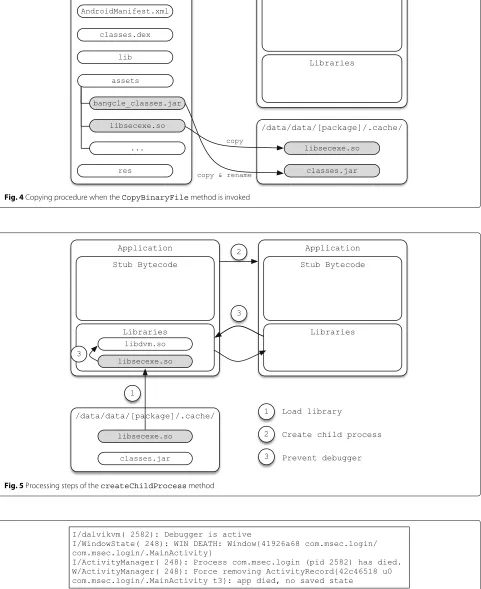
The operation process of the primary methods is as follows. First, thecheckX86method identifies whether the CPU of the device running the app is x86-based or ARM-based. If it is an x86-based CPU, the libse-cexe.x86 file is copied to a temporary folder, whereas if it is an ARM-based CPU, the libsecexe.so file is copied to a temporary folder. CopyBinaryFile takes the bangcle_classes.jar file in the assets folder of the compressed APK file, copies it to the temporary folder /data/data/[package_name]/.cache/, and renames it asclasses.jar (Fig. 4). As a method that provides anti-debugging-related functions,createChildProcessis explained in more detail in the next section. tryDo restores the (packed) classes.jar file copied to the tem-porary folder into the (unpacked) classes.jar file that includes the original classes.dex. runPkg loads the originalclasses.dex in the(unpacked) classes.jar file into memory and executes it. After the original classes.dex has been loaded, the(unpacked) classes.jarfile is recom-pressed into the (packed) classes.jar and saved in the temporary folder.1
3.3 Anti-debugging
The method createChildProcess generates a child process, so that Java debug wire protocol (JDWP) and a
native debugger cannot run. As shown in Fig. 5, first, the libsecexe.sofile copied to the temporary folder is loaded into memory. After the file is loaded into memory, the method used to prevent native and/or managed code debuggers is applied.
Both Figs. 6 and 7 show that the app instantly terminates as soon as connection of the NetBeans and IDA debuggers to the packed APK is attempted.
In this way, because the anti-debugging function is already applied with Bangcle, analysis methods that use existing debuggers do not work, and a different method must be used for analysis.
3.4 Code extraction
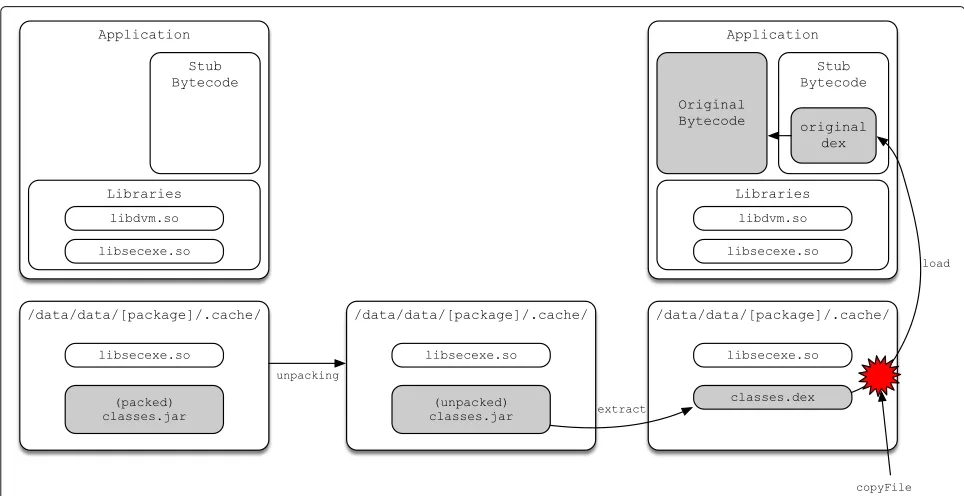
As explained in Section 3.2, when the packed APK is exe-cuted, thebangcle_classes.jarfile is renamed toclasses.jar and copied to the temporary folder along with files such as libsecexe.so. Theclasses.jarsaved in the temporary folder at this time is packed, so we cannot analyze it. However, as shown in Fig. 8, if we find the point when the(packed) classes.jar file is temporarily restored to the (unpacked) classes.jar and copy that file to the data folder, we can extract the originalclasses.dex.
Figure 9 shows a section of Util.java modified to copy the (unpacked) classes.jar file into the data folder, namely, if the copyFile method is added in order to copy the file between the tryDo method andrunPkg method, we can procure the(unpacked) classes.jar with the originalclasses.dexincluded.
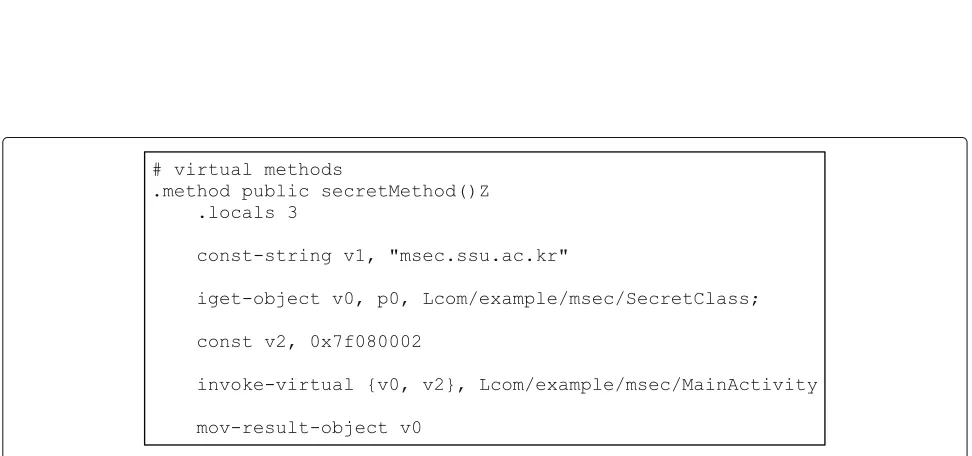
If theclasses.dexfile obtained in this way is converted into smali code using the baksmalitool, we can observe the code in its original state as in Fig. 10. Thus, we see that Bangcle’s packing function can be neutralized in this manner.
4 Structural analysis on DexProtector
4.1 Encryption
DexProtector is a program used for anti-reverse engi-neering for Androids. The main functions provided by DexProtector are class encryption, tamper detection, code and data hiding, etc. In this paper, we set out to examine
Fig. 11Class encryption procedure of DexProtector
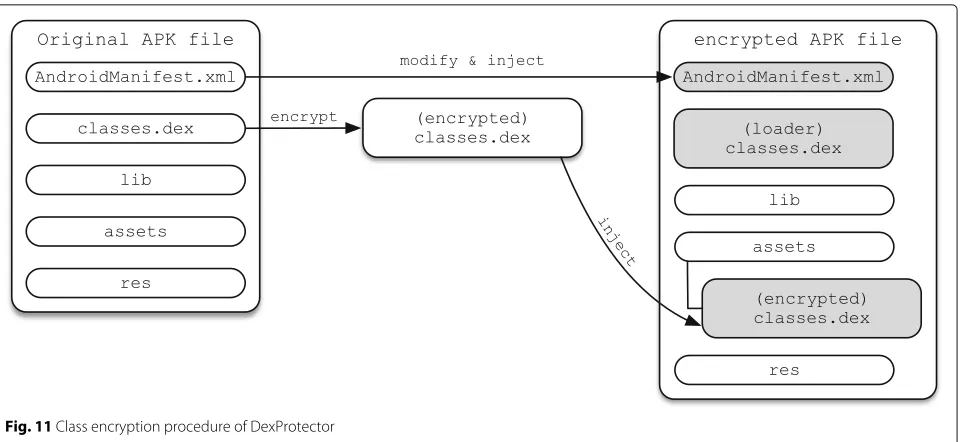
the potential for reverse engineering analysis focusing on the class encryption function in the various DexProtector functions. Figure 11 shows the class encryption process of DexProtector.
First, theclasses.dexof the original APK file is encrypted to generate the identically named(encrypted) classes.dex
and save it in the assets folder. During this time, both the classes.dex file for decrypting and executing the (encrypted) classes.dex file and the AndroidMan-ifest.xml file updated with the modified file infor-mation are saved, and the encrypted APK file is generated.
Fig. 13ModifyingAndroidManifest.xmlfor enabling debugger attachment
4.2 Decryption
When the encrypted APK file is executed, the (loader) classes.dex file is executed first. The (loader) classes.dex file generates the decryptor APK file in the
/data/data/[package_name]/.cache folder,
and, using the generated decryptor APK file, the decryptor is run. The executed decryptor decrypts the (encrypted) classes.dex file saved in the assets folder of the encrypted APK file and saves the original APK file in the /data/data/[package_name]/.cache folder. Afterwards, the restored original APK file is actually exe-cuted. After being executed, the original APK file saved
in the /data/data/[package_name]/.cache
folder is deleted. Figure 12 shows the DexProtector class decryption procedure.
4.3 Code extraction
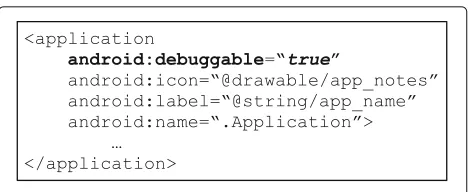
Because apps with DexProtector have the anti-debugging function applied by default, debugging at the smali code level can be done using IDA. Therefore, to debug an app at the smali code level, the debuggable property in the AndroidManifest.xml file must be forcibly modified to true, as shown in Fig. 13.
In this paper, the objective is to obtain the decrypted classes by reverse engineering the encrypted classes. If the APK is simply repackaged and executed, the original app is terminated before MainActivity is executed and the log is outputted, as seen in Fig. 14. By analyzing thelogfile, we confirmed that the first generatednew.apkfile was loaded properly and the second generated new.apkfile failed to open because it was not in a zip file format.
In the case of normal execution, the new.apk file is generated twice and then loaded. However, when the
application is executed normally, thenew.apk cannot be found because the new.apk file is deleted after loading. Therefore, to incapacitate DexProtector’s class encryption scheme, thenew.apk file which is generated in real time must be obtained before deletion.
To open the new.apk file, we must first set a break-point for the Applicationclass that is executed for the first time the app is executed by using the smali code level debugger. Then, we set breakpoints such as thedvmJarFileOpenfunction fromlibdvm.soby using native code-level debugger. Afterwards, when the app is rerun, after anew.apkfile is generated, the app freezes at the assigned breakpoint. If we obtain the first generated new.apk file and decompile it using the JEB decompiler, we can observe the unpack function, etc., as in Fig. 15. Theunpackfunction uses the application’s hash value as a decryption key to decrypt the packedclasses.dex. Because hash values change when the application is repackaged, the secondnew.apkis not generated correctly. Thus, to obtain the secondnew.apkfile (without repack-aging), one must connect the debugger and obtain the file beforeMainActivityis executed.
Because Android apps are generated initially from the early Zygote process, we go about attempting to debug during the Zygote process. Using the follow-fork-mode child option in the debugger, we debug the child process generated by Zygote.
The dvmJarFileOpen function [29] is immedi-ately called to load the file type compressed by the functions in the libdvm.so library file (see Fig. 16). The dvmJarFileOpen function that is called first is a function for loading the installed APK file. The dvmJarFileOpen function that is called second is a function for loading the firstnew.apk file generated. The dvmJarFileOpenfunction called afterwards is a func-tion for loading the second new.apk file, which includes the decrypted logic.
Figure 17 shows the result of obtaining and disassem-bling the second new.apk file generated in the installed app’s data folder before the lastdvmJarFileOpen func-tion is called. Because the encrypted class was already decrypted, hereafter, there are no constraints on dis-assembling and conducting reverse analysis. Figure 18 shows one of methods to obtain the original code from DexProtector.
Fig. 15Java code decompiled from the firstnew.apkfile
Fig. 16Debugging process to obtain the secondnew.apkfile
Fig. 18Process used to obtain the original class from the APK file with class encryption
5 Experiments
In this section, we describe experimental results for deter-mining whether code extraction schemes can be used successfully for analyzing malware samples that apply Bangcle and DexProtector.
5.1 Target app selection
We first obtained the target malware apps for the experiment from Contagio [30] and VirusShare [31] and distinguished them according to whether the apps applied Bangcle or DexProtector.
Table 3The analysis results on packed and unpacked applications with various analysis engines
Analysis engine Packed application Unpacked application
AVG Android/Deng.MAO Android/Deng.GNV
Alibaba A.L.Rog.Tgcmbwlbehlb A.W.Rog.ModelAd
CAT-QuickHeal Android.SecApk.A (PUP) Android.Dowgin.AM (AdWare)
ESET-NOD32 Secapk.E potentially unsafe AdDisplay.Dowgin.Rpotentially unwanted
Fortinet Adware/Secapk!Android Adware/Secapk!Android
Ikarus AdWare.AndroidOS.Secapk PUA.AndroidOS.Dowgin
Kaspersky not-a-virus:HEUR: AdWare.AndroidOS.Mmaro.a HEUR:Trojan-Downloader. AndroidOS.Agent.az
NANO-Antivirus Trojan.Android.Dowgin.dtznya Trojan.Android.Dowgin.dtznya
Qihoo-360 Adware.Android.Gen Adware.Android.Gen
First, in the case of determining Bangcle, when decompiling the APK file, if package names such as com.secapk.wrapper, com.secneo.guard, and com.bangc-le.protectare included or iflibexec.so,libmain.so,bangcle _classes.jar, etc. are found in the assets folder, Bangcle was determined to have been applied. In the case of Dex-Protector, because it is difficult to determine its use with only the results generated from decompiling the file, the Applicationclass is included. It was determined that DexProtector is applied based on the log record showing whether, when executed, theDexOptprocess optimizes an identical named apk file twice.
Based on the above criteria, we were able to determine seven malware apps that applied Bangcle and one mal-ware app that applied DexProtector, thus selecting a total of eight apps as the subjects for our experiment.
5.2 Experimental setup
To extract code from malware that applied Bangcle and DexProtector, we experimented in the environment described as follows. Because an app using Bangcle only needs to be repackaged to be executed, we ran the app on an Android version 4.4.4 device that had not been rooted. We determined that the Bangcle version information was given by the numbers assigned with theVERSION_NAME variables in theUtilclass. Because a debugger needs to be used for apps that have applied DexProtector, we used a rooted device to obtain higher privileges than the app pro-cess. For the debugger, we used a GDB built for ARM use. Finally, for decompiling and repackaging, we usedapktool version 2.0.3.
5.3 Experimental results
The analyzed apps were applied with various versions of Bangcle, from 1.0 to 8.5.12. However, all of the versions were able to extract the original codes. Likewise, it was possible to extract the original codes from DexProtector.
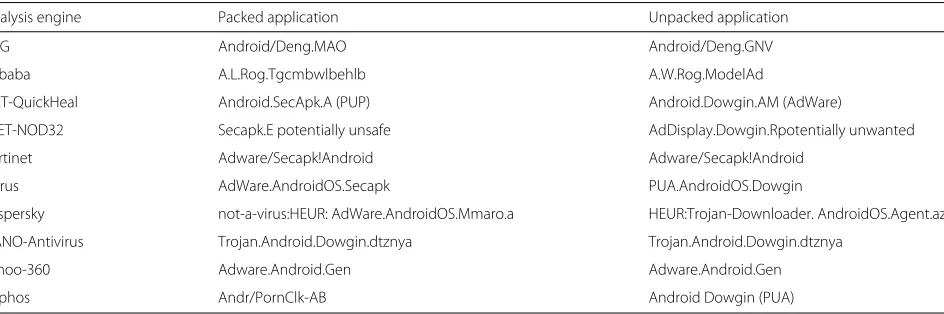
Table 3 shows the experimental results on packed and unpacked applications using well-known analysis engines. In the case of the packed applications, most of the analysis engines recognize that Bangcle has been used but do not check their behaviors in details. On the other hand, most of them are able to figure out the unpacked application’s behavior and thus determine it is an adware.
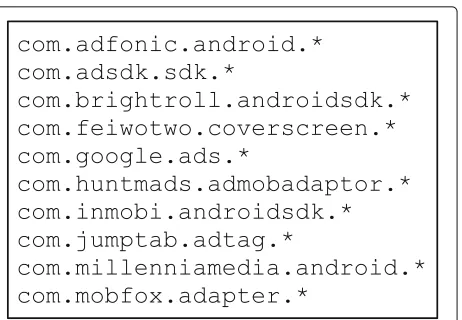
Also, we observed that the unpacked applications include various library related to advertisement as shown in Fig. 19. Therefore, we can understand the exact behav-ior of the applications by obtaining unseen information from the unpacked applications.
6 Conclusions
In this paper, we present the experimental results of a reverse engineering analysis conducted regarding code-hiding methods applied in Android-based malware. As
Fig. 19Advertisement libraries included in the application
code-hiding tools in the experiment, we used Bangcle, the most commonly used packer in the Android market, and DexProtector, the highest-performing binary code protec-tor, as subjects. Through structural analysis, we were able to identify characteristics and fundamentals of the shield-ing method for each tool and were successful in extractshield-ing the original code that causes malicious behavior from all of the tested malicious apps. We predict that such an anal-ysis method will be used as a foundational technique to quickly detect and counteract mobile malware, which is the core security risk factor in the proliferation of IoT service.
It should be noted that, if the shielding methods ana-lyzed in this paper are conversely used to protect code in normal apps, they could be used to act on the apps’ weaknesses. Therefore, further investigation is required on secure code-hiding methods to prevent such reverse engineering.
Endnote
1Note that we speculate that the reason for
recompres-sion after loading the original classes.dex is to prevent reverse engineering analysis of the folder saved in the temporary folder.
Acknowledgements
This research was supported by the Global Research Laboratory (GRL) program through the National Research Foundation of Korea (NRF) funded by the Ministry of Science, ICT, and Future Planning (NRF-2014K1A1A2043029).
Competing interests
The authors declare that they have no competing interests.
Received: 2 April 2016 Accepted: 6 September 2016
References
2. A Kitana, I Traore, I Woungang, Impact study of a mobile botnet over LTE networks. J. Internet Serv. Inform. Secur.6(2), 1–22 (2016)
3. Hacking accident. https://blog.kaspersky.com/tesla-s-hacked-and-patched/9516/. Accessed 21 Jan 2016
4. J Park, H Kim, Y Jeong, S-J Cho, S Han, M Park, Effects of code obfuscation on android app similarity analysis. J. Wireless Mobile Netw. Ubiquitous Comput. Dependable Appl.6(4), 86–98 (2015)
5. Bangcle. http://www.bangcle.com 6. DexProtector. https://dexprotector.com/
7. A Design, Android open source project (2012). https://developer.android. com/design/index.html. Accessed 28 Jan 2016
8. B Rashidi, C Fung, A survey of android security threats and defenses. J. Wireless Mobile Netw. Ubiquitous Comput. Dependable Appl.6, 4–10 (2015)
9. APK file. https://developer.android.com/tools/building/index.html 10. D Barrera, J Clark, D McCarney, PC van Oorschot, inProceedings of the
Second ACM Workshop on Security and Privacy in Smartphones and Mobile Devices. Understanding and improving app installation security mechanisms through empirical analysis of android (ACM, New York, 2012), pp. 81–92
11. W Enck, D Octeau, P McDaniel, S Chaudhuri, inProceedings of the 20th USENIX Security Symposium (USENIX Security 11). A study of android application security (USENIX, Berkeley, 2011), pp. 21–21
12. J-H Jung, JY Kim, H-C Lee, JH Yi, Repackaging attack on android banking applications and its countermeasures. Wireless Pers. Commun.73(4), 1421–1437 (2013)
13. SW Park, JH Yi, Multiple device login attacks and countermeasures of mobile VoIP apps on android. J. Internet Serv. Inform. Secur.4(4), 115–126 (2014)
14. C Linn, S Debray, inProceedings of the 10th ACM Conference on Computer and Communications Security. Obfuscation of executable code to improve resistance to static disassembly (ACM, New York, 2003), pp. 290–299 15. baksmali. http://code.google.com/p/smali/. Accessed 13 Feb 2016 16. dedexer. http://sourceforge.net/projects/dedexer/. Accessed 3 Mar 2016 17. apktoolkit. http://ibotpeaches.github.io/Apktool/. Accessed 8 Mar 2016 18. smali. https://code.google.com/p/smali/. Accessed 15 Feb 2016 19. Bytecode.
https://source.android.com/devices/tech/dalvik/dalvik-bytecode.html
20. dex2jar. http://code.google.com/p/dex2jar/. Accessed 28 Feb 2016 21. JEB. http://www.android-decompiler.com/. Accessed 24 Mar 2016 22. IDA. http://www.hex-rays.com. Accessed 27 Mar 2016
23. LK Yan, H Yin, inPresented as Part of the 21st USENIX Security Symposium (USENIX Security 12). Droidscope: seamlessly reconstructing the OS and Dalvik semantic views for dynamic android malware analysis, (Berkeley, 2012), pp. 569–584
24. AppUse. https://appsec-labs.com/AppUse. Accessed 18 Feb 2016 25. P Lantz, A Desnos, K Yang, DroidBox: Android application sandbox (2012).
https://code.google.com/archive/p/droidbox/. Accessed 2 Mar 2016 26. R Stallman, R Pesch, S Shebs,et al, Debugging with GDB. https://
sourceware.org/gdb/onlinedocs/gdb. Accessed 24 Feb 2016
27. H Cho, J Lim, H Kim, JH Yi, Anti-debugging scheme for protecting mobile apps on android platform. J. Supercomputing.72(1), 232–246 (2016) 28. R Yu, inProceedings of the Virus Bulletin Conference (VB’14). Android packer
facing the challenges, building solutions, (Abingdon, 2014), pp. 266–275 29. D Kim, J Kwak, J Ryou, Dwroiddump: Executable code extraction from
android applications for malware analysis. Int J Distrib Sensor Netw.11(9) (2015). Article ID: 379682
30. Contagio. http://contagiodump.blogspot.kr/. Accessed 31 Mar 2016 31. VirusShare. https://virusshare.com/. Accessed 31 Mar 2016
Submit your manuscript to a
journal and benefi t from:
7Convenient online submission 7Rigorous peer review
7Immediate publication on acceptance 7Open access: articles freely available online 7High visibility within the fi eld
7Retaining the copyright to your article