89
An open source Tesseract based Optical Character
Recognizer for Mobile Platform
Dhawal Chheda
1, Mihir Mirajkar
2, Akshita Dalvi
3, Mithil Patil
4 Computer Engineering1, 2, 3, 4,Rajiv Gandhi Institute Of Technology, Versova, Mumbai1, 2, 3, 4
Email: [email protected]1, [email protected]2, [email protected] 3 [email protected]4
Abstract
- Optical Character Recognition (OCR) is a technology that has been around for past two decades but
never been fully utilized until the current hype in Augmented Reality. Primarily, OCR are used for converting the printed text into editable and searchable text. Now a days OCRs are used to extract text from templates or fill up the online forms by retrieving the details from payment cards. Two of the most important parameters of an OCR are accuracy and time complexity. Since OCR uses the image processing techniques to extract data it requires large amount of processing. In a mobile computing due to the restrain in the amount of resources available, it is hard to get the Ideal parameters of an OCR. Sometimes it’s hard to get the text because of different size, style, orientation, complex background of image etc. In this paper we will focus on the preprocessing techniques and tesseract integration procedure for the mobile platform.
Index Terms- Optical Character Recognition, Open Source, Tesseract, Image preprocessing.
1. INTRODUCTION
Optical Character Recognition (OCR) is a technology which is used to convert the printed text into editable text. There are ample of software’s which takes advantage of OCR, such as License Recognition [1] and Handwriting Recognition [2]. However, many of them are commercial, rigid and can't be modified for any other purpose other than the purpose they were originally meant for. OCR performance depends on the processing and quality of the input image.
However, it is difficult to get the ideal output because of the nature of the image and the size and color of the characters. For the aforesaid reasons, we are going to use tesseract which is an Open Source OCR engine which was developed by HP between 1984 to 1994 [3] and currently maintained by the Google.
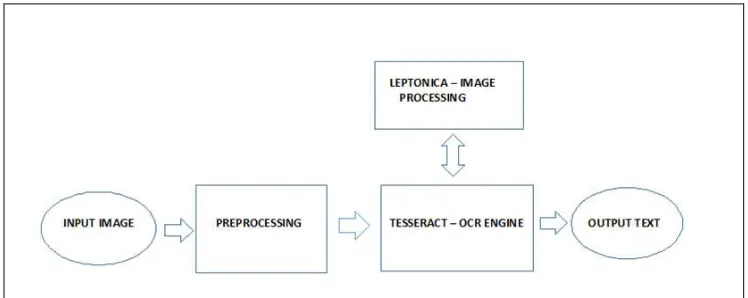
The overall architecture of the OCR is shown in
diagram below:
In the following OCR system, input image is taken by the camera or from the gallery. This input is first preprocessed before given as the input to the Tesseract. Tesseract is the "brain" of the application. It processes the image with the help of leptonica to convert it into the editable text.
2. PREPROCESSING
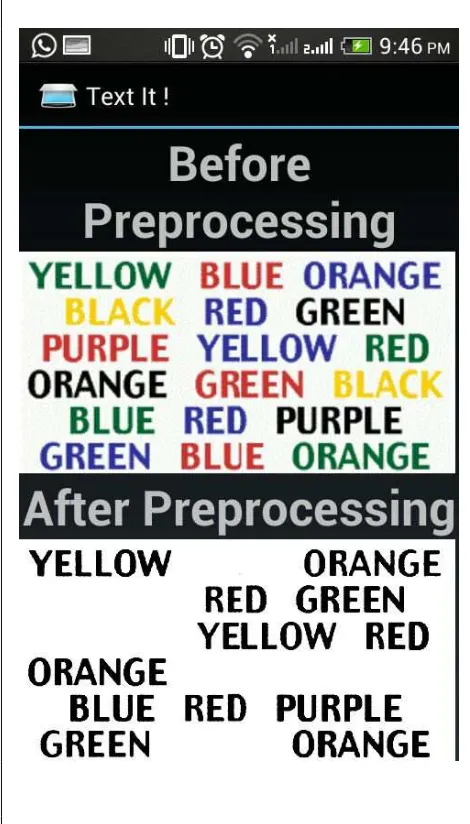
For Tesseract, it is easy to detect the inverse text and recognize it as black on white text [3].Hence, we can preprocess the image by converting it into grayscale and then changing the contrast of the image appropriately.
2.1. Grayscale
Grayscale digital image is an image in which each single pixel is a sample point and which carries only intensity information which composes of shades of
90 gray color. The range of the intensity is from black at
the weakest and white at the strongest. It is also known as "Black and white" image [12].
We use Luminance to convert color image into grayscale image. Luminance is a measure that describes the amount of light that passes through, is emitted or reflected from a particular area, and falls within a given solid angle.
Any color can be generated by the three basic colors .i.e red, green and blue [13]. For digital images or videos, luminance is gray tones computed from RGB with the formula [14]:
Y= 0.3 R + 0.59 G + 0.11 B Where Y is the luminance signal.
This luminance signal imparts the grayscale color to each pixel which results into the grayscale image.
2.2. Contrast
Contrast is the difference in luminance or color that makes an object (or its representation in an image or display) distinguishable [4].Whenever we take any photographs or try to scale the image there are always some differences between the original document and the scanned image. For example while capturing the image of the document text appears to have light shade of black and the background seems to have yellowish tint. So changing the contrast, distinguishes the background and the text properly. This helps the OCR to extract the text more thoroughly and improves the output.
Figure 2 is the algorithm to change the contrast of the image:
In this algorithm we use single-point processing. Single point processing is a method in which the output value of the pixel depends on the original value of the same pixel only [6]. After selecting the value of the pixel we extract the values of alpha (opacity), Red, Green and Blue color of the pixel. We use the formula:
contrast = ((value + 100) / 100) ^ 2 to calculate the contrast we require. Using the contrast we receive from the formula we get new color by using the following formula:
Color = (((((Color / 255.0) - 0.5) * contrast) + 0.5) * 255.0) The subtraction and addition of 0.5 is to center the expansion/compression of the range around 50% gray and Color is divided and multiplied by 255 again to convert it into the original RGB range .i.e. 0 to 255. A contrast above 1.0 will increase the contrast by making bright samples brighter and dark samples darker thus expanding on the range used. While a value below 1.0 will do the opposite and reduce use a smaller range of sample values [5].
91 After converting this image into the grayscale and
changing contrast, we send it as an input to the tesseract to obtain the editable text.
3. TESSERACT
3.1. Introduction
Tesseract is an OCR engine which was developed at HP between 1985 and 1994 [3]. In 1995, it was sent to UNLV for Annual Test of OCR Accuracy after the joint project between HP Labs Bristol and HP’s Scanner Division in Colorado [8]. Tesseract is currently maintained by Google since 2006[9].Tesseract supports and can recognize more than 100 languages [10].
3.2. Architecture
Tesseract assumes that its input is a binary image with optional polygonal text regions defined. The first step is a connected component analysis in which outlines of the components are stored. It is simple to detect inverse text and recognize it as easily as black-on-white text. This outlines are gathered purely by nesting them into blobs [3].
A blob is a (Binary Large Object) is a collection of the binary data stored in the database [11].
Blobs are organized into text lines, and the lines and regions are analyzed for fixed pitch or proportional text. Text lines are broken into words differently according to the kind of character spacing. Fixed pitch text is chopped immediately by character cells. Proportional text is broken into words using definite spaces and fuzzy spaces [3].
Recognition uses the two-pass process. In the first pass, it tries to recognize each word one by one. If the word is properly recognized then it is passed to the adaptive classifier as training data. This adaptive classifier is useful for recognizing the words later on more accurately. However , the adaptive classifier may have new information by the time it gets to the end of the page, so second pass is used to recognize any missing words with the help of the adaptive classifier[3][8].
Following is the architecture of the tesseract [7]:
Fig. 3. Image with multiple text color and its output after Preprocessing.
92
4. APPLICATION
There are many applications of OCR. In many systems OCR are the core components. Here are few examples as where can the OCR be used as a part of a system or as a standalone system.
4.1.Legal industries
Now a days due to digitalization, legal systems are using scanned documents rather than the orthodox system of storing the files manually. OCRs can help them to quickly edit the scanned documents rather than the hectic repetitive typing in every case.
4.2.Automated payment system
Now a days due for the convenience of the users, payments applications are working on the way to make the payment method more Intuitive and
Interesting. For example, for paying his electric bill, user can simply point his mobile at the bill and Application can recognize all the information regarding the user, thereby making payment easier and prone free to errors.
4.3.License plate detector
OCR can help the traffic control system to detect the number on the license Plates of the fast moving cars which are very hard to do by naked eyes.
4.4.Translator
We can use the OCR in the translators to convert any language into the desired language on the fly.
4.5.Other Applications
93 be used for the convenience of the data entry work. It
can used the students to scan there books or papers rather than typing all the things.
5. RESULT
We tested our application with many different categories of the image and different range of mobile devices. The accuracy of the output varied greatly. The main factor which were responsible for this variation in the accuracy were the nature of the image, mobiles computing power and the layout of the page. In an ideal case i.e. black text with the white text, application processed the text very quickly and the accuracy of the output more than 90%.To detect the colored text, application took more time to process but results were good with decent accuracy. However, for other images which are skewed or are blurry outputs accuracy is low and varies greatly.
Table 1. Output Accuracy for different types of images and Orientation.
Successful Error Accuracy %
The OCR system that has been presented in this paper with computationally efficient techniques makes it applicable for low computing architectures such as mobile phones, tablets etc. Due to the computing constraints of handheld devices we have maintain our study limited to lightweight and computationally efficient techniques. With this application it is possible to extract text from low contrast or complex images by using contrast algorithm. We can even extract images from colored text by using grayscale algorithm. This makes it possible to extract text from wide range of images.
7. FUTURE SCOPE
In the future implementation of the propose OCR application the post processing recognition can be added which will enable it able to run on high computational architectures such as computers. We can add the functionality which will make this application capable to extract text from images having variations in font size, style, color, orientation and alignment. We can make this app support the conversion of different languages and can also integrate the translator to translate the text retrieved into users preferred language.
Acknowledgments
We wish to express our sincere gratitude to Dr. U. V. Bhosle, Principal and Dr. S. B. Wankhade, H.O.D of Computer Department of RGIT for providing us an opportunity to do our project work on “An open source Tesseract based Optical Character Recognizer for Mobile Platform”. This project bears on imprint of many peoples. We sincerely thank our project guide Dr. Satish Y. Ket for his guidance and encouragement in carrying out this synopsis work. Finally, we would like to thank our colleagues and friends who helped us in completing the Project (Synopsis) work successfully.
REFERENCES
[1] Tavares, D.M., de Paula Caurin, G.A. and Gonzaga, A., 2003. Tesseract OCR: A Case Study for License Plate Recognition in Brazil. Minerva, 7(1),pp.19-26.<
http://www.fipai.org.br/Minerva%2007(01)%200 3.pdf >
[2] Comerford, L.D. and Levy, S.E., International Business Machines Corporation, 1994.Handwriting recognition by character template. U.S. Patent 5,303,312.
94 %D1%81%D0%BF%D0%BE%D0%B7%D0%B
D%D0%B0%D0%B2%D0%B0%D0%BD%D0% B8%D0%B5%20%D1%82%D0%B5%D0%BA% D1%81%D1%82%D0%B0/Tesser/TesseractOSC ON.pdf>
[8] Mithe, R., Indalkar, S. and Divekar, N., 2013. Optical character recognition. International Journal of Recent Technology and Engineering
(IJRTE) Volume, 2, pp.72-75.
<http://www.ijrte.org/attachments/File/v2i1/A050 4032113.pdf>
[9] https://en.wikipedia.org/wiki/Tesseract_(software )
[10]Tesseract documentation
<
https://github.com/tesseract-ocr/tesseract/blob/master/README.md>
[11]https://en.wikipedia.org/wiki/Binary_large_object
[12]https://en.wikipedia.org/wiki/Grayscale