Borland
"
ObieclWindows
·
Reference Guide
Borland
··ObjectWindows®
for
C++
Borland may have patents and.br pending patent applications covering subject matter in this document. The furnishing of this document does not give you any license to these patents. COPYRIGHT © 1991, 1993 by Borland International. All rights reserved. All Borland products are trademarks or registered trademarks of Borland International, Inc. ObjectWindows is a registered trademark of Borland International, Inc. Other brand and product names are trademarks or registered trademarks of their respective holders.
Borland International, Inc.
100 Borland Way, Scotts Valley, CA 95067-3249
PRINTED IN THE UNITED STATES OF AMERICA
1 EOR993
Contents
Introduction 1
Contents of this manual ... 1
IDW MDIFIRSTCHILD constant ... 26
lmPa~ent constant ... 26
Icons and typefaces used in this manual ... 2 LongMulDiv function ... 26
Conventions used in this manual ... 3
ObjectWindows hierarchy diagram ... 3
MAX RSRC ERROR_STRING constant ... 26
NBits-functi~n ... 27
Chapter 1 Library reference 7 TBird class [sample] ... 8
Public data members ... 8
Public constructors and destructor ... 8
Public member functions ... 8
NColors function ... 27
of xxx x document open enum ... 27
pfxxxx property attribute constants ... 28
BUILDOWLDLL macro ... 28
- OWLCLASS macro " ... 29
- OWLDATAmacro ... 29
Protected data members ... 9 - OWLDLL macro ... 29
Protected constructors ... 9 - OWLFAR macro ... 29
Protected member functions ... 9 - OWLFUNC macro ... 29
Response table entries ... 10 OWLGetVersion function ... ' ... 30
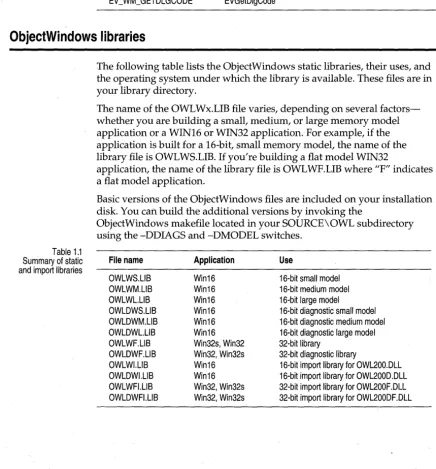
ObjectWindows libraries ... 10
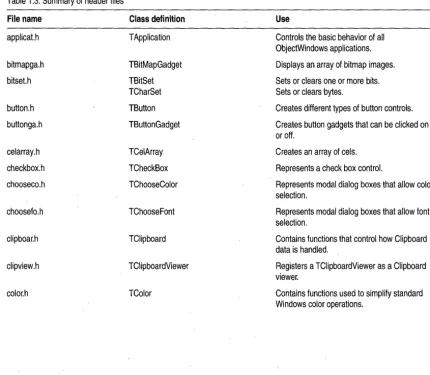
The ObjectWindows header files ... 11
The ObjectWindows resource files ... 15
The ObjectWindows library reference ... 16
BF xxxx constants ... 16
CM xxxx edit constants ... 16
CM-xxxx editfile constants ... 17
CM - xxxx edit file exit constant ... 17
CM=xxxx edit replace constants ... 17
shxxxx document sharing enum ... 30
TActionFunc typedef ... 30
TActionMemFunc typedef ... 30
TAnyPMF typedef ... 31
TAnyDispatcher typedef ... 31
TApplication class ... 31
Public data members ... 31
Public constructors and destructor ... 32
Public member functions ... 33
CM xxxx MDI constants ... ~ ... 18
DECLARE RESPONSE TABLE macro ... 18
DEFINE D-OC TEMPLATE CLASS macro .... 18
DEFINE-RESPONSE TABLE macros ... 19
dmxxxx document m;nager mode constants ... 19
Protected data members ... 37
Protected member functions ... 38
TApplication::TXInvalidMainWindow class ... 39
Public constructors ... 39
Public member functions ... 39
dnxxxx document message enum ... ' ... 20
dt document view constants ... 20
END RESPONSE TABLE macro ... 21
EV x;'xx macros .~ ... 21
ID -xxxx file constants ... 22
ID=xxxx printer constants ... 23
IDA xxxx accelerator ID constants ... 23
IDM xxxx menu ID constant ... 23
IDS_~xxx document string ID constants ... 23
TBandlnfo class ... 40
TBitmap class ... 40
Public constructors ... 40
Public member functions ... 42
Protected member functions ... 43
TBitmapGadget class ... 43
Public constructors and destructor ... 44
Public member functions ... 44
Protected member functions ... 44
IDS xxxx edit file ID constants ... 24
IDS=xxxx exception messages ... 24 TBitSet class ... 45 Constructors ... 45
IDS xxxx listview ID constants ... 25
IDS=xxxx printer string ID constants ... 25 TBrush class ... 46 Public member-functions ... 45
IDS xxxx valida tor ID constants ... 25
Public constructors ... 47 TClipboardViewer class ... 71
Public member functions ... 48 Public constructors ... 71
TButton class ... 48 Public member functions ... 71
Public data members ... 49 Protected data members ... 72
Public constructors ... 49 Response table entries ... 72
Protected data members ... 49 TColor class ... 72
Protected member functions ... 49 Public data members ... 72
Response table entries ... 50 Public constructors ... 73
TButtonGadget class ... 50 Public member functions ... 74
Public data 'members ... 51 Protected data members ... 75
Public constructors and destructor ... 51 TComboBox class ... 76
Public member functions ... 51 Public data members ... 76
Protected data members ... 52 Public constructors ... 76
Protected member functions ... 53 Public member functions ... 77
TCelArray class ... 55 Protected member functions ... 80
Public constructors and destructor ... 55 TComboBoxData class ... 81
Public member functions ... 56 Public data members ... 81
Protected data members ... 57 Public constructors and destructor ... 81
TCharSet class ... 57 Public member functions ... 81
Public constructors ... 57 TCommonDialog class ... 82
Public member functions ... 58 Public constructors ... 82
TCheckBox class ... 58 Public member functions ... 82
Public data members ... 58 Protected data members ... 82
Public constructors ... 58 Protected member functions ... 83
Public member functions ... 59 Response table entries ... 83 '
Protected member functions ... 60 TCondFunc type ... 83
Response table entries ... 61 TCondMemFunc typedef ... 84
TChooseColorDialog class ... 61 TControl class ... 84
Public constructors ... 61 Public constructors ... 84
Public member functions ... ;. 61 Public member functions ... 84
Protected data members ... 61 Protected member functions ... 85
Protected member functions ... 62 Response table entries ... 86
Response table entries ... 62 TControlBar class ... 86
TChooseColorDialog::TData struct ... 62 Public constructors ... 87
Public data members ... 63 Public member functions ... 87
TChooseFontDialog class ... 63 Protected member functions ... ; ... 87
Public constructors ... 64 TControlGadget class ... 87
Protected data members ... 64 Public constructors and destructor ... 88
Protected member functions ... 64 Protected data members ... 88
Response table entries ... 65 Protected member functions ... 88
TChooseFontDialog::TData struct ... 65 Response table entries ... 89
Public data members ... 65 TCreatedDC class ... 89
TClientDC class ... 67 Public constructors and destructor ... 89
Public constructors ... 67 Protected member functions ... 90
TClipboard class ... 67 TCursor class ... 90
Public data members ... , ... 67 Public constructors and destructor ... 90
Public member functions ... 67 Public member functions ... 91
Protected data members ... 70 TDC class ... 91
Public constructors and destructor ... 92
Public member functions ... 93
Protected data members ... 134
Protected constructors ... 135
Protected member functions ... 136
TDecoratedFrame class ... 136
Public constructors ... 136
Public member functions ... 136
Protected data members ... 137
Protected member functions ... 137
Response table entries ... 138
TDecoratedMDIFrame class ... 138
Public constructors ... 138
Protected member function ... 138
Response table entries ... 139
TDesktopDC class ... 139
Public constructors ... 139
TDialog class ... 139
Public data members ... 140
Public constructors and destructor ... 140
Public member functions ... 140
Protected member functions ... 143
Response table entries ' ... 144
TDialogAttr struct ... 144
Public data members ... 144
TDib class ... 145
Protected data members ... 145
Public constructors and destructor ... 146
Public member functions ... 147
Protected member functions ... 151
TDibDC class ... 151
Public constructors ... 151
TDocManager class ... 152
Public data members ... 153
Public constructors and destructor .. , ... 153
Public member functions ... 153
Protected member functions ... 156
Response table entries ... 157
TDocTemplate class ... 157
Public member functions ... 157
Protected constructors and destructor ... 160
Protected member functions ... 160
TDocTemplateT <D/V> class ... 160
Public constructors ... 161
Public member functions ... 161
TDocument class ... 162
Public data members ... 163
Public constructors and destructor ... 163
Public member functions ... 164
Protected data members . . . 168
Protected member functions ... 168
TDocument::List class ... 169
Public constructors and destructor ... 169
Public member functions ... , ... 169
TDropInfo class ... 169
Public constructors ... 169
Public member functions ... 170
TEdgeConstraint struct ... 171
Public member functions ... 171
TEdgeOrSizeConstraint struct ... 172
Public member functions ... 172
TEdit class . . . 173
Public constructors ... 174
Public member functions ... 174
Protected data members ... 179
Protected member functions ... 179
Response table entries ... 181
TEditFile class ... 182
Public data members ... 182
Public constructors and destructor . . . 182
Public member functions . . . 183
Protected member functions ... 184
Response table entries ... 185
TEditSearch class ... 185
Public data members ... 185
Public constructors ... 185
Public member functions ... 186
Response table entries ... 186
TEditView class ... 187
Public constructors and destructor ... 187
Public member functions ... 187
Protected data member ... 188
Protected member functions ... 188
Response table entries ... 189
TEventHandler class ... 189
Public member functions ... 189
Protected member functions ... 190
TEventHandler::TEqualOperator type ... 190
TEventHandler::TEventInfo class ... 190
Public data members ... 190
Public constructors ... 191
TEventStatus enum ... 191
TEventHandler::TEqualOperator type ... 191
TFileDocument class ... 192
Public constructors and destructor ... 192
Public member functions ... 192
Protected data members ... 194
TFileOpenDialog class ... 195 TGadgetWindowFont class ., ... 221
Public constructors ... 195 Public constructors ... 221
Public member functions ... 195 TGauge class ... 222
TFileSaveDialog class ... 195 Public member functions ... 222
Public constructors ... 195 Public constructors ... 223
Public member functions ... 196 Protected data members ... 223
TFilterValidator class ... 196 Protected member functions ... 223
Public constructors ... 196 Response table entries ... 224
Public member functions ... 196 TGdiObject class ... 224
Protected data members ... 197 Public data members ... 225
TFindDialog class ... 197 Public member functions ... 225
Public constructors ... 197 Protected data members ... 227
Protected member functions ... 197 Protected constructors and destructor . . . 227
TFindReplaceDialog class, ... 197 Macros ... -... 228
Public constructors ... 198 TGdiObject::TXGdi class ... 229
Public member functions ... 198 Public constructors ... 230
Protected data members ... 198 Public member functions ... 230
Protected member functions ... 199 TGroupBox class ... 230
Response table entries ... 199 Public data members ... 231
TFindReplaceDialog::TData struct ... 199 Public constructors ... 231
Public member functions ... 199 Public member functions ... 231
TFloatingFrame class ... 200 Protected member functions ... 232
Public constructors ... 201 THintMode enum ... 232
Public member functions ... 201 THSlider class ... 232
Response table entries ... 202 Public constructors ... 232
TFont class ... 202 Protected member functions ... 232
Public data members ... 202 TIC class ... 233
Protected data members ... 202 Public constructors ... 233
Public constructors ... 202 TIcon class ... 233
Public member functions ... 203 Public constructors and destructor ... 234
TFrameWindow class ... 203 Public member functions ., ... 235
Public data member ... 204 TlnputDialog class ... 235
Public constructors and destructor ... 204 Public data members ... 235
Public member functions ... 204 Public constructors ... 236
Protected data members ... 206 Public member function ... , ... 236
Protected member functions ... 206 Protected member function ... 236
Response table entries ... 208 TlnStream class ... 236
TGadget class ... 208 Public constructors ... 236
Public data members ... 208 TKeyboardModeTracker class ... 237
Public constructors and destructor ... 209 Public data members ... 237
Public member functions ... 210 Public constructors ... 237
Protected data members ... 212 Protected data members ... 237
Protected member functions ... 213 Protected member functions ... ,238
TGadgetWindow class ... 214 Response table entries : ... 239
Public constructors and destructor ... 215 TLayoutConstraint struct ... 239
Public member functions ... 215 Public data members ... 240
Protected data members ... 218 TLayoutMetrics class ... ; ... 241
Protected member functions ... 219 Public data members ... 242
Response table entries ... 221 Public constructors ... 242
TLayoutWindow class ... 244 Public member functions ... 271
Examples ... , ... 244 Protected data members ... 273
Public constructors and destructor ... ~ ... 247 TMenuDescr class ... 273
Public member functions ... 247 Public data members ... 275
Protected data members ... 248 Public Constructors ... 275
Protected member functions ... 248 TMenuDescr:: TGroup enum ... 276
Response table entries ... 248 TMessageBar class ... 276
TListBox class ... 248 Public constructors ... 276
Public constructors ... 248 Public member function ... 276
Public member functions ... 249 Protected data member ... 277
Protected member functions ... 254 Protected member functions ... 277
TListBoxData struct ... 254 TMetaFileDC class ... 277
Public data members ... 254 Constructors and destructor ... 277
Public constructors and destructor ... 255 Public member function ... 278
Public member functions ... 255 TMetaFilePict class ... 278
TListView class ... 256 Protected data member ... 278
Public constructors and destructor ... 256 Public constructors and destructor ... 278
Public data member ... 256 Public member functions ... 280
Public member functions ... 256 TModule class ... 280
Protected data members ... 257 Public data members ...•. 280
Protected member functions ... 257 Public constructors and destructor ... 281
Response table entry ... 259 Public member functions ... 282
TLookup Valida tor class ... 260 Protected data members ... 287
Public constructors ... 260 TModule::TXlnvalidModule class ... 287
Public member functions ... 260 Public constructors ... 287
TMDIChild class ... 261 TOpenSaveDialog class ... 287
Public constructors and destructor ... 261 Public constructors ... 288
Public member functions ... 261 Public member functions ... 288
Protected member functions ... 262 Protected data members ... 288
Response table entries ... 263 Protected constructors ... 288
TMDIClient class ... 263 Protected member functions ... 289
Public data member ... " ... '" ... 263 Response table entries ... 290
Public constructors and destructor ... 263 TOpenSaveDialog::TData struct ... 290
Public member functions ... 263 Public data members ... 290
Protected member functions ... 265 Public constructors and destructor ... 291
Response table entries ... 266 Public member functions ... 292
TMDIFrame class ... 267 TOutStream class ... 292
Public data members ... 267 Public constructors ... 292
Public constructors ... 267 TPaintDC class ... 292
Public member functions ... 268 Public data members ... 292
Protected member function ... 268 Public constructors and destructor ... 292
Response table entries ... 268 TPalette class ... 293
TMeasurementUnits enum ... 269 Public data members ... 293
TMemoryDC class ... 269 Protected data'members ... 293
Public constructors ... 269 Public constructors ... 293
Public member Junctions ... 269 Public member functions ... 295
Protected data member ... 270 Protected member functions ... 297
TMenu class ... 270 TPaletteEntry class ... 297
TPen class ... 298 TPrintout class ... 330
Public data members ... 298 Public constructors and destructor ... 330
Protected data members ... 299 Public member functions ... 330
Public constructors ... 299 Protected data members ... 332
Public member functions ... 300 TPrintoutFlags enum ... 332
TPicResult enum ... 300 TProcInstance class . . . .. . 333
TPlacement enum ... 301 Public constructors and destructor ... 333
TPoint class ... 301 Public member functions ... 333
Public constructors ... 301 TPXPicture Validator class ... 333
Public member functions ... 302 Public constructors ... 333
Friend functions ... 303 Public member functions ... 334
TPointer<> class ... 304 Protected data member ... 335
Public constructors ... 304 Protected member functions ... 335
Public member functions ... 304 TRadioButton class ... 336
TPopupMenu class ... 305 Public constructors ... 336
Public constructors ... 305 Protected member functions ... 337
Public member functions ... 305 Response table entries ... 337
TPreviewPage class ... 306 TRangeValidator class ... 337
Public constructors ... 307 Public constructors ... 337
Public member functions ... 307 Public member functions ... 337
Protected data members ... 307 Protected data members ... 338
Protected member functions ... 308 TRect class ... 338
Response table entries ... 308 Public constructors ... 339
TPrintDC class ... 308 Public member functions ... 340
Public constructors ... 308 Friend functions ... 344
Public member functions ... 308 TRegion class ... 345
Protected data members ... 319 Public data members ... 345
TPrintDialog class ... 319 Public constructors ... 345
Public constructors ... 319 Public member functions ... 346
Public member functions ... 319 TRelationship enum ... 349
Protected data members ... 320 TReplaceDialog class ... 349
Protected member functions ... 320 Public constructors ... 349
Response table entries ... 320 Protected member functions ... 349
TPrintDialog::TData struct ... 320 TResId class ... 350
Public data members ... 321 Public constructors ... 350
Public member functions ... 322 Public member functions ... 350
TPrintPreviewDC class ... 323 Friend functions ... 350
Public constructors and destructor ... 324 TResponseTableEntry class ... 351
Public member functions ... 324 Public data members ... 351
Protected data members ... 327 TRgbQuad class ... 352
Protected member functions ... 327 Public constructors ... 352
TPrinter class ... 327 TRgbTriple class ... 353
Public constructors and destructor ... 327 Public constructors ... 353
Public member fl,tnctions ... 328 TScreenDC class ... 354
Protected data members ... 328 Public constructors ... 354
Protected member functions ... 329 TScrollBar ... 354
TPrinterAbortDlg class ... 329 Public data members ... 354
Public constructors ... 329 Public constructors ... 355
Public member functions ... 330 Public member functions ... 355
Protected member functions ... 357 Public member functions ... 381
TScrollBar Data struct ... 358 Protected data members ... 382
Public data members ... 358 Protected member functions ... 382
TScroller class ... 358 TTileDirection enum ... 383
Public data members ... 359 TTinyCaption class ... 383
Public constructors and destructor ... 359 Protected data members ... 384
Public member functions ... 360 Protected constructors and destructor ... 385
TSeparatorGadget class ... 362 Protected member functions ... 385
Public member functions ... 362
TSize class ... : ... 363
Response table entries ... 389
TToolBox class ... 389
Public constructors ... 363 Public constructors ... 390
Public member functions ... 364 Public member functions ... 390
Friend functions ... 365 Protected data members ... 390
TSlider class ... 365 Protected member functions ... 391
Public constructors and destructor ... 367 TTransferDirection enum ... 391
Public member functions ... 367 TValidator class ... 391
Protected member functions ... 368 Public constructors and destructor ... 392
Protected data members ... 371 Public member functions ... 392
Response table entries ... 372 Protected data members ... 394
TSortedStringArray typedef ... 373 TValidator::TXValidator class ... 395
TStatic class ... 373 Public constructors ... 395
Public data members ... 373 TVbxControl class ... 395
Public constructors ... 373 Public constructors and destructor ... 396
Public member functions ... 374 Public member functions ... 397
Protected member functions ... 375 Protected member functions ... 401
TStatus class ... 375 Response table entries ... 402
Public constructors ... 375 TVbxEventHandler class ... 402
Public data members ... 375 Protected member functions ... 407
TStatusBar class ... 375 Response table entries ... 407
Public data members ... 376 TView class ... 407
Public constructors ... 376 Public data members ... 408
Public member functions ... 376 Public constructors and destructor ... 408
Protected data members ... 377 Public member functions ... 409
Protected member functions ... 378 Protected data members ... 410
TStream class ... 378 Protected member functions ... 410
Public data members ... 378 TVSlider class ... 411
Public destructor ... 378 Public constructors ... 411
Public member functions ... 379 Protected member functions ... 411
Protected data members ... 379 TWidthHeight enum ... 412
Protected constructors ... 379 TWindow class ... '" ... 412
TStringLookupValidator class ... 379 Public data members ... 413
Public constructors and destructor ... 379 Public constructors and destructor ... 414
Public member functions ... 380 Public member functions ... 415
Protected data member ... 380 Protected data members ... 445
TSystemMenu class ... 380 Protected member functions ... 446
Public constructors ... 380 Response table entries ... 447
TTextGadget class ... 381 TWindow::TXWindow class ... 448
Public data members ... 381 Public constructors ... 448
Public member functions ... 448 Chapter 4 WIN API encapsulated functions 473
TWindowFlag enum ... 449
TWindow Attr struct ... 449 Appendix A Inheritance diagrams 479 Public data members ... 449 TApplication ... 479
TWindowDC class ... 450 TBitMap ... 480
Public constructors and destructor ... 450 TBitMapGadget ... 480
Protected constructors ... 451 TButton ... 481
Protected data member ... 451 TButtonGadget ... 482
TWindowView class ... 451 TCheckbox ... 483
Public constructors and destructor ... 451 TChooseColorDialog ... 484
Public member functions ... 451 TChooseFontDialog ... 486
Response table entries ... 452
TXCompatibility class ... 452
Public constructors ... 453
TClipboardViewer ... 487
TComboBox ... 488
TComboBoxData ... 490
Public member functions ... 453 TCommonDialog ... 492
TXOwl class ... 453 TControl ... 493
Public constructors and destructor ... 454 TControlBar ... 494
Public member functions ... 454 TControlGadget ... 495
Vnxxxx view notification constants ... 455 TDecoratedFrame ... 496
Voxxxx valida tor constants ... 455 TDecoratedMDIFrame ... 497
xs exception status enum ... 456
Chapter 2 Event handlers 457 TDialog ... 499
TDocManager ... 500
TDocTemplate ... 500
Chapter 3 Dispatch functions 465 HBRVSH_HDC_W _V_Dispatch ... 466
i_LP ARAM_Dispatch ... 466
i_V_W _V_Dispatch ... 466
i_ WP ARAM_Dispatch ... 467
LRESVLT_WPARAM_LPARAM_Dispatch ... 467
, V_POINT_Dispatch ... 467
V_V_V_V_Dispatch ... 467
V_V_V_W_Dispatch ... 468
V_Dispatch ... " ... 468
V _ WP ARAM_LP ARAM_Dispatch ... 468
v _LP ARAM_Dispatch ... 468
v_POINT_Dispatch ., ... 468
v_POINTER_Dispatch ... 469
v_V_B_W_Dispatch ... 469
v _V_POINT_Dispatch ... 469
v_V_V_Dispatch ... 469
v_V_V_V_Dispatch ... 470
v _V_V_W _Dispatch ... 470
v_Dispatch ... 470
v _ WP ARAM_Dispatch ... 470
v _ WP ARAM_LP ARAM_Dispatch ... 471
v_W_W_Dispatch ... 471
TDocument ... " ... 500
TEdit ... 501
TEditFile ... 503
TEditSearch ... 505
TEditView ... " ... 506
TFileDocument ... 507
TFileOpenDialog ... 508
TFileSaveDialog ... 510
TFindDialog ... 512
TFloatingFrame ... 514
TGadgetWindow ... 516
TGauge ... 518
TLayoutWindow ... 519
TListBox ... 520
TListView ... 521
TMDIClient ... 522
TMDIFrame ... 523
TRadioButton ... 525
TSlider ... 527
TStatusBar ... 529
TTextGadget . ~' ... , ... 530
TToolBox ... 531
TWindowView ... 533
TWindow ... 534
Index 535
Tables
1.1 Summary of static and import libraries ... 10 1.33 Shift key bit values ... 406
1.2 Summary of dynamic link libraries ... 11 1.34 Mouse button key arguments ... 406
1.3 Summary of header files ... 11 1.35 TWindow's attribute masks ... 449
104 Summary of resource files ... 15 1.36 Vnxxxx view notification IDs ... 455
1.5 Button flag constants ... 16
1.6 Command-based constants ... 16
1.37 Voxxxx validator constants ... 455
1.38 xs exception status enum ... ~ .... 456
1.7 Command-based constants ... 17 2.1 WM_COMMAND messages ... 458
1.8 Command-based constant ... '" ... 17 2.2 WM_xxxx Window messages ... 458
1.9 Command-based constants ... 17 2.3 Child ID notification messages ... 461
1.10 Command message constants ... 18 2.4 Button notification messages ... 461
1.11 Document manager mode constants ... 19 2.5 Combo box notification messages ... 461
1.12 Document message enum ... 20 2.6 List box notification messages ... 462
1.13 Document view constants ... 20 2.7 Edit control notification messages ... 462
1.14 EV _xxxx macros ... 22 2.8 New document and view messages ... 462
1.15 ID file constants ... 22 2.9 Document view messages ... 463
1.16 ID printer constants ... 23 2.10 VBX messages ... 463
1.17 Accelerator ID constants ... 23 4.1 Encapsulated inline HWND functions .... 474
1.18 Menu ID constants ... 23 4.2 Encapsulated Window messages ... 474
1.19 Document string ID constants ... 23 4.3 Window coordinates and dimensions .... 474
1.20 Edit file ID constants ... 24 4.4 Window properties ... 475
1.21 Exception message constants ... 24 4.5 Window placement ... 475
1.22 Listview string ID constants ... 25 4.6 Window relationships ... 476
1.23 Printer string ID constants ... 25 4.7 Window painting functions ... 476
1.24 Valida tor ID constants ... 25 4.8 Window scrolling functions ... 476
1.25 shxxxx constants ... 30 4.9 Child window ID functions ... 477
1.26 TCheckBox check states ... 59 4.10 Menu and menu bar functions ... 477
1.27 Event status constants ... 191 4.11 Clipboard functions ... 477
1.28 Picture format characters ... 335 4.12 Timer functions ... 478
1.29 Transfer function constants ... 391 4.13 Caret and cursor functions ... 478
1.30 Property and C++ types ... 399 4.14 Hot key functions ... 478
1.31 Basic and C++ VBX data types ... 405 4.15 Help and task functions ... 478
I ntrod uction
This Reference Guide can be used to help you perform the following tasks in ObjectWindows:
• Look up the overall purpose for each class.
• Learn the details about how to use a particular ObjectWindows class and its members and functions.
• View the virtual and nonvirtual multiple inheritance relationships among ObjectWindows classes.
• Learn which classes introduce or redefine functions.
• Determine which ancestor of a class introduced a data member or member function.
• Learn how data members and member functions are declared. • Use event-handling functions to respond to messages.
• Use dispatch functions to crack Windows messages.
Contents of this manual
This manual has four reference chapters and one appendix:
Chapter 1: Library reference is an alphabetical listing of all the standard
ObjectWindows classes, including explanations of their purpose, usage, and members. It also describes the nonobject elements such as structures, constants, variables, and macros that classes use.
Chapter 2: Event handlers lists the ObjectWindows functions and
notification codes that crack Windows messages.
Chapter 3: Dispatch functions lists all of the ObjectWindows functions that
dispatch Windows messages.
Chapter 4: WIN API encapsulated functions lists the ObjectWindows
functions that encapsulate Windows API functions.
Appendix A: Inheritance dia9rams lists the member functions for each class
Icons and typefaces used in this manual
Depending on the Windows application programming (API) environment you are using, different ObjectWindows functions are available. If a data member or function is available only under the Windows 32-bit API, including Windows NT, the Win32 icon is displayed to the left of the data member or function.
Similarly, if a class member is functional only under Win16, the Win16 icon is displayed to the left of the data member or function. Any differences in implementation between Win16 and Win32 are described. Otherwise, a class member is considered fully functional under both the Win16 and Win32 APIs.
Boldface Boldface type indicates language keywords (such as char, switch, and
begin) and command-line options (such as -rn).
Italics Italic type indicates program variables and constants that appear in text. This typeface is also used to emphasize certain words, such as new terms.
Monospace Monospace type represents text as it appears onscreen or in a program. It is also used for anything you must type literally (such as TD32 to start up the 32-bit Turbo Debugger).
Key 1 This typeface indicates a key on your keyboard. For example, "Press Esc to exit a menu."
Key1+Key2 Key combinations produced by holding down one or more keys
simultaneously are represented as Key1+Key2. For example, you can execute the Program Reset command by holding down the Ctrl key and pressing F2 (which is represented as Ctrl+F2).
MenulCommand This command sequence represents a choice from the menu bar followed by a menu choice. For example, the command "File I Open" represents the Open command on the File menu.
- . This icon indicates material you should take special notice of.
Conventions used in this manual
Inline functions, those functions that are declared and defined within a class, are prefaced by the keyword "inline" before the function declaration. For example,
inline virtual int AddString(const char far* string);
Cross-referenced entries to ObjectWindows functions include the class name, the scope resolution operator, and the function name. For example,
See also: T Application::Pump WaitingMessages
Windows API function calls are prefixed with the scope resolution operator (::). For example,
See also: ::ShowWindow
C++ data types that are keywords (such as int and long) are in lowercase bold. Predefined Windows types (such as HWND and UINT) are in capital letters; for example,
inline BOOL TrackPopupMenu(UINT flags, int x, int y, int rsvd, HWND wnd, TRect* rect=O);
ObjectWindows hierarchy diagram
The ObjectWindows hierarchy diagram shows the classes that are
ObjectWindows class hierarchy
• * .&%
" Nonvirtual inheritance" .~ Virtual inheritance
The ObjectWindows library-reference entries begin on page 16. A sample entry that explains the contents of each entry section is provided on page 7.
For more information on Windows types such as LPSTR, see the online Help.
c
H A p T E R1
Library reference
This chapter alphabetically lists the ObjectWindows classes, data members, member functions, macros, constants, and data types. The header file that defines each entry is listed opposite the entry name. Class members are grouped according to their access specifiers-public or protected. Within these categories, data members, then constructors (and the destructor, if one exists), and member functions are listed alphabetically.
Because many of the properties of the classes in the hierarchy are inherited from base classes, only data members and member functions that are new
or redefined for a particular class are listed. Private members are not listed. If
any response table entries exist, they are also listed. The cross-referenced entries provide additional information about how to use the specified entry. The first sample entry (on page 7) illustrates this format.
To find information about a particular inherited member function, use the inheritance diagram in A. The inheritance diagram shows the ancestry of the class, excluding TEventHandler and TStreamableBase, from which all classes are inherited.
The following figure uses a sample class and its functions to illustrate this format. In this example, TBird inherits functions from TParent and
overrides the shaded member functions, OwlHoot and OwlSleep, defined in the base class. The underlined functions OwlSleep and ZatsIt are defined as virtual functions in TBird. For more information about virtual functions (those functions defined in base classes and overidden in derived classes), see the Object Windows Programmer's Guide.
TParent
Catch It
~
....
WhazzAt ZatsSo
TBird
EvGetDl gCode
Owl Hoot'
~w~ 21 eep
I DIIU I.,;li::ltiti lsampleJ
TBird class [sample]
bird.h
anOwlBeak
anOwlWing
Constructor
Destructor
EvGetDlgCode
OwlHoot
8
Public data members
This section alphabetically lists all public data members and their declarations, and explains how they are used.
anOwlType anOwlBeaki
anOwlBeak is a data member that holds information about this sample class. This text explains what anOwlBeak contains, and how you use it.
See also: Related data members, member functions, classes, constants, and types
anOwlType anOWLWingi
anOwlWing is another public data member.
Public constructors and destructor
This section lists any public constructors and destructor for this class. Classes can have more than one constructor; they never have more than one destructor.
TBird(anOwlType aParameter)i
Constructor for a new sample class; sets the anOwlBeak data member to aParameter.
~TBirdi
Destructor for a new sample class; destroys the TBird object.
Public member functions
This section alphabetically lists all public member functions that are either newly defined for this class or that are redefined inherited member functions. If a function overrides a virtual base class function, the text specifies this.
UINT OwlHoot()i
Responds to WM_GETDLGCODE messages.
void OwlHoot()i
OwlSleep
anOwlFeather
Constructor
OwlCry
Zatslt
1!:Slra class lsampl8J
The OwlHoot member function causes the sample class to perform some
action. This function overrides the function OwlHoot in its base class, TParent.
See also: TParent::OwlHoot
virtual int OwlSleep(int index);
The OwlSleep function performs another action and overrides the function OwlSleep in its base class, TParent.
See also: TParent::OwlSleep
Protected data members
This section alphabetically lists all protected data members and their declarations, and explains how they are used.
anOwlType anOwlFeatheri
anOwlFeather is a protected data member that holds information about this sample class.
See also: Related data members, member functions, classes, constants,' and types
Protected constructors
TBird(anOwlType bParameter) i
If the class has a protected constructor, it is listed here.
Protected member functions
This section lists all protected member functions.
BOOLEAN OwlCrYi
The OwlCry member function causes the sample class to perform some
action.
See also: TSomethingElse::OwlCry
virtual int Zatslt(int index);
l!jlra Class lsampleJ
Response table entries
The TBird response table contains this predefined macro for the EV _xxxx messages and calls this member function:
Response table entry Member function
EVGetDlgCode
ObjectWindows libraries
Table 1.1 Summary of static and import libraries
10
The following table lists the ObjectWindows static libraries, their uses, and the operating system under which the library is available. These files are in your library directory.
The name of the OWLWx.LIB file varies, depending on several factors-whether you are building a small, medium, or large memory model application or a WIN16 or WIN32 application. For example, if the application is built for a 16-bit, small memory model, the name of the library file is OWLWS.LIB. If you're building a flat model WIN32
application, the name of the library file is OWLWF.LIB where /IF" indicates a flat model application.
Basic versions of the ObjectWindows files are included on your installation disk. You can build the additional versions by invoking the
ObjectWindows makefile located in your SOURCE\OWL subdirectory using the -DDIAGS and -DMODEL switches.
File name OWLWS.LlB OWLWM.LlB OWLWL.LlB OWLDWS.LlB OWLDWM.LlB OWLDWL.LlB OWLWF.LlB OWLDWF.LlB OWLWI.LlB OWLDWI.LlB OWLWFI.LlB OWLDWFI.LlB Application Win16 Win16 Win16 Win16 Win16 Win16 Win32s, Win32 Win32, Win32s Win16 Win16 Win32, Win32s Win32, Win32s
Use
16-bit small model 16-bit medium model 16-bit large model
16-bit diagnostic small model 16-bit diagnostic medium model 16-bit diagnostic large model 32-bit library
32-bit diagnostic library
16-bit import library for OWL200.DLL 16-bit import library for OWL200D.DLL 32-bit import library for OWL200F.DLL 32-bit import library for OWL200DF.DLL
[image:23.512.36.472.152.621.2]Table 1.2 Summary of dynamic link libraries
TBird class [sample]
The dynamic-link (DLL) versions of ObjectWindows are contained in your \BIN subdirectory. The following table lists the DLL names and uses.
File name
OWL200.DLL OWL200F.DLL OWL200D.DLL OWL200DF.DLL
. Application
Win 16 Win 32 Win 16 Win 32
Use
16-bit dynamic library 32-bit dynamic library
Diagnostic version of 16-bit dynamic library Diagnostic version of 32-bit dynamic library
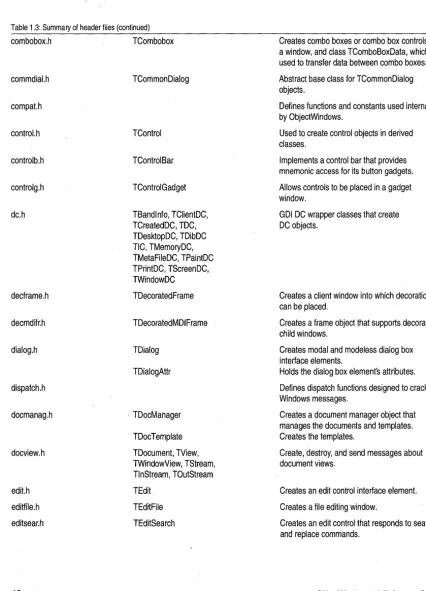
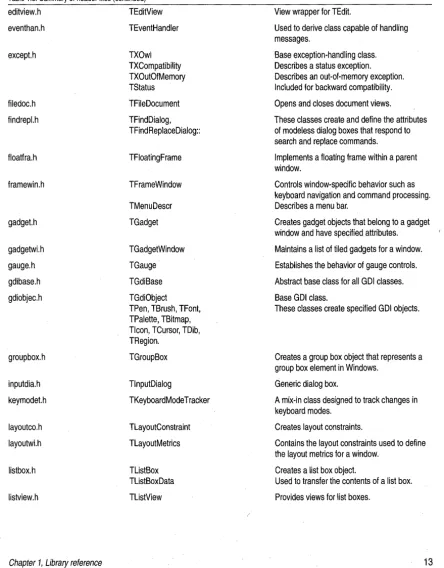
The ObjectWindows header files
Header files, located in your OWL \ INCLUDE subdirectory, contain
[image:24.513.30.460.257.631.2]declarations for class functions and definitions for data types and constants.
Table 1.3: Summary of header files
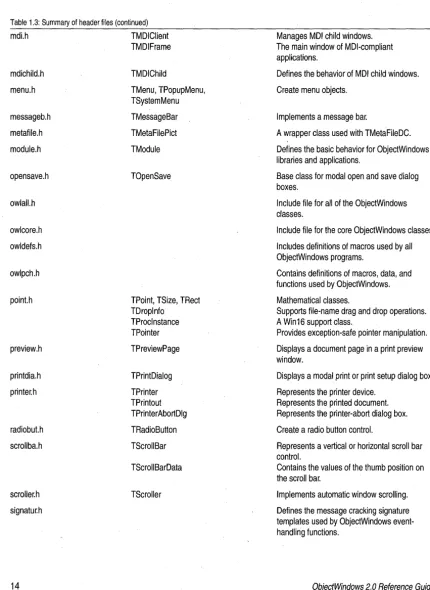
File name Class definition Use
applicat.h TApplication Controls the basic behavior of all
ObjectWindows applications.
bitmapga.h TBitMapGadget Displays· an array of bitmap images.
bitset.h TBitSet Sets or clears one or more bits.
TCharSet Sets or clears bytes.
button.h TButton Creates different types of button controls.
buttonga.h TButtonGadget Creates button gadgets that can be clicked on or off.
celarray.h TCelArray Creates an array of cels.
checkbox.h TCheckBox Represents a check box control.
chooseco.h TChooseColor Represents modal dialog boxes that allow color
selection.
choosefo.h TChooseFont Represents modal dialog boxes that allow font
selection.
clipboar.h TClipboard Contains functions that control how Clipboard
data is handled.
clipview.h TClipboardViewer Registers a TClipboardViewer as a Clipboard viewer.
color.h TColor Contains functions used to simplify standard
TBird class [sample]
Table 1.3: Summary of header files (continued)
combobox.h TCombobox
commdial,h compat.h control,h controlb.h controlg.h dc.h decframe.h decmdifr.h dialog.h dispatch.h docmanag.h docview.h edit.h editfile.h editsear.h 12 TCommonDialog TControl TControlBar TControlGadget TBandlnfo, TClientDC, TCreatedDC, TDC, TDesktopDC, TDibDC TIC, TMemoryDC, TMetaFileDC, TPaintDC TPrintDC, TScreenDC, TWindowDC TDecoratedFrame TDecoratedMDIFrame TDialog TDialogAttr
i TDocManager
TDocTemplate
TDocument, TView, TWindowView, TStream, TlnStream, TOutStream
TEdit
TEditFile
TEditSearch
Creates combo boxes or combo box controls in a window, and class TComboBoxData, which is used to transfer data between combo boxes.
Abstract base class for TCommonDialog objects.
Defines functions and constants used internally by ObjectWindows.
Used to create control objects in derived classes.
Implements a control bar that provides mnemonic access for its button gadgets.
Allows controls to be placed in a gadget window.
GDI DC wrapper classes that create DC objects.
Creates a client window into which decorations can be placed.
Creates a frame object that supports. decorated child windows.
Creates modal and modeless dialog box interface elements.
Holds the dialog box elements attributes.
Defines dispatch functions designed to crack Windows messages.
Creates a document manager object that manages the documents and templates. Creates the templates.
Create, destroy, and send messages about document views.
Creates an edit control interface element.
Creates a file editing window.
Creates an edit control that responds to search and replace commands.
[image:25.513.37.464.41.633.2]Table 1.3: Summary of header files (continued)
editview.h TEditView
eventhan.h except.h filedoc.h findrepl.h floatfra.h framewin.h gadget.h gadgetwLh gauge.h gdibase.h gdiobjec.h groupbox.h inputdia.h keymodet.h layoutco.h layoutwLh Iistbox.h listview.h TEventHandler TXOwl TXCompatibility TXOutOfMemory TStatus TFileDocument TFindDialog, TFindReplaceDialog:: TFloatingFrame TFrameWindow TMenuDescr TGadget TGadgetWindow TGauge TGdiBase TGdiObject TPen, TBrush, TFont, TPalette, TBitmap, Tlcon, TCursor, TDib, TRegion. TGroupBox TlnputDialog TKeyboardMode Tracker TLayoutConstraint TLayoutMetrics TListBox TListBoxData TListView
TBird class [sample]
View wrapper for TEdit.
Used to derive class capable of handling messages.
Base exception-handling class. Describes a status exception. Describes an out-of-memory exception. Included for backward compatibility.
Opens and closes document views.
These classes create and define the attributes of modeless dialog boxes that respond to search and replace commands.
Implements a floating frame within a parent window.
Controls window-specific behavior such as keyboard navigation and command processing. Describes a menu bar.
Creates gadget objects that belong to a gadget window and have specified attributes.
Maintains a list of tiled gadgets for a window.
Establishes the behavior of gauge controls.
Abstract base class for all GDI classes.
Base GDI class.
These classes create specified GDI objects.
Creates a group box object that represents a group box element in Windows.
Generic dialog box.
A mix-in class designed to track changes in keyboard modes.
Creates layout constraints.
Contains the layout constraints used to define the layout metrics for a window.
Creates a list box object.
Used to transfer the contents of a list box.
[image:26.510.28.473.68.636.2]TBird class [sample]
Table 1.3: Summary of header files (continued)
mdLh TMOIClient
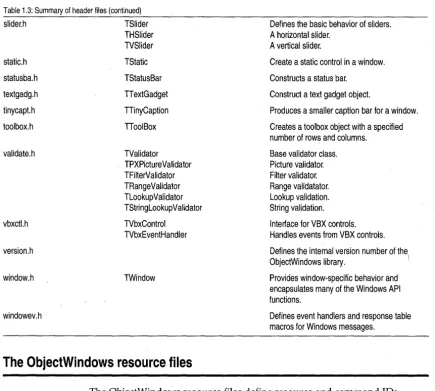
mdichild.h menu.h messageb.h metafile.h module.h opensave.h owlall.h owlcore.h owldefs.h owlpch.h point.h preview.h printdia.h printer.h radiobut.h scrollba.h scroller.h signatur.h 14 TMOIFrame TMOIChild TMenu, TPopupMenu, TSystemMenu TMessageBar TMetaFilePict TModule TOpenSave
TPoint, TSize, TRect TDroplnfo TProcinstance TPointer TPreviewPage TPrintDialog TPrinter TPrintout TPrinterAbortDlg TRadioButton TScroliBar TScroliBarData TScrolier
Manages MOl child windows. The main window of MOl-compliant applications.
Defines the behaviorof MOl child windows.
Create menu objects.
Implements a message bar.
A wrapper class used with TMetaFileDC.
Defines the basic behavior for ObjectWindows libraries and applications.
Base class for modal open and save dialog boxes.
Include file for all of the ObjectWindows classes.
Include file for the core ObjectWindows classes.
Includes definitions of macros used by all ObjectWindows programs.
Contains definitions of macros, data, and functions used by ObjectWindows.
Mathematical classes.
Supports file-name drag and drop operations. A Win16 support class.
Provides exception-safe pOinter manipulation.
Displays a document page in a print preview window.
Displays a modal print or print setup dialog box.
Represents the printer device. Represents the printed document. Represents the printer-abort dialog box.
Create a radio button control.
Represents a vertical or horizontal scroll bar control.
Contains the values of the thumb position on the scroll bar.
Implements automatic window scrolling.
Defines the message cracking signature templates used by ObjectWindows event-handling functions.
[image:27.510.38.469.44.634.2]TBird class [sample]
Table 1.3: Summary of header files (continued)
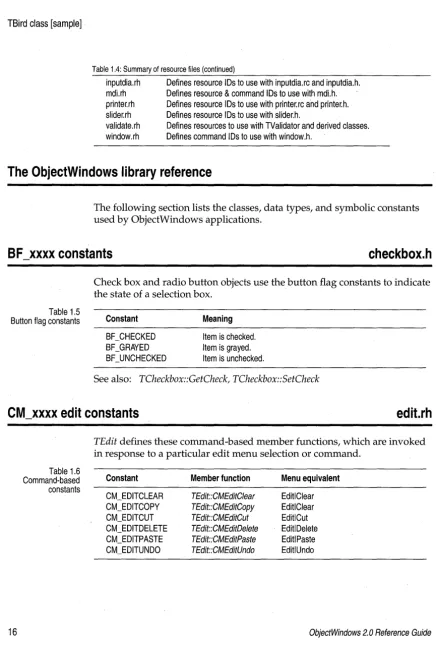
slider.h TSlider Defines the basic behavior of sliders.
A horizontal slider.
static.h statusba.h textgadg.h tinycapt.h toolbox.h validate.h vbxctl.h version.h window.h windowev.h THSlider TVSlider TStatic TStatusBar TT extGadget TIinyCaption TIoolBox TValidator TPXPictureValidator TFilterValidator TRangeValidator TLookupValidator TStringLookup Validator TVbxControl TVbxEventHandler TWindow
A vertical slider.
Create a static control in a window.
Constructs a status bar.
Construct a text gadget object.
Produces a smaller caption bar for a window.
Creates a toolbox object with a specified number of rows and columns.
Base validator class. Picture validator. Filter validator. Range validatator. Lookup validation. String validation.
Interface for VBX controls. Handles events from VBX controls.
Defines the internal version number of the ObjectWindows library. \
Provides window-specific behavior and encapsulates many of the Windows API functions.
Defines event handlers and response table macros for Windows messages.
The ObjectWindows resource files
The ObjectWindows resource files define resource and command IDs.
Table 1.4 Summary of resource files
File name Use
Directory of OWLIINCLUDE
docview.rh Defines resource and command IDs to use with docview.h and
edit.rh editfile.rh
editsear.rh
exceptrh
docview.rc.
Defines command IDs to use with edit.h.
Defines resource and command IDs to with in editfile.rc and editfile.h.
Defines resource and command IDs to use in editsear.rc and editsear.h.
[image:28.510.35.471.59.450.2]TBird class [sample]
Table 1.4: Summary of resource files (continued)
inputdia.rh Defines resource IDs to use with inputdia.rc and inputdia.h. mdi.rh Defines resource & command IDs to use with mdLh. printer.rh Defines resource IDs to use with printer.rc and printer.h. slider.rh Defines resource IDs to use with slider.h.
validate.rh Defines resources to use with TValidator and derived classes. window.rh Defines command IDs to use with window.h.
The ObjectWindows library reference
The following section lists the classes, data types, and symbolic constants used by ObjectWindows applications.
BF _xxxx constants
checkbox.h
Table 1.5 Button flag constants
Check box and radio button objects use the button flag constants to indicate the state of a selection box.
Constant
BF_CHECKED BF_GRAYED BF _UNCHECKED
Meaning
Item is checked. Item is grayed. Item is unchecked.
See also: TCheckbox::GetCheck, TCheckbox::SetCheck
eM_xxxx edit constants
edit.rh
16
Table 1.6 Command-based constants
TEdit defines these command-based member functions, which are invoked in response to a particular edit menu selection or command.
Constant
CM_EDITCLEAR CM_EDITCOPY CM_EDITCUT CM_EDITDELETE CM_EDITPASTE CM_EDITUNDO
Member function
TEdit::CMEditClear TEdit::CMEditCopy TEdit::CMEditCut TEdit::CMEditDelete TEdit::CMEditPaste TEdit::CMEditUndo
Menu equivalent
EditlClear EditlClear EditlCut Editl Delete EditlPaste EditlUndo
[image:29.509.39.476.0.648.2]CM_xxxx edit file constants
CM_xxxx edit file constants
docview.rh
Table 1.7 Command-based constants
These command -based member functions are invoked in response to open, close, print, and save commands.
Constant
CM_FILECLOSE CM_FILENEW CM_FILEOPEN CM_FILEPRINT
CM_FILEPRINTERSETUP CM_FILESAVE
CM_FILESAVEAS
Member function
TEditFile::CmFileNew TEditFile::CmFileOpen
TEditFile::CmFileSave TEditFile::CmFileSaveAs
Menu equivalent
FilelNew FilelOpen FilelPrint FilelPrinter Setup FilelSave FilelSave As
CM_xxxx edit file exit constant
window.rh
Table 1.8 Command-based constant
This command-based member function is invoked in response to a file exit request from a user.
Constant Member function Menu equivalent
TWindow::CmExit FilelExit
CM_xxxx edit replace constants
editsear.rh
Table 1.9 Command-based constants
These command-based member functions are invoked when the corresponding find and replace command is received.
Constant
CM_EDITFIND CM_EDITFINDNEXT CM_EDITREPLACE
Member function
TEditWindow::CMEditFind TEditWindow::CMEditFindNext TEditWindow::CMEditReplace '
Menu equivalent
CM_xxxx MDI constants
CM_xxxx MOl constants
mdi.rh
Table 1.10 Command message constants
These MDI functions are invoked when the corresponding MDI command message is received.
Constant
CM_ARRANGEICONS
CM_CASCADECHILDREN CM_CLOSECHILDREN CM_CREATECHILD CM_ TILECHILDREN
Member function
TMDIClient::CmArrangelcons
TMDIClient::CmCascadeChildren TMDIClient::CmCloseChildren TMDIClient::CmCreateChild TMDIClient::Cm TileChildren
Menu equivalent
WindowlArrange Icdns
WindowlCascade WindowlClose All
WindowlTile
OECLARE_RESPONSE_ TABLE macro
eventhan.h
18
To handle events for a class, you need to declare a response table using the DECLARE_RESPONSE_ TABLE macro within the class definition and you need to define the response table using one of the
DEFINE_RESPONSE_TABLE macros. For example, to declare a response table, use
DECLARE_RESPONSE_TABLE(ClasS)i
where Class r~presents the name of the current class.
See also: DEFINE_RESPONSE_ TABLE macros, END _RESPONSE_TABLE macro
For more information about response table entries, see TEventHandler
(where the response table entries are defined) or TWindow (where the member functions are defined). For more information about how to declare, define, and add message response entries to a response table, see Chapter 5 in the Object Windows Programmer's Guide.
docmanag.h
Used to create a document template, the
DEFINE_DOC_TEMPLATE_CLASS takes three arguments: the name of the document class that holds the data, the name of the view class that displays the data, and the name of the template class. The following examples from DVSAMPLE.CPPj a sample program on your distribution disk, associate
document and view classes with new template classes.
DEFINE_DOC_TEMPLATE_CLASS(TFileDocurnent, TListView, ListTernplate); DEFINE_DOC_TEMPLATE_CLASS(TFileDocurnent, TEditView, EditTernplate);
See also: TDocTemplate
DEFINE_RESPONSE_ TABLE macros
eventhan.h
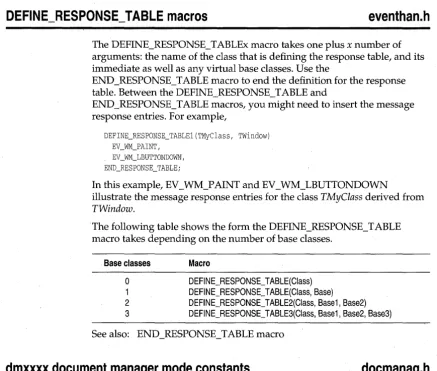
The DEFINE_RESPONSE_TABLEx macro takes one plus x number of arguments: the name of the class that is defining the response table, and its immediate as well as any virtual base classes. Use the
[image:32.508.29.467.110.481.2]END _RESPONSE_TABLE macro to end the definition for the response table. Between the DEFINE_RESPONSE_TABLE and
END _RESPONSE_TABLE macros, you might need to insert the message response entries. For example,
DEFINE_RESPONSE_TABLE1(TMyClass, TWindow)
EV_WM_LBUTTONDOWN, END_RESPONSE_TABLE;
In this example, EV _ WM_P AINT and EV _ WM_LBUTTONDOWN
illustrate the message response entries for the class TMyClass derived from TWindow.
The following table shows the form the DEFINE_RESPONSE_ TABLE macro takes depending on the number of base classes.
Base classes
o
1 2 3
Macro
DEFINE_RESPONSE_ TABLE(Class) DEFINE_RESPONSE_ TABLE(Class, Base) DEFINE_RESPONSE_ TABLE2(Class, Base1, Base2) DEFINE_RESPONSE_TABLE3(Class, Base1, Base2, Base3)
See also: END_RESPONSE_TABLE macro
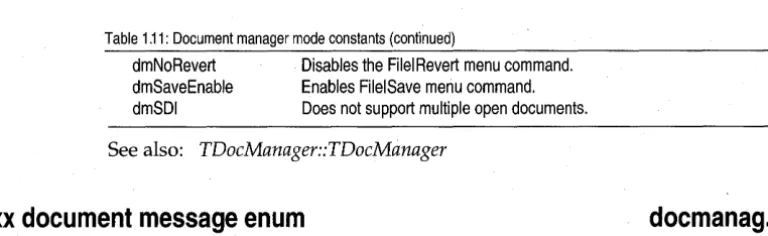
dmxxxx document manager mode constants
docmanag.h
Table 1.11 Document manager mode constants
TDocManager uses the dmxxxx constants to indicate if a document supports single or multiple open documents, and to indicate if it has file menu IDs.
Constant
dmMenu dmMDI
Meaning
Sets IDs for file menu.
dmxxxx document manager mode constants
Table 1.11: Document manager mode constants (continued)
dmNoRevert Disables the FilelRevert menu command. dmSaveEnable Enables FilelSave menu command. dmSDI Does not support multiple open documents.
See also: TDocManager::TDocManager
dnxxxx document message enum
docmanag.h
Table 1.12 Document message enum
TDocManager uses the dnxxxx message constants to indicate that a
document or view has been created or closed. You can set up response table entries for these messages using the EV _OWL VIEW or
EV _ OWLDOCUMENT macros. See Chapter 9 in the Object Windows
Programmer's Guide for information about how to do this.
Constant
dnCreate dnClose
Meaning
A new document or view has been created. A document or view has been closed.
See also: TDocManager::TDocManager
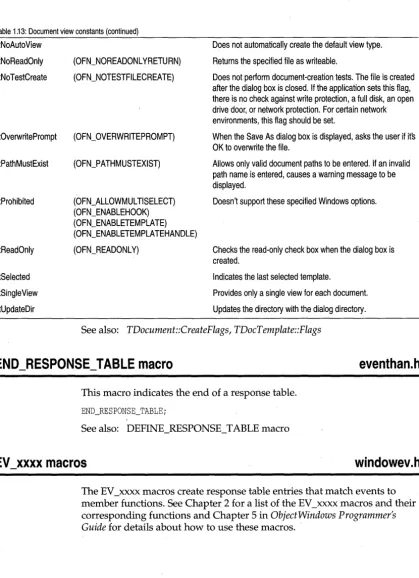
dt document view constants
docmanag.h
dtxxxx constants are used by TDocument and TDocTemplate to create
templates. Several constants are equivalent to the OFN_xxxx constants defined by Windows in commdlg.h.
Table 1.13: Document view constants
Constant
dtAutoDelete
dtAutoOpen
dtCreatePrompt
dtFileMustExist
dtHidden
dtHideReadOnly
dtNewDoc
20
Windows equivalent
(OFN_ CREATEPROMPT)
(OFN_FILEMUSTEXIST)
(OFN_HIDEREADONL Y)
Meaning
Deletes the document when the last view is deleted.
Opens a document upon creation.
Prompts the user before creating a document that does not currently exist.
Lets the user enter only existing file names in the File Name entry field. If an invalid file name is entered, causes a warning message to be displayed.
Hides the template from the users selection.
Hides the read-only check box.
Creates a new document with no path specified.
[image:33.508.81.465.45.163.2] [image:33.508.33.488.402.638.2]dt document view constants
Table 1.13: Document view constants (continued)
dtNoAutoView Does not automatically create the default view type.
dtNoReadOnly (OFN_NOREADONLYRETURN) Returns the specified file as writeable.
dtNoTestCreate (OFN_NOTESTFILECREATE) Does not perform document-creation tests. The file is created after the dialog box is closed. If the application sets this flag, there is no check against write protection, a full disk, an open drive door, or network protection. For certain network environments, this flag should be set.
dtOverwritePrompt (OFN_OVERWRITEPROMPT) When the Save As dialog box is displayed, asks the user if its OK to overwrite the file.
dtPathMustExist (OFN_PATHMUSTEXIST) Allows only valid document paths to be entered. If an invalid path name is entered, causes a warning message to be displayed.
dtProhibited (OFN_ALLOWMUL TISELECT) Doesn't support these specified Windows options. (OFN_ENABLEHOOK)
(OFN_ENABLETEMPLATE) (OFN_ENABLETEMPLA TEHANDLE)
dtReadOnly (OFN_READONL Y) Checks the read-only check box when the dialog box is created.
dtSelected
dtSingleView
dtUpdateDir
Indicates the last selected template.
Provides only a single view for each document.
Updates the directory with the dialog directory.
See also: TDocument::CreateFlags, TDocTemplate::Flags
END_RESPONSE_TABLE macro
eventhan.h
This macro indicates the end of a response table.
END_RESPONSE_TABLE;
See also: DEFINE_RESPONSE_TABLE macro
EV _xxxx macros
windowev.h
The EV _xxxx macros create response table entries that match events to member functions. See Chapter 2 for a list of the EV _xxxx macros and their corresponding functions and Chapter 5 in Object Windows Programmer's
t:.v_XXXX macros
Table 1.14: EV _xxxx macros
Macro
EV_CHILO_NOTIFY(id,notifyCode,method)
Meaning
Handles child 10 notifications (for example, button, edit control, list box, combo box, and scroll bar notification messages) at the childs parent window. Passes no arguments.
Passes all notifications to the response function and passes the notification code in as an argument.
EV _CHIL~_NOTIFY _ANO_COOE(id, notifyCode, method) Handles child 10 notifications at the childs parent window and passes the notification code as an argument.
EV _COMMANO(id, method)
EV _COMMANO_ANOJO(id, method)
EV _COMMANO_ENABLE(id, method)
EV _MESSAGE(message, method)
EV _NOTIFY_AT _CHILO(notifyCode, method)
EV _OWLOOCUMENT(id, method)
EV_OWLNOTIFY(id, method)
EV_OWLVIEW(id, method)
EV _REGISTEREO(str, method)
ID_xxx~
file constants
Handler for menu selections, accelerator keys, and push buttons.
Handler for multiple commands using a single response function. Passes the menu 10 in as an argument.
Enables and disables commands such as buttons and menu items.
General purpose macro for Windows WM_xxxx messages.
Handles all child 10 notifications at the child window.
Handles new document notifications.
Generic document handler.
Handles view notifications.
Handles registered MSG messages.
inputdia.rh
These are the resource and control IDs for the input dialog box.
22
Table 1.15
10 file constants Constant
100JNPUTOIALOG
10JNPUT 10_PROMPT
Meaning
Resource 10 number for the input dialog box.
Control 10 for the user input. Control 10 for the static text.
See also: TlnputDialog::SetUpWindow
[image:35.509.44.473.26.622.2]ID_xxxx printer constants
10_xxxx printer constants
printer.rh
Table 1.16 ID printer constants
The ID _xxxx printer constants are the resource and control IDs for the printer abort dialog box.
Constant
I DD _ABORTDIALOG ID_TITLE
ID_DEVICE ID_PORT
Meaning
Resource ID number for the abort dialog box. ControllD for the selected printer driver. ControllD for the selected printer. ControllD for the selectedprinter port.
10A_xxxx accelerator 10 constants
editfile.rh
Table 1.17 Accelerator ID constants
IDA_EDITFILE is a resource ID for accelerator keys.
Constant Meaning
Resource ID for accelerator keys.
10M_xxxx menu 10 constant
editfile.rh
IDM_EDITFILE is a resource ID for menu selections.
Table 1.18
Menu ID constants Constant Meaning
Resource ID for menu selections.
10S_xxxx document string 10 constants '
docview.rh
Table 1.19 Document string ID constants
Constant
IDS_DOCCHANGED
IDS_DOCLIST IDS_NOTCHANGED IDS_UNABLECLOSE IDS_UNABLEOPEN IDS_UNTITLED IDS_VI EWLIST
Displays these messages:
If the document has been changed, displays the message, "Do you want to save the changes?"
Document is a document type. The document has not been changed.
Document manager is unable to close the document. Document manager is unable to open the document. Document is untitled.
[image:36.510.33.460.57.648.2]IUt)_XXXX edit file ID constants
IDS_xxxx edit file 10 constants
editfile.rh
Table 1.20 Edit file ID constants
ObjectWindows defines.these string constants used by edit and file classes to display information about files.
Constant
IDS_FILECHANGED IDS_FILEFIL TER IDS_UNABLEREAD I DS_ UNABLEWRITE
Meaning
The text in the file has changed. Do you want to save the changes? Use this filter to display text files.
Unable to read the file from the disk. Unable to write the file to the disk.
IDS_xxxx exception messages
except.rh
Table 1.21 Exception message
constants
24
The following list includes general and application exception message constants grouped according to message types.
Constant
I DS-,NVALI DMAI NWI NDOW IDS-,NVALIDMODULE IDS_NOAPP IDS_OUTOFMEMORY IDS_UNKNOWNERROR IDS_MENUFAILURE IDS_ VALIDATORSYNTAX IDS_PRINTERERROR
Owl 1 compatibility messages: IDS-,NVALIDCHILDWINDOW I DS-' NVALI DCLIENTWINDOW I DS-, NVALI DWINDOW
TXWindow messages: IDS_CHILDCREATEFAIL IDS_CHILDREGISTERFAIL IDS_CLASSREGISTERFAIL IDS_WINDOWCREATEFAIL IDS_ WINDOWEXECUTEFAIL
GOI messages: IDS_GDIALLOCFAIL IDS_ GDICREATEFAIL IDS_GDIDELETEFAIL IDS_GDIDESTROYFAIL IDS_GDIFAILURE IDS_GDIFILEREADFAIL Meaning Invalid MainWindow
Invalid module specified for window No application object
Out of memory Unknown error Menu creation failure Validator syntax error Printer error
Invalid child window Invalid client window Invalid window
Child create fail for window
Child class registration fails for window Class registration fails for window Create fail for window
Execute fail for window
GDI aI/ocate failure GDI creation failure GDI object delete failure GDI object destroy failure GDI failure
GDI file read failure
[image:37.510.42.467.269.631.2]IDS_xxxx exception messages
Table 1.21: Exception message constants (continued)
10SJNVALIOOIBHANOLE Invalid DIB handle 10S_GOIRESLOAOFAIL GOI resource load failure
IDS_xxxx listview 10 constants
listview.rc
Table 1.22 Listview string 10 constants
ObjectWindows uses list view constants to define operations perfomed on views. These include clearing the document, inserting a new line, copying text to the Clipboard, and so on.
Constant Meaning
Resource 10 for listview constants.
IDS_xxxx printer string 10 constants
printer.rh
Table 1.23 Printer string ID constants
ObjectWindows defines several constants used by printer classes to determine the printer status.
Constant
10S_PRNCANCEL 10S_PRNERRORCAPTION 10S_PRNERRORTEMPLATE 10S_PRNGENERROR 10S_PRNMGRABORT 10S_PRNON IDS_PRNOUTOFDISK 10S_PRNOUTOFMEMORY
String displayed
Printing is canceled. Printer error occurred. Document was not printed. Error encountered during printing. Printing aborted in Print Manager. Printer is on.
Out of disk space. Out of memory.
IDS_xxxx validator 10 constants
validator.rh
Table 1.24 Validator 10 constants
ObjectWindows defines several constants used by validator classes to determine the validator status.
Constant
IDS_ VALPXPCONFORM 10S_ VAll NVALI OCHAR 10S_ VALNOTINRANGE IDS_ VALNOTINLIST
Meaning
[image:38.513.40.461.47.648.2]IDW_MDICLIENT constant
IOW_MOICLIENT constant
framewin.h
Child ID constant used to identify MDI client windows.
IDW_MDICLIENT
lOW _MOIFIRSTCHILO constant
framewin.h
Child ID constant used to identify the first MDI client window ..
IDW_FIRSTMDICHILD
ImParent constant
layoutco.h
LmParent is used to construct layout metrics (for example, edge and size constraints).
#define lmParent 0
See also: TLayoutConstraint
LongMulOiv function
scroller.h
26
TScroller uses this function to convert horizontal range values (XRange) from the scroll bar to horizontal scroll values (XScrollValue) and vice versa, or to convert vertical range values (YRange) from the scroll bar to vertical scroll values (YScrollValue) and vice versa.
inline long LongMulDi v (long mull, long mul2, long divl) ;
See also: TScroller
Maximum number of characters possible for an error message.
const int MAX_RSRC_ERROR_STRING
=
255;except.h
NBits function
WORD NBits(int colors);
Returns the bit count corresponding to the given color count.
See also: NColors, rColor class
NBits function
color.h
NColors function
color.h
Returns the color count corresponding to the given bit count, or -1 if the bit count is not supported by Windows. Bit counts currently supported are 1, 4,8, and 24.
int NColors(WORD bitCount);
See also: NBits, TColor class
of xxx x document open enum
docview.h
This enum defines the document and open sharing modes used for constructing streams and storing data. Any constants that have the same functionality as those used by OLE 2.0 docfiles are indicated in the following table; for example, STGM_TRANSACTED, STGM_CONVERT, STGM_PRIORITY, and STGM_DELETEONRELEASE.
Although files are typically used for data storage, databases or
spreadsheets can also be used. I/O streams rather than DOS use these bit values. Documents open the object used for storage in one of the following modes:
Constant
of Parent of Read of Write of Read Write ofAtEnd of Append ofTruncate of No Create of No Replace ·ofBinary
of los Mask
Meaning
A storage object is opened using the parent's mode. A storage object is opened for reading.
A storage object is opened for writing.
A storage object is opened for reading and writing. Seek to end-of-file when opened originally. Data is appended to the end of the storage object. An already existing file is truncated.
Open fails if file doesn't exist. Open fails if file already exists.
Data is stored in a binary, not text, for