EVALUATION OF TWO CAMERA-BASED APPROACHES FOR COLLECTING STUDENT FEEDBACK
Samuel Kosolapov, Nissim Sabag, Evgeny Gershikov ORT Braude College, Karmiel, Israel
Abstract
Many educators have demonstrated that use of the clicker-based Instant Feedback System (IFS) during lectures advances in students' active learning that results in better academic achievements. The wide proliferation of smartphones and tablets (having high-resolution digital cameras and powerful computing processors) means that simple and inexpensive camera-based feedback systems (CBFS) can and should be developed. In this paper, the usefulness and reliability of two CBFS implementations will be analyzed. A number of tests of the two systems were run in big classes (more than 50 students) and in small classes (less than 20 students). Pedagogical impact of both CBFS implementations is discussed.
Key words: Active Learning, IFS, Image Processing, OCR
1. INTRODUCTION
The multiple-choice exam method is widely used in universities, colleges and schools. The current paper presents a new method of using a camera-based feedback system (CBFS) as an automatic and immediate tester for multiple-choice exams instead of the traditional use of electro-mechanical scanner. In the presented method, every examinee marks his or her selected answers on a specially prepared printed form. After students submit their completed exam, an ordinary scanner scans and checks the collected forms. The resulting results are processed (by a well-known image processing technique) and routed to the lecturer. An important advantage of this method is that it releases lecturers from having to check the exams. On the other hand, at this moment in time, scanning takes more time than is desired (even with dedicated, fast scanning systems). The use of CBFS might be a right way to improve scanning methods in the future.
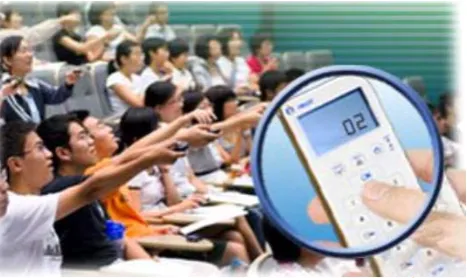
A well-known faster alternative to scanner-based systems are clickers. Many educators have demonstrated that the use of clickers during lectures advances students’ academic achievements (Bjorn et al., 2011; Felder & Brent, 2009; Google Apps for Education, 2014; Lasry, 2008; Markett et al. 2006). Figure 1 presents a typical use of clickers in class. During the lecture, the lecturer gives students a multiple-choice question. Every student in the room answers the question by clicking the key that corresponds to his or her answer.
Fig. 1. Usage of clickers in class
clickers are distributed prior to the lecture, significant time is needed to distribute the clickers so that users, i.e., students, can be identified; and again time is needed to collect them at the end of the lecture. Whatever the scenario, maintenance of the batteries is a serious logistics and reliability issue.
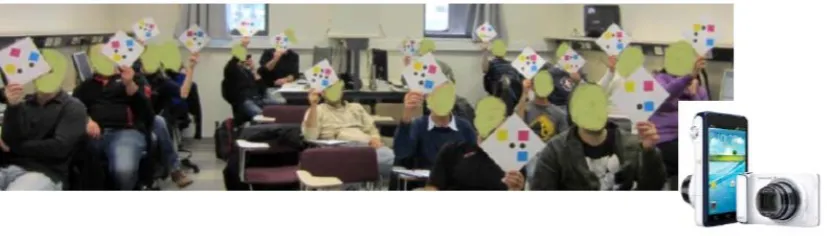
In previous research (Kosolapov, Gershikov & Sabag, 2013) we described a camera-based IFS. In this system, (Figure 2) students answer a multiple-choice question by raising specially prepared cards. Each card bears a short ID of the respective student (a kind of 2D barcode). Orientation of the card encodes the number of the selected answer. Using any available camera, a lecturer photographs the students holding up the cards (for example, a smartphone camera). The image (or multiple images) is processed and results are sent to the lecturer in a very short time. Cards are printed on thick paper and folded in a special way. A clear advantage of this method is that the cards are passive (no batteries, RF, Wi-Fi etc.) and extremely inexpensive compared to clickers.
Fig. 2 Camera-based IFS
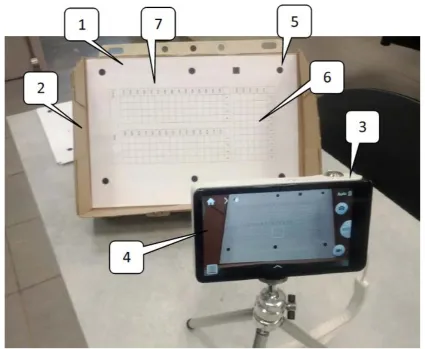
Our present research deals with another variant of multiple-choice exam grading. In this case, every student receives a slightly modified multiple-choice printed form. Students manually mark their answers and at the end of the lecture/lesson, place their exam on a stand and smartphone camera photographs the form (see Figure 3). Since it takes a number of minutes to collect the forms and process them, we refer to this approach as a camera-based FFS (Fast Feedback System).
Fig. 3. Camera-based FFS
1. Multiple-choice form printed on plain paper. 2. Simple stand holds the forms. 3. Smartphone high-resolution camera photographs the form. 4. The form’s image on the smartphone’s screen. 5. Multiple markers on the form, added to compensate for distortions. 6. A special area where the last 5 digits of the student’s ID are entered. 7. Exam form for entering up to 30 answers.
A literature search found no equivalent camera-based FFS. However, a system nearly identical to ours was recently described as a practical and feasible PC application (Xian, 2013). The only difference between this system and ours is that our application can be run using an assortment of platforms: Android-based camera-based FFS, Windows 8 camera–based FFS, and cloud-based FFS, whereas Xian’s application (ibid.) is a C# PC application that can be converted to a cloud ASP.NET application.
In what follows we describe some implementation details of a number of camera-based IFSs and FFS systems. At the end, we compare logistics and pedagogical aspects of each system.
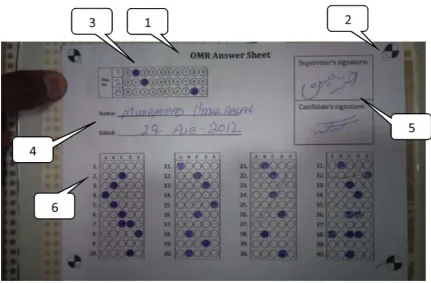
Fig. 4. Usage of an Optical Marks Recognition (OMR) Engine to collect answers to multiple-choice questions (Xian, 2013)
1. OMR form as seen by the smartphone camera. 2. Markers used to properly orient the form. 3. Form ID area in a computer readable code. 4. Human readable data form area. 5. Signatures area (for student and lecturer). 6. Multiple choice answers area (up to 45 questions).
2. CAMERA-BASED INSTANT FEEDBACK SYSTEM (IFS) 2.1 IFS using one camera manually positioned by lecturer
In this implementation, the lecturer takes a picture of the class (if the class is small enough) or multiple images (when the class is big and the camera’s field of view cannot take one picture of the entire class). Considering the need for high resolution, the operator (using 16 MP cameras) must be stable to prevent image smearing. A tripod can be used, but most modern cameras have built-in image stabilization, so that manual camera positioning is feasible. For more details of this implementation, see Kosolapov, Gershikov and Sabag (2013).
2.2 IFS using one mechanically rotated camera
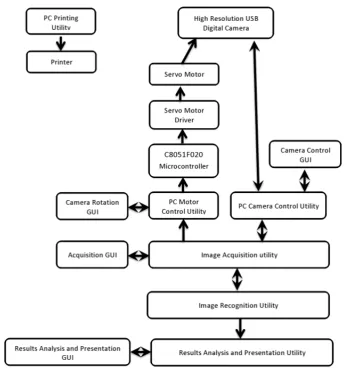
In this implementation, the camera is rotated by using a computer controlled servo-motor (see Figure 5). Depending on the classroom geometry and the number of images required, a proper camera rotation protocol can be prepared. Figure 8 presents the main components of this implementation. For more details, see (Blumberg, Dvorin 2013).
2.3 IFS using two electronically synchronized cameras
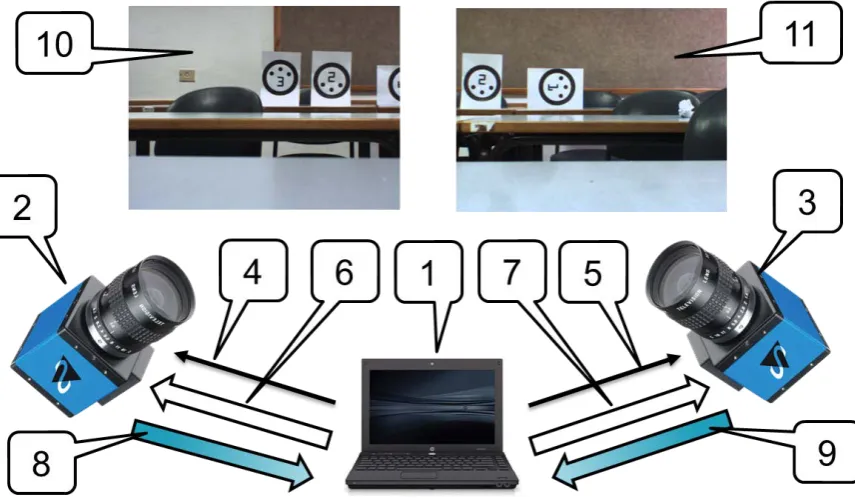
Analysis of the operation of the system described in Section 2.2 leads to the conclusion that while one camera is adequate for small laboratories, manual computer-controlled camera rotation or two cameras are necessary for most middle-size classrooms (up to 50 students). Figure 6 presents an idea of the two-camera system. For more details, see (Tselnik, 2013).
Fig. 5. Camera rotated by electro-mechanical means
Fig 6. IFS using two cameras with hardware synchronization
1. Computer. 2. Camera #1. 3. Camera #2. 4. Synch signal from computer to Camera #1. 5. Synch signal from computer to Camera #2. 6. Computer sends configuration parameters to Camera #1. 7. Computer sends configuration parameters to Camera #2. 8. Image from Camera #1 sent to Computer. 9. Image from Camera #2 sent to Computer. 10. Image from Camera #2. 11. Image from Camera #1.
2.4. Main software blocks and data flow
In Figure 7 one can see the main blocks and data flow for the system described in Section 2.2. It is clear that many software blocks dealing with image acquisition and image processing can be reused in the systems described in Sections 2.1 and 2.3.
Fig. 7. Main blocks and data flow for the system described in Section 2.2. Some blocks were used in the systems described in Sections 2.1 and 2.3. For more technical details, see Blumberg and Dvorin,
(2013).
2.5 Image processing software
In our experiments with a camera-based IFS, a number of card designs were evaluated. Orientation of the card (encoding the number of the answer selected by the specific student) was evaluated by using color or monochrome markers. In most cases, markers were treated as blobs and the popular AFORGE library (2014) was used to calculate the positions of these blobs.
The systems described in Sections 2.1 and 2.2 uses a machine-friendly card design: students’ short IDs were encoded by circles positioned in predefined places and treated as a binary number. (The selected design enabled us to have a maximum of 63 students take the exam).
The system described in Section 2.3 uses a human-friendly design: each student’s short ID was printed as a plain two-digit number. The advantage of this design is that in case of recognition failure, the lecturer can easily correct the software error. Furthermore, for small classes, fully manual result processing is feasible (albeit not recommended).
The human-friendly card design allowed blob algorithms to be used to evaluate the card orientation; however, ID identification was executed by a well-known OCR and template matching approaches.
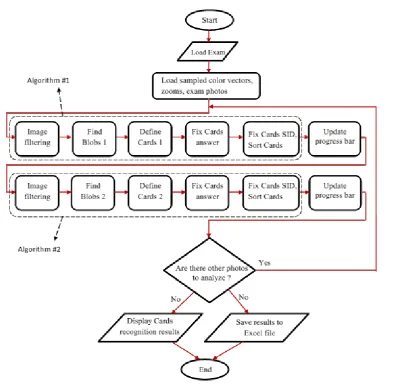
Fig. 8. Main blocks of the image processing software of the system described in Sections 2.1 and 2.2. Two different image-processing algorithms were used to increase reliability. For more technical
details, see Blumberg and Dvorin (2013).
2.6. Representative results of the camera-based IFS operation
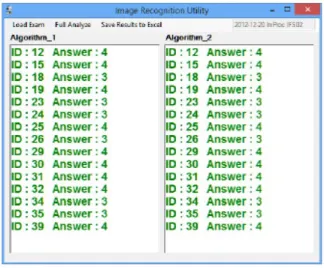
Results of the operation system described in Section 2.1, which used the software described in Figure 8, are presented in the Figure 9. One image was adequate for the small laboratory room. All cards are clearly seen. Processing time for the “off the shelf” portable PC was about 18 sec. Note that only one card of the total 16 cards was not recognized (marked by red, the card was rejected because of low contrast as a result of backlight from the window). Ten IFS exams were provided in this class. 1% of the cards were rejected. No false recognition occurred in this class.
Fig. 9. Results of a real camera-based IFS exam in the small Image Processing Laboratory (Kosolapov, Gershikov & Sabag, 2013)
Fig. 10. Summary of the IFS exam shown in Figure 9. Both image-processing algorithms worked properly.
Fig. 11a. Results of the camera-based IFS exam for the big, wide classroom
Fig. 11b. Results of the camera-based IFS exam for the big, wide classroom
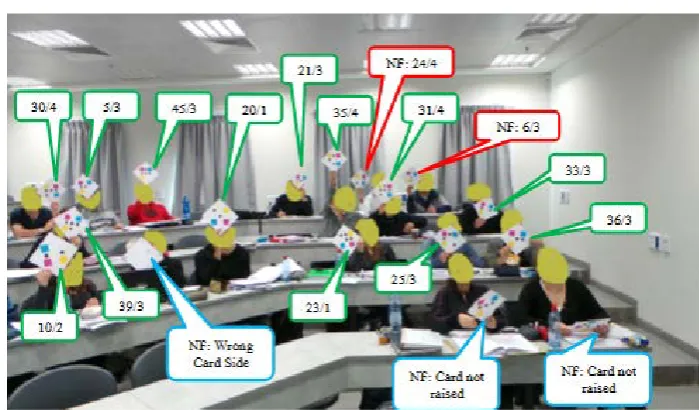
Figures 11a and 11b present results of the camera-based IFS exam for the big, wide classroom (maximum capacity ~60 students). Two images were enough to collect data from all the students who took the exam. Processing time was ~ 35 sec. Image synchronization was not provided in this case: it can be seen that card #10 was not raised in Figure 11a, but is raised in Figure 11b. All 22 recognized cards were recognized correctly. Three images from the last row were not recognized (because of lack of resolution). Analysis of more than 10 camera-based IFS exams in the big classroom reveals that the main problem in the big class is that cards overlap. This problem can be solved by having students follow a simple “optical rule”: “If you can see the camera, then the camera can see you”. However, practical implementation of this technique may be problematic in non-cooperative classes.
3. CAMERA-BASED FFS
Considering the problematic results of the IFS in the big classroom, an alternative camera-based FFS shown in Figure 3 with software from Figure 4 was tested in the same classes during one semester. The main problem was image distortion because of form mechanical deformation. However, a simple stand and six markers enable us to “straighten” the form into a nearly ideal rectangle. After this
From the technical aspect, we can conclude that a camera-based IFS is reliable enough for small classes (up to 20 students). Considering current implementations, a camera-based FFS is preferable for bigger classes (up to 60 students). As for pedagogical impact, we definitely may conclude that usage of frequent exams (even of primitive multiple-choice exams) has a strong and consistent positive impact on the failure rate on final exams (students that participated in the IFS and FFS exams demonstrated a significantly lower failure rate that those that did not participate in these exams). We plan to continue our work on camera-based systems (IFS and FFS) in order to get more statistics, and improve reliability and simplicity of usage.
ACKNOWLEDGMENT
This study was supported by a number of grants from the research committee of ORT Braude College, Karmiel, Israel.
REFERENCES
AFORGENET Library. Retrieved February 2014 from: http://www.aforgenet.com
Blumberg, M, Dvorin, O 2013, IFS System Prototype, unpublished BSc project, ORT Braude College.
Felder, R & Brent, R 2009, 'Active Learning: and Introduction', ASQ Higher Education Brief, vol. 2, no. 4, pp. 1-5.
Google Apps for Education. Retrieved March 2014 from: http://edutraining.googleapps.com/Training-Home/module-1
Kosolapov, S, Gershikov, E & Sabag, N 2013, Feasibility of a Camera-Based Instant Feedback System. CONTENT 2013: The Fifth International Conference on Creative Content Technologies, pp. 23-29
Lasry, N 2008, 'Clickers or Flashcards: Is There Really a Difference?', The Physics Teacher, vol. 46, pp. 242-244.
Markett, C, Sanches, IA, Weber S & Tangney, BT 2006, 'Using Short Message Service to Encourage Interactivity in the Classroom', Computers & Education, vol. 46, no. 3, pp. 280-293.
Tselnik, B 2013, IFS Using Two-Camera Fixed Configuration, unpublished BSc project, ORT Braude College.
Wolter, BHK, Lundberg, MA, Kang, H & Herreid, CF 2011, 'Students’ Perception of Using Personal Response Systems (“Clickers”) with Cases in Science', Journal of College Science Teaching, vol. 40, no. 4, pp. 14-19.
Xian, LY 2013, Optical Marks Recognition (OMR) Engine. Code Projects.