s o l u t i o n s @ s y n g r e s s . c o m
With more than 1,500,000 copies of our MCSE, MCSD, CompTIA, and Cisco study guides in print, we continue to look for ways we can better serve the information needs of our readers. One way we do that is by listening.
Readers like yourself have been telling us they want an Internet-based ser-vice that would extend and enhance the value of our books. Based on reader feedback and our own strategic plan, we have created a Web site that we hope will exceed your expectations.
[email protected] is an interactive treasure trove of useful
infor-mation focusing on our book topics and related technologies. The site offers the following features:
â One-year warranty against content obsolescence due to vendor
product upgrades. You can access online updates for any affected chapters.
â âAsk the Authorâ customer query forms that enable you to post
questions to our authors and editors.
â Exclusive monthly mailings in which our experts provide answers to
reader queries and clear explanations of complex material.
â Regularly updated links to sites specially selected by our editors for
readers desiring additional reliable information on key topics.
Best of all, the book youâre now holding is your key to this amazing site. Just go to www.syngress.com/solutions, and keep this book handy when you register to verify your purchase.
Thank you for giving us the opportunity to serve your needs. And be sure to let us know if thereâs anything else we can do to help you get the maximum value from your investment. Weâre listening.
1 YEAR UPGRADE
B U Y E R P R O T E C T I O N P L A NDeveloping
Web Services
with
Java APIs
for XML Using WSDP
Jerry Foster Mick Porter
Dreamtech Software, Inc. Natalie Wear
v
Acknowledgments
v We would like to acknowledge the following people for their kindness and support in making this book possible.
Ralph Troupe, Rhonda St. John, Emlyn Rhodes, and the team at Callisma for their invaluable insight into the challenges of designing, deploying and supporting world-class enterprise networks.
Karen Cross, Lance Tilford, Meaghan Cunningham, Kim Wylie, Harry Kirchner, Kevin Votel, Kent Anderson, Frida Yara, Jon Mayes, John Mesjak, Peg OâDonnell, Sandra Patterson, Betty Redmond, Roy Remer, Ron Shapiro, Patricia Kelly, Andrea Tetrick, Jennifer Pascal, Doug Reil, David Dahl, Janis Carpenter, and Susan Fryer of Publishers Group West for sharing their incredible marketing experience and expertise.
Jacquie Shanahan, AnnHelen Lindeholm, David Burton, Febea Marinetti, and Rosie Moss of Elsevier Science for making certain that our vision remains worldwide in scope.
Annabel Dent and Paul Barry of Elsevier Science/Harcourt Australia for all their help.
David Buckland,Wendi Wong, Marie Chieng, Lucy Chong, Leslie Lim, Audrey Gan, and Joseph Chan of Transquest Publishers for the enthusiasm with which they receive our books. And welcome back to Daniel Lohâglad to have you back Daniel!
Kwon Sung June at Acorn Publishing for his support.
Ethan Atkin at Cranbury International for his help in expanding the Syngress program.
Jackie Gross, Gayle Voycey, Alexia Penny, Anik Robitaille, Craig Siddall, Darlene Morrow, Iolanda Miller, Jane Mackay, and Marie Skelly at Jackie Gross & Associates for all their help and enthusiasm representing our product in Canada.
vi
Contributors
Jay Foster has been an IT professional since 1989. His areas of expertise include object-oriented design and modeling, software engineering,Web based application design/development, extranet/intranet security, and N-tier application development. He has extensive experience in the fol-lowing technologies: Java Servlets, Enterprise JavaBeans (EJB), Java Server Pages (JSP), Java Database Connectivity (JDBC), Remote Method
Invocation (RMI), Java Foundation Classes (JFC), Swing, OOA/OOD/ OOP using the Unified Modeling Language (UML), CORBA,Web Services, .NET Framework, C#, ASP.NET,Web Security and Enterprise Application Integration. Jay has been developing object-oriented systems in Java since 1996 and is a Sun Certified Java Programmer. Jay has authored several books on various Java programming topics.
Mick Porter(SSJCP, MCP) is a Senior Technical Architect for Logica, a global systems integrator. Mick specializes in the design and implementa-tion of wireless and mobile commerce systems.With 15 years of experi-ence in the IT industry, Mick has worked on an enormous variety of systems and projects, and over the last few years, he has delivered a number of major e-commerce systems. Mick holds a bachelorâs degree in Computer Science, and became a Sun Certified Java Programmer five years ago, as well as having passed eight Microsoft Certified Professional exams. Mick lives in Sydney, Australia, with his wife, Andrea, and children, Holly and Anthony.
vii
Dreamtech Software India Inc. is a software solution and service provider that provides a broad range of services and offers a dynamic blend of consultancy and system integration to help corporations build and implement innovative e-business strategies. A futuristic vision moti-vates the globally acclaimed software products of Dreamtech Software. Dreamtech has already distinguished itself with an excellent track record of publishing books on advanced technologies including XML and XSLT, WAP, Bluetooth, 3G , peer-to-peer networking, C#, and Java.The success of Dreamtechâs endeavors to provide world-class software products can be gauged by the fact that its clientele includes some of the most distin-guished names in IT-related publishing and solutions.
Natalie S. Wear is a Senior Java Developer and Systems Engineer at Telecommunications Services, Inc. in Tampa, FL. She creates code designs, provides architecture recommendations, and writes software for the Java applications used within her department. Such applications are primarily centered on back-end integration using XML and wireless industry-stan-dard APIs. Her specialties include e-commerce, CORBA implementation, back-end system integration, and internet/intranet development. Natalieâs background includes positions as Senior Java Engineer at Verizon Wireless and as an instructor of Vitria at PriceWaterhouseCoopers, LLP. She also teaches an undergraduate course on Java at the University of South Florida. Natalie holds a bachelorâs degree in Political Science and another bachelorâs degree in Management Information Systems (MIS) from the University of South Florida. She holds a masterâs degree in Business Administration (MBA) from the University of South Florida.
viii
Technical Editor and Contributor
c:otherwise 174 Importing External Resources 174
c:import 174
c:param 175
URL Manipulation 175
c:urlEncode 175
c:redirect 176
SQL Query Tags 176
Setting up a driver 176
sql:driver 177
Executing queries 177
sql:query 177
sql:param 177
Executing updates 179
sql:update 179
Denoting transactional boundaries 180
sql:transaction 180
Internationalization Tags 182
Defining the Locale 183
Browser Specified 183
JSP Specified 184
Defining the Timezone 184
fmt:timeZone 184
Specifying a Resource Bundle 185
fmt:bundle 186
Locating the resource bundle 186 Using Internationalized Messages 187
Obtaining Simple Internationalized
Messages 187
Performing Parameter Substitution 188 Exception Localization 190
Parsing and formatting 192
fmt:formatNumber 192
fmt:parseNumber 194
fmt:formatDate 194
fmt:parseDate 195
Using SocketFactories and
ServerSocketFactories 421
The SocketFactory Class 421 The ServerSocketFactory Class 422 Advantages of SocketFactories 422 Determining Default and Installed
Cipher Suites 422
Determining the Installed Cipher Suites 423 Using Secure Server Sockets 424 Getting the Secure Socket Factory 425 Registering a Secure Server Socket 426
Accepting Connections 426
Reading Data 426
Writing Data 427
Closing Connections 427
Using Secure Client Sockets 429 Connecting to a Remote Secure Server 430
Writing Data 430
Reading Data 431
Closing the Connection 431
Using JSSE Applications with WSDP 437 Using the URLHandler in a Web Service 440 Client-Server Web Service 443
Summary 448
Solutions Fast Track 448
Frequently Asked Questions 450
Chapter 11 Using JWSDP Tools 453
Introduction 454
JWSDP UDDI Registry 454
Installing 455
Microsoft Windows Installation
Instructions 455
Unix, Linux Installation Instructions 455
Configuring 460
Activating 460
It should come as no surprise to someone reading this foreword that two of the most influential forces in information systems over the last few years have been Java and XML. Java provides a stable, industrial-strength language that runs on a variety of platforms, while XML offers a simple format for the exchange of information across a variety of platforms.Together, they showcase tools for developing numerous appli-cations: from reaching back into legacy computer systems, to reaching out to users and partners on the World Wide Web.
Lately, it has become popular to combine these two technologies in a highly-dis-tributed architectural technique called Web services. Broadly speaking, a Web service is the exposure of a business process over a network.The connotation is generally that XML-based traffic is being moved on a public network (the Internet) via the HTTP protocol. However,Web services can also be useful internally to an organization, as a mechanism for encapsulating and exposing the business logic inherent in legacy sys-tems. New applications can then utilize this Web service interface to leverage the complex business logic that has been refined, sometimes for decades, in these legacy systems.This allows for the reuse of systems at the logical level, without regard to physical configuration.
There is nothing specific to Java in Web services. In fact, the whole point of Web services is that any language, and any platform, can be used. Iâve written Web services in languages as varied as Java, C++, C#, and Perl, but the features that make Java attractive for general server programming (rich libraries, straightforward execution model, and portability) are the same ones that make Java attractive when writing new Web-service-based systems as well.
Until recently, Java programmers wanting to use XML-based Web services have been faced with a variety of libraries, each presenting a slightly different API and func-tionality.Web service standards such as SOAP, UDDI, and ebXML appeared (being key for next-generation Web-based applications), but had no direct support in Java.
xxiii
This recently changed with the introduction of the Java Web Services Developer Pack (JWSDP).The JWSDP was designed to create or endorse standard interfaces for the Java processing of XML.The name is somewhat misleading in that the JWSDP can be used for applications that have nothing to do with Web services. However, it does focus on the presentation of business logic over a network:Web services.
JWSDP is a rich collection of existing interfaces and libraries that Java endorsed, new standards developed under the Java Community Process, and code that Sun developed internally to support Web services. At the time this book was written, the most recent release was the EA2 (Early Access 2) version, which is the version focused on in these pages. As updates become available, check the Syngress Web site for amendments to this book.
The first chapter is intended to introduce you to the components of the JWSDP. It introduces the history of the JWSDP, and the components that make up the package. Itâs a good idea to read chapter one before skipping to any of the other chapters, just to get an overview of how the parts interoperate.
Since processing XML is key to Web services, the next three chapters take an in-depth look at processing XML in Java, each covering a different aspect of the process. Chapter 2 tackles parsing XML using SAXâthe Simple API for XML. Chapter 3 covers parsing again, but this time for the Document Object Model. SAX and DOM are the two dominant mechanisms for processing XML in Java, and after reading these chapters youâll be able to decide which best fits your application needs.
Chapter 4 explores XML processing using XSL, a powerful system for trans-forming XML data, while Chapter 5 concentrates on the new APIs contained in the JWSDP. After reading Chapter 4, youâll be set to begin applying your XSL stylesheets to the XML you parsed in Chapters 2 and 3.
While XML is the core of a Web-services-based system, you need to be able to present those services externally. Its frequently the case that these services need to be presented directly to end users, and in J2EE that often means JSP. Chapter 5 also introduces the JSP Standard Tab Library, a component of the JWSDP designed to facilitate the development of complex JSPs.
Next, Chapters 6 and 7 turn to computer-to-computer communication, each dis-cussing the SOAP (Simple Object Access Protocol) support built into JWSDP.
providers, which can supply reliable routing of SOAP messages, and/or simplify the development of systems that rely on higher-level, SOAP-based protocols such as ebXML.
While message passing works well for many Web service systems, there are times where you want to be able to encapsulate the functionality of a remote service and present it as an object in your local application.This technique, known as remote proce-dure calls, is nothing newâUnix systems have provided this functionality for years, as have middleware tools such as COM and CORBA. However, with XML-based RPC, the remote system can be wildly different from the local machineâand doesnât even have to run a specific middleware tool. Chapter 8 investigates the XML-based RPC systems, and shows how you can develop applications that act as clients or servers.
Chapter 9 addresses the issue of finding and describing Web services. It covers the JWSDP interfaces to UDDI and ebXML registries, which are the dominant mecha-nisms for describing Web services. Registries were originally conceived as a global resourceâa mechanism for finding an electronic business partner on the Internetâ but the advent of low-cost registries such as the JWSDP Registry tool and jUDDI have made it practical for organizations to deploy registries for internal systems as well. After reading Chapter 9, you will be ready to dynamically describe and locate Web service descriptions a variety of ways.
For applications that do communicate with external partners, security is always a concern. Chapter 10 addresses the JSSE (Java Secure Sockets Extension). JSSE intro-duces a portable (and exportable) API for securing the point-to-point transfer of information. Using JSSE ensures that the messages you send are not intercepted or viewed by unintended audiences.
Finally, Chapter 11 addresses some of the miscellaneous tools included in the JWSDP.These tools, including Tomcat, Ant, and the JWSDP Registry, are designed to provide a development environment for building and testing Web-service-based applications. Again, these tools are complex, and could easily be a book topic on their own. Chapter 11 strives to introduce just enough of them for you to use them in conjunction with the JWSDP.
serves as both an introduction and a reference when writing Web-service-based sys-tems in Java.
I want to give thanks to my editor, Jonathan Babcock, who made my first tech-nical editing job easier than I expected. On a personal note, I want to thank my ever-supportive wife,Trish, and my daughters, Anna and Katie.Without Anna and Katie, larger portions of the book would have been done in daylight hours, but the laughter they bring more than makes up for any lost sleep. And without Trish, there would be no laughter or daylight at all.
Introduction
to the JWSDP
Solutions in this chapter:
â JWSDP History
â JAXP
â JAXM
â JAX-RPC
â JAXR
â JSSE
â JSTL
â Ant and Tomcat
Chapter 1
1
Summary
Solutions Fast Track
Introduction
The Java Web Services Developer Pack (JWSDP) is a collection of tools and libraries designed to make the development of Web services in Java as painless as possible. First introduced in January 2002 as an Early Access (EA) release, the JWSDP brings together XML parsers, SOAP support, service containers, and build tools that can be used to create and consume widely distributed services based on XML protocols.
At the time of this writing, the current release is EA2, which contains the following components:
â The JAXP XML processing libraries
â The JAXM XML messaging libraries
â The JAX-RPC XML Remote Procedure Call libraries
â The JAXR libraries for accessing XML registries
â The Java Secure Sockets (JSSE) library
â JSP Standard Tag Libraries
â The Apache/Jakarta Ant build tool
â The Apache/Jakarta Tomcat servlet container
â A simple UDDI registry (WSDP Registry tool)
â The Web Application Deployment tool
You probably noticed that parts of the JWSDP were not written by Sun. In fact, the JWSDP is mostly a collection of existing products; the JWSDP acts to package these tools in a form convenient to download and install. Also, with the JWSDP you know you have versions of the tools that work together, saving a lot of frustration when trying to get some code working.
This book covers the components of the JWSDP in detail. However, in order to make the book something you can actually lift without heavy machinery, some background information has been excluded. Specifically, this book wonât teach you how to program Java (itâs assumed you already know that). It wonât teach you details about XML, SOAP, or other related protocols, although there will be some coverage of those topics in order to make points clear.
JWSDP History
As just mentioned, the JWSDP is a collection of existing tools, and is, in some sense, a marketing response to Microsoftâs .Net initiative, gathering and high-lighting existing technologies, and giving them a common name.
In most cases, this works to the benefit of the user.You no longer have to worry about what APIs are going to survive in the long run; the APIs in the JWSDP have Sunâs blessing and are good choices to standardize on.You also donât have to wonder about version compatibility between different libraries; so long as the libraries all come with the JWSDP, you shouldnât have compatibility problems.
There are a few places where the gathering of libraries results in some oddi-ties. In particular, the JAXM, JAXP, and JAX-RPC libraries were developed as separate initiatives by the Apache XML project and the Java Community Process. Because they were developed separately, there are places where the APIs
overlapâfor instance, some functionalities in the JAXM is also provided in JAXP. These places are pointed out in the text. It remains unclear if future versions of the JWSDP will address these issues.
The other aspect that can be confusing about the JWSDP is that some parts of it are available in different forms on the Web. For example, the JAXP libraries are shipped as a part of the JDK 1.4 release. JWSDP includes these libraries for capability with older versions of the JDK, especially as it will take some time for vendors to migrate to supporting the newer JDK releases.
Having said all that, itâs worth looking at the individual components of the JWDSP.
JAXP
The Java API for XML Processing (JAXP) provides standardized interfaces for parsing and transforming XML documents. JAXP is designed to fill a hole in the XML standard interfaces: there are standard interfaces for transforming and parsing XML, but no standard interfaces for obtaining the transformers and parsers.
not.This meant XML libraries could not be swapped in and out without making small changes to the application code.
JAXP provides a standard set of interfaces, and more importantly classes, that allow for the creation of these implementation objects. JAXP does not redefine XML standards; instead, it leverages those standards (DOM, SAX, XSLT) that already have wide acceptance. JAXP ensures that code utilizing the standards will not have to be changed if the XML library supporting the standard interfaces is changed.
Because JAXP does not define XML interfaces on its own, you will find that some interfaces exposed in JAXP are not in the java or javax packages. Instead, Sun chose to adopt those standards already in wide use.This means that modi-fying code to use JAXP will hopefully be limited to those sections of code that create the parsers and transformers.
The next three chapters of the book cover the three aspects of JAXP: parsing using SAX and DOM parsers, and processing XML through XSLT transforms.
JAXM
The Java API for XML messaging addresses a similar problem: when the SOAP (Simple Object Access Protocol) standard was proposed, it did not have a standard set of libraries for Java. Not particularly surprising, given Microsoftâs involvement in the creation of the standard, but still a problem for Java programmers. JAXM addresses this issue by providing a standard interface for SOAP 1.1 and the SOAP with Attachments, so that Java programmers can easily send and receive SOAP messages.
JAXM provides a number of features above just the implementation of the SOAP standards. It gives vendors a mechanism for supporting reliable delivery of messages, and for partial population of SOAP messages for specific SOAP-based protocols (such as ebXML).
It was earlier mentioned that some areas of the JWSDP overlap. JAXM is one example of this. Parts of JAXM provide a simple implementation for manipu-lating XML documentsâan example of what JAXP provides in greater detail, and with standard interfaces. Ideally, JAXM would just leverage the interfaces provided by JAXP, but it doesnât.
Sun has not, to my knowledge, publicly discussed this issue. However, one can hope that future JAXM releases will fix this problem.
JAXM is discussed in detail in Chapters 6 and 7 of this book.
JAX-RPC
The Java API for XML-based Remote Procedure Calls (JAX-RPC) provides a mechanism for making what appear to be object calls across a network via SOAP-based messages. JAX-RPC allows for the implementation of Web services described by WSDL (Web Service Definition Language) documentsâthe
apparent standard for describing Web services.
With JAX-RPC, the implementation of what appears to be a Java object can, in reality, be hosted on a machine across a network (including the Internet), in any language that supports SOAP.This gives a powerful mechanism for decou-pling business systems. Unlike other distributed systems (COM, CORBA), XML-based RPC can span architectures without requiring a large investment in
common support software. All that is required is you process XML documents at each end.The mechanism for processing them, and the underlying system, are completely unimportant.
JAX-RPC acts much like RMI in that stub objects are created for use in invoking remote objects. Conceptually, you use the two systems identically.What differs between JAX-RPC and RMI is the format of the data transferred
between the two machines. RMI uses low-level, Java-specific protocols (or CORBA IIOP), while JAX-RPC uses XML. Because of this, RMI may be fasterâsince the protocols are more efficientâbut it is important to remember that JAX-RPC isnât about performance, itâs about interoperability.
JAX-RPC, like JAXM, was a Java Community Process project, and was devel-oped in parallel. However, JAX-RPC does a better job of hiding the implemen-tation details. It does not need to expose the underlying XML structures as much as JAXM did.The current reference implementation does not appear to use JAXP, but implementations from other vendors could (as could the reference implementation in future releases). Again, this is a legacy from when JAX-RPC might have been downloaded without downloading JAXPâa problem the JWSDP (and JDK 1.4) eliminates.
JAXR
Once Web services have been defined via WSDL, there needs to be a mechanism for finding them.WSDL documents are often published in registries, which pro-vide a mechanism for the storage and retrieval of service descriptions. Registries allow users to search for services that will fulfill their needs, and download the specifications for those services.
The most common registry interfaces right now are the Universal Description Discovery and Integration (UDDI) and the ebXML (Electronic Business using XML) Registry and Repository. JAXR, the Java API for XML Registries, provides an abstract interface for querying registries; JAXR can be used to isolate the user from having to know the specifics of either UDDI or ebXML RegRep.
Registries provide rich, complex mechanisms for categorizing services. A large part of the JAXR API is targeted toward providing a standardized view of these categories.This is the main reason JAXR was created as a separate library, rather than extending JNDI (Java Naming and Directory Interface, which pro-vides a similar functionality).The categories used by JAXR would be meaningless to most JNDI users, so it did not make sense to include them in the JNDI
package. On the other hand, it isnât possible to use WSDL registries without these categories, therefore JAXR is a package that stands on its own.
JAXR, like packages discussed previously, was developed in parallel. However, the JAXR committee did a good job of watching the other Java Community Process efforts, and has come up with a specification that can be implemented using JAX-RPC, JAXM, and JAXP.
JAXR is covered in Chapter 9 of this book.
JSSE
At this point, you might have the impression that the JWSDP is nothing but XML processing.That isnât really true. JWSDP is closely related to the Java XML pack, which is limited to those packages discussed earlier. However, the JWSDP includes additional packages useful for creating Web-based applications.
The Java Secure Socket Extension (JSSE) is a good example of this. JSSE pro-vides a mechanism for communicating over encrypted network connections and managing the keys associated with that encryption.
implementation may be exported from the United States, dramatically easing the adoption of secure communication in worldwide organizations.
In addition to providing low-level socket support for encryption, JSSE pro-vides additional URL handlers, so that the java.net.URL class can understand and process HTTP URLs.This means that Web services, which require transport-level security, can be easily implemented in Java.
The JSSE is discussed in Chapter 10.
JSTL
Just as Web services are not only about XML, they are not only about business processing.There needs to be a mechanism for presenting functionality to end users, as well as to remote machines. Itâs common to use Java Server Pages (JSPs) to encapsulate the user interface of an application; this provides a simpler inter-face than coding servlets by hand.
However, JSPs have traditionally had to include either direct Java code or custom-written tag libraries in order to access the underlying business function-ality.The JSP Standard Tag Library (JSTL) is designed to help ease this burden. JSTL provides a standard set of tags for common JSP tasks, such as iterating over a collection of objects, making database queries, and internationalizing text.
JSTL also provides for expression languages, which allow the user to directly access business objects with a simple expression. JSTL currently provides support for not one but a number of expression languages.This allows the user to choose the language that best suits their needs, but more importantly, protects the user from an upcoming JSP standard that should directly include expression languages.
JSTL comes directly from an Apache Jakarta project of the same name, which later came under the Java Community Process. JSTL is covered in Chapter 5.
Ant and Tomcat
Like JSTL, Ant comes from Apache Jakarta. Ant isnât a Java libraryârather, itâs a build tool. Itâs included with the JWSDP simply because it makes writing and bundling Java applications easy to do. Ant comes with built-in tasks for creating WAR (Web Application aRchive), which are the default packing for Java Web Services. Ant is an open-source project, whose sources can be found on www.apache.org
Web services, such as JAXM supports. Unlike Ant, you likely will not use Tomcat for production deployments; it does not support failover, reliable message delivery, EJBs, or a host of other production features. However, it is free, fast, and lightweight to install; you can easily run Tomcat as a test server on your development machine. Like Ant,Tomcat is open-source and available at www.jakarta.apache.org/ant.
Along with Ant and Tomcat, JWSDP includes the WSDP (Web Services Developer Package) Registry server.This is a simple UDDI server, again for development and testing use. Unlike Ant and Tomcat,WSDP is a Sun project and is not open-source.
Summary
The JWSDP provides a collection of libraries and tools designed to give you everything you need to begin developing and testing Web services. In addition to the standard interface libraries, reference implementations for each library are provided. In some cases (JAXP), these reference implementations are production quality; in other cases (JAXM), they are sufficient for development. In all cases, the interfaces are designed to allow for the replacement of the reference imple-mentations with alternative versions.
JWSDP also provides some tools to ease the development of Web services. They may not replace production servers (such as IBM WebSphere or BEA WebLogic) and other tools, but they will allow you to begin developing Web services.
Once you download the JWSDP, you have everything you need to develop Web services.The following chapters will walk you through all the pieces in detail, explaining how they work and how to use them. After finishing this book, you will be able to quickly develop high-quality Web services in Java.
Solutions Fast Track
JWSDP History
The JWSDP is a collection of existing tools.
JWSDP is, in some sense, a marketing response to Microsoftâs .Net initiativeâit gathers and highlights existing technologies, and gives them a common name.
The JAXM, JAXP, and JAX-RPC libraries were developed as separate initiatives by the Apache Jakarta project and the Java Community Process. Because they were developed separately, there are places where the APIs overlap.
JAXP
Because JAXP does not define XML interfaces on its own, you will find that some interfaces exposed in JAXP are not in the Java or javax
packages. Instead, Sun chose to adopt standards already widely used.This means that modifying code to use JAXP will hopefully be limited to those sections of code that create the parsers and transformers.
JAXM
JAXM provides a standard interface for SOAP 1.1 and SOAP with Attachments, so that Java programmers can easily send and receive SOAP messages.
JAXM gives vendors a mechanism for supporting the reliable delivery of messages, and for partial population of SOAP messages for specific SOAP-based protocols (such as ebXML).
JAX-RPC
The Java API for XML-based Remote Procedure Calls (JAX-RPC) provides a mechanism for making what appear to be object calls across a network via SOAP-based messages.
With JAX-RPC, the implementation of what appears to be a Java object can, in reality, be hosted on a machine across a network (including the Internet), in any language that supports SOAP.
JAX-RPC acts much like RMI in that stub objects are created to invoke remote objects. Conceptually, you use the two systems identically.What differs between JAX-RPC and RMI is the format of the data transferred between the two machines. RMI uses low-level, Java-specific protocols (or CORBA IIOP), while JAX-RPC uses XML.
JAXR
JAXR, the Java API for XML Registries, provides an abstract interface for querying registries; JAXR can be used to isolate the user from having to know the specifics of either UDDI or ebXML RegRep.
JSSE
JSSE provides a mechanism for communicating over encrypted network connections and managing the keys associated with that encryption.
JSSE provides a royalty-free implementation of SSL (Secure Sockets Layer) v3 and TLS (Transport Layer Security) 1.0 support.
In addition to providing low-level socket support for encryption, JSSE provides additional URL handlers, so that the java.net.URL class can understand and process HTTP URLs.
JSTL
JSTL provides a standard set of tags for common JSP tasks, such as iterating over a collection of objects, making database queries, and internationalizing text.
JSTL also provides for expression languages, which allow the user to directly access business objects with a simple expression.
JSTL currently provides support for not one but a number of expression languages.This allows the user to choose the language that best suits their needs, but more importantly, protects the user from an upcoming JSP standard that should directly include expression languages.
Ant and Tomcat
Ant is an open-source build tool that comes with built in tasks for creating WAR (Web Application aRchives), which are the default packing for Java Web Services.
Tomcat is a reference implementation of the JSP and servlet standards. As such, it allows for the development hosting of servlet-based Web
services, such as those JAXM supports.
Q: What is the JWSDP?
A: The JWSDP is a collection of libraries, tools, and standard interfaces designed to ease the development of XML-based Web services in the Java program-ming language.
Q: How do I obtain JWSDP?
A: The JWSDP can be obtained from the following Web site: http://java.sun.com/Webservices/Webservicespack.html.
Q: What version of the JWSDP does this book cover?
A: At the time this book was written, the current version of the JWSDP was the EA2 release.That release is the one covered here.
Q: Is JWSDP new technology?
A: No, in most cases the JWSDP is a consistent packaging of existing technolo-gies. Some portions, such as the WSDP registry, are unique to the JWSDP.
Q: Is JWSDP Sunâs answer to .Net?
A: JWSDP is one aspect of the overall Java programming environment. It pro-vides some features that compete with features in the .Net platform. Other parts of the Java programming environment, especially the J2EE specification, are equally important to consider when compared against .Net.
Q: Is there a charge for JWSDP?
A: No, JWSDP can be downloaded free from the site listed earlier in these questions.
Frequently Asked Questions
The following Frequently Asked Questions, answered by the authors of this book, are designed to both measure your understanding of the concepts presented in this chapter and to assist you with real-life implementation of these concepts. To have your questions about this chapter answered by the author, browse to
Processing
XML Documents
with SAX
Solutions in this chapter:
â Understanding Event-Based XML Parsing
â Creating a SAX Parser
â Parsing Data with a SAX Parser
â Configuring the Parser
â Handling Advanced Events
Chapter 2
13
Summary
Solutions Fast Track
Introduction
JAXP provides wrappers around two different mechanisms for processing XML data.The first is the Simple API for XML or SAX, and is covered in this chapter. The second, the Document Object Model (DOM), is covered in the next.
In the SAX model, XML documents are provided to the application as a series of events, with each event representing one transition in the XML docu-ment. For example, the beginning of a new element counts as an event, as does the appearance of text inside that element. A SAX parser reads through the XML document one time, reporting each event to the application exactly once in the order it appears in the document.
Event-based parsing has strengths and weaknesses.Very large documents can be processed with events; there is no need to read the entire document into memory at once. However, working with sections of an XML document (a record made up of many elements, for example) can become complicated because the application developer has to track all the events for a given section.
SAX is a widely used standard, but is not controlled by any industry group. Rather, it is a de facto standard that was originally developed by a single developer (David Megginson) and by others in the XML community and is now supported by an open source project (http://www.saxproject.org).
The SAX wrapper provided by JAXP allows for plugging in different SAX parsers without concern for the underlying implementation.This feature is some-what moot because there arenât that many SAX parsers in widespread use today. However, it does provide for safeguards against changes in future versions.
Understanding Event-Based XML Parsing
One benefit of using XML is its inherent readability.You can take an XML docu-ment, print it out on paper, and show it to someone, whoâll likely make some sense of its contents. Most XML documents provide some amount of context. You can probably discern a document of product inventory levels from a docu-ment of account balances just by looking at the tag names.
The SAX Event Model
Most XML parsers fall into one of two main categories: tree-based or event-based. Each kind of parser represents XML information slightly differently. A tree-based parser converts an XML document into a tree of objects (You will learn more about tree-based parsers in the next chapter). An event-based parser presents a document as a series of events, each representing a transition in the document.Taken together, these events provide your program with a complete picture of the document.
Overview of Event Processing
Imagine again that we have printed out an XML document. How would you begin to read the document? You would probably begin at the top of the page and continue line by line, left to right. Since you are familiar with XML, you know that the tags have specific meanings.You would likely take notice of where one element ends and another begins; and with each new element you would gain a better understanding of the complete document.
Event-based parsers work in much the same way. An event-based parser scans through a document from top to bottom. As it scans, the parser takes notice of interesting points in the document. For example, it would notice where one ele-ment ends and another begins.The parser then alerts your program, giving it the opportunity to respond to the transition. In parser terminology, the alert is called an event and your programâs response is a callback. A complete document parse may consist of hundreds or even thousands of events in series. Each event pro-vides further information about the document.
Handling hundreds or thousands of events sounds overwhelming, and thereâs no doubt that it can get complicated. Event-based parsing suits some situations better than others.The simpler the DTD associated with a document is, the easier it will be to use event-based processing. Oftentimes these documents contain repeating groups of elements, where each group is to be processed the same way. Poor candi-date documents are much the opposite.They are loosely-structured or contain deep and complex hierarchies.You may also want to avoid documents where elements are reused throughout multiple levels of a hierarchy. For these types of documents, consider the tree-based parsers discussed elsewhere in this book.
History of SAX
SAX was one of the first XML technologies for Java. It has evolved only slightly since it was first released, and it has certainly proven itself a stable foundation for building XML applications in Java. Part of its success lies in how it was developed. It was conceived by an early group of XML users in an open, collaborative forum.
XMLâs creators addressed a common problem: systems from one vendor could not easily communicate with systems from another. XML breaks down those bar-riers by introducing a standard way to represent data. Once the standard was in place, early XML users began to focus on the problem of reading and incorpo-rating XML into their applications.
It soon became clear that there was room for more than one parser, and quite a few companies developed their own implementations. Some of these parsers adopted the same basic approach, relying on an event-based model to parse docu-ments. Although early parsers read XML documents just fine, they each presented results in a proprietary manner, and it became difficult to compare the various parsers one-on-one, especially for conformance with the XML spec. More importantly, users needed to learn new APIs for each parser. Suddenly, a tech-nology created for interoperability was under threat of fragmentation by propri-etary implementations.
Parser developers agreed that interoperability was a good idea for parsers, too. One early parser implementer, David Megginson, proposed a scheme for stan-dardizing the interface to all event-based parsers. He solicited input from other interested members of the XML community, and then demonstrated the new scheme in his own early parser, Ãlfred.The scheme was donated to the XML developer community as the Simple API for XML Processing.
SAX was primarily the work of one driving individual and several interested contributors. It was released without the backing of a formal sponsor or standards body. It found success, however, because it addressed a clear need in the XML community. Parser developers could write to one half of the API, and parser users could write to the other half.This leveled the playing field for parser imple-menters and parser users alike. Furthermore, SAX was simple to understand and to implement. It made learning the technologies less confusing and encouraged further adoption of XML.
future.The SAX community responded by publishing SAX Version 2.0 with better support for namespaces. Since then, little has changed in the core of SAX except minor clarifications and bug fixes. Over time, it has proven to be a com-plete and stable package.
Basic SAX Events
The XML language allows us to build very complex documents while learning only a few simple rules. For example, all XML documents must start with one root element. Elements in turn may contain more elements, attributes, and text in any number of combinations.There are only a handful of other concepts - namely entities, namespaces, and Document Type Definitions.These latter concepts are indeed important, but they are secondary to understanding and using XML. Elements, attributes, and text remain the foundation of any XML document.
SAX includes at least one event for each of the basic XML structures, and since there are only a handful of basic XML structures, there are only a handful of SAX events.This is part of what makes SAX simple to learn and use; a real world XML document may be large and complex, but it can still be broken down into the basic events outlined below.
Here are the basic SAX events:
Document Events
Document events notify your program of the beginning and end of an XML document. A SAX parse always begins with a start document event and ends with an end document event.The end document event is particularly useful because itâs the SAX parserâs signal that the parse is complete.
Element Events
Element events notify your program of the beginning and end of each element. The SAX parser creates a start element event for each opening tag in the docu-ment. Likewise, it will create an end element event for each closing tag it finds.
Empty elements, or those without content, may not have distinct start and end tags. However, the SAX parser will still create both a start and end event for any empty element.
Character Events
SAX includes a few other events that are useful in special situations.These advanced events cover some of XMLâs advanced concepts, including:
â namespaces
â entities and entity declarations
â ignorable whitespace
â processing instructions
We will cover the advanced events in greater depth further in this chapter.
Example Parse Events
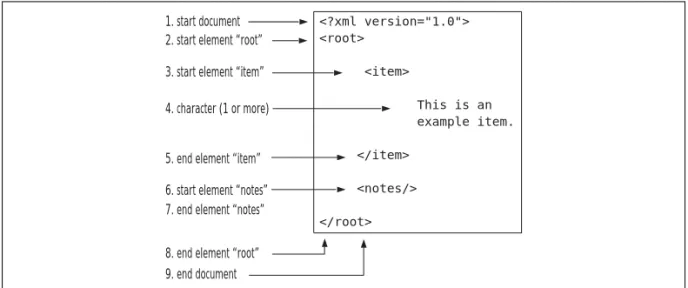
Figure 2.1 shows a clearer picture of how events fit together. It illustrates an example XML document and the event sequence created by the SAX parser. As you can see, even a simple XML document results in quite a number of events.
Understanding Event Handlers
Events by themselves arenât very interesting, especially if nothing listens for the events.When the parser creates an event, however, your program has the oppor-tunity to respond. Itâs up to you as the programmer to supply the logic to handle the events.You provide that logic by writing an event handler.
Overview of Handlers
The SAX parser and the event handler work in unison to parse an XML docu-ment. First, the SAX parser notifies the event handler of every event it creates. Figure 2.1 Example XML with Associated Parse Events
<?xml version="1.0">
<root>
<item>
This is an
example item.
</item>
<notes/>
</root>
1. start document
3. start element âitemâ
6. start element ânotesâ 7. end element ânotesâ
The event handler then services the event before passing control back to the parser. In servicing the event, your event handler can interpret the event in what-ever manner you see fit. Parsing an XML document thus shifts back and forth between the parser and the event handler.
ContentHandler
The ContentHandler is the core interface of any SAX parser. It defines the most frequently used callbacks in the SAX API. Once you have a class that implements the ContentHandler interface, you are ready to begin using SAX in your programs. ContentHandler defines ten distinct callbacks, so you would need to write ten dis-tinct methods to implement your own Content Handler.
DefaultHandler
You can easily create a class to implement all the SAX callbacks, but thereâs an even easier way to get started.The SAX package includes the DefaultHandler class to get you up and running quickly.You have already learned that SAX includes both frequently used events and less frequently used events.The DefaultHandler class allows you to concentrate on the frequently used events that are most inter-esting for your purposes.
The DefaultHandler serves as a concrete implementation of the ContentHandler interface, and defines simple callbacks for every event. However, the callbacks do nothing more than consume the events, making it an extremely basic imple-mentation.
To create a more interesting event handler for your program, extend the DefaultHandler with your own subclass.You can provide your own implementa-tion for only those callbacks that interest you most and ignore the other, less fre-quently used callbacks. If you do not implement a callback for a particular event, then the DefaultHandlerâs callback will take care of it.
Basic SAX Callbacks
You have already learned about the basic SAX events; here we describe the basic SAX callbacks. Each SAX event requires its own corresponding callback.When the SAX parser creates a particular event, the parser will call the appropriate call-back method, as outlined below.
Document Callbacks
with a call to the startDocument() callback method.The startDocument() callback is an excellent place to perform any necessary initialization before continuing with the parse.
public void startDocument() throws SAXException;
public void endDocument() throws SAXException;
Likewise, the parser ends with a call to endDocument(). This is the final event provided by the SAX parser, and signals that the parse is complete.
Element Callbacks
The element callbacks execute at the beginning and end of each element.The ele-ment callbacks are much more interesting than the docuele-ment callbacks because the SAX parser includes information parsed right out of the XML document.This information includes the elementâs name, namespace URI, and attributes.
public void startElement(String uri, String localName,
String qName, Attributes atts)
throws SAXException
public void endElement(String uri, String localName,
String qName) throws SAXException
The elementâs name is probably of most immediate interest. It gives some sense of the parserâs progress through the document.You find the name of the parsed element in one of two parameters: the localName or the qName, which are each used in slightly different situations.The localName is interesting only while processing namespaces. Since namespace processing is disabled by default, weâll ignore the localName for now. Instead, look for the element name in the qName parameter.Weâll discuss the differences between the localName and qName when we explore namespace processing later in this chapter.
A typical callback method will begin by interpreting the current elementâs name. Different elements may require different actions, so the callback must choose an action based on the elementâs name. Here is a simple example:
public void startElement(String uri, String localName,
String qName, Attributes atts)
throws SAXException
{
if (qName.equals("order"))
//code to handle <order> element
}
else if (qName.equals("orderItem"))
{
//code to handle <orderItem> element
}
}
If the element includes any attributes, the event will provide an Attributes object.The Attributes object contains the names and values of any element attributes.To find the value of an attribute, simply refer to a specific attribute by name. For example:
String value = atts.getValue("id"); // return the value of
// the "id" attribute
Characters Callback
The characters callback handles any character events from the parser. As it scans the document, the SAX parser reads characters into an array.This includes text, entities, and CDATA sections.The parser then passes the array to the characters() callback method.
Importantly, the SAX parser may reuse the array between calls, so it may con-tain more than just the characters for the most recent event.The start and length parameters help you find the valid characters.The start parameter provides the offset into the array, while the length parameter provides the number of characters for the most recent event.
public void characters(char[] ch, int start,
int length) throws SAXException
Example Event Handler
To get a better idea of how the callbacks fit together, weâll implement a basic SAX event handler and associated callbacks. However, before we can even begin to design an event handler, we must first understand the structure of the XML document to be parsed. In this example, we will be building part of an applica-tion to help manage a companyâs inventory. Here is an typical XML document containing information about the example companyâs wares and its inventory:
<?xml version="1.0" encoding="UTF-8"?>
<INVENTORY>
<ITEM>
<SKU>3956</SKU>
<DESCRIPTION>widget</DESCRIPTION>
<QUANTITY>108</QUANTITY>
</ITEM>
<ITEM>
<SKU>5783</SKU>
<DESCRIPTION>gadget</DESCRIPTION>
<QUANTITY>32</QUANTITY>
</ITEM>
<ITEM>
<SKU>6583</SKU>
<DESCRIPTION>sprocket</DESCRIPTION>
<QUANTITY>7</QUANTITY>
</ITEM>
</INVENTORY>
Our example handler will read the XML document above and convert it into something more useful. In this example, weâll construct an object representation of the items in the companyâs inventory. Our business objects (of type âItemâ) simply hold the values from the XML document. After parsing, the business objects may then be manipulated further by the client application. Converting XML into objects is a very common application of SAX, so you may find these techniques useful for your own programs.
Here is the example event handler with its callbacks:
import org.xml.sax.helpers.DefaultHandler;
import org.xml.sax.SAXException;
/**
* This class implements a SAX event handler for parsing
* item inventory levels from an XML document.
*/
public class InventoryHandler extends DefaultHandler
{
private Item currentItem; //item model object
private ItemCollection items; //parse results holder
private StringBuffer characters; //buffer for element content
/**
* SAX callback to handle character events
*/
public void characters(char[] ch, int start, int length)
throws SAXException
{
characters.append(ch,start,length);
}
/**
* SAX callback to handle start of document
*/
public void startDocument() throws SAXException
{
// Initialize before parsing this document
characters = new StringBuffer();
items = new ItemCollection();
}
/**
* SAX callback to handle start of each element.
*/
public void startElement(String uri, String localName,
String qName, Attributes aAttribs)
{
if (qName.equals("ITEM"))
{
//Create a new Item object to hold Item data
currentItem = new Item();
}
//Prepare character buffer for element content
characters = new StringBuffer();
}
/**
* SAX callback to handle end of each element.
*/
public void endElement(String uri, String localName,
String qName) throws SAXException
{
//read element contents from buffer
String content = characters.toString();
if (qName.equals("SKU"))
{
//We have just parsed a SKU
currentItem.setSKU(content);
}
else if (qName.equals("QUANTITY"))
{
//We have just parsed a QUANTITY
currentItem.setQuantity(content);
}
else if (qName.equals("ITEM"))
{
//We have finished parsing one item. Save in
//collection before we parse another.
items.add(currentItem);
}
}
The event handler code may be difficult to follow until you consider the original XML document.The XML document itself drives the sequence of events created by the parser.With each event, the parser will call the appropriate callback method. Each callback in turn processes a small portion of the docu-ment.To better understand the order of execution, it helps to envision the parser as it scans the XML document. Consider the parserâs progress through the example document:
1. Document start The parser triggers the startDocument callback.We begin by initializing any data structures needed for the parse.
2. <INVENTORY> element The parser triggers its first startElement callback.The inventory element doesnât tell us anything useful, so we move on without performing any special processing.
3. <ITEM> element The parser triggers a second startElement callback. We are now parsing information about a particular item.This is our opportunity to create a new data structure to hold information about the coming item.
4. <SKU> element The parser triggers yet another startElement callback. We are about to read information about the SKU, but we must wait for a subsequent character event for the SKU itself.
5. Element content The parser passes in the SKU data itself through one or more calls to the characters callback. Remember, the element content may all appear in one callback, or it may be broken up into multiple callbacks.Thus, we collect the character data in a buffer.
6. </SKU> end element The parser triggers its first endElement callback, letting us know that we have finished reading in the element content. We interpret the content as a SKU and add it to our model object.
7. <QUANTITY/> and <DESCRIPTION/> elements The parser handles these in much the same way as the <SKU/> element, repeating steps 4 through 6 for each element. For this particular example, our code ignores the <DESCRIPTION/> element completely.This is one of the key benefits of event-based parsing. SAX allows us to save some parts of the document while filtering out others completely.
9. <ITEM/> If the document contains additional items, then steps 3 through 8 will be repeated until all items have been read.
10. </INVENTORY> The parser triggers one last endElement callback.
11. Finally, the parser terminates with an endDocument callback.We defer to the DefaultHandlerâs implementation since our handler does not provide its own implementation.The DefaultHandler simply consumes the event.
When the parse is complete, the InventoryHandler will have created a complete object representation of the original XML document. Running this InventoryHandler against an XML document requires a few more pieces, however. It must be combined with a SAX parser and a source of XML data.Weâll pick up this example in later sections, adding the other components to complete the picture.
Creating a SAX Parser
The SAX parser does much of the heavy lifting in reading an XML document, while you only need to provide a simple event handler. In this section, youâll learn how to instantiate the parser itself.
SAX Interfaces and SAX Implementations
Interoperability among parsers was one of the original design goals of SAX.The SAX creators wanted to make it easy for developers to swap in one parser for another.This is accomplished through heavy use of interfaces, which are an excellent way to shield developers from underlying implementations. In SAX, this shield works two ways: It protects both the SAX user and the parser.
Weâve already seen how this works with the event handler interface described in the previous section. As a SAX user, you implement the ContentHandler inter-face yourself.Whenever the parser needs to communicate with your application, it does so only through the narrowly defined ContentHandler interface.The SAX parser never concerns itself with the specifics of your implementation; it simply creates events and passes them through the ContentHandler interface.
With these two interfaces, the parser and the event handler remain virtually decoupled.They can each proceed without ever acknowledging one anotherâs con-crete implementation, which is an excellent quality because it allows you to write applications that are independent of the underlying SAX engine. In fact, you can write an entire SAX application without ever referring to a specific SAX parser.
JAXP and Underlying SAX Engines
So far weâve talked a lot about SAX but not a lot about JAXP.The reason for this is simple: SAX is very much complete and usable in and of itself.That being said, JAXP adds some important refinements that merit discussion.
Introducing the JAXP Package
JAXP essentially bundles a number of existing XML technologies into one con-venient and unified framework. Most of these technologiesâincluding SAXâ predate JAXP itself. Further, existing applications may be using SAX
independently of JAXP, so JAXP strives to ensure backwards compatibility. One result is that under JAXP, existing XML classes maintain their original naming conventions.This can be rather confusing at first, so it helps to understand how things are organized.
First, the core SAX classes are located in their original SAX packages.These are found in the following packages:
org.xml.sax.*
org.xml.sax.helpers.*
JAXP introduces several new classes in several new packages.The classes for working with SAX parsers are located here:
javax.xml.parsers.*
The new JAXP classes add a âplugability layerâ over the existing SAX inter-faces.With JAXP, you can plug a SAX engine into the Java runtime and then refer back to it through the JAXP API. Here, weâll see how to use this plugability layer to create applications that are portable across SAX engines.
Using the SAXParserFactory
parser by name if you knew about the underlying implementation and its con-structors.This latter approach would make your code dependent on a specific SAX parser.
Fortunately, JAXP allows us to construct parsers in a manner that is com-pletely portable. It provides an abstract factory mechanism for constructing parsers irrespective of the underlying implementation. Use the abstract factory class, called SAXParserFactory, to construct an instance of a parser. It is actually a two-step process:You first, obtain an instance of the concrete factory, and then you obtain a concrete parser from the concrete factory:
SAXParserFactory factory = SAXParserFactory.newInstance();
SAXParser parser = factory.newSAXParser();
By applying the factory, we avoid referencing any specific SAX engine by name, which helps to keep things portable.The JAXP factoryâs newInstance() method ends up returning a concrete SAX factory for a specific SAX engine, but we never concern ourselves with the concrete implementationâs details. In the next section, youâll learn how the newInstance() method makes its selection.
With the concrete factory in hand, we can begin to build concrete instances of the parser.The newSAXParser() factory method creates instances of JAXPâs SAXParser class.The SAXParser class is just a simple wrapper over the SAXâs stan-dard XMLReader parser class. It also provides a few convenience methods for interacting with the underlying parser.
N
OTEAlthough SAX originally included its own parser factory, only the new JAXP factories provide for plugability. Use JAXPâs SAXParserFactory to instantiate a parser, and ignore SAXâs older XMLReaderFactory.
Selecting a SAX Parser with the Plugability Interface
The JAXP plugability layer always provides a valid SAX engine, but how do we know exactly which engine it provides? The answer lies within SAXParserFactoryâs newInstance() method.The newInstance() method searches the target environment at runtime for a suitable SAX engine. It searches the following places in order:
1. System property space
3. JAR metafile
4. Platform default
System Property Space
JAXP begins its search by querying for a system property named javax.xml .parsers.SAXParserFactory.To force JAXP to use a particular engine, simply set the property to the name of a specific SAX implementation.You can set this at run-time through the command line. For example, starting Java as follows will force JAXP to use the Xerces XML parser:
java -Djavax.xml.parsers.SAXParserFactory=
org.apache.xerces.jaxp.SAXParserFactoryImpl <your main class>
JAXP Properties File
If you choose not to set the system property, JAXP will look in a specific proper-ties file for the information.The properproper-ties file, called jaxp.properproper-ties, must be installed as a Java extension. Simply create a properties file with the same key and value as above and save it to your Java runtime environmentâs JRE/lib directory. This is convenient because you only need to go through this once; thereâs no need to set system properties everytime you run.
JAR Metafile
JAXP provides a third method that is more complicated but more powerful than the first two methods.This is where JAXP will most likely find its parser, so it is important to understand how it works. Basically, JAXP looks for a preferred SAX engine within each JAR file in the classpath.The name of the preferred SAX engine is tucked away in a metafile within the JAR file itself. Conveniently, most JAXP parsers already contain this metafile.Thus, the simple act of adding your parserâs JAR file to the classpath is all thatâs needed to access this functionality. If youâd like to introduce a new parser, simply place it somewhere forward in the classpath and JAXP will automatically configure itself to use the parser, without forcing you to explicitly set any properties.
Platform Default
JAXP plugability can simplify the task of distributing SAX applications, because you donât necessarily need to bundle a SAX parser. As long as your code follows
Parser Proliferation
If XML continues to grow in popularity, XML parsers may eventually become ubiquitous. Already, XML is an integral part of many products. These products may bundle their own XML parsers; if these are Java products, then chances are the XML parsers use SAX. For example, if you are using a modern Integrated Development Environment, it likely includes a SAX parser, soyou may already have a SAX-compliant parser in your possession without even realizing it.
As you begin to work with XML, here are some of the parsers you will likely encounter:
â Xerces 1 Xerces 1 is the workhorse of modern parsers. It is
SAX 2.0 compliant but does not support the JAXP plugability layer. Even so, many XML tools, development environments, and application servers still depend on the Xerces parser. If you are developing for a server-side environment, check to see if your application server requires you to use Xerces.
â Crimson Sun originally developed this parser as a
tech-nology demonstration, then donated it to the open-source community. Now it has found its way back into Sunâs product fold. Crimson is the standard parser in JAXP 1.1, and it is the standard parser bundled with Sunâs Java Development Kit version 1.4.
â Xerces 2 Xerces 2 is a next-generation, high performance
XML parser. Xerces 2 is the standard parser included with JAXP 1.2, which makes it a sign of things to come.
Eventually, it should replace both Xerces 1 and Crimson in Sunâs lineup.
As XML standards continue to evolve, we can expect XML parsers to evolve with the standards. Newer parsers may offer extra features, like schema-based validation in the Xerces parser. JAXP insulates you from these changes without preventing you from using them to full effect.
the SAX standard, you can be reasonably confident it will work with whatever SAX engine is available. Of course, it is always best to test your application thor-oughly with each parser. If you notice any difference, you can always bundle a SAX parser with your application and configure JAXP to use your preferred parser.
Parsing Data with a SAX Parser
Parsing with SAX requires three things: an event handler, a parser instance, and an XML document to be parsed.Youâve already learned how to write an event han-dler and how to create a parser instance; this section describes how to combine an event handler and parser along with an XML document itself.
Input Sources
XML documents may be static or dynamic. Static documents may be stored in a file system or document repository, whereas dynamic documents may be assem-bled on the fly from databases or other enterprise systems. Either may be trans-mitted electronically through any number of networking protocols.Whatever its source, you can find a way to parse the document with SAX.
InputSource
Use the SAX InputSource class to pass the XML document to a parser.The InputSource object allows the parser to locate the XML data.
URI-based Sources
If you know the XML documentâs exact location, you can create an InputSource directly from a Uniform Resource Identifier (URI).This method works particu-larly well for reading in static documents from your local file system.You can also read documents over the Internet using the HTTP protocol:
InputSource fromFile = new InputSource("file:///"+aFilename);
InputSource fromWeb = new InputSource("http://wwwâ¦");
Stream-based Sources
InputSource byteSource = new InputSource( someInputStream );
InputSource charSource = new InputSource( someReader );
Stream-based sources provide a lot of flexibility, but they also come with some additional responsibility.With stream-based sources, you may need to pro-vide additional information to help the parser correctly interpret the source. For example, when working with byte streams, the parser must convert the bytes into characters. It then becomes important to tell the parser how the characters are encoded. If youâve set the character encoding within the documentâs XML decla-ration, then the parser should be able make the conversion on its own. However, if youâve failed to set the encoding within the document, you should set it on the InputSource itself. For example, to set the streamâs encoding to UTF-8, use the fol-lowing method:
byteSource.setEncoding("UTF-8");
Character encodings can get quite complex and SAX parsers are not required to support all encodings known to man. Generally, parsers support at least the common encodings, including US-ASCII, ISO-Latin-1, and UTF-8. If you are working with international content, make sure that your XML parser can under-stand the