ABSTRACT
JOHNSON, BRITTANY ITELIA. A Tool (Mis)communication Theory and Adaptive Approach for Supporting Developer Tool Use. (Under the direction of Emerson Murphy-Hill and Sarah Heckman.)
Software development and maintenance is an important part of the software engineering process.
It is during these phases of the software engineering process that developers complete actions
to ensure quality software, such as finding and resolving software defects and refactoring. Many
of the actions involved in writing and maintaining software are manual, tedious and, as a result,
error-prone. Program analysis tools, including those that find and resolve defects, provide feedback to and automate tasks for developers. Research has found, however, that developers use these
tools infrequently in practice. Multiple studies have explored developers’ usage of program analysis
tools and cumulatively found that developers encounter various challenges when attempting to
understand and resolve problems in their code.
The goal of this research is to improve the communication between developers and static analysis
tools by providing theories and approaches that identify and utilize the differences between
devel-opers’ information needs, based on their knowledge, that influence develdevel-opers’ ability to resolve tool
notifications.To achieve this goal, I explored developer tool usage and information needs when
understanding and resolving notifications. In this thesis, I propose a theory that developers have difficulty with tool output because of gaps and mismatches between how much developers know
and how tools communicate. I evaluate this theory by building on other existing research to
deter-mine factors that influence developer knowledge and information needs of developers, based on
their knowledge, when resolving defects.
My dissertation consists of four consecutive studies that evaluate my thesis, that program
analysistool useis a form ofcommunicationandinability to interpret and resolvenotifications is
a result ofmiscommunicationcaused byknowledge gapsandknowledge mismatches; therefore
we can improve tool design by providing the means for tools toclassifyindividual developer’s
attempts made when resolving.
I first conducted a study to explore the reasons developers have for using and not using static
analysis tools. I categorized interview responses from professional developers about their usage
of tools and identified five reasons developers have for not frequently using the tools available to
them. The results suggest that one major barrier to use is the ability for developers to understand
the textual and visual notifications provided by tools. The second study took a deeper look at the difficulties developers have when understanding tool notifications by observing developers as
they attempt to explain textual and visual notifications presented by various tools. Based on the
data collected and analyzed, I proposed a theory of tool communication based on the 10 kinds
of challenges identified in the data. All of the challenges identified in this study stemmed from
gaps in developers’ knowledge that notifications did not fill and mismatches between knowledge
participants had accrued through their experiences and the information provided by tools.
After determining an explanation for developer difficulties with tool notifications, the next study
evaluated the possibility of operationalizing and evaluating that theory. The theory, and previous research, suggests software development experiences influence developer knowledge. Therefore, the
third study used developer source code contributions, one of the primary experiences for developers,
and concept inventories, a validated educational assessment, to classify developers based on their
knowledge of programming concepts. The models created from this study classified developers’
knowledge of variables, exception handling, and generics with 60–80% accuracy. Results from this
study support the possibility for tools to automatically ascertain how much developers know about
the defects they encounter in their code using the source code they have written.
Finally, because it is possible to classify developer knowledge using their code contributions, the
fourth study evaluated the effectiveness of using developer knowledge classification to customize the information presented to developers by program analysis tools. I used existing research on problem
solving to adapt notifications communicating about defects pertaining to the concepts of variables,
exception handling, and generics. I presented developers classified as novices and experts in the
concepts of interest with notifications aligned and misaligned with their knowledge classification
resolve notifications aligned with their knowledge classification; there was a significant difference
between the time it took novices and experts in a given concept to resolve aligned versus misaligned
notifications. I also found that on average, novices in a given concept presented with aligned
notifications made significantly fewer attempts at resolving notifications than those presented with
misaligned notifications, and that developers tended to prefer information provided in aligned
notifications. For experts, aligned notifications led to a higher percentage of resolved notifications. Although not all differences in observations were statistically significant, results from this study
suggests that presenting information in tool notifications based on developer software development
experiences can improve communication between developers and their tools. I conclude this thesis
© Copyright 2017 by Brittany Itelia Johnson
A Tool (Mis)communication Theory and Adaptive Approach for Supporting Developer Tool Use
by
Brittany Itelia Johnson
A dissertation submitted to the Graduate Faculty of North Carolina State University
in partial fulfillment of the requirements for the Degree of
Doctor of Philosophy
Computer Science
Raleigh, North Carolina
2017
APPROVED BY:
Tim Menzies Tiffany Barnes
Emerson Murphy-Hill Co-chair of Advisory Committee
Sarah Heckman
DEDICATION
To my parents, Engadine and Valerie, who made me the strong black woman I am.
To my sister, Chelsea, who continues to motivate and inspire me through everything.
BIOGRAPHY
Brittany Itelia Johnson was born in a small town called Sumter, South Carolina to Engadine and
Valerie Johnson on November 25, 1988. She graduated from Sumter High School in 2007. During
her time in high school, Brittany was active in the marching and jazz bands. After high school, she continued on to pursue her undergraduate degree at the College of Charleston (CofC), where
she studied Computer Science. While at CofC, Brittany was a member of SCAMP, an organization
focused on increasing minority participation in STEM research. This led to her participation in
undergraduate research, which informed her passion to pursue a Ph.D. She was also a member of
the Pep Band, where she let off some academic steam, and an officer in the CofC Chapter of the
National Society of Collegiate Scholars. Brittany obtained her Bachelor of Arts in Computer Science
in Spring 2011. She was selected as the feature student graduating from College of Charleston with
the Class of 2011 for her involvement and performance in academics, research, and extra-curricular activities. Following her time at CofC, Brittany began her journey to her Ph.D. at NC State University
in Fall 2011 under the direction of Dr. Emerson Murphy-Hill. As she began her Ph.D. studies, she
accrued a co-advisor, Dr. Sarah Heckman. During her time at NC State, aside from her research,
she participated in numerous outreach and mentoring initiatives as she discovered her passion for
mentoring others like her. Brittany aspires to have a career in academia, where she can incorporate
ACKNOWLEDGEMENTS
TABLE OF CONTENTS
LIST OF TABLES . . . .viii
LIST OF FIGURES. . . ix
Chapter 1 Introduction. . . 1
Chapter 2 Related Work . . . 6
2.1 Program Analysis Tools . . . 6
2.1.1 Static Analysis Tools . . . 7
2.1.2 Dynamic Analysis Tools . . . 7
2.1.3 Communication via Notifications . . . 8
2.1.4 Typical Notification Components . . . 9
2.1.5 Breaking Down the Code Developers Write & Tools Analyze . . . 11
2.2 Program Analysis Tool Usability . . . 14
2.3 Aiding Notification Resolution . . . 15
2.4 Predictive User Models . . . 17
Chapter 3 Static Analysis Tools Use . . . 19
3.1 Exploring Developer Tool Use . . . 21
3.1.1 Participants . . . 21
3.1.2 Research Questions . . . 21
3.1.3 Part I: Questions and Short Responses . . . 22
3.1.4 Part II: Interactive Interview . . . 22
3.1.5 Part III: Participatory Design . . . 23
3.1.6 Coding Interview Responses . . . 23
3.2 Barriers to Tool Use . . . 25
3.2.1 RQ1: Reasons for Use and Underuse . . . 26
3.2.2 RQ2: Workflow Integration . . . 29
3.2.3 RQ3: Tool Design . . . 31
3.2.4 Threats to Validity . . . 32
3.3 Next Steps to A Solution . . . 34
3.3.1 Notification Resolution Solutions . . . 34
3.3.2 Notification Understandability Solutions . . . 34
Chapter 4 Theory of (Mis)communication . . . 36
4.1 Identifying Challenges . . . 37
4.1.1 Participants . . . 37
4.1.2 Program Analysis Tools Investigated . . . 38
4.1.3 Study Protocol . . . 40
4.1.4 Data Collection . . . 42
4.1.5 Data Analysis . . . 42
4.1.6 Study Credibility & Findings Validation . . . 43
4.2.1 Knowledge Gaps . . . 45
4.2.2 Knowledge Mismatches . . . 49
4.2.3 Member Check . . . 53
4.3 From Theory to Practice . . . 53
4.3.1 Filling Developer Knowledge Gaps . . . 53
4.3.2 Matching Developer Expectations . . . 54
Chapter 5 Assessing Developer Knowledge . . . 56
5.1 Modified Concept Inventories . . . 58
5.2 Defining Conceptual Content . . . 59
5.3 Building A Bank of Questions . . . 60
5.4 Think Aloud Pilots . . . 60
5.5 Concept Inventory Validation . . . 61
5.5.1 Item Analysis . . . 61
5.5.2 Distractor Analysis . . . 62
5.6 Limitations & Challenges . . . 63
Chapter 6 Developer Knowledge Classification . . . 65
6.1 Knowledge Acquisition . . . 66
6.2 Knowledge Classification . . . 67
6.2.1 Knowledge Validation . . . 67
6.2.2 Knowledge Prediction . . . 67
6.3 Knowledge Models . . . 76
6.3.1 RQ1Findings . . . 76
6.3.2 RQ2Findings . . . 79
6.4 Implications . . . 79
6.4.1 Program Analysis Tool Output . . . 80
6.4.2 Industry & Education Practices . . . 80
6.5 Lessons Learned . . . 81
6.5.1 Limitations . . . 81
6.5.2 Challenges . . . 82
Chapter 7 Knowledge-Based Communication. . . 84
7.1 Proposed Approach . . . 85
7.1.1 Notification Adaptations . . . 85
7.1.2 Notification Selection . . . 89
7.1.3 Adaptation Evaluation . . . 90
7.2 Adaptation Effectiveness . . . 93
7.2.1 Resolving Adapted Notifications . . . 93
7.2.2 Adaptation Preferences . . . 98
7.2.3 Threats to Validity . . . 100
7.3 From “Pipe Dream” to Reality . . . 101
7.3.1 Challenges to Overcome . . . 102
8.1 Future Directions . . . 105
8.1.1 The Big Picture . . . 105
8.1.2 Developer Knowledge Acquisition . . . 107
8.1.3 Developer Knowledge Classification . . . 107
BIBLIOGRAPHY . . . .109
APPENDICES . . . .120
Appendix A Chapter 3 Artifacts . . . 121
A.1 Pre-Interview Questionnaire . . . 121
A.2 Interview Script . . . 124
A.3 Participatory Design Sketches . . . 131
A.4 Coding Categories with Examples . . . 143
Appendix B Chapter 4 Artifacts . . . 145
B.1 Notification Oracle . . . 145
B.2 Pre-Questionnaire and Consent Form . . . 155
B.3 Session Script . . . 159
Appendix C Chapter 6 Artifacts . . . 166
C.1 Example Concept Inventory (Generics) . . . 166
LIST OF TABLES
Table 3.1 Descriptive statistics reported by participants. . . 20
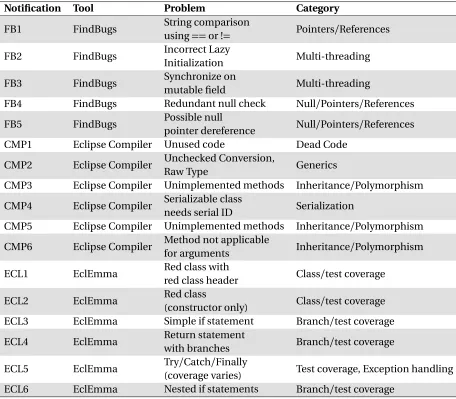
Table 4.1 Notifications used in our study . . . 41
Table 5.1 Summary of the differences between my approach and existing approaches. . 58
Table 5.2 Exception handling concept inventory item analysis results . . . 62
Table 6.1 Source Code Collected for Variables . . . 69
Table 6.2 Source Code Collected for Exceptions . . . 70
Table 6.3 Source Code Collected for Generics . . . 71
Table 6.4 Variables Model Accuracy . . . 77
Table 6.5 Exceptions Model Accuracy . . . 77
Table 6.6 Generics Model Accuracy (Non-LOC) . . . 77
Table 6.7 Generics Model Accuracy (LOC only) . . . 77
Table 7.1 Notifications used in the user study. . . 90
Table 7.2 Average time to resolve (seconds) aligned and misaligned notifications for each concept. . . 93
Table 7.3 Totals for aligned and misaligned defect resolution. . . 94
Table 7.4 Aligned and misaligned notifications resolved by each participant . . . 96
Table 7.5 Average resolution times (seconds) for aligned and misaligned notifications by participant. . . 96
Table 7.6 Participants whose notification preference aligned exactly with expectations. . 98
LIST OF FIGURES
Figure 1.1 Findbugs notification in the Eclipse IDE on checking string equality. . . 2
Figure 1.2 Findbugs notification in the Eclipse IDE concerning multi-threading. . . 3
Figure 2.1 EclEmma notifications in the Eclipse IDE. . . 8
Figure 2.2 Notifications provided by Cobertura regarding code coverage. Figure from . . 10
Figure 2.3 Notifications provided by JSlice regarding a dynamic slice of the program. . . . 10
Figure 2.4 A notification provided by Coverity regarding a race condition. . . 11
Figure 2.5 Notifications provided by StenchBlossom regarding code smells. Figure from[MHB10a]. 12 Figure 2.6 A notification provided by WitchDoctor regarding a refactoring that’s taking place. Figure from[MHM14]. . . 12
Figure 2.7 A source code example for writing to a log file. . . 13
Figure 3.1 The number of participants in each category expressing the good and the bad about static analysis tools they have used. . . 26
Figure 3.2 One of our participant, Matt’s, Participatory Design drawing; (A) shows where Matt wants the gradient colors and (B) shows the way his current tool repre-sents severity. . . 33
Figure 4.1 Distribution of participants based on years of programming experience. . . 37
Figure 4.2 A notification of a previous null check from FindBugs (FB4). . . 38
Figure 4.3 An Eclipse compiler notification about unimplemented methods (CMP5). . . 39
Figure 4.4 An EclEmma notification about partial branch coverage (ECL3). . . 40
Figure 4.5 A notification from the compiler about generics (CMP2). . . 42
Figure 4.6 Distribution of challenges encountered and notifications that caused them. . 45
Figure 4.7 A notification from EclEmma regarding
finally
coverage (ECL5). . . 51Figure 5.1 Question assessing ability to evaluate generic type instantiation. . . 59
Figure 5.2 Item removed from original concept inventory. . . 62
Figure 6.1 An overview of my approach. . . 68
Figure 6.2 Mapping of developer source code contributions on one class in an open source repository. . . 72
Figure 6.3 Variables decision tree model. . . 78
Figure 6.4 Exceptions decision tree model. . . 78
Figure 6.5 Generics decision tree model. . . 79
Figure 7.1 A notification modified for a developer classified as a novice in exception handling. . . 87
CHAPTER
1
INTRODUCTION
Software implementation and maintenance are important parts of the software development pro-cess[Kri00]. It is during these phases that developers complete actions to ensure quality software, such finding and resolving software defects and refactoring. Many of the actions involved in writing and maintaining software are manual, tedious and, as a result, error-prone. Tools, known asprogram analysis tools, exist for developers to automate some of theses tasks and reduce the effort involved in tasks like defect finding and resolution[Bru96]. Some program analysis tools, known as static analysis tools, allow developers to find and resolve defects early in the development process and occasionally to find defects previously overlooked[AP10; Aye08].
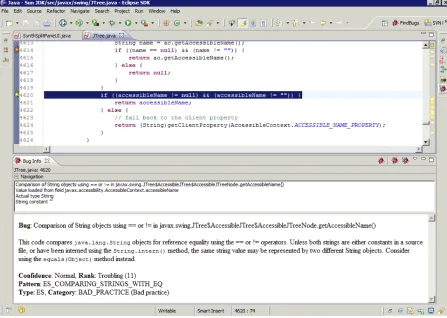
Figure 1.1Findbugs notification in the Eclipse IDE on checking string equality.
Although Valerie’s goal when using tools like FindBugs is to find and resolve defects, which requires the ability to interpret the notifications provided by the tools, a secondary goal is to learn more about Java programming concepts. The first few defects Valerie encountered she was able to understand and resolve. However, she quickly realized that some notifications are better at communicating problems while contributing to knowledge than others.
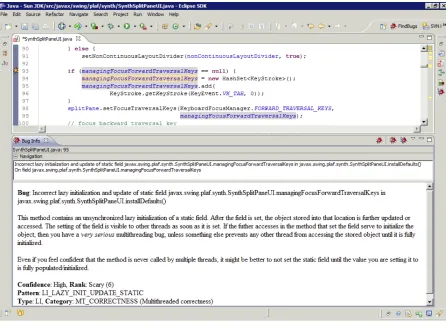
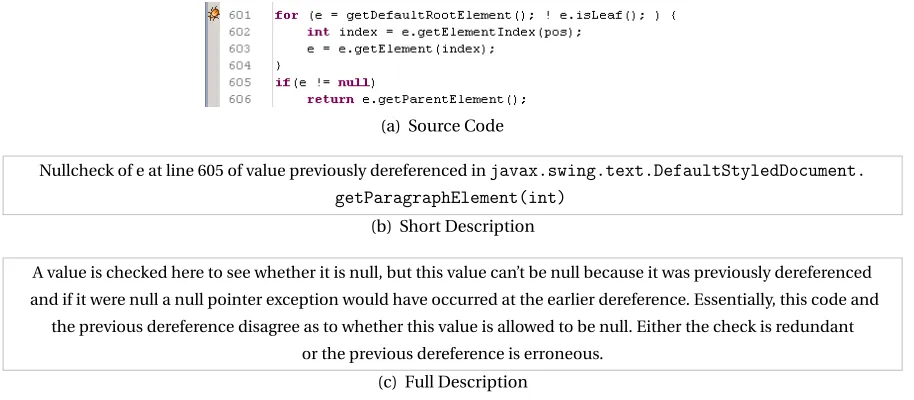
For example, when Valerie encountered the notification in Figure 1.1, she was able to under-stand and resolve the notification. Along with her existing knowledge, the notification in Figure 1.1 informed her ofwhywhat she was doing was wrong andhowshe can fix it. One the other hand, when Valerie comes across the notification in Figure 1.2, she realizes that despite her experience with FindBugs, she is having difficulty determining how to resolve the notification. From previous bugs, and some research on the web, she knows that an orange bug icon indicates ascarybug and that by clicking the bug icon she can gain access to more information about the bug.
Figure 1.2Findbugs notification in the Eclipse IDE concerning multi-threading.
the problem. However, she is unfamiliar with the concept central to the notification in Figure 1.2 (lazy initialization). Though the notification tells her that the problem relates to multi-threading, she is unable to make a connection between her knowledge regarding multi-threading and the message FindBugs is attempting to communicate and therefore cannot resolve the notification without outside help. As done previously with compiler synchronization notifications, she toggles between the web and her IDE to understand and resolve the notification.
Because the tools Valerie uses have no notion of what she does and does not know, some notifications communicate in a way that she is able to understand the problem, while others are not, leading to miscommunication.The goal of this research is to improve how program analysis tools communicate to developers by providing theories and approaches that identify and utilize the differences between developer information needs, based on their knowledge, that influence their
ability to resolve tool notifications.
these kinds of challenges. Chapter 2 grounds my research in existing research in Computer Science and other fields. Study 1, outlined in Chapter 3, answers the following research questions:
RQ1 :What reasons do developers have for using or not using static analysis tools to find bugs? RQ2 :How well do current static analysis tools fit into the workflows of developers? We define a
workflow as the steps a developer takes when writing, inspecting and modifying their code.
RQ3 :What improvements do developers want to see being made to static analysis tools?
Based on findings from Study 1, which identified tool notification understandability as a barrier to use, Chapter 4 answers the research questionwhy do developers encounter challenges when inter-preting tool notifications?. I used the findings from Study 2 to formulate the boxed explanatory theory above regarding how knowledge affects developers’ ability to interpret and resolve notifications.
Based on these two initial studies, I formulated and evaluated the following thesis:
Program analysistool useis a form ofcommunication andinability to interpret and resolve
notifications is a result ofmiscommunicationcaused byknowledge gapsandknowledge
mis-matches; therefore we can improve tool design by providing the means for tools toclassify
in-dividual developer’sconceptual knowledgeand adapt notifications accordingly, leading to the
potential forreducing timerequired for developers to resolve tool notifications,increasing
abil-ity to resolve, anddecreasing attempts made when resolving.
Based on the theory proposed in Chapter 4, Chapters 5 and 6 present Study 3, which answers the following research questions:
RQ1 :Is source code a good predictor of how much developers know about programming concepts? RQ2 :Does concept-specific source code increase the ability to classify how much developers know
about programming concepts in comparison to a naive model?
In Chapter 5, I outline an approach used to assess developer concept knowledge in preparation for the work done in Chapter 6 to predict developer concept knowledge. Finally, based the ability to predict conceptual knowledge, I posit and evaluate the following hypotheses and research question in Chapter 7:
H1 : Knowledge-based notifications can decrease the time required for notification resolution. H2 : Knowledge-based notifications increase developer likelihood of resolving notifications
cor-rectly.
H4 : Developer adaptation preferences match expectations, based on existing literature.
Findings from Study 4 suggest the possibility of improving developers’ ability to quickly resolve notifications. Though the differences observed in this study are small, it is a first step in the direction of better understanding how to improve tool use for developers. To conclude this dissertation, Chapter 8 outlines possible directions for future work that builds the foundations set by this research in this thesis.
The contributions of this dissertation are as follows:
• A categorized list of reasons developers have for not using program analysis tools, accompa-nied by tool design suggestions provided by developers.
• An explanatory theory for the challenges that developers encounter when interpreting infor-mation provided by tool notifications.
• An approach for assessing developer depth of programming concept knowledge that builds on an existing validated approach for assessing breadth of knowledge.
CHAPTER
2
RELATED WORK
2.1
Program Analysis Tools
Program analysis tools are designed to aid developers when developing software by automating the writing, analysis, and modification of source code. Often, program analysis is discussed as synonymous with static analysis[Nie15]. For the purpose of my research, I define a program analysis tool asa recommendation system that performs program analysis, whether it be static or dynamic analysis, and provides information to developers regarding the source code being analyzed[Rob14].
Examples of program analysis tools include, but are not limited to, static code analyzers, code coverage tools, code smell detectors, and refactoring tools[Ado11; MHB10a; Ge12]. Program analysis tools can be used in integrated development environments (IDEs) as well in most text editors that can be used for programming, such as Vim1or Emacs2. In the following sections, I will define and discuss static analysis and dynamic analysis tools separately; the reader should note that although I discuss static and dynamic analysis separately, it is not uncommon to find program analysis tools that combine static and dynamic analysis[Ern03].
1http://www.vim.org/
2.1.1 Static Analysis Tools
Static analysis tools are designed to aid developers when developing software by statically ana-lyzing source code, pre-runtime, and providing the developer with feedback about the state of their code[Ern03]. Typically, static analysis works by examining the current state of the program, predicting how the program may react in that state at runtime, and reporting any information they deem necessary to the developer. Static analyses are often more conservative than dynamic analyses; this is to reduce the potential for false positives, as in most cases static analysis cannot say with 100% certainty what will happen during run-time[Ern03]. Examples of static analysis tools include defect detectors, such as FindBugs, compilers, code smell detectors, and refactoring tools.
Let’s use the example of FindBugs,3an open source static analysis tool, to better understand how static analysis tools work. FindBugs statically analyzes code to report potential defects. FindBugs determines the potential for defects usingbug patterns. Bug patterns are code idioms that map to errors, found in Javabytecode. Bytecode, in Java, represents the compiled Java class files. Because FindBugs analyzes code without executing it, there is a heightened risk forfalse positives. False positives are defects detected that will never manifest during run-time. When FindBugs finds a potential defect, it alerts the developer using notifications that provide information regarding the defect. I will discuss tool notifications in more detail in Section 2.1.3.
2.1.2 Dynamic Analysis Tools
Dynamic analysis tools are designed to aide developers when developing software by analyzing source code during run-time and providing the developer with feedback about runtime behav-ior[Ern03]. Dynamic analysis works by executing the program and then making observations about program execution; because dynamic analysis runs the code, it is typically more precise than static analysis. Though dynamic analysis can produce more precise results in a similar amount of time as static analysis, dynamic analysis execution is less likely to generalize to future executions since it is based on a set of inputs that can, and probably will, change for each execution. Examples of dynamic analysis tools include testing, code coverage, and profiling tools.
Let’s use the example of Cobertura,4an open source dynamic code coverage tool, to better understand how dynamic analysis tools work. Cobertura executes source code using JUnit test cases and reports to the user what parts of the code got covered during execution and what parts did not. Because Cobertura executes the source code, it can communicate precisely regarding the flow of the program during run-time. A static code coverage tool could speculate how much of a code base would be covered based on test cases, and possibly even a set of inputs; however, it would require more effort and be more likely to produce false positives than a dynamic code coverage tool. On the
3http://findbugs.sourceforge.net/factSheet.html
down side, the test suites a developer writes may not be characteristic of all possible executions of the program, thereby lowering the generalizability of dynamic analyses.
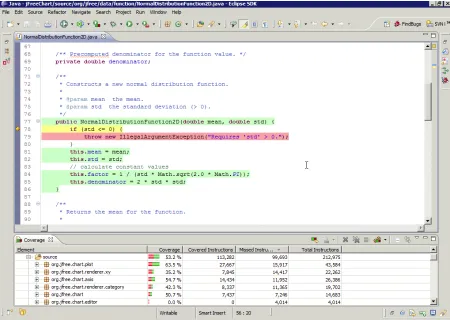
Figure 2.1EclEmma notifications in the Eclipse IDE.
2.1.3 Communication via Notifications
One common thread between program analysis tools like FindBugs and Cobertura is that they use
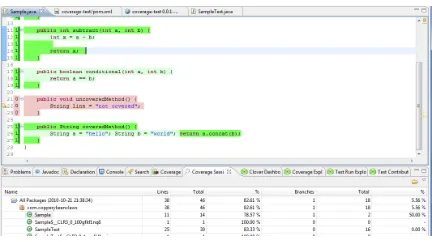
Notifications across tools vary; some provide lots of text (like FindBugs) with few visual aides, some use primarily visual means of communications (like Cobertura). Notifications can also have different goals, which may influence how developers design notifications. For example, the goal of a notification from Coverity,5 another static analysis tool, is to explain a potential defect in the developer’s source code and, ideally, help the developer make a decision about the defect (i.e. whether and how to resolve). Because Coverity’s goal is to explain, we expect to see textual notifications that provide that explanation. The goal of code coverage notifications is to statically show dynamic program behavior and help the developer determine the effectiveness of her test suite. EclEmma, another code coverage tool, uses colors applied directly to the source code to communicate as opposed to text. Though EclEmma also uses text to communicate code coverage (i.e.
1 of 2 branches missed
on a partially coveredif
statement), this does not allow the developer to scan the program for areas in most need of attention. Therefore, EclEmma uses other visuals, such as the bar visuals in the Coverage View (Figure 2.1) to show coverage on a given package or class.The list of tools and notifications tools use can go on and on, but for the purposes of my research, the general definition I will use for a notification isa combination of visual and textual interfaces used by a program analysis tool to communicate information to developers about their source code.
Notifications can vary regarding what information and how much detail they provide, however, there are commonalities across tool notifications that informed this definition, which I will discuss next.
2.1.4 Typical Notification Components
One reason I talk about program analysis tools as a type of recommendation system is because they provide information to developers completing software engineering tasks[Rob14]. Another reason is that program analysis tools use the same strategies defined by Robillard as typical of recommendation systems: 1) strategies for getting the user’s attention and 2) descriptive interfaces. Program analysis tools use these strategies when communicating with developers via notifications. There are a variety of ways that a tool can get the attention of its user[Rob14]. Program analysis tool notifications get the attention of developers in their IDEs in one or more of the following ways: icons, dashboards, pop-ups, affordance overlays, annotations, or email notifications. Once the tool has the developer’s attention, program analysis tool notifications provide descriptive interfaces that convey information about a developer’s source code. Information is conveyed using some combination of textual, visual, and sometimes transformative descriptions.
Some tools, like FindBugs and most IDE compilers, use icons to get developers’ attention. Using the same icons, developers can access more information either by hovering over or clicking the
Figure 2.2Notifications provided by Cobertura regarding code coverage. Figure from
Figure 2.3Notifications provided by JSlice regarding a dynamic slice of the program.
icon. Although the icons are visual, most of the description provided by these tools is textual. As stated previously, these kinds of notifications are most common with static analysis tools as they typically need to be more descriptive. However, dynamic analysis tools like Veracode,6 which communicate about defects similar to the ones reported by FindBugs and Coverity, also use icons and text descriptions to pass along information to the developer.
Some tools use affordance overlays or annotations to both get the attention of the developer and for the descriptive interface. For example, Cobertura and JSlice7use affordance overlays in the form of source code highlighting, as shown in Figure 2.2 and Figure 2.3, to alert the developer of and communicate about dynamic behavior. Coverity Dynamic Analyzer,8which is similar to Veracode, uses annotations, such as the one in Figure 2.4 in the editor to communicate about defects in the code.
A small subset of tools use dashboards, such as the one shown to the right in Figure 2.5. Stench-Blossom, a code smell detection tool gets and maintains a developer’s attention using an ambient
6http://www.veracode.com/products/dynamic-analysis-dast/dynamic-analysis
7http://jslice.sourceforge.net/
Figure 2.4A notification provided by Coverity regarding a race condition.
dashboard[MHB10a]. At anytime the developer is interested in the information being provided by the tool, the developer can use options in the dashboard to explore code smells present in their code base. The description is visual, using color overlays that map to each type of code smell.
Finally, an even smaller subset of program analysis tools provide transformative descriptive interfaces. Transformative interfaces provide the developer with some idea of how the suggestion being made would affect the task at hand. For example, WitchDoctor, a refactoring tool, detects refactorings and then makes the developer aware of their refactoring by offering to complete the refactoring for the developer. To inform this process, WitchDoctor provides information regarding the assumed refactoring by showing the developer within their text editor what will happen if the refactoring is applied, as shown in Figure 2.6.
2.1.5 Breaking Down the Code Developers Write & Tools Analyze
The goal of program analysis tool notifications is to communicate some information to the de-veloper about her source code about the task at hand. The source code a dede-veloper writes is a runnable manifestation of programming-oriented and human-oriented concepts[VRH04; Big94]. At the lowest, most fundamental level, areprogramming-oriented concepts, which relate to how the source code maps to programming language concepts. For simplicity, I will refer to these concepts simply as programming concepts. Programming concepts can be as simple as the means for storing and passing data, such as variables, or as complex as the means for structuring data, such as gener-ics[JG97]. At a more abstract level,human-oriented conceptsrelate to the high level requirement of the source code, such as “complete transaction”.
Figure 2.5Notifications provided by StenchBlossom regarding code smells. Figure from[MHB10a].
Figure 2.6A notification provided by WitchDoctor regarding a refactoring that’s taking place. Figure
communicate about requirements such as “acquire target.” These kinds of tools typically focus on programming concepts; refactoring tools attempt to communicate about programming concepts such as variables and modules. On the flip side, there can be more than one notification pertaining to a one human-oriented concept and one notification can communicate about more than one programming concept.
Figure 2.7A source code example for writing to a log file.
Sonar, and IntelliJ’s built-in static analyzers notify developers when they have opened a stream (
BufferedWriter
in the above example) and there is a possibility the stream that is writing to the file is not closed. A developer may also get a notification regarding exception handling. Here, the developer has written code to catch anIOException
if it occurs. However, if she did not implement code to deal with the potential for anIOException
she would get a compiler notification communicating the need to do so.Research related to mine falls under the following categories: evaluating and improving tool us-ability, improving notification understanding and resolution, predictive user models, and developer knowledge representation.
2.2
Program Analysis Tool Usability
There have been many studies on program analysis tools, many of which focus on their correctness and functionality[Aye08; Bes10; Dug00; Luk05]. Unlike existing work, which typically focuses on one type of program analysis tool, my work focuses on developers’ perception on using different types of program analysis tools, what may have caused their perceptions, and how we can build on or improve their perceptions. Perception plays an important role in when considering human and computer interactions[Das02]and can be influenced by a number of things, such as the subjective preferences of the user.
Pettit and colleagues studied the effect of enhanced compiler messages for students[Pet17]. They found no significant improvement, based on likelihood of successive compiler errors, compiler error occurrence, and progress students make towards successful project completion. Their en-hancements were designed without rationale, only focusing on students. Also, the information the was same no matter how much students already knew. Enhancements were made based somewhat on assumed knowledge; the adaptations I am proposing would be based on actual knowledge. I also assessed other types of enhancements, such as inclusion of examples and links to external information.
Hamou-Lhadj and Lethbridge surveyed trace exploration tools to determine how these tools can be used by developers and potential improvements to trace exporation tools[HLL04]. Based on their evaluation of the tools, they found that areas for improvement for these type of tools include visibility during trace removal and automated suggestions. Pacione and colleagues conducted a case study on five dynamic visualization tools that perform either static or dynamic code analysis and observed the output provided[Pac03]. Pertaining to usability, they found that level of abstraction can make a difference when explaining large scale problems.
rather than multiple windows. Bennett and colleagues conducted interviews and user experiments to evaluate the usability and potential improvements of their sequence diagram creation and exploration tool[Ben08]. Sequence diagram tools create sequence diagrams using static analysis, dynamic analysis, or both. Much of the feedback developers provided suggested search and selection highlighting are both useful feature for sequence diagram tools, though there are improvements that can be made to existing implementations.
Ayewah and Pugh conducted a study where they claimed that static analysis tools should help engineers find bugs as early as possible in the development cycle, when they are cheap to fix[AP08]. They interviewed 12 FindBugs users by phone and conducted a controlled study with 12 students to see how they use FindBugs and handle defects that are labeled “not a bug”. Ayewah and Pugh also conducted a study on using checklists for triaging bug reports[Ayeb]. In their study, they asked students to complete a checklist based off the warnings produced by FindBugs in order to identify warnings that are most important to the users. The checklist gave different scales used to measure warning severity and relevance and was used for 13 different warnings.
Khoo et al. examined and focused on the interface of static analysis tools and how the interface could be improved[Kho08]. They developed a user interface toolkit calledPath Projectionthat uses program visualizations to help developers walk through the error reports produced by static analysis tools.Path Projectionwas designed to improve and simplify the process of triaging bug reports, or labeling bugs as a false or true positives, by utilizing checklists to systematically label bugs. This research is similar to my work in that they look at improving the static analysis tool user experience. My research builds on this work by investigating not only improving the user experience, but also finding out why these improvements need to be made from the developers who use them.
Heckman and Williams conducted research in an attempt to develop a benchmark, FAULT-BENCH, that would help developers compare and evaluate static analysis alert prioritization and classification techniques[HW08]. The overall goal of their research was to make using static analysis tools easier and more useful to developers. My work is related in that I am also looking for ways to improve the current state of tools for developers. Layman et al. recruited 18 participants to investi-gate factors that developers may consider when deciding whether to address a defect when notified of it[Lay07]. This study is related to my work in that they are also interested in learning more about how developers use tools available to them and how usage can be made easier. My work builds on these works by focusing on various aspects of using program analysis tools, including how users interact with the tools.
2.3
Aiding Notification Resolution
sep-arately, we believe it is more fruitful to understand the challenges developers encounter across multiple program analysis tools. As we describe in this section, existing studies that examine multiple tools typically either focus on tools of the same type (i.e. multiple compilers) or helping developers make informed choices among tools. My work is related in that our findings can be used to improve the design of tools to better support developers. My work differs in that we investigate different types of tools to identify general challenges developers encounter when interpreting notifications across tools.
Much of the research on improving developers’ ability to interpret tool notifications has focused on compiler notifications[Har10; Tra10; Bar14]. Hartmann and colleagues developed a social recom-mender system, HELPMEOUT, to better assist novices with understanding and resolving compiler notifications[Har10]. They found their tool provides useful fixes about half of the time. Traver inves-tigated why developers have difficulty with compiler notifications and ways to improve compiler notification design[Tra10]. Based on his findings, Traver developed compiler notification design principles, which includes using consistent messages and including more visual aids.
Nienaltowski and colleagues studied novice developers’ ability to identify errors in their pro-grams and how we can better support that process[Nie08]. Rigby and Thompson studied novices’ use of Eclipse and Gild, a customized version of Eclipse featuring “novice-friendly” compiler notifi-cations[RT05]. Mu¸slu and colleagues developed QUICKFIXSCOUT, an extension to Eclipse Quick Fix, to ease the process of determining an optimal fix[Mu¸s12b]. They found programmers could more quickly assess and apply quick fixes when able to easily reason about fix trade-offs. Following up on work with QUICKFIXSCOUT, Mu¸slu and colleagues explored the possibility of improving IDE recommendations, and the ability for developers to determine the best fix for their code, by considering the whole code base rather the local context of the notification[Mu¸s12a]. Barik and colleagues studied how developers reason about compiler notifications to improve tool support for understanding and resolving tool notifications[Bar14]. Compiler notifications are not the only type of notifications a developer might encounter, further supporting the need for cross-tool investiga-tions. Studying tool notifications across tools, as we have, increases the likelihood our findings can generalize to a variety of tools.
Cross-tool studies that do exist focus on helping developers decide what tools to use rather than tool improvement. Mettrey evaluated five expert systems tools on factors such as performance, to aide developers in selecting one for their projects[Met91]. Wagner and colleagues compared two analysis tools that detect defects to evaluate their efficiency[Wag08]. Other tool evaluations have had the same goal[Roy09; Zhe06].
messages[Bar14]. In other prior work, we used Diffusion of Innovation theory to explore factors that influence security tool adoption[Xia14]. Similarly, Rienmenschneider and Hardgrave explored why tools do not get used using the Technology Acceptance Model, based largely on the Theory of Reasoned Action[RH01]. Lawrance and colleagues used information foraging theory to propose a theory of information foraging for how programmers navigate code when debugging[Law13].
2.4
Predictive User Models
Existing research has explored the idea of creating and using predictive user models both in the design of intelligent tutoring systems (ITS) and adaptive user interfaces (AUI). Research also exists that uses code as a proxy for knowledge [Fri10]. While related, this research proposes models that predict knowledge of source code; my research proposes models that predict knowledge of programming concepts for adapting tool notifications.
Both ITS and AUI use models of user knowledge to adapt to their users, based on the user’s experiences[Mur99a]. ITS pose questions to students to model knowledge of concepts and adapt lesson plans. In contrast, I used source code history to model knowledge for adaption of tool notifications. Amershi and Conati explored using machine learning rather than knowledge-based user models to deal with the drawback of using knowledge-based user models, as most ITS do[AC07]. Stamper and Barnes proposed a method for using student data, such as the code they write, to improve ITS with adaptive hints for programming mistakes[SB09]. Similarly, my research explores using source code and machine learning to predict user knowledge but for adaptive tool notifications.
There are a variety of AUI used in different Human-Computer Interaction contexts, many of which use task or domain models[Sch96]. Most relevant to our models in the context of AUIs are works that build and apply user models, such as FUSE, which creates user models based on static and dynamic properties of the user to assist with user interface development[LS96]. Most relevant to our research are the models proposed by Zou and colleagues for adaptive menus in Eclipse[Zou08]. This AUI’s models are built based on how often developers use menu items to remove menu items that are used infrequently; we built models based on the concept-specific code a developer writes to adapt notifications to their experience.
understand a fault or failure when testing best in a code base[Per12].
CHAPTER
3
STATIC ANALYSIS TOOLS USE
One common type of program analysis tool that developers use when writing code is known as a static analysis tool. As described in the previous chapter, static analysis tools automate software development tasks to reduce developer effort, especially when completing tasks such as finding and resolving defects. However, despite the benefits of using static analysis tools to find bugs, consistent usage of these tools is not very frequent[Aye08; Ge12].
There have been studies to investigate ways of improving static analysis tools[Bes10; Kho08]. However, none look at what the tools do for a developer, what could be improvedandwhy these improvements might help. The study outlined in this chapter provided an improved understanding of why software developers are not using static analysis tools and how current tools could be improved to increase usage based on developer feedback.
Table 3.1Descriptive statistics reported by participants.
Participant Open Source Tools Closed Source Tools Local
Abby FindBugs IntelliJ Yes
Adam CheckStyle, FindBugs, PMD IntelliJ Yes
Andy FindBugs, Lint Jtest Yes
Chris CheckStyle, FindBugs, Lint Coverity Yes
Cody Dehydra - Yes
Frank - - Yes
Gordon Lint, CheckStyle, FindBugs - Yes
Jake FindBugs, Lint FlexLint, Klocwork Insight, Visual Studio Yes
James CheckStyle, FindBugs, Lint Visual Studio Yes
Jason FindBugs, Lint - Yes
John CheckStyle, Copy/Paste Detector(CPD),
FindBugs, Lint, PMD & CodePro - Yes
Jordan CheckStyle, FindBugs, PMD JTest Yes
Josh FindBugs, Lint Coverity No
Lee CheckStyle, FindBugs, Lint Visual Studio Yes
Matt Lint FlexLint, PyCharm Yes
Phil - - Yes
Ray CheckStyle, FindBugs - Yes
Ryan FindBugs, Ling Coverity Yes
Steve CheckStyle, FindBugs, Lint, CPD IntelliJ Yes
Tony CheckStyle, FindBugs, Lint, PMD,
3.1
Exploring Developer Tool Use
For this study, I conducted interviews with software developers. Each semi-structured interview lasted approximately 40-60 minutes and, with the participant’s consent, was recorded. By conducting “semi-structured” interviews, I aimed to achieve the flexibility needed to get as much detailed information as possible[HA05]. I prepared a script of questions for the interview, but would add or omit questions on the fly depending on how detailed a participant was in their responses. We created and modified the script as we conducted trial interviews; any changes made to the script was based on the responses we got from our 4 trial participants[Joh12].
Upon completion, I manually transcribed each session. I performed qualitative analysis on the transcripts by “coding” the transcriptions. The pre-interview questionnaire, interview script, coding categories with examples, and participatory design sketches can be found in Appendix A. This process is discussed in detail in Section 3.1.6.
3.1.1 Participants
I conducted this study with a group of 20 participants. Although this seems like a small sample, I followed a similar methodology to that of Layman et. al.’s study that only had 18 participants[Lay07]. I recruited participants using an electronic recruitment flyer that was sent out to industry contacts to then be sent to developers within their company. Sixteen participants were, at the time, professional developers at a large company and 4 were graduate students at North Carolina State University with previous industry experience. Participants’ years of development experience ranged from 3 to 25 years. We did not explicitly ask participants about their experience building static analysis tools, however, based on conversations approximately 2 participants had tool building experience. We interviewed two participants remotely, one by phone and one by video chat, due to location differ-ences. Each participant filled out a short questionnaire used to collect demographic information prior to their interview.
Table 3.1 shows the statistics and background information gathered from the questionnaire and interviews. The first column lists the participants’ pseudonyms, given for confidentiality purposes. The second and third columns show the open-source tools and closed-source tools that they have used to find bugs. If a space has a “-”, it indicates no response from the participant.
3.1.2 Research Questions
For this study, I answered the following research questions:
RQ2 : How well do current static analysis tools fit into the workflows of developers? We define a workflow as the steps a developer takes when writing, inspecting and modifying their code.
RQ3 : What improvements do developers want to see being made to static analysis tools?
I asked these questions because answers to these questions are important to the progression through my dissertation and can give toolsmiths and researchers areas for future work and improve-ment in the area of static analysis tool usability. Research has shown that the way a tool interrupts a developer’s workflow is important therefore I also wanted to specifically investigate this aspect of tool usage[Rob04; Glu07]. The interviews focused on developers’ experiences with finding defects using static analysis tools. Learning developers’ relevant experiences and observing how they use static analysis tools to find bugs may shed some light on why these tools are underused. I organized the interviews into into three main parts: Questions and Short Responses (Section 3.1.3), Interactive Interview (Section 3.1.4), and Participatory Design (Section 3.1.5).
3.1.3 Part I: Questions and Short Responses
During part 1, Question and Short Response, I asked developers questions related to their general usage, understanding, and opinion of static analysis tools in order to answer RQ1.
Some of the questions I asked include:
• Can you tell me about your first experience with a static analysis tool?
• Can you remember anything that stood out about this experience as easy or difficult?
• Have you ever used a static analysis tool in a team setting? Was it beneficial and why?
• Have you ever consciously avoided using a static analysis tool? Why or why not?
• What in your opinion are the critical characteristics of a good static analysis tool?
3.1.4 Part II: Interactive Interview
The second part is what I called the “interactive interview”. The goal behind the interactive interview is to be able to observe developers actually using a static analysis tool. This allowed for the gathering of more detailed information as to how developers are using their tools. I used the information obtained during this portion to address RQ2. I asked participants to explain what they are doing out loud[Lew82]so I could get a better understanding of their workflow and thought process. Practice interviews before this study revealed that using the interactive interview portion produced more detailed information regarding when and how developers use their static analysis tools[Joh12].
• Now that you have run your tool and gotten your feedback, what is your next move(s)?
• Do you configure the settings of your tool from default? If so, how?
• Does this static analysis tool aid in assessing what to do about a warning?
• Do you feel that “quick fixes” or code suggestions would be helpful if they were available?1 For confidentiality reasons, not all participants could use their own workstation for this part of the interview. For those who could not, I provided 6 open source projects in Java, such as log4j[Log] and Ant[Ant], and asked each participant to run FindBugs on one of them. I chose FindBugs because it is one of the most popular and mature open source static analysis tools for Eclipse. Due to technical difficulties, the remote interviews could not fully experience the “interactive” portion. Each remote participant was given a scenario of static analysis tool usage and asked to, first, explain their thought process in walking through that particular scenario. I then asked the same questions as I would have asked if they had been local.
3.1.5 Part III: Participatory Design
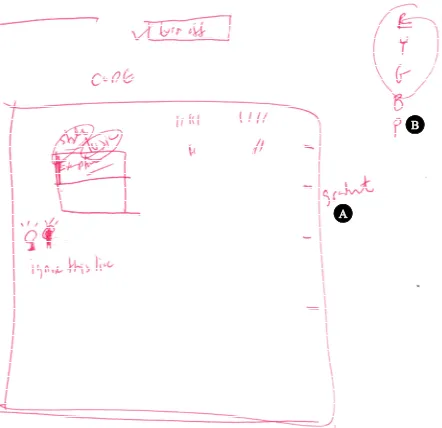
The last part of the interview allowed participants to make design suggestions for improving static analysis tools. I utilized a concept calledparticipatory design[Spi05], which involves getting stake-holders (in this case, the participants) involved in the design process by allowing them to show what they want instead of saying it. In order to promote creativity, each participant was given a blank sheet of paper and asked to sketch what they wanted their tool to look like and describe how it should work[Joh12]. I did not require participants to draw something, but 6 of them did. The rest of the participants gave verbal descriptions of tool features they desired.
3.1.6 Coding Interview Responses
After completing the interviews, I manually transcribed each interview. Then, Icodedthe transcrip-tions. Coding is a process that is meant to make referencing transcriptions quicker and easier[Gor98]. I used Gordon’s basic steps to code the interview transcripts and used the codes to help organize the Results (Section 3.2). According to Gordon’s steps, before coding an interview, “coding categories” need to be defined. These should be general enough for relevant information to be grouped together but detailed enough that a concrete example only falls under one category. Because of this, it is possible to have “emergent” categories that may need to be defined after reading the transcriptions. I developed and used the following coding categories:
1Participants were only asked about quick fixes and code suggestions being useful when they mentioned, either during
• Tool Output: anything related to the output produced by the tool (for example, false positives).
• Supporting Teamwork: anything about using static analysis tools in a team or collaborative setting
• User Input and Customizability: points made about the customizability of the static analysis tools (for example, modifying rule sets)
• Result Understandability: anything said about the ability or inability to understand or interpret the results produced by a static analysis tool
• Workflows: anything related to the steps a developer takes when writing, inspecting and modifying their software (for example, tool integration)
• Tool Design: the proposed tool design ideas from our participants.
Examples of each of these categories from the transcriptions are as follows:
Tool Output
Jason:“. . . like I mentioned with FlexLint it gives you so many warnings and sifting through them is so, arduous that whenever I just look at it I’m like ehhh forget this.”
User Input/Customizability
Andy:“. . . it’s like is this list prioritized by you know what’s important to me? No. You know? And there may be a default listing that should be prioritized because like this one’s inefficient.”
Supporting Teamwork
John:“The only reason I like the batch results is to communicate, broadcast to the team a sense of progress or lack of progress.”
Result Understandability
Matt:so now I wanna know why raising a string exception is bad. Like what should I be doing instead? Since it thinks it’s a problem. And so none of these really help me.
Workflows
Mike:“Clang is my favorite. It’s built into the compiler. You don’t have to invoke anything special.”
Tool Design
Chris:“I don’t mind the idea of the actual source code itself having some plasticity . . . let’s say the fourth line there was some error here. . . having the 5th line drop down and having the
The next step in Gordon’s methodology is to assign “category symbols” to each category for easier indexing and processing of information. Gordon then suggests finding and classifying the relevant information in the transcriptions using the category symbols. In my set of codes, each coding category had its own color as a “symbol”; if a portion of a participant’s transcription fell into one of the categories, the text would be highlighted the same color as its respective category. A participant’s coded interview could contain multiple categories or even multiple data items for one category. To ensure consistency, only I was responsible for coming up with the coding categories and “symbols” and going through the transcriptions to apply them. The last step is to check the reliability of the codes. For this study, once the coding was complete, I passed the documents over to other contributors to look over. If there were any discrepancies we discussed and resolved them as a group. This includes items that could fall into more than one category; in this situation, either a new, more specific, category or a “sub-category” was created for the item. The purpose of the categories are to organize the data in a relevant and useful manner; they are not meant to directly correlate with the research questions. The next section discusses findings from this study.
3.2
Barriers to Tool Use
In this section, I will discuss the results obtained from the interviews. I answered my research ques-tions by linking the quesques-tions to coding categories and interview parts. My first research question (RQ1) was answered by observing the results categorized under “Tool Output,” “Supporting Team-work,” “User Input and Customizability,” “Result Understandability” and “Developer Workflows”; the information collected in these categories could be reasons why developers are or are not using static analysis tools. My second research question (RQ2) was answered by observing the results cate-gorized under “Developer Workflows.” My third research question (RQ3) was answered by observing the results categorized under “Tool Design”; most of these results are from the Participatory Design portion.
7 14 7 9 3 17 10 19 7 15 0 5 10 15 20
Positives Negatives Positives Negatives Positives Negatives Positives Negatives Positives Negatives Tool Output Supporting Teamwork User Input and
Customizability
Result Understandability Developer Workflows
N u m b er o f P a rt ic ip a n ts
Figure 3.1The number of participants in each category expressing the good and the bad about static analysis tools they have used.
3.2.1 RQ1: Reasons for Use and Underuse
The interviews revealed that there are a variety of reasons developers may have for choosing to use a static analysis tool to find bugs in their code. One of the obvious reasons is because too much time and effort is involved in manually searching for bugs. Five out of 20 participants felt that because static analysis tools can automatically find bugs, they are worth using. During his interactive interview, Jason told us “anything that will automate a mundane task is great.” In other words, one reason for using static analysis tools is that they automate the process of finding bugs.
Another reason developers might use a static analysis tool is if it is already available in the development environment and ready to be used. For 3 participants, this was the case. Development environments such as IntelliJ and PyCharm come with built-in static analyzers, which requires little extra effort on the developer’s part. Two participants, Matt and Adam, used PyCharm and IntelliJ regularly and liked the fact that static analysis was already integrated. For 7 participants, a good reason to use static analysis tools is to support team development efforts. According to Josh and Andy, static analysis tools do this by raising awareness of the potential problems, or “dumb mistakes,” in the code earlier in the development process. For Cody and Ray, static analysis tools are useful for communicating and enforcing coding standards and styles on development teams. Some developers enjoy using the static analysis tools they use to find bugs because of the level of customizability. Three participants fit into this category. According to James, the customizability of a tool can play a large part in the volume and quality of output developers get.
Although some participants could find reasons to use static analysis tools to find bugs, most of our participants brought up conflicting concerns that could make the decision to adopt and regularly use static analysis tools less obvious.
produce false positives and these false positives can “outweigh” the true positives in volume[She11]. Another known fact is that, especially with larger projects, the number of warnings produced by a tool can be high, sometimes in the thousands[Ayea]. Some participants felt, however, that false positives and large volumes of warnings would be less burdensome if the way the output is presented was more user-friendly and intuitive. Cody, who likes using Dehydra, finds himself frustrated at times because the results are dumped onto his screen with no distinct structure causing him to spend a lot of time trying to figure out what needs to be done. Jason wishes that his tool’s output would be a “slice” that shows what the problem is and what else could be affected in order to more quickly assess what is or is not important. This “slice” should be taken from the entire project, using call hierarchies, to show which parts are affected by each defect. During his interactive interview he commented on a previous experience with FindBugs. He had a large list of warnings to scroll through but without there being any context to the problems it just seemed like “a bunch of junk to sift through,” which made him not want to bother using it. It may be worth investigating how valuable an output like this would be.
Collaboration.In industry, software development is often a team effort. For 9 participants, lack of or weak support for teamwork or collaboration was one reason that teams, as well as individual developers, may not adopt or regularly use static analysis tools. According to John, although static analysis tools are useful for trying to enforce coding standards, there is no easy way to share the settings with other people on the team so it ends up being a cumbersome manual process and causing confusion when the standards need to be changed. Many participants mentioned the desire for a way to easily communicate and collaborate when using their static analysis tool, especially in a team setting. Although static analysis tools can be beneficial in team settings, current tools are not collaborative enough for some developers. Newer versions of FindBugs offer a cloud storage feature that can be used store, share and discuss warning evaluations[Fin]. Although a feature like this does make it easier to communicate and share warning evaluations between developers, to add a comment to a bug or current evaluation a web browser is needed. This takes the developer out of context and out of the development environment which could demotivate some individuals from checking them when they should.
to locate the tool’s preferences. A common problem expressed by most of the participants is the inability to temporarily ignore or suppress certain warnings. Although some static analysis tools allow developers to turn off certain filters, not all developers are comfortable with turning warnings completely off. Matt, for example, is afraid that he may not remember to turn it back on. The notion of dismissing or ignoring static analysis warnings may be too coarse; as Jordan noted, he would prefer if static analysis tools offered a way of recording his judgement about a given warning. More sophisticated judgements may include things like “this warning isn’t a problem now, but may be in the future if the following conditions are met. . . ”.
Result Understandability.The main objective when using a tool like FindBugs is to learn what defects are in the code so that problems can be removed. A developer not being able to understand what the tool is telling her, according to participants, is a definite barrier to use. Nineteen out of 20 participants felt that many static analysis tools do not present their results in a way that gives enough information for them to assess what the problem is, why it is a problem and what they should be doing differently. James told us during his interview that “it’s one thing to give an error message, it’s another thing to give a useful error message.” When talking about the Eclipse Python plug-ins, he also stated, “I find that the information they provide is not very useful, so I tend to ignore them.” A few participants felt that it would be helpful to have links to more details or examples in the error reports. In some situations more information is needed to understand exactly what the problem is and why it is a problem; understanding why a defect is a problem can help the developer better assess whether the error is a false positive and try to avoid repeating the same problem. Ryan told us during his interactive interview that a start would be using “real words,” or a more natural language, to explain the problem.
quick fixes can help them to better understand the problems tools tell them about, leading to a better sense of productivity for the developer.
3.2.2 RQ2: Workflow Integration
The most common topic during the interviews was tool and environment integration. Sometimes a developer’s process includes running a static analysis tool, but more often it is not part of a developer’s workflow to stop and run a tool in the middle of working on some code or a specific task; she usually prefers finding a “stopping point” in her code to run the tool[Lay07]. Analysis of these interviews revealed that while this is true, there are many different ways that developers may want their tool to fit into their development workflow. For example, some developers prefer that the tool run in the background; it is easier for them to figure out what is wrong if they are in the process of doing it and do not have to think about invoking the tool. On the other hand, some developers do not use IDEs, so if they are to use a static analysis tool, compiler integration is very important. Nineteen of the 20 developers I interviewed expressed the importance of workflow integration to them and how these needs have been or should be met.
For some participants, there are features of static analysis tools they have used that helped the tool better integrate into their workflow leading to increased usage of the tool. In fact, John felt that static analysis tools can be used to help organize a workflow, based on the results it produces. For example, running a static analysis tool on some code for the first time can be a good indicator of the kinds of bugs the tool finds and that may be present; this can give an idea as to how detailed of an analysis the tool provides, possibly giving a better idea of when it would be best to run it. Of all the tools Adam has used in the past, he much preferred to use IntelliJ and its built-in static analysis to find bugs; they are tightly integrated making it seem more “real time”. For these participants, as well as a few others, integration with the development environment plays a major role in their decision to use or continue using a static analysis tool. Common standalone static analysis tools like FindBugs and PMD have the ability to integrate with IDEs like Eclipse and NetBeans which becomes especially important when using more than one static analysis tool at a time, as we learned from discussing a past experience of Steve’s where he used 3 different static analysis tools at once. Jordan and Chris like how FindBugs, PMD and CheckStyle fit into their development processes; for Jordan, it is an integral part of his workflow. For the majority of participants, however, current static analysis tools are not doing enough to effectively integrate into their development process.
explore the complete listing of bugs. According to Lee, having to open another perspective to know what is going on is a guarantee that unmotivated people will not do it. For Frank, although it is nice that the results are hidden so that you are not overwhelmed, having to go back and forth and drill down to see the bugs requires extra effort and is disruptive to his workflow. Other tools participants had similar complaints about was Coverity and Lint for C/C++projects. For Ryan and Tony, the biggest downside to using Coverity is that it is not capable of being integrated into their coding environment, leading to a lot of clicking back and forth between their editor and the static analysis tool. Phil does not like using Lint because of the fact that he has to “go out of his way” to do so.
Some participants made it clear, however, that even if the tool is integrated with their devel-opmentenvironment, it is still possible that the tool does not integrate well into their develop-mentprocess. For example, Mike does not use IDEs so using a tool that integrates well with an IDE does not fit well into his development process; he likes using Clang because it can be tied into his compiler which does not require a “development environment”. According to Gordon, one of the key problems with static analysis tools is that at times they can prevent him from being productive. One way this can happen is when the tool slows the developer down by taking a long time to run, which was a common complaint amongst participants in this study. From Jason’s experience, he believes that “if it disrupts your flow, you’re not gonna use it.” Jason’s statement rang true among other participants as well, like Steve who had used various tools in his past but did not like to use FindBugs because, even though it is IDE integrable, it runs slow. IntelliJ, which contains built in static analyzers, utilizesidle timewhen reporting bugs in an attempt to prevent the problem of interrupting the developer’s workflow but for Matt, it can still be bothersome. Jason believes that the problem with current static analysis tools is that they are not capable of running well on larger code bases, leading to a break in his “development flow” as he waits for the tool to catch up.
3.2.3 RQ3: Tool Design
My main research goal to determine how we can improve static analysis tools for developers. The best way to do this is to find out how developers want their tool to be designed. Most of the proposed designs are for warning notification and manipulation or quick fix display. Participants made some other interesting proposals which will also be presented.
Quick Fix Design.Ten participants made a suggestion related to the way in which a quick fix should be displayed. Most participants wanted to be able to preview the fix and how it is going to change their code before they apply it. Abby and Tony recommended splitting the code editor to show a diff of the code, using highlighting to show what code has changed or been added to their code. On one side there would be the code now and on the other the code once the fix is applied. Some felt that you should be able to see the fix before applying it, but then also manually apply it so tha