Operating System
Programmer's Reference Manual
under the licence from Microsoft Corporation
Printed in Taiwan
,1
Information in this document is subject to change without notice and does not represent a commitment on the part of Microsoft Corporation. The software described in this document is furnished under a license agreement or nondisclosure agreement. The software may be used or copied only in accordance with the terms of the agreement. It is against the law to copy the Programmer's Reference Manual on magnetic tape, disk; or any other medium for any purpose other than the' purchaser's personal use.
(C) Microsoft Corporation 1981, 1983
Comments about this documentation may be sent to:
Microsoft Corporation Microsof,t Building 10700 Northup Way Bellevue, WA 98004
Microsoft is Corporation.
a registered trademark of Microsoft
MS is a registered trademark of Microsoft Corporation.
CP/M is a registered trademark of Digital Research, Inc.
Document No. 8411-200-00
Part No. 14F36PM
System Requirements
Disk drive(s)
One disk drive i f and only if output is sent to the same physical disk from which the input was taken. None of the programs allows time to swap disks during operation on a one-drive configuration. Therefore, two disk drives is ·a more practical configuration.
For more information about other contact:
Microsoft Corporation 10700 Northup Way Bellevue, WA 98004
(206) 828-8080
Contents
Chapter I
1.1 1.2 1.2.1 1.2.2 1.2.3 1. 2.4 1.2.5 1.3 1.3.1 1. 3. 2
1. 3. 3
1. 3.4 1.4 1.4.1 1.5 1.6 1.7 1. 7.1 1. 7.2
General Introduction
System Calls
Introduction 1-1
Programming Considerations 1-1 Calling From Macro Assembler Calling From a High-Level
Language 1-1
1-1
Returning Control to MS-DOS Console and Printer Input/
Output Calls 1-3 Disk I/O System Calls 1-3 File Control Block (FCB) 1-3
Fields of the FCB 1-4 Extended FCB 1-6 Directory Entry 1-6 Fields of the FCB 1-7 System Call Descriptions
Programming Examples Xenix-Compatible Calls Interrupts 1-14
1-9 1-10
1-11
20H Program Terminate 1-16 2lH Function Request 1-18
1-2
22H ~erminate Address 1-19
23H CONTROL-C Exit Address 24H Fatal Error Abort Address 25H Absolute Disk Read 1-23
1-19 1-20
26H Absolute Disk Write 1-25 27H Terminate But Stay Resident Function Requests 1-28
1-27
CP/M-Compatible Calling Sequence Treatment of Registers· 1-29 Function Requests
OOH Terminate Program 1-33 OlH Read Keyboard and Echo 02H Display Character 1-35 03H Auxiliary Input 1-36 04H Auxiliary Output 1-37 05H print Character 1-38
1-34
06H Direct Console I/O 1-40 07H Direct Console Input 1-42 08H Read Keyboard 1-43
09H Display String 1-44
OAR Buffered Keyboard Input 1-45 OBH Check Keyboard Status 1-47 OCH Flush nuffer, Read Keyboard ODH Disk Reset 1-49
OEH Select Disk 1-50 OFH Open File 1-50 10H Close File 1-53 llH Search for First Entry l2H Search for Next Entry l3H Delete File 1-59
1-55 1-57
1-28
14H Sequential Read 1-61 15H Sequential Write 1-63 16H Create File 1-65 17U Rename FUe 1-67 19H Current Disk 1-69
1AH Set Disk Transfer Address 1-70 21H Random Read 1-72
22H Random Write 1-74 23H File Size 1-76
24H Set Relative Record 1-78 25H Set Vector 1-80
27H Random Slock Read 1-81 28H Random Block Write 1-84 29H Parse File Name 1-87 2AH Get Date 1-90
2BH Set Date 1-92 2CH Get Time 1-94 2DH Set Time 1-95
2EH Set/Reset Verify Flag 1-97 2FH Get Disk Transfer Address 1-99 30H Get DOS Version Number 1-100 31H Keep Process 1-101
33H CONTROL-C Check 1-102 35H Get Interrupt Vector 1-104 36H Get Disk Free Space 1-105 38H Return Country-Dependent
Information 1-106
39H Create Sub-Directory 1~109 3AH Remove a Directory Entry 1-110 3BH Change Current Directory 1-111 3CH Create a File 1-112
3DH Open a File 1-112
3EH Close a File Handle 1-115 3FH Read From File/Device 1-116 40H Write to a File/Device 1-117 41H Delete a Directory Entry 1-118 42H Move a File Pointer 1-119 43H Change Attributes 1-120 44H I/O Control for Devices 1-121 45H Duplicate a File Handle 1-125 46H Force a Duplicate of a Handle 1-126 47H Return Text of Current
Directory 1-127 48H Allocate Memory 1-128 49H Free Allocated Memory 1-129
4AH Modify Allocated Memory Blocks 1-130 4BH Load and Execute a Program 1-131 4CH Terminate a ~rocess 1-134
4DH Retrieve the·Return Code of a Child 1-135
4EH Find Match File 1-136 4FH Step Through a Directory
Matching Files 1-138 54H Return Current Setting of
Verify 1-139
1.9
Chapter 2
2.1 2.2 2.2.1 2.2.2 2.2.3 2.2.4 2.3 2.4 2.S 2.S.l 2.S.2 2.S.3 2.S.4 2.6 2.6.1 2.6.2 2.6.3 2.6.4 2.6.S 2,6.6 2.6.7 2.6.S 2.7 2.S 2.S.l 2.S.2
Chapter 3
3.1 3.2 3.3 3.4 3.S 3.S.l 3.6
Chapter
4
4.1
4.2
Chapter 5
Index
Call Examples (00H-S7H) 1-142 Extended Example of MS-DOS System
Calls 1-149
MS-DOS 2.0 Device Drivers
What is a Device Driver? 2-1 Device Headers 2-3
Pointer to Next Device Field 2-3 Attribute Field 2-4
Strategy and Interrupt Routines 2-S Name Field 2-S
How to Create a Device Driver 2-5 Installation of Device Drivers 2-6 Request Header 2-6
Unit Code 2-7
Command Code Field 2-7
MEDIA CHECK and BUILD BPB 2-S Status Word 2-9
Function Call Parameters 2-11 INIT 2-12
MEDIA CHECK 2-12 BUILD BPB 2-13
Media Descriptor Byte 2-15 READ OR WRITE 2-16
NON DESTRUCTIVE READ NO WAIT 2-17 STATUS 2-lS
FLUSH 2-18
The CLOCK Device 2-19
Example of Device Drivers 2-20 Block Device Driver 2-20 Character Device Driver 2-34
MS-DOS Technical Information
MS-DOS Initialization 3-1 The Command Processor 3-1 MS-DOS Disk Allocation 3-3 MS-DOS Disk Directory 3-3 File Allocation Table 3-7
How to Use the File Allocation Table MS-DOS Standard Disk Formats 3-9
MS-DOS Control Blocks and Work Areas
Typical MS-DOS Memory Map 4-1 MS-DO~ Program Segment 4-2
EXE File Structure and Loading
GENERAL INTRODUC'rION
CHAPTER 1
SYSTEM CALLS
1.1 INTRODUCTION
MS-DOS provides two types of system calls: interrupts and function requests. This chapter describes the environments from which these routines can be called, how to call them, and the processing performed by each.
1.2 PROGRAMMING CONSIDERATIONS
The system calls mean you don't have to invent your own ways to perform these primitive functions, and make it easier to write machine-independent programs.
1.2.1 Calling From MacrO,.Assembter
The system calls can be invoked from Macro Assembler simply by moving any required data into registers and issuing an interrupt. Some of the calls destroy registers, so you may have to save registers before using a system call. The system calls can be used in macros and procedures to make your programs more readable1 this technique is used to show examples of the calls.
1.2.2 Calling From A High-Level Language
The system calls can be invoked from any high-level language whose modules can be linked with assembly-language modules.
Calling from Microsoft Basic: Different techniques are used
to invo~system calls from the compiler and interpreter.
SYSTEM CALLS Page 1-2
Calling from Microsoft Pascal: In addition to linking with an assembly-language module, Microsoft Pascal includes a function (DOSXQQ) that can be used directly from a Pascal program to call a function request.
Calling from Microsoft FORTRAN: . Modules compiled with Microsoft FORTRAN can be linked with assembly-language modules.
1.2.3 Returning Control To MS-DOS
Control can be returned to MS-DOS in any of four ways:
1. Call Function Request 4CH
MOV AH,4CH INT 21H
This is the preferred method.
2. Call Interrupt 20H:
INT 20H
3. Jump to location 0 (the beginning of the Program Segment prefix):
JMP 0
Location 0 of the Program Segment prefix contains an INT 20H instruction, so this technique is simply one step removed from the first •.
4. Call Function Request OOH:
MOV AH,OOH INT 21H
SYSTEM CALLS Page 1-3
1.2.4 Console And Printer Input/Output Calls
The console and printer system calls let you read from and write to the console device and print on the printer without using any machine-specific codes. . You can still take advantage of specific capabilities (display attributes such as positioning the cursor or erasing the screen. printer attributes such as double-strike or underline. etc.) by using constants for these codes and reassembling once with the correct constant values for the attributes.
1.2.5 Disk I/O System Calls
Many of the system calls that perform disk input and output require placing values into or reading values from two system control blocks: the File Control Block (FCB) and directory entry.
1.3 PILE CORTROL BLOCK (PCB)
SYSTEM CALLS page 1-4
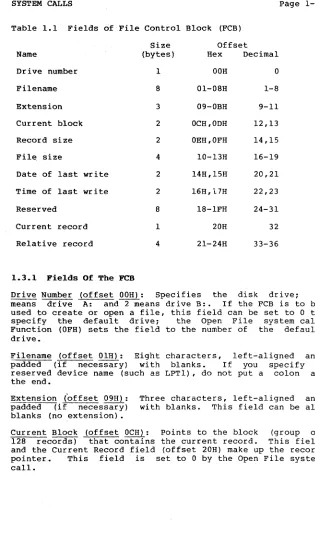
Table 1.1 Fields
of
File Control Block (FCB)Size Offset
Name (bytes) Hex Decimal
Drive number I OOH 0
Filename S Ol-OSH l-S
Extension 3 09-0BH 9-11
Current block 2 OCH,ODH 12,13
Record size 2 OEH,OFH 14,15
File size 4 lO..,13H 16-19
Date of last write 2 14H,15H 20,21
Time of last write 2 16H,i7H 22,23
Reserved S IS-lFH 24-31
Current record 1 20H 32
Relative record 4 21-24H 33-36
1.3.1 Fields Of The FeB
Drive Number (offset OOH): Specifies the disk drive: 1 means drive A: and~eans drive B:. If the FCB is to be used to create or open a file, this field can be set to 0 to specify the default drive: the Open File system call Function (OFH) sets the field to the number of the default drive.
Filename (offset OlH): Eight padded (if necessary) with reserved device name (such as the end.
characters, left-aligned and blanks. If you specify a LPTl), do not put a colon at
Extension (offset 09H): Three characters, left-aligned and padded (if necessary) with blanks. This field can be all blanks (no extension).
[image:15.414.47.362.54.589.2]SYSTEM CALLS Page 1-5
Record Size (offset OEH): The size of a logical record, in bytes. --set to l2a--by the Open File system call. If the record size is not 128 bytes, you must set this field after opening the file.
File Size (offset 10H): The size of the file, in bytes. The first word of this 4-byte field is the low-order part of
the size.
Date of Last Write (offset l4H): ·Cieatea
-or-
~ upaated.----Themapped into two bytes as follows:
Offset ISH
I Y I y I y I y I y I y I y I M
15 9 8
Offset 14H
I M I M I MID I DID I DID I
5 4 0
The date the file was year, month, and day are
Time of Last Write (offset l6H): The time the file was Cieatea or-Iast updated. Tnenour, minutes, and seconds ar.e mapped into two bytes as follows:
Offset l7H
I H I H I H I H I HIM I M I M I
15. . 11 10
Offset l6H
IMIMIM I s I s1 S I s I s I
5 4 0
Reserved (offset l8H): These fields are reserved for use by
MS-DOS.
-Current Record (offset 20H): Points to one of the 128 records in the current block. This field and the Current Block field (offset OCH) make up the record pointer. This field is not initialized by the Open File system call. You must set it~fore doing a sequential read or write to the file.
SYSTEM CALLS
NOTE
If you use the FCB at offset 5CH of the Program Segment Prefix, the last byte of the Relative Record field is the first byte of the unformatted parameter area that starts at offset 80H. This is the default Disk Transfer Address.
1.3.2 Bxtended PCB
Page 1-6
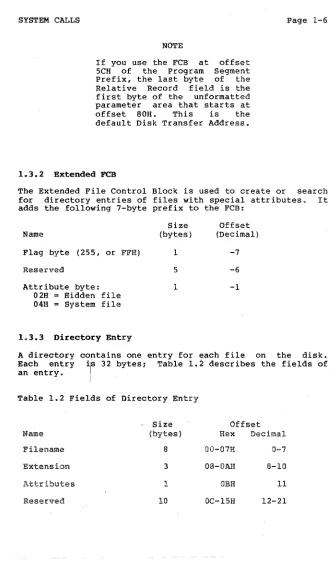
The Extended File Control Block is used to create or search for directory entries of files with special attributes. It adds the following 7-byte prefix to the FCB:
Name
Flag byte (255, or FFH)
Reserved
Attribute byte: 02H Hidden file 04H = System file
1.3.3 Directory Bntry
Size (bytes)
I
5
I
Offset (Decimal)
-7
-6
-1
A directory contains one entry for each file on the disk. Each entry ~s 32 bytesr Table 1.2 describes the fields of an entry. I
I
Table 1.2 Fields of Directory Entry
-
Size OffsetName (bytes) Hex Decimal
Filename 8 0O-07H 0-7
Extension 3 08-0AH 8-10
Attributes 1 OBH 11
[image:17.414.38.374.35.600.2]SYSTEM CALLS
Time of last write
Date of last read
Reserved
File size
1.3.4 Fields Of The FeB
2
2
2
4
Page 1-7
16H,17H 22,23
lSH,19H 24,25
lAH,lBH 26,27
lC-lFH 2S-31
Filename (offset OOH): Eight characters, left-aligned and padded (if necessary) with blanks. MS-DOS uses the first byte of this field for two special codes:
OOH (0) E5H (229)
End of allocated directory Free directory entry
Extension (offset OSH): Three characters, left-aligned and padded (if necessary) with blanks. This field can be all blanks (no extension).
'Attributes (offset OBH): Attributes of the file:
Value
Hex Binary Dec OlH 0000 0001 1 02H 0000 0010 2 04H 0000 0100 4 07H 0000 0111 7 OSH 0000 1000 S OAH 0001 0000 10 16H 0001 0110 22 20H 0020 0000 32
Meaning Read-only Hidden System
Changeable with CHGMOD Volume-ID
Directory
Hard attributes for FINDENTRY Archive
Reserved (offset OCH): Reserved for MS-DOS.
Time of Last write (offset 16H): The time the file was created or last updated. The hour, minutes, and seconds are mapped into two bytes as follows:
Offset 17H
I
HI
HI
HI
HI
HIMI
MI
MI
15 . 11 10
Offset 16H
I
M
I
M
I
Mis
Js i s
I
s i s
I
5 4 0
Date of Last Write (offset ISH): created or last updated. The mapped into two bytes as follows:
SYSTEM CALLS Page 1-8
Offset 19H
I
YI
yI
yI
yI
yI
yI
yI M
15 9 8
Offset 18H
I M I M I MID I DID I DID I
5 4 0
SYSTEM CALLS Page 1-9
1.4 SYSTEM CALL DESCRIPT.IONS
Many system calls require that parameters be loaded into one or more registers before the call is issued: most calls return information in the registers (usually a code that describes the success or failure of the operation). The description of system calls 00H-2EH includes the following:
A drawing of the 8088 registers that shows their contents before and after the system call.
A more complete description of the register contents required before the system call.
A description of the processing performed.
A more complete description of contents after the system call.
An example of its use~
the register
The description of system calls ·2FH-57H includes the following:
A drawing of the 8088 registers that shows their contents before and after the system call.
A more complete description of the register contents required before the system call.
A description of the processing performed.
Error returns from the system call.
An example of its use.
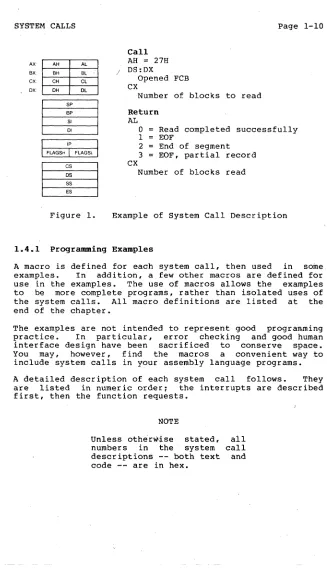
SYSTEM CALLS Page 1-10
AX:
BX:
ex:
OX:
AH AL
BH BL
eH el
OH DL
~
pBP
51 01
~
5.
:
E5Figure 1.
Call AH = 27H / DS:DX
Opened FCB CX
Number of blocks to read
Return AL
CX
o
1 2 3
Read completed successfully EOF
End of segment EOF, partial record
Number of blocks read
Example of System Call Description
1.4.1 Programming Examples
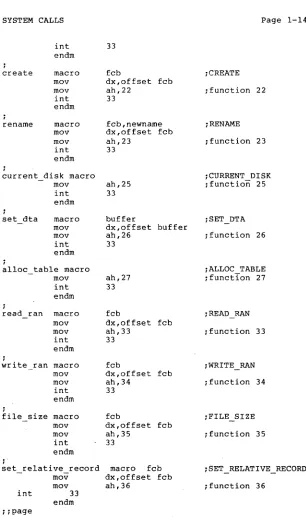
A macro is defined for each system call, then used in some examples. In addition, a few other macros are defined for use in the examples. The use of macros allows the examples to be more complete programs, rather than isolated uses of the system calls. All macro definitions are listed at the end of the chapter.
The examples are not intended to represent good programming practice. In particular, error checking and good human interface design have been sacrificed to conserve space. You may, however, find the macros a convenient way .to include system calls in your assembly language programs.
A detailed description of each system call follows. They are listed in numeric order; the interrupts are described first, then the function requests.
NOTE
Unless othe'rWise stated, numbers in the· system descriptions -- both text code -- are in hex.
ail
[image:21.414.40.367.30.598.2]SYSTEM CALLS Page 1-11
1.5 XENIX COMPATIBLE CALLS
MS-DOS 2.0 supports hierarchical (i.e., tree-structured) directories, similar to those found in the Xenix operating system. (For information on tree-structured director ies, refer to the MS-DOS User's Guide.)
The following system calls are compatible with the Xenix system:
Function 39H Function 3AH Function 3BH Function 3CH Function 3DH Function 3FH Function 40H Function 4lH Function 42H Function 43H Function 44H Function 45H Function 46H Function 4BH Function 4CH Function 4DH
Create Sub-Directory Remove a Directory Entry Change the Current Directory Create a File
Open a File
Read From File/Device Write to a File or Device Delete a Directory Entry Move a File Pointer Change Attributes I/O Control for Devices Duplicate a File Handle Force a Duplicate of a Handle Load and Execute a Program Terminate a Process
Retrieve Return Code of a Child
There is no restriction in MS-DOS 2.0 on the depth of a tree (the length of the longest path from root to leaf) except in the number of allocation units available. The root directory will have a fixed number of entries (64 for the single-sided disk). For non-root directories, the number of files per directory is only limited by the number of allocation units availahle.
SYSTEM CALLS Page 1-12
Implementation of the tree structure is simple. The root directory is the pre-2.0 directory. Subdirectories of the root have a special attribute set indicating that they are directories. ?he subdirectories themselves are files, linked through the FAT as usual. Their contents are identical in character to the contents of the root directory.
Pre-2.0 programs that us"e system calls not described in this chapter will be unable to make use of files in other directories. Those files not necessary for the current task will be placed in other directories.
SYSTEM CALLS
Attribute
volume id
directory
archive
hidden/ system
Meaning/Function for files
Present at the root. Only one file may have this set.
Meaningless.
Old fcb-create, new Create, new open (for write or read/write) will fail.
Set when file is written. Set/reset via Function 43H.
Prevents file from being found in search first/search next. Old Qpen will fail.
Page 1-13
Meaning/Function for directories
Meaningless.
Indicates that the directory entry is a directory. Cannot be changed with 43H.
Meaningless.
Meaningless.
SYSTEM CALLS Page 1-14
1.6 INTERRUPTS
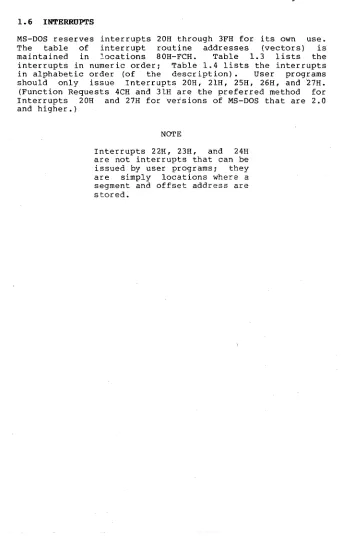
MS-DOS reserves interrupts 20H through 3FH for its own use. The table of interrupt routine addresses (vectors) is maintained in locations 80H~FCH. Table 1.3 lists the interrupts in numeric order; Table 1.4 lists the interrupts in alphabetic order (of the description). User programs should only issue Interrupts 20H, 21H, 25H, 26H, and '27H.
(Function Requests 4CH and 3lH are the preferred method for Interrupts 20H and 27H for versions of MS-DOS that are 2.0 and higher.)
NOTE
[image:25.414.36.381.61.597.2]SYSTEM CALLS
Table 1.3 MS-DOS Interrupts, Numeric Order
Interrupt
Hex Dec Description
Program Terminate Function Request Terminate Address
<CTRL-C> Exit Address
20H
2lH
22H 23H
24H 25H
26H
27H
32 33 34 35
36
37
38 39
Fatal Error Abort Address Absolute Disk Read
28-40H 40-64
Absolute Disk Write
Terminate But Stay Resident RESERVED -- DO NOT USE
Table 1.4 MS-DOS Interrupts, Alphabetic Order
Description
Absolute Disk Read Absolute Disk Write <CTRL-C> Exit Address Fatal Error Abort Address Function Request
Program Terminate RESERVED -- DO NOT USE Terminate Address
Terminate But Stay Resident
Interrupt Hex Dec
25H
26H 23H 24H 2lH
20H
28-40H
22H 27H
37
38
35
36
33 32 40-64 34
39
SYSTEM CALLS Program Terminate Page 1-16
Program Terminate (Interrupt 208)
AX:
BX:
CX: OX:
AH AL BH BL CH CL DH OL
~
pBP
SI
01
I
FLAGSHT
FLAGS,r
~
)"""::M>: '\~'.OS
SS
ES
Call CS
Segment address of Program Segment Prefix
Return None
Interrupt 208 causes the current process to terminate and returns control to its parent process. All open file handles are closed and the disk cache is cleaned. This interrupt is almost always is used in old .COM files for termination.
The CS register must contain the segment address of the Program Segment Prefix before you call this interrupt.
The following exit addresses are restored from the Program Segment Prefix:
Exit Address
Program Terminate CONTROL-C
Critical Error
Offset
OAH OEH 12H
All file buffers are flushed to disk.
NOTE
SYSTEM CALLS Program Terminate Page 1-17
Interrupt 20H is provided for compatibility with versions of MS-DOS prior to 2.0. New programs should use Function Request 4CH, Terminate a Process.
Macro Definition: terminate macro
int 20H endm
Example
:CS must be equal to PSP values given at program start : (ES and DS values)
INT 20H
SYSTEM CALLS Function Request
Function Request (Interrupt 21H)
AX: AH BX: BH
CX: CH
AL
BL CL
Call AH
Function number
Page 1-18
OX: OH OL
m
pOther registers as specified in individual function
BP
SI
01 Return As specified in individual function
I
FLAGS"T
FLAGSlI
~
sOS
SS
ES
The AH register must contain the number of the system function. See Section 1.7, "Function Requests," for a description of the MS-DOS system functions.
Example
NOTE
No macro is defined for interrupt, because function descriptions in chapter that define a
include Interrupt 21H.
this
all
this macro
To call the Get Time function:
mov int
ah,2CH 21H
SYSTEM CALLS Terminate Address
Terminate Address (Interrupt 22H) CONTROL-C Exit Address (Interrupt 23H) Fatal Error Abort Address (Inter~upt 24H)
Page 1-19
These are not true interrupts, but rather storage locations for a segment and offset address. The interrupts are issued by MS-DOS under the specified circumstance. You can change any of these addresses with Function Request 25H (Set Vector) if you prefer to write your own interrupt handlers.
Interrupt 22H -- Terminate Address
When a program terminates, control transfers to the address at offset OAH of the Program Segment Prefix. This address is copied into the Program Segment prefix, from the Interrupt 22H vector, when the segment is created.
Interrupt 23H -- CONTROL-C Exit Address
If the user types CONTROL-C during keyboard input or display output, control transfers to the INT. 23H vector in the interrupt table. This address is copied into the Program Segment Prefix, from the Interrupt 23H vector, when the segment is created.
If the CONTROL-C routine preserves all registers, it can end with an IRET instruction (return from interrupt) to continue program execution. When the interrupt occurs, all registers are set to the value they had when the original call to MS-DOS was made. There are no restrictions on what a CONTROL-C handler can do -- including MS-DOS function calls -- so long as the registers are unchanged if IRET is used.
If Function 09H or OAH (Display String or Buffered Keyboard Input) is interrupted by CONTROL-C, the three-byte sequence 03H-ODH-OAH (ETX-CR-LF) is sent to the display and the function resumes at the beginning of the next line.
SYSTEM CALLS Terminate Address Page 1-20
Interrupt 24H -- Fatal Error Abort Address
If a fatal disk error occurs during execution of one of the disk I/O function calls, control transfers to the INT 24H
v~ctor in the vector table. This address is copied into the
Program Segment Prefix, from the Interrupt 24H vector, when the segment is created.
BP:SI contains the address of a Device Header Control Block from which additional information can be retrieved.
Error Codes
NOTE
Interrupt 24H is not issued if the failure occurs during execution of Interrupt 25H (Absolute Disk Read) or Interrupt 26H (Absolute Disk Write) . These errors are usually handled by the MS-DOS error routine in COMMAND.COM that retries the disk operation, then gives the user the choice of aborting, retrying the operation, or ignoring the error. The following topics give you the information you need about interpreting the error codes, managing the registers and stack, and controlling the system's response to the error in order to write your own error-handling routines.
SYSTEM CALLS Terminate Address Page 1-21
The following are error codes for Interrupt 24H:
Description Error Code
o
Attempt to write on write-protected disk1
7-3 4 5
6
7 8
9 A B
C
Unknown unit Drive not ready Unknown command Data error
Bad request structure length Seek error
Unknown media type Sector not found Printer out of paper Write fault
Read fault General failure
The user stack will be in effect (the first item described below is at the top of the stack), and will contain the following from top to bottom:
IP CS FLAGS
AX
BX CX DX SI DI BP DS ES
IP CS FLAGS
MS-DOS registers from issuing INT 24H
User registers at time of original INT 21H request
From the original INT 21H from the user to MS-DOS
The registers are set such that if an IRET is executed, MS-DOS will respond according to (AL) as follows:
(AL)=O
=1
=2
Notes:
ignore the error retry the operation
terminate the program via INT 23H
SYSTEM CALLS Terminate Address Page 1-22
2. For disk errors, this exit is taken only for errors occurring during an Interrupt 21H. It is not used for errors during Interrupts 25H or 26H.
3. This routine is entered in a disabled state.
4. The SS, SP, DS, ES, BX, CX, and DX registers must be preserved.
5. This interrupt handler should refrain from using MS-DOS funtion calls. If necessary, it may use calls OIH through OCH. Use of any other call will destroy the MS-DOS stack and will leave MS-DOS in an unpredictable state.
6. The interrupt handler must not change the contents of the device header.
SYSTEM CALLS Absolute Disk Read
Absolute Disk Read (Interrupt 258)
AX;
BX;
ex;
OX;
AH IlL
" a t ' 'ilL
t:ff <lI,;
~
pBP Sf Dl
I
FLAGSHr~
I
Call AL
Drive number DS:BX
Disk Transfer Address CX
Number of sectors DX
Beginning relative sector
Return AL
Error code if CF=l FlagsL
CF 0 if successful
1 if not successful
The registers must contain the following:
AL Drive number. (O=A, l=B, etc.). BX Offset of Disk Transfer Address
(from 'segment address in DS).
ex
Number of sectors to read. DX Beginning relative sector.This interrupt transfers control to the MS-DOS number of sectors specified in CX is read from the Disk Transfer Address. Its requirements and are identical to Interrupt 26H, except data is than written.
NOTE
All registers except the segment registers are destroyed by this call. Be sure to save any registers your program uses before issuing the interrupt.
Page 1-23
BIOS. The the disk to processing read rather
SYSTEM CALLS Absolute Disk Read Page 1-24
If the disk operation was successful. the Carry Flag (CF) is O. If the disk operation was not successful. CF is 1 and AL contains the MS-DOS error code (see Interrupt 24H earlier in this section for the codes and their meaning).
Racro Definition: abs_disk_read' macro
mov mov mov mov int endm
disk .buffer .num s'ectors .start a1.dis'k
-bx.offset buffer cx.num sectors dh.start 25H
Bxample
The following program copies the contents of a single-sided disk in drive A: to the disk in drive B:. It uses a buffer of 32K bytes:
prompt
start buffer
int 25H:
copy:
db db dw db
"Source in A. target in B".13.10 "Any key to start. $"
o
64 dup (512 dup (?» ~64 sectors
display prompt read kbd mov cx.5
push cx abs disk read abs-disk-write add- start. 64 pop cx loop copy
~see Function 09H
~see Function OSH
~copy 5 groups of ~64 sectors
~save the loop counter O.buffer.64.start ~THIS INTERRUPT 1.buffer.64.start ~see INT 26H
~do the next 64 sectors
SYSTEM CALLS Absolute Disk Write
Absolute Disk Write (Interrupt 26H)
AX: BX:
cx:
DX:
AH A1.
flI1 !II.. CH Cl
DH IlL
~
pBP
SI
DI
I
FLAGS"r
FlAG$LI
~
CSos '
SS
ES
Call AL
Drive number DS:BX
Disk Transfer Address
ex
Number of sectors
ox
Beginning relative sector
Return AL
Error code if CF = I
FLAGSL
CF = 0 if successful
I if not successful
The registers must contain the following:
AL Drive number (O=A, l=B, etc.). BX Offset of Disk Transfer Address
(from segment address in OS).
ex
Number of sectors to write.ox
Beginning relative sector.page 1-25
This interrupt transfers control to the MS-DOS BIOS. The number of sectors specified in CX is written from the Disk Transfer Address to the disk. Its requirements and processing are identical to Interrupt 25H, except data is written to the disk rather than read from it.
NOTE
All registers except the segment registers are destroyed by this call. Be sure to save any registers your program uses before issuing the interrupt.
/
SYSTEM CALLS Absolute Disk Write page 1-26
If the disk operation was successful, the Carry Flag (CF) is O. If the disk operation was not successful, CF is 1 and AL contains the MS-DOS error code (see Interrupt 24H for the codes and their meaning).
Macro Definition: abs disk write macro
mov mov mov mov int endm
Example
disk,buffer,num sectors,start
al,disk
-bx,offset buffer cx,num sectors dh,start 26H
The following program copies the contents of a single-sided disk in drive A: to the Qisk in drive B:, verifying each write. It uses a buffer of 32K bytes:
off on
prompt
start buffer
int 26H:
copy:
equ 0 equ 1
db "Source in A, target in &",13,10 db "Any key to start. $"
dw 0
db 64 dup (512 dup (?» 164 sectors
display prompt read kbd verify on mov cx,5 push cx abs disk read abs-disk-write add- start,64 pop cx loop copy verify off
lsee Function 09H 1see Function OSH lsee Function 2EH
lCOPY 5 groups of 64 sectors lsave the loop counter 0,buffer,64,start 1see INT 25H 1,buffer,64,start 1THIS INTERRUPT
ldo the next 64 sectors lrestore the loop counter
SYSTEM CALLS Terminate But Stay Resident
Terminate But Stay Resident (Interrupt 27H)
AXe
BK CX: OX:
AH AL BH BL CH CL
DH DL
~
pBP SI 01
m
· c i $os ss
ES
Call CS:DX
First byte following last byte of code
Return None
The Terminate But Stay Resident call is used to of code remain resident in the system after its Typically, this call is used in .COM files to device-specific interrupt handler to remain process asynchronous interrupts.
Page 1-27
make a piece termination. allow some resident to
DX must contain of the first program. When terminates but remains resident i t terminates.
the offset (from the segment address in CS) byte following the last byte of code in the
Interrupt 27H is executed, the program is treated as an extension of MS-DOS; it and is not overlaid by other programs when
This interrupt is provided for compatibility with versions of MS-DOS prior to 2.0. New programs should use Function 31H, Keep Process.
Macro Definition: stay_resident macro mov
inc int endm
Example
last instruc dx,offset last dx
27H
instruc
;CS must be equal to PS·p values given at program start ; (ES and DS values)
mov DX,LastAddress int 27H
SYSTEM CALLS Page 1-28
1.7 FUNCTION REQUESTS
Most of the MS-DOS function calls require input to be passed to them in registers. After setting the proper register values, the function may be invoked in one of the following ways:
1. Place the function number in AH and execute a long call to offset SOH in your Program Segment Prefix. Note that programs using this method will not operate correctly on. versions of MS-DOS that are lower than 2.0.
2. Place the function number in AH and issue Interrupt 21H. All of the examples in this chapter use this method.
3. An additional method exists for programs that
~ere
written with different calling conventions. This method should be avoided for all new programs. The function number is placed in the CL register and other registers are set according to the function specification. Then, an intraiegment call is made to location S in the current code segment. That location contains a long call to the MS-DOS function dispatcher. Register AX is always destroyed if this method is used; otherwise, it is the same as normal function calls. Note that this method is valid only for Function Requests OOHthrough 024H.
1.7.1 CP/M(R)-Compatible Calling Sequence
A different sequence can be used for programs that must conform to CP/M calling conventions:
1. Move any required data into the appropriate registers (just as in the standard sequence).
2. Move the function number into the CL register.
3. Execute an intrasegment call to location S in the current code segment.
SYSTEM CALLS Page 1-29
1.7.2 Treatment Of Registers
When MS-DOS takes control after a function call, it switches to an internal stack. Registers not used to return information (except AX) are preserved. The calling program's stack must be large enough to accommodate the interrupt system -- at least 128 bytes in addition to other needs.
IMPORTANT NOTE
The macro definitions and extended example for MS-DOS system calls OOH through 2EH can be found at the end of this chapter.
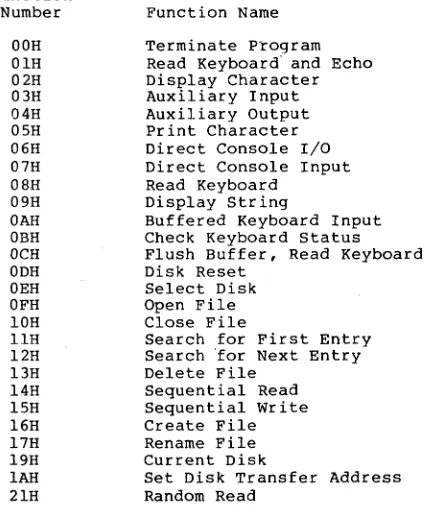
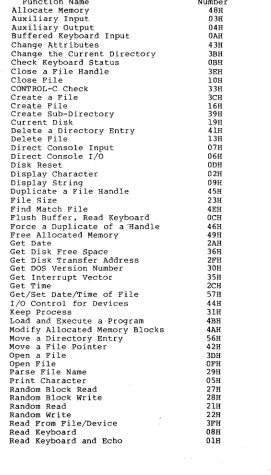
Table 1.5 lists the function requests in numeric order; Table 1.6 list the function requests in alphabetic order (of the description).
Table 1.5 MS-DOS Function Requests, Numeric Order
Function Number OOH OlH 02H 03H 04H OSH 06H 07H OSH 09H OAH OBH OCH ODH OEH OFH IOH llH l2H 13H l4H ISH 16H l7H 19H
IAH
2lHFunction Name
Terminate Program Read Keyboard' and Echo Display Character Auxiliary Input Auxiliary Output Print Character Direct Console I/O Direct Console Input Read Keyboard
Display String
Buffered Keyboard Input Check Keyboard Status Flush Buffer, Read Keyboard Disk Reset
Select Disk Open File Close File
Search for First Entry Search 'for Next Entry Delete File
Sequential Read Sequential Write Create File Rename File Current Disk
[image:40.414.61.278.304.559.2]SYSTEM CALLS 22H 23H 24H 25H 27H 2BH 29H 2AH 2BH 2CH 2DH 2EH 2FH 30H 3lH 33H 35H 36H 3BH 39H 3AH 3BH 3CH 3DH 3EH 3FH 40H 4lH 42H 43H 44H 45H 46H 47H 4BH 49H 4AH 4BH 4CH 4DH 4EH 4FH 54H 56H 57H
Random Write File Size
Set Relative Record Set vector
Random Block Read Random Block Write Parse File Name Get Date
Set Date Get Time Set Time
Set/Reset Verify Flag Get Disk Transfer Address Get DOS Version Number Keep Process
CONTROL-C Check Get Interrupt Vector Get Disk Free Space
Page 1-30
Return Country-Dependent Information Create Sub-Directory
Remove a Directory Entry Change Current Directory Create a File
Open a File
Close • File Handle Read From File/Device Write to a File/Device Delete a Directory Entry Move a File Pointer Change Attributes
I/O Control for Devices Duplicate a File Handle Force a Duplicate of a Handle Return Text of Current Directory Allocate Memory
Free Allocated Memory
Modify Allocated Memory Blocks Load and Execut,e a program Terminate a Process
Retrieve the Return Code of a Child Find Match File
Step Through a Directory Matching File.s Return Current Setting of verify
SYSTEM CALLS Page 1-31
Table 1.6 MS-DOS Function Requests, Alphabetic Order
Function Name Allocate Memory Auxiliary Input Auxiliary Output
Buffered Keyboard Input Change Attributes
Change the Current Directory Check Keyboard Status
Close a File Handle Close File
CONTROL-C Check Create a File Create File
Create Sub-Directory Current Disk
Delete a Directory Entry Delete File
Direct Console Input Direct Console I/O Disk Reset
Display Character Display String
Duplicate a File Handle File Size
Find Match F.ile
Flush Buffer, Read Keyboard Force a Duplicate of a 'Handle Free Allocated Memory
Get Date
Get Disk Free Space Get Disk Transfer Address Get DOS Version Number Get Interrupt Vector Get Time
Get/Set Date/Time of File I/O Control for Devices Keep Process
Load and Execute a Program Modify Allocated Memory Blocks Move a Directory Entry
Move a File Pointer Open a File
Open File Parse File Name Print Character Random Block Read Random Block Write Random Read
Random Write
Read From File/Device Read Keyboard
Read Keyboard and Echo
[image:42.414.51.322.121.596.2]SYSTEM CALLS pa~e 1-32
Remove a Directory Entry 3AH
Rename File l7H
Retrieve the Return Code of a Child 4DH Return Current Setting of Verify 54H Return Country-Dependent Information 38H Return Text of Current Directory 47H Search for First Entry llH Search for Next Entry l2H
Select Disk OEH
Sequential Read l4H
Sequential Write l5H
Set Date 2BH
Set Disk Transfer Address lAH
Set Relative Record 24H
Set Time 2DH
Set Vector 25H
Set/Reset Verify Flag 2EH
Step Through a Directory Matching 4FH
Terminate a Process 4CH
Terminate Program OOH
SYSTEM CALLS Terminate Program
Terminate Program (Function OOH)
AX: BX: CX:
OX:
Alt· AL BH BL CH CL OH OL
I
FLAGS"T
FLAGS,I
~
i":""""/':"''.:'OS
S5
E5
Call AH
=
OOH CSSegmen~ address of Program Segment Prefix
Return None
Page 1-33
Function OOH is called by Interrupt 20H;
same processing. it performs the
The CS register must contain the segment address of the Program Segment Prefix before you call this interrupt.
The following exit addresses are restored from the specified offsets in the Program Segment Prefix:
program terminate OAH
CONTROL-C OEH
Critical error 12H
All file buffers are flushed to disk.
Warning: Close all files that have changed in length before calling this function. If a changed file is not closed, its length is not recorded correctly in the directory. See Function lOH for a description of the Close File system call.
Macro Definition: terminate_program macro xor int endm
Example
ah,ab 21H
;CS must be equal to PSP values given at program start ; (ES and OS values)
mov ab,O int 2lH
SYSTEM CALLS Read Keyboard/Echo
Read Keyboard and Echo (Function OlB)
A)(,
BX,
cx, ox,
~, 'C";.~.t'\'
BH BL CH CL OH OL
~
:
51 DI
I
FLAGS"T
FLAGSLI
~
s:
..ES
Call
AD = OlB
Return AL
Character typed
Paqe 1-34
Function OlB waits for a character to be typed at the keyboard, then echos the character to the display and returns it in AL. If the. character is CONTROL-C, Interrupt 23H is executed.
Macro Definition: read kbd and echo macro
Example
mov ah, OlH int 2lH endm
The following program both displays and prints characters as they are typed. If RETURN is pressed, the program sends Line Feed-Carriage Return to both the· display and the printer:
func OlB: read kbd and echo ;THIS FUNCTION print_char al ;see Function 05H cmp aI,ODH ;is it a CR? jne func OlB ino, print it print char 10
-
;see Function 05B "display char 10 ;see Function 02HSYSTEM CALLS Display Character Page 1-35
Display Character (Function 02B)
AX,
BX: AM BH CH
AL
BL CL
Call AH
=
02H DLCX;
DX: DH OL Character to be displayed
~
pBP
SI DI
I
FLAGS"T
FLAGSlI
~
sDS
55
ES
Return None
Function 02H displays the character in DL. If CONTROL-C is typed, Interrupt 23H is issued.
Macro Definition: display_char macro mov mov int endm
character dl,character ah,02H 21H
Example
The following program converts lowercase characters to uppercase before displaying them:
func 02H: read kbd cmp aI, "a"
jl uppercase cmp aI, "z"
jg uppercase sub aI, 20H
uppercase: display char al jmp -func 02H:
:see Function 08H
:don't convert
:don't convert
:convert to ASCII code :for uppercase
:THIS FUNCTION
SYSTEM CALLS Auxiliary Input
Auxiliary Input (Function 03H)
AX:
BX:
ex:
DX:
Call AH
=
03HReturn AL
Page 1-36
m
;
51 " DICharacter from auxiliary device
I
FLAGS"r
FLAGSLI
Function 03H waits for a character from the auxiliary input device, then returns the character in AL. This system call does not return a status or error code.
If a CONTROL-C has been typed at console input, Interrupt 23H is issued.
Macro Definition: aux_input macro
Example
mov ah,03H int 2lH endm
The following program prints characters as they are received from the auxiliary device. It stops printing when an end-of-file character (ASCII 26, or CONTROL-Z) is received:
func 03H:
continue:
aux input cmp- al,lAH· je continue print char al "jmp -func_03H
SYSTEM CALLS Auxiliary Output Page 1-37
Auxiliary Output (Function 048)
AX: lIif· BX: BH
CX: CH AL BL CL
Call AH = 04H DL
OX: OH DI.: Character for .'auxiliary device
m
pBP SI 01
I
FLAGS"T
FLAGS,I
m
DS 55 sES
Return None
Function 04H sends the character in DL to the, auxiliary output device. This system call does not return a status'or error code.
If a CONTROL-C has been typed at console input, Interrupt 23H is iSSued.
Macro Definition: aux_output macro character mov dl,character mov ah,048
int 21H endm
Example
The following program gets a series of strings of up to 80 bytes from the keyboard, sending each to the auxiliary device. It stops when a null string (CR only) is typed: .
string db 81 dup(?) ;see Function OAB
.
func_04H:get_string 80,string cmp string.[1],O je continue
mov cx, word ptr string[l] mov bx,O
send it: aux output string[bx+2] inc- bx
loop send it jmp func 04H
continue:
-;see Function OAB ;null string? ;yes, all done ;get string length ;set index to 0 ;THIS FUNCTION ;bump index
SYSTEM CALLS Print Character Page 1-38
Print Character (Function OSH)
AX:
BX: ex:
oX: 1--,...-1_,..",,..,.,.
m
I
FlAGs..T
FlAGSLI
Call AH = OSH DL
Character for printer
Return None
Function OSH prints the character printer device. If CONTROL-C input, Interrupt 23H is issued.
in has
DL on the standard been typed at console
Macro Definition: print_char macro mov mov int endm
character dl,character ah,OSH 2lH
Example
The following program prints a walking test pattern on the printer. It stops if CONTROL-C is pressed.
line num db
o
func OSH: mov start line: mov
cx,60 bl,33
add bl,line_num push cx
mov cx,80 print char bl inc
cmp
jl mov
bl bl,126
no reset bl-;33
lprint 60 lines
lfirst printable ASCII lcharacter (!)
lto offset one character lsave number-of-lines counter lloop counter for line
lTHIS FUNCTION
lmove to next ASCII character llast printable ASCII
SYSTEM CALLS
no reset:
Print Character Page 1-39
loop print it print char
13
print-char 10 inc -line num pop exloop start_line;
;print another character ;carriage return
;line feed
SYSTEM CALLS Direct Console I/O
Direct Console I/O (Function 068)
AX: ~. . . .A\.,
BX: BH BL CX: CH CL
OX: I--=O-H -if---=OI.';;""""
Call AH
=
06H DLSee text
Return AL
Page 1-40
I
FLAGS"T
FLAGSLI
If DL
=
FFH (255) before call, then Zero flag set means AL has character from keyboard.~
sOS . SS ES
Zero flag not set means there was not a character to get, and AL
=
0The processing depends on the value in DL when the function is called:
DL is FFH (255) -- If a character has been typed at the keyboard, it is returned in AL and the Zero flag is 0: if a character has not been typed, the Zero flag is 1.
DL is not FFH -- The character in DL is displayed.
This function does not check for CONTROL-C.
Macro Definition: dir console io macro switch
SYSTEM CALLS Direct Console I/O Page 1-41
Example
The following program sets the continuously displays the time. typed, the cisplay stops changing: typed again, the clock is reset to again:
system When when
o
andclock to 0 and any character is any character is the display starts
time
ten
func 06H: read-clock:
stop:
db "00:00:00.00",13,10,"$" :see Function 09H :for explanation of $ db 10
set time 0,0,0,0
g~t-time
convert ch,ten,time convert cl,ten,time[3] convert dh,ten,time[6] convert dl,ten,time[9] display time
dir console io FFH jne stop jmp read clock
read kbd
jmp func 06H
:see Function 2DH :see Function 2CH :see end of chapter :see end of chapter :see end of chapter :see end of chapter :see Function 09H :THIS FUNCTION :yes, stop timer :no, keep timer : running
SYSTEM CALLS Direct Console Input Page 1-42
Direct Console Input (Function 07B)
AX. BX: CX OX:
BH CH DH
BL CL DL
I
I
J
Call AH
=
97HReturn AL
BP
SI
~
pCharacter from keyboard
"01 .
I
FLAGS"r
FLAGSLI
~
sDS SS ES .
Function 07H waits for a character to be typed, then returns i t in AL. This function does not echo the character or check for CONTROL-C. (For a keyboard input function that echoes or checks for CONTROL-C, see Functions OlH or 08H.)
Macro Definition:
Example
macro mov ah,07H int 2lH endm
The following program prompts for a password (8 characters maximum) and places the characters into a string without echoing them:
password prompt
func 07H:
get _pass:
continue:
db 8 dupe?) db "Password: $"
display prompt mov cx,8 xor bx,bx
dir console
-
input cmp al,ODH je continuemov password [bx] ,al inc bx
loop get_pass
lsee Function 09H for iexplanation of $
isee Function 09H
imaximum length of password iSO BL can be used as index iTHIS FUNCTION
iwas it a CR? lyes, all done
;nc, put character -in string ibump index
SYSTEM CALLS Read Keyboard
Read Keyboard (Function 08H)
AX: BX: CX. OX:
AH BH CH OH
AI. BL CL OL
Call AH
=
08HReturn AL
Page 1-43
m
pBP
SI DI
Character from keyboard
m
os SS sES
Function 08H waits for a character to be typed, then returns it in AL. If CONTROL-C is pressed,
executed. This function does not echo the a keyboard input function that echoes checks for CONTROL-C, see Function OlH.)
Interrupt 23H is character. (For the character or
Macro Definition: read kbd macro mov
int endm
ah,08H 21H
Example
The following program prompts for a password (8 characters maximum) and places the characters into a string without echoing them:
password prompt
func 08H:
get_pass:
continue:
db 8 dup(?) db "Password: $"
display prompt mov cx,8 xor bx,bx read kbd cmp al,ODH je continue
mov password [bx] ,al inc bx
loop get_pass
;see Function 09H ;for explanation of $
;see Function 09H
;maximum length of password ;BL can be an index
;THIS FUNCTION ;was it a CR? ;yes, all done
;no, put char. in string ;bump index
SYSTEM CALLS Display String
Display String (Function 09H)
AK BX: CX: ox:
AH AL BH BL CH CL
01{ .11
~
pBP
SI
DI
I
FLAGSH'j
FLAGS,I
Call AH
=
09H DS:DXString to be displayed
Return None
Page 1-44
DX must contain the offset (from the segment address in DS) of a string that ends with ~$". The string is di~played
(the $ is not displayed).
Macro Definition: display
Example
macro mov mov int endm
string dx,offset ah,09H 21H
string
The following program displays the hexadecimal code of the key that is typed: .
"0123456789ABCDEF" 16
table db sixteen db
result db " - OOH",13,lO,"$" ;see text for ;explanation of $
func 09H:read kbd and echo
convert al,slxteen,result[3] display result
jmp func 09H
SYSTEM CALLS Buffered Keyboard Input Page 1-45
Buffered Keyboard Input (Function OAH)
AX
BX:
ex: ox
~
pBP
51 01
~
555 E5
Call AH = OAH DS:DX
Input buffer
Return None
DX must contain the offset (from the se.gment address in DS) of an input buffer of the following form:
Byte Contents
1 Maximum number of characters in buffer, including the CR (you must set this value).
2 Actual number of characters typed, not counting the CR (the function sets this value).
3-n Bufferl must be at least as long as the number in byte 1.
This function waits for characters to be typed. Characters are read from the keyboard and placed in the buffer beginning at the third byte ·until RETURN is typed. If the buffer fills to one less than the maximum, additional characters typed are ignored and ASCII 7 (BEL) is sent to the display until RETURN is pressed. The string can be edited as it is being entered. If CONTROL-C is typed, Interrupt 23H is issued.
The second byte of the buffer is set to the number of characters entered (not counting the CR).
Macro Definition: get_string macro
mov mov mov int endm
SYSTEM CALLS Buffered Keyboard Input Page 1-46
Example
The following program gets a l6-byte (maximum) string from the keyboard and fills a 24-line by aO-character screen with it:
buffer max length chars entered string
strings_per_line
crlf
func OAH:
display_screen:
label byte db ?
db ?
db 17 dup (?) dw 0
db 13,10,"$"
get_string 17,buffer xor bx,bx
mov mov mov cbw div
bl,chars entered buffer [bx+2J ," $" al,50H
chars entered
~maximum length ~number of chars. ~16 chars + CR ~how many strings ~ fit on line
~THIS FUNCTION ~ so byte can be ~used as index ~get string length ~see Function 09H
~columns per line
~times string fits ~on line
xor ah,ah ~clear remainder mov strings per line,ax ~save col. counter mov cx,24 - - ~row counter
push cx ~ save. it
mov cx,strings per line ~get col. counter display string- ~see Function 09H loop display line
display crlf-pop ex
loop display_screen
SYSTEM CALLS Check Keyboard Status Page 1-47
Check Keyboard Status (Function OBB)
AX: !<f,' Call
BX: BH BL AH
=
OBH CX: CH CLOX: OH OL
~
5PBP
51 01
Return AL
255 (FFH) = characters in type-ahead buffer
o
= no characters in type-ahead buffer~
505 55
E5
Checks whether there are characters in the type-ahead buffer. If so, AL returns FFH (255), if not, AL returns O. If CONTROL-C is in the buffer, Interrupt 23H is executed.
Macro Definition: check kbd status macro mov
int endm
ah,O.BH
2lFi .
Example
T1'!e following program continuously displays the time until any key is pressed.
time ten
func OBH: db db
"00:00:00.00",13,10,"$" 10
get time
convert ch,ten,time convert cl,ten,time[3] convert dh,ten,time[6] convert dl,ten,time[9] display time
check kbd status cmp - aI,FFH je all done jlllP funC_OBH
,see Function 2CH ,see end of chapter 1see end of chapter ,see end of chapter 1see end of chapter 1see Function09H 7THIS FUNCTION
,has a key been typed? 1yes, go home
SYSTEM CALLS Flush Buffer Page 1-48
Flush Buffer, Read Keyboard (Function OCB)
AX: BX: CX: DX:
AH Al
BH BL CH CL
OJ:{ PI..
~
pBP
SI
DI
I
FLAGS"T
FLAGSLI
~
sDS
SS
ES
Call AB = OCH AL
1, 6, 7, 8, or OAH
=
The corresponding function is called.Any other value
=
no further processing.Return AL
o
=
Type-ahead buffer was flushed; no otherprocessing performed.
The keyboard type-ahead buffer is emptied. Further processing depends on the value in AL when the function is called:
1, 6, 7, 8, or DAB function is executed.
Any other value returns O.
The corresponding MS-DOS
No further processing; AL
Macro Definition: flush and read kbd macro mov mov int endm switch al,switch ah,OCH 21H Example
The following program both displays and prints characters as they are typed. If RETURN is pressed, the program sends Carriage Return-Line Feed to both the display and the printer.
func OCH: flush and read kbd 1 print::::char
cmp jne
print char display char jmp
-aT
al,ODH func OCH 10 10 func OCHSYSTEM CALLS
Disk Reset (Function DOH)
AK
ax: cx
DX:
AH AL 8H 8L CH CL OH OL
~
p8P SI 01
~
sos SS ES
Call AH
=
ODHReturn None
Disk Reset Page 1-49
Function ODH is used to ensure that the internal buffer cache matches the disks in the drives. This function writes out dirty buffers (buffers that have been modified), and marks all buffers in the internal cache as free.
Function ODH flushes all file buffers. It does not update directory entries; you must close files that have changed to update their directory entries (see Function lOH, Close File) . This function need not be called before a disk change if all files that changed were closed. It is generally used to force a known state of the system; CONTROL-C interrupt handlers should call this function.
Macro Definition: disk reset macro disk
Example
mov ah,ODH int 2IH
mov int endm
ah,ODH 2lH
SYSTEM CALLS Select Disk
Select Disk (Function OEB)
AX: BX:
CX: OX:
CH
OH
~
::
SI
01
I
FLAGS"T
FLAGSLI
~
sOS
SS
ES
Call AH
=
OEH DLDrive number
(0 = A:, 1 =
Return AL
B:, etc.)
Number of logical drives
Page 1-50
The drive specified in DL (0
=
A:, 1=
B:, etc.) is selected as the default disk. The number of drives is returned in AL.Macro Definition: select disk macro disk
dl,disk[-64) ah,OEH
Example
mov mov int endm
2lH
The following program selects the drive not currently selected in a 2-dr i v.e system:
func OEH:
select b: . continue:
current disk cmp ii1,00H
j e select b select disk
"An
jmp -continue select disk "Sn~see Function 19H
~drive A: selected?
~yes, selectB ~THIS FUNCTION
SYSTEM CALLS Open File Page 1-51
Open File (Function OFH)
AX:
BX:
CX:
DX:
AH I AL
BH BL CH I CL
DH I OL
~
pBP SI
01
I
FLAGS"'j
FLAGJ§: .
SSES
Call AH
=
OFH DS:DXUnopened FCB
Return AL
o
=
Directory entry found255 (FFH)
=
No directory entry foundOX must contain the offset (from the segment address in DS) of an unopened File C6ntrol Block (FCB). The disk directory is searched for the named file.
If a directory entry for the file is found, AL returns 0 and the FCB is filled as follows:
If the drive code was 0 (default disk), it is changed to the actual disk used (1
=
A:, 2=
B:, etc.). This lets you change the default disk without interfering with subsequent operations on this file.The Current Block field (offset OCH) is set to zero.
The Record Size (offset OEH) is set to the system default of 128.
The File Size (offset lOH), Date of Last Write (offset l4H), and Time of Last Write (offset l6H) are set from the directory entry.
SYSTEM CALLS Open File Page 1-52
If a directory entry for the file is not found, AL returns FFH (255).
Macro Definition: open macro fcb
Example
mov mov int endm
dx,offset fcb ah,OFH
21H
The following program prints the file named TEXTFILE.ASC that is on the disk in drive B:. If a partial record is in the buffer at end-of-file, the routine that prints the partial record prints characters until it encounters an end-of-file mark (ASCII 26, or CONTROL-Z):
fcb
buffer
func OFH:
read line:
check more:
find eof:
all done:
db db db
2, "TEXTFILEASC" 25 dup (?) 128 dup (?)
set dta buffer open fcb read seq fcb cmp - al,02H je all done cmp al,QOH jg check more
mov cx,128 xor si,si
print_char buffer[si] inc loop jmp cmp jne mov si print it read line al,03H all done cx,I28 xor si,si
cmp buffer'[si] ,26 je all done
print char buffer[si] inc -si
loop find eof close fcb
:see Function lAH :THIS FUNCTION :see Function 14H :end of file? :yes, go home :more to come?
:no, check for partial :record
:yes, print the buffer :set index to 0
:see Function 05H :bump index
:print next character :read another record :part. record to print? :no
:yes, print it :set index to 0 :end-of-file mark? :yes
:see Function 05H :bump index to next :character
SYSTEM CALLS Close File Page 1-53
Close File (Function lOB)
AX. BK CX:
DX:
AH
BH CH DH
AL
BL CL DL
Call AH
=
lOH DS:DXOpened FCB
~
pBP
SI
DI
Return AL
o
=
Directory entry foundFFH (255)
=
No directory entry found~
sos SS
ES
DX must contain the offset (to the segment address in DS) of an opened FCB. The disk directory is searched for the file named in the FCB. This function must be called after a file is changed to update the directory entry.
If a directory entry for the file is found, the location of the file is compared with the corresponding entries in the FCB. The directory entry is updated, if necessary, to match the FCB, and AL returns O.
If a directory entry for the file is not found, AL returns FFH (255).
Macro Definition: close macro fcb
Example
mov dx,offset fcb mov ah,lOH
int 21H endm
The following program checks the firs