DIGITAL
RESEARCH
®
Pascal/MT+
™
Language
Programmer’s Guide
For the CP/M-68K
™COPYRIGHT
Copyright ©1984 by Digital Research Inc. All rights reserved. No part of this publication may be reproduced, transmitted, transcribed, stored in a retrieval system, or translated into any language or computer language, in any form or by any means, electronic, mechanical, magnetic, optical, chemical, manual or otherwise, without the prior written permission of Digital Research Inc., Post Of f ice Box 579, Pacific Grove, California, 93950 .
DISCLAIMER
Digital Research 1nc. makes no representations or warranties with respect to the contents hereof and specifically disclaims any implied warranties of merchantability or fitness for any particular purpose. Further, Digital Research Inc. reserves the right to revise this publication and to make changes from time to time in the content hereof without obligation of Digital Research Inc. to notify any person of such revision or changes.
NOTICE TO USER
From time to time changes are made in the file names and in the files actually included with the distribution disk. This manual should not be construed as a representation or warranty that such files or facilities exist on the distribution disk or as part of the materials and programs distributed. Most distribution disks include a “READ.ME” file, which explains variations from the manual and which do constitute modification of the manual and the items included therewith. Be sure to read that file before using the software.
TRADEMARKS
Digital Research and its logo are registered trademarks of Digital Research Inc. CB68K, CP/M-68K, Digital Research C, Pascal/MT+, and TEX are trademarks of Digital Research Inc. Motorola is a registered trademark of Motorola, Inc.
The Pascal/MT+ Language Programmer’s Guide for the CP/M-68K Operating System was prepared using the Digital Research TEX™ Text Formatter and printed in the United States of America.
Foreword
The Pascal/MT+™ language is formally based on the definition of standard Pascal as described in the International Standards Organization (ISO) standard DPS/7185. Pascal/MT+ also has several additions to standard Pascal that make it more suitable for commercial programming. You can use Pascal/MT+ to develop high-quality, efficient, maintainable software for both data processing and real – time control applications.
The Pascal/MT+ system, which includes compilers, linkers, and programming tools, is implemented on a variety of operating systems and microprocessors. Pascal/MT+ programs are easily transportable between various target processors and operating systems because the language is consistent. The Pascal/MT+ system can also generate software for use in a ROM-based environment, to operate with or without an operating system.
This manual describes Pascal/MT+ Release 3.3, a system that runs under the CP/M-68K™ operating system using a Motorola©MC68000 microprocessor with at least 128K bytes of memory.
This manual is divided in five parts. Part 1 (Sections 1 – 2) gives a general description of the Pascal/MT+ programming system, the notational conventions used in the manual, and some guidelines for configuring your own system.
Part 2 (Sections 3 – 5) describes how to use software. This includes the operation of the compiler, linker, and disassembler. The command-line and source-code options for the compiler and the command-line options for the linker are fully described.
Part 3 (Sections 6 – 10) describes a variety of advanced topics, including how to write large programs in segments, how to inter face Pascal/MT+ code with assembly-language code, how to directly access the operating system, and how to write your own error handling procedures. Also included is a set of guidelines for writing ROM-based code.
Part 4 (Section 11) contains some sample Pascal/MT+ programs that illustrate various features of the language. You can study these examples, and then modify them to gain experience with the language. Part 5 is a reference section containing appendixes and an index.
This manual assumes you are already familiar with general aspects of computer programming, and may have programmed in a language such as BASIC. If you are not familiar with Pascal, refer to the
Contents
1. Section ...1-1
Introduction To Pascal/MT+ ...1-1
The Pascal/MT+ Language ...1-1
Pascal/MT+ Implementation ...1-1
Pascal/MT+ for CP/M-68K...1-1
Pascal/MT+ Documentation Set ...1-2
Notational Conventions...1-3
2. Section ...2-1
Getting Started...2-1
Hardware Requirements ...2-1
Pascal/MT+ System Files...2-1
Installing Your System...2-2
System with Hard-disk Drive...2-2
System with Floppy-disk Drives ...2-2
Compiling and Linking a Program...2-3
3. Section ...3-1
BYTE
Representation ...D-2
CHAR Representation...D-2
INTEGER Representation...D-2
LONGINT Representation ...D-2
WORD Representation...D-3
REAL
Representation ...D-3
BCD Format ...D-3
IEEE Format...D-3
Array Representation...D-5
Set Representation...D-5
Static Data Allocation ...D-5
Global Variables...D-5
Local Variables ...D-6
E. Appendix ... E-1
Writing Portable Programs... E-1
Hardware-dependent Features... E-1
System-dependent Features... E-1
Tables
Table 2-1. Pascal/MT+ System Filetypes... 2-1 Table 3-1 Compiler Command-line Options ... 3-4 Table 3-2 $K Option Values ... 3-5 Table 3-3 Compiler Source Code Options ... 3-7 Table 4-1 Required Libraries ... 4-2 Table 4-2 LINK68 Command-line Options ... 4-5 Table 9-1 ERR Routine Error Codes... 9-7 Table 11-1 Comparison of I/O Methods ... 11-1
Figures
Figure 1-1 Software Development under Pascal/MT+... 1-2 Figure 4-1 LINK68 Operation... 4-1 Figure 5-1 DIS68 Operation... 5-1 Figure 6-1 Memory Layout in Transient Program Area... 6-2 Figure 7-1 Typical LINK68 Overlay Sheme... 7-4 Figure 7-2 Overlay Scheme Example 1 ... 7-5 Figure 7-3 Overlay Scheme Example 2 ... 7-5 Figure 8-1 Stack Containing a Parameter List ... 8-2
Listings
Listing 5-1 PPRIME.PAS ... 5-3
1. Section
Introduction To Pascal/MT+
The Pascal/MT+ Language
Pascal/MT+ is a high-level, block-structured, programming language. It is formally based on the definition of standard Pascal as described in the International Standards Organization (ISO) standard 7185.
The Pascal/MT+ language is a superset of standard Pascal. That is, Pascal/MT+ has all the features and constructs of standard Pascal, as well as enhancements that make it suitable for writing professional applications and system-level programs.
The enhancements fall into four categories: • additional data types
• enhanced file handling and input/output capability
• accesses both the run-time and operating systems
• writes modular programs using overlays and chaining
Collectively, these enhancements make Pascal/MT+ more suitable for commercial programming in both data processing and real-time control applications.
The Pascal/MT+ language is also the basis of a complete software development system that includes compilers, linkers, subroutine libraries, and other programming tools.
Pascal/MT+ Implementation
An implementation of the Pascal/MT+ language is a particular combination of software and hardware components that can translate the language’s statements into machine-readable instructions for a target system.
Software components include the compiler, linker, run-time libraries, and other tools such as assemblers, disassemblers, and symbolic debuggers. Hardware components include microprocessors, random access memory, disk storage, and peripheral devices such as consoles and printers. Thus, there can be many implementations of the Pascal/MT+ language, each tailored for a particular
hardware/software combination.
Every implementation of Pascal/MT+ must support all the syntactical constructs of the language and translate language statements in conformance with the ISO standard. However, each implementation can differ in the way it internally represents data, or organizes and transfers files.
Digital Research has implementations of Pascal/MT+ for a variety of 8-bit and 16-bit microprocessors and operating system environments. Because of differences in the capabilities of various
microprocessors and operating systems, not all the extensions of Pascal/MT+ are supported in each implementation.
Pascal/MT+ for CP/M-68K
Pascal/MT+ for CP/M-68K is a complete programming system that includes a compiler, a linker, a disassembler, and a large library of run-time subroutines to help you build better programs faster.
Pascal/MT+ Programmer’s Guide Pascal/MT+ Documentation Set
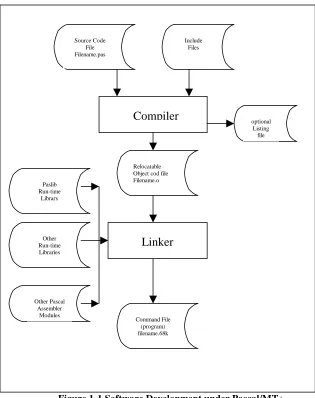
Figure 1-1 Software Development under Pascal/MT+
Pascal/MT+ Documentation Set
The Pascal/MT+ Language Programmer ’s Guide for the CP/M-68K Operating System, cited as Programmer’s Guide, contains information about using the compiler, linker, and disassembler. It provides general guidelines for creating modular programs using overlays, chaining, and shared variables.
The Programmer’s Guide also contains information on advanced programming topics, including how to write large programs in segments, interfacing Pascal/MT+ programs with assembly language modules, direct access to the operating system from Pascal/MT+ programs, and writing your own error handling routines. There is also a set of guidelines for writing ROM–based code.
The Pascal/MT+ Language Reference Manual, cited as Language Reference Manual, describes the Pascal/MT+ language, its syntax, and semantics. It is not a programming tutorial. Rather, it is primarily a reference document and should be used in conjunction with the Programmer ’s Guide.
The Pascal/MT+ documentation set assumes you have general experience with computer programming and possibly with standard Pascal. If you are a beginning programmer, or if you are not familiar with Pascal, you should refer to the bibliography of textbooks 1isted in the Language Reference Manua1.
The documentation set also assumes you are familiar with your own hardware components and operating system.
Linker
Paslib Run-time
Library
Other Run-time Libraries
Other Pascal Assembler
Modules
Compiler
Source Code File Filename.pas
Include Files
Relocatable Object cod file Filename.o
optional Listing
file
2. Section
Getting Started
Hardware Requirements
The Pascal/MT+ system runs under the CP/M-68K operating system using a Motorola MC68000 microprocessor. The compiler and linker need at least 192K bytes of memory, but it is recommended that your system have 256K bytes to handle large programs.
The size of a program developed with Pascal/MT+ depends on the size of the source code and on the number of run-time subroutines it uses. For example, compiling, linking, and then using the RELOC utility on the minimal program TEST1.PAS (described later in this section) generates a command file of 5K bytes.
Pascal/MT+ System Files
Digital Research supplies the Pascal/MT+ system in a variety of disk formats. When you receive your distribution disks, be sure to examine the file named READ.ME. This file completely describes the contents of all the other files on each of the distribution disks.
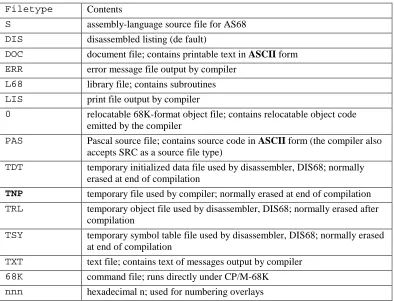
The Pascal/MT+ system uses a variety of filetypes, described in Table 1-1.
Table 2-1. Pascal/MT+ System Filetypes
Filetype Contents
S assembly-language source file for AS68
DIS disassembled listing (de fault)
DOC document file; contains printable text in ASCII form
ERR error message file output by compiler
L68 library file; contains subroutines
LIS print file output by compiler
0 relocatable 68K-format object file; contains relocatable object code emitted by the compiler
PAS Pascal source file; contains source code in ASCII form (the compiler also accepts SRC as a source file type)
TDT temporary initialized data file used by disassembler, DIS68; normally erased at end of compilation
TNP temporary file used by compiler; normally erased at end of compilation
TRL temporary object file used by disassembler, DIS68; normally erased after compilation
TSY temporary symbol table file used by disassembler, DIS68; normally erased at end of compilation
TXT text file; contains text of messages output by compiler
68K command file; runs directly under CP/M-68K
Pascal/MT+ Programmer’s Guide Installing Your System
Installing Your System
The first thing you should do when you receive your Pascal/MT+ system is make a backup copy of all the distribution disks.
Note: You have certain responsibilities when copying Digital Research products. Read your licensing agreement.
When installing your own system, you might find it convenient to copy only specific files from the distribution disks. The way in which you configure your system depends on its actual hardware capabilities.
System with Hard-disk Drive
If your system has a hard disk, the easiest way to configure it is to put the compiler files, the linker, and run-time library files on one logical drive.
The compiler files are as follows:
• MT68.68K • MT68.000
• MTERRS.TXT (optional)
The linker and run-time libraries are as follows:
• LINK68 . 68K • PASLI B. L68 • BCDREALS.L68 • FPREALS.L68 • FULLHEAP . 0
System with Floppy-disk Drives
If your system has two floppy-disk drives, you can use one disk for compiling and another disk for linking. You can use other disks for the programming tools, assorted source code, and examples.
To configure separate disks for compiling and linking, perform the following steps:
1. Install the CP/M-68K operating system, the PIP utility, and a text editor on two blank disks. Label one disk as the compiler and the other as the linker.
Put the following files on the compiler disk:
• MT68.68K
• MT68.000
• MTERRS.TXT (optional)
2. Put the following files on the linker disk:
• LINK68.68K
• PASLIB.L68
• BCDREALS.L68
• FPREALS.L68
• FULLHEAP.O
Pascal/MT+ Programmer’s Guide Compiling and Linking a Program
Compiling and Linking a Program
If you have never used Pascal/MT+ before, the following step- by-step example shows you how to compile, link, and run a simple program. This example assumes that you are using a CP/M-68K system with two disk drives and that you are familiar with CP/M-68K.
1. Put the compiler disk in drive A.
2. Using the text editor, create a file called TEST1.PAS and enter the following program. Use PIP to put the file on drive B.
PROGRAM simple example; VAR
i : INTEGER; BEGIN
WRITELN(’This is just a test’); FOR i := 1 TO lO DO
WRITELN(i);
WRITELN(’A11 Done’) END.
3. Now, compile the program with the following command:
A>mt68 b:testl
If you examine your directory, you will see a file named TEST1.O that contains the relocatable object code emitted by the compiler. If the compiler detects any errors, correct your source program and try again.
4. Now, log on to drive B, and link the program using the fo1lowing command:
B>link68 testl,paslib.168
Your directory will now contain a file named TEST1.68K that runs directly under CP/M-68K.
5. To run the program, enter the command:
B>testl
Although the test program shown above is very simple, it demonstrates the essential steps in the development process of any program: editing, compiling, and linking.
3. Section
Using the Compiler
Compiler Organization
The Pascal/MT+ compiler is composed of two files:
• MT68.68K • MT68.000
When you invoke the compiler, CP/M-68K loads the root module, MT68.68K, which performs the initial processing, then chains to the second module, MT68.000, to continue processing.
Compiler Operation
The Pascal/MT+ compiler processes a source-code file in three separate steps called passes or phases. • Phase 0 checks the syntax and generates a token file named PASTMP.TOK. This file
contains an intermediate language (tokenized) version of the source code.
• Phase 1 generates a table of the symbols that are defined in the source code. The compiler uses this symbol table when generating the relocatable object-code file in Phase 2.
• Phase 2 generates the relocatable object-code f ile.
The compiler also creates temporary files on the same disk containing the source code file. Under normal conditions, the compiler deletes the temporary files when finished processing. However, if the compiler terminates abnormally, the temporary files can remain in the directory.
When you compile the program, make sure there is enough space on the disk, or use the Td option to specify a different disk for the temporary files. See Command-line Options in this section.
Invoking the Compiler
You invoke the compiler with a command line of the form
MT68 < filespec> [<opt ions > ]
where <filespec> is the source-code file to be compiled, and the <options> are a list of optional parameters that control the compilation process.
The compiler can read the source file from any disk. The <filespec> must be in Digital Research standard filespec format, and end with a carriage return, line feed, and CTRL-Z.
When you create Pascal/MT+ programs, make sure that your text editor does not insert nonprintable formatting characters in the source file. The compiler cannot process a file containing any nonprintable control characters except tabs. Some text editors use nonprintable ASCII characters to control
formatting.
If you do not specify a filetype, the compiler searches for the file with no filetype. If the compiler cannot find the file, it assumes a SRC filetype, then a PAS filetype. If the compiler still cannot find the file, it displays an error message and stops processing.
The compiler generates a relocatable object-code file with the same filename as the input source program. The relocatable file has the filetype O.
Compilation Data
Pascal/MT+ Programmer’s Guide Compilation Errors
source code.
At the beginning of Phase 1, the compiler indicates the total amount of memory space available. The compiler also indicates the amount of memory space available after the predefined (internal compiler) symbols are loaded. This second indication is the amount of memory left for user symbols. Both amounts are shown in decimal.
During Phase 1, the compiler also outputs a pound sign (#) to the console each time it reads a procedure or function. At completion of Phase 1, the compiler indicates the total number of bytes remaining in memory.
Phase 2 generates the relocatable object code. During this phase, each time the compiler encounters a procedure or function, it displays the procedure’s name, its offset f rom the beginning of the module, and its size in decimal.
When the processing is completed at the end of Phase 2, the compiler displays the following diagnostic information:
Lines : lines of source code compiled
Errors: number of error s detected
Code : bytes of code generated ( in decimal)
Bss : bytes of block storage used (in decimal)
Compilation Errors
During Phase 0, when the compiler detects a syntax error, it displays the line containing the error. If you are using the MTERRS.TXT file, the compiler also displays an error description. In all other phases, the compiler displays an error identification number.
When the compiler is building the symbol table in Phase 1, over flow occurs ifnot enough space remains for the current symbol. Symbol table over flow is a non-recoverable error. You can overcome the problem by using the $Kn option to eliminate unused symbols from the table ( see Source Code Options in this section). You can also try to segment the program into smaller modules and compile them separately (see Section 7, ”Writing Segmented Programs”) .
In all phases, when the compiler detects an error it asks if you want to continue or stop, unless you use the C command line option. See Command Line Options, in this section.
Note: You must ensure that all the compiler overlays are on the same disk. If the overlay manager in
the run-time system cannot find an overlay, it displays an error message and stops processing.
Usually you can find a missing overlay by ensuring that the filename is correct and that it is on the disk. If you cannot find it, recopy the overlay file from your distribution disk. If you are sure the overlay is on the disk and you still get an error message, then the file is corrupted.
When all processing is completed, the ERR file generated by the compiler summarizes all non-syntactic errors.
Appendix A contains a complete list of the error messages, their causes, and suggested responses.
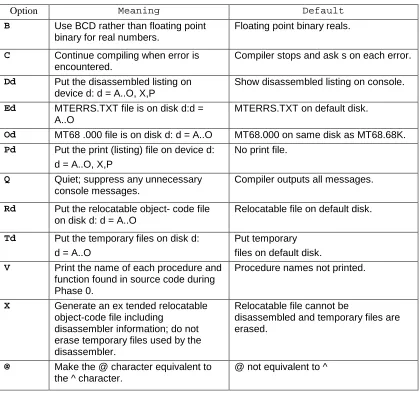
Compiler Command-line Options
Command-line options control specific actions of the compiler, such as where it writes the output files. All command-line options are single letters that start with a dollar sign ($) or a pound sign (#). If you specify more than one option, do not put any blanks between the options.
Certain options require an additional parameter to specify a disk drive or other I/O device.
Pascal/MT+ Programmer’s Guide Compiler Command-line Options
B, BCD Representation
The B option tells the compiler to internally represent REAL numbers using Binary Coded Decimal (BCD) instead of a point format. The default is to represent REAL numbers using floating-point format. Refer to Appendix D for more information about internal representation of data.
C, Continue on Error
The C option tells the compiler to continue processing the source-code file whenever it encounters an error. The default is to stop at each error and ask whether to continue or not.
Dd, Disassembled File Location
The Dd option tells the compiler to put the disassembled listing file on the I/O device d. d can be any logical disk drive, A through 0, or the currently logged-in drive. You can also specify X, the console or P, the printer. By default, the compiler outputs the disassembled listing file at the console.
Ed, Error File Locat ion
The Ed option tells the compiler that the error message text file, NTERRS.TXT, is located on disk d. d can be any logical disk drive, A through O. By default, the compiler searches for MTERRS.TXT on the default (currently logged-in) disk.
Od, MT68.000 Overlay Location
The Od option tells the compiler that the overlay file MT68.000 is located on disk d. By default, the compiler searches for MT68.000 on the same drive as the MT68.68K file.
Pd, Print (Listing) File Location
The Pd option tells the compiler to put the print file (LIS) on the I/O device d. d can be any logical disk drive, A through 0, or the currently logged-in drive, designated by Q. You can also specify X (the console) or P (the printer) . By default, the compiler does not create a print file.
Q, Quiet Operation
The Q option tells the compiler not to display any unnecessary diagnostic messages on the console. By default, the compiler displays all diagnostic messages on the console.
Rd, Relocatable File Location
The Rd option tells the compiler to put the relocatable object-code file on disk d. d can be any logical disk drive, A through O. By default, the compiler puts the relocatable object-code file on the default ( currently logged-in) disk.
Td, Temporary File Location
The Td option tells the compiler to put the temporary files on disk d. d can be any logical disk drive, A through O. By default, the compiler puts the temporary files on the default (currently logged-in) disk.
V, View Procedures and Functions
The V option tells the compiler to print at the console the name of each procedure and function it encounters in the source-code file during Phase 0. Such procedure and function names can be useful for finding errors during Phase 0. By default, the compiler does not print the names of procedures and functions during Phase 0.
Pascal/MT+ Programmer’s Guide Source Code Options
Source Code Options
Source-code options are special instructions to the compiler that you put in the program source code A source-code option is a single lower or uppercase letter preceded by a dollar sign, embedded in a comment The option must be the first item in the comment. Certain source-code options require additional parameter s.
You can put any number of options in a source program, but only one option per comment is allowed. You cannot place blanks between the dollar sign and the option letter. The compiler accepts blanks between the option letter and the parameter.
The source-code options are listed below.
E, Entry-point Record Generation
The E option controls the generation of entry-point records in the relocatable object-code file. Enable the E option using a + parameter and disable it using a – parameter. E+ is the default.
E+ tells the compiler to generate entry-point records for variables, procedures, and functions declared at the outermost (global) level o f the program. You can reference a global variable, procedure, or function in a separate module if the module uses the same declaration and the reserved word EXTERNAL .
E- tells the compiler not to generate entry-point records, thus making all variables, procedures, and functions local to the block where they are defined.
I, Include Files
The I option tells the compiler to include a specified file for compilation in the input stream of the original program. The compiler supports only one level of file inclusion, so you cannot nest Include files. The form of the option is
I <filespec>
where <filespec> must be in standard format. If you omit the drive specification, the compiler looks on the default drive. If you omit the filetype, the compiler supplies the same filetype as the original source file. If the compiler cannot find the file, it displays an error message and stops processing. The file must end with a carriage return, line feed, and CTRL-Z.
Kn, Symbol Table Space Reduction
The Kn option tells the compiler to make more room in the symbol table for user symbols by removing any predefined symbols that are unreferenced in the source program. Examples of predefined symbols are the Pascal/MT+ reserved words and names of predefined functions and procedures. These predefined symbols normally take about 6K bytes of symbol table space.
The form of the option is
Kn
where n is an integer parameter ranging from 0 to 15. Each integer corresponds to a different group of routines as defined in Table 3-2.
You must enter all K options before the reserved words PROGRAM or MODULE in the source code. You can use as many K options as required, but place only one integer parameter after each letter K. Note that if the program makes any reference to a symbol removed with the K option, the compiler issues the following error message:
UNDECLARED IDENTIFI ER
Pascal/MT+ Programmer’s Guide Source Code Options
Group Routines Removed
0 ROUND, TRUNC, EXP, LN, ARCTAN, SQRT, COS, SIN
1 COPY, IN SERT, PO S, DELETE, LENGTH, CONCAT
2 GNB, WNB, CLOSEDEL, OPENX, BLOCKREAD, BLOCKWRITE
3 CLOSE, OPEN, PURGE, CHAIN
4 WRD, HI, LO, SWAP, ADDR, SIZEOF, INLINE, EXIT, PACK, UNPACK
5 IORESULT, PAGE, NEW, DISPOSE
6 SUCC, PRED, EOF, EOLN
7 TSTBIT, CLRBIT, SETBIT, SHR, SHL
8 RESET, REWRITE, GET, PUT, ASSIGN, MOVEL EFT, MOVE R IG HT, FILLCHAR
9 READ, RE ADLN
10 WRI TE, WRI TEL N
11 unused
12 MEMAVAIL, MAXAVAIL
13 SEEKREAD, SEEKWRITE
14 unused on the 68000
15 unused on the 68000
L, P; Listing Controls
The L option controls the listing that the compiler generates during Phase 0. Enable the L option with the + parameter and disable it with the – parameter. L+ is the default.
The P option starts a new page by placing a form-feed character in the listing file.
R, Run-time Range Checking
The R option tells the compiler to generate run-time code that performs range checking for array subscripts and assignment to subrange variables. Enable the R option with the + parameter and disable it with the – parameter. R- is the default. Refer to Section 9.6 for information on range checking.
T,W; Type and ISO Standard Checking
The T option controls the compiler ’s strict type -checking/non ISO-standard warning facility. The W option controls the display of warning messages pertaining to the T option. Enable both options with the + parameter and disable them with the - parameter. The default value for both options is -.
Pascal/MT+ Programmer’s Guide Source Code Options
enabled and the compiler detects a non ISO-standard feature, the compiler displays the message
NON-ISO STANDARD FEATURE
For example, when both options are enabled, string operations generate this message because the
STRING data type is non ISO- standard.
X, Exception (Error) Checking at Run-time
The X option tells the compiler to generate code that performs error checking at run-time. Error checking covers division by zero (both integer and real numbers) and real number over
flow/underflow.
You enable the X option with the + parameter and disable it with the – parameter. By default, error checking is always enabled in this version. Refer to Section 9.6 for information on run-time error handling.
The following examples show proper source-code compiler options:
($p) ($e+) ($kO)
($i d:userfile.lib)
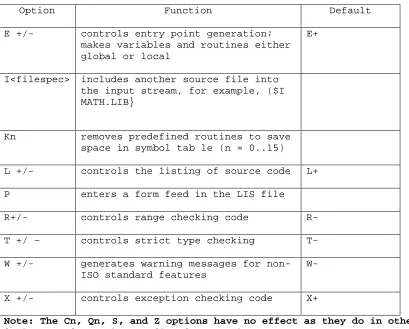
For reference, Table 3-3 summarizes the source-code compiler options.
Table 3-3 Compiler Source Code Options
Option Function Default E +/- controls entry point generation;
makes variables and routines either global or local
E+
I<filespec> includes another source file into the input stream, for example, ($I MATH.LIB}
Kn removes predefined routines to save space in symbol tab le (n = 0..15)
L +/- controls the 1isting of source code L+ P enters a form feed in the LIS file
R+/- controls range checking code R- T +/ – controls strict type checking T- W +/- generates warning messages for
non-ISO standard features
W-
X +/- controls exception checking code X+
Pascal/MT+ Programmer’s Guide Conditional Compilation
Conditional Compilation
Pascal/MT+ supports conditional compilation directives so that you can compile alternative versions of a single source-code file. This facility can be very useful when compiling large application programs that are designed to run in different hardware or operating system environments. You can isolate the environment dependent code and then compile different versions based on some conditional test.
The conditional compilation directives are
• &SET
• &IF
• &ELSE
• &END
• &MSG
Put conditional compilation directives in the source code as you do for other options. Each directive begins with an ampersand character (&), and must be in the first column.
You use the &IF and &END directives to delimit the section of source code you want to conditionally compile. The syntax is shown below.
&IF ( <variable> )
<source line 1>
. . .
<source line n>
[&ELSE]
<alternate source line 1>
. . .
<alternate source line n>
&END
If the value of the <variable> is TRUE, the source code in lines 1 through n is compiled. If the value is FALSE, the compiler ignores the lines and continues compiling at the line immediately following &END.
If the value is FALSE and you use the optional &ELSE directive to specify an alternative section of code, the compiler ignores lines 1 through n, compiles the alternate source code instead, and continues at the line immediately following &END.
You must define the test <variable> using the syntax
6 SET <variable>
The most common way to use conditional compilation is to put several &SET directives in an Include file and select the proper version by placing comments around any directives not wanted. To compile a different version, simply remove the comments .
For example, if the Include file contains the code
Pascal/MT+ Programmer’s Guide Conditional Compilation
the compiler processes the source code delimited by
&IF ver2 . . . &END
However, if the Include file contains the code
&SET verl
(* &SET ver2 *)
the compiler processes the source code delimited by
&IF verl . . . &END
The &MSG directive outputs a diagnostic message to the console that tells you which section of code is being conditionally compiled. For example,
&IF ver2
&MSG Now compiling version #2 .
. . &END
The message must be an ASCII string not exceeding 80 characters.
4. Section
Using the Linker
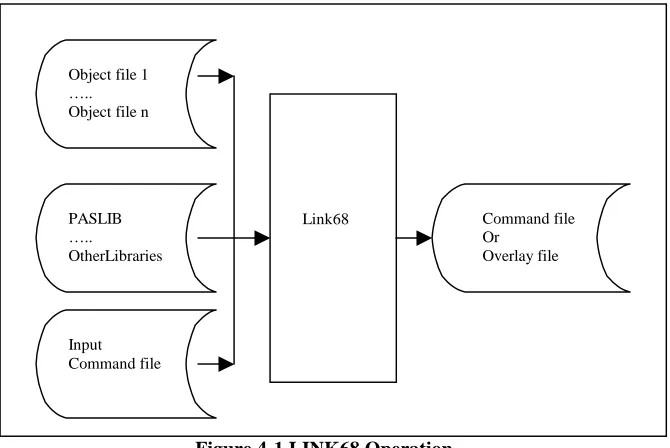
LINK68™ is the linkage editor that combines object-code files into a command file. You can also use LINK68 to link a program as a set of overlays (see ”Overlays,” in Section 7).
LINK68 accepts the object-code files produced by Pascal/MT+ compiler and produces an executable file in the 68K command file format. LINK68 also accepts object-code files produced by any CP/M-68K language processor including AS68, CBCP/M-68K, and the Digital Research C compiler.
LINK68 resolves all references to external symbols and concatenates the object-code files in the order you specify in the command line. The entry point of the resulting command file is the first instruction in the first object-code file.
Figure 4-1 illustrates LINK68 operation.
Figure 4-1 LINK68 Operation
Run-time Libraries
Although the Pascal/MT+ compiler generates native machine code, each implementation requires a library of run-time routines to handle file processing and other features that are not supported by the native hardware.
PASLIB
The main run-time library is called PASLIB, for Pascal Library. All I/O is per formed and all set variables are manipulated with PASLIB routines. Console I/O is assumed by the initialization routine,
_INI, so the I/O routines are always loaded. You can avoid this by writing a replacement _INI routine
and linking it before linking PASLIB to resolve the _INI reference.
Other Libraries
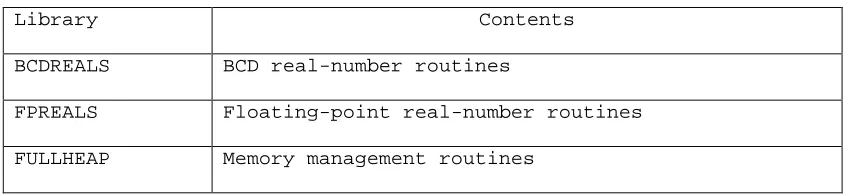
Other libraries contain routines that are required by any program using real numbers in either BCD or floating-point format, or per forming calculations with transcendental functions, or random access I/O operations. Table 4-1 summarizes these libraries. Appendix C contains a complete list of the routines in each library.
Link68 Command file Or
Overlay file Object file 1
….. Object file n
PASLIB …..
OtherLibraries
Pascal/MT+ Programmer’s Guide Invoking the Linker
Table 4-1 Required Libraries
Library Contents BCDREALS BCD real-number routines
FPREALS Floating-point real-number routines FULLHEAP Memory management routines
Note: You must use LINK68 to create an executable command file even when a single object-code file contains no undefined symbols.
Invoking the Linker
You invoke LINK68 with a command line of the form:
LINK68 {file=} object-file-1[,object-file-2,...object-file-n]
where file is the name of the command file you want to create, and object-f ile-1 through object-file-n are the object-code files to link.
If you invoke LINK68 without a command tail, the linker lists the options and returns control to the operating system.
If you enter a filename to the left of the equal sign, LINK68 creates the output file with that name. For example, the command
A>link68 math = sin,cos, tan
creates the command file MATH. However, if you omit the filename to the left of the equal sign, LINK68 creates the command file using the first filename in the command line and assigns the default filetype 68K. For example,
A>link68 sin, cos, tan
creates the command file SIN.68K.
LINK68 ignores anything past a backslash (\) character, so you can put comments in a command line. See the example below.
Errors
When LINK68 detects an error while processing, it returns an error message in the following form:
LINK68: < Error Message>
Most linkage errors are nonrecoverable and prevent your program from linking. Appendix B contains a complete list of the LINK68 errors with explanations and suggested user responses.
Redirecting Output
Normally, LINK68 sends all diagnostic output to the console. However, you can redirect this output by using the > character in the command line. For example, the command
A>link68 [tem[b:] myfile.68k = moda, modb >d:lnkmsgs.txt
Pascal/MT+ Programmer’s Guide Linker Command-line Options
There are two kinds of options: global and local. Global options apply to the entire link operation. Local options apply only to the individual files being linked. You enclose both kinds of options in square brackets.
You enclose global options in square brackets immediately preceding the command filename (if specified) in the command line. You enclose local options in square brackets immediately following the filename to which they apply.
You can use spaces between filenames to improve readability in the command line, and you can put more than one option in square brackets by separating the options with commas. LINK68 also allows you to abbreviate an option name to its shortest unambiguous form.
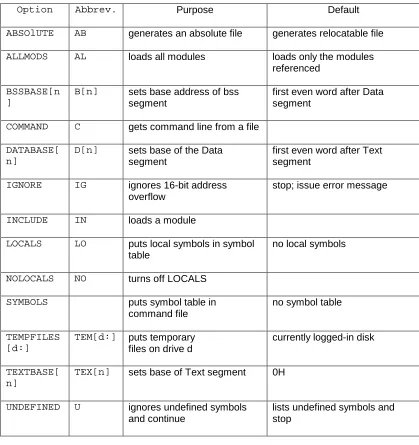
The command-line options are listed below.
ABSOLUTE
Tells LINK68 to generate an absolute command file with no relocation bits. The default is a relocatable command file.
ALLMODS
Tells LINK68 to load all modules from a library, even if they are not referenced. The default action is to include only those modules that are actually referenced.
BSSBASE[n]
Specifies the base address for the Block Storage Segment (bss) containing the uninitialized data in discontiguous programs. n is a hexadecimal value. The default value is the first even word after the Data segment. You cannot use this option when linking overlaid programs.
COMMAND
Tells LINK68 that the following named file contains the rest of the command line. LINK68 ignores the rest of the main command line. Nested command files are not allowed.
The format of this option is
COMMAND [filename]
where filename is the file containing the rest of the command line.
DATABASE (n)
Specifies the base address of the Data segment in discontiguous programs. n is a hexadecimal value. The default is the first even word after the Text segment. You cannot use this option when linking overlaid programs.
IGNORE
Tells LINK68 to ignore 16-bit address overflow and continue processing. The default action is to issue an error message and stop processing.
INCLUDE
Tells LINK68 to load an unreferenced module from a library. The format for this option is
filename [INCLUDE [module-name]]
where module-name is the module you want to load.
LOCALS
Pascal/MT+ Programmer’s Guide Linker Command-line Options
applies from the point in the command line that it appears.
The NOLOCALS option turns this option of f. Use LOCALS and NOLOCALS in combination to put local symbols from specific files in the symbol table. LINK68 always ignores local symbols starting with L.
NOLOCALS
See LOCALS.
SYMBOLS
Tells LINK68 to put the symbol table in the command file. The default is no symbol table in the command file.
TEMPFILES[d:]
Tells LINK68 to use drive d for the temporary files it creates during processing. The default is the currently logged-in drive. If you use TEMPFILES, it must precede any input files on the command line.
TEXTBASE [n]
Specifies the base address for the Text segment t. n is a hexadecimal value. The default is 0H. You can use this option when linking overlaid programs.
UNDEFINED
Tells LINK68 to ignore the presence of undefined symbols in the input files. LINK68 lists the undefined symbols, and then continues processing. The default action is to list any undefined symbols and then stop processing.
The following are examples of LINK68 command lines. Addresses are in hexadecimal.
A>link68 [sym, tem[b:]] math = mathmain,mathlib
This command links the files MATHMAIN and MATHLIB into a command file named MATH. It also tells LINK68 to include the symbol table in MATH, and place the temporary files on drive B.
A>link68 [com[linkit.inp
This command tells LINK68K to read the command line from the file LINKIT. INP. Note that closing brackets are not needed. The file LINKIT. INP might contain the following commands:
link68 [ab, tex[500], d[2aOO], b[3000]] screen = \ too long scrnsl[l], iolib[al]
This command creates the file SCREEN from the files SCRNS1 and IOLIB. The command tells LINK68 to create SCREEN as an absolute command file with the Text segment starting at 500H, the Data segment starting at 2AOOH, and the uninitialized Data segment starting at 3000H. It also tells LINK68 to include local symbols from SCRNS1 and all the modules in IOLIB.
5. Section
Using the Disassembler
DIS68 is a utility program that enables you to disassernble the machine code produced by the compiler into a series of assembly-language instructions. This can be very useful when debugging a program at the machine-code level.
In order to disassemble a program, you must compile the source code using the Pd and X command-line options.
The Pd option tells the compiler to generate a print (listing) file with filetype LIS.
The X option tells the compiler to generate an extended relocatable object-code file. This extended file contains the assembly-language code emitted by the compiler, and source-code line number
information in encoded form. The X option also tells the compiler not to erase the temporary files needed by DI S68.
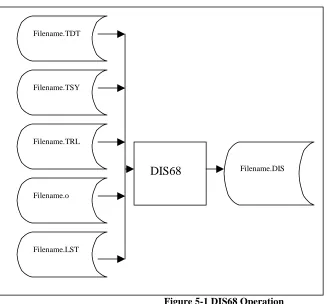
DIS68 combines the extended relocatable object-code file, the LIS file, and the temporary files ( TRL and TSY) to produce a file showing the assembly-language code generated for each line of source code.
Figure 5-1 illustrates the operation of DIS68.
Figure 5-1 DIS68 Operation
Invoking DIS68
DIS68 is automatically invoked when you compile a program with the command-line options Pd and X. The compiler chains to the disassembler at the end of the compilation. The object-code file, the listing file, and the temporary files must all be on one logical disk drive.
Filename.TDT
Filename.TSY
Filename.TRL
Filename.o
Filename.LST
Pascal/MT+ Programmer’s Guide Errors
location can be a disk file or a Pascal/MT+ logical device, CON: or LST:. The default destination is CON:. If you specify a disk file, DIS68 supplies the default filetype DIS.
For examp1e, the command
A>mt68 mathlib $xp
compiles, then disassembles the file MATHLIB and sends the disassembled listing to the console. The command
A>mt68 mathlib $xpbd:
compiles, then disassembles the file MATHLIB, and sends the disassembled listing to the file MATHLIB.DIS on drive B.
Errors
DIS68 generates an error message whenever it detects an error in the relocatable object-code file. Since the relocatable object-code file should not have any errors, continuing at this point produces more errors because the sequence is off. To correct error s, recompile the program and be sure you are disassembling Pascal/MT+ code only.
Sample Disassembly
Pascal/MT+ Programmer’s Guide Sample Disassembly
Listing 5-1 PPRIME.PAS
PROGRAM
pprime; (* Uses sieve of Eratosthenes *)
CONST
size = 8190;
VAR
flags :ARRAY[0 .. size] OF BOOLEAN; i,k :INTEGER;
prime :INTEGER; count :INTEGER; iteration :INTEGER;
BEGIN (* Main Program *) count:= 0;
writeln( ’Do 10 iterations’ );
FOR iteration := 1 TO 10 DO BEGIN
count := 0;
FILLCHAR(flags,SIZEOF(flags), CHR(TRUE)); FOR i := 0 TO size DO
IF flags[i] THEN BEGIN
prime := i + i + 3; k := i + prime; WHILE k <= size DO BEGIN
flags[k]: = FALSE; k := k + prime; END;
count := count + 1; END
END;
Pascal/MT+ Programmer’s Guide Sample Disassembly
Listing 5-2 PPRIME.DIS
* Address Opcode Mneumonic Operands00000000 .globl _win * external 00000000 .globl _crl * external 00000000 .globl _sfb * external 00000000 .globl _ini * external 00000000 .globl _wrs * external 00000000 .globl _hlt * external
00000000 .globl flags * external 00004000 .globl 1 * external
00003FFE .globl k * external
00004002 .globl prime * external 00004006 .globl iteratio * external 00004004 .globl count * external 00000000 .globl output * external 00000000 .globl fillchar * external
00000000 6000 bra 0004 00000004 4EB9 jsr _ini
* 1 0 PROGRAM pprime; (* Uses sieve of Eratosthenes *) * 2 0
* 3 0 CONST
* 4 1 size = 8190; * 5 1
* 6 1 VAR
* 7 1 flags :ARRAY[0 .. size] OF BOOLEAN; * 8 1 i,k :INTEGER;
* 9 1 prime :INTEGER; * 10 1 count :INTEGER; * 11 1 iteration :INTEGER; * 12 1
* 13 1 BEGIN (* Main Program *) * 14 1 count:= 0;
0000000A 33FC move.w #$0000,count
6. Section
Program Structure at Runtime
Command File Structure
LINK68 creates a command file in the standard CP/M-68K format. Each command file has a 28-byte header. The header contains the size and starting address for each of the following components in the command file:
• A Text (code) segment containing the program’s instructions.
• A Data segment containing the program’s initialized data such as arithmetic and string constants.
• A Block storage segment (bss) for any uninitialized data generated by the program when it runs. This space is not allocated until the operating system load the command file.
• An optional symbol table that defines any symbols referenced by the program.
• Optional relocation information that specifies the relative relocation of each word within each program segment, if required.
At the beginning of each module is a jump table that contains jumps to each procedure or function in the module. The main module also has a jump to the beginning of the code (first instruction).
Run-time Memory Map
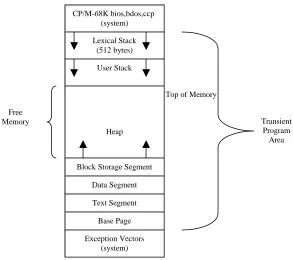
Figure 6-1 shows the memory layout at run-time after CP/M-68K loads a Pascal/MT+ program into the Transient Program Area (TPA).
An area reserved for stack space is immediately below the operating system. First, there is a lexical stack used by the run-time system to keep track of the lexical level of procedure blocks. Below the lexical stack is the user stack (see Figure 6-1).
The default size for the lexical stack is 512 bytes, and the default size of the user stack is 1024 bytes. You can change both values by altering the file named CPMINI, which is included on the distribution disks.
Pascal/MT+ Programmer’s Guide Stack
Figure 6-1 Memory Layout in Transient Program Area
Stack
The compiler always generates recursive code. Return addresses and local variables for all procedures are stored on the user stack. If recursion is deeply nested and the default stack size is too small, the program can overwrite the top of memory. Generally this is not a problem unless the heap is also very large. In this case, if recursion continues or the heap continues to grow, it is possible for the user stack to overwrite the heap or vice versa.
Note: The run-time system does not perform any checks on memory allocation bounds. If the user stack overwrites the heap, the program halts with unpredictable results.
Heap
The heap is the area of free memory from which storage for certain variables is dynamically allocated and deallocated at run-time. Refer to Section 9 for more in formation about managing the heap.
End of Section 6 Top of Memory CP/M-68K bios,bdos,ccp
(system) Lexical Stack
(512 bytes) User Stack
Heap
Block Storage Segment Data Segment Text Segment Base Page Exception Vectors
(system)
Transient Program Area Free
7. Section
Writing Segmented Programs
One major advantage of Pascal/MT+ is the ability to write a large, complex program as a series of small, independent modules. You can code, test, debug, and maintain each module separately, and thereby greatly simplify the overall task of program design. The process of breaking a program into separate units is called segmenting.
Pascal/MT+ provides three methods for segmenting programs: modules, overlays, and chaining. • Modules are separately compiled program sections. You can link modules together to build
overlays, libraries, or entire programs.
• Overlays are sets of modules, linked together as a unit, that load into memory from disk when a procedure or function in one of the modules is referenced from somewhere else in the program. Overlays need to be in memory only when a routine in the overlay is called; otherwise, they remain on the disk. Overlays have hexadecimal filetypes, for example, PROG.01F .
• Chaining allows one program to call another and leave data in memory that can be shared by the new program.
You can use these three features in any combination to produce modular programs that are easier to maintain and take up less memory than monolithic programs.
If you are not an experienced Pascal/MT+ programmer, you should start by writing programs without overlays.
Modules
The Pascal/MT+ system lets you do modular programming with little preliminary planning. You can develop programs until they become too large to compile and then split them into modules. The E compiler source-code option lets you make variables, functions, and procedures local to the module.
There are two main differences between modules and programs:
• A module must contain at least one procedure or function. However, a module does not have a main body of statements other than those contained in procedures and functions.
• In a module, the reserved words MODULE and MODEND replace the reserved words PROGRAM and END.
The following example shows a typical module.
MODULE sample_mod;
VAR
mainfile : EXTERNAL TEXT;
PROCEDURE echo (st: STRING; times: INTEGER);
VAR
Pascal/MT+ Programmer’s Guide Overlays
Listing 7-2 Module Example
MODULE module_demo;
(* label, constant and type declarations go here *)
VAR
i,j EXTERNAL INTEGER; (* use those from main program *) k,l INTEGER; (* define these here *)
EXTERNAL PROCEDURE prod; (* from main program *) PROCEDURE SORT(...); (* define sort here *)
. . .
FUNCTION iotest INTEGER; (* define iotest here *) .
. .
(* maybe other procedures and functions here *)
MODEND.
Overlays
Using overlays, you can link programs so that parts of them automatically load from the disk as they are needed. Thus, a whole program does not have to fit in memory simultaneously. You can use overlays to store infrequently used modules and module groups that need not be co-resident.
Terminology
The following terms are used when describing overlays:
• Root module: the portion of the program that is always in memory. Root modules have the 68K filetype. A root module consists of a main program, the run-time routines it requires, and, optionally, the run-time routines that the overlays require.
• Overlay area: an area of memory where the overlay manager loads overlays. Plan the location and size of the overlay areas and specify them at link-time.
• Overlay static variables: global variables, or variables local to a run-time or
assembly-language routine in the overlay. All Pascal/MT+ modules are recursive. Recursion reduces the amount of static data. It does not necessarily eliminate it because run-time code linked with the overlay might contain static data. When you link the overlay, the linker determines the amount of space required for static variables.
General Overlay Scheme
Pascal/MT+ Programmer’s Guide Overlays
in an overlay that is more than one level above itself.
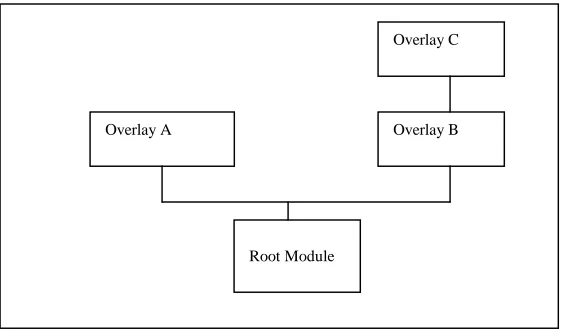
Figure 7-1 shows a typical overlay scheme. In this scheme, overlays A and B can both reference symbols in the root, but overlay A cannot reference symbols in B because they cannot be coresident. Overlays B and C can reference symbols in each other and the root, but not in overlay A.
Figure 7-1 Typical LINK68 Overlay Sheme
Overlay File Format
An overlay file has the same format as a regular 68K command file. The first word in the header is always 6OlAH. An overlay file can be either absolute or relocatable. An overlay file can have any filetype. The default filetype is 068.
If you use the SYMBOLS option, LINK68 places the overlay’s symbols in the root module.
If you use the common directive in AS68 to specify a common area shared by separate overlay modules, LINK68 resolves all common areas with the same name to the same address in the root module’s bss segment. If more than one overlay file specifies static storage with the same name, LINK68 uses the largest size for allocation.
The bss size for the root module is set to contain the area into which the overlays are loaded. The symbol _end is resolved to the top of the overlay area.
Linking Overlays
You determine a specific overlay scheme by the manner in which you link the programs. That is, overlays do not require any special construct or syntax in the source code. However, you must ensure that the root module contains the overlay manager and loader.
The general form of the command line for linking overlays is
LINK68 <root>, <ovlmgr>,( <overlay-l>[, <overlay-2>[, ... <overlay-n>]])
where <ovlmgr> is the overlay manager in the run—time system and <overlay—i> through
<overlay—n> are the overlay modules. The overlay specifications are always last in the command line.
For example, the following command creates the overlay scheme shown in Figure 7-2:
A>link68 myfile = parta,ovlmgr,(partb1,partb2)
Overlay C
Overlay B Overlay A
Pascal/MT+ Programmer’s Guide Chaining
Figure 7-2 Overlay Scheme Example 1
You can nest overlays by nesting the enclosing parentheses in the command line. For example, the following command creates the overlay scheme shown in Figure 7—3:
A>link68 myfile = parta,ovlmgr,(partbl, (partb2))
Figure 7-3 Overlay Scheme Example 2
Chaining
Chaining allows one program to call another program into memory and transfer control to that program. Chaining is an implementation—dependent feature that is not be available on all implementations of Pascal/MT+ (see Appendix E, “Writing Portable Programs”).
To chain to another program, you execute a call to the CHAIN procedure, and pass the name of the file variable as a single string parameter.
Sharing Data
There are two ways that chained programs can share data: shared global variables and absolute variables.
Overlay Part B1 Overlay Part B2
Part A Root Module
Overlay Part B2
Overlay Part B1
Pascal/MT+ Programmer’s Guide Chaining
programs so that they have the same location and size.
Using the absolute variable method, you typically define a record that is used as a communication area; then place the record at the same absolute location in each module.
Maintaining the Heap
No special facilities are needed to maintain the heap across the chain. However, files cannot remain open across a chain. If you want to leave something open, you must use overlays, not chaining.
Listings 7—3a and 7—3b list two example programs that communicate with each other using absolute variables. The first program chains to the second program, which prints the results of the first
program’s execution.
Listing 7-3 Chain Demonstration Program 1
PROGRAM chain_1; (* Program #1 in chain demonstration *) TYPE comm_area = RECORD
i,j,k INTEGER END;
VAR
globals ABSOLUTE [$8OOO] comm_area; (* this address is arbitrary; *) (* it may not work on your system *) chain_file FILE;
title string;
BEGIN (* Main program #1 *) title := ‘F:CHAIN2.68K’; WITH globals DO
BEGIN i:= 3; j:= 3; k:= i * j; END;
IF IORESULT = 255 THEN BEGIN
WRITELN(‘Unable to open CHAIN2.68K’); EXIT
END;
Pascal/MT+ Programmer’s Guide Chaining
Listing 7-3b. chain Demonstration Program 2
PROGRAM chain_2; (* Program #2 in chain demonstration *)
TYPE
comm_area = RECORD i,j,k INTEGER END;
VAR
globals ABSOLUTE [$8OOO] comm_area;
BEGIN (* Main program #2 *) WITH globals DO
WRITELN(’Result of ‘,i,’ times ‘,j, ‘is =’, k)
8. Section
Interfacing Pascal/MT + with Assembly Language Routines
This section describes the conventions for interfacing Pascal/MT+ programs with code written in assembly language.
Interface Conventions
Both the AS68 assembler and the Pascal/MT+ compiler generate entry-point and external-reference records in the same relocatable object-code format. These records contain external symbol names. The relocatable object-code format allows up to seven characters in an external name.
To access assembly-language variables or routines from a Pascal/MT+ program, you must follow these conventions:
• Declare them .globl in the Data segment of the assembly-language module. • Declare them EXTERNAL in the Pascal/MT+ program.
To access Pascal/MT+ global variables and routines from an assembly—language routine, you must perform the following steps:
• Declare the name .globl in the Data segment of the assembly-language program. • Declare the variable or routine at the global level in the Pascal/MT+ program. • Compile the program using the E+ source-code option to generate entry-point records.
The following example shows how an assembly-language module references a variable that is declared in a Pascal/MT+ module.
(* program test.s *)
.globl pqr (* external variable from pascal program *) .text
test: . .
move.w pqr,d7 (*get contents of pascal integer *) .
.
end
(* Pascal program fragment *)
VAR (* in globals *)
Pascal/MT+ Programmer’s Guide Interface Example
Interface Example
Listings 8-1 and 8-2 illustrate the interface between a Pascal/MT+ program and two assembly— language routines.
The Pascal program performs the PEEK and POKE functions found in BASIC. The assembly-language module simulates the PEEK and POKE. PEEK returns the byte found at the address passed to it, and POKE puts the bytes in the specified address.
Listing 8-1 Pascal/MT+ PEEK_POKE Program
PROGRAM peek_poke;
TYPE
byte_ptr = ^BYTE;
pointerkludge = RECORD
CASE BOOLEAN OF
TRUE (p : byte_ptr); FALSE: (q : LONGINT) END;
VAR
choice INTEGER; bbb BYTE;
ppp pointerkludge;
EXTERNAL PROCEDURE poke(b : BYTE; p byte-ptr); EXTERNAL FUNCTION peek(p : byte_ptr) : BYTE;
BEGIN (* Main Program *) REPEAT
WRITE( ‘Which address?’); READLN(ppp.q);
WRITE(‘l) Peek 2) Poke 3) Exit’); READLN(choice);
IF choice = 1 THEN
WRITELN(ppp.q, ‘ contains ’,peek(ppp.p)) ELSE
IF choice =2 THEN BEGIN
WRITE(‘Enter byte of data: ’); READLN(bbb);
POKE(bbb, ppp.p) END
Pascal/MT+ Programmer’s Guide Interface Example
Listing 8-2. Assembly-Language PEEK and POKE Routines
* PEEK and POKE Routines
*
*
.globl peek * Entry point for peek routine .globl poke * Entry point for poke routine .text * Tell assembler we are writing code *
*
* PEEK — Address to peek is on stack. Return result in D7. *
*
peek:
move.l (a7)+,a0 * pop return address move.l (a7)+,al * pop address to peek moveq #0,d7 * clear function return
move.b (al),d7 * get byte from memory jmp (aQ) * return
*
*
* POKE - Byte to poke is on top of stack as the lower byte * of a word.
* Address to poke follows on stack.
*
*
poke:
move.l (a7)+,a0 * pop return address move.w (a7)+,d7 * byte to store move.l (a7)+,al * address to poke move.b d7,(al) * poke byte
jmp (aO) * return *
.end
9. Section
Controlling the Run-time Environment
This section describes several Pascal/MT+ features that let you control your program’s run —time environment. The features provide the ability to
• manage the heap as a standard heap, or as a stack • access the operating system through direct function calls
• insert machine code into the Pascal/MT+ source code using INLINE • declare variables with absolute addresses
• address the processor’s I/O ports • perform range and error checking
Heap Management
Pascal/MT+ supports two alternative methods for managing the heap: as a standard heap or as a stack.
Using the FULLHEAP Routines
You can manage the heap using the ISO—standard routines NEW and DISIOSE as they are implemented in the library named FULLHEAP. When you use the FULLHEAP routines,
• NEW assumes a standard heap and dynamically allocates data to the smallest space that can hold the requested item.
• DISPOSE frees the memory allocated to the requested item.
Using the PASLIB Routines
You can also manage the heap using the NEW and DISPOSE routines as they are implemented in the PASLIB run-time library. When you use the PASLIB routines,
• NEW treats the heap area as an ordinary stack. NEW puts the dynamic data on top of the stack which grows upward from the end of the bss segment.
• DISPOSE performs no function, but is included in the symbol-table.
• You can simulate UCSD Pascal’s MARK and RELEASE routines by using the built -in routines MRK and RLS, as shown in this example:
MODULE ucsd_heap;
EXTERNAL FUNCTION MRK : LONGINT; EXTERNAL FUNCTION _RLS (l : LONGINT);
PROCEDURE mark(VAR p : LONGINT); BEGIN
Pascal/MT+ Programmer’s Guide Direct Operating System Access
PROCEDURE release(p : LONGINT); BEGIN
_RLS(p) END;
MODEND.
LMAXAVAIL and LMEMAVAIL
You can use the predefined functions LMAXAVAIL and LMEMAVAIL to determine the amount of heap space remaining at any given time. LMAXAVAIL and LMEMAVAIL are not included in PASLIB. You must explicitly declare them in your program as
EXTERNAL FUNCTION LMEMAVAIL : LONGINT; EXTERNAL FUNCTION LMAXAVAIL : LONGINT;
When used in conjunction with the NEW and DISPOSE routines in FULLHEAP, LMAXAVAIL returns the size of the largest contiguous block of unallocated free memory. LMEMAVAIL returns the total of all currently unallocated blocks of memory.
When used in conjunction with the NEW and DISPOSE routines in PASLIB, LMAXAVAIL and LMEMAVAIL return identical values.
You should always use LMAXAVAIL and LMEMAVAIL instead of the standard PASLIB routines MEMAVAIL and MAXAVAIL, which return true values only if the total amount of heap space is less than 32,767 bytes. If the heap space is greater than 32,767 bytes, both MEMAVAIL and MAXAVAIL return 7FFFH.
_HERR
HERR (Heap Error) is a predefined BOOLEAN variable used by NEW to return the result of an allocation request. Always use HERR in conjunction with NEW, because the heap management system does not signal an error if there is no space available when you make an allocation request.
Direct Operating System Access
You can make direct function calls to the CP/M—68K operating system by using the BDOS routine which you declare in a Pascal/MT+ program as follows:
EXTERNAL FUNCTION_BDOS (<func>:INTEGER;<parm>PTR):INTEGER;
<func> is the BDOS function number. Refer to your operating system documentation for the list of functions. <parm> is a generic pointer. You can use the ADDR function to generate the value.
The following example demonstrates direct access to the operating system in a function definition. The function KEYPRESSED returns TRUE if a key is pressed, and FALSE if not.
FUNCTION keypressed : BOOLEAN;
BEGIN
keypressed := (_BDOS (ll,ADDR(keypressed)) <> 0) END;
Pascal/MT+ Programmer’s Guide Direct Operating System Access
Listing 9-1 Calling _BDOS Function 6
PROGRAM BDOS_6; (* Use BDOS Function 6 for console I/o *)
(* Since the BDOS call requires a pointer parameter *) (* we must define a record that allows us to pass an *) (* INTEGER as a pointer type. In the record, the *) (* FALSE tagfield occupies the same memory as the two *) (* INTEGERS in the TRUE tagfield.
TYPE
ptr = ^CHAR;
VAR
i :INTEGER; ch :CHAR; pchar :ptr;
EXTERNAL FUNCTION _BDOS(func INTEGER; parm ptr) INTEGER;
(* The main program echoes any input character *) (* at the console until you input a colon *)
BEGIN (* Main Program *) new(pchar);
REPEAT
pchar^ := chr(255);
REPEAT (* Read a character *) ch := CHR(_BDOS(6,pchar)); UNTIL ch <> CHR(0);
IF ch <> ':' THEN
BEGIN (* convert ch to INTEGER, pass as a pointer *) pchar^ := ch;
i:= BDOS(6,pchar); (* Write a character *) END;
UNTIL ch = ‘:’
Pascal/MT+ Programmer’s Guide INLINE
Listing 9-2 Calling BDOS Function
PROGRAM BDOS_23;(* Use BDOS Function 23 to rename files *)
TYPE
ptr^ = INTEGER;
fcblk = PACKED ARRAY [0. .36] OF CHAR;
VAR
oldname,newname :STRING; fl,f2 : fcblk; i :INTEGER;
EXTERNAL FUNCTION _BDOS(func INTEGER; parm : ptr) INTEGER; EXTERNAL PROCEDURE _PARSE(VAR f : fcblk; S STRING);
(* _PARSE converts a string into internal *)
(* CP/M filename format *)
BEGIN (* Main Program *)
WRITE(‘Enter old filename:’ );(* Get the old filename *) READLN(oldname);
_PARSE( fl, oldname);
WRITE(‘Enter new filename:’ );(* Get the new filename *) READLN(newname);
_PARSE ( f2, newname);
(* Create the FCB required by BDOS call 23 *)
MOVE( f2, f1[16] ,12);
(* Now call the rename function passing pointer to FCB *) (* containing the old and new filenames *)
IF BDOS(23,ADDR(fl)) = 255 THEN
WRITELN(‘Rename failed. ’,oldname, ‘ not found.’) ELSE
WRITELN(‘File ’ ,oldname, ‘renamed to ’ , newname);
END. (* Main Program *) <