Volume 4, No. 6, May 2013 (Special Issue)
International Journal of Advanced Research in Computer Science
REVIEW ARTICAL
Available Online at www.ijarcs.info
Sharing Backup and Restoring Data Using Android Based Server
Ms.Dhanashri R. Karanjkar
Final Year, IT Dept, J. D.I. E.T., Yavatmal
Maharashtra, INDIA [email protected]
Mr.Gopal P. Dhole
Final Year, IT Dept, J. D.I. E.T., Yavatmal
Maharashtra, India [email protected]
Prof.Sunita P. Aware
Assistant Prof., IT Dept, J.D.I.E.T., Yavatmal Maharashtra, India.
Abstract: Many solutions for making backups and restoring data are known for servers and desktops, mobile devices pose several challenges, mainly due to the plethora of devices, vendors, operating systems and versions available in the mobile market. In this paper, we introduce a new backup and restore approach for mobile devices, which helps to reduce the effort in saving and restoring personal data. Our approach is platform independent: in particular, we present two prototypes based on two different mobile operating systems: Google Android and Symbian S60. Another feature of our approach lies in the capability of sharing information in mobile devices among a group of selected persons. This can be useful in many situations e.g., in creating a mobile business network among a group of people.
Keywords: Backup and restore Mobile devices, Collaboration, and Interoperability.
I. INTRODUCTION
Backup is a crucial task, since hardware faults and software or human errors can lead to the loss of important information. In addition to faults, backups are even more important for devices such as laptops and smartphones, since they are more prone to loss or to theft. Currently, smartphones are used more as handheld computers than as mobile phones, and consequently a lot of data is stored in those devices. This makes more critical the need to keep data stored on those devices safe from losses. In addition, the rapid technological evolution in mobile devices makes it more difficult to restore data saved from old devices to new ones. Thus, mobile devices pose new challenges for the backup and restore problem.
Making backups on external memory devices, such as on Secure Digital (SD) cards or on laptop disks, suffers from the same risks of failure or loss. As smartphones tend to be always connected to the Internet, it seems natural to move the information online and to provide backup and restore services based on the cloud computing paradigm, which is considered to be more reliable and less expensive by end users [5], [6]. This approach reduces also the risk of data loss and decouples the data from a specific device.A backup that allows data sharing, however, can suffer the same security and privacy issues present in social networks [7] such limitations can be approached in different ways depending on the environment where the system is used. In an enterprise scenario, data sharing can be monitored by administrators which can enforce the company privacy policies. In a general purpose environment, like a mobile social network, ownership of data must be verified and sharing must be allowed only for the data owner. Security can be ensured by deploying secure connections and data encryption.
The main goal of this work is a backup system for smartphones that allows users to share part of their personal data in the backup with a selected set of contacts. In order to be platform independent, our approach is based on a novel management of data, and hinges on a data model which abstracts from the underlying platform and focuses on the data type. The same backup and restore method can be applied both on mobile and on desktop platforms. With such system, users can manage different devices, under different operating systems, and keep data synchronized across different platforms. In order to assess the feasibility and impact of our approach in a real scenario, we realized two prototypes of our backup and restore system for the Android and the Symbian OS, and tested them on actual mobile devices.
II. STATE OF THE ART
Dhanashri R. Karanjkaret al, International Journal of Advanced Research in Computer Science, 4 (6) Special Issue, May 2013,255-259
backup require the system to be idle: on-line backups are more convenient, as they do not interfere with the users’ work, but are more complex to handle, as the system needs to deal with updates carried out during the backup. In all cases, backups can be stored locally, e.g., on an external device, or remotely, e.g., on a remote server.
Backups for mobile devices can be stored locally on a SD card, or on a personal computer, or remotely on a server accessible via network connectivity. Several synchronization protocols have been proposed for mobile devices, including Microsoft’s ActiveSync, HotSync for Palm OS devices, Pumatech’s Intellisync, SyncML and CPISync. We refer the interested reader to in [2] for a detailed analysis of these protocols.
In case of failure, a full backup is able to restore the entire content of a device: this process is slow in the backup phase, introduces a huge overhead in the data stored, but allows for faster restores. On the contrary, incremental backups reduce backup times and sizes but imply higher restore times. Backups can operate on files (file-based approach) or on data physically saved on the disk (device-based approach): although a file-(device-based approach: tends to be slower than a device-based bac more flexibility and it is easier to manage. permit to save and restore data while the s while off-line backups require the system backups are more convenient, as they do not users work, but are more complex to hand needs to deal with updates carried out during cases, backups can be stored locally, e.g. device, or remotely, e.g., on a remote server.
III. A NEW APPROACH FOR MOBILE
BACKUP/RESTORE
In this work, we try to overcome the limitations in saving and restoring data from mobile devices, by using online backups as a uniform interface for sharing data among different users and multiple platforms. In particular, we present an online backup system based on a Service Oriented Architecture (SOA): the services offered by our solution allow to backup and restore not only files but also more structured data such as contacts, calendar events, and text messages (SMS). In order to be able to access those services, a mobile device must be equipped with a client capable of retrieving internal data from the device and sending them to the server via a common interface. This interface is designed so as to exploit the common features of mobile data models: e.g., independently of the platform used, a contact in an address book is always identified by fields such as first name, last name, address, phone numbers, etc… etc… All the communication exchanged between the client and the server is based on an extensible standard language (i.e., XML).
Using our general data model, backup data can be shared among different users this allows sharing part of the backups that transparently are kept updated on all the devices that can access the information.
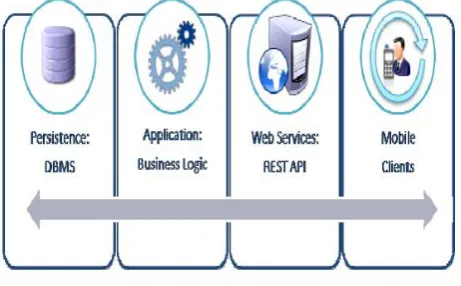
Figure 1: Backup and Restore system architecture
In our architecture (see Figure 1), the server provides his services using a representational state transfer (REST) architecture [3], [4]. For each type of platform, a different client is implemented: each client connects to the server using the HTTP protocol to exchange information in XML format. In the following, we describe in more detail the functionalities of the server and the client.
A. Server:
The server has been designed as RESTful in REST architectures requests and responses are built around the transfer of representations of resources. In our case, a resource is the XML representation of its state, for example a contact or a contact list.
REST architectures are based on the HTTP protocol and use all the HTTP facilities, such as the security layer provided by HTTPS in a transparent way. The server allows mobile clients to perform full backups and incremental backups. When a user performs a backup, all the user’s data previously stored on the server are still accessible from the mobile client; old data are kept on the server, and made accessible to the mobile client, to allow the user to revert to old backups in case of loss or failure.
Our server implementation offers two REST methods: PUT, used to insert new entries on the server’s database, and GET that allows the mobile client to perform queries for a single entry or for entry lists). In Figure 2 we show a typical URI of a PUT/ GET request (this specific case shows a request for a contact).
Figure 2: Example of request of a contact
When receiving a GET request at a URI as shown in Figure 2, the server will answer with the “contactItemName”, for the “imei“ device from the “backupType” resource using the XML ,otherwise, if a PUT request is received, the server expects in the HTTP(S) request, the contact details to be processed.
B. Client:
Dhanashri R. Karanjkaret al, International Journal of Advanced Research in Computer Science, 4 (6) Special Issue, May 2013,255-259
and store them into the device, for example in the address book, in the device specific format.
Figure 3: Example of Client Server Interaction
Usually devices need to be built on purpose to interact with a backup server; in some cases they need to handle dirty flags in order to manage the status of the resources to be saved. In our approach, in order to interact with the server, clients need only to be able to read and write resources to be saved and to implement just some basic HTTP methods.
To improve the performance in incremental backup operations the client may handle the list of items to be sent to the server. Figure 3 shows a typical interaction for an incremental backup. First, the client asks the list of identifiers of the items in the last backup, the server sends the list of the identifiers to the client in a XML format with the last backup date. At this point, the client computes its internal list of identifiers and compares the two lists: now, the client knows all the data that have been updated in the device, and can build the list of modified contents. If last modification date in the client’s list is most recent than the one in the server, then the client adds the item to the list of data to backup. Note that our approach ensures compatibility with all old devices that can run third party applications able to access private data.
The restore process gets the list of items on the server and saves all contents on the client. If there are some contents that appear on the client but not on the server, such contents are preserved in the client. In case of migration to a new device, or restore after a hard reset, the device is empty so the device contents after restore will be those contained in the last backup.
IV. PLAN OF WORK
Following a user-centric idea of the collaborative Web, the proposed approach for sharing data among different users and different devices can be often useful. It is easy to imagine a community of people willing to share some of their data within their mobile network. In a closed group of people, such as friends or work colleagues, usually some class of data stored in mobile devices are the same for the entire group. Collaborating people usually share each others’ mobile phone numbers, emails, calendar, addresses documents and so on.
In an enterprise scenario, for example, it can be useful for people to share business cards or calendar events contained in their mobile’s backups, with some selected contacts of their working group. At the same time, in such a collaborative backup, it will be easier to recover data loss even if these data were not saved in a personal backup; in
fact in a closed group that collaborates, it will be easier to asks one of the members for some data that a member lost and another still owns. Members of the same social community tend to share more or less the same data [7], [8]: if a member of the group changes his/her mobile phone number he/she will have to spread his/her new number to all the network; in the same way if a new member joins the group other members will have to save his/her contacts in their mobile device. The approach proposed her aims at speeding up the sharing of updated information between project teams, study groups or more in general social communities.
V. INTEROPERABLE CLIENTS ON
DIFFERENT PLATFORMS
Our data model allows different OS to communicate, in particular we describe how it is possible to backup data on a Symbian S60 device, store them in a remote server, and then restore the same data in an Android 2.1 device. We choose to implement our clients on Symbian and Android to show how very different mobile operating systems can easily cooperate with our approach.
A. Symbian:
We realized the backup and restore client for Symbian, with a basic user interface just to show how collaboration was possible. The Symbian Socket framework was used to establish a TLS connection with the server. Symbian’s CActive allows performing long running task in background and realizing an asynchronous communication with the server, this behaviour is similar to Android’s AsyncTask class. To access data it was necessary, for each data type, to open a session with the respective servers, which manage the communication with underlying databases or files.
B. Android:
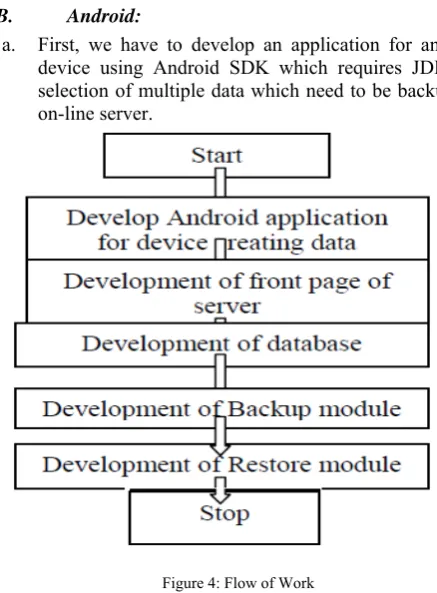
a. First, we have to develop an application for android device using Android SDK which requires JDK for selection of multiple data which need to be backup on on-line server.
Figure 4: Flow of Work
Dhanashri R. Karanjkaret al, International Journal of Advanced Research in Computer Science, 4 (6) Special Issue, May 2013,255-259
account for storing /backup data of mobile device in his or her personal account.
c. For storage of user mobile data, we need to maintain a record or databases for which, we use mysql.
d. In backup module, we incorporate some backup technique such as full backup or incremental backup system with content provider by android.
e. Similarly for restore , we can implement only selected file should be restore on mobile device or full restoration from server by using fetch call i.e. On restore method().
VI. SECURITY
A backup that allows data sharing, however, can suffer the same security and privacy issues present in social networks [9]; as personal data are more affected from privacy issues than common ones, both for interest they arose and for the problems a data theft can carry to the user, some additional measures to grant privacy should be applied.
Depending on the size of the sharing group, privacy issues can be approached differently. In small and medium groups an administrator can handle permissions and grants access to data to users. For example, in a medium scenario like an enterprise, data sharing can be monitored by administrators which can enforce the company privacy policies. For bigger groups like a widespread social communities, privacy cannot be demanded to security managers or privileged users; each user must prove his/her ownership on data he/she wants to share. For example, if a user wants to share an email contact, the system will send a verification code to this email address and the user will have to prove ownership replying to the challenge.
For such approach privacy issues are more challenging than security; a security layer is provided deploying secure connections and data encryption. Communication security is provided using HTTP over TLS connections while data encryption can be transparently done via common DBMS encryption functions.
For some classes of information (e.g., calendars) time limited sharing could be an improvement to grant privacy to user that are interested to share data just for a limited period with someone. Since mobile devices introduce a new feature applicable to backup and sharing: the geographic position, location limited sharing could solve the problem of a user that wants to share data just with person in a certain geographic area. Obviously all these solutions should be combined to grant different levels and configuration of privacy settings.
VII. USE CASES
In this section we present some possible use cases where the application of our backup approach can carry an improvement of the interaction between persons.
A. Social backup in business environment:
In an enterprise where people collaborate daily, it could be important for employees to share commonly useful information e.g., calendar, part of the address book, templates for presentations or documents etc...
Moreover if a new employee joins the team, his/her contacts are added to the common address book and shared
with selected users of his/her new team; his/her new business device is added to a specific closed group and all data updated to the last changes are kept from the shared backup and saved on it. If somebody’s device is lost, or stolen, or the employee leaves the company, the group administrator can disconnected it from the social backup and the privacy of the group members is granted. Using our approach, all these updates are directly exchanged and notified on employees’ smartphones.
Figure 5: Use Case Of Meeting Backup And Share
B. Sharing conference data:
Using some restrictions (i.e., time, location), our approach, can be useful in some particular kind of events, such as meeting, conventions or conferences. In this kind of events, the interest on some information (e.g., organizer contacts, event schedule) is temporary; the participant is interested in such information just for the time he/she is in the meeting location. Organizing committee can inform participant sharing documents and other related info just in the event area and when the event is. In this way participant will have just the information he/she needs directly on his/her mobile device, e.g., the conference schedule is shared via calendar, venue address via maps, committee contacts via address book; this avoids a plethora of non-useful data for the attendee and a lot of noisy requests of information for the committee.
VIII. RUNNING THE APPLICATION
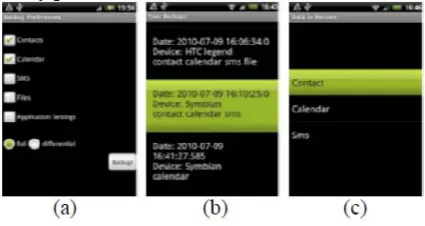
We ran our application on real devices. Figure 6 and Figure 7 show some snapshots of the Android’s client GUI that explains how the system works; the Symbian client and the server side implementations are omitted. Figure 6(a) illustrates the backup setup features where the user can choose which data to backup and the type (full or incremental) of the backup to be performed. Figure 6(b) shows the interface where the user can select a backup to be restored: note that this backup may have been performed on another device. In Figure 6(c) depicts a granular view of a backup: in this interface the user can choose to restore just a part of the backup, or to keep updated only part of his/her data.
Dhanashri R. Karanjkaret al, International Journal of Advanced Research in Computer Science, 4 (6) Special Issue, May 2013,255-259
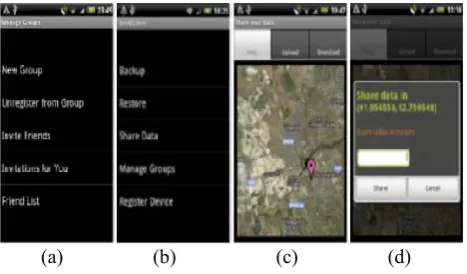
Figure 7 illustrates how to share information based on geographic coordinates. In Figure 7 (a) the user is presented the actions used to manage groups with which he/she shares information; Figure 7 (b) shows all the possible actions which can be performed by the client. If the user chooses share data, Figure 7 (c) is presented and he/she can share data with his/her friends or with the groups he/she participates. In Figure 7 (c) and (d) show the interfaces to share data geographically: tapping on the map the user specifies the area where a resource is visible and shares a resource from a backup. When another user of his/her group accesses the area in which the shared information resides, the new user is notified and the information is made available.
(a) (b) (c) (d)
Figure 7: Android Backup and Restore client
IX. PERFORMANCE
The system developed had been tested on a HTC Legend device connected to a 54Mbps WIFI network on a secure HTTPS channel. We aimed at measuring the time overhead introduced by our system, and thus we measured the time needed to execute single backup functions.
Table 1: Time Overhead of the backup operation per data type
TABLE I summarizes the first testing results. TABLE I shows the times needed to backup a commonly used smartphone, with 150 contacts, 170 text messages, 14 calendar events and 3 files of size 104.796 KB, 5.659 KB and 161.166 KB. Clearly, the most expansive operations are on files; to save the 3 files, the application needs 278 seconds, which is 71% of the total time needed for the backup. The total overhead to perform a full backup of the device amounts to 447 seconds (about 7 minutes), preserving the usability for real use cases. The most common operations are on incremental backup, hence, in the last column of TABLE I we show the time per unit. Currently we are performing more intensive performance tests on Symbian and Android devices; furthermore, we are
implementing an iPhone and a Blackberry version of the client application.
X. CONCLUSION
The presented work here can be enriched with many refinement which are now in study phase. It’s however represents a highly encouraging first approach of defining system of backup and restore on on-line server in minimize time.
XI. REFERENCES
[1]. A. Chervenak, V. Vellanki, and Z. Kurmas, Protecting File Systems: A Survey of Backup Techniques. Proceedings Joint NASA and IEEE Mass Storage. 1998.
[2]. S. Agarwal, D. Starobinski, and A. Trachtenberg, On the Scalability of Data Synchronization Protocols for PDAs and Mobile Devices. Department of Electrical and Computer Engineering, Boston University, 2002. [3]. R. Fielding, Architectural Styles and the Design of
Network-based Software Architectures. Dissertation submitted in partial satisfaction of the requirements for the degree of doctor of philosophy in Information and Computer Science. University of California, Irvine. 2000.
[4]. Fielding, R.T.; Taylor, R.N.; , "Principled design of the modern Web architecture," Software Engineering, 2000. Proceedings of the 2000 International Conference on , vol., no., pp.407-416, 2000.
[5]. Buyya, R.; Chee Shin Yeo; Venugopal, S.; , "Market-Oriented Cloud Computing: Vision, Hype, and Reality for Delivering IT Services as Computing Utilities," High Performance Computing and Communications, 2008. HPCC '08. 10th IEEE International Conference on , vol., no., pp.5-13, 25-27 Sept. 2008.
[6]. Wei-Tek Tsai; Xin Sun; Balasooriya, J.; , "Service-Oriented Cloud Computing Architecture," Information Technology: New Generations (ITNG), 2010 Seventh International Conference on , vol., no., pp.684689, 12-14 April 2010.
[7]. F. Dellutri, L. Laura, V. Ottaviani, and G. F. Italiano. Extracting social networks from seized smartphones and web data. In Proceedings of the IEEE Workshop on Information Forensics and Security, WIFS09. [8]. F. Dellutri, “Profiling Mobile Identities” PhD Thesis
dissertation, 2009 http://dspace.uniroma2.it/dspace/handle/2108/1099?
mode=full.