$3.00
TABLE OF CONTENTS
More PFM-80 ... .- ... 5
The First 16 Bytes ... 5
Translating Your Keyboard
&
Listing ... 6
Simple Keyboard Encoder ... 8
4 MHz (More and Less) ... 9
XM-80 (Extended Macro 80) ... 10
Undoing the Fatal Erase ...
10
Bringing Up a Reluctant Big Board ... 16
On Modems, SIOs, and Lync ... 17
REGULAR FEATURES
Letters ... 2
Big Board Notes ... 4
Designer's Corner ... 9
FORTHwords ... 12
NEW PRICES EFFECTIVE ON THE 1ST DAY OF THE COVER MONTH OF THIS MAGAZINE
"THE BIG BOARD"
OEM - INDUSTRIAL - BUSINESS - SCIENTIFIC
INGLE BOARD COM'PUTER KIT!
Z-80 CPU! 64K RAM!
THE BIG BOARD PROJECT: Three years In the works, and maybe too good to be true. A tribute to hard headed, no compromise, high performance, American engineering! The Big Board gives you all the most needed computing features on one board at a very reasonable cost. The Big Board was designed from scratch to run the latest version of CP/M*. Just imagine all the off-the-shelf software that can be run on the Big Board without any modifications needed! Take a Big Board, add a couple of 8 inch disc drives, power supply, an enclosure, C.R.T., and you have a total Business System for about 1/3 the cost you might expect to pay.
SIZE: 8'" x 13'1, IN. (64K KIT BASIC I/O)
SAME AS AN 8 IN. DRIVE. REQUIRES: ~5V @ 3 AMPS
+ -12V @ .5 AMPS. FULLY SOCKETED! FEATURES: (Remember, all this on one board!)
64K RAM
Uses Industry standard 4116 RAM'S. AII64K is available to the user, our VIDEO and EPROM sections do not make holes in system RAM. Also, very special care was taken In the RAM array PC layout to eliminate potential noise and glitches.
Z-80 CPU
Running at 2.5 MHZ. Handles all 4116 RAM refresh and supports Mode 2 INTERUPTS. Fully buffered and runs 8080 software.
SERIAL I/O (OPTIONAL)
Full 2 channels using the Z80 510 and the SMC8116 Baud Rate Generator. FULL RS232! For synchronous or asynchronous communication. In synchronous mode, the clocks can be transmitted or received by a modem. Both channels can be set up for either data-communication or data-terminals. Supports mode 21nl. Price for all parts and connectors: $49
BASIC I/O
Consists of a separate parallel port (Z80 PIO) for use with an ASCII encoded keyboard for Input. Output would be on the 80 x 24 Video Display.
BLANK PC BOARD - $149
24 x 80 CHARACTER VIDEO
With a crisp, flicker-free display that looks extremely sharp even on small monitors. Hardware scroll and full cursor control. Composite video or split video and sync. Character set is supplied on a 2716 style ROM, making customl;!ed fonts easy. Sync pulses can be any desired length or polarity. Video may be
inverted or true. 5 x 7 Matrix - Upper & Lower Case
FLOPPY DISC CONTROLLER
Uses WDl77l controller chip with a TTL Data Separator for enhanced reliability. IBM 3740 compatible. Supports up to four 81nch disc drives. Directly compatible with standard Shugart drives such as the SA800 or SA80l. Drives can be configured for remote AC off-on. Runs CP/M" 2.2.
TWO PORT PARALLEL I/O (OPTIONAL)
Uses Z-80 PIO. Full 16 bits, fully buffered, bl-dlrectional. User selectable hand shake polarity. Set of all parts and connectors for parallel I/O: $19.95
REAL TIME CLOCK (OPTIONAL)
Uses Z-80 CTC. Can be configured as a Counter on Real Time Clock. Set 01 all parts: $9.95
CP/M* 2.2 FOR BIG BOARD
The blank Big Board PC Board comes complete with full documentation (including schematics), the character ROM, the PFM 3.3 MONITOR ROM, and a diskette with the source of our BIOS, BOOT, and PFM 3.3 MONITOR.
The popular CP/M" D.O.S. to run on Big Board Is available for $159.00.
PRICE CUT!
PFM 3.3 2K SYSTEM MONITORThe real power of the Big Board lies In Its PFM 3.3 on board monitor. PFM commands include: Dump Memory, Boot CP/M*, Copy, Examine, Fill Memory, Test Memory, Go To, Read and Write I/O Ports, Disc Read (Drive, Track, Sector), and Search. PFM occupies one of the four 2716 EPROM locations provided.
Z-80 is a Trademark of Zilog.
Digital Research Computers
(OF TEXAS)
P.O. BOX 401565 • GARLAND, TEXAS 75040 • (214) 271-3538
TERMS: Shipments will be made approximately 3 to 6 weeks after we receive your order, VISA, MC, cash accepted. We will accept COD's (for the Big Board only) with a $75 deposit. Balance UPS COD. Add $4.00 shipping.
USA AND CANADA ONLY
*TRADEMARK OF DIGITAL RESEARCH. NOT ASSOCIATED WITH DIGITAL RESEARCH OF CALIFORNIA, THE ORIGINATORS OF CPM SOFTWARE **1 TO 4 PIECE DOMESTIC USA PRICE.
c
~
•
Z Cm
C
::D
o
'V
!!I n o z ~ n
-t
<
i n m
,...
o
::D
C
,...
~
~g o
,...
C % C::D
~ -t
m
::D ::D ~
m
6
Z C o z
MICRO CORNUCOPIA 11740 N.W. West Road Portland, Oregon 97229
503-645-3253
Editor & Publisher David J. Thompson
Technical Editor Ruth Fredine-Burt
Graphic Design Sandra Thompson
Typography
Patti Morris & Martin White Irish Setter
Cover Illustration Gerald Torrey
MICRO CORNUCOPIA is pub-lished six times a year by Micro Cor-nucopia of Oregon, 11740 N.W. West Road, Portland, Oregon 97229.
SUBSCRIPTION RATES: 1 yr. (6 issues)
1 yr. (Canada & Mexico) 1 yr. (other foreign)
$16.00 $20.00 $26.00
All subscription orders payable in United States funds only, please.
ADVERTISING RATES: Available on request.
CHANGE OF ADDRESS:Please send old label and new address.
SOFTWARE, HARDWARE, AND BOOK VENDORS: Micro
Cornu-copia is establishing a group of ~e
viewers. We would very much lIke to review your Big Board compatible
products for Micro C. Please send
material to Review Editor, Micro Cornucopia.
WRITER'S GUIDELINES: All items should be typed, double-spaced on white paper or better yet, on disk. (Your disk will be returned promptly.) Payment is in contribu-tor's copies.
LETTERS TO THE EDITOR: Please sound off.
CP 1M is a trademark of Digital Research, Inc.
Copyright 1981 by Micro Cornucopia. All rights reserved.
II~ID ~DI.U~D'II
Feb. 1982
Extra! Extra! Read All Abou tIt!
The Journal of the Big Board Users
No.4
Can't Leave
Well Enough Alone
Two Exclusives! ,
Just when things seem to be settling down to a dull roar someone decides things are just too quiet and they light off a firecracker. Actually, the way news has been breaking around here it sounds like someone is celebrating an early July 4th.
First, I found out that Russell Smith and Jim Fergu-son are coming out with a whole new Z80-based single board computer with such goodies as graphics, DMA, STD bus interface, double density, up to 5 MHz, and 64 K RAM chips. Because of the STD bus interface, the RAM is expandable. They are planning to supply it in kit form, as a finished board, and as a complete sys-tem. More information on this as it's available.
Second, Jim Tanner is reducing the price of the basic Big Board package from $650 to $499 on February 1, th.e publication date of this issue. You can say you saw It first right here in the pages of Micro C.
FORTH in ROM
Quite a number of folks have written asking when FORTH in ROM would be available. Well, it's availa-ble now. It is FIG FORTH complete with disk I/O cus-tomized for the Big Board. Now you can run FORTH even if you don't yet have CP/M, or even a disk drive. The price is $65.00 for the three ~hip set ~nd docum.en-tation. We also have the disk edItor avaIlable (on dIsk) for $15.00. Again, no CP/M is required.
Other ROMs are also available. If you need a new character ROM but don't want to part with your present one, or if you need a faster monitor ROM to run 4 MHz, I will burn it for you. (See the Micro Cad.) If you want a copy of the monitor ROM, please either send me the old one to copy or send the serial number of your board. I wouldn't feel right making copies of the monitor for folks who don't have Big Boards.
Other Products
We are -contacting the manufacturers of the prod-ucts we review (prodprod-ucts that look particularly good) about making the items available through Micro C at a discount. Check the Micro C ad each issue for informa-tion on what's available. If you are using something fantastic that we haven't mentioned in the magazine, holler!
Letters
Dear Editor,
Please send user's disk #1, and advertising rates. I have 5, 10, and 20 M hard disks available for the Big Board. The price is $2825 for 5 Meg, $3945 for 10 Meg, and 4715 for 20 Meg. Expect delivery in February.
Jim Thompson 41 King St.
Redwood City, CA 94062
Dear Editor,
I want to set up my Big Board as a lightweight terminal for accessing my employer's scientific computer. Dragging a TI Silent 700 through air-ports has made my right arm 2" longer than the left.
I have a Sanyo 9" monitor that would fit into my briefcase along with the Big Board and power sup-ply. So the Big Board seems like a good way to go but since I wouldn't have disk drives I would need the terminal software in ROM.
Basically the software I need would do minimal word processing and dumb terminal emulation so I could create text and move it to and from the main computer.
Is anyone interested in doing it? I have very little loose money but I'll bet we could work out a very profit-able trade.
Thomas Mason Professional Engineer 2402·Audubon Rd Akron, OH 44320
Dear Editor,
Four MHz has been a problem. After making the mods the board runs until I hit reset. Then the proc-essor goes into the weeds and I can't recover unless I power down. Why? What's the fix? I use 150 ns RAM and Z80Aparts.
Also, my keyboard entries ran-domly change from upper case to
2
lower. I suspect that the stash sub-routine at F333H is changing the lock byte at FF33H or the flag byte at FF34H. How about it?
Finally, how do you load a CBIOS and CP/M without making calls into the monitor. Then how do you re-cover when reset time comes. Oops, lost the CBIOS and back into the PFM monitor.
Keep up the good work on the magazine.
Larry Blazek 3210 Echo Rd Sapulpa, Ok 74066
Editor's note:
The monitor ROM is probably just barely making it when it is cool and as it warms up, it slows down. Try using a 2716-1 for the monitor. Fast monitor ROMs are available from Micro C. As for the other questions, what say any-one?
Dear Editor,
I thoroughly enjoy your maga-zine. The Direct Input Routine on page 7 of issue #2 can be done more easily in Microsoft Basic version 5.1 or higher.
10 L$=INKEY$ 20 IF L$
< >" "
THEN [DO SOMETHING] ELSE [DO SOMETHING ELSE]
INKEY$ does not hang up the pro-gram if there is no input.
Dr. Sandy Warshaw Laurence Livermore Lab PO Box 808 1-461
Livermore, CA 94550
Editor's note:
Another tip for Microsoft users (this one undocumented). To use random ac-cess records larger than 128 bytes each, you have to call the Basic program as fol-lows:
MBASIC FILENAME /S:(BYTES/ RECORD)
Dear Editor,
A thousand thanks for your prompt reply with issue #3 of Micro C. I was quite overwhelmed with ex-citement (not a lot happens on a Thursday in Nunawading, Austral-ia). Imagine finding out that there are others doing the same things I am and having the same hassles.
From your brief description of the first 2 issues, it appears that they cover most of the problems I've just fought my way through and one I've just started to work on. My MX-100 printer arrived on Wednesday (you can imagine how I was on Wednes-day) but I am already tired of just looking at it in admiration and run-ning the self test. So I have decided to actually connect it to the Big Board.
Congratulations on a first class publication both technically and philosophically.
Do you have many Australian members? I know that at least 300 to 600 Big Boards have been sold here. If you are interested in further expo-sure here I would be happy to dis-tribute any sample issues and pro-motional material to the local CP/M and microcomputer user groups.
Articles I'd like to see include a terminal program in ROM and an Epson plotting package.
Michael Staindl 63 Mt Pleasant Rd
Nunawading, Australia 3131
Editor's note:
Thank you for the comments Mike. We will be sending you some materiaL about Micro C that you can pass around. We have only a couple of subscribers in Australia and we would really like to reach those who don't know about us.
We'd also like to reach all those other folks in the US, Canada, etc. who either don't know about us or just haven't bothered to get a copy of the magazine to see what the group is doing. If any of you know of such a person or group, let us know and we will make sure they at least hear about the Big Board User's group. (In other words, rat on you friends, it's for their own good.)
•••
ANNOUNCING
THE BIG BOARD ADD--ON
•••• FEATURES ••••
Program
2708, 2716, 2732,
and
2764
type EPROMS. With foul" programming
sockets you can program lots of memory-at once. Programs EPROMS sequentially
or in parallel for small production runs.
Second bank (64K) of memory will allow fast screen swaps, larger EPROM
program storage, etc. Memory is fully-static 6116 CMOS type RAMS which will
allow RAMIEPROM intermixing. Battery back-up for CMOS RAM.
More goodies.
Sixteen channels of both 8-bi t
AIDand
DIA conversion.
Connect any of the FCC approved modems by NOVATION directly into the board.
Plus, there's an S-100 connector which will allow you to connect an S-100
card directly or interface with an S-100 motherboard.
And speaking of
features, voice output with the on-board VOTRAX phoneme generator chip.
All this plus: four serial channels, four parallel ports, everything
socketed, and it runs at 4 MHz. (In fact, with all this, you may just forget
about the Big Board altogether!)
This is the board you have been waiting :for.
This board is intended for
the serious builder and the novice alike.
It will be available in bare
board, full kit, partial kits, and assembled and tested.
The board has the
same dimensions as the BIG BOARD so it piggy-backs into the same space.
Available
3/20/82.Bare board ••••••••••••••••••••••••••••••••••••••••••••••••• $ 99.00
Complete package •••••••••••••••••••••••••••••••••••••••••••
CALL
•••• OTHER BIG BOARD ACCESSORIES ••••
Big Board power supply kit (BB
+2 DRIVES
+ ) ••••••••••••••$ 85.00
Big Board power supply A&T ••••••••••••••••••••••••••••••••• 135.00
C.ITOH 8510 9xN matrix, graphics, 5 char sets printer (ser.) 645.00
C.ITOH 8510 same as above but par. interface •••••••••••••••• 595.00
4Mhz mod that WORKS •••• $7.50
BIG BOARD PARTS...
CALL
E.C.R.L.,INC.
P.O. BOX 387
CANBY,
OREGON
97013-0387
Big Board Notes
By
David Thompson
Video Jitter
Numerous folks have contacted me about problems they are having with video jitter. I had the same problem so I put an oscilloscope (Tektronix) on the video crystal and noticed a harmonic in the waveform. I tried changing the feedback capaci-tor from 33 pF to 80 pF but that didn't help much. Finally I talked to Tom Brandt, a local Big Board guru, and he mentioned that the 74LS04 (U11) oscillator sometimes had to be hand selected or replaced with a 74504 to cure the problem. There are several 74LS04s on board so it is easy to swap them around.
System Reset
I can finally sympathize with all you folks who got alternating gar-bage on the screen the first time you fired up your Big Board, and then spent hours and hours trying to fig-ure out why. It happened to me when I fired up my second board.
One thing I noticed immediately was that nothing happened when 1 reset the system. So I probed around with my trusty scope and found that the reset line to the Z80 (U80-pin 26) was not going low when I hit the re-set button. Well, one thing led to an-other. The reset button input is clocked through the reset circuit by the M1B line. The M1B (buffered) came from the Z80 M1, and M1 wasn't moving. (Nor was the refresh line, etc.) I replaced all the chips in the 'kernel but it didn't help.
DO 0, 02
eN { 03 DATA
IUS 04
D~
06 07
fi
.,
{
MsETCONTROL ii FROM iiiiIo CPU iiii ~v GND cj) DAISY { iii CHAIN
INTERRUPT lEI CONTROL lED
z80
SIOIO
cic alA
'4
So 1 borrowed a small logic anal-yzer. It showed me that the power-up reset went away before the 20 MHZ clock got started. Thus, the system never got initialized and there was no M1 to dock through another reset. Since M1 obviously wasn't going to be there when I needed it, I decided to do without it and put the reset button across C141 (located in the lower left-hand side of schematic 1.)
When 1 hit the reset button, there was a short pause and then the screen went blank (hooray). When I hit the carriage return, there it was, 'PFM-80 ... ' (And at two o'clock in the morning, that one little message was Pretty F ... Magic!)
Serial Port A Problem
I decided to use port A to drive my Diablo printer. After pages and pages of manuals about configuring the 510 and configuring the Diablo so they would speak to each other (it was worse that our two little girls), I got them on speaking terms. Occa-sionally, however, the Diablo heard strange things.
After additional hours of head scratching (causes wear in strange places), 1 went for help. Lynn Coch-ran and a trusty 834 Data Comm Tes-ter deTes-termined that the data 1 was sending out was just fine, but the Diablo was still having indigestion. It turned out that the DSR A line was the problem.
The schematic shows both port A
RIDA DO
W 0,
hDA DZ
iTcA
~{
DATA 03 SYNCA IUS 04ViRiiYA CH-A D~
,,~
}
0,07
CTsA MOO'EM oTRA CONTROL
{
a
DCDASID RESET CONTROL iii
RIDB FROM lORD CPU
-R.r.Ca RD
TIDB
SYiiCi +~v
WiiiiYi GND
CH-B
•
""
}
rna
MODEM CHAIN DAISY { iNr DTRB CONTROL INTERRUPT lEI DCOB CONTROL lEDZ80
SIO/1
and port B DSR lines tied to + 12 V through 4.7K resistors. However, the port A resistor (R45) is really tied to +5 V. (Obviously a board layout error.) So cross talk between the lines in the RS-232 cable caused the DSR line to occasionally go negative, shutting down the receiver in the Diablo. There are two fixes: change R45 to 1K ohms, or pull its 5 V lead ou t of the hole and wire it to + 12 V.
Bad Parts
In the last two boards that 1 put together I found two bad parts, a 74LS123 flip/flop and a 74LS242 bi-directional buffer. Several other folks have found defective 74LS123s (this includes folks who got com-plete parts sets and folks who gathered their own).
Using an 510-1
I'm using an 510-1 rather than an 510-0 for the serial interface. (It was quite a bit cheaper and it was availa-ble.) The port A side of the 510-1 is identical to the 510-0, the port B side is slightly different. See the illustra-tion for the pinouts. Anyway, 1 set up serial port B as follows: connect pin 21 to pin 8 (xmit data), pin 11 to pin 12 (rec data), pin 15 to pin 16 (req to send), and pin 19 to pin 20 (clear to send).
1 am using port B to drive an Ep-son MX80. The P.COM and PRo COM programs on user disk #1 pro-vide the software interface.
•••
IbDA RICA TlDA TlCA SYMCAWIRDYA CH-A
.m}
CTSA MODEM DTRA CONTROL DCDA RIDa Rica TIDa Tica SYNca CH" W/RDYB
RTSB } MODEM CTsa CONTROL DCDa
cro
ali.MorePFM-80
By
Don Retzlaff
6435 Northwood Dallas, TX 75225
In issue #1 I talked about the en-try point table in PFM-80. The first entry point is the cold start which sets up the monitor to go to work. Control is then passed to the warm start entry (which does not reinitial-ize the system).
Following the warm start, the monitor displays the ,*, and waits for a command.
Commands:
R -Read a disk sector 0 -Write to output port I -Read from input port G -Go to specified address T -Test memory
F -Fill memory with character M-Memory examine/change C -Move data in memory B -Boot CP/M
D -Dump memory to display S -Switch console output
Of the above commands, only the '5' command is not well document-ed in the PFM-80 manual. It lets you switch the output of the monitor from the video display to the serial output port B. This makes it easy to bring up the system normally and then switch to a hard copy unit such as a thermal printer or DEC Writer.
When '5' is typed on the Big Board keyboard, the output is transferred back to the Big Board CRT. Note that only the output is switched, not the input. When '5' is typed again, the output is switched back to the
printer. (continued next column)
CPU { DATA
eus
SID { CONTROL FROM CPU
DAISY { CHAIN INTERRUPT CONTROL
00 0, 02 03 0, 05 06 01
fi
RESET
Mt
lORD
Rii
5V
GNO
41
iNT
lEI lEO
z80
SIO/2C/O
The First 16 Bytes
By
David Thompson
Sig Peterson left a note on my bench a while back and on that note was a 16-byte listing. This was a listing of the first 16 bytes of the monitor ROM: the invisible 16 bytes that don't get loaded up into high mem-ory.
This information should help those of you who are having trouble bringing up your boards if you can get a logic analyzer. On power-up, the system sets PIO bit seven (select-ing the memory bank with the
moni-tor ROM in it) and jumps to address 0000.
One place to look if your system is not coming up is PIO bit 7. If that isn't getting set to 1 when the reset button is pressed then the Z80 isn't even getting to the ROM.
If the bit is getting set, then check whether the Z80 is jumping to ad-dress 0000. If it is, then you should see the registers get loaded and see data being shuffled up into high
memory. • • •
FIRST 16 BYTES OF THE PFM MONITOR ROM 0000 Dl
0001 L.D HL!lOO10 0004 LD DE !I FOOO
0007 LD BC,0800
OOOA LDIH
OOOC \JP FOOO OOOF NOP
(More PFM-80 continued)
Another interesting command is 'B' (boot). It is amazingly simple. When 'B' is typed, the monitor jumps to the label BOOT. Drive A is selected when 0 is placed in register C and the monitor calls the subrou-tine SELECT. PFM calls HOME (which moves the head to track 0) and then puts 0080H in the HL regis-ters (to point to where the first sector will be stored). The first sector is read into memory and then control is passed to 0080H. From here on, CP/M has control of the loading.
RIOA RICA hOA hCA SYNCA
WIROYA CH-A
""
}
ClsA MODEM OTRA CONTROL OCOA
RIOB
Rica
hOB
Tlca
W/ROYB
CH-B
"$I }
CTSB MODEM OTRB CONTROL OCOB
Bli.
;Disable Interupts ;Source starts at 0010
;Destination at FOOO ;Move 800 (Hex) bytes
; No"",, move them
; OK
!I operate out of i t;A
No-Op place holderUsing the monitor
The monitor is great for testing memory, exercising the I/O ports, dumping and loading memory, and looking at disk data. (Editor's note: See Undoing the Fatal Erase and De-signer's Corner for examples.)
You can get into the monitor any-time you are in DDT by jumping to location F003H (GF003). If you enter a second argument in the 'G' com-mand (a breakpoint), then you can return to DDT (and CP/M) by simply jumping to the address you selected as a breakpoint. (Pick an unused ad-dress.)
Example: GF003,FFFO
Control is transferred from DDT to the warm start entry in the moni-tor but DDT is still hanging around in the background just waiting to see the program counter set at FFFOH. If you enter GFFFO (while in the moni-tor) you will return to DDT.
Error Department
I have found an error in the PFM-80 article in issue #1. The RAM loca-tions used by PFM for data storage are FFOOH through FFC8H, not
Translating Your Keyboard
By
Daryl Coulthart
532 Lake Bayview CtShoreview MN 55112
This program translates the HEX value of the keyboard characters to whatever value you want. This rou-tine is especially nice for defining single-keystroke control codes such as CNTL/C, etc.
tern is powered-up or reset. How-ever, this also makes it easy to do different translations for different software. You could use different tables for Word Star, Word Master, Basic, or whatever.
r-7TABLE I DEFB DEFB DEFB OOOH 001H (l02H
For example, I have a reset key on my keyboard but it generates a HEX A4, so I use my translation table to change it into a CNTRL/C. So my re-set key does a rere-set and a warm boot. Neat huh?
The portion called TABLE is a 256-byte table that contains a value for each character entered at the key-board. This will be particularly use-ful if you have a keyboard that has extra keys or if you have keys that generate characters you don't need.
I have an 'Adds' keyboard with an extra 15 keys. These are word proc-essing keys like PREY PAGE, NEXT PAGE, INSERT, and DELETE. However, I have no backspace or carriage return keys. So I wrote this program to change the key codes I didn't need into codes I needed.
One disadvantage of this program is that it overlays the monitor so that is has to be rerun each time the
sys-Translate Listing
This program is executed by sim-ply entering its name. When it com-pletes it returns to CP/M by branch-ing to address O.
I hope this is useful for others in the group-it's useful for me.
Editor's note: This routine opens up a lot of possibilities for customizing keyboards and customizing software that uses CNTL-KEY sequences. For instance, different text editors use dif-ferent CNTL-KEY sequences to do the same function. It would be easy to set up a custom translation program for each editor so that the same CNTL-KEYs would do the same things.
Also, this program would make it
very easy to set up a real custom key-board such as a Dvorak or American Simplified. Touch typists often manage to double their speed using these new key layouts. We'll cover this subject more thoroughly in a future issue.
0100H ;START WHERE CP/M LIKES TO
; BURP
START BC,0100H
DE,OFEOOH HL,TABLE BC,OOOAH DE,OFDOOH HL,PROG BC,0003H DE,OF468H HL,ZAP ; BURP ; BURP
;MOVE 256 BYTES, 1 PAGE
;MOVE TRANSLATE TABLE TO FEOO, NOT USED BY MON ;MOVE THE TRANSLATE TABLE
;MOVE IT
;MOVE THE 10 BYTE TRANSLATE PROGRAM ;MOVE IT TO FDOO
;POINT TO TRANSLATE PROGRAM ;MOVE IT
;MOVE 3 BYTE ZAP THAT OVERLAYS MONITOR
;OVERLAY ADDRESS F468 ~A CALL TO INDEX~
;POINT TO ZAP
;MOVE IT WITH OVERKILL ;RETURN TO CP/M
;CALL THE TRANSLATE ROUTINE AT FDOO
I
I
I
I
EXIT ZAP PROG1 PROG OOOOOH PROG1 (IFDOOH HL H,OFEH L,C; SAVE .~
INDEX
C, (HL) HL OF474H
INDEX
;LOAD PAGE ADDRESS OF TABLE I
;LOAD THE CHARACTER TO TRANSLATE FROM KEYBOARD
I
;00 THE TRANSLATE
; RESTORE I
;CALL INDEX ROUTINE AT F474
I
DEFB 003H DEFB 004H DEFB OOSH DEFB 006H DEFB 007H DEFB 008H DEFB 009H DEFB OOAH DEFB OOBH DEFB OOCH DEFB OODH DEFB OOEH DEFB OOFH DEFB 010H DEFB 011H DEFB 012H DEFB 013H DEFB 014H DEFB 015H DEFB 016H DEFB 017H DEFB 018H DEFB 019H DEFB 01AH DEFB 01BH DEFB 01CH DEFB 01DH DEEB 01EH DEFB 01FH DEFB 020H DEFB 021H DEFB 022H DEFB 023H DEFB 024H DEFB 025H DEFB 026H DEFB 027H DEFB 028H DEFB 029H DEFB 02AH DEFB 02BH DEFB 02CH DEFB 02DH DEFB 02EH DEFB 02FH DEFB ()30H DEFB 031H DEFB 032H DEFB 033H DEFB 034H DEFB 035H DEFB 036H DEFB 037H DEFB 038H DEFB 039H DE?FB 03AH DEFB 03BH DEFB 03CH DEFB 03DH DEFB 03EH DEFB 03FH DEFB 040H DEFB 041H DEFB 042H DEFB 043H
l'
I
I
II
I ORG NOP NOP NOP LD LD LD LDIR LD LD LD LDIR LD LD LD LDIR JP CALL EQU PUSHu:>
LD LD POP EQU CALL RET;CALL IT BECAUSE WE ZAPPED THIS INSTRUCTION
I
;NOW BACK TO MONITOR AND CONTIUNE KEYB~A~_I~O_J
DEFB 044H _.-J
r-7DEFB 045H r--~DEFB 08AH
DEFB 046H DEFB 08BH
I
DEFB 047HI
DEFB 08CHI
DEFB 048H DEFB 08DHI
DEFB 049HI
DEFB 08EHI
DEFE 04AH DEFB 04BHI
DEFB 08FH DEFB 090H STATUS LINEI
DEFB 04CHI
DEFB 008H ERASE LINE CNTRL H, BACKSPACEDEFB 04DH DEFB 092H
DEFB 04EH DEFB 093H
DEFB 04FH DEFB 012H PRE V PAGE CNTRL R, PREV PAGE
DEFB 050H DEFB 011H CURR PAGE CNTRL Q, HELP
DEFB 051H DEFB 003H NEXT PAGE CNTRL C, NEXT PAGE
DEFB 052H DEFB OOAH NEW LINE CNTRL J
DEFB 053H DEFB 006H INS CHAR CNTRL F, INSERT MODE
DEFB 054H DEFB OlBH SET ATTR CNTRL {
,
LINE ENTER MODEDEFB 055H DEFB 006H INS LINE CNTRL F, INSERT MODE
DEFB 056H DEFB 09BH FORM SELECT
DEFB 057H DEFB 009H TAB CNTRL I, TAB
DEFB 058H DEFB 007H DEL CHAR CNTRL G, DELETE CHARACTER
DEFB 059H DEFB OOBH UP ARROW CNTRL 1<, UP ARROW
DEFB 05AH DEFB 019H DEL LINE CNTRL G
,
DELETE LINEDEFB 05BH DEFB OAOH PRINT LOCAL
DEFB 05CH DEFB 008H LEFT ARROW CNTRL H, LEFT ARROW
DEFB 05DH DEFB 014H HOME CNTRL T, CURSOR TOP/BOTTOM
DEFB 05EH DEFB OOCH RIGHT ARROW CNTRL L, RIGHT ARROW
DEFB 05FH DEFB 003H RESET CNTRL C, NEXT PAGE/ WARM START CP/M
DEFB 06(1H DEFB OODH ENTER CNTRL M, CARRIAGE REUTRN
DEFB (l61H DEFB 004H FWD TAB CNTRL D, TAB TO NEXT WORD
DEFB 062H DEFB OOAH DOWN ARROW CNTRL J, DOWN ARROW
DEFB 063H DEFB OOlH BACKTAB CNTRL A, TAB TO PREV WORD
DEFB 064H DEFB OA9H
DEFB 065H DEFB OAAH
DEFB 066H DEFB OABH
DEFB 067H DEFB OACH
DEFB 068H DEFB OADH
DEFB 069H DEFB OAEH
DEFB 06AH DEFB OAFH
r -
-~DEFB OCFH r--~DEFB OEFHDEFB 06BH DEFB OBOH
I
DEFB ODOH DEFB OFOHDEFB 06CH DEFB OB1H DEFB OD1H
I
DEFB OF1HDEFB 06DH· DEFB OB2H
I
DEFB OD2HI
DEFB OF2HDEFB 06EH DEFB OB3H
I
DEFB OD3H DEFB OF3HDEFB 06FH DEFB OB4H
I
DEFB OD4HI
DEFB OF4HDEFB 070H DEFB OB5H
I
DEFB OD5HI
DEFB OF5HDEFB 071H DEFB OB6H DEFB OD6H DEFB OF6H
DEFB 072H DEFB OB7H DEFB OD7H DEFB OF7H
DEFB 073H DEFB OB8H DEFB OD8H D~FB OF8H
DEFB 074H DEFB OB9H DEFB OD9H DEFB OF9H
DEFB 075H DEFB OBAH DEFB ODAH DEFB OFAH
DEFB 076H DEFB OBBH DEFB ODBH DEFB OFBH
DEFB 077H DEFB OBCH DEFB ODCH DEFB OFCH
DEFB 078H DEFB OBDH DEFB ODDH DEFB OFDH
DEFB 079H DEFB OBEH DEFB ODEH DEFB OFEH
DEFB 07AH DEFB OBFH DEFB ODFH DEFB OFFH
DEFB 07BH DEFB OCOH DEFB OEOH END
DEFB (l7CH DEFB (lC1H DEFB OE1H
DEFB 07DH DEFB OC2H DEFB OE2H
DEFB 07EH DEFB OC3H DEFB OE3H
DEFB 017H DUP CNTRL W DEFB OC4H DEFB OE4H
DEFB 080H DEFB OC5H DEFB OE5H
end
DEFB 081H
~ DEFB OC6H
t
DEFB OE6HIf'
DEFB (l82H DEFB (lC7H DEF-B OE7H
DEFB 083H
I
DEFB OC8HI
DEFB (lE8HI
DEFB 084H
I
DEFB OC9HI
DEFB (lE9H IDEFB 085H DEFB (lCAH DEFB (lEAH
I
DEFB 086H
I
DEFB OCBHI
DEFB OEBHI
DEFB 087H
I
DEFB OCCHI
DEFB OECHDEFB 088H
-l
DEFB OCDH DEFB OEDH.J
-Simple Keyboard Encoder
By
Arne A. Henden
My Big Board is enclosed in an old terminal, occupying the space which had been home for the logic board. The old terminal used a simple ma-trix keyboard which was encoded (not ASCII) by the logic board. So I had to design an encoder for the keyboard.
The circuit uses a 50 KHz 555 oscil-lator to drive a 6-bit binary counter. The 3 high-order bits are used by the 74145 BCD-to-decimal decoder to select one of eight columns. The three low-order bits are used by a
Keyboard Encoder Schematic
+s
330~ ~
.
> ~.
~.
~ .~ >5[> .[>
J4
4 [>
7~
8~ ....
KB2
9
0'"
v-I[)
390 c
~
.
> :
)
:
> ~ > -c
~ 0(
:
-c
q .30 mW TTL
96",W LS
~~
7
390 o.~ .~
r=!
-f-O'
8
>
-c > .~ ~ ~
~ ~ > ~ ~ ~ ~>
> -c c ~ 0(
'\ 0( ~
-=
-+5
8
4-555
~
12 1'4-0 01
74151 data selector which samples the eight key rows.
A key closure connects a row and column line, coupling the 74145 out-put to the 74151 inout-put. When the cir-cuit detects a key closure the 74151 turns off the oscillator and starts a 74122 monostable. The 74122 waits 1 ms (for debounce) and then gener-ates a strobe pulse.
The 6-bit counter output indicates which of 64 keys has been pressed, but this isn't ASCII. So, this 6-bits is combined with the shift and control
KB1
~~ ~
7~ ,~ ,~ ~37
J
~
Y
12 07
13 06
14 DS
IS Df
I 03 .2 Ol.
3 PI
4 Do
7
4
1
7415 Leahy Rd New Carrollton, MD 20784
key status as an address for an EPROM . .
You have a choice of EPROMs. A 1702 has sufficient storage for the entire ASCII code. I used a 2708, however, because it is'easier to pro-gram and is available on the surplus market for around $3.00. A 2716 is overkill but it doesn't require the + 12 and -5 V supplies. (It requires +5 V only.)
•••
( +s
I.~~
16 3 ~
I 741.2:.2. 5
[L-5
f
C I .. ,p.'s.>
f O-1
I ~
7-#0(1
robe """Lr
2.V
1 2 3 ..,. 5 6 7 9 ABC.
~
~6~
l 7 ~I
-=
-cDO DI Dl. D3 D+ D5 D6 D7
DF!
74145
A B c
16.1
15 Ii- 13+5
+5
J
51
9 8 5 ,81
7493
~4
7493
/I21
3 1021
3 10\-l-
-5[>---{>
1<61
Reset: 12
1/ 10 9 -c 270
JJj
'\7 sv
-=
8 AO Do
.Lc>
7 AI DI
~
6 Al.2
Dlf!!-t>
5 A3
7
D3f!L-t>
... AiD
D.of.~
3 A5
8
D5~
shift 2. A(' Db
f!L-r>
).. A7
rt>
+~ ~ WE
7~oo lO 12
AL:P >11'\
~
~
10CTR~~
]f'
K82. 6~ ... 1K.
v KI\1
4"}
~
--<l.'
_ " K
3 82. NUIIII +5
FLO
4
MHz (More and Less)
By
Everyone
3.5 MHz (Easiest mod of all) This modification is free. It re-quires no cutting on the board, and produces a symmetrical square wave clock.
1. Remove U96 and lift pin 9 so that when the chip is replaced, pin 9 will be out of the socket.
2. Jumper pin 11 of U96 to pin 8 of U11.
3. Replace U96, making sure that pin 9 does not go into the socket.
The new clock will be 3.4944 MHz. It is derived by dividing the 13.9776 MHz video clock by 4. This works just fine with 250 ns memory chips since the 3.5 MHz period is 286 ns.
Gary Hvizdak
1107 Country Club Ct #19 Bellevue, NE 68005
Inverted 4 MHz
An easy and reliable method of converting your Big Board system to run at 4 MHz requires the following steps.
1. Remove U96 from its socket. 2. Remove U97 from its socket. 3. Obtain a 74LS14 Schmitt trigger
buffer.
4. Bend up pins 1,5,9, 11, and 13 on the 74LS14.
5. Solder a piece of wire from U97 pin 4 to U96 pin 3.
6. Install the 74LS290 back at U97 and the 74LS14 at U96.
This modification inverts and buffers the clock signal and changes the duty cycle so that the signal is low 60 % of the time and high 40 % of
the time. This allows more time for memory access and so you can use of slower memory devices. My board was shipped with 300 ns T14116-30 RAMs that worked fine at 4 MHz the first time the system was powered up.
Tom Dilger
5804B Nassau Drive Austin, TX 78723
5 MHz
There are problems getting all boards to operate using the modifi-cation in issue #2 page 4. This is be-cause the output is a non-symmetri-cal 4 MHz which, at best, is a 40% /60% square wave (100 ns high,
150 ns low). The spec on the Z80A calls for a minimum of 110 ns high and 110 ns low, leaving 30 ns for rise time. (110 ns
+
110 ns+
30 ns = 250 ns.) After making this modification, I tried three Z80As in my system but they all worked erratically and were extremely temperature sensitive.A Z80B solved all the problems and even allowed 5 MHz operation! Pin 5 on U96 produces a nice sym-metrical 5 MHz clock (100 ns high, 100 ns low). Just replace the old 2.5 MHz pin 4 signal with the 5 MHz pin 5 signal and you have it.
Gary OHaro 45 North Mill Rd BOX 100A, RD #1 Cranbury, NJ 08512
Editor's note:
Each of the above modifications has its own merits. 3.5 MHz is the simplest and safest but you still should have the Z80A, SIOA, PIOA, and CTCA parts. You probably won't need a faster monitor ROM.
The 4 MHz mod does not address the requirements of the Z80A for 110 ns high and low, but I've heard of a number of systems which are violating this 110 ns requirement with no problems at all. (Japanese parts perhaps?)
If you are determined to go 4 MHz and do it by the book, use Otto Hiller's modi-fication (issue #3 letters to the editor). It
gets a true 50 ISO clock by replacing the 20 MHz crystal with a 16 MHz crystal and then dividing by 4. The 16 MHz crystal shouldn't cost more than $4.00.
The 5 MHz mod is also very simple bu t the Z80B, SlOB, etc. parts are not all that cheap or easy to find.
And finally, Christopher Brock is working on a very interesting 6 MHz modification. (Seven MHz anyone?)
With any of these mods you need to move the CAS and MUXC lines on U76. CAS moves to U76 pin 4, and MUXC moves to U76 pin 3. • • •
Designer's
Corner
The following is a little func- . tion I find very useful.
There are some functions that I prefer to do in the PFM monitor such as reading a flaky disk or just poke around a CP 1M disk, sector by sector. I wrote a
one-liner that exits CP/M and
branches to the PFM warm start address. When I return by re-booting, the data stays intact.
Program to enter the monitor fromCP/M.
JPOF003H END
XM-80 (Extended Macro 80)
By
Andrew Klossner
Overview
Last issue Dave described the Un-ica software tool package. This month we'll look at XM-80, the lan-guage in which the Unica are writ-ten.
XM-80 is Z80 assembly language with additional syntax for modular
programming. It is implemented by
a transla tor, which produces straight Z80 assembly code and then calls Microsoft's MACRO-80 as-sembler to yield object code. XM-80 comes with a library of modules, called software components, which
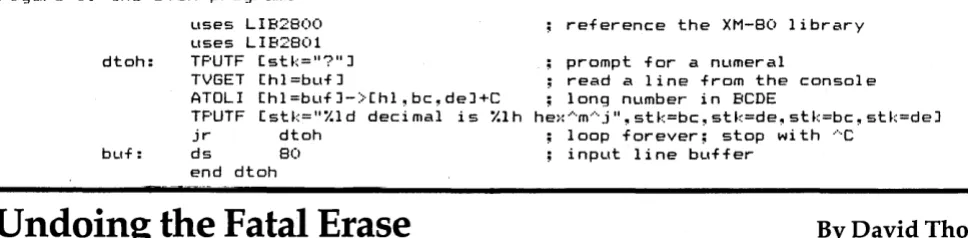
Figure 1: the DTOH program.
uses LlB2800 uses LlB2801 dtoh: TPUTF [stk=I?"J
TVGET [hl=bufJ
perform a variety of support ser-vices. Many of these services resem-ble those availaresem-ble under the Unix operating system.
Example XM-80 Program
Let's look at the program in figure 1, which reads decimal numbers and displays their hexadecimal equiva-lents. The call to TPUTF (terminal pu t, formatted; similar to C's 'printf') prints a question mark to prompt the operator for input. TVGET waits for the operator to type a line (it understands the CP/M
Knowlogy
PO Box 283 Wilsonville, OR 97070
line editing commands), and stores the line as a null-terminated string at 'buf:'.
ATOLl (ASCII to long integer) at-tempts to interpret the contents of 'buf:' as a decimal numeral. If suc-cessful, it returns a 32-bit long inte-ger in registers BC and DE, sets HL to point to the delimiter (probably the null), and clears carry. Other-wise it sets carry to indicate an error. (For brevity, this example assumes that the operator will make no er-rors.) Then TPUTF is called to format a message containing the decimal
reference the XM-80 library
prompt for a numeral
ATOLl [hl=bufJ-)[hl,bc,deJ+C TPUTF [stk="'/.ld decimal is '/.lh
read a line from the console ; long number in BCDE
he:·: ···m··· j ", st k=bc, stk=de, stk=bc ~ stk=deJ ; loop forever; stop with AC
jr dtoh
bLlf: ds 80 ; input line buffer
end dtoh
Undoing the Fatal Erase
By
David Thompson
It was a dark night (not a speck of sunlight to be seen), my eyes had long before decided that focusing was a waste of effort, so I saved what I was working on, cleaned up the disk, and staggered downstairs to 'inspect the top side of my pillow.
Unfortunately, that night I had cleaned up more of the disk than I had intended.
I know that the only thing the erase command does is change the first character in a file's directory from 00 to E5. No big deal, half a night's effort still lay intact on the disk with only a piddling little E5 blocking my way. The problem is that CP 1M thinks that an E5 is gos-pel.
However, the PFM monitor doesn't care one whit about E5s. So I got into the monitor, and used the read command to locate the sector on track 2 (track 2 contains the direc-tory) that contained the name of the erased file.
Forinstance, toPFM, R021 means read disk 0, track 2, sector I, which is
10
the first sector of the directory on drive A. To read the second sector of the directory you'd enter RO 2 7 (it goes every 6 sectors in HEX num-bers).
located at address 0080 in the disk buffer so I used the memory com-mand to change it.
Enter the underlined characters. And now, when you get back into CP 1M, the file has magically
reap-peared. • • •
I found the name of the erased file with the E5 in front of it. The E5 was
RO 2 7 <CR>
M008l).
<CR)
0080 E5 00
0081 41 •
MF72F
<CR}
F72F 88 A8
F730 XX •
RO 2 7 <CR>
<RESET> <CR)
B
<CR>
;Where 1 found the file name
;The
E5was at
0080;1
entered the
00;A non
HEXcharacter terminates
; Get the IIREAD" character in
PFI"I;Change i t to "WRITE
II;Terminate
;Now a read will write the
;sector back onto the disk
;Do a hardware reset or a boot
;will write over track
0;Now you're back
[image:12.613.51.535.298.417.2]and hex representations of the long number. The jump statement causes this behavior to loop until aborted by control-C.
Figure 2 displays the assembly code produced by the translator. When arguments are passed on the stack, a fair amount of overhead is incurred. When arguments are passed and returned in registers, there is very little overhead. You are free to decide, when creating new procedures, whether the application calls for the generality of stacked pa-rameters or the speed of registers.
XM-80 Services
The transla tor checks every proce-dure call against its definition. In this example, the library procedure definitions are called by the USES statements. If, for example, you had passed the buffer address to TVGET in register IX instead of HL, the translator would have printed 'input needed in HL' and' extra in pu t (IX)' , and would have skipped the assem-bly phase.
The services performed by the XM-80 library procedures include dynamic heap memory manage-ment, general device-independent, variable buffer size I/O, Unix-like pipes and I/O diversion, wildcard ('ambiguous file name') expansion, data sorting, character string manip-ulation, and random number gener-ation.
Conclusions
There are three aspects of XM -80 which ease the task of writing as-sembly programs.
First, the procedure definition/in-vocation syntax makes subroutines much easier to use since it takes care of parameter passing and stack ma-nipulation with a single statement.
Second, the translator catches many programming errors by flag-ging incorrect procedure calls.
Third, the XM -80 library provides solutions to a lot of the drudgery of writing assembly code, leaving you free to concentrate on the new as-pects of the application. And, by writing new routines as callable modules, you can invent each wheel
just once. As your library grows, the effort required to build a new pro-gram decreases, until eventually al-most no new code is needed.
A place forXM-80
While machine oriented lan-guages such as FORTH and C have their domains, there are some cases where you just have to grunt it out in assembler. These cases include time-critical applications, operating system modules, and situations where you don't want to pay
royal-ties for using someone else's run-time library. XM -80 provides the special power of assembly language while adding that touch of conven-ience that makes the job easier.
Acknowledgements
XM-80 was designed by Hugh McLarty at Scientific Enterprises. Hugh wrote the translator using the BOS C compiler. The component li-brary was a joint project of Scientific Enterprises and Knowlogy.
•••
Figure 2: the assembly code resulting from the DTOH program.
EXTRN TF'UTF ;+3
PUSH HL ;+3
LD HL, •• O ;+3
EX (SP),HL ;+3
CALL TPUTF ;+3 INC SP ;+3
INC SF' ;+3
EXTRN TVGET ; +4 LD HL,BUF ;+4 CALL TVGET ;+4 EXTRN ATOLl ;+5
LD HL,BUF ;+5 CALL ATOLl ;+5 PUSH DE ;+6 F'USH BC ;+6 PUSH DE ;+6 PUSH BC ;+6 PUSH HL ;+6 LD HL, •• 1 ;+6 EX (SF'),HL ;+6 CALL TF'UTF ;+6 INC SP ;+6 INC SF' ;+6 INC SF' ;+6 INC SP ;+6 INC SF' ;+6 INC SF' ;+6 INC SF' ;+6 INC SF' ;+6 INC SF' ;+6 INC SF' ;+6
jr dtoh ; loop Ltnti 1 ···C buf: ds 80 ; input line buffer
•• 1 : db "I.ld decimal is 1.1h he:·: ···'m··· j II , 0 •. 0: db "?",O
END DTOH ;+9
Figure 3: a sample run of the DTOH program.
'7-'100000
100000 decimal is 186AO hex ?1234567890
1234567890 decimal is 499602D2 hex ?-1
FORTHwords
Column
by
Arne A. Henden
Welcome to the second FORTH col-umn! This time, I will discuss the dif-ferences between 'standalone' and 'captured' FORTHs. Included sepa-rately are reviews of several versions of FORTH available for the Big Board.
Standalone vs. Captured FORTH One of the biggest questions to be answered before a user can purchase a version of FORTH is: 'Should I buy a FORTH that works as a task under an operating system such as CP/M, or should I buy a· standalone ver-sion?' There are advantages and dis-advantages to both. I have used both versions and will now present my opinions on the matter.
FORTH was originally imple-mented as a standalone system. By this, I mean that standalone FORTH is self-booting from a disk and con-tains all terminal and disk I/O rou-tines. FORTH was designed for this kind of use, since it contains an edi-tor and assembler and does not need a file system for its disk block trans-fers.
Advantages of standalone FORTH:
1. You have more usable memory since you don't need CP 1M.
2. You have more disk space since FORTH doesn't use a directory. Also, FORTH is a natural for folks with only a single drive.
3. FORTH executes faster since it doesn't need to call CP 1M for 1/ O.
4. You don't need to buy CP/M.
Disadvantage of standalone FORTH:
You must customize standalone FORTH to do I/O on your system. For example, different video con-trollers and disk concon-trollers require different I/O calls.
Customizing is very much like creating a new BIOS for CP/M. For bus-oriented computers, where the user can put many different kinds of video, disk drives and other periph-erals on the bus, creating a standa-lone FORTH is not possible by the distributor without large expense. For single board computers,
how-12
ever, the customization only has to be performed once.
HART-FORTH and STOIC are ex-amples of complete standalone sys-tems. Timin FORTH is a hybrid stan-dalone system. Because it uses the CP 1M BIOS, Timin does not have to
customize his FORTH for every in-stallation. However, you must boot
CP/M before booting FORTH.
Captured FORTH
FORTH executing as a task is stan-dalone FORTH that has been 'cap-tured' by an operating system. All usual functions are there: editor, as-sembler, and disk I/O. However, in-stead of including the I/O functions in the kernel, calls are made to the operating system routines that per-form the necessary operations. In addition, FORTH can then access the BDOS and use files for program and data storage.
The disadvantages are, of course, the time and memory overhead of the operating system. The main ad-vantage is that you can create a data file and access it with any language
running under CP 1M. Z80 FORTH is
a captured FORTH. SL5 ,goes one step further and removes the block structure of disk I/O entirely.
Which version should you buy? It's a matter of individual prefer-ence. At Indiana University we use standalone FORTH exclusively. We need the extra disk space to store our astronomical data and also find very rare need for CP/M (usually just when modifying the FORTH.ASM kernel file). We have disks with bootable systems that come up con-figured for the specific instrument that we are using at the observatory
that night. \
At Goddard Space Flight Center, we use a captured FORTH. The
PDP-11/44 handles 16 users, of
which about half are using FORTH. The rest use other languages, word processors and editors. By using captured FORTH in a multi-user en-vironment, other users are not re-quired to use FORTH and the sys-tem disk is available to all types of users. Both facilities are completely
7415 Leahy Road New Carrollton, MD 20784
satisfied with their versions of FORTH.
HART-FORTH
I am going to provide a standalone FORTH that is configured specifi-cally for the Big Board: HART-FORTH. I just was not totally happy with any of the reviewed FORTHs. While I think HART-FORTH is the only way to go, this is a definitely biased opinion! For this reason, HART-FORTH was not included in the first round of reviews and will be reviewed in the next issue by some-one other than myself.
HART-FORTH will come in two versions. Version 1 will be a self-booting FORTH-79, customized for the Z80 and the Big Board. It will in-clude both the double precision inte-ger and assembler extensions, along .with many extras such as arrays, screen editor and debugging. Its cost will be $50, and it will be available February 1, 1982 (contact me at the above address).
Version 2 will also include full IEEE-compatible 32-bit floating point with all transcendental func-tions. Its cost will be $75 and it will be available March 1, 1982. Owners of version 1 will be given complete credit when purchasing version 2.
As you will see, programmers have complete freedom when creat-ing their own implementations of FORTH. The FIG model is often cho-sen as a starting point because of its ready availability. However, unique FORTHs such as STOIC and SL5 are available and make very interesting contrast to the FIG model.
My personal recommendation is to stay with. a standard FORTH so you can exchange software easily. The choice between standalone and captured FORTH is up to you.
Miscellaneous
In the book reviews last time, I mentioned that Starting FORTH in paperback form was spiral-bound. This is not the case. I had access to a prepublication edition that was spi-ral bound.
(continued next page)
Stackwork's FORTH
Review
by
Arne Henden
Stackwork's FORTH (SL5) is one of the more unusual and interesting implementations of FORTH that I've seen. It matches FORTH-77 (with some minor differences) instead of FORTH-79. While double precision integer arithmetic operations are not included, many normally optional features such as arrays and case statements are available. The SL5 copy that I have is over a year old so this review does not include any re-cent changes.
File Access
As opposed to 280 FORTH, which is tied to CP/M but treats the disk just like traditional FORTH (as 250 1024-byte blocks, randomly ac-cessed); SL5 uses sequential access, record oriented files exclusively and has no block structure.
This means that SL5 does not re-serve 1024-byte memory blocks to buffer data from the disk, leaving more memory space for application software. One input and one output file can be open simultaneously with the basic system, and more files can easily be added if necessary. SL5 can perform character or buffered read/ write operations. Rather than LOAD one application screen at a time, it loads the entire application file.
FORTHwords continued
The next couple of columns will discuss benchmark results for the five FORTHs mentioned in this col-umn, a very accurate harqware timer using CTC#O, and discuss several screens of utility software. Also, there'll be a review of HART-FORTH.
Meanwhile, please send me your questions and comments about FORTH. I would very much like to help you use this unique program-mer's language to its fullest advan-tage!
•••
What you get
The 5 L5 disk comes with one of the best manuals I've seen. Its major entries include a tutorial (6 pages), reference (22 pages), the 280 as-sembler (12 pages) and a glossary (20 pages).
The disk includes the kernel (both .ASM and .COM files), the debug package (DEBUG.SL5), and the as-sembler (ASSEM.SL5). SL5 itself re-quired no modifications and worked the first time. One of the major ad-vantages of SL5 is that all of the source code is included, making sys-tem modification simple.
Disk I/O
SL5's non-FORTHian file struc-ture makes SL5 appear quite differ-ent from other versions of FORTH. No editor is included because all files can be entered with any standard editor such as ED. This means that debugging changes are not interac-tive.
Because you cannot examine source files easily while in SL5 (no LIST commands), errors during loading are hard to trace down. You cannot incrementally load your pro-gram. More disk activity is necessary since source code is brought in one sector at a time and no extensive buf-fering is included. At the same time, the ability to manipulate source files with standard editors and other lan-guage compilers is an advantage. Leaving out the screen buffers pro-vides more application program-ming space.
The compiler and assembler Another advantage of SL5 is that a cross-compiler is built-in. You can easily produce ROMabie code for dedicated applications. SL5 does this by separating code and data areas from the symbol table. You can create headerless code by simply re-moving the symbol table while cross-compiling. Variables and ar-rays can be stored separately from code segments, easing the problem of creating ROMabie FORTH.
New system configurations can be of two types: user applications load-ed on top of SL5, creating a new
SL5.COM file; and creating entirely new systems using the cross com-piler, perhaps modifying the kernel or burning a small application into ROM.
The assembler is excellent. Not only are 2ilog mnemonics sup-ported, but high level structures such as IF-ELSE-ENDIF and BE-GIN-END are available. Stackworks is careful to point out system register usage to prevent loss of pointers by assembly code produced by the user.
Conclusion
My major complaint with SL5 is its file structure. When you lose the FORTH block/screen, you lose many of the advantages of FORTH. In-teractive debugging is hampered, more disk I/O occurs, and less stor-age space is available on any given disk. SL5 is not easily upgradable to FORTH-79 because of the file struc-ture.
Also, no double precision integer words are included, and floating point is not available as an option.
In all, I think SL5 is a good lan-guage that is well documented and comes with a lot of usually optional features. Its unique implementation of FORTH is interesting, but at the same time prevents me from recom-mending it to a user who wants to learn standard FORTH.
•••
Name: SL5
Authors: The Stackworks
Mike Brothers Larry Mongin Dave DeLauter
Type: FORTH for the Z80
Distributor: Supersoft Associates P. O. Box 1628 Champaign, IL 61820
Price: $175
Requires: CP/M operating system
Z80 processor 24K bytes RAM
Manual: 110 page 8 1/2 x 11n
spiral bound
TiminFORTH
Review
by
Arne Henden
Mitchell Timin has modified FIG FORTH to include a screen editor, fast disk I/O, system configuration and array handling. The system is in 8080 machine code, but a Z80/8080 assembler is provided for program-ming in the Z80 superset. Timin uses CP 1M to boot FORTH and to provide BIOS calls, but all disk storage is in a special format and not compatible withCP/M.
The Manual
The 66-page user's manual covers Timin's additions nicely. Plus, it provides information on how to in-stall the system.
About 20 pages are devoted to a tutorial, 11 pages to the assembler, and 22 pages to the glossary. Docu-mentation for the screen editor, CPI
M utility, and floating point are on disk. Included on the disk are the FORTH.COM file and 20+ screens of FORTH, mostly the editor and ex-amples.
Installation
Timin FORTH is harder to install than Z-80 FORTH. It isn't a standa-lone system, but it doesn't operate
under CP/M either. Usually you put
the FORTH. COM file on a CP 1M disk, boot FORTH, and then replace the boot disk with a FORTH-format disk. You can also use a different drive for the FORTH-format disk, or write FORTH screens onto the CP 1M disk, but I highly recommend
Name:
Author: Type: Distributor:
Price: FP
CPIM utils Util disk Requires:
Manual:
14
Timin FORTH Mitchell E. Timin 8080 FIG-FORTH Timin Engineering Co.
9575 Genesee Avenue
San Diego, CA 92121
$235
$100 extra
$50 extra
$75 extra
CPIM
8080 or Z80 24K bytes RAM 66 page 7 x 8 1/2" stapled booklet
against it. You would have two op-erating systems sharing a common disk and it just doesn't work. For ex-ample, the message screens 4 and 5 are on track I, or in the middle of the
CP/M system.
As mentioned above, Timin FORTH is a hybrid standalone sys-tem. One problem with this kind of system is that you must swap .disks after loading FORTH. This is a seemingly minor inconvenience, but FORTH tends to crash often. For ex-ample, you can attempt to store a value in a variable and get the stack order wrong, thereby storing non-executable garbage somewhere in the kernel. Then you must reload the system, which with Timin FORTH means swapping disks.
If you have a two-disk drive sys-tem, you can leave the CP 1M disk in drive A and execute your applica-tions software from drive B.
Some Details: Timin's Z80 as-sembler is not Zilog-compatible. It uses 8080 mnemonics except for the Z80 additions. Timin advertises fast disk I/O, and achieves it at the ex-pense of about 10 percent of disk storage. Only 24 sectors are used on each track, with interleaving every third sector.
While this format allows a full FORTH screen read in one disk rev-olution, it is not optimized for se-quential screen reads (at least not at 2.5 MHz). I found that reading 100 sequential screens took about the same length of time for Timin and Z80 FORTH, probably because the sector timing mark. Also, the Timin drive-switching words AD and BD do not flush updated screens before switching, a potentially dangerous omission.
Floating Point
Options for Timin FORTH include software floating point and the CPI
M utility. The floating point uses hexadecimal exponents, providing a range of 10**76 at the expense of up to 1 significant digit in the mantissa. It provides the usual arithmetic and comparison functions. I don't like the way Timin implements the float-ing point. He uses a mode control
flag to switch between integer and floating point modes.
While in floating point, all opera-tors (e.g. '*', '0=') are redefined. All numbers, whether entered as '3', '3.00' , or '3. OOEO' , are considered floating point. This is fine until you realize that DO-LOOP parameters are integers and there are many, many cases of mixing modes within a FORTH definition. It would have been much better to have just creat-ed new words callcreat-ed F*, FO=, etc.
Timin's CP/M utility handles
transfer of CP 1M files to and from
FORTH blocks. If the FORTH
screens are text, the utility inserts the CR/LF at the end of each line during the transfer. Other functions include saving and retrieving parts
of memory, CP/M BOOS calls, and
LOADing from a CP/M text file. This utility only transfers whole files. It does not allow you to build the file a record at a time with read/writes. It occupies 19 blocks on the basic disk.
The Editor
The screen editor was easily modi-fied to run on the Big Board. The 'CLR' function is the only command that needs to be changed. Similar cursor commands are available as on the Z-80 FORTH full screen editor. I like the Z-80 FORTH editor better, since it lets you switch blocks with-out having to drop with-out of the edit mode. It also has a nifty command menu. However, the Timin editor is resident rather than a separate pro-gram as is the Z80 FORTH editor.
Conclusion
Timin has a good FORTH, but the $235 basic price is a little steep. He has offered version 3 without the
CP/M utility to Big Board users for
$75, a more competitive price. Check with Timin before ordering to be sure the offer still stands.
•••
Z80FORTH
Review
by
Arne Henden
Ray Duncan created Z80 FORTH by taking FIG FORTH and exten-sively modifying it to take advantage of the additional Z80 registers and instructions. He claims an 8-12 per-cent speed advantage over the origi-nal 8080 FIG implementation. His system operates completely under CP/M, with FORTH as a .COM file and the screen storage using CP/M 2.2 random access disk files. Because of this, FORTH applications and da-ta software can co-exist with CP/M files.
What you get
The FORTH disk comes nicely packaged with a 90-page user's manual in a soft plastic binder. The documentation is very professional looking. It contains all of the infor-mation necessary to install FORTH in your system, and information on Duncan's extensions to the basic model. And though it includes a complete Z80 FORTH glossary, there is little information on how to use FORTH.
The Z80 FORTH disk contains five utilities to provide access to the screen file without entering FORTH. In addition, Duncan has included two general purpose CP/M utility programs. FCOPY copies one file from one disk to another (with veri-fication), and FVFY, which performs only the verification operation of FCOPY.
The FORTH screen file provided is
Name:
Author: Type: Distributor:
Price: FP
Cross-compo Requires:
Manual:
Z80 FORTH Ray Duncan
Z80 optimized FIG-FORTH Laboratory Microsystems 4141 Beethoven Street Los Angeles, CA 90066
$50 $100 extra $150 extra CP/M 2.2 Z80
24K bytes RAM 95 pages 8 1/2 x 11" Looseleaf binder
remarkably full, containing over 140 screens. Some of the major entries include: two editors, FORTH exten-sions such as arrays, games (includ-ing Breakforth and Life), 8080 and Z80 assemblers, a CP/M interface utility, time and date for the Dual Clock-24 board, and debugging op-tions.
Running it
I had absolutely no problems bringing up Z80 FORTH. There are only a few minor complaints. Full CP/M control character input is not implemented. That is, you can back-space, but have no CNTL/R, CNTL/ U functions. This can be very frus-trating when trying to delete lines.
There is a discrepancy between the concepts of 'block' and 'screen.' A Z80 FORTH 'block' is 128 bytes long, while all 'screens' are 1024 bytes long. FIG-FORTH makes no size restrictions on 'blocks,' but FORTH-79 requires blocks and screens to both be 1024 bytes long. I suggest redefining Duncan's BLOCK, UPDATE, FLUSH, etc. words to operate on 1024-byte buffers. Because of the CP/M struc-ture, the screen file is limited to about 200 screens plus the directory and FORTH. COM.
Editors
Three editors are included. A FIG-FORTH portable line editor allows configuration of the two cursor-con-trolled editors: the mini-screen edi-tor and the full-screen ediedi-tor. All three editors come in high-level FORTH so that you can easily mod-ify them.
The full-screen editor is only available as a separate entity. It al-lows cursor positioning, character insertion and deletion, and allows moving from one screen to another with a single keystroke. It is very useful when entering several screens of a new application.
The mini-screen is a subset of the full-screen editor, and is available while you are in the FORTH pro-gram. Duncan provides screens for configuring the editors for various terminals. I supplied him with the
proper screen for the Big Board/ ADM-3 so there should be no prob-lems bringing up the full-screen edi-tor.
There is one potential problem with the screen editors: CNTL/C is intercepted by the operating system instead of the editor. This means that if you inadvertently hit CNTL/C when meaning to hit CNTL/V, you can lose all edited screens that have not been flushed to disk!
Disk I/O
A full CP/M interface utility is in-cluded, providing file create/delete, open/close, and read/write func-tions for sequential and random-ac-cess files. Acrandom-ac-cess to the BOOS is pro-vided with the word 'FDOS.' However, Duncan's documentation is unclear about how to read and write from an arbitrary buffet ad-dress. The Z80 assembler is com-plete and uses Zilog mnemonics, but I have strong reservations about it.
Duncan uses a mixture of postfix and infix notation which can be very confusing. The software helps by doing a lot of error checking bu t that slows down the compilation proc-ess.
Floating Poi