Page 329
INTERACTIVITY IN EDUCATION IN THE DIGITAL WORLD Peter Kolarovszki*, Zuzana Kolarovszka, Juraj Fabuš
Faculty of Operation and Economics of Transport and Communication, University of Žilina, Univerzitná 1, Žilina 010 26, Slovakia
Abstract
In today's digital world, it is becoming increasingly problematic to engage young people. This is of course also true for students at primary and secondary schools and universities as well. The article deals with interactive learning in various areas through multimedia applications and animations. It describes the creation of the given applications as well as their usage in real practice in the teaching of students. The first part deals with the issue of logistics and the postal sector, the second with technology of automatic identification and data collection. Both areas are part of the teaching courses at the University of Žilina, namely at the Department of Communications. Today, PowerPoint slides are not enough, the student should be interested in providing an alternative that will not increase the lecturer's expertise. Teacher remains as a carrier element in education, but effectively using modern technologies and practices.
Keywords: multimedia, application, education, animation
1. INTRODUCTION
Multimedia is a term frequently heard and discussed among educational technologists today. Unless clearly defined, the term can alternately mean a judicious mix of various mass media such as print, audio and video. Or it may mean the development of computer-based hardware and software packages produced on a mass scale and yet allow individualized use and learning. In essence, multimedia merges multiple levels of learning into an educational tool that allows for diversity in curricula presentation.
Multimedia is the exciting combination of computer hardware and software that allows you to integrate video, animation, audio, graphics, and test resources to develop effective presentations on an affordable desktop computer (Fenrich, 1997).
Multimedia is characterized by the presence of text, pictures, sound, animation and video; some or all of which are organized into some coherent program (Phillips, 1997). Today's multimedia is a carefully woven combination of text, graphic art, sound, animation, and video elements. When you allow an end user, i.e. the viewer of a multimedia project, to control 'what' and 'when' and 'how' of the elements that are delivered and presented, it becomes interactive multimedia. Multimedia enables us to provide a way by which learners can experience their subject in a vicarious manner. The key to providing this experience is having simultaneous graphic, video and audio, rather than in a sequential manner. The appeal of multimedia learning is best illustrated by the popularity of the video games currently available in the market. These are multimedia programs combining text, audio, video, and animated graphics in an easy-to-use fashion. [1,2]
2. MATERIALS AND METHODS
For the purpose of creating a multimedia work, we followed the methodology described below. We have created a corresponding 3D models and then have them processed through the program Cinema 4D. The most important part of preparing our multimedia applications is creating a scenario which will be followed.
Scenario creation:
Page 330
Obtaining the necessary supporting documents: information, facts for creating pictorial scripts, create 3D objects.
Writing the script for the video component video and animation. Shooting a scene, edit them, cut, any rotation again.
Creation of graphics, 3D animation.
Preparation of texts that describe individual functional blocks of the machine.
Creation of user interface: folding the work of all its parts - image - sound - animation - text, a final correction between them.
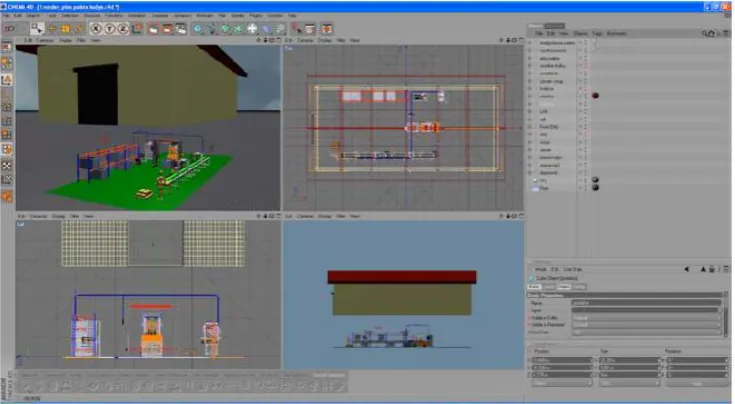
For creating multimedia applications, we used the tool CINEMA 4D. CINEMA 4D is a universal 3D modelling, visualizing and animation program. On the following figures you can see an environment of Cinema 4D program. [5]
Fig. 1. Main panel description 1-3 [9] 1. Scene
2. Basic tools
3. Schematic layout, choosing to alter the layout object
3. CREATION OF INTERACTIVE CONTENT
On the basis of the creation of technological procedures, we have the resulting animation divided into five parts. We have created the following 3 animations:
1. Start animation.
2. The process of sending postal mails.
3. Sorting of postal mails.
Page 331
Finally, it was necessary to export our animation (rendering of scenes). It was divided into set of rendering parameters and rendering using Net Render Cinema. Set rendering parameters: Export of video was the same after completion of each animation. They made two kinds of settings of export animation. The first was a video animation at 267 x 150 resolutions, due to faster rendering. The second set of exports was made up to suit the requirements of the animation, which was verified in a video with lower resolution. The second set of the exports was as follows: video resolution 1280 x 720 pixels with a size relative to the first the final format was 16 at the ninth were all selected frames. [7]
3.1 Start animation
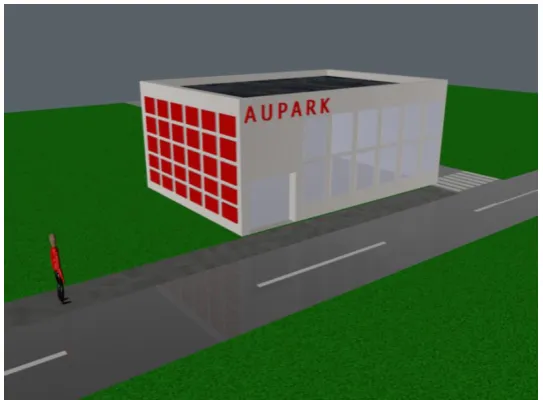
In the start animation we simulated characters (humans) who enters the building Aupark in which the branch PB Partner a.s. is located (fig. 2). We created a character using object "figure" and we adjust the size as needed. Furthermore, we see the road that we have created through the object "plane". In object road we set number of segments as we needed. Subsequently, the object plane was converted to polygons due to the creation of centreline road.
Following the issuance of a scene using key frames we have made a simple movement of the character, which is the result of animation.
Fig. 2. Start animation
3.2 The process of sending postal mails
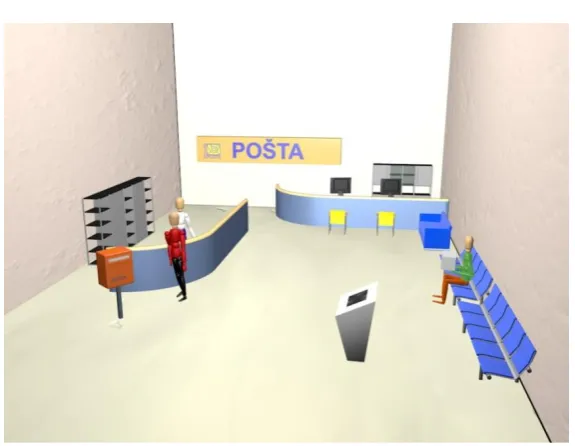
Scene named as process of sending postal mails illustrates the process of administration of mail. This is a room PB partner a.s located at shopping mall named as Aupark, where we modelled the clerk and two customers. This is a more complicated animation because we were trying to create a walking figure. Customer comes to the clerk with the letter mail and then followed by parcel mail item (fig. 3). The walls we have created through the object "plane". For furniture creation i.e. chairs, desk, wardrobe, computer monitor etc., were used Cinema4D library. Counter (desk) and developing system we have developed using object "Cube" (block). Next, we tried to depict walking customers. [8]
Page 332
Fig. 3. The process of sending postal mails in post office
3.3 Sorting of letter postal mails
In this section we have included animation manual and automated sorting of mail. In terms of letter sorting machines, it was implemented two models, the first model was the CRS lines (Figure 4), and the FSM model lines. These models are described briefly in multimedia works and also each of the parts of the movie were interdependent, leading to reality applications. It was subsequently established tree structure (workflow upon arrival of mail to the HSS 022 from PB partner a.s. located at shopping mall Aupark). Assembly and interconnection of the various models and movies was carried out using Adobe Flash. The student then has the opportunity to interactively see how they handled the postal mails suitable and unsuitable for mechanized sorting.
Fig. 4. Model of CRS sorting line
Page 333
Fig. 5. Manual sorting process
3.4 3D modelling of logistics processes based on AIDC technologies
Identification processes that rely on AIDC technologies are significantly more reliable and less expensive than those that are not automated. The most common AIDC technology is bar code technology, which uses optical scanners to read labels. Radio frequency identification is a wireless data collection technology that uses electronic tags which store data, and tag readers which remotely retrieve data. In conjunction with RFID technology we decided to characterized and animated production line and warehouse management processes situated at the laboratory for the automatic identification of goods and services.
In order to animate the models, it was necessary to create a final scene. Next figure shows the preview of the work environment. Cinema 4D R10 was used to remodel likenesses of all the objects and place them in the final scene. The Y axis of the building was moved for clarity in the picture. Preview the template of modelling, which is designed for modelling objects in the program Cinema 4D R10. Units of length used Cinema 4D R10 uses meters as units of length. Generated models were modeled in scale, the reality that the observed ratio of the various parts of models.
Page 334 The following scenes of individual processes were animated:
Goods Receipt - this part featured the animation motion model of a forklift truck, which carries a variety of materials for input into production.
Data from the Frontend pass to the server and then to the printer ZEBRA - this animation was used because of representations from - where transmit data after entering production.
Data from the RFID gate No.1 forwarded to the server – the animation showed the transition of data from RFID gate No. 1 to the server after reading an RFID tag placed on the box. First it was necessary to animate the movement patterns of boxes on the model conveyor belt.
Data from the RFID gate No. 2 forwarded to the server.
Data from the RFID gate KODYS / VECTRA forwarded to the server. Entering Warehouse.
4. CONCLUSIONS
Multimedia applications are an important part of the educational process. With these applications is possible to achieve interactivity for students who know the process easier to understand and imagine. From the perspective of the postal and logistic company, they can use multimedia works in conjunction with volunteers learning curve that with adequate facilities come into contact. It is also possible to use them to promote their activities and thus contribute to the nearer people's awareness of the postal business.
These multimedia applications provide a comprehensive view on the issue of processing postal mails in the company PB Partner a.s. Žilina (Aupark) and HSS Žilina 022, which is the main sorting center located in Žilina. It presents a full-fledged tool for teaching the topic, and in addition to voluminous theoretical information also provides the added value of video information. These multimedia applications are used in respect of study objects dealing with the mechanization and automation of postal and logistics operations.
Multimedia enables learning through exploration, discovery, and experience. Technology does not necessarily drive education. That role belongs to the learning needs of students. With multimedia, the process of learning can become more goals oriented, more participatory, and flexible in time and space, unaffected by distances and tailored to individual learning styles, and increase collaboration between teachers and students. Multimedia enables learning to become fun and friendly, without fear of inadequacies or failure.
ACKNOWLEDGMENTS
This article was created to support project named as: Operation of central information systems. Security operation, development and maintenance of central information systems MŠVVaŠ SR, namely eKEGA, CRS, CRZ, Portal VŠ.
REFERENCES
1. ŠVADLENKA, L., SALAVA, D. Redefinition of universal postal service in conditions of fully liberalized market. In POSTPOINT 2009: 16. - 18. September 2009, University of Zilina, 2009. p. 234-239.
Page 335
3. KEBO V., STAŠA P., BENEŠ F., ŠVUB J., “RFID Technology in Logistics Processes”; In: Proceedings of the 13th International Multidisciplinary Scientific GeoConference SGEM, Albena, Bulgaria;
4. KOLÁŘ, P., RODRIGUE, J.-P. (Improving the Bottlenecks: The Czech Republic as a Central European Intermodal Transport and Logistics Platform. In IAME Conference 2014. Norfolk: Maritime Institute, Old Dominion University,
5. KOENIGSMARCK, von A: Cinema 4D R10, Computer Press a.s. ,2008, BRNO
6. KOLAROVSZKI, P., VACULÍK, J. Reálny proces automatickej identifikácie tovarov a služieb a transferu poznatkov – RFID LAB. In Pošta, Telekomunikácie a Elektronický obchod. [online], 2010, ISSN 1336-8281.
7. MADLEŇÁKOVÁ, L., MADLEŇÁK, R., DROZDZIEL, P., & KURTEV, I. (2015). Layers and processes in the model of technological postal system, Transport and telecommunication. 353-360.
8. CINEMA 4D ONLINE, http://www.tutoriarts.cz/zaciname-s-cinema-4d-prvni-modelovani-videotutorial-1197
![Fig. 1. Main panel description 1-3 [9]](https://thumb-us.123doks.com/thumbv2/123dok_us/96244.1510056/2.595.69.530.284.550/fig-main-panel-description.webp)